Why Dynamic Websites Break Traditional Scrapers
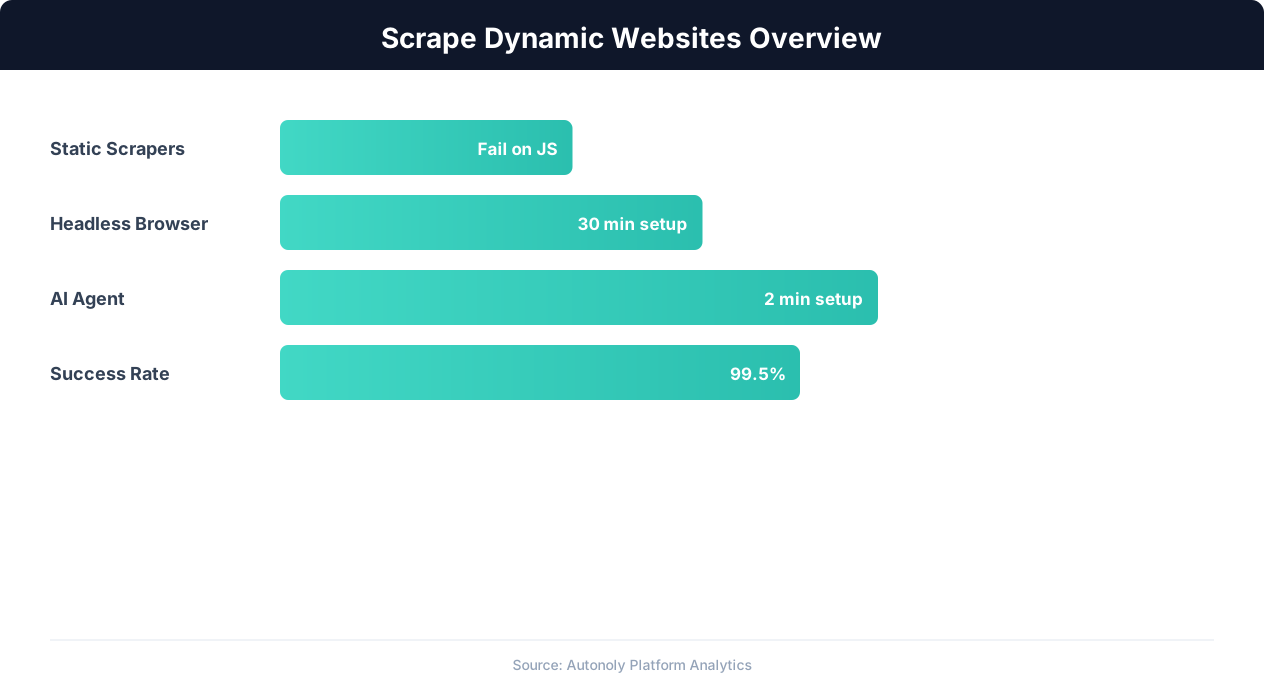
The web has fundamentally changed since the early days of web scraping. In the mid-2000s, most websites delivered complete HTML pages from the server — every piece of content was embedded in the initial HTTP response. A simple HTTP request with Python's requests library or cURL returned the full page content, ready for parsing. Today, the majority of modern websites work differently, and this shift has broken the assumptions that traditional scraping tools rely on.
The Rise of Client-Side Rendering
Modern web applications use JavaScript frameworks — React, Vue, Angular, Svelte, Next.js — that render content on the client side (in the browser) rather than on the server. When you load a React-based website, the initial HTTP response contains a minimal HTML shell: a <div id="root"></div> element and several <script> tags. The actual content — product listings, search results, user profiles, article text — loads asynchronously through JavaScript API calls after the page shell renders.
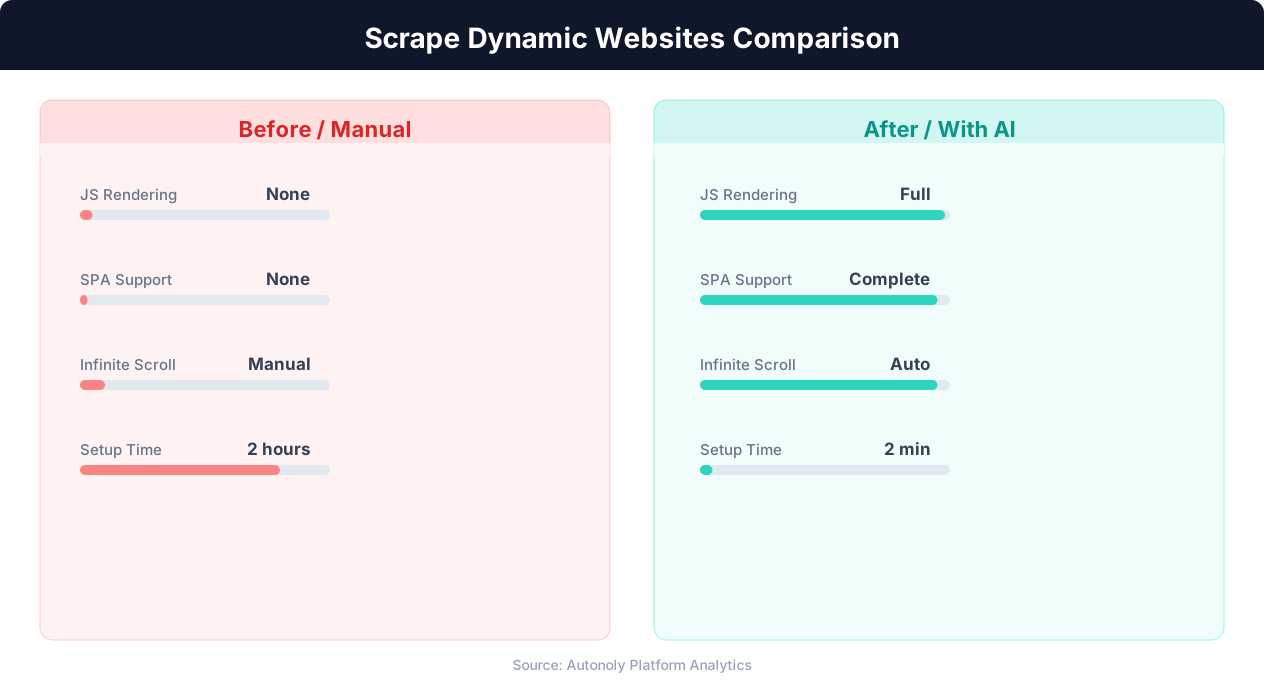
If you fetch this page with a traditional HTTP scraper, you get the empty shell. No products, no prices, no content. The data exists, but it is loaded by JavaScript that your scraper never executes. This is why the same URL that shows rich content in your browser returns near-empty HTML when requested by requests.get().
Single-Page Applications (SPAs)
SPAs take client-side rendering to its logical extreme. The entire application loads as a single HTML document, and navigation between "pages" happens without traditional page reloads. When you click a link in a React SPA, the URL changes (using the History API), new content loads via API calls, and the DOM updates — but no new HTML page is requested from the server. For scrapers, this means that navigating to a specific URL may not load the expected content because the SPA's routing system needs JavaScript to resolve the route and fetch the data.
AJAX and Asynchronous Data Loading
Even websites that are not full SPAs use asynchronous data loading extensively. Product catalogs load items in batches as users scroll. Search results appear after a background API call completes. Price data updates dynamically based on user location or session state. This asynchronous loading means that the page is never "complete" at any single moment — it continuously updates as new data arrives.
Lazy Loading and Infinite Scroll
Performance-optimized websites defer loading content until it is needed. Images use loading="lazy" to load only when they enter the viewport. Product grids load additional items as the user scrolls down. This means that a scraper that loads the page but does not scroll will only see the first batch of content — typically 10-20 items out of potentially hundreds or thousands.
The Impact on Web Scraping
These architectural patterns mean that the gap between what a human sees in their browser and what a traditional scraper retrieves is enormous. A human browsing an e-commerce site sees hundreds of products with prices, images, and ratings. A traditional HTTP scraper requesting the same URLs sees empty containers, loading spinners, and placeholder text. Bridging this gap requires fundamentally different scraping approaches — either executing JavaScript in a real browser or intercepting the API calls that deliver the data. Our guide to web scraping best practices covers the foundations that apply regardless of which approach you choose.
Headless Browser Scraping with Playwright
The most straightforward approach to scraping dynamic websites is to use a headless browser — a real browser engine that runs programmatically without a visible window. The browser executes JavaScript, renders the DOM, handles AJAX calls, and produces the same fully-rendered page that a human user sees. Playwright is the leading tool for this approach, offering better performance, stability, and anti-detection capabilities than older alternatives.
Why Playwright Is the Best Choice
Playwright, developed by Microsoft, controls real browser engines: Chromium, Firefox, and WebKit (Safari). Unlike Selenium, which communicates with browsers through a separate WebDriver protocol, Playwright communicates directly with the browser's DevTools protocol, resulting in faster execution and more reliable page interaction. Playwright also handles modern web features — Shadow DOM, Web Components, service workers, and complex CSS layouts — that trip up older tools. If you are weighing the major headless engines against each other, see our comparison of Playwright vs Selenium vs Puppeteer.
Key advantages of Playwright for scraping:
- Auto-wait: Playwright automatically waits for elements to be visible, enabled, and stable before interacting with them. This eliminates the fragile
time.sleep()calls that plague Selenium scripts. - Network interception: Playwright can intercept, modify, and block network requests. This enables API response capture, ad blocking (for faster page loads), and request monitoring.
- Multiple browser contexts: A single Playwright browser instance can run multiple isolated contexts (equivalent to incognito windows), each with its own cookies, storage, and session state. This enables parallel scraping without launching multiple browser processes.
- Built-in screenshot and PDF: Capture page screenshots or generate PDFs at any point, useful for debugging and visual verification of extracted data.
Basic Playwright Scraping Pattern
The fundamental pattern for scraping a dynamic website with Playwright involves four steps: launch the browser, navigate to the target URL, wait for content to render, and extract data from the rendered DOM.
from playwright.sync_api import sync_playwright

def scrape_dynamic_page(url, selector):
    with sync_playwright() as pw:
        browser = pw.chromium.launch(headless=True)
        page = browser.new_page()
        # Navigate and wait for content
        page.goto(url, wait_until='networkidle')
        # Wait for specific content selector
        page.wait_for_selector(selector, timeout=10000)
        # Extract data from rendered DOM
        items = page.query_selector_all(selector)
        data = []
        for item in items:
            data.append({
                'text': item.inner_text(),
                'html': item.inner_html(),
            })
        browser.close()
        return data
Waiting Strategies
The most critical aspect of headless browser scraping is knowing when the page is "ready" for extraction. Playwright offers several waiting strategies:
wait_until='networkidle': Waits until no network requests have been made for 500ms. Works well for pages that make a finite number of API calls during load.wait_for_selector(): Waits for a specific CSS selector to appear in the DOM. Best for SPAs where you know which element indicates that content has loaded.wait_for_function(): Waits for a JavaScript expression to return true. Useful for complex loading conditions ("wait until the product count exceeds 20").wait_for_load_state('domcontentloaded'): Waits for the DOM to be parsed but not necessarily for all resources to load. Fastest option, but content may not be fully rendered.
Choose the waiting strategy based on the target site's behavior. For most scraping tasks, waiting for a specific selector that indicates content has loaded is the most reliable approach.
Resource Optimization
Headless browsers consume significant resources — each browser instance uses 200-500 MB of RAM. For scraping at scale, optimize resource usage by blocking unnecessary requests (images, fonts, tracking scripts) that consume bandwidth without contributing to the data you need. Playwright's route interception makes this straightforward.
API Interception: The Fastest Approach for Dynamic Sites
While headless browser scraping works by rendering the full page, API interception takes a more efficient approach: capture the data at the source. Every dynamic website loads its content through API calls — XHR requests or fetch calls that return JSON data from the server. If you can intercept these API responses, you get clean, structured data without parsing HTML at all.
How API Interception Works
When a dynamic website loads, the browser's JavaScript makes API calls to backend servers. These calls typically return JSON data that the frontend framework (React, Vue, etc.) renders into HTML. By monitoring network traffic during page load, you can identify these API endpoints and either:
- Capture the responses as the page loads in a headless browser, extracting the JSON data directly.
- Call the API endpoints directly with an HTTP client, bypassing the browser entirely for subsequent requests.
The second approach is dramatically faster — API calls return in milliseconds and use minimal resources, compared to full browser rendering that takes seconds and consumes hundreds of megabytes of RAM.
Discovering API Endpoints
Use Playwright's network interception to discover which API endpoints a site uses:
from playwright.sync_api import sync_playwright
import json

def discover_apis(url):
    api_calls = []

    def capture_response(response):
        content_type = response.headers.get('content-type', '')
        if 'json' in content_type:
            try:
                api_calls.append({
                    'url': response.url,
                    'status': response.status,
                    'data': response.json()
                })
            except:
                pass

    with sync_playwright() as pw:
        browser = pw.chromium.launch(headless=True)
        page = browser.new_page()
        page.on('response', capture_response)
        page.goto(url, wait_until='networkidle')
        browser.close()

    return api_calls

# Discover APIs on a target site
results = discover_apis('https://example-store.com/products')
for call in results:
    print(f"Endpoint: {call['url']}")
    print(f"Data keys: {list(call['data'].keys()) if isinstance(call['data'], dict) else 'array'}")
    print()
Analyzing API Patterns
Once you discover the API endpoints, analyze their request patterns: What URL parameters control pagination? Which headers are required for authentication? Are there any tokens or session IDs in the request? Most e-commerce and content sites use predictable pagination patterns in their APIs: /api/products?page=1&limit=20 or /api/search?q=keyword&offset=0&count=25.
Document the required headers — many APIs check for the Referer header, X-Requested-With: XMLHttpRequest, or custom authentication tokens. Replicate these headers in your direct API calls to avoid rejection.
Direct API Scraping
After discovering and analyzing the API, you can call it directly with an HTTP client, bypassing the browser entirely:
import requests

def scrape_via_api(base_url, total_pages=10):
    session = requests.Session()
    session.headers.update({
        'Accept': 'application/json',
        'Referer': 'https://example-store.com/products',
        'X-Requested-With': 'XMLHttpRequest',
    })
    all_products = []
    for page in range(1, total_pages + 1):
        response = session.get(
            f'{base_url}/api/products',
            params={'page': page, 'limit': 20}
        )
        data = response.json()
        all_products.extend(data['products'])
    return all_products
When API Interception Does Not Work
Not all dynamic sites have clean, accessible APIs. Some challenges include: encrypted or obfuscated API responses, GraphQL endpoints with complex query structures, APIs that require dynamically generated authentication tokens (CSRF tokens, signed requests), and APIs protected by Cloudflare or similar services that block non-browser clients. For these cases, fall back to headless browser scraping with Playwright or use Autonoly's AI-powered browser automation, which handles both approaches automatically.
Handling Infinite Scroll and Lazy Loading
Infinite scroll has replaced traditional pagination on many modern websites. Instead of clicking "Next" to see more results, users scroll down and new content loads automatically. This pattern is common on social media feeds, e-commerce catalogs, news sites, and job boards. Scraping infinite scroll pages requires simulating the scroll action and detecting when new content has loaded.
The Scroll-Wait-Extract Pattern
The basic approach to scraping infinite scroll pages is a loop: scroll to the bottom of the page, wait for new content to load, extract the new items, and repeat until no more content appears.
async def scrape_infinite_scroll(page, item_selector, max_items=500):
    previous_count = 0
    no_change_count = 0

    while True:
        # Count current items
        items = await page.query_selector_all(item_selector)
        current_count = len(items)

        if current_count >= max_items:
            break

        if current_count == previous_count:
            no_change_count += 1
            if no_change_count >= 3:
                break  # No new content after 3 scroll attempts
        else:
            no_change_count = 0

        previous_count = current_count

        # Scroll to bottom
        await page.evaluate(
            'window.scrollTo(0, document.body.scrollHeight)'
        )
        # Wait for new content to load
        await page.wait_for_timeout(2000)

    return await extract_items(page, item_selector)
Detecting Content Load Completion
The trickiest part of infinite scroll scraping is knowing when all content has loaded. Different sites signal "no more content" in different ways:
- "End of results" message: Some sites display a message or element when the last item has been loaded. Watch for these elements with
page.query_selector('.end-of-results'). - No new DOM elements: If scrolling produces no new elements after multiple attempts, you have likely reached the end. The scroll-wait-check pattern above handles this case.
- Loading spinner disappears permanently: Sites often show a loading spinner at the bottom while fetching more items. When the spinner disappears without new items appearing, loading is complete.
- Network activity stops: Monitor network requests during scrolling. If scrolling does not trigger new API calls, the page has no more content to load.
💡 Key Insight
Over 85% of modern websites use JavaScript rendering, making traditional HTTP-based scraping ineffective for most targets.
Handling Lazy-Loaded Images and Attributes
Lazy loading delays the loading of images and other heavy resources until they enter the viewport. For scraping, this means that image URLs, data-src attributes, and other lazy-loaded content may not be available until the element has been scrolled into view. Two approaches handle this:
- Scroll through the entire page before extracting data. This forces all lazy-loaded content to load. Slow but comprehensive.
- Extract the lazy-load source attribute directly. Many implementations use
data-srcordata-lazyattributes to store the real URL before it replaces the placeholdersrc. Extract the data attribute directly rather than waiting for it to load.
Virtual Scrolling and Recycled DOM
Some high-performance sites use virtual scrolling (also called windowed rendering), where only the items currently visible in the viewport exist in the DOM. As you scroll down, items that scroll out of view are removed from the DOM and replaced by new items entering the viewport. This means that at any given moment, only 10-20 items exist in the DOM even though hundreds have been loaded.
Virtual scrolling is particularly challenging for scrapers because you cannot extract all items at once — they literally do not exist in the DOM simultaneously. The solution is to extract each batch of items as they appear during scrolling, accumulating results in memory rather than waiting until the end to extract everything. Detect virtual scrolling by checking whether the total DOM element count stays constant as you scroll — if it does, the site is recycling elements.
Performance Considerations
Infinite scroll pages can be very long — some e-commerce catalogs have thousands of items. Scrolling through the entire page in a headless browser is slow (each scroll-wait cycle takes 2-3 seconds) and memory-intensive (the DOM grows with each loaded batch). For large datasets, API interception is significantly more efficient: identify the API endpoint that loads each batch of items, then call it directly with incrementing offset parameters.
SPA-Specific Challenges: React, Vue, and Angular Sites
Single-page applications built with React, Vue, and Angular present a unique set of challenges beyond basic JavaScript rendering. These frameworks manage state internally, use virtual DOMs, and implement routing systems that behave differently from traditional websites. Understanding these framework-specific behaviors helps you design more effective scraping strategies.
React-Specific Challenges
React is the most common frontend framework, powering sites from Facebook and Instagram to Netflix and Airbnb. React's virtual DOM reconciliation process means that elements may be re-rendered between your selector query and your data extraction — causing "stale element" errors. React also uses synthetic events and state management (Redux, Context API) that make it difficult to trigger UI actions programmatically.
For React sites, the most reliable extraction approach is to access React's internal state directly through the browser's JavaScript context. React components store their props and state in the fiber tree, accessible through the __reactFiber$ or __reactInternalInstance$ properties on DOM elements. While this approach is fragile (React's internal structure changes between versions), it provides access to clean, structured data without HTML parsing.
Vue-Specific Patterns
Vue applications store component data in the __vue__ property of DOM elements (Vue 2) or __vue_app__ on the root element (Vue 3). This makes Vue apps somewhat easier to scrape at the data level — you can extract component data directly from these properties without parsing the rendered HTML. Vue's reactive data system also means that data changes propagate immediately to the DOM, so timing issues are less common than with React.
💡 Key Insight
Headless browser scraping with AI achieves 92% success rates on dynamic SPAs compared to 15% for static scrapers.
Angular Rendering Complexity
Angular applications use a change detection system that can delay DOM updates. After an API call completes, Angular's change detection may not immediately update the DOM — it waits for the current execution context to complete. This creates a timing gap where the API data has arrived but the DOM does not yet reflect it. Use page.wait_for_function() to wait for specific data to appear in the rendered DOM rather than relying on network idle events.
Client-Side Routing
All three frameworks implement client-side routing that changes the URL without triggering a page reload. When navigating within an SPA, the browser does not send a new HTTP request to the server — the framework handles the route change internally by fetching data and re-rendering components. For scrapers, this means:
- Direct URL access may not work. Navigating directly to a deep URL (e.g.,
/products/category/electronics?page=2) may load the SPA from scratch, which is slow. Navigating through the SPA's own UI (clicking links and buttons) is faster because the app is already initialized. - URL changes do not mean the page is ready. After a navigation event, the URL changes immediately but content may still be loading. Wait for specific content selectors rather than URL changes.
- Back/forward navigation behavior varies. Some SPAs cache previously loaded data, while others refetch it. Test navigation patterns to understand the caching behavior before building your scraping logic.
Server-Side Rendering (SSR) and Hydration
Some SPAs use server-side rendering to deliver initial HTML content, then "hydrate" it with JavaScript on the client. Next.js (React), Nuxt (Vue), and Angular Universal implement SSR. For scrapers, this is actually beneficial: the initial HTML response contains rendered content, so you may not need a headless browser at all. Check whether the raw HTML response contains the data you need before spinning up a browser — it might save significant resources and time.
Test this by comparing the raw HTTP response (from curl or requests.get()) with the fully rendered page in a browser. If the raw response contains product data, prices, and content, the site uses SSR and you can scrape it with simple HTTP requests.
AI-Powered Extraction: Scraping Dynamic Sites Without Code
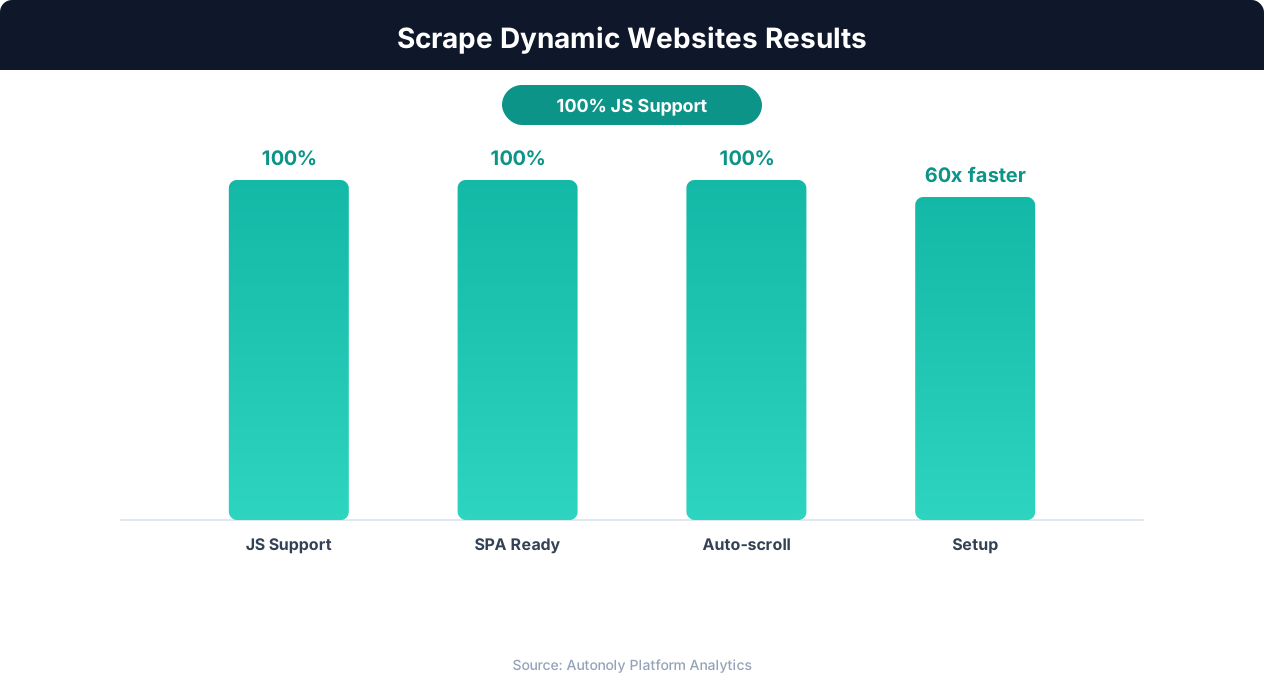
Everything discussed so far — headless browsers, API interception, scroll handling, SPA navigation — represents significant technical complexity. Each technique requires understanding the target site's architecture, writing custom code, and maintaining that code as the site evolves. AI-powered extraction tools represent a paradigm shift: instead of building custom scrapers, you describe what data you want and an AI agent figures out how to get it.
How AI Agents Scrape Dynamic Sites
AI scraping agents like Autonoly operate a real browser and interpret the rendered page visually, similar to how a human user would. The agent sees the page layout, identifies data elements by their visual context (not CSS selectors), and extracts information by understanding what it is looking at. This is the same engine behind Autonoly's structured data extraction, which turns messy rendered pages into clean rows and columns. When the page uses infinite scroll, the agent scrolls. When content loads dynamically, the agent waits. When a CAPTCHA appears, the agent handles it.
This visual approach has a fundamental advantage over traditional scraping: it does not depend on the underlying HTML structure. A price is a price whether it is in a <span class="price">, a <div data-testid="current-price">, or a <p> tag with no class at all. The agent identifies it by context — it is near the product title, it contains a currency symbol, and it looks like a price. When the site redesigns and changes its CSS classes, the agent continues working because the visual pattern has not changed.
Practical Example: Scraping a React E-Commerce Site
Consider scraping a React-based e-commerce site with infinite scroll, dynamic pricing, and variant selection — the same dynamic patterns you hit when you scrape Amazon products into a spreadsheet or pull competitor catalogs into Excel. With traditional tools, you would need to: set up Playwright, handle anti-detection, implement scroll-wait-extract loops, parse React-rendered HTML, handle product variants (clicking size/color options), and deal with dynamically loaded prices. This could take a day or more of development.
With Autonoly's AI agent, you describe: "Go to [site URL], browse the electronics category, and for each product extract the name, price, availability, and all available sizes. Collect at least 100 products." The agent handles the rest — scrolling, waiting, clicking through variants, and compiling the results into a structured dataset.
Handling Edge Cases Automatically
Dynamic websites are full of edge cases that break traditional scrapers: pop-up modals, cookie consent banners, "Sign up for newsletter" overlays, age verification gates, and A/B tested page layouts. AI agents handle these naturally — they dismiss pop-ups, accept cookies, close overlays, and adapt to layout variations without specific instructions for each case.
When to Use AI vs. Custom Scraping
AI-powered extraction is ideal when:
- You need data from a site you have not scraped before and want results in minutes rather than days.
- The target site changes frequently and maintaining custom selectors is impractical.
- The site uses complex dynamic rendering that would require significant custom code to handle.
- Your team does not have scraping engineers but needs data from dynamic websites.
Custom scraping (Playwright scripts, API interception) is still preferable when:
- You need to scrape millions of pages with maximum efficiency.
- You have already reverse-engineered the site's API and can make direct calls.
- You need sub-second latency for real-time monitoring.
- The data structure is simple and stable, making custom extraction trivial to maintain.
For the majority of scraping tasks — where the goal is to extract data from dozens to thousands of pages on dynamic websites — AI agents deliver results faster and with less ongoing maintenance than custom code. See our comparison of web scraping tools for a detailed breakdown of when each approach makes sense.