How We Evaluated These Web Scraping Tools
Choosing a web scraping tool is a consequential decision. The tool you pick determines how much data you can extract, how reliably your scraping workflows run, and how much time you spend on setup and maintenance versus actual analysis. We evaluated the seven leading scraping tools across six criteria that matter most to teams who need reliable, scalable data extraction. If scraping is one piece of a larger automation effort for you, our guide to what automation is covers how data extraction fits the bigger picture.
Evaluation Criteria
1. Ease of Use: How quickly can a new user build their first scraping workflow? We measured the time from account creation to first successful data extraction. Tools that require no coding knowledge score higher than those requiring programming skills. Tools with AI-assisted workflow building score highest.
2. Anti-Detection Capabilities: Modern websites use sophisticated bot detection. We tested each tool against sites protected by Cloudflare, PerimeterX, and DataDome to evaluate how each tool handles anti-bot challenges. Tools with built-in proxy rotation, browser fingerprinting, and CAPTCHA handling score higher than those that require manual anti-detection configuration.
3. Dynamic Site Support: Most valuable web data lives on JavaScript-rendered sites. We tested each tool against React SPAs, infinite scroll pages, and AJAX-loaded content. Tools that handle dynamic rendering out of the box score higher than those limited to static HTML.
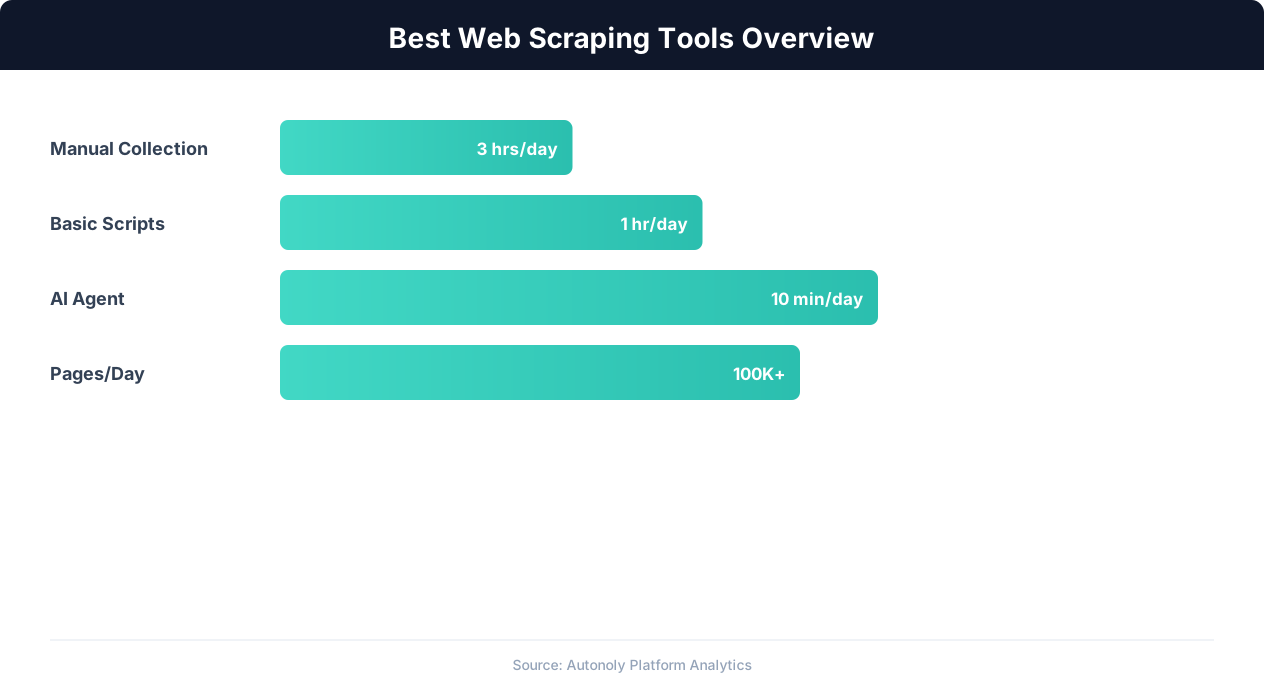
4. Scalability: How well does the tool handle large-scale scraping — thousands or millions of pages? We evaluated concurrent execution capabilities, rate limiting management, and infrastructure scaling. Enterprise tools that handle millions of pages daily score higher for scalability.
5. Output and Integration: Extracted data needs to go somewhere useful. We evaluated each tool's export options: CSV, JSON, Google Sheets, databases, APIs, and webhook delivery. Tools with native integrations to common business tools score higher.
6. Pricing Value: We calculated the cost per 1,000 pages scraped at typical usage levels. The best tools deliver reliable extraction at reasonable per-page costs, including the cost of proxy usage, compute resources, and anti-detection features.
Our Testing Methodology
We tested each tool on the same set of target sites: an unprotected static HTML site (baseline), a React-based e-commerce site (dynamic rendering), an Amazon product page (moderate anti-bot protection), and a Cloudflare-protected SPA (aggressive anti-bot protection). This standardized testing ensures fair comparison across tools with very different architectures and approaches.
We also considered the overall ecosystem around each tool: documentation quality, community support, third-party tutorials, and the vendor's track record for reliability and continued development. A tool that works well today but has uncertain long-term support is a risky choice for production scraping workflows.
1. Autonoly: AI-Powered Browser Automation and Scraping
Autonoly takes a fundamentally different approach to web scraping: instead of building rule-based scrapers, you describe what data you want and an AI agent extracts it. The agent operates a real browser, understands page content visually, and adapts to site changes automatically.
Key Features
- AI agent extraction: Describe your scraping goal in natural language ("Extract all product names, prices, and ratings from this Amazon search") and the agent handles navigation, data identification, and extraction. No CSS selectors, no XPath, no code.
- Real browser automation: The agent controls a Chromium browser through Playwright, providing full JavaScript rendering, cookie management, and realistic browsing behavior. This handles dynamic sites, SPAs, and AJAX-loaded content natively.
- Built-in anti-detection: Automatic proxy rotation, browser fingerprint management, CAPTCHA handling, and session warming. The agent adapts its behavior when it detects anti-bot measures.
- Visual workflow builder: Build multi-step scraping workflows on a drag-and-drop canvas. Chain scraping steps with data transformation, Google Sheets export, email notifications, and other actions.
- Scheduled execution: Run scraping workflows on daily, weekly, or custom schedules for automated data monitoring.
Strengths
Autonoly's primary strength is accessibility. Non-technical users can build production-quality scraping workflows without understanding HTML structure, CSS selectors, or anti-detection configuration. The AI agent handles the technical complexity that makes traditional scraping tools difficult to use.
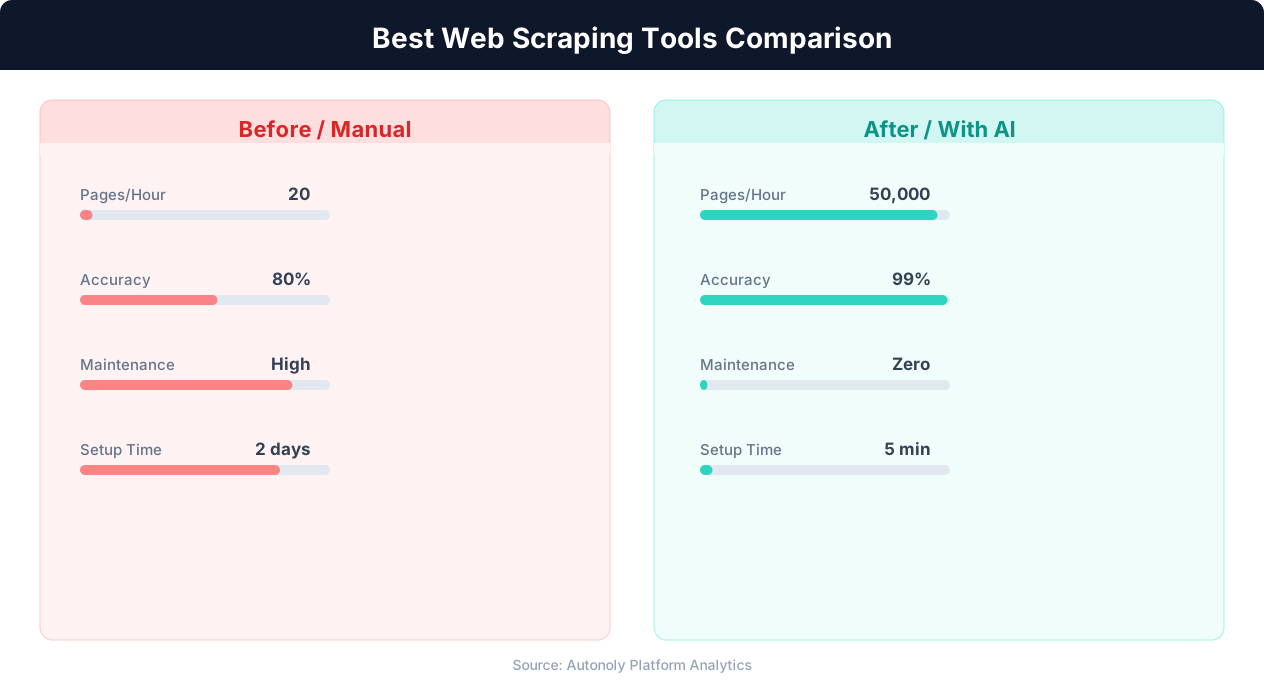
The visual approach also makes Autonoly exceptionally good at handling site changes. When a website redesigns its layout, traditional scrapers break because their CSS selectors no longer match. Autonoly's agent continues extracting data because it identifies elements by visual context rather than HTML structure.
Limitations
Autonoly is not optimized for very high-volume scraping (millions of pages per day). For enterprise-scale data collection with sub-second latency requirements, dedicated scraping infrastructure (like Bright Data or custom Playwright clusters) is more appropriate. Autonoly is best for medium-scale scraping — hundreds to tens of thousands of pages — where reliability and ease of use matter more than raw throughput.
Best For
Teams without engineering resources who need reliable data extraction from dynamic websites. Particularly strong for price monitoring, e-commerce data extraction, and competitive intelligence where data quality and ease of setup matter more than scraping speed.
Pricing
See Autonoly's pricing page for current plans. Plans include built-in proxy usage and anti-detection features — no separate proxy subscription required.
2. Apify: The Developer's Scraping Platform
Apify is a cloud-based scraping platform built for developers. It provides a managed infrastructure for running scraping scripts (called "Actors") with built-in proxy management, scheduling, and data storage. Apify's marketplace of pre-built Actors covers common scraping targets, reducing development time for popular sites.
Key Features
- Actor marketplace: Hundreds of pre-built scraping scripts for popular sites: Amazon, Google, Instagram, LinkedIn, Airbnb, and more. Run a pre-built Actor without writing any code.
- Custom Actor development: Build custom scrapers in JavaScript or Python using Apify's SDK. Full access to Playwright and Puppeteer for browser automation.
- Managed proxy pool: Residential and datacenter proxies with automatic rotation. Proxy cost is included in higher-tier plans or available as a separate add-on.
- Cloud execution: Actors run on Apify's cloud infrastructure — no need to manage servers. Auto-scaling handles varying workloads.
- Data storage: Scraped data is stored in Apify's dataset storage with API access for downstream integration. Export to JSON, CSV, or connect via API.
Strengths
Apify's strongest feature is its Actor marketplace. For common scraping targets (Amazon products, Google search results, social media profiles), you can find a pre-built Actor that handles the target site's specific challenges. This saves significant development time compared to building scrapers from scratch.
For developers, Apify provides excellent infrastructure management. The SDK handles browser lifecycle, proxy rotation, request queuing, and error retries — letting developers focus on extraction logic rather than infrastructure. The platform scales from a single page to millions of pages without infrastructure changes.
Limitations
Apify's primary limitation is its technical barrier. While pre-built Actors are usable by non-technical users, customizing them or building new ones requires JavaScript or Python skills. The platform is designed for developers, and the documentation, APIs, and debugging tools reflect this orientation. Non-technical teams will struggle to modify Actors when they break or to build scrapers for sites not covered by the marketplace.
Pre-built Actors can also be unreliable. Since many are community-contributed, quality and maintenance vary. An Actor that worked last month may be broken today because the target site changed its structure and the Actor's maintainer has not updated it.
Best For
Developer teams that need a managed scraping platform with cloud infrastructure, proxy management, and a library of pre-built scrapers. Best for teams with JavaScript/Python skills who want to spend time on extraction logic rather than infrastructure management.
Pricing
Free tier with $5 of monthly platform credits. Paid plans start at $49/month for 100 Actor compute units. Proxy usage is charged separately or included in higher tiers. Pricing scales with compute usage, which can be unpredictable for complex scraping tasks.
3. Octoparse: Visual Point-and-Click Scraping
Octoparse is a visual web scraping tool that lets you build scrapers by pointing and clicking on elements in a built-in browser. It targets non-technical users who want to extract data without coding, using a template-based approach for common scraping scenarios.
Key Features
- Point-and-click interface: Navigate to a website in Octoparse's built-in browser, click on the data you want to extract, and the tool auto-detects similar elements on the page. Build extraction rules visually without writing selectors manually.
- Pre-built templates: Templates for common scraping targets — Amazon, eBay, Google Maps, Yellow Pages, and others — provide one-click scraping for popular use cases.
- Cloud execution: Run scrapers on Octoparse's cloud infrastructure with scheduling support. Free tier supports local execution only.
- IP rotation: Built-in IP rotation for cloud runs. Uses Octoparse's proxy pool to reduce block rates.
- Data export: Export to CSV, Excel, Google Sheets, and databases. API access available on higher tiers.
Strengths
Octoparse is one of the most approachable scraping tools for non-technical users. The point-and-click interface eliminates the need to understand HTML, CSS selectors, or XPath. You see the page in a browser, click on what you want, and the tool figures out the extraction pattern. For static and semi-dynamic pages with consistent layouts, this approach works well and requires minimal learning.
The template library is useful for beginners — if your scraping target has a template, you can extract data within minutes of creating an account.
Limitations
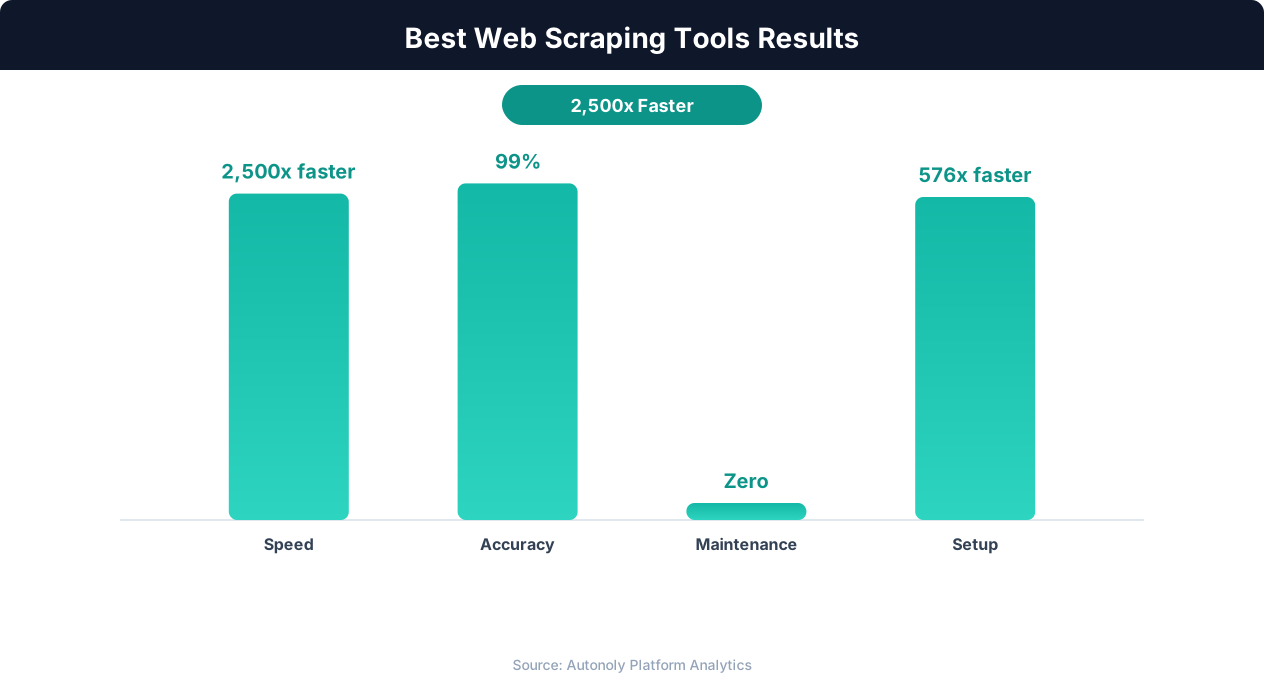
Octoparse struggles with highly dynamic websites. Its auto-detection algorithm sometimes misidentifies data fields, requiring manual correction. Sites with complex layouts, pop-ups, or heavy JavaScript interaction often require multiple attempts to configure correctly. The tool's handling of anti-bot measures is basic — it does not match the anti-detection capabilities of platforms like Autonoly or Bright Data.
The point-and-click interface, while intuitive for simple pages, becomes cumbersome for complex scraping scenarios. Configuring pagination, handling login, managing multiple data types on a single page, and dealing with edge cases often requires navigating through layers of menus and options that are not immediately intuitive.
Best For
Non-technical users who need to scrape simple to moderately complex websites without coding. Best for one-time or infrequent scraping tasks on sites with consistent layouts. Less suitable for dynamic sites with aggressive anti-bot protection or ongoing automated monitoring.
Pricing
Free tier with limited features and local execution only. Standard plan starts at $89/month with cloud execution and 10 concurrent scrapers. Professional plan at $249/month adds more concurrency and advanced features. Pricing is higher per feature than some alternatives.
4. Browse AI and 5. ScrapingBee: Specialized Approaches
Browse AI and ScrapingBee represent two different specialized approaches to web scraping. Browse AI focuses on no-code, AI-assisted extraction, while ScrapingBee provides a developer-focused API for rendered web pages.
Browse AI
Browse AI positions itself as a "robot builder" that creates automated web data extraction workflows. You train a robot by showing it what data to extract on an example page, and it generalizes to similar pages. The AI component helps identify data patterns and adapt to minor page variations.
Strengths: Intuitive training-based interface that works well for extracting structured data (product listings, directory entries, search results) from consistent page layouts. Good for monitoring tasks where you need to check pages regularly for changes. Pre-built robots for common sites reduce setup time.
Limitations: The "training" approach requires several example pages to achieve reliable extraction, which can be time-consuming for complex layouts. Anti-detection capabilities are limited compared to full browser automation tools. Handling of dynamic content and JavaScript-heavy sites is inconsistent. The free tier is very limited (5 robots, 50 runs per month).
Pricing: Free tier with 5 robots and 50 monthly runs. Starter plan at $48/month for 50 robots and 2,000 runs. Professional at $99/month for 250 robots and 5,000 runs.
💡 Key Insight
AI-powered scraping tools handle dynamic JavaScript-heavy websites with 90%+ success rates vs 40% for basic tools.
ScrapingBee
ScrapingBee is a scraping API rather than a visual tool. You send HTTP requests to ScrapingBee's API with a target URL, and it returns the rendered HTML page content. ScrapingBee handles JavaScript rendering, proxy rotation, and CAPTCHA solving on their infrastructure — you get back clean HTML that you parse with your own code.
Strengths: Excellent for developers who want to offload rendering and anti-detection to an API while controlling extraction logic themselves. Simple API with clear documentation. Handles JavaScript rendering, Cloudflare, and basic anti-bot measures reliably. Residential proxy pool included in higher tiers.
Limitations: Requires programming skills — ScrapingBee returns HTML that you must parse yourself with libraries like BeautifulSoup or Cheerio. No visual interface, no built-in data transformation, and no scheduling. It solves the rendering and anti-detection problem but not the extraction and workflow automation problem. You still need to write and maintain parsing code.
Pricing: Free tier with 1,000 API credits. Freelance plan at $49/month for 150,000 credits. Startup at $99/month for 500,000 credits. Business at $249/month for 2 million credits. Each request consumes 1-25 credits depending on features used (JavaScript rendering, premium proxies, AI extraction).
When to Choose Which
Choose Browse AI if you are a non-technical user who needs to monitor specific web pages for data changes and can tolerate limited anti-detection capabilities. Choose ScrapingBee if you are a developer who wants reliable JavaScript rendering and proxy management without managing your own headless browser infrastructure. For a more comprehensive solution that combines AI extraction, browser automation, and workflow building, Autonoly's approach covers more use cases than either tool alone.
6. Bright Data: Enterprise-Grade Proxy and Scraping Infrastructure
Bright Data (formerly Luminati) is the largest proxy network provider in the world, with over 72 million residential IPs across 195 countries. While primarily known as a proxy service, Bright Data has expanded into a full scraping platform with browser automation, pre-built data collectors, and managed scraping services.
Key Features
- Massive proxy network: 72+ million residential IPs, 7+ million datacenter IPs, and 3+ million mobile IPs. The largest and most diverse proxy network available, with fine-grained geographic targeting down to the city level.
- Scraping Browser: A hosted headless browser that integrates with Bright Data's proxy network. Handles JavaScript rendering, automatic CAPTCHA solving, and fingerprint management. Accessible via Puppeteer or Playwright API.
- Data Collector: Pre-built scraping templates for popular sites (Amazon, Google, LinkedIn, etc.) that run on Bright Data's infrastructure. Similar to Apify's Actors but backed by Bright Data's superior proxy infrastructure.
- Web Unlocker: An API that handles anti-bot bypass automatically. Send a URL, get back the rendered page content with all anti-detection measures handled transparently.
- SERP API: Specialized API for scraping search engine results pages with high reliability.
Strengths
Bright Data's proxy network is unmatched. For scraping heavily protected sites at scale, the quality and diversity of their proxy pool is the single most important factor. Their residential proxies are genuine ISP-assigned IPs that anti-bot systems cannot distinguish from real user traffic. For enterprises scraping millions of pages daily from aggressive anti-bot sites, Bright Data's infrastructure is the gold standard.
The Scraping Browser product combines their proxy strength with headless browser automation, handling the most difficult anti-detection challenges (Cloudflare, PerimeterX, DataDome) with higher success rates than any other tool we tested.
Limitations
Bright Data is expensive. Residential proxy bandwidth costs $8-15 per GB, and high-volume scraping consumes significant bandwidth. A scraping project that processes 10,000 pages per day can easily cost $500-2,000/month in proxy bandwidth alone, on top of the platform subscription.
The platform is also complex. Bright Data offers many products (proxy networks, browser, collectors, APIs) with overlapping capabilities, and understanding which product to use for which scenario requires significant evaluation. The learning curve is steeper than simpler tools, and the documentation, while comprehensive, can be overwhelming for beginners.
Bright Data is not a no-code tool. While Data Collectors provide some template-based functionality, extracting data from sites not covered by templates requires programming skills. The platform excels at infrastructure and anti-detection but does not provide the visual workflow building or AI-assisted extraction that non-technical users need.
Best For
Enterprise teams with dedicated engineering resources who need to scrape heavily protected sites at massive scale (millions of pages). Best for organizations where data extraction is a core business function and the proxy and infrastructure investment is justified by the data value.
Pricing
Pay-as-you-go residential proxies start at $8.40/GB. Scraping Browser from $0.09 per page. Web Unlocker from $3/1,000 requests. Data Collector pricing varies by site. Minimum spend requirements on some products. Enterprise custom pricing available.
7. Playwright: The Open-Source Developer Framework
Playwright is not a scraping tool — it is a browser automation framework developed by Microsoft. But it is the foundation that many scraping tools (including Autonoly) are built on, and it remains the most powerful option for developers who want full control over their scraping infrastructure.
Key Features
- Real browser control: Playwright controls Chromium, Firefox, and WebKit browsers programmatically. Full JavaScript execution, DOM manipulation, network interception, and device emulation.
- Auto-wait: Built-in intelligent waiting that ensures elements are visible and interactable before actions execute. Eliminates the fragile
time.sleep()calls common in Selenium scripts. - Network interception: Intercept, modify, and mock network requests. Essential for API discovery, request blocking (ads, tracking), and response manipulation.
- Multi-language support: Official SDKs for Python, JavaScript/TypeScript, Java, and C#. Choose the language your team is most comfortable with.
- Tracing and debugging: Built-in trace viewer that records every action, screenshot, and network request during execution. Invaluable for debugging scraping scripts.
- Browser contexts: Run multiple isolated sessions in a single browser instance. Each context has its own cookies, storage, and session state.
Strengths
Playwright provides the maximum control and flexibility of any scraping approach. Every aspect of the browser — network requests, JavaScript execution, DOM state, device settings — is programmable. This makes Playwright capable of handling any scraping scenario, no matter how complex or heavily protected the target site.
As open-source software, Playwright has no per-page pricing, no usage limits, and no vendor lock-in. You run it on your own infrastructure and control every aspect of the execution environment. For high-volume scraping where per-page costs matter, self-hosted Playwright is the most economical option.
Playwright also has the most active development community of any browser automation tool. Microsoft releases updates frequently, with new features and improved compatibility. The extensive documentation, active GitHub discussions, and third-party ecosystem (stealth plugins, anti-detection extensions) provide ample resources for solving scraping challenges.
💡 Key Insight
The average business saves 15-20 hours per week by switching from manual data collection to automated scraping tools.
Limitations
Playwright requires programming skills — Python or JavaScript at minimum. There is no visual interface, no drag-and-drop workflow builder, and no AI assistance. Every scraping workflow must be coded, tested, debugged, and maintained manually.
Anti-detection is not built in. Default Playwright configurations are detectable by anti-bot systems. You need to configure stealth settings, manage proxies, handle CAPTCHAs, and maintain browser fingerprints yourself. This anti-detection engineering is a significant ongoing investment — it is exactly the work that platforms like Autonoly and Bright Data automate.
Infrastructure management is your responsibility. Running Playwright at scale requires managing servers, browser instances, memory usage, and concurrent execution limits. For teams without DevOps expertise, this operational overhead can consume more time than the scraping development itself.
Best For
Developer teams who want full control over their scraping infrastructure and are willing to invest in anti-detection engineering and infrastructure management. Ideal for high-volume scraping where per-page costs must be minimized, or for scraping scenarios that require custom browser behavior that no managed platform supports. For a comparison of Playwright with other browser automation frameworks, see our Playwright vs. Selenium vs. Puppeteer guide.
Pricing
Free and open source. Infrastructure costs (servers, proxies) are your responsibility. A typical production Playwright scraping setup costs $50-500/month in infrastructure depending on scale, plus proxy costs ($3-15/GB for residential proxies).
Comparison Summary: Which Tool Should You Choose?
Each scraping tool serves a different audience and use case. The right choice depends on your technical skills, scraping volume, budget, and target websites. Here is a decision framework based on our testing and evaluation.
Overall Comparison Table
| Tool | Technical Skill Required | Anti-Detection | Dynamic Sites | Scale | Starting Price |
|---|---|---|---|---|---|
| Autonoly | None (AI-assisted) | Excellent (built-in) | Excellent | Medium | See pricing |
| Apify | JavaScript/Python | Good (proxy included) | Excellent | High | $49/month |
| Octoparse | None (point-and-click) | Basic | Moderate | Medium | $89/month |
| Browse AI | None (training-based) | Limited | Moderate | Low-Medium | $48/month |
| ScrapingBee | Developer (API) | Good | Good | Medium-High | $49/month |
| Bright Data | Developer | Best-in-class | Excellent | Enterprise | $8.40/GB |
| Playwright | Developer (code) | DIY | Excellent | Unlimited (self-managed) | Free (+ infrastructure) |
Decision Guide
"I need data from websites but I am not technical."
Choose Autonoly. Its AI agent handles the technical complexity of scraping — anti-detection, JavaScript rendering, pagination — while you focus on describing what data you need. Octoparse is a secondary option for simpler sites.
"I am a developer who wants a managed scraping platform."
Choose Apify or ScrapingBee. Apify if you want pre-built scrapers and cloud execution. ScrapingBee if you want a rendering API while keeping extraction logic in your own code.
"I need to scrape heavily protected sites at enterprise scale."
Choose Bright Data. Their proxy network and anti-detection infrastructure handle the most challenging targets at the highest volumes. Be prepared for significant costs.
"I want full control and have engineering resources."
Choose Playwright. It is free, infinitely flexible, and the foundation for most modern scraping. Be prepared to build and maintain anti-detection, infrastructure, and monitoring yourself.
"I want to monitor a few websites for changes."
Choose Browse AI for simple monitoring of specific pages, or Autonoly for more complex monitoring that involves dynamic sites, data transformation, or integration with other tools.
Our Recommendation
For most teams — especially those without dedicated scraping engineers — Autonoly provides the best balance of capability, ease of use, and reliability. The AI-powered approach eliminates the technical barriers that make other tools difficult for non-technical users, while the visual workflow builder enables end-to-end automation from data extraction through analysis and reporting. For teams that need enterprise-scale extraction or full programmatic control, Bright Data and Playwright respectively serve those specialized needs. For a broader comparison of automation platforms beyond scraping, see our automation platform comparison.