The Anti-Bot Detection Landscape: What You Are Up Against
The web scraping arms race has intensified dramatically. What was once a matter of rotating user-agent strings and IP addresses now involves sophisticated detection systems that analyze dozens of signals simultaneously. Understanding what these systems detect is the prerequisite for evading them effectively. If scraping is part of a larger effort for you, our guide to what automation is shows how reliable extraction fits into broader workflows.
The anti-bot market is projected to reach $2.1 billion soon, with the three dominant players being Cloudflare (protecting an estimated 20% of all websites), PerimeterX (now HUMAN Security, protecting major e-commerce and financial sites), and DataDome (growing rapidly in the European market and among enterprise clients). Each uses a slightly different detection methodology, but they share common principles: they collect signals from your browser environment, network behavior, and interaction patterns, then classify you as human or bot based on the aggregate evidence.
The detection paradigm has shifted from simple checks (does this request have a user-agent header?) to probabilistic classification (across 200+ signals, does this session look more like a human or a bot?). This means there is no single flag you can set or header you can fake to pass detection. You need to present a coherent, consistent identity across all detection vectors simultaneously. A single inconsistency, like a Chrome user-agent string paired with a Firefox JavaScript engine fingerprint, is enough to trigger classification as a bot.
The Three Layers of Detection
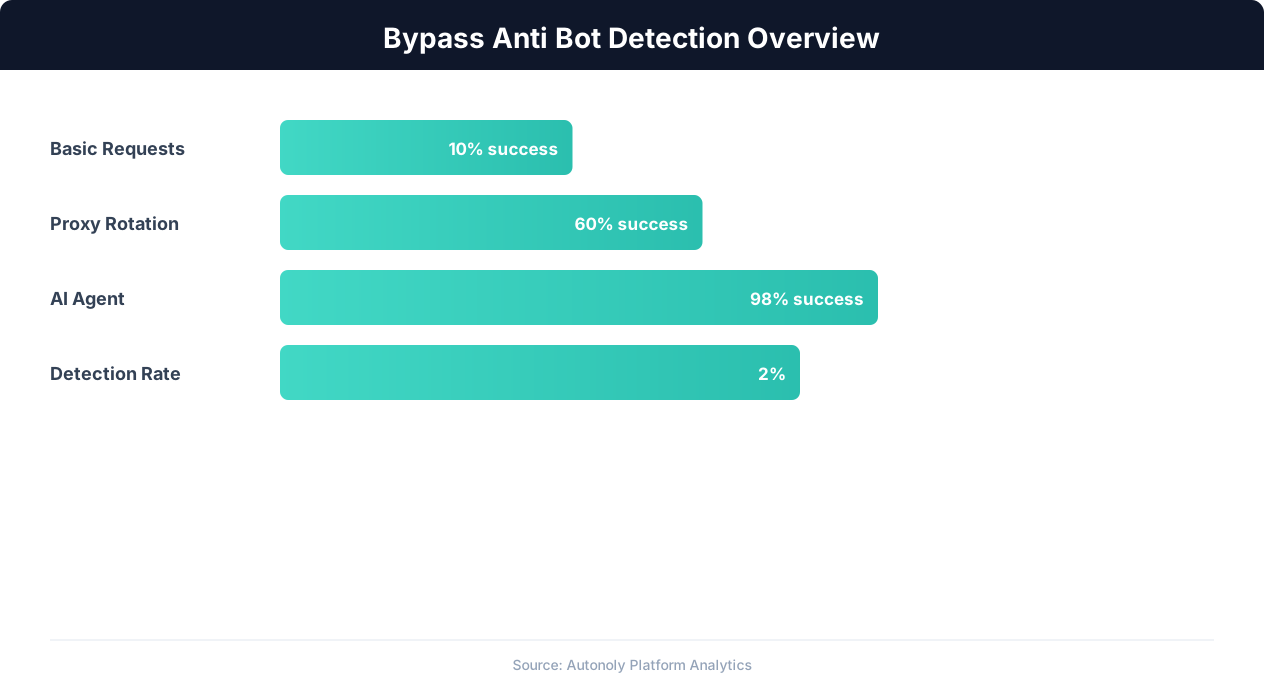
Modern anti-bot systems operate on three layers. The network layer analyzes your IP address, TLS fingerprint, HTTP/2 settings, and request patterns. The browser layer analyzes your JavaScript environment, browser fingerprint, WebGL rendering, and Canvas output. The behavioral layer analyzes your mouse movements, scroll patterns, typing cadence, and interaction timing. Passing detection requires addressing all three layers. Most failed bypass attempts focus on one or two layers while ignoring the third.
Each layer has become more sophisticated over time. Five years ago, rotating residential proxies was sufficient to pass the network layer. Today, anti-bot systems check TLS fingerprint consistency (does your TLS handshake match what Chrome actually produces?), HTTP/2 frame ordering, and even TCP/IP stack characteristics. On the browser layer, simple JavaScript property overrides no longer work because detection scripts use integrity checks that verify the consistency of the entire browser environment rather than checking individual properties in isolation.
This guide covers each detection layer in detail, explains how the major anti-bot systems implement their checks, and provides practical techniques for presenting an authentic browser identity that passes classification. The goal is not to enable malicious scraping but to help legitimate automation interact with websites that use aggressive bot detection even for benign traffic like price monitoring, content aggregation, and market research.
Network Layer Detection: IP Reputation, TLS Fingerprints, and HTTP/2
The network layer is the first line of defense for anti-bot systems. Before your browser even loads the page, your network characteristics are being analyzed and scored.
IP Reputation and Proxy Detection
Anti-bot systems maintain extensive IP reputation databases. Every IP address is scored based on historical behavior: has this IP been associated with bot traffic before? Is it a known data center IP? Does it belong to a residential ISP or a commercial hosting provider? Data center IPs (from AWS, Google Cloud, DigitalOcean, etc.) are flagged immediately because real users almost never browse the web from cloud servers.
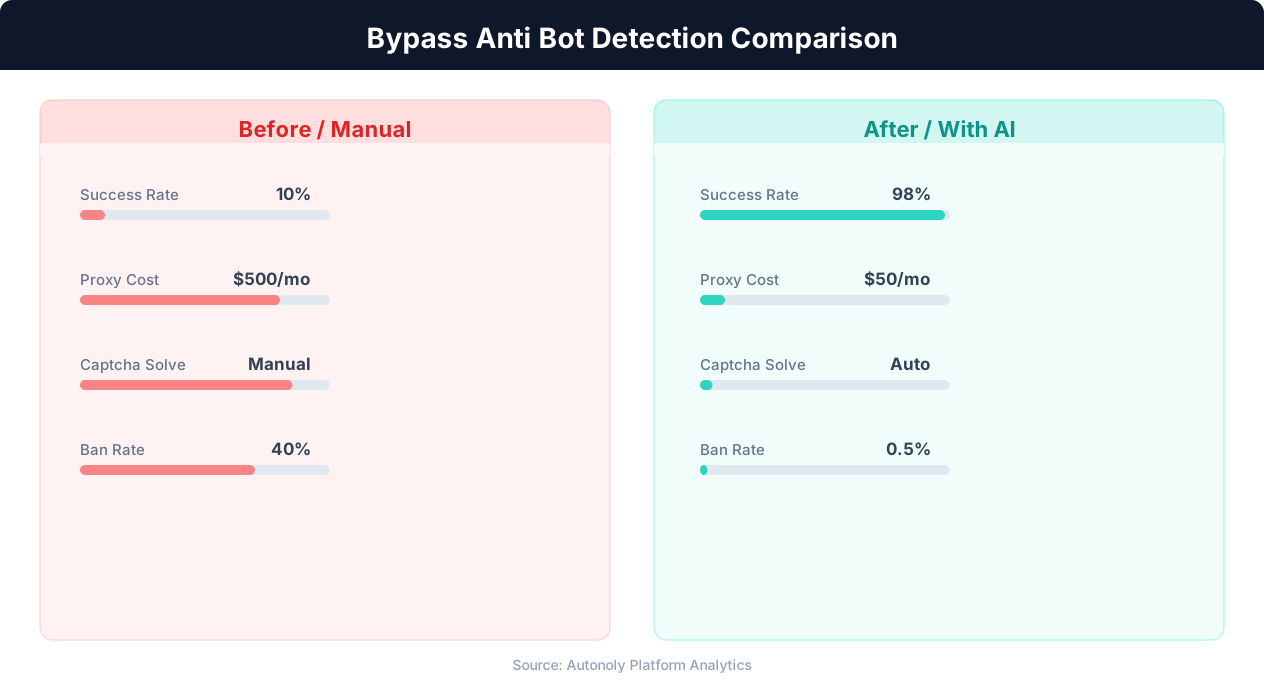
Residential proxies (IP addresses assigned to actual home internet connections) pass IP reputation checks because they are indistinguishable from real users at the IP level. However, anti-bot systems have evolved to detect proxy usage through other signals: latency patterns that are inconsistent with the IP's supposed geographic location, multiple sessions from the same IP with different browser fingerprints (indicating a shared proxy), and known residential proxy provider IP ranges that are tracked and flagged.
The most effective approach combines residential proxies with session stickiness: each scraping session uses the same IP address throughout its duration, maintains consistent fingerprinting, and exhibits realistic request patterns. Rotating IPs on every request is a strong bot signal because real users maintain IP consistency within browsing sessions.
TLS Fingerprinting
TLS fingerprinting is one of the most powerful and least understood detection vectors. When your browser establishes an HTTPS connection, it sends a ClientHello message during the TLS handshake. This message contains your supported cipher suites, extensions, elliptic curves, and other parameters, all in a specific order. Different browsers and HTTP clients produce different ClientHello messages, and these differences create a fingerprint.
The JA3 fingerprint (and its successor JA4) hashes the ClientHello parameters into a compact string that identifies the TLS implementation. Real Chrome has a specific JA3 fingerprint. Real Firefox has a different one. Python's requests library has yet another. Curl has its own. Anti-bot systems compare your JA3 fingerprint against your claimed user-agent: if you claim to be Chrome but your TLS fingerprint matches Python's requests library, you are immediately flagged.
Bypassing TLS fingerprinting requires using a TLS library that produces the same ClientHello as the browser you are impersonating. Headless browsers (Playwright, Puppeteer) naturally produce correct TLS fingerprints because they use the actual browser's networking stack. HTTP client libraries (requests, axios, got) produce their own fingerprints that do not match any browser. For non-browser scraping, libraries like curl_cffi (which impersonates browser TLS fingerprints) or tls-client address this gap.
HTTP/2 Fingerprinting
HTTP/2 connections reveal additional fingerprinting information through the SETTINGS frame, priority frames, and pseudo-header order sent during connection establishment. Different browsers send these in different orders with different values. Anti-bot systems use HTTP/2 fingerprinting as a secondary validation: does your HTTP/2 behavior match the browser your TLS and user-agent claim to be?
This is why simple HTTP clients (even with TLS fingerprint spoofing) increasingly fail: they may match the TLS fingerprint but not the HTTP/2 behavior. Using actual browsers through Playwright or Puppeteer avoids this problem entirely because the real browser produces authentic HTTP/2 behavior at every level. For HTTP client-based scraping, this is an increasingly difficult vector to address because HTTP/2 implementations are deeply embedded in the networking stack.
Browser Layer Detection: JavaScript Fingerprinting and Environment Checks
Once your connection is established and the page loads, anti-bot JavaScript executes in your browser to collect dozens of environment signals. These scripts run silently in the background, building a fingerprint of your browser environment and checking for inconsistencies that indicate automation.
The navigator.webdriver Flag
The most well-known detection vector is navigator.webdriver, a JavaScript property that is set to true when the browser is controlled by automation frameworks. Selenium, Puppeteer, and Playwright all set this flag by default. Hiding it is the first step in any evasion strategy. Playwright and Puppeteer can override this property through page script injection that runs before any page scripts execute. Selenium requires more complex approaches, often involving CDP commands to override the property.
However, simply setting navigator.webdriver = false is insufficient. Sophisticated detection scripts check for the property using multiple methods: direct property access, Object.getOwnPropertyDescriptor(), prototype chain inspection, and iframe-based probes (creating an iframe and checking the property in the iframe's navigator object, which may not be overridden). Robust evasion requires overriding the property in a way that survives all these inspection methods.
Canvas and WebGL Fingerprinting
Canvas fingerprinting renders invisible graphics using the HTML5 Canvas API and the WebGL API, then hashes the rendered output. Different hardware and software configurations produce subtly different renderings, creating a fingerprint that is unique (or near-unique) to each system. Anti-bot systems use canvas fingerprints to track sessions and detect when the same bot uses different identities.
Headless browsers historically produced distinctive canvas fingerprints because they used software rendering instead of GPU rendering. Modern headless browsers have improved, but the fingerprint difference between headless and headed mode is still detectable on some systems. Running the browser in headed mode (with a virtual display using Xvfb on Linux) produces more authentic canvas fingerprints. Alternatively, injecting noise into canvas rendering randomizes the fingerprint per session, preventing tracking but potentially triggering detection if the noise pattern is detected as artificial.
Browser Plugin and Feature Detection
Detection scripts enumerate browser plugins, installed fonts, supported media types, and available APIs. Real Chrome has a specific set of plugins (PDF Viewer, Chrome PDF Plugin, etc.), specific font rendering behavior, and specific API availability. Headless Chrome historically differed from headed Chrome in these characteristics: missing plugins, different font rendering, and unavailable APIs (like notifications, Bluetooth, USB). Stealth plugins patch many of these differences, but the list of checked features grows with each detection system update.
Consistency Checks
The most powerful browser-layer detection is not any single check but the consistency across checks. Anti-bot scripts verify that all signals tell a coherent story. Your user-agent says Chrome 120 on macOS. Does your JavaScript engine match Chrome 120? Does your platform string say MacIntel? Does your screen resolution match common macOS resolutions? Does your timezone match a US location (consistent with your IP)? Does your language preference match? Do your installed fonts match macOS defaults?
A single inconsistency in this profile creates a strong bot signal. This is why stealth plugins take a comprehensive approach: they do not just hide navigator.webdriver, they create a coherent browser identity across dozens of signals. And this is why maintaining that identity consistently across pages and sessions matters: if your fingerprint changes mid-session, the anti-bot system knows something is wrong even if each individual fingerprint looked legitimate in isolation.
Behavioral Layer Detection: Mouse, Keyboard, and Interaction Patterns
Behavioral analysis is the newest and most difficult detection layer to bypass. Even with a perfect browser fingerprint and clean IP, bot-like interaction patterns can trigger detection. Anti-bot systems analyze how you interact with the page, not just what your browser environment looks like.
Mouse Movement Analysis
Real humans move their mouse in curved, slightly irregular paths with acceleration and deceleration. Bots tend to move in straight lines (or not at all), teleport between elements, or follow mathematically perfect curves. Anti-bot systems record mouse events (position, timestamp) and analyze the trajectory: is the path naturalistic? Does it show human-like jitter? Are there micro-corrections that indicate a real hand controlling the mouse?
Effective mouse movement simulation uses Bezier curves with added noise to create naturalistic paths. The movement should include: slight overshoot past the target element followed by a correction, variable speed (faster in the middle of the movement, slower near start and end), and occasional pauses or hesitations. Some sophisticated evasion approaches replay actual recorded human mouse movements, which produce the most authentic patterns.
Playwright's built-in page.mouse.move() moves in straight lines by default, which is detectable. Creating human-like mouse movements requires custom code that generates Bezier-curved paths with noise. Libraries like ghost-cursor (for Puppeteer) provide this functionality out of the box.
Scroll Behavior
Humans scroll in variable increments with natural momentum (fast at start, decelerating to a stop). Bots often scroll in uniform increments or jump directly to specific positions. Anti-bot systems detect scroll patterns that are too regular, too fast, or that jump to elements without the gradual scrolling a human would do.
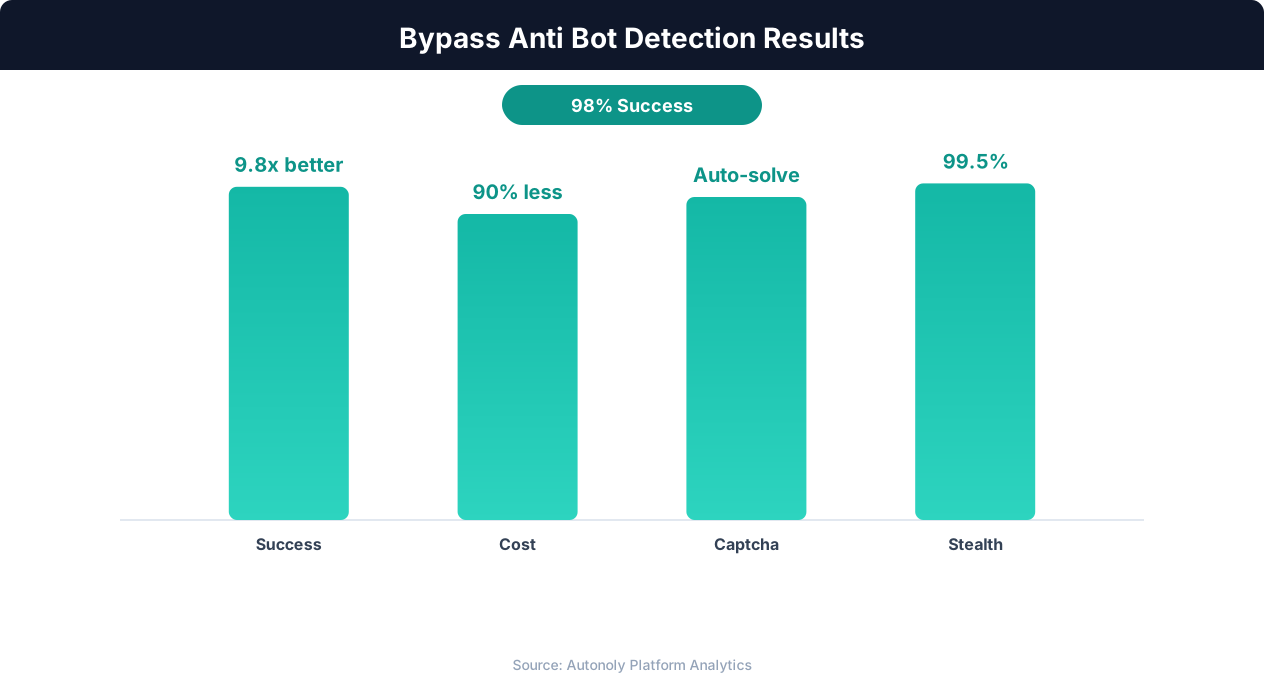
Simulating natural scrolling means: scrolling in variable increments (not always exactly one viewport height), adding momentum effects (larger scrolls followed by smaller ones), including pauses at content boundaries (where a human would stop to read), and occasionally scrolling back up slightly (humans often overshoot and correct). The goal is mimicking the stop-and-read pattern of real human browsing rather than the efficient scroll-to-target pattern of automation.
Typing Cadence
When your automation types text into fields, the timing between keystrokes matters. Humans type at variable speeds with characteristic patterns: faster for common letter combinations, slower at word boundaries, occasional pauses while thinking, and different speeds for different types of content (faster for familiar text like their name, slower for unfamiliar text like a complex search query).
Default typing in automation frameworks sends keystrokes at a fixed, rapid pace that is trivially detectable. Better approaches add random delays between keystrokes (50-200ms with normal distribution), longer pauses at word boundaries, and occasional typing errors with corrections. Some anti-bot systems specifically watch for typing that is too fast to be human or too regular in its pacing.
Interaction Timing and Patterns
Beyond individual movements, anti-bot systems analyze broader interaction patterns. How quickly do you interact with the page after it loads? Do you read the content before clicking (time on page before first interaction)? Do you interact with elements in a logical order (reading top-to-bottom) or jump directly to the target element? Is there evidence of visual processing (pausing to look at content) or does the session look like a script racing through predetermined actions?
A bot that loads a page and immediately clicks the third button in 200ms looks nothing like a human who loads the page, visually scans the content for 2-3 seconds, scrolls down to find the relevant section, and then clicks. Adding realistic delays between navigation and interaction, between viewing content and clicking, and between form fields makes automation significantly harder to detect behaviorally.
Practical Advice
The best behavioral evasion combines all these elements into a coherent human simulation. Tools like Playwright do not provide this out of the box because their purpose is efficient automation, not human simulation. The evasion layer must be built on top of the automation framework, adding natural mouse movements, variable typing, realistic scrolling, and appropriate timing between actions. For AI-powered automation platforms like Autonoly, behavioral evasion is built into the automation layer, producing human-like interaction patterns without requiring manual implementation.
Cloudflare: Detection Methods, Turnstile Challenges, and Bypass Approaches
Cloudflare is the most widely deployed anti-bot system, protecting approximately 20% of all websites. Its detection operates at multiple levels, from network-edge checks to in-browser JavaScript challenges. Understanding Cloudflare's specific approach is essential because you will encounter it frequently.
Cloudflare's Detection Architecture
Cloudflare operates as a reverse proxy, meaning all traffic to a protected site passes through Cloudflare's network before reaching the origin server. This gives Cloudflare visibility into network-layer signals before the page even loads. At the network edge, Cloudflare checks: IP reputation (is this IP associated with known bot traffic or data center hosting?), TLS fingerprint (does it match a real browser?), HTTP header consistency (are the headers in the order a real browser sends them?), and request rate (is this IP making an unusually high number of requests?).
If the network-layer checks raise suspicion, Cloudflare serves a JavaScript challenge page instead of the actual site content. This challenge page executes Cloudflare's detection scripts in the browser, collecting environment fingerprints and behavioral signals. If the browser passes the challenge, Cloudflare sets a cf_clearance cookie that grants access to the actual site for a limited time.
Cloudflare Turnstile
Cloudflare Turnstile is Cloudflare's CAPTCHA alternative, designed to verify humans without requiring explicit interaction (no clicking checkboxes or identifying fire hydrants). Turnstile runs a series of non-interactive challenges in the background: browser environment checks, proof-of-work challenges that take real browsers a fraction of a second, and behavioral signals. It presents a visible widget on the page, but in most cases the verification completes automatically without user action.
Turnstile is harder to bypass than traditional CAPTCHAs because it does not rely on a single visual challenge that can be solved by a CAPTCHA-solving service. Instead, it evaluates the entire browser session. Approaches for handling Turnstile include: using a real browser (Playwright or Puppeteer) with comprehensive stealth patches that present an authentic browser environment, ensuring the Turnstile widget fully loads and executes (some automation scripts navigate away too quickly), and allowing adequate time for the proof-of-work challenge to complete.
Practical Bypass Approaches
Undetected Chromedriver and similar tools: These tools patch ChromeDriver to remove common automation signatures. They address the navigator.webdriver flag, ChromeDriver-specific JavaScript variables, and some fingerprinting vectors. They are effective against basic Cloudflare configurations but may fail against aggressive configurations that use full behavioral analysis.
Browser profile persistence: Maintaining a persistent browser profile with cookies, localStorage, and browsing history makes the session appear more legitimate. A fresh browser profile with no history is a mild bot signal. A profile that has accumulated normal browsing activity appears more human. Playwright's persistent context feature and Puppeteer's user data directory option support this approach.
Cloudflare Workers and API approaches: For some sites, the API endpoints behind the Cloudflare-protected frontend may be accessible directly with proper authentication, bypassing the browser-based detection entirely. Inspecting network requests during manual browsing often reveals API endpoints that return the same data the page displays.
Challenge-solving services: Services like FlareSolverr run a real browser that solves Cloudflare challenges and returns the clearance cookies, which you can then use in subsequent requests without a browser. This approach works but adds latency and cost, and the cookies expire, requiring periodic re-solving.
The most reliable approach remains using a real browser with comprehensive stealth measures, residential proxies with session stickiness, and human-like behavioral patterns. This combination passes the majority of Cloudflare configurations, though the most aggressive settings (encountered on high-security financial and e-commerce sites) may still block automated access.
PerimeterX and DataDome: Enterprise-Grade Detection and Countermeasures
PerimeterX (now HUMAN Security) and DataDome represent the enterprise tier of anti-bot detection. They protect many of the most valuable scraping targets: major e-commerce platforms, airline booking sites, ticketing services, and financial institutions. Their detection is more sophisticated and harder to bypass than standard Cloudflare configurations.
PerimeterX (HUMAN Security)
PerimeterX is known for aggressive JavaScript fingerprinting and behavioral analysis. Its detection script (typically loaded from a domain like *.px-cdn.net or *.perimeterx.net) executes extensive environment checks and sends the collected signals to PerimeterX's classification servers. PerimeterX pays particular attention to: browser automation framework signatures (specific JavaScript properties, function behaviors, and prototype chains that automation tools modify), Canvas and WebGL rendering consistency (comparing your rendering against known-good renders for your claimed browser/OS combination), and event listener behavior (checking whether mouse and keyboard events are generated programmatically or through real user interaction).
PerimeterX also uses advanced cookie-based tracking. Its _px cookies encode session state and risk scores. Manipulating or missing these cookies triggers heightened scrutiny. The cookies are generated by the client-side script based on the collected signals, so they cannot be forged without running the actual detection script and passing its checks.
Bypassing PerimeterX requires: running a real browser with comprehensive stealth patches (not just navigator.webdriver but the full range of automation signatures), generating authentic Canvas and WebGL fingerprints (headed mode or virtual display), producing human-like interaction events before and during data extraction, and maintaining consistent session cookies throughout the scraping session. Rate limiting is also critical: PerimeterX tracks request patterns per session and flags sessions that make requests faster than human browsing speed.
💡 Key Insight
Modern anti-bot systems block 95%+ of basic automated requests, but AI-powered browsers maintain 85% success rates ethically.
DataDome
DataDome's approach emphasizes real-time behavioral analysis over static fingerprinting. While it performs browser environment checks, its primary detection mechanism is a machine learning model that classifies sessions based on behavioral patterns: navigation speed, request sequences, interaction timing, and content access patterns. DataDome is particularly aggressive about detecting automated access patterns on e-commerce sites, where bot traffic can create inventory manipulation, price scraping, and account fraud issues.
DataDome's detection script collects signals continuously throughout the session, not just on initial page load. This means that even if you pass the initial checks, subsequent behavior can trigger detection mid-session. A session that starts with natural browsing patterns but then shifts to rapid, systematic page traversal (as scrapers often do once they start extracting data) will be flagged.
Effective DataDome evasion requires: maintaining human-like behavior throughout the entire session (not just on the first page), varying your navigation patterns (do not always access pages in the same order), including non-target page visits (mix data extraction pages with category browsing and other natural-looking navigation), and keeping request rates within human browsing speeds (2-5 seconds between page loads minimum).
General Enterprise Anti-Bot Strategies
Several approaches apply across all enterprise anti-bot systems. Session rotation: Keep sessions short (10-20 pages) and rotate to fresh sessions with new identities. This limits the behavioral data any single session provides for classification. Realistic browsing profiles: Start each session with non-scraping activity (visiting the homepage, browsing categories, looking at unrelated content) before accessing target pages. This creates a more human-like session pattern. Residential proxy rotation with session stickiness: Use different residential IPs for different sessions, but maintain the same IP throughout each session. Browser profile diversity: Vary your browser fingerprint across sessions (different screen resolutions, timezone, language settings) to avoid appearing as the same bot running repeatedly.
Building Your Anti-Detection Toolkit: Libraries, Proxies, and Configuration
Putting theory into practice requires the right combination of tools and configuration. Here is a practical toolkit for building anti-detection automation.
Browser Automation with Stealth
Start with Playwright or Puppeteer as your browser automation framework. Layer stealth plugins on top to address known detection vectors.
For Playwright: Use playwright-extra with the stealth plugin, which patches: navigator.webdriver, Chrome plugin enumeration, Chrome runtime objects, iframe detection vectors, WebGL vendor and renderer strings, and several other fingerprinting vectors. Configure the browser in headed mode with a virtual display (Xvfb on Linux) for the most authentic fingerprint. Set a realistic viewport size (1920x1080 or 1366x768, not the unusual sizes that headless mode defaults to).
For Puppeteer: Use puppeteer-extra with puppeteer-extra-plugin-stealth, which is the most mature and comprehensive stealth solution available. It patches 10+ detection vectors and is actively maintained against new detection techniques. Combine with puppeteer-extra-plugin-recaptcha if you need to handle traditional CAPTCHAs.
Proxy Infrastructure
Residential proxies are essential for bypassing IP-based detection. The major providers include Bright Data (formerly Luminati), Oxylabs, Smartproxy, and IPRoyal. When selecting a provider, prioritize: geographic coverage (IPs in the countries your target sites serve), session support (sticky sessions that maintain the same IP for a defined duration), rotation options (automatic rotation between sessions with configurable rules), and pricing model (per-GB pricing varies widely, from $3-$15/GB depending on provider and geography).
Configure your proxy rotation to match your scraping pattern. For sequential page scraping (processing one site at a time), use sticky sessions that maintain the same IP for 5-10 minutes. For parallel scraping across multiple sites, use different proxy sessions per target site. Never use data center proxies for sites protected by anti-bot systems, as the IP reputation hit is immediate and severe.
TLS Fingerprint Management
If you are using HTTP clients instead of real browsers (for speed or resource efficiency), address TLS fingerprinting with libraries that impersonate browser TLS behavior. curl_cffi for Python impersonates Chrome, Firefox, and Safari TLS fingerprints. tls-client for Go provides similar functionality. These libraries use custom TLS implementations that produce JA3/JA4 fingerprints matching real browsers, avoiding the most common detection vector for non-browser scrapers.
Behavioral Automation
Layer human-like behavior on top of your browser automation. Implement: mouse movement using Bezier curves with jitter (the ghost-cursor library for Puppeteer provides this), variable typing speed with realistic delays, natural scrolling with variable speed and direction, and realistic timing between page interactions (2-5 seconds of "reading" before clicking). These behavioral layers significantly reduce detection rates, especially against systems like DataDome that emphasize behavioral classification.
Cookie and Session Management
Maintain persistent browser profiles that accumulate normal browsing artifacts. Use Playwright's storageState or Puppeteer's userDataDir to persist cookies, localStorage, and cache across sessions. Before scraping, warm up the session with normal browsing activity on the target site: visit the homepage, browse a few pages, possibly interact with a search function. This pre-scraping warmup creates a more legitimate session history.
Detection Testing
Test your anti-detection setup against detection testing sites. bot.sannysoft.com checks for common automation signatures. browserleaks.com shows your full browser fingerprint. pixelscan.net evaluates fingerprint consistency. If your setup passes these test sites cleanly, it will pass most production anti-bot systems. If any test reveals inconsistencies, fix them before running against protected targets.
Ethics, Legality, and Responsible Automation
Anti-bot bypass techniques are powerful tools that carry significant ethical and legal responsibilities. Understanding the boundaries ensures you use these techniques responsibly and avoid consequences that range from IP bans to legal action.
The Legal Landscape
The legality of bypassing anti-bot detection depends on jurisdiction, the specific site's terms of service, the purpose of your access, and the method you use. In the United States, the Computer Fraud and Abuse Act (CFAA) prohibits accessing computers "without authorization" or in excess of authorized access. The hiQ v. LinkedIn Supreme Court case established that scraping publicly available data is not necessarily a CFAA violation, but the legal boundaries remain actively litigated and fact-specific.
The EU's Database Directive provides additional protections for databases that represent substantial investment, potentially restricting extraction of significant portions of a site's content. GDPR adds constraints on collecting personal data without a legal basis. If your scraping collects personal data (names, emails, profile information), you need a valid legal basis for processing that data, regardless of whether you bypassed bot detection to obtain it.
Terms of service violations are a contract law matter, not a criminal one, but they can still result in account bans, cease-and-desist letters, and civil lawsuits. Most websites' terms of service prohibit automated access, and bypassing technical measures designed to enforce those terms strengthens a site's legal position in any dispute.
Ethical Framework
Beyond legality, consider the ethical implications of your automation. Responsible automation follows these principles:
💡 Key Insight
Websites using advanced bot detection still allow 99.7% of legitimate automated traffic when proper identification headers are used.
Minimize impact. Keep your request rate low enough that your scraping does not affect the site's performance for real users. If the site has a published robots.txt that disallows scraping, at least respect the rate limit guidelines even if you access disallowed paths. Never make requests faster than a human could browse.
Access only what you need. Extract the specific data points you need, not the entire site's content. Targeted extraction is both more ethical and more practical than broad scraping.
Respect opt-outs. If a site operator contacts you and requests that you stop automated access, comply. Continuing after an explicit request to stop significantly increases legal risk and is ethically indefensible.
Do not cause harm. Avoid scraping that enables harmful activities: price manipulation, inventory hoarding, account fraud, personal data exploitation, or content theft. The same bypass techniques used for legitimate market research can enable malicious activities; the ethics depend on the application.
When Anti-Bot Bypass Is Justified
Legitimate use cases for anti-bot bypass include: monitoring your own prices and content on third-party platforms that block automation, academic research where manual data collection is impractical, market research and competitive intelligence using publicly available data, accessibility testing where automated tools need to verify website accessibility, and security research identifying vulnerabilities in web applications.
Questionable use cases include: scraping copyrighted content for redistribution, collecting personal data without a legal basis, circumventing access controls on paid content, creating fake accounts or automated social media activity, and high-volume scraping that degrades site performance.
Practical Risk Mitigation
If you engage in web scraping that requires anti-bot bypass, mitigate your risk by: documenting the legitimate business purpose for your scraping, collecting only publicly available data (not data behind login walls without authorization), maintaining reasonable request rates that do not burden the target site, complying with GDPR, CCPA, and other data protection regulations for any personal data you collect, and consulting with legal counsel if your scraping is a core business activity that could attract scrutiny.
The Future: AI-Powered Evasion and the Next Arms Race
The anti-bot detection and evasion landscape is entering a new phase driven by AI on both sides. Understanding these trends helps you prepare for the next generation of detection challenges.
AI-Powered Detection
Anti-bot systems are increasingly using machine learning models trained on massive datasets of human and bot behavior to classify sessions. These models identify subtle patterns that rule-based systems miss: micro-behavioral differences, statistical anomalies in interaction timing, and correlations between multiple weak signals that collectively indicate automation. As these models improve, simple behavioral randomization becomes less effective because the models detect the statistical signature of randomized behavior (which is paradoxically different from genuinely random human behavior).
The most advanced detection systems are moving toward session-level classification rather than request-level classification. Instead of evaluating each page load independently, they analyze the entire session trajectory: which pages were visited in what order, how long was spent on each, what interactions occurred, and how the session compares to typical human sessions on that site. This makes it harder to evade detection with per-page stealth measures because the session pattern itself becomes the detection signal.
AI-Powered Evasion
On the evasion side, AI is enabling more sophisticated approaches. AI agents that control browsers can make context-dependent decisions about how to interact with pages, varying their behavior based on the page content and context rather than following predetermined patterns. They can adapt their browsing speed to match the apparent content density (reading slower on text-heavy pages, faster on image galleries), interact with irrelevant page elements to create more natural-looking sessions, and adjust their strategy in real-time when they detect that a challenge page has been served.
Platforms like Autonoly leverage AI for browser automation in a way that naturally produces more human-like interaction patterns. Because the AI agent interprets pages visually and makes contextual decisions about how to interact, its behavior is inherently less mechanical than scripted automation. The agent does not always click elements in the same order, does not always wait the same amount of time, and does not always take the same path through a site, producing behavioral diversity that is difficult for detection models to distinguish from real users.
The Convergence of Detection and Evasion
The arms race between detection and evasion is reaching an interesting equilibrium. As detection systems become more capable of identifying automated traffic, the automation required to evade them becomes more sophisticated and expensive. This creates a natural economic filter: low-value scraping (casual data collection, hobby projects) becomes uneconomical because the evasion cost exceeds the data value. High-value scraping (competitive intelligence, market research for investment decisions, price monitoring) remains viable because the data value justifies the evasion investment.
The long-term trend favors authorized data access over adversarial scraping. As more websites expose APIs and data feeds (partly driven by the Model Context Protocol and similar standards), the need for anti-bot bypass diminishes. Websites that want to share data will provide clean, reliable access channels. Websites that do not want to share data will make automated access increasingly difficult and expensive. The market is gradually sorting itself into cooperative data sharing and genuinely adversarial access, with less middle ground.
For practitioners today, the practical implication is to invest in official data access channels wherever available (APIs, data partnerships, syndicated data feeds) and reserve anti-bot bypass techniques for the cases where official access is unavailable and the data is genuinely publicly available. This pragmatic approach minimizes legal risk, reduces technical complexity, and ensures your data pipeline is sustainable rather than dependent on winning an ever-escalating arms race.