Why Websites Block Scrapers (and Why It Matters)
Before diving into countermeasures, it helps to understand why websites invest heavily in blocking scrapers. The motivations are both technical and commercial, and understanding them helps you design scraping strategies that are less likely to trigger defenses in the first place.
Server Load and Infrastructure Costs
A poorly written scraper can send hundreds or thousands of requests per second to a single server. For context, a typical human browsing session generates one page request every 5-15 seconds. A scraper hitting a product catalog at 50 requests per second is equivalent to 250-750 simultaneous human visitors — except those visitors are not buying anything. This consumes bandwidth, CPU cycles, and database connections that could serve paying customers. Large e-commerce sites like Amazon handle billions of requests daily, and a significant percentage of that traffic comes from bots.
Competitive Intelligence Protection
Pricing data, inventory levels, product descriptions, and customer reviews are valuable assets. Competitors scrape this data to undercut prices, replicate product catalogs, or identify market gaps. Websites invest in anti-bot measures specifically to protect this competitive advantage. Real estate platforms like Zillow guard their listing data aggressively for exactly this reason.
Content Theft and SEO Impact
Scraped content that gets republished elsewhere creates duplicate content problems. Search engines may penalize the original site if scraped content appears to be the "original" source. Publishers, news sites, and content platforms are particularly aggressive about blocking scrapers to protect their SEO rankings and intellectual property.
Compliance and Privacy Regulations
Under GDPR, CCPA, and similar regulations, websites are responsible for protecting user data. If a scraper extracts personal information (user profiles, email addresses, phone numbers), the website could face regulatory consequences for inadequate data protection. This is why platforms like LinkedIn invest millions in anti-scraping technology — they have a legal obligation to protect user data.
The Detection Arms Race
The result of these motivations is an ongoing arms race between scrapers and anti-bot systems. Websites deploy increasingly sophisticated detection methods, scrapers develop new evasion techniques, and the cycle continues. Understanding this dynamic is essential because it means that any single technique eventually stops working. The best approach combines multiple strategies, adapts to changes, and — most importantly — scrapes responsibly.
Throughout this guide, we cover practical techniques that balance effectiveness with responsibility. If you want to skip the manual configuration entirely, tools like Autonoly's browser automation handle most of these challenges automatically through AI-driven agents.
Rate Limiting: The Foundation of Sustainable Scraping
Rate limiting is the single most important practice in web scraping. More scrapers get blocked for sending too many requests too quickly than for any other reason. The goal is to mimic human browsing patterns — irregular intervals, reasonable page load times, and natural navigation paths.
The Basics: Requests Per Second
A good starting point is one request every 2-5 seconds for a single domain. This mimics a human reading a page, then clicking a link. For large-scale scrapes, you can increase throughput by distributing requests across multiple IP addresses (see the proxy rotation section), but each individual IP should maintain this pace.
Implementing Random Delays
Fixed-interval requests are a dead giveaway. No human clicks links at exactly 3-second intervals. Add randomized delays between requests to create natural-looking traffic patterns.
Python example with randomized delays:
import requests
import time
import random

def scrape_with_rate_limit(urls, min_delay=2, max_delay=5):
    session = requests.Session()
    session.headers.update({
        'User-Agent': 'Mozilla/5.0 (Windows NT 10.0; Win64; x64) '
                      'AppleWebKit/537.36 (KHTML, like Gecko) '
                      'Chrome/124.0.0.0 Safari/537.36',
        'Accept-Language': 'en-US,en;q=0.9',
        'Accept': 'text/html,application/xhtml+xml'
    })
    results = []
    for url in urls:
        try:
            response = session.get(url, timeout=30)
            response.raise_for_status()
            results.append(response.text)
        except requests.exceptions.HTTPError as e:
            if e.response.status_code == 429:
                # Rate limited — back off exponentially
                wait = random.uniform(30, 60)
                print(f"Rate limited. Waiting {wait:.0f}s")
                time.sleep(wait)
            else:
                print(f"Error {e.response.status_code}: {url}")
        # Randomized delay between requests
        delay = random.uniform(min_delay, max_delay)
        time.sleep(delay)
    return results
Exponential Backoff on Errors
When you receive a 429 (Too Many Requests) or 503 (Service Unavailable) response, do not retry immediately. Implement exponential backoff: wait 30 seconds after the first error, 60 seconds after the second, 120 seconds after the third, and so on. This shows the server you are responding to its signals, and it prevents your IP from being permanently blocked.
Concurrent Request Limits
If you are scraping with multiple threads or async requests, limit concurrency per domain. A good rule is a maximum of 2-3 concurrent connections to any single domain. More than that, and you start looking like a DDoS attack rather than a user.
Time-of-Day Considerations
Scrape during off-peak hours when the target site experiences lower traffic. For US-based e-commerce sites, this is typically between midnight and 6 AM Eastern. This reduces the impact of your scraping on the site's infrastructure and makes rate-limiting detection less likely because overall traffic thresholds are higher.
Respecting HTTP Response Headers
Many sites include rate-limiting hints in their response headers. Look for Retry-After, X-RateLimit-Remaining, and X-RateLimit-Reset headers. These tell you exactly how many requests you have left in the current window and when the window resets. Respecting these headers is both polite and practical — it prevents unnecessary blocks.
Proxy Rotation: Distributing Requests Across IP Addresses
Even with perfect rate limiting, scraping at scale from a single IP address will eventually trigger blocks. Proxy rotation distributes your requests across hundreds or thousands of IP addresses, making each individual IP appear to be a casual visitor.
Types of Proxies
| Proxy Type | Cost (per GB) | Speed | Detection Risk | Best For |
|---|---|---|---|---|
| Datacenter | $0.50-2 | Very fast | High — easily fingerprinted | Non-protected sites, APIs |
| Residential | $3-15 | Moderate | Low — real ISP IPs | Most web scraping |
| Mobile | $15-40 | Slower | Very low — carrier IPs | Heavily protected sites |
| ISP (Static Residential) | $2-5 | Fast | Low | Account-based scraping |
Datacenter vs. Residential Proxies
Datacenter proxies are hosted in cloud data centers (AWS, Google Cloud, etc.). They are fast and cheap, but anti-bot systems maintain databases of datacenter IP ranges and can identify them instantly. For scraping sites with any level of bot protection, datacenter proxies are usually insufficient.
Residential proxies route traffic through real ISP connections — home internet users who opt in to share their bandwidth. Because the IP addresses belong to real ISPs (Comcast, Verizon, BT, etc.), they are indistinguishable from genuine user traffic. The tradeoff is higher cost and sometimes slower speeds.
Rotation Strategies
Per-request rotation: Use a different IP for every single request. This is the safest approach for catalog scraping where each request is independent. Most proxy providers offer "rotating" endpoints that automatically assign a new IP per request.
Sticky sessions: For scraping that requires maintaining a session (login, pagination, shopping cart), use the same IP for a set duration (5-30 minutes). Most proxy providers support sticky sessions through session IDs in the proxy URL.
Geographic targeting: Use proxies from the same country or region as the target site's primary audience. A UK e-commerce site receiving traffic from a Brazilian IP at 3 AM GMT is suspicious. Match the IP geography to expected user locations.
Implementation Example
import requests
import random

proxies_list = [
    'http://user:[email protected]:8080',
    'http://user:[email protected]:8080',
    'http://user:[email protected]:8080',
]

def get_with_proxy(url):
    proxy = random.choice(proxies_list)
    return requests.get(
        url,
        proxies={'http': proxy, 'https': proxy},
        timeout=30
    )

# Most providers offer a single rotating endpoint:
# All requests through this URL automatically get a new IP
rotating_proxy = 'http://user:[email protected]:7777'
response = requests.get(
    'https://target-site.com/products',
    proxies={'http': rotating_proxy, 'https': rotating_proxy}
)
Proxy Health Monitoring
Not all proxies work all the time. Implement health checks that detect dead or blocked proxies and remove them from your rotation pool. Track success rates per proxy and automatically drop proxies with response rates below 90%. Good proxy providers handle this on their end with automatically rotating pools, but if you are managing your own proxy infrastructure, health monitoring is essential.
Autonoly's anti-detection system manages proxy rotation automatically, selecting the right proxy type and rotation strategy based on the target site's protection level.
Respecting robots.txt and Terms of Service
The robots.txt file is a standard protocol that tells web crawlers which parts of a site they are allowed to access. While it is not legally binding in all jurisdictions, respecting it is a fundamental best practice that reduces your legal exposure and demonstrates good faith.
How robots.txt Works
Every website can publish a robots.txt file at its root URL (e.g., https://example.com/robots.txt). The file specifies rules for different user agents:
User-agent: *
Disallow: /private/
Disallow: /admin/
Disallow: /api/internal/
Crawl-delay: 10

User-agent: Googlebot
Allow: /
Crawl-delay: 1
This example tells all crawlers to avoid /private/, /admin/, and /api/internal/ paths, and to wait 10 seconds between requests. Google's crawler gets special permission to crawl everything with only a 1-second delay.
Parsing robots.txt in Python
from urllib.robotparser import RobotFileParser

def can_scrape(url, user_agent='*'):
    from urllib.parse import urlparse
    parsed = urlparse(url)
    robots_url = f"{parsed.scheme}://{parsed.netloc}/robots.txt"
    rp = RobotFileParser()
    rp.set_url(robots_url)
    rp.read()
    return rp.can_fetch(user_agent, url)

# Check before scraping
if can_scrape('https://example.com/products'):
    # Safe to scrape
    response = requests.get('https://example.com/products')
else:
    print("Blocked by robots.txt")
The Crawl-Delay Directive
The Crawl-delay directive specifies the minimum number of seconds between requests. While not all search engines honor it, you should treat it as a mandatory minimum. If a site specifies Crawl-delay: 10, your scraper should wait at least 10 seconds between requests, regardless of your own rate-limiting settings.
Terms of Service (ToS)
Many websites explicitly prohibit scraping in their Terms of Service. While the enforceability of ToS-based scraping restrictions varies by jurisdiction (see the legal section), violating ToS creates legal risk. Before scraping a site at scale, review its ToS for specific language about automated access, data collection, and bot usage.
Key phrases to look for in ToS:
- "Automated access" or "automated means"
- "Scraping," "crawling," or "data mining"
- "You agree not to use any robot, spider, or other automated device"
- "Systematic retrieval of data or content"
Practical Guidelines
- Always check robots.txt first. Parse it programmatically and respect Disallow rules.
- Honor Crawl-delay directives. They exist for a reason — the site is telling you its infrastructure limits.
- Review ToS for high-value targets. If you plan to scrape a site repeatedly or at scale, understand the legal terms.
- Avoid scraping user-generated personal data. Even if robots.txt allows it, scraping personal profiles, emails, or phone numbers creates GDPR/CCPA exposure.
- Cache aggressively. Do not scrape the same page twice. Store results locally and only re-scrape when data freshness requires it.
Responsible scraping is not just ethical — it is practical. Sites are far less likely to invest in blocking you if your scraper behaves like a polite visitor rather than an aggressive bot.
Handling CAPTCHAs: Strategies and Limitations
CAPTCHAs are the most visible anti-bot measure. When a website suspects automated access, it presents a challenge that is easy for humans but difficult for machines. Today, CAPTCHAs have evolved significantly beyond the "select all traffic lights" puzzles of a few years ago.
Types of CAPTCHAs today
reCAPTCHA v3 (Google): No visible challenge at all. Instead, reCAPTCHA v3 runs in the background, scoring each visitor from 0.0 (likely bot) to 1.0 (likely human) based on behavior patterns — mouse movements, scroll patterns, typing cadence, and browsing history. Low scores trigger blocks or additional challenges. This is the hardest to bypass because there is nothing to "solve."
hCaptcha: Similar to reCAPTCHA v2 (image selection challenges) but privacy-focused. Used by Cloudflare and many major sites. Challenges include identifying objects in images, selecting matching pairs, or drawing boundaries around objects.
Turnstile (Cloudflare): A non-interactive challenge that verifies visitors using browser environment signals, proof-of-work challenges, and behavioral analysis. Invisible to most human visitors but difficult for automated tools.
Custom CAPTCHAs: Large platforms build proprietary challenge systems. Amazon, Google, and Meta use custom CAPTCHAs that are not solvable by generic CAPTCHA-solving services.
CAPTCHA Solving Approaches
| Approach | Cost per 1K solves | Speed | Reliability | Ethical Concerns |
|---|---|---|---|---|
| Human solving services | $1-3 | 10-30 seconds | 90-95% | Worker exploitation concerns |
| AI-based solvers | $2-5 | 2-10 seconds | 70-90% | Lower — no human labor |
| Browser automation (avoid triggering) | Proxy cost only | N/A | Variable | None |
The Better Approach: Avoid Triggering CAPTCHAs
Rather than trying to solve CAPTCHAs, the most effective strategy is to avoid triggering them in the first place. CAPTCHAs are typically shown when a visitor's behavior triggers a suspicion threshold. By maintaining a convincing browser fingerprint, using residential proxies, implementing natural delays, and managing cookies properly, you can keep your risk score below the CAPTCHA trigger threshold.
Key techniques to avoid CAPTCHA triggers:
- Maintain realistic browser sessions. Use a real browser engine (Playwright, Puppeteer) instead of raw HTTP requests. Headless browsers generate the JavaScript execution context, DOM events, and WebGL rendering that reCAPTCHA v3 checks for.
- Warm up sessions. Before scraping target pages, visit the site's homepage, browse a few pages naturally, and accept cookies. This builds a behavioral profile that looks human.
- Preserve cookies across requests. reCAPTCHA and hCaptcha set cookies that track visitor reputation. Clearing cookies between requests resets your reputation to zero, which is suspicious.
- Mouse and scroll simulation. For reCAPTCHA v3, simulate realistic mouse movements and scroll events on the page. Random mouse movements are not enough — they need to follow natural cursor paths (Bezier curves, not straight lines).
If CAPTCHAs do appear despite prevention measures, Autonoly's browser automation agents can detect and handle common CAPTCHA types automatically, adjusting their behavior in real time to reduce future triggers.
Anti-Bot Detection Systems: Cloudflare, PerimeterX, and DataDome
Modern anti-bot systems go far beyond simple rate limiting and CAPTCHAs. Enterprise-grade solutions like Cloudflare Bot Management, PerimeterX (now HUMAN Security), and DataDome use multi-layered detection that analyzes hundreds of signals simultaneously. Understanding how these systems work is essential to scraping protected sites.
How Enterprise Anti-Bot Systems Work
These systems operate in layers. Each layer adds signals that contribute to a bot probability score:
Layer 1 — Network Analysis: IP reputation, ASN (is this a datacenter or residential ISP?), geolocation consistency, TLS fingerprint, HTTP/2 settings, and TCP/IP stack fingerprinting.
Layer 2 — Browser Environment: JavaScript execution environment, WebGL renderer, canvas fingerprint, installed plugins, screen resolution, timezone, language settings, and Web API support.
Layer 3 — Behavioral Analysis: Mouse movement patterns, scroll behavior, click timing, keystroke dynamics, navigation path, and session duration.
Layer 4 — Machine Learning: All signals feed into ML models trained on billions of requests. These models identify bot traffic even when individual signals look normal.
Comparison of Major Anti-Bot Services
| Feature | Cloudflare Bot Management | HUMAN Security (PerimeterX) | DataDome |
|---|---|---|---|
| Market share | ~40% of protected sites | ~20% of protected sites | ~15% of protected sites |
| Detection approach | JS challenge + ML + fingerprinting | Behavioral biometrics + ML | Real-time ML + device fingerprinting |
| CAPTCHA system | Turnstile (non-interactive) | HUMAN Challenge | DataDome CAPTCHA |
| JavaScript challenge | Yes — mandatory JS execution | Yes — sensor data collection | Yes — device signals |
| TLS fingerprinting | Yes — JA3/JA4 | Yes | Yes |
| Response time | <1ms (edge network) | ~5ms | <2ms |
| Bypass difficulty | High | Very high | High |
Cloudflare Bypass Strategies
Cloudflare is the most common anti-bot system, protecting roughly 20% of all websites. Its detection relies heavily on JavaScript challenges and TLS fingerprinting.
- Use a real browser. Cloudflare's JS challenges require actual JavaScript execution. The
requestslibrary alone will not work. Use Playwright or Puppeteer with a full browser engine. - Fix your TLS fingerprint. Cloudflare checks JA3 and JA4 fingerprints — the TLS handshake pattern. Default Python TLS libraries produce fingerprints that are instantly identifiable as non-browser. Use libraries like
curl_cffiortls-clientthat mimic real browser TLS behavior. - Handle Cloudflare cookies. After passing the initial JS challenge, Cloudflare sets
cf_clearancecookies. Preserve these cookies and reuse them for subsequent requests to the same domain.
PerimeterX (HUMAN Security) Strategies
PerimeterX focuses heavily on behavioral biometrics. It injects a sensor script that collects detailed data about user interactions.
- Simulate realistic interactions. PerimeterX's sensor script tracks mouse movements, scroll events, touch events, and keystroke patterns. Simple page loads without interaction will be flagged.
- Do not block the sensor script. If the PerimeterX sensor fails to load or execute, the request is automatically flagged as a bot.
- Use undetected browser configurations. PerimeterX checks for common automation markers (navigator.webdriver, missing plugins, headless mode indicators).
For most scraping projects, dealing with these systems manually is impractical. Autonoly's anti-detection features are purpose-built to handle Cloudflare, PerimeterX, and DataDome challenges without manual configuration.
Browser Fingerprinting: Making Automated Browsers Look Human
Browser fingerprinting is how anti-bot systems distinguish real browsers from automated ones. Every browser exposes hundreds of data points through JavaScript APIs, and the combination of these data points creates a unique "fingerprint." Automated browsers like headless Chrome have telltale fingerprints that anti-bot systems detect instantly.
Common Fingerprinting Vectors
Navigator properties: The navigator object exposes webdriver (true for automated browsers), plugins (empty in headless mode), languages, platform, hardwareConcurrency, and deviceMemory. A headless Chrome instance with navigator.webdriver = true, zero plugins, and default settings is trivially detectable.
Canvas fingerprinting: Websites draw invisible graphics using the Canvas API and read back the pixel data. Different GPU drivers, font rendering engines, and anti-aliasing settings produce slightly different results. Headless browsers produce uniform, predictable canvas fingerprints that do not match any real device.
WebGL fingerprinting: Similar to canvas but uses 3D rendering. The WebGL renderer string, vendor, and rendering output reveal the GPU and driver combination. Headless Chrome reports "Google SwiftShader" — a software renderer that no real user would have as their primary GPU.
Audio fingerprinting: The AudioContext API processes audio samples slightly differently on each device due to hardware and driver differences. Automated browsers produce consistent, identifiable audio signatures.
💡 Key Insight
Following web scraping best practices reduces scraper maintenance costs by 70% and increases uptime to 99%+.
Making Playwright Look Human
Playwright is the best tool for web scraping today because it controls real browser engines (Chromium, Firefox, WebKit). But out of the box, Playwright still has detectable automation markers. Here is how to fix them:
from playwright.sync_api import sync_playwright

def create_stealth_browser():
    pw = sync_playwright().start()
    browser = pw.chromium.launch(
        headless=False,  # Headed mode avoids many detections
        args=[
            '--disable-blink-features=AutomationControlled',
            '--disable-features=IsolateOrigins,site-per-process',
            '--disable-dev-shm-usage',
        ]
    )
    context = browser.new_context(
        viewport={'width': 1920, 'height': 1080},
        user_agent='Mozilla/5.0 (Windows NT 10.0; Win64; x64) '
                   'AppleWebKit/537.36 (KHTML, like Gecko) '
                   'Chrome/124.0.0.0 Safari/537.36',
        locale='en-US',
        timezone_id='America/New_York',
        geolocation={'latitude': 40.7128, 'longitude': -74.0060},
        permissions=['geolocation'],
    )
    # Remove webdriver flag
    context.add_init_script("""
        Object.defineProperty(navigator, 'webdriver', {
            get: () => undefined
        });
        // Fix plugins array
        Object.defineProperty(navigator, 'plugins', {
            get: () => [1, 2, 3, 4, 5]
        });
        // Fix languages
        Object.defineProperty(navigator, 'languages', {
            get: () => ['en-US', 'en']
        });
    """)
    return browser, context
Consistency Is Key
The most common fingerprinting mistake is inconsistency between signals. If your User-Agent says Windows but your platform says MacIntel, or your timezone says New York but your IP is in Tokyo, anti-bot systems catch these mismatches instantly. Every signal must tell a coherent story:
- User-Agent, platform, and OS version must match
- Timezone must match the IP geolocation
- Language settings must match the geographic region
- Screen resolution must be realistic for the claimed device
- WebGL renderer must match the claimed OS and hardware
Beyond Static Fingerprints
Modern detection goes beyond static properties. Systems now analyze how the browser behaves over time — the pattern of API calls, the order of resource loading, and the cadence of JavaScript execution. This means that simply patching navigator.webdriver is no longer sufficient. You need a browser environment that behaves like a real user's browser throughout the entire session.
Building and maintaining a stealth browser configuration is a full-time job. Autonoly's anti-detection system maintains continuously updated fingerprint profiles that match real browser populations, handling all of these concerns automatically.
The Legal Landscape: CFAA, hiQ v LinkedIn, and Global Regulations
Web scraping legality is nuanced, jurisdiction-dependent, and evolving. There is no simple "scraping is legal" or "scraping is illegal" answer. The legality depends on what you scrape, how you scrape it, and what you do with the data.
Key Legal Frameworks
Computer Fraud and Abuse Act (CFAA) — United States: The CFAA prohibits "unauthorized access" to computer systems. The key question for scrapers is whether accessing a public website constitutes "authorized" access. The landmark Van Buren v. United States (2021) Supreme Court decision narrowed the CFAA's scope, ruling that the law covers those who access systems they are not allowed to access at all, not those who misuse access they otherwise have.
hiQ Labs v. LinkedIn (2022): This Ninth Circuit case is the most important web scraping precedent. The court ruled that scraping publicly accessible data on LinkedIn did not violate the CFAA because the data was publicly available — no authentication was required. Key takeaways:
- Scraping publicly available data (no login required) is generally permissible under the CFAA
- Scraping data behind a login wall is riskier — it could constitute unauthorized access
- The website's Terms of Service alone may not be enough to create "unauthorized access" under the CFAA
- This ruling applies in the Ninth Circuit (California and western US) — other circuits may differ
GDPR (European Union): The General Data Protection Regulation restricts the collection and processing of personal data. If you scrape personal information (names, email addresses, profiles) of EU residents, you need a lawful basis for processing that data. Legitimate interest may apply for some scraping use cases, but you must conduct a balancing test and provide notice to data subjects.
CCPA / CPRA (California): Similar to GDPR, the California Consumer Privacy Act restricts the collection of personal information of California residents. Commercial scraping of personal data triggers compliance obligations.
Practical Legal Guidelines
- Public data is safer than private data. Scraping information that requires no login is far less risky than scraping behind authentication. If you must create an account to access data, proceed with caution.
- Respect robots.txt. Courts have considered robots.txt compliance as evidence of good faith. Ignoring it weakens your legal position.
- Do not scrape personal data at scale. Collecting personal information (emails, phone numbers, names, addresses) creates significant GDPR/CCPA exposure. If you must collect personal data, have a clear lawful basis and comply with all applicable privacy regulations.
- Do not circumvent technical measures. Bypassing CAPTCHAs, IP blocks, or rate limits can be framed as "circumventing access controls" under the CFAA or DMCA. While the legal risk is lower for public data, it adds complexity to your legal position.
- Do not republish copyrighted content verbatim. Scraping data for analysis (prices, availability, statistics) is different from scraping content for republication. Copyright law protects original creative works regardless of how they are accessed.
- Document your compliance efforts. Maintain records of robots.txt checks, rate-limiting configurations, and data handling procedures. If challenged, this documentation demonstrates good faith.
Industry-Specific Considerations
Some industries have additional regulations. Financial data scraping may trigger SEC regulations. Healthcare data is protected by HIPAA. Real estate listing data is subject to MLS rules and NAR policies. Always research industry-specific rules before scraping regulated sectors.
The legal landscape is complex, but the core principle is straightforward: scrape public data responsibly, respect website signals, avoid personal data unless you have a lawful basis, and do not republish copyrighted content. When in doubt, consult a lawyer who specializes in internet law.
Scraping Dynamic Websites: JavaScript Rendering and API Interception
The majority of modern websites render content dynamically with JavaScript. Product catalogs, search results, infinite scrolling feeds, and single-page applications load data asynchronously after the initial page load. Traditional HTTP-based scraping (using requests or curl) only sees the raw HTML — which on a dynamic site is often an empty shell with a few <script> tags.
HTTP Requests vs. Browser Automation
There are two fundamental approaches to scraping dynamic sites, each with tradeoffs:
| Approach | Speed | Resource Usage | JavaScript Support | Detection Risk |
|---|---|---|---|---|
| HTTP requests (requests, httpx) | Very fast (50-100 req/s) | Minimal | None | High — no browser signals |
| Browser automation (Playwright) | Slower (1-5 pages/s) | High (200-500 MB per browser) | Full | Lower — real browser engine |
| API interception (hybrid) | Fast (after discovery) | Minimal (after discovery) | Not needed | Low — looks like AJAX calls |
The API Interception Strategy
The most efficient approach for dynamic sites is to intercept the API calls that the website's own JavaScript makes to load data. Instead of rendering the page and parsing HTML, you call the same API endpoints directly and get clean, structured JSON.
from playwright.sync_api import sync_playwright
import json

def intercept_api_calls(target_url, api_pattern):
    """Discover API endpoints by monitoring network traffic."""
    captured_responses = []

    def handle_response(response):
        if api_pattern in response.url:
            try:
                data = response.json()
                captured_responses.append({
                    'url': response.url,
                    'data': data
                })
            except:
                pass

    with sync_playwright() as pw:
        browser = pw.chromium.launch(headless=True)
        page = browser.new_page()
        page.on('response', handle_response)
        page.goto(target_url, wait_until='networkidle')
        # Scroll to trigger lazy-loaded content
        page.evaluate('window.scrollTo(0, document.body.scrollHeight)')
        page.wait_for_timeout(2000)
        browser.close()

    return captured_responses

# Example: discover product API on an e-commerce site
results = intercept_api_calls(
    'https://example-store.com/category/electronics',
    '/api/products'
)
for r in results:
    print(f"Found API: {r['url']}")
    print(f"Products: {len(r['data'].get('items', []))}")
💡 Key Insight
Properly configured scrapers with rate limiting and error handling achieve 95% long-term reliability vs 40% for naive implementations.
Handling Infinite Scroll and Pagination
Many sites use infinite scroll instead of traditional pagination. To scrape all content, you need to simulate scrolling and wait for new content to load:
async def scrape_infinite_scroll(page, max_items=500):
    items = []
    last_height = 0
    while len(items) < max_items:
        # Scroll to bottom
        await page.evaluate(
            'window.scrollTo(0, document.body.scrollHeight)'
        )
        await page.wait_for_timeout(2000)
        # Check if new content loaded
        new_height = await page.evaluate(
            'document.body.scrollHeight'
        )
        if new_height == last_height:
            break  # No more content
        last_height = new_height
        # Extract visible items
        new_items = await page.query_selector_all('.product-card')
        items = new_items
    return items
Single-Page Application (SPA) Challenges
SPAs built with React, Vue, or Angular present unique challenges. Content is rendered client-side, URLs change without page reloads, and state is managed in JavaScript memory. For SPAs:
- Wait for specific selectors rather than
networkidle. SPAs may have background connections (WebSockets) that preventnetworkidlefrom ever resolving. - Monitor DOM mutations to detect when new content has been rendered.
- Navigate using the SPA's own routing (clicking links) rather than direct URL navigation, which may trigger full page reloads.
For a deeper dive into dynamic website scraping techniques, see our guide on scraping dynamic websites with JavaScript rendering.
How AI Agents Handle Web Scraping Automatically
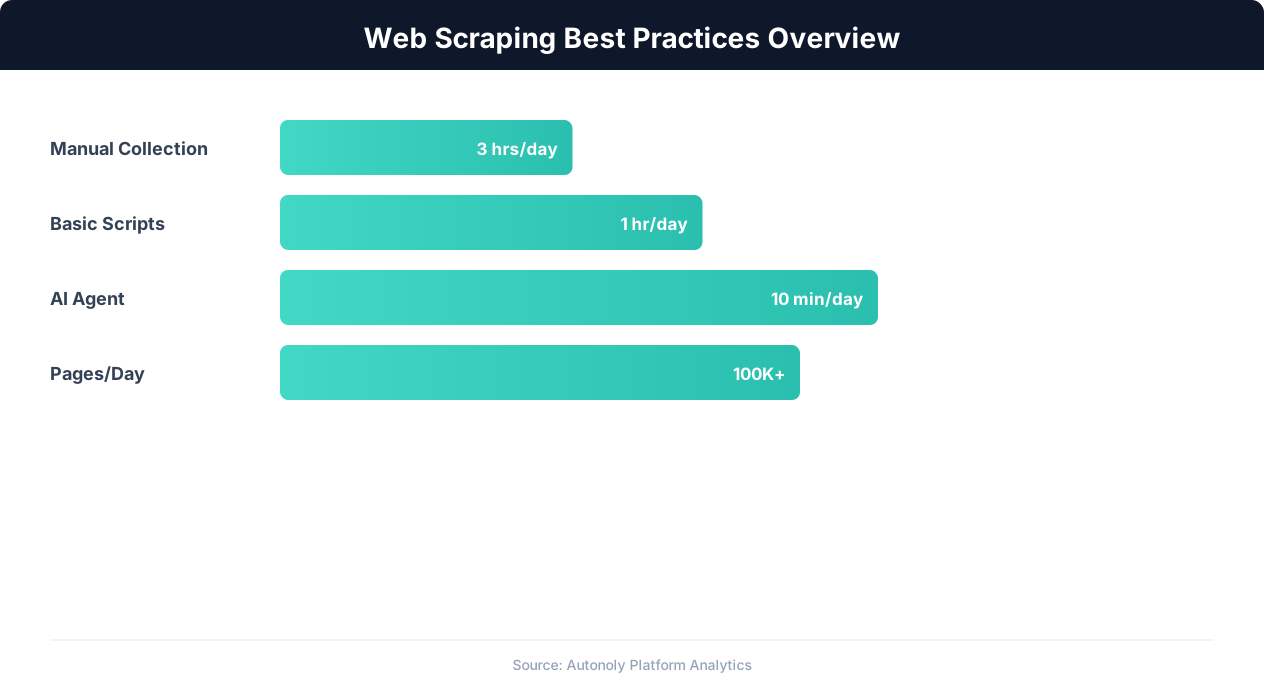
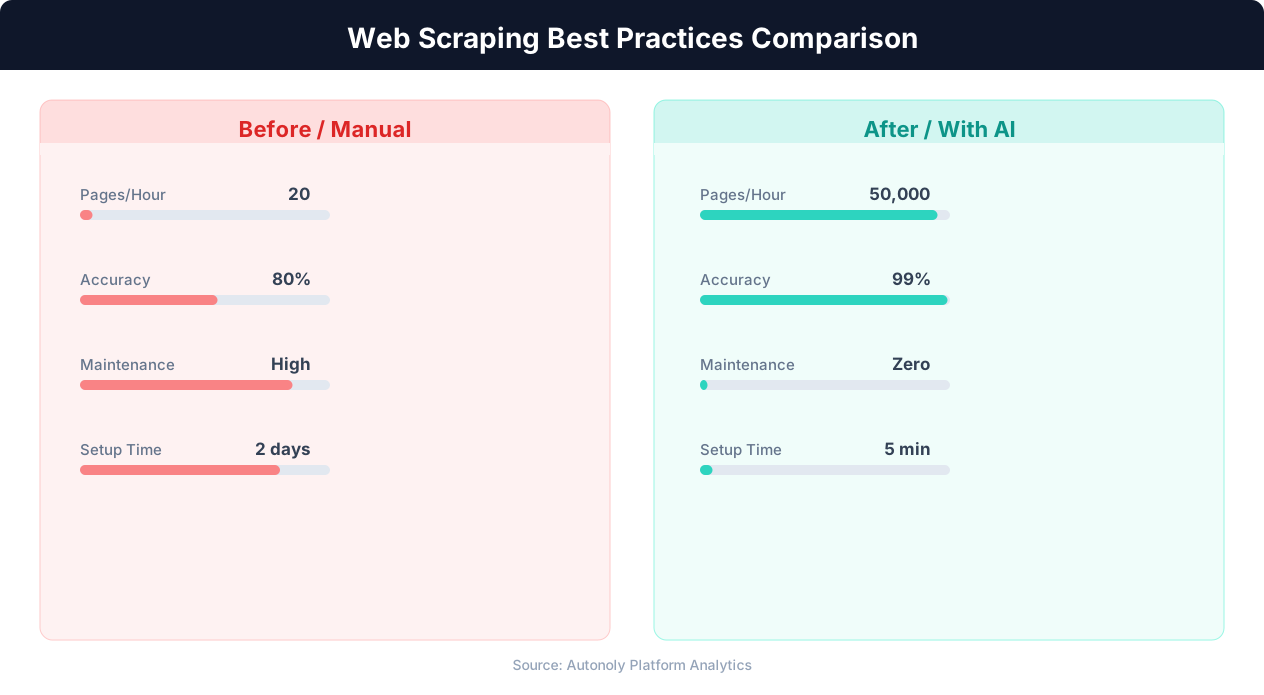
Everything covered in this guide — rate limiting, proxy rotation, fingerprinting, CAPTCHA handling, anti-bot evasion — represents a significant engineering effort. Building and maintaining a production scraping system that handles all these challenges requires ongoing work as detection methods evolve. This is where AI-powered scraping agents represent a fundamental shift in approach.
The Manual Scraping Maintenance Problem
Traditional scrapers are brittle. A well-built scraper works perfectly until something changes: the site updates its HTML structure, switches anti-bot providers, adds a new CAPTCHA, or changes its API format. When this happens, the scraper breaks and requires manual debugging. Teams that rely on scraping at scale spend 40-60% of their engineering time on maintenance rather than building new scrapers.
Common maintenance triggers:
- HTML structure changes (CSS selectors break)
- Anti-bot system updates (Cloudflare deploys new challenge type)
- API endpoint changes (URL, parameters, or response format)
- New CAPTCHA or challenge type appears
- Rate limiting thresholds change
- IP reputation changes (previously clean IPs get flagged)
How Autonoly's AI Agents Approach Scraping
Instead of writing and maintaining custom scraper code, Autonoly's AI agents interact with websites the way a human would — through a real browser. The agent sees the rendered page, understands its structure, and extracts data by interpreting the visual layout rather than relying on hardcoded CSS selectors.
This approach provides several advantages:
Automatic adaptation: When a site changes its layout, the agent adapts automatically. It does not rely on specific div.product-card > span.price selectors that break when the class name changes. Instead, it identifies the price by understanding the page context — just as a human would still find the price even if the font or layout changed.
Built-in anti-detection: Autonoly's anti-detection system manages browser fingerprinting, proxy rotation, and CAPTCHA handling automatically. The agent maintains realistic browsing patterns without you configuring delays, proxies, or stealth scripts.
Intelligent rate limiting: The agent monitors response patterns and automatically adjusts its request rate. If it detects signs of rate limiting (slower responses, 429 errors, CAPTCHA challenges), it backs off and adapts its strategy — switching proxies, increasing delays, or changing its access pattern.
From Code to Instructions
With AI agents, you describe what data you want in natural language rather than writing scraping code. Instead of building a Playwright script to navigate Amazon's product pages, extract prices from specific DOM elements, and handle pagination — you tell the agent: "Collect product names, prices, ratings, and review counts for the top 50 results for 'wireless headphones' on Amazon."
The agent handles the rest: navigating to the site, understanding the page structure, extracting the data, handling pagination, managing anti-bot challenges, and delivering the results in a structured format.
When to Use AI Agents vs. Custom Scrapers
AI agents are ideal for:
- Scraping sites you have not scraped before (no custom development needed)
- Sites that change frequently (agent adapts automatically)
- Heavily protected sites (built-in anti-detection)
- Small-to-medium scale data collection (hundreds to thousands of pages)
Custom scrapers are still better for:
- Very high volume scraping (millions of pages daily)
- Sites with clean, stable APIs (direct API access is faster)
- Real-time price monitoring with sub-minute latency requirements
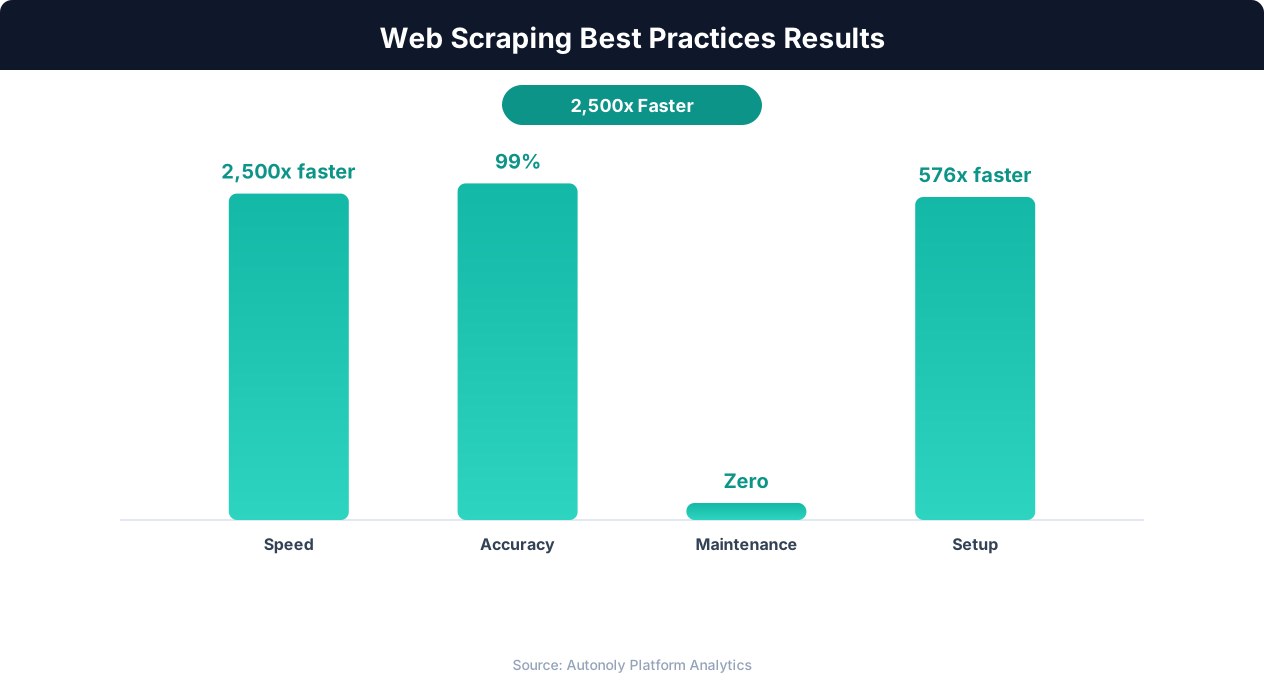
For most scraping use cases, AI agents deliver results faster, require no maintenance, and handle anti-bot challenges that would take weeks to solve manually. Try Autonoly's browser automation to see how AI agents simplify web scraping.