The Reality: Most Business Data Lives in Databases, Most Automation Tools Cannot Touch It
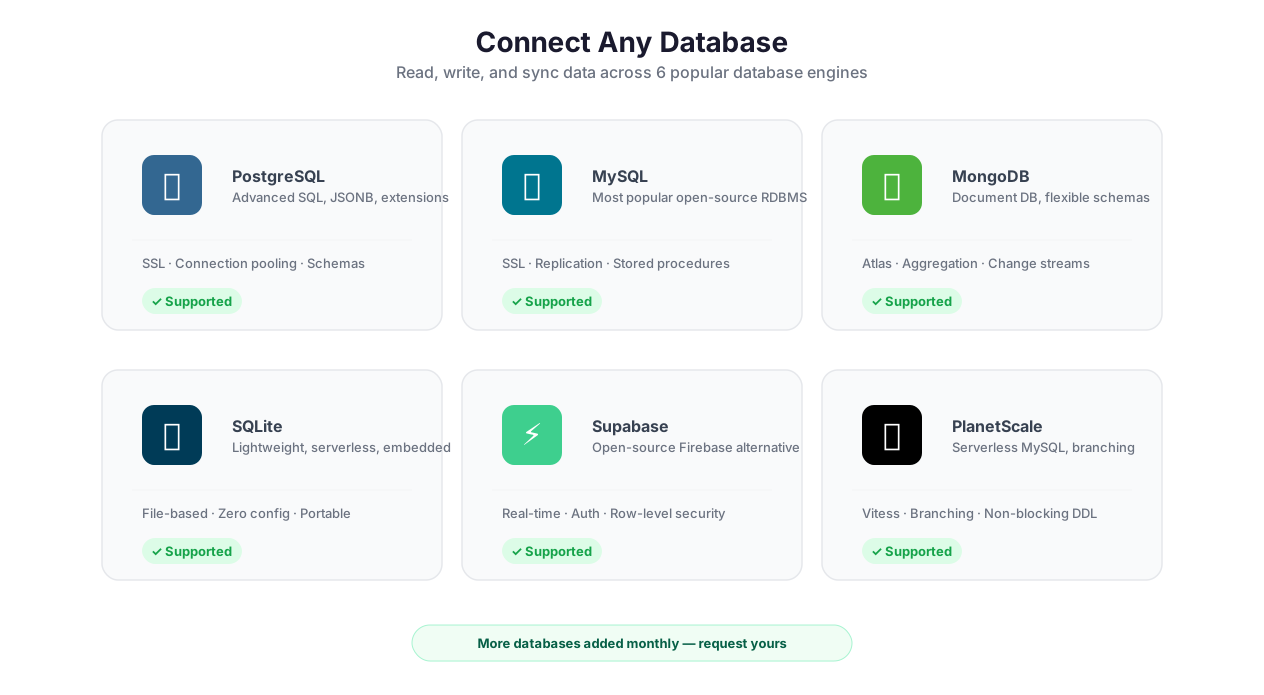
Database operations: CRUD, aggregations, transactions
Here is the gap in the automation market that nobody talks about: Zapier, Make, and most no-code automation tools treat Google Sheets as a database. They can read from Sheets, write to Sheets, and update Sheets. But ask them to run a JOIN across two PostgreSQL tables, or insert 50,000 scraped product records into a MySQL database with upsert logic, or execute a MongoDB aggregation pipeline that groups customer orders by month — and they fall apart.
Google Sheets is not a database. It breaks at 10 million cells. It has no indexes, no transactions, no foreign keys, no concurrent write safety. For prototyping and small datasets, Sheets is fine. For production data pipelines that process thousands of records daily, you need an actual database.
Autonoly's Database feature connects your workflows directly to PostgreSQL, MySQL, MongoDB, SQLite, Supabase, and PlanetScale. Full CRUD operations. Raw SQL and MongoDB query support. Visual query builder for non-developers. Transactions, aggregations, bulk operations, and schema inspection. Your automation can read from and write to real databases — the same databases your applications, dashboards, and data teams already use.
This closes the loop between data collection and data storage. Extract data from websites with Data Extraction, process it with Data Processing, and write it directly to your database — a complete data pipeline running as a single automated ETL workflow. No CSV exports. No manual imports. No Google Sheets bottleneck.
Supported Databases
[PostgreSQL](https://www.postgresql.org) — the industry standard for relational data. Full SQL support including JOINs, CTEs, window functions, JSONB operations, and full-text search. If your data team uses Postgres, your automation should too.
MySQL — the most widely deployed relational database in the world. Compatible with MySQL 5.7+ and MariaDB. If your web application runs on MySQL, your automation can read and write directly to the same database.
[MongoDB](https://www.mongodb.com) — the leading document database. Full support for the aggregation pipeline ($group, $match, $lookup, $unwind), text search, and geospatial queries. Perfect for flexible schemas where records do not all have the same fields.
SQLite — the embedded database for lightweight use cases. No server required. Useful for local data processing, prototyping, and workflows that generate standalone database files.
Supabase — PostgreSQL with an API layer, authentication, and real-time subscriptions. Autonoly connects directly to the underlying Postgres instance, bypassing Supabase's REST API for maximum flexibility and performance.
PlanetScale — MySQL-compatible serverless database with branching workflows. Autonoly connects via standard MySQL protocol, so PlanetScale's horizontal scaling and non-blocking schema changes work transparently.
Connection setup supports both connection strings (paste a URI like postgresql://user:pass@host:5432/dbname) and field-by-field configuration. The system validates the connection before saving — you know immediately if the credentials are wrong, the host is unreachable, or SSL is misconfigured.
CRUD Without SQL: The Visual Query Builder
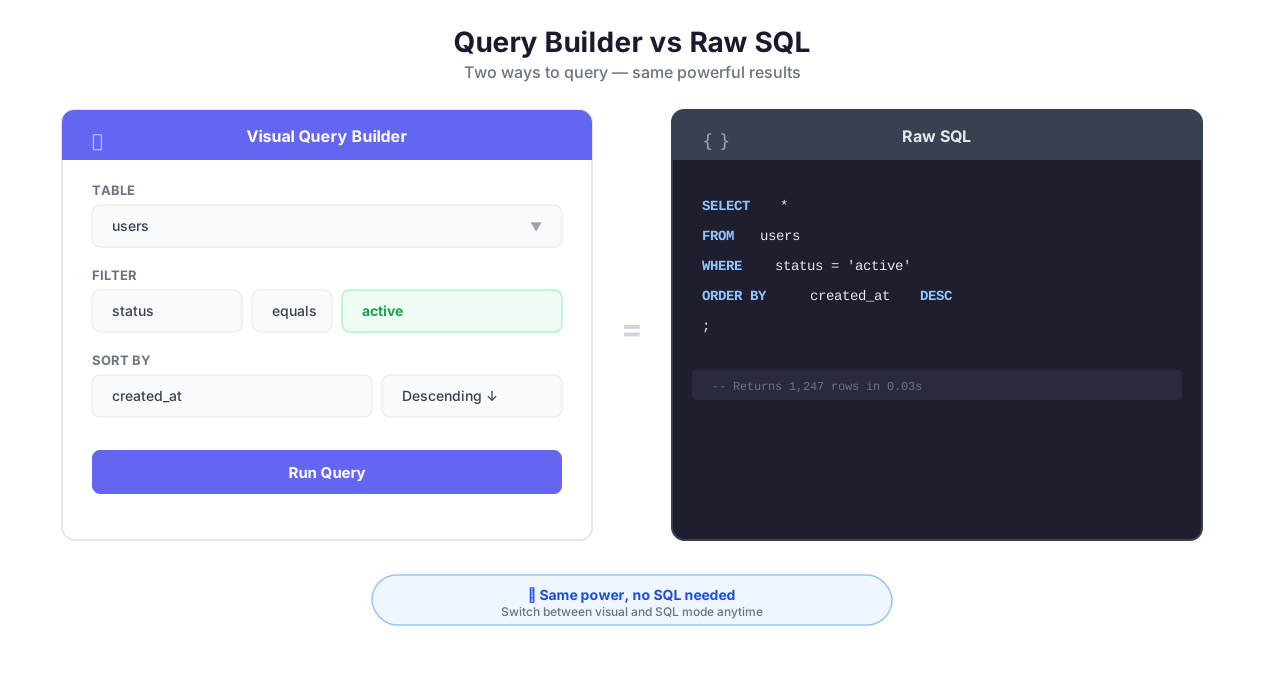
SQL tools vs no-code database access comparison
Not everyone knows SQL, and not every operation requires it. Autonoly's visual query builder lets non-developers perform database operations using a point-and-click interface.
How It Works
- Select your database and table/collection from a dropdown (the schema inspector populates the list)
- Choose the operation — Insert, Read, Update, Delete
- Configure visually — for reads, select columns and add filter conditions with dropdowns. For inserts, map workflow data to columns. For updates, define the WHERE condition and the fields to change.
- Preview results — the query editor shows a live preview of what the query will return (for reads) or affect (for writes)
The visual builder generates the underlying SQL or MongoDB query, which you can view and edit. This is a great learning path — build the query visually, then inspect the generated SQL to understand what it does.
When You SHOULD Use Raw SQL
The visual builder handles simple CRUD well. But databases are powerful precisely because SQL is powerful, and some operations require it:
JOINs across multiple tables — "get all orders with their customer names and product details" requires joining three tables. The visual builder supports simple single-table queries; complex joins need raw SQL.
Aggregations with GROUP BY — "total revenue per customer per month" with GROUP BY, HAVING, and date formatting is a SQL query, not a visual builder operation.
Subqueries — "find customers who have placed more orders than the average" is a subquery pattern.
Window functions — "rank products by revenue within each category" uses ROW_NUMBER() or RANK() with PARTITION BY.
CTEs (Common Table Expressions) — complex multi-step queries that build on intermediate results.
MongoDB aggregation pipelines — multi-stage pipelines with $lookup, $unwind, $group, and $project are too complex for visual building.
The query editor includes syntax highlighting, auto-completion for table and column names, and live result preview. You iterate on the query in the editor, see results immediately, and then commit the final version to your workflow.
Migration Workflows: Old System to New Database
One of the most valuable database automation patterns is data migration. Companies switch CRMs, upgrade ERP systems, or consolidate databases — and the migration process is always manual, error-prone, and dreaded.
Autonoly automates it:
- Extract data from the old system — if it has an API, use API & HTTP. If it only has a web UI, use Browser Automation to navigate, search, and extract records page by page. If it can export CSVs, use Data Processing to parse them.
- Transform the data — field names change between systems. Data types differ. Some fields need splitting (full name -> first name + last name) or merging. Data Processing handles these transformations.
- Insert into the new database — use bulk insert for large datasets (up to 100,000 records per operation with automatic chunking). Use upserts if the migration is incremental (running daily until the cutover is complete).
- Validate — query the new database to verify record counts, spot-check specific records, and compare totals with the old system.
This pattern works for migrating from one SaaS tool to another (HubSpot to Salesforce), from spreadsheets to databases (Google Sheets to PostgreSQL), or from legacy systems to modern infrastructure.
Sync Patterns: One-Way, Two-Way, and Event-Driven
Data synchronization between systems is one of the most common (and most botched) automation patterns. Understanding the tradeoffs prevents data corruption.
One-Way Sync (Source -> Destination)
The simplest pattern. Data flows in one direction. The source is authoritative; the destination is a copy. Example: scrape product prices daily and insert into PostgreSQL. The database reflects the website; the website does not care about the database.
When to use: reporting, analytics, data warehousing, archiving. Any case where you are collecting data for analysis without needing to write back.
The gotcha: if someone manually edits a record in the destination database, the next sync overwrites their change. Use upserts with a "last_scraped" timestamp so you can detect and handle this.
Two-Way Sync (Bidirectional)
Both systems are authoritative. Changes in either system propagate to the other. Example: keep a PostgreSQL database and a Google Sheet in sync — sales reps update the Sheet, automations update the database, and changes flow both ways.
When to use: collaborative workflows where multiple teams use different tools to work on the same data.
The gotcha: conflict resolution. If someone updates a record in the database and someone else updates the same record in the Sheet between sync cycles, which change wins? You must define a conflict strategy: last-write-wins (based on timestamp), source-priority (one system always wins), or merge (combine non-conflicting field changes). Two-way sync without a conflict strategy is a recipe for data loss.
Event-Driven Sync
Changes trigger syncs immediately via webhooks. Instead of running a sync every 15 minutes and checking for changes, the source system notifies Autonoly the instant a change occurs, and the workflow updates the destination immediately.
When to use: real-time requirements. Inventory updates that need to reflect within seconds. Order status changes that trigger customer notifications. Any case where a 15-minute polling delay is unacceptable.
The gotcha: event-driven sync adds complexity — you need idempotent handlers (processing the same event twice should not corrupt data), ordering guarantees (events can arrive out of order), and dead-letter handling (what happens when the sync fails).
Advanced Operations
Transactions: The Feature That Prevents Data Corruption
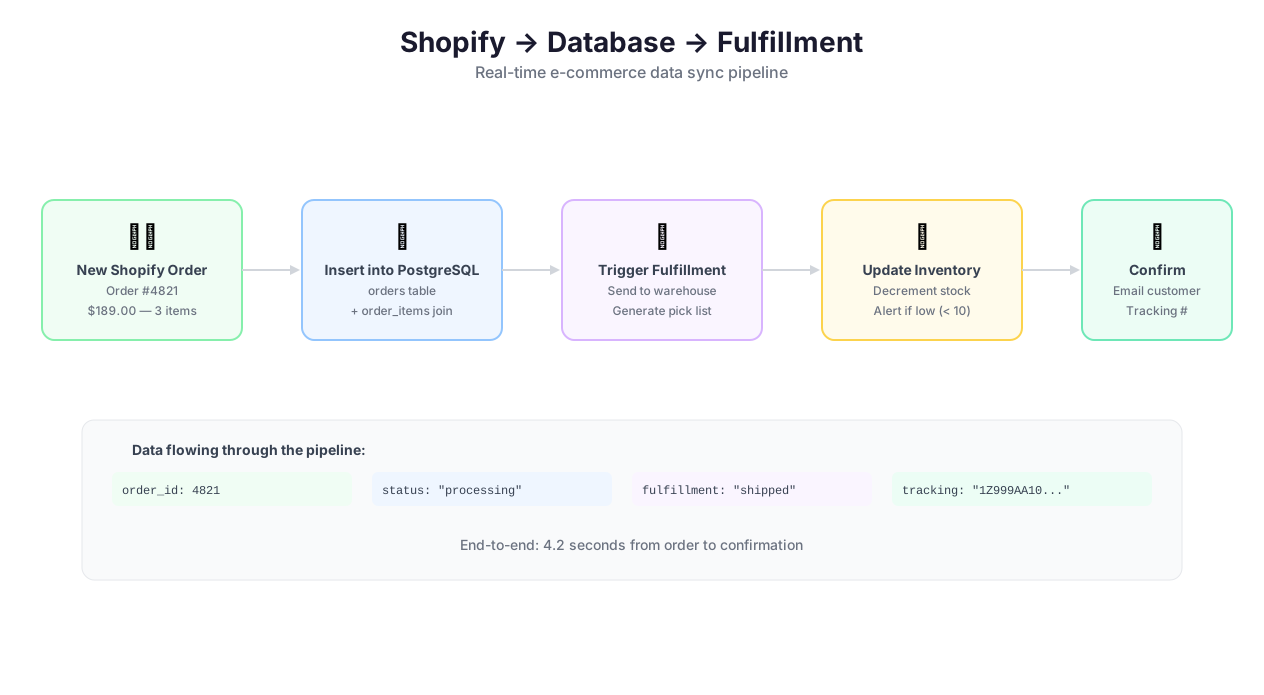
Connect, query, and sync database workflow
Wrap multiple operations in a transaction to ensure atomicity. If your workflow inserts an order into the orders table, decrements inventory in the products table, and creates a record in the order_items table — and the inventory decrement fails — the transaction rolls back the order insert too. Without transactions, you would have an order with no inventory adjustment: a data integrity bug that is hard to find and harder to fix.
Transactions are essential for financial data, inventory management, e-commerce order processing, and any workflow where partial updates would cause problems.
Bulk Operations: Inserting 50,000 Records Without Breaking Things
Insert, update, or delete thousands of records efficiently:
Batch insert — insert up to 100,000 records per operation with automatic chunking (Autonoly splits large inserts into batches of 1,000-5,000 to avoid timeout and memory issues)
Bulk update — update multiple records with different values in a single operation
Upsert — insert if new, update if existing, based on a unique key. This is the single most useful database operation for automation — define the key (product URL, email address, SKU) and the database handles conflict resolution
Schema Inspection
Before writing queries, browse your database schema directly within Autonoly. The schema inspector shows tables, columns, data types, indexes, and relationships for SQL databases, and collections, sample documents, and field frequencies for MongoDB. This eliminates switching to DBeaver, pgAdmin, or Compass while building workflows.
Best Practices
Use upserts for everything that touches external data. When your workflow scrapes product prices, enriches lead records, or syncs data from another system, the data may or may not already exist in the database. Upserts (INSERT ... ON CONFLICT UPDATE in PostgreSQL, INSERT ... ON DUPLICATE KEY UPDATE in MySQL, $merge or updateOne with upsert:true in MongoDB) handle both cases in a single operation. Querying first, then deciding whether to insert or update, is slower, more complex, and creates race conditions under concurrent execution.
Index the columns your workflows query. If your workflow looks up a lead by email before enriching it, the email column must be indexed. Without an index, the database scans every row — fine for 1,000 records, catastrophic for 1,000,000. The schema inspector shows existing indexes and can suggest new ones based on your query patterns. At minimum, index every column used in WHERE clauses, JOIN conditions, and unique constraints.
Use transactions for multi-table writes, always. Writing to multiple tables without a transaction is playing Russian roulette with data integrity. If step 3 of 4 fails, steps 1 and 2 are already committed — your data is now in an inconsistent state. Transactions ensure all-or-nothing. The performance cost is negligible; the data integrity benefit is enormous.
Paginate large query results. Pulling 100,000 rows in a single query consumes memory, slows execution, and can cause timeouts. Use LIMIT/OFFSET (SQL) or skip/limit (MongoDB) to process data in batches of 1,000-5,000. This keeps memory usage predictable and execution times consistent. For very large datasets, use cursor-based pagination (WHERE id > last_id ORDER BY id LIMIT 1000) instead of OFFSET, which gets slower as the offset increases. Learn about building robust data pipelines in our web scraping best practices guide.
Test queries with live preview before deploying to production. The query editor's preview mode runs your query against the actual database and shows sample results. Use this to verify correctness before committing the query to a production workflow. A malformed WHERE clause in an UPDATE query can modify every row in the table — preview mode catches this before it happens.
Never store database credentials outside the vault. Do not paste connection strings into workflow node configurations, Python scripts, or note files. Use the credential vault exclusively. Credentials in the vault are encrypted with AES-256, decrypted only at runtime, and never logged. Credentials hardcoded anywhere else end up in execution logs, team-shared workflows, and eventually in screenshots posted to Slack.
Security & Compliance
Database connections are the highest-sensitivity credentials in most organizations. A leaked database connection string provides direct access to customer data, financial records, and business intelligence.
Autonoly stores all database credentials using AES-256 encryption in the credential vault. Credentials are decrypted only at the moment of connection and are never written to logs, workflow definitions, or API responses. All connections are encrypted in transit using SSL/TLS. For databases requiring client certificate authentication, Autonoly stores client certificates in the vault alongside connection credentials.
Autonoly provides static IP addresses that you can whitelist in your database's firewall rules. This means only Autonoly's infrastructure can connect — no one else on the internet can reach your database through these credentials. For databases behind private networks (VPCs, VPNs), use the SSH Terminal feature to create a secure tunnel.
Database connections can be restricted by workspace role. An admin can configure which team members can create connections, which can run read queries, and which can execute writes. Every database operation is logged in the audit trail: user, query, rows affected, timestamp. These logs are available in the security dashboard and can be exported for SOC 2, PCI DSS, and HIPAA compliance reviews. Our comparison of automation platforms highlights how Autonoly's database security compares to alternatives.
Common Use Cases
Web Scraping Data Warehouse
A market research team scrapes product data from 40+ e-commerce sites daily using Data Extraction and Browser Automation. Each scrape run writes 10,000+ product records — names, prices, descriptions, availability, ratings, review counts — into a PostgreSQL database via upsert operations. The unique key is the product URL, so existing records are updated with fresh prices and new products are inserted automatically. A price_history table stores every price point with a timestamp, building a comprehensive price trend dataset over weeks and months. The data team runs SQL queries against this warehouse to power dashboards, identify pricing patterns, and generate competitive intelligence reports. This pattern is detailed in our e-commerce price monitoring guide.
Real Example: Shopify Order to PostgreSQL Pipeline
Every new Shopify order triggers a webhook that starts a multi-step database workflow:
- Insert the order into the
orderstable — order ID, customer ID, total amount, status, created_at - Insert line items into the
order_itemstable — product ID, quantity, unit price, discount applied - Update inventory in the
productstable — decrementstock_countby the ordered quantity - Check reorder threshold — query
SELECT * FROM products WHERE stock_count < reorder_threshold - Trigger alerts — if any products are below threshold, send a procurement alert via Slack and an email to the supplier via Email Campaigns
Steps 1-3 run inside a transaction. If the inventory update fails (e.g., the product was deleted between order and fulfillment), the order insert is rolled back — no orphan orders in the database. The entire pipeline runs in under 2 seconds per order.
CRM Enrichment Pipeline
A sales team maintains a MongoDB database of 50,000 prospects. When new leads enter from Webhooks (form submissions, trade show scans, purchased lists), a workflow triggers automatically. It reads the new lead, visits the company website with Browser Automation, extracts company size, industry, funding stage, tech stack, and recent news with Data Extraction, and writes the enriched fields back to the lead document. The entire enrichment runs in under a minute. By the time a sales rep opens the record, the context is already there — no manual research required.
Lead Deduplication and Cleanup
Over time, databases accumulate duplicates from multiple data sources — the same person entered from a webinar signup, a content download, and a sales outreach list. A weekly Scheduled Execution workflow reads all lead records, runs them through Data Processing for deduplication based on email address normalization (lowercase, trim whitespace, handle gmail dot-aliasing) and company name fuzzy matching. Duplicate groups are merged, preserving the most complete data from each record (the one with a phone number keeps it, the one with a LinkedIn URL keeps it). Merged results are written back in a single transaction. Before the cleanup runs, a backup query exports the current dataset — a safety net in case the merge logic needs adjustment.
Check pricing for database connection limits and query volume per plan.