
Why Data Cleaning Matters
Data quality is the foundation of every analytical decision. When spreadsheets contain duplicate records, inconsistent formatting, and missing values, any analysis built on that data is unreliable. Studies show that data professionals spend up to 80% of their time cleaning data, leaving only 20% for actual analysis. Automating the cleaning process flips this ratio, letting you focus on insights rather than janitorial work.
The problem compounds in organizations where data comes from multiple sources. CRM exports have one date format, accounting systems use another, and manual entry introduces typos and inconsistencies. Merging these sources without cleaning first creates a mess that grows worse over time. Autonoly's Data Processing feature handles all of these issues systematically.
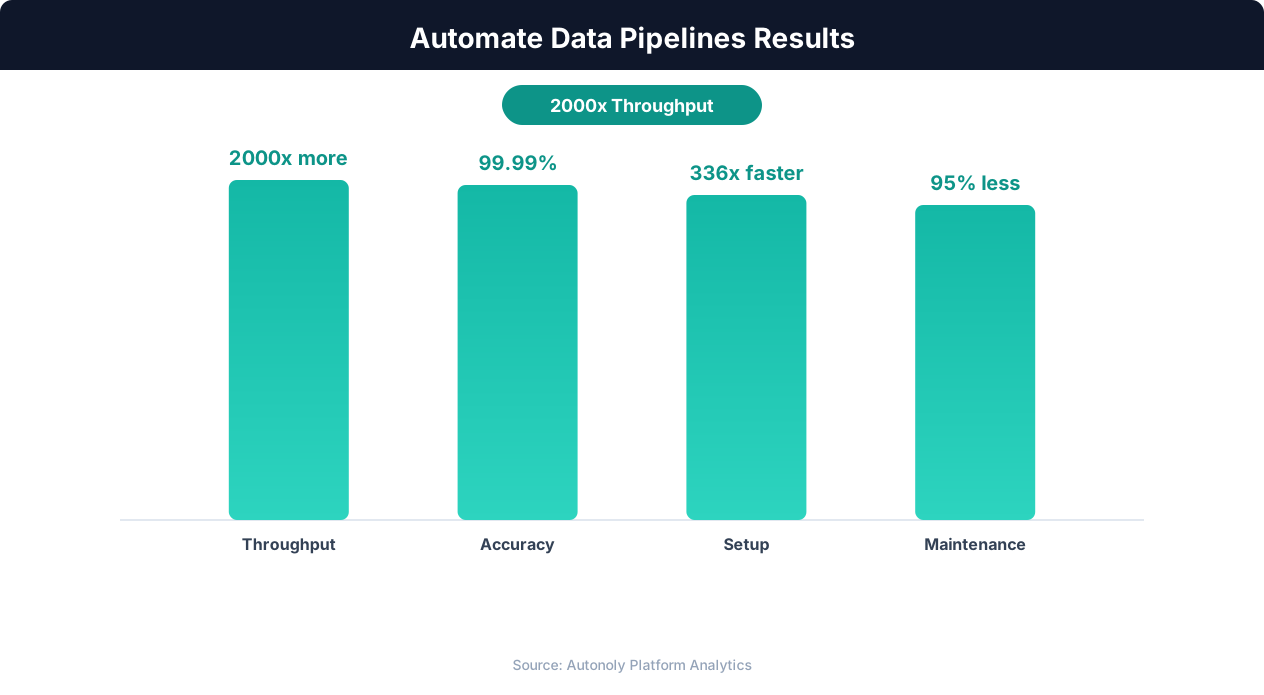
Data processing throughput with automated pipelines
Key Insight: Organizations with automated data pipelines deliver analytical insights 5x faster than those relying on manual data integration (Deloitte Analytics Trends).
How Autonoly Cleans Excel Data
The AI Agent Chat lets you describe your data problems naturally. You might say "clean this spreadsheet — remove duplicates based on email address, standardize the phone numbers, and fix the inconsistent date formats." The agent analyzes your data, builds the appropriate cleaning pipeline, and executes it.
Intelligent Duplicate Detection
Simple exact-match deduplication misses most real-world duplicates. "John Smith" and "john smith" are the same person. "123 Main St" and "123 Main Street" are the same address. Autonoly uses fuzzy matching algorithms that detect near-duplicates based on configurable similarity thresholds. You choose the matching columns, the similarity threshold, and which version to keep (first, last, or the most complete record).
The SSH & Terminal feature powers the fuzzy matching engine, running Python-based deduplication algorithms like Levenshtein distance, Jaro-Winkler similarity, and phonetic matching in a secure container. This is far more sophisticated than basic spreadsheet-level deduplication.
Format Standardization
The agent identifies and fixes common format inconsistencies automatically. Date formats are standardized to your preferred format, with the unambiguous ISO 8601 layout a popular default for downstream systems. Phone numbers are parsed and reformatted consistently. Email addresses are lowercased and trimmed. Currency values are normalized (removing stray symbols and spaces). Company names are standardized (handling variations like "Inc.", "Inc", "Incorporated").
For domain-specific standardization, you can provide rules or let the AI infer patterns from your data. The Data Extraction capabilities can even enrich your data by looking up standardized values from the web — for example, verifying company names against official registries.
Missing Value Handling
Missing data requires strategy, not just deletion. Autonoly supports multiple approaches — flagging missing values for manual review, imputing based on column statistics (mean, median, mode), using related columns to infer values, or removing rows that are missing critical fields. The Logic & Flow feature lets you apply different strategies to different columns based on their importance and data type.
Cleaning Report
Every cleaning job produces a detailed report showing the total number of duplicates removed and the matching criteria used, format changes applied with before-and-after examples, missing values found and how each was handled, outliers detected and whether they were kept or removed, and a summary of overall data quality improvement.
This report is essential for data governance and audit trails. You know exactly what changed and why, making the cleaning process transparent and reproducible.
Building Reusable Cleaning Workflows
The Visual Workflow Builder lets you save cleaning workflows as reusable templates. If you receive the same type of messy spreadsheet regularly — monthly sales reports, quarterly survey data, weekly CRM exports — you can run the same cleaning pipeline each time with one click. The Browser Automation feature can even download the source file automatically before cleaning begins.
Visit the templates library for pre-built data cleaning workflows, and check the pricing page for plan details. For more on data processing, see the workflow automation glossary, and learn about connected data systems in the API integration glossary. The Google Sheets integration lets you load cleaned data directly into collaborative spreadsheets, and the Integrations ecosystem connects to your full data stack. See the web scraping glossary for how Autonoly collects data that then flows into cleaning pipelines.
Key Insight: Pipeline failures cost enterprises an average of $15 million per year in lost productivity and delayed decisions. Automated monitoring cuts this by 73% (Gartner).
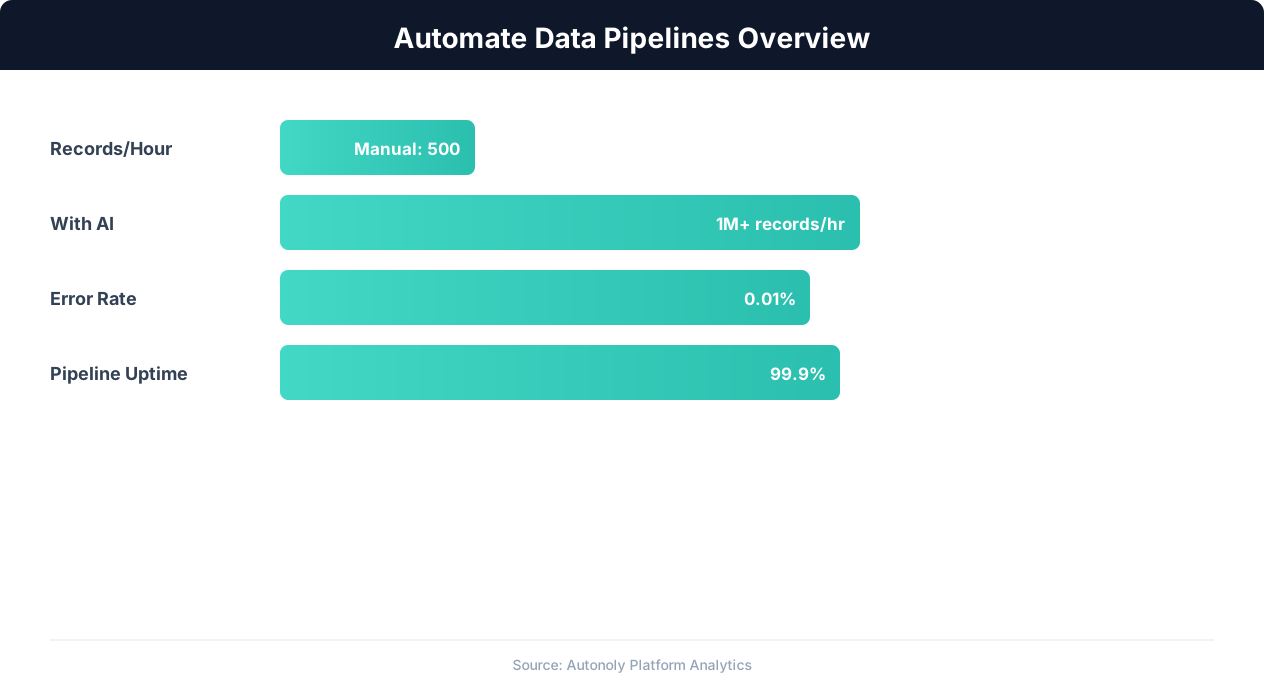
Data pipeline automation efficiency gains over time
Key Insight: Data teams spend 80% of their time on data preparation and pipeline maintenance. Automation can reclaim up to 60% of that time (Anaconda State of Data Science).
Scheduling and Automation
Data cleaning is most effective when it runs automatically on a recurring schedule. If your organization receives weekly CRM exports, monthly survey data, or daily sales reports, you can configure Autonoly to clean each file as soon as it arrives. The Visual Workflow Builder lets you chain a file download step with the cleaning pipeline and a delivery step — downloading from an email attachment, cleaning the data, and loading the result into Google Sheets or saving it as a new Excel file. Scheduling ensures that your team always works with clean data without anyone remembering to run the cleaning process manually.
Handling Large Datasets
For spreadsheets with tens of thousands of rows, the SSH & Terminal container provides the computational power needed for efficient fuzzy matching and deduplication. The agent processes data in chunks to stay within memory limits and produces the same high-quality results regardless of dataset size. You can configure memory and timeout thresholds in the Visual Workflow Builder to match your data volume.
Connecting to Downstream Pipelines
Cleaned data rarely exists in isolation. Use Logic & Flow to route cleaned output into downstream workflows — feeding it into ML pipelines, loading it into reporting dashboards, or syncing it with your CRM. The Integrations ecosystem supports pushing cleaned data to Airtable, Notion, Slack, or any API endpoint, making data cleaning a seamless first step in your broader data infrastructure.
Further Reading
Explore more about the tools and techniques used in this workflow: Automate Data Entry, No Code Automation Guide, Ai Content.