The Lead Generation Problem: Why Manual Prospecting Fails to Scale
Every B2B sales team faces the same fundamental challenge: the pipeline needs a steady flow of qualified prospects, but filling that pipeline through manual research is painfully slow. A sales development representative (SDR) manually researching prospects spends their day in an exhausting cycle: search LinkedIn for people matching the ideal customer profile, open profiles one by one, copy names and titles into a spreadsheet, find email addresses through guesswork or paid lookup tools, research their company to personalize outreach, and draft individual messages. On a productive day, a skilled SDR might identify and reach out to 30-50 new prospects. On a realistic day with meetings, administrative work, and context-switching, 15-25 is more common. Understanding what automation is and how marketing automation accelerates the top of the funnel is what separates teams that scale from those that stall.
The math reveals the scaling problem. If your sales team needs 200 qualified opportunities per quarter to hit revenue targets, and your conversion rate from outreach to opportunity is 5% (a strong rate for cold outreach), you need 4,000 personalized outreach touches per quarter, roughly 300 per week. With each SDR producing 15-25 per day, you need 3-4 full-time SDRs just for prospecting, before a single discovery call or demo is conducted. At fully loaded SDR salaries of $65,000-$85,000 per year, that is a quarter million dollars annually in prospecting labor alone.
Manual prospecting also suffers from quality inconsistency. The first 10 prospects of the day get thorough research and thoughtful personalization. The last 10 get a quick glance and a templated message. Research quality degrades as fatigue accumulates, but the leads at the end of the day are just as potentially valuable as the ones at the beginning. The inconsistency affects conversion rates: well-researched, personalized outreach converts at 2-3x the rate of generic messages, meaning that time-pressured cutting of corners directly costs revenue.
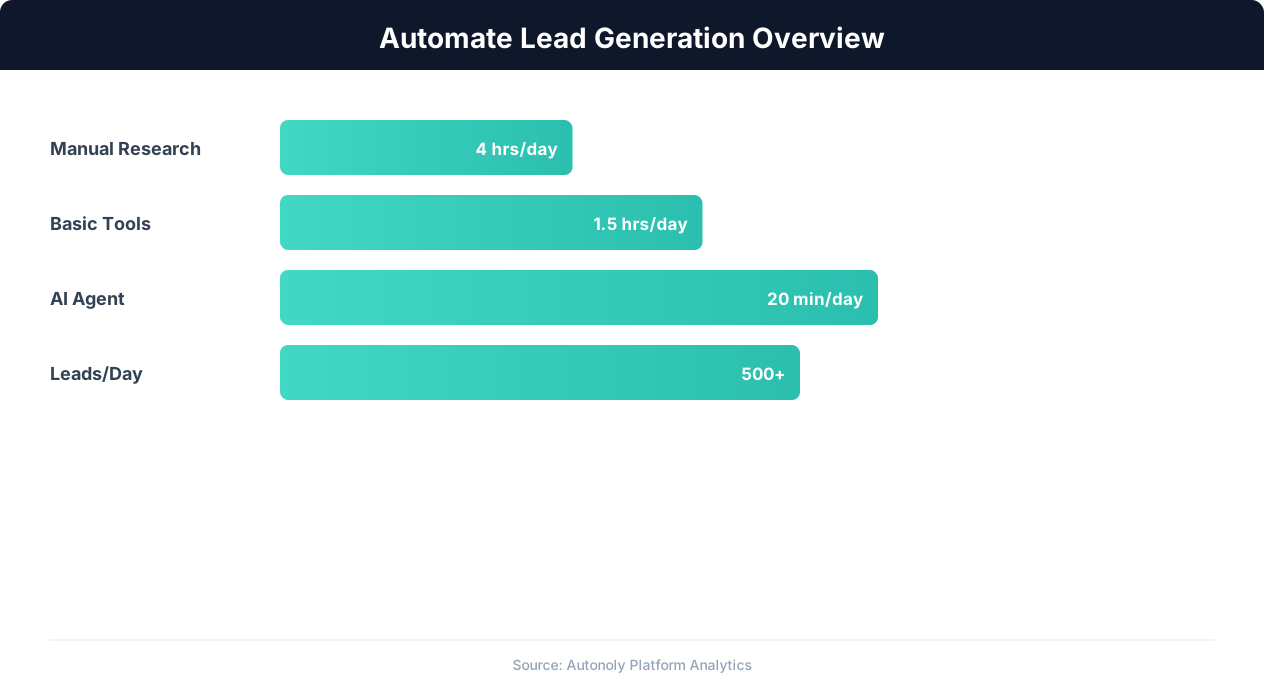
Data decay compounds the problem. B2B contact data degrades at roughly 30% per year as people change jobs, companies rebrand, and email addresses become invalid. A prospect list that is accurate today will have 100 bounced emails and wrong titles three months from now. Manual processes rarely include systematic data freshness checks, so sales teams gradually lose confidence in their prospect databases and start over-investing in re-research.
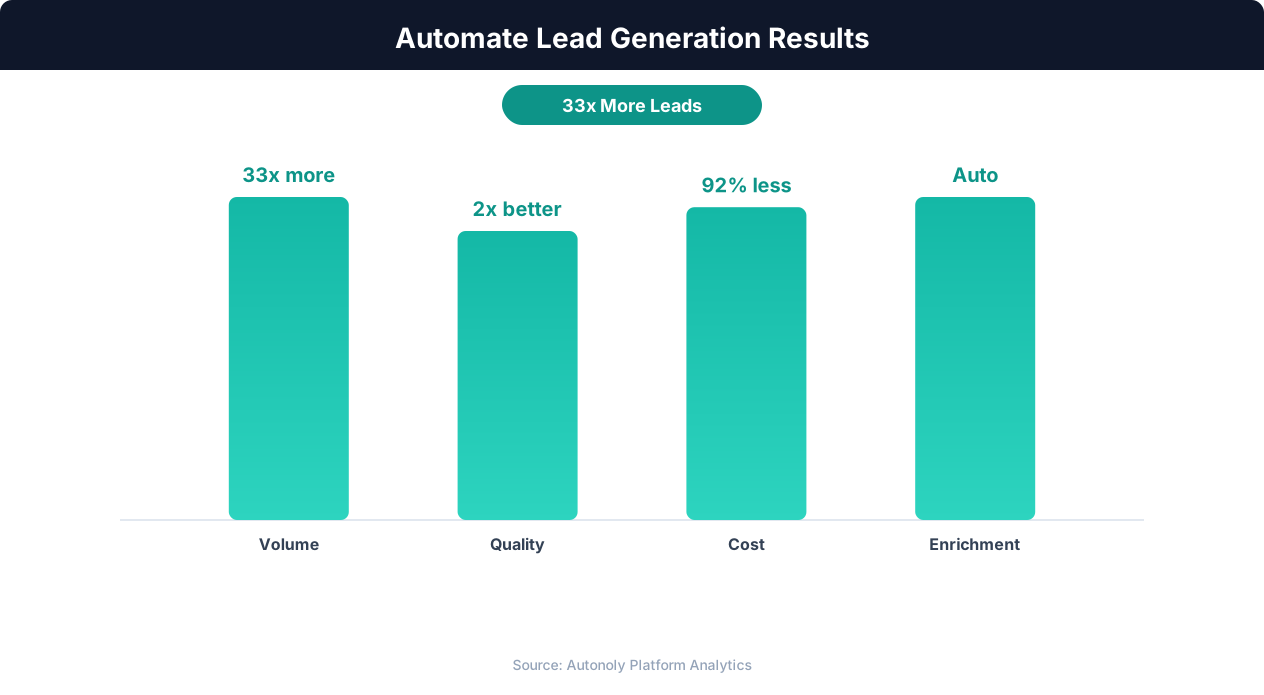
Automated lead generation addresses all of these constraints simultaneously. It scales prospecting volume from dozens to hundreds or thousands per day without additional headcount. It applies consistent research depth to every prospect regardless of position in the queue. It refreshes data automatically on a schedule, maintaining database accuracy. And it frees SDRs to focus on the human elements that actually close deals: building relationships, conducting discovery calls, and crafting compelling narratives, the work that no automation can replace.
Anatomy of an Automated Lead Generation Pipeline
An automated lead generation pipeline has four stages: identification, enrichment, scoring, and outreach. Each stage transforms raw signals into actionable sales intelligence. Understanding the architecture helps you build a pipeline that produces genuinely qualified, reachable prospects rather than a noisy list of names.
Stage 1: Identification (Finding Prospects)
The identification stage answers the question: who might be a good fit for our product or service? This stage uses web scraping and data extraction to build a raw prospect list from multiple sources. Common identification sources include LinkedIn search results (people matching title, industry, company size, and location criteria), company directories and industry association member lists, conference attendee and speaker lists, job posting data (companies hiring for roles your product supports indicate active need), technology usage databases (companies using complementary or competitive tools), and news sources (companies that recently raised funding, expanded, or announced relevant initiatives).
Each source provides different signals. LinkedIn provides professional profile data. Company directories provide firmographic data. Job postings signal active pain points. Technology databases reveal tech stack compatibility. News signals indicate timing and budget. The most effective identification strategies combine multiple sources to build a multi-dimensional prospect profile rather than relying on a single source.
Stage 2: Enrichment (Completing the Picture)
Raw identification data is typically sparse: a name, a title, a company. Enrichment adds the context needed for effective outreach and accurate scoring. Automated enrichment workflows take each identified prospect and layer on additional data: verified business email address, direct phone number, company revenue and employee count, technology stack, recent company news and announcements, social media profiles and activity, mutual connections or shared interests, and any previous interactions with your company (website visits, content downloads, event attendance).
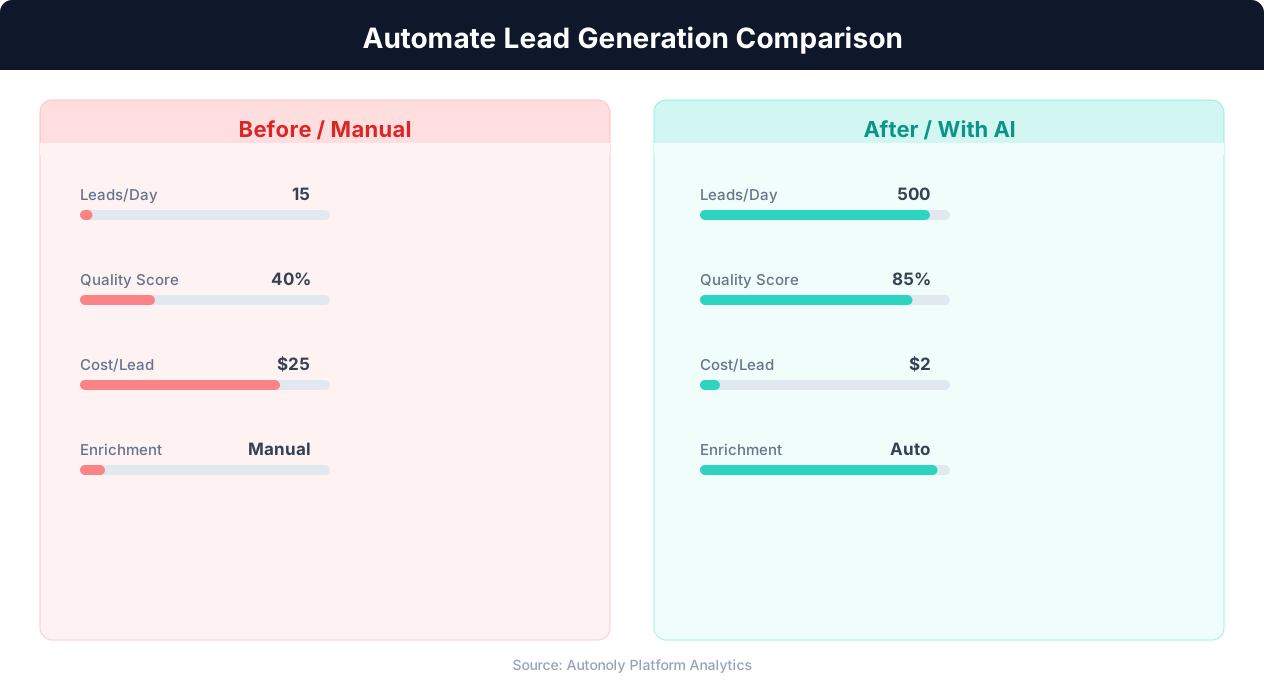
Enrichment data comes from a combination of web scraping (company websites, LinkedIn profiles, news sites), third-party data APIs (Clearbit, ZoomInfo, Hunter.io for email verification), and your own internal data (CRM records, marketing automation engagement data). The automation orchestrates these lookups in parallel, enriching a batch of 100 prospects in the time it would take a human to research 3-4.
Stage 3: Scoring (Prioritizing Effort)
Not every prospect deserves the same level of attention. Scoring assigns a numeric priority to each prospect based on how closely they match your ideal customer profile (ICP) and how strong the buying signals are. ICP fit scoring evaluates firmographic match (right industry, right company size, right geography), demographic match (right title, right seniority, right department), and technographic match (uses complementary technology, does not use a competitor). Signal scoring evaluates timing indicators: recent funding, active job postings, technology evaluation signals, content engagement with your brand, and intent data from third-party providers.
The scoring model outputs a ranked list where the highest-scoring prospects represent the best combination of fit and timing. SDRs work the list from the top, ensuring their limited outreach capacity is always allocated to the highest-potential prospects.
Stage 4: Outreach (Making Contact)
The outreach stage converts prospect data into personalized contact sequences. Automation handles message generation (populating templates with prospect-specific data points), multi-channel sequencing (email, LinkedIn, phone in a coordinated cadence), timing optimization (sending at times most likely to get a response based on the prospect's time zone and platform activity), and follow-up management (automated follow-ups for non-responses, pause on engagement). The human SDR reviews and sends the first outreach for high-priority prospects and monitors responses across all prospects.
Scraping Prospect Data: Sources, Techniques, and Best Practices
The quality of your lead generation pipeline depends entirely on the quality of the data you extract. Scraping prospect data from the web requires thoughtful source selection, robust extraction techniques, and careful attention to data quality.
LinkedIn: The Primary B2B Prospecting Source
LinkedIn remains the most valuable source for B2B prospect identification. With over 900 million members and detailed professional profiles, it provides unmatched coverage of the business world. Our deep dive on how to scrape LinkedIn data covers the extraction techniques in more detail. Automated LinkedIn prospecting typically involves searching with specific filters (title keywords, industry, company size, location), extracting visible profile data from search results, and optionally visiting individual profiles for deeper data extraction.
Effective LinkedIn extraction captures: full name, current job title, current company, location, profile URL, headline text (which often contains keywords indicating specialty or interest), and connection degree (1st, 2nd, 3rd). For deeper extraction, profile visits add: full work history, education, skills and endorsements, activity (posts, comments, shares), and recommendations. The depth of extraction should match your needs. For high-volume outreach with basic personalization, search result data is sufficient. For targeted, highly personalized outreach to strategic accounts, deeper profile data justifies the slower extraction speed. A ready-made workflow to extract LinkedIn leads to a spreadsheet handles this entire search-and-capture step on autopilot.
Company Websites and Directories
Company team pages, about pages, and leadership directories provide prospect data that LinkedIn may not capture, particularly for senior executives and founders who maintain minimal LinkedIn profiles. Industry association directories (like state bar associations for legal, medical board directories for healthcare, or chamber of commerce membership lists) provide targeted prospect lists for industry-specific sales. Trade publication contributor lists identify thought leaders and decision-makers who are publicly active in their field.
Extracting data from these varied sources requires flexible automation that can adapt to different page layouts. An AI-powered browser automation tool like Autonoly handles this variation better than traditional scrapers because it interprets page content semantically rather than depending on specific HTML structure. A team page with cards showing name, title, and photo is extracted the same way whether it uses a grid layout, a list layout, or an accordion layout.
Job Posting Data as Intent Signals
Companies actively hiring for roles related to your product or service are signaling a relevant need. A company posting a "Head of Data Engineering" role probably needs data infrastructure tools. A company hiring multiple SDRs is scaling their sales function and may need sales tools. Automated extraction of job postings from Indeed, LinkedIn Jobs, and Glassdoor provides a continuously refreshing stream of intent signals.
The extraction workflow captures: hiring company name, job title, posting date, location, and key requirements. The automation then identifies which of these companies match your ICP and enriches them with contact data for the decision-makers most likely to be involved in purchasing decisions related to the hiring signal.
Data Quality Best Practices
Raw scraped data is inherently messy. Names may include prefixes or suffixes that need stripping. Titles vary wildly across companies ("VP Engineering" vs. "Vice President of Engineering" vs. "VP, Eng"). Company names appear in different forms ("Google" vs. "Google LLC" vs. "Alphabet Inc."). Location formats are inconsistent. Building data normalization into your extraction pipeline ensures consistent, usable data downstream.
Validate email addresses before adding them to outreach sequences. Email verification APIs check whether an address exists, is deliverable, and is not a known spam trap. Sending to unverified addresses damages your sender reputation and reduces deliverability for all your outreach. The small cost of email verification ($0.01-0.03 per address) prevents the much larger cost of damaged deliverability.
Deduplicate across sources. A prospect found on LinkedIn, on a company team page, and in an industry directory should appear once in your pipeline with the richest combined data, not three times with three separate outreach sequences. Match on email address (most reliable), then on name plus company (fuzzy matching to handle variations).
Lead Enrichment Strategies: Building Complete Prospect Profiles
Enrichment transforms a name and company into a complete prospect profile that enables relevant, personalized outreach. The difference between a prospect record with just a name and title versus one with verified email, company size, technology stack, recent news, and social activity is the difference between a shot in the dark and an informed conversation opener.
Contact Information Enrichment
The most critical enrichment is obtaining verified contact channels. Business email address is the primary outreach channel for most B2B sales. Automated email finding combines multiple strategies: pattern-based generation (most companies use [email protected] or similar patterns), email verification API checks against the generated possibilities, cross-referencing with public sources (GitHub profiles, conference speaker bios, personal websites often include email addresses), and third-party data provider lookups.
Phone numbers are valuable for multi-channel outreach but harder to obtain. Company switchboard numbers are publicly available on websites but route through gatekeepers. Direct dial numbers come from third-party data providers or occasionally from public profiles and directories. Mobile numbers are the most effective for reaching prospects but the hardest to find ethically and the most sensitive from a privacy perspective.
LinkedIn profile URLs are essential for LinkedIn-based outreach. Most enrichment workflows already have this from the identification stage, but for prospects identified through non-LinkedIn sources, a LinkedIn search matching name and company can locate the correct profile.
Firmographic Enrichment
Company-level data provides critical context for scoring and personalization. Automated enrichment extracts from company websites and data sources: company size (employee count), revenue range (from public filings, funding data, or estimated ranges), industry classification, headquarters location and office locations, founding year, and company description. This data feeds into ICP scoring (is this company the right size, industry, and stage for our product?) and personalization ("I noticed [Company] recently expanded to 200 employees, which is typically when teams start looking for solutions like ours").
Technographic Enrichment
Knowing what technology a prospect's company uses enables highly relevant outreach and qualification. If you sell a CRM, knowing that a prospect uses Salesforce versus HubSpot versus no CRM at all changes your messaging entirely. Automated technographic enrichment inspects company websites for technology signatures: JavaScript libraries, analytics tools, marketing automation pixels, chat widgets, and infrastructure providers leave detectable traces in page source code and HTTP headers.
Third-party technographic databases (like BuiltWith and Wappalyzer data) provide broader technology stack information including tools that do not leave client-side signatures. The automation queries these sources for each prospect's company domain and appends the technology stack data to the prospect record.
Trigger Event Enrichment
Trigger events create timely outreach opportunities. The most valuable trigger events include: recent funding rounds (company has budget and is likely investing in growth), executive changes (new decision-makers often bring in new vendors), product launches (may create need for supporting tools), expansion announcements (new offices, new markets create operational needs), and technology changes (migrating platforms creates evaluation windows for complementary tools).
Automated trigger event monitoring scans news sources, press release databases, social media, and company blogs for these signals. When a trigger event matches a prospect in your pipeline, the prospect's priority score increases and the outreach messaging is updated to reference the specific event. "Congratulations on your Series B. As you scale the team from 50 to 150, many companies at your stage find that..." is dramatically more effective than generic outreach precisely because it demonstrates awareness of the prospect's specific situation.
Social and Behavioral Enrichment
Social media activity provides insight into a prospect's interests, communication style, and current concerns. LinkedIn posts and comments reveal professional interests and thought leadership topics. Twitter activity may show personal interests and industry perspectives. Conference speaking engagements indicate expertise areas and willingness to engage publicly. The automation extracts recent social activity and identifies themes that can be referenced in outreach for authentic personalization.
Building Lead Scoring Models That Actually Predict Conversion
Lead scoring is the mechanism that transforms a large prospect database into a prioritized action list. The difference between a good scoring model and a bad one is whether the highest-scored leads actually convert at a higher rate. Too many teams build scoring models based on assumptions rather than data, then wonder why their SDRs are not seeing results from "high-priority" leads.
Fit Scoring: Does This Prospect Match Our ICP?
Fit scoring evaluates how closely a prospect matches your ideal customer profile based on static attributes. The foundation is analyzing your existing customer base to identify common characteristics. What industries are your best customers in? What company sizes? What job titles do your buyers typically hold? What geography? What technology stack?
A practical fit scoring model assigns points to each attribute. For example: industry match (0-20 points, with your top 3 industries scoring highest), company size match (0-15 points, with your sweet-spot employee range scoring highest), title seniority match (0-15 points, with VP and C-level scoring highest for enterprise sales, or manager and director for mid-market), and geography match (0-10 points, for territory-based sales teams). The maximum possible fit score might be 60 points, with any score above 40 indicating strong ICP alignment.
The critical mistake in fit scoring is weighting based on intuition rather than data. You might assume that company size is the most important factor, but analysis of your closed-won deals might reveal that industry is actually 3x more predictive of conversion than company size. Build your initial model on assumptions, but calibrate the weights against actual conversion data within 2-3 months.
Intent Scoring: Is This Prospect Likely to Buy Now?
Fit tells you who could buy. Intent tells you who is likely to buy soon. Intent signals include: visiting your pricing page (strong signal), downloading a buyer's guide or comparison content (strong signal), attending a webinar or product demo (strong signal), recent company trigger events like funding or hiring (moderate signal), technology evaluation activity detected by third-party intent data providers (moderate signal), and engaging with your social media content (weak but positive signal).
Intent scoring is time-sensitive. A pricing page visit from last week is a stronger signal than one from 3 months ago. Effective intent scoring applies recency decay: recent signals score higher than older ones. A prospect who visited your pricing page yesterday and downloaded a case study this morning has a very different intent score than one who did the same things 6 months ago.
Combined Scoring and Tiering
The most effective approach combines fit and intent into a two-dimensional score. A prospect with high fit and high intent is your top priority (Tier A). High fit, low intent (Tier B) should receive nurture sequences designed to build interest. Low fit, high intent (Tier C) may be worth engaging but with tempered expectations. Low fit, low intent (Tier D) should be deprioritized entirely.
This two-dimensional model prevents the common mistake of chasing high-intent but poor-fit prospects (who waste sales time and rarely convert to good customers) or ignoring high-fit prospects simply because they have not shown intent signals yet (they may be early in their buying journey).
Continuous Model Improvement
Your scoring model is a hypothesis that gets refined over time. Track conversion rates by score tier: are Tier A leads actually converting at a significantly higher rate than Tier B? If not, your scoring model is not predictive and needs adjustment. Run this analysis monthly for the first quarter, then quarterly thereafter.
Look for attributes that predict conversion but are missing from your model. Maybe you discover that prospects from companies that use a specific technology convert at 2x the average rate, indicating that you should add technographic scoring for that technology. Or you find that prospects from a particular geographic region convert poorly despite matching your ICP on other dimensions, suggesting a regional fit adjustment.
The feedback loop from scoring to outcomes to model refinement is what makes automated lead generation continuously better over time. Manual prospecting has no equivalent mechanism because there is no systematic tracking of which prospect attributes predicted conversion success.
Personalized Outreach at Scale: Templates, Sequences, and Deliverability
The outreach stage is where your automated pipeline produces revenue. All the identification, enrichment, and scoring work converges into messages that reach real people and start real conversations. The challenge is maintaining message quality and personalization at volume while protecting your sender reputation and staying out of spam folders.
Message Architecture: Structured Personalization
Effective outreach messages balance personalization with scalability through a layered template structure. The message framework has three layers: a personalized hook (unique to each prospect), a value proposition (shared across prospects in the same segment), and a call to action (consistent across all messages). The personalized hook uses enrichment data to demonstrate relevance: referencing the prospect's company, recent news, a specific challenge associated with their role, or content they have published. The value proposition speaks to the specific pain point that your product addresses for prospects in their segment (by industry, company stage, or role). The call to action is a clear, low-friction next step, typically a brief call, a demo, or sharing a relevant resource.
The automation populates the personalization layer using merge fields from your enriched prospect data. But the merge fields must be rich enough to produce genuinely personal-feeling messages. "Hi {first_name}, I noticed {company_name} is growing" is not personalized. "Hi {first_name}, I saw that {company_name} just opened a new office in {expansion_city} and is hiring {relevant_role_count} people in {relevant_department}, which often signals a need for {your_product_category}" is genuinely personal because it references specific, recent, relevant facts about the prospect's situation.
Multi-Channel Sequences
No single channel reaches every prospect. Email catches some, LinkedIn reaches others, and some prospects only respond to phone calls. An effective outreach sequence coordinates across channels. A typical B2B sequence might be: Day 1 email (personalized introduction with value prop), Day 3 LinkedIn connection request (with a brief note referencing the email), Day 5 follow-up email (add a new value point, case study, or relevant insight), Day 8 LinkedIn message (if connected, share a relevant resource), Day 12 email (final attempt with a different angle), Day 15 phone call (for high-priority prospects only).
💡 Key Insight
AI-automated lead generation produces 3x more qualified leads per hour compared to manual prospecting methods.
A packaged workflow that turns LinkedIn leads into Gmail outreach automates the handoff from sourcing to the first email touch. The automation manages the timing, channel routing, and personalization for each step. Crucially, it pauses the sequence when a prospect responds on any channel, preventing the embarrassment of sending a follow-up email after the prospect already replied on LinkedIn. Response detection across channels is one of the most important automation features because channel-switching is invisible without it.
Email Deliverability: Keeping Out of Spam
Outreach at scale requires careful attention to email deliverability. Sending 500 emails per day from a brand-new domain will land most of them in spam folders. Deliverability best practices include: warming your email domain gradually (start with 20-30 emails per day and increase by 10-15% weekly over 4-6 weeks), authenticating your domain with SPF, DKIM, and DMARC records, maintaining list hygiene by verifying email addresses before sending, keeping bounce rates below 2% and spam complaint rates below 0.1%, personalizing subject lines and body content to avoid spam filter triggers, and spacing sends throughout the day rather than blasting all at once.
Monitor deliverability metrics continuously. Track open rates (healthy range: 40-60% for personalized B2B outreach), bounce rates (must stay below 3%), and reply rates (healthy range: 3-8% for cold outreach). Sudden drops in open rates may indicate deliverability issues. A/B test subject lines and send times to optimize performance within your specific audience.
Handling Responses
When a prospect responds, the automated system should: immediately pause their outreach sequence, categorize the response (positive interest, request for information, objection, not interested, wrong person), route positive responses to the assigned SDR with full prospect context, and trigger appropriate follow-up workflows (a positive response triggers meeting scheduling, a "not now" response triggers a 90-day follow-up). Negative responses should be handled gracefully: thank the prospect, honor any opt-out requests immediately, and tag the record appropriately so they are excluded from future outreach.
Lead Generation Tools: Comparing Your Options
The lead generation tool landscape includes specialized point solutions, all-in-one platforms, and general-purpose automation tools. Understanding the tradeoffs helps you build the right stack for your team's needs.
Data Providers: ZoomInfo, Apollo, Lusha
ZoomInfo is the enterprise standard for B2B contact and company data. It provides the largest database with extensive firmographic, technographic, and intent data. The quality is generally high, but pricing starts at $15,000-$25,000 per year, making it inaccessible for many small and mid-size teams. ZoomInfo's strength is breadth and depth of data; its weakness is the cost and the fact that you are limited to what is in their database.
Apollo.io provides a more affordable alternative with a combined database, sequencing, and CRM in one platform. Pricing starts at $49/month for individuals, making it accessible to smaller teams. The database is extensive (250M+ contacts) though not as thoroughly verified as ZoomInfo's. Apollo's strength is the all-in-one approach; its weakness is that the jack-of-all-trades design means each individual feature is less powerful than a best-in-class point solution.
Lusha focuses specifically on contact finding with a browser extension that reveals email addresses and phone numbers while browsing LinkedIn. Simple, affordable ($29-$51/month), and effective for SDRs who want to enhance manual prospecting rather than fully automate it.
Outreach Platforms: Outreach.io, Salesloft, Instantly
These platforms specialize in managing multi-step, multi-channel outreach sequences. Outreach.io and Salesloft are enterprise-grade platforms ($100-$150 per user per month) with sophisticated sequencing, analytics, and CRM integration. They are powerful but complex and expensive. Instantly.ai targets high-volume cold email specifically with email warmup, sending optimization, and campaign management at a fraction of the cost ($30-$78/month).
General-Purpose Automation: Autonoly, Zapier, Make
Autonoly provides a fundamentally different approach to lead generation automation. Instead of being limited to pre-built integrations and databases, Autonoly's AI agent can interact with any website through browser automation. This means it can scrape prospects from LinkedIn, industry directories, conference attendee lists, or any other website, enrich them using any publicly available source, and feed them into your outreach tools. It is not a replacement for a data provider or outreach platform but rather the intelligent automation layer that connects your sources, enrichment, scoring, and outreach into a cohesive pipeline.
Zapier and Make excel at connecting tools via API integrations. They can automate the flow of data between your CRM, email platform, and enrichment tools. Their limitation is that they cannot interact with websites that lack API integrations, which means they cannot handle the web scraping and browser-based extraction that is central to prospecting from LinkedIn and other platforms.
Building Your Stack
A cost-effective starter stack for a small team: Autonoly for scraping and enrichment (replacing the need for an expensive data provider), Apollo.io for combined database and sequencing, and your existing CRM for pipeline management. If lead gen feeds a broader funnel, pair it with the tactics in our marketing automation playbook. Total cost: $100-$250 per month versus $1,500+ per month for ZoomInfo plus Outreach.io.
A mid-market stack: ZoomInfo or Apollo for database access, Autonoly for custom scraping and enrichment from sources not in the database, Outreach.io or Salesloft for enterprise-grade sequencing, and Salesforce for CRM. Total cost: $2,000-$3,000 per month but with comprehensive coverage and sophisticated capabilities.
The key principle is avoiding tool overlap and ensuring clean data flow between tools. Every lead should have a single record that flows through your pipeline without duplication or data loss at handoff points.
Compliance, Ethics, and Sustainable Lead Generation
Automated lead generation operates at the intersection of technology, law, and professional ethics. Building a sustainable lead generation engine requires respecting legal boundaries, maintaining ethical standards, and protecting your brand reputation.
Legal Framework
Multiple laws govern automated outreach and data collection. CAN-SPAM Act (US): Requires a physical mailing address in commercial emails, a clear unsubscribe mechanism, honest subject lines, and honoring opt-out requests within 10 business days. CAN-SPAM does not require prior consent for B2B email, but it does require compliance with these structural requirements. GDPR (EU/UK): Requires a legal basis for processing personal data. For B2B prospecting, "legitimate interest" is the typical basis, but this requires a documented balancing test showing that your legitimate interest outweighs the prospect's privacy interest. You must also provide prospects with information about your data processing and honor subject access and deletion requests. CCPA (California): Gives California residents the right to know what personal data you collect, the right to delete it, and the right to opt out of its sale. If your prospects include California residents, CCPA compliance is required.
Practically, compliance means: include your company address and unsubscribe link in every outreach email, honor opt-out requests immediately (your automation must process unsubscribes before sending the next sequence step), maintain records of your data processing for regulatory review, and respond to data access or deletion requests within the legally required timeframe.
💡 Key Insight
Companies using automated lead enrichment see a 40% increase in sales conversion rates within 6 months.
Platform Terms of Service
LinkedIn, Indeed, and most job boards prohibit automated scraping in their terms of service. While enforcement is inconsistent and the legal boundaries are actively evolving (the hiQ v. LinkedIn case established some rights to access public data), operating aggressively against platform terms creates risks: account suspension, IP blocking, and potential legal action. Mitigate these risks by maintaining human-like browsing patterns, respecting rate limits, using your own authenticated accounts (not fake profiles), and avoiding bulk data extraction that could be characterized as harvesting.
Ethical Best Practices
Legal compliance is the floor, not the ceiling. Ethical lead generation also means: only reaching out to prospects who could genuinely benefit from your product (do not spam irrelevant contacts just because you have their email), limiting outreach frequency (3-5 touchpoints total per prospect, not 15), respecting explicit and implicit signals of disinterest (if someone does not respond to 3 emails, they are probably not interested, so stop), being transparent about how you found the prospect ("I came across your LinkedIn profile" is honest; pretending you have a mutual connection when you do not is deceptive), and never misrepresenting your identity, company, or offering.
Protecting Your Brand
Every outreach message is a brand touchpoint. Poorly targeted, overly aggressive, or dishonest outreach damages your company's reputation in ways that are difficult to repair. Decision-makers talk to each other. A VP who receives irrelevant, pushy automated emails from your company will mention it to peers, creating negative word-of-mouth that undermines your sales efforts far beyond that single prospect.
Protect your brand by treating every automated message with the same care you would give a message you personally wrote and signed. Would you be comfortable if the recipient posted your message on LinkedIn as an example of spammy sales outreach? If not, revise the message until you would be. Automated lead generation at its best is indistinguishable from thoughtful, well-researched personal outreach. At its worst, it is spam at scale. The difference is in the care you put into targeting, personalization, and messaging quality.
Getting Started: Building Your First Automated Lead Gen Pipeline
Here is a concrete, step-by-step guide to building your first automated lead generation pipeline. Start small, validate quality, then scale.
Step 1: Define Your Ideal Customer Profile (1-2 Hours)
Before building any automation, clearly define who you are targeting. Analyze your 10-20 best customers and identify patterns: what industries are they in, what size are they, what titles do your buyers hold, what triggered their purchase, and where are they located? Write this up as a one-page ICP document with specific criteria. For example: "SaaS companies, 50-500 employees, based in the US, buyer is typically VP of Sales or Head of Revenue Operations, trigger is rapid headcount growth or new CRO hire."
Step 2: Choose Your First Source (30 Minutes)
Start with one prospect source. For most B2B teams, LinkedIn is the best starting point because of its professional data richness and universal coverage. Later you will add additional sources, but starting with one keeps the initial build simple.
Step 3: Build the Identification Workflow (1-2 Hours)
Using Autonoly or your chosen automation platform, build a workflow that searches LinkedIn for prospects matching your ICP criteria and extracts their profile data to a spreadsheet. Define specific search parameters (title contains "VP Sales" OR "Head of Revenue," company size 50-500, industry "Software" or "SaaS," location United States). Run the workflow and review the first 50 results for relevance. If less than 70% of results match your ICP, refine your search parameters and re-run.
Step 4: Add Basic Enrichment (1-2 Hours)
For each prospect in your spreadsheet, build an enrichment workflow that finds their business email address (using pattern-based generation and verification) and adds basic company data (employee count, industry, website). Verify a sample of enriched data manually to confirm accuracy. Email addresses should have a verification pass rate above 90% before you proceed to outreach.
Step 5: Set Up Simple Scoring (1 Hour)
Add a scoring formula to your spreadsheet based on your ICP criteria. Even a simple formula that scores company size match (0-10), title match (0-10), and industry match (0-10) for a maximum of 30 points will help you prioritize. Sort by score and focus your initial outreach on the top-scoring prospects.
Step 6: Launch Manual Outreach First (1 Week)
Before automating outreach, manually email your top 20-30 prospects using the personalized message framework described earlier. This serves two purposes: it validates that your prospect data and messaging resonate (are you getting responses?), and it gives you real performance data to benchmark against when you automate. If manual outreach converts at 5% but automated outreach converts at 1%, you know the automation needs refinement.
Step 7: Automate Outreach Sequences (2-3 Hours)
Once your manual outreach proves the messaging works, build automated sequences using your outreach platform. Start conservatively: 20-30 new prospects per day, 3-step email sequence with 3-day gaps between steps. Monitor deliverability metrics (open rates, bounce rates) closely for the first two weeks. Scale volume gradually as deliverability remains healthy.
Step 8: Measure and Iterate (Ongoing)
Track key metrics weekly: prospects identified, emails sent, open rate, reply rate, positive reply rate, and meetings booked. These metrics tell you where the pipeline is strong and where it needs improvement. Low open rates indicate deliverability or subject line issues. Low reply rates indicate messaging or targeting issues. High reply rates but low meeting booking indicates qualification or CTA issues. Each metric points to a specific part of the pipeline to optimize.