Why Web Scraping Is Essential for AI Training and RAG
The quality of any AI system — whether a fine-tuned model, a RAG-powered chatbot, or a domain-specific classifier — is fundamentally limited by the quality and breadth of its training data. The web is the largest repository of human knowledge ever created, and web scraping is the most practical way to turn that knowledge into structured datasets that AI systems can learn from. For the broader context of what automation is and how AI automation pipelines consume this data, see our related guides.
The Training Data Bottleneck
Every organization building AI products hits the same wall: they need domain-specific data, and they need a lot of it. Generic foundation models like GPT-4 and Claude are trained on broad internet data, but they lack depth in specialized domains — medical protocols, legal precedents, industry-specific pricing, niche technical documentation, and proprietary market data. Fine-tuning or RAG augmentation with domain-specific data is the standard approach to bridging this gap, and web scraping is how most teams source that data.
RAG: Grounding AI in Real Data
Retrieval-Augmented Generation (RAG) has become the dominant architecture for building AI applications that need to reference specific, up-to-date information. Instead of relying solely on the model's training data, RAG systems retrieve relevant documents from an external knowledge base and include them in the prompt context. The AI then generates responses grounded in those retrieved documents, dramatically reducing hallucinations and enabling the system to reference information the model was never trained on.
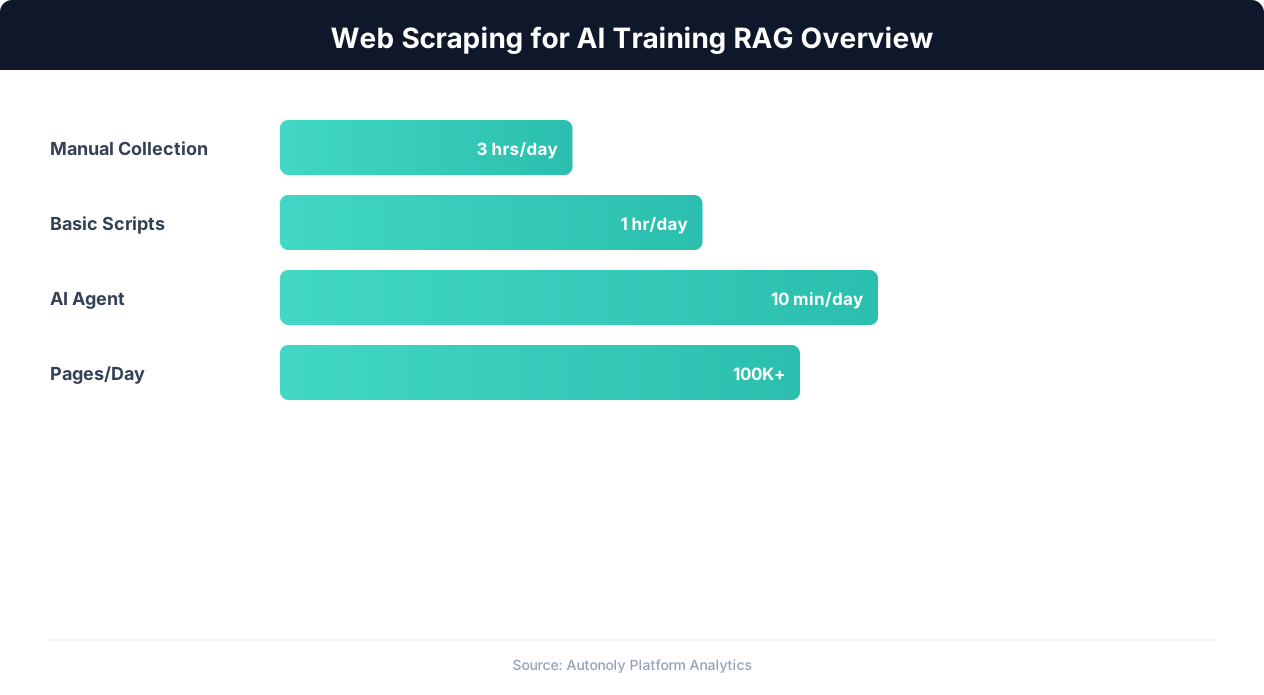
For RAG to work, you need a knowledge base — a collection of documents, chunked and embedded, that the retrieval system can search. Web scraping is the most scalable way to build that knowledge base from publicly available sources: documentation sites, knowledge bases, industry publications, government data portals, and competitor content.
Fine-Tuning and Instruction Datasets
Fine-tuning a language model on domain-specific data creates a model that naturally speaks the language of your industry, understands domain conventions, and produces more relevant outputs without needing extensive prompting. Building fine-tuning datasets from web-scraped content — extracting question-answer pairs from FAQ pages, structured data from technical documentation, or examples from tutorial sites — is a common and effective approach.
The pipeline from raw web content to usable AI training data involves several stages: content extraction, cleaning, structuring, chunking, and quality filtering. Each stage has specific technical requirements, and this guide covers the practical implementation of each.
Content Extraction Strategies for AI Datasets
Not all web content is equally useful for AI training. The extraction strategy you choose determines the quality of your raw data, which cascades through every downstream step.
Documentation and Knowledge Base Scraping
Technical documentation sites (ReadTheDocs, GitBook, Docusaurus, Confluence public pages) are among the highest-value sources for RAG knowledge bases. They contain structured, factual, up-to-date information written in clear language. When scraping documentation sites:
- Follow the site structure. Documentation sites have a clear hierarchy (sections, pages, subpages) that maps to a natural chunking strategy. Preserve this hierarchy in your scraped data — section titles become metadata that improves retrieval relevance.
- Extract code blocks separately. Technical documentation contains code examples that should be tagged as code in your dataset. Code blocks have different semantic properties than prose and benefit from separate embedding treatment.
- Capture version information. Documentation often covers multiple versions of a product. Tag scraped content with the applicable version to prevent RAG systems from retrieving outdated information.
Article and Blog Content Scraping
Industry blogs, news sites, and publication archives provide domain knowledge, expert opinions, and real-world examples. The challenge is separating the valuable content from the surrounding noise — navigation menus, sidebars, advertisements, related article links, and cookie consent banners.
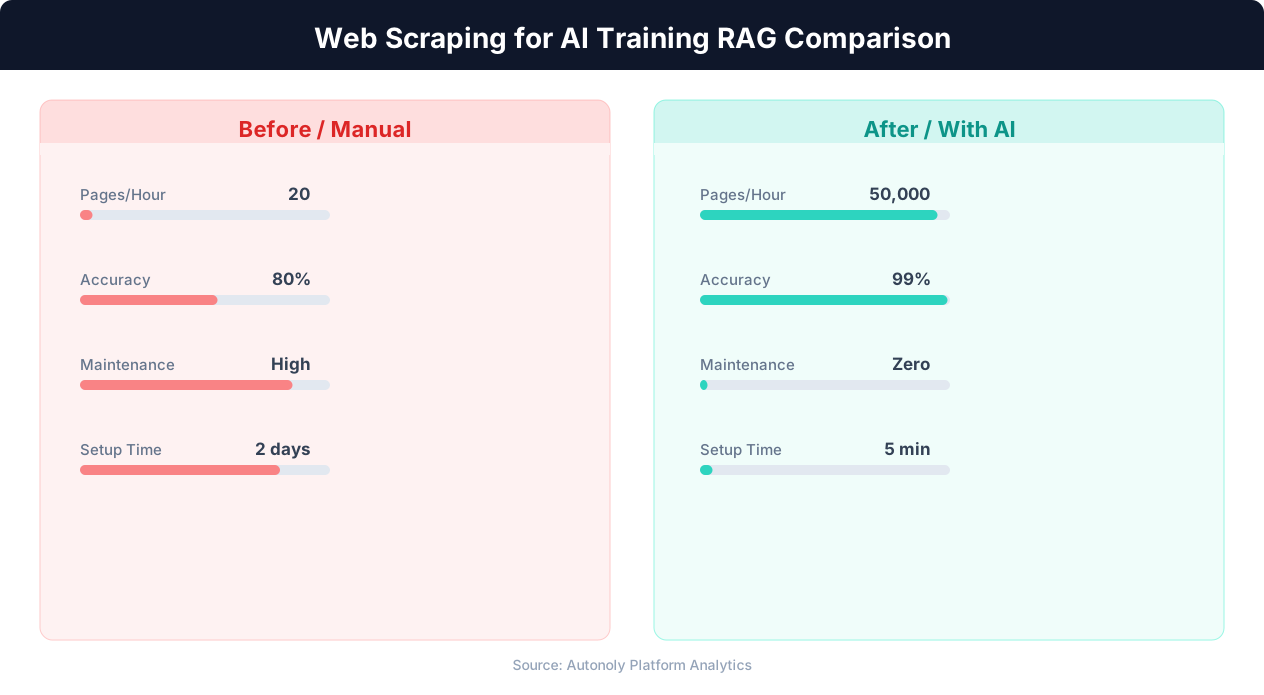
Autonoly's browser automation combined with data extraction handles this cleanly. The AI agent can identify the main content area of any page, ignoring boilerplate elements. You can instruct the agent: "Extract only the main article text, headings, and any embedded images or code blocks. Ignore the navigation, sidebar, footer, and advertisements."
Structured Data from Tables and Lists
Tables, specification sheets, comparison charts, and structured lists are gold for AI training data because they contain dense, factual information in a format that is already partially structured. When scraping tables, preserve the row-column structure rather than flattening to plain text. This structured representation helps both RAG retrieval (the table structure adds semantic meaning) and fine-tuning (the model learns to reference structured data correctly).
Forum and Q&A Content
Forums (Reddit, Stack Overflow, niche community forums) contain question-answer pairs that are directly usable for instruction fine-tuning datasets. Each thread naturally maps to a training example: the question is the user prompt, and the top-voted or accepted answer is the target response. Scraping forum content at scale produces thousands of domain-specific Q&A pairs with minimal post-processing.
Multi-Page Content Assembly
Some content spans multiple pages — long-form guides, paginated reports, multi-part tutorials. For AI datasets, you want the complete content assembled into a single document rather than fragmented across pages. Autonoly's agent handles multi-page content naturally — it follows "Next" links, continuation pages, and expandable sections, assembling the complete content before extraction.
Cleaning Scraped Data with Python and pandas
Raw scraped content is messy. HTML artifacts, inconsistent encoding, duplicate content, boilerplate text, and formatting noise all degrade AI training data quality. Cleaning is where Autonoly's terminal environment becomes essential — you can run Python scripts with pandas, regex, and NLP libraries directly in the platform, creating a seamless pipeline from scraping to clean data.
HTML to Clean Text Conversion
Even after extracting the main content, scraped text often contains HTML residue — entity codes (&, ), inline styles, empty tags, and malformed markup. A standard cleaning pipeline in Python handles these systematically:
Use libraries like beautifulsoup4 to parse and extract text from HTML, html module to unescape HTML entities, and regular expressions to remove residual markup. The goal is clean, readable text that preserves the semantic structure (paragraphs, headings, lists) while removing all presentational markup.
De-duplication
Web scraping frequently produces duplicate content — the same paragraph appears on multiple pages, boilerplate disclaimers repeat across a site, and syndicated content shows up on multiple domains. Duplicates in training data cause the AI to overweight those passages, producing repetitive or biased outputs.
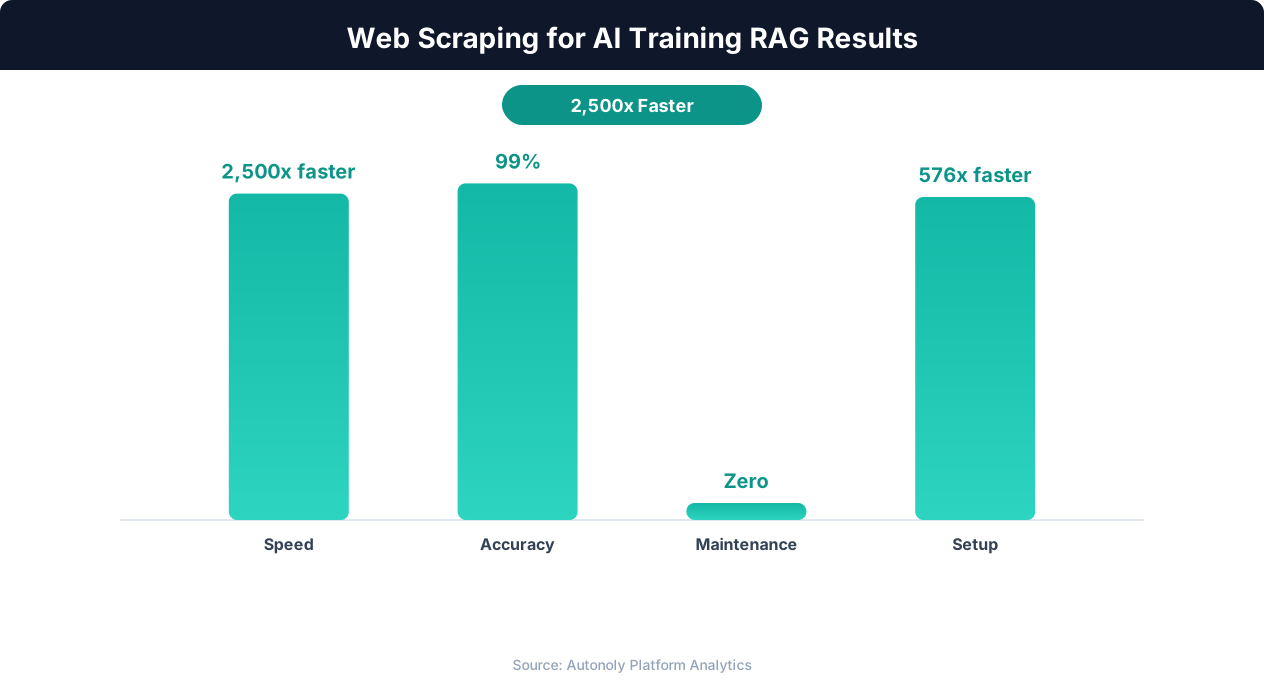
For exact duplicates, hash each document or chunk and remove duplicates by hash. For near-duplicates (content that differs by a few words, like slight variations of the same article), use MinHash or SimHash algorithms available in Python's datasketch library. Set a similarity threshold (typically 0.85-0.90) and keep only one version of near-duplicate content.
Boilerplate Removal
Even with careful content extraction, scraped datasets often contain boilerplate text — copyright notices, cookie policy snippets, "subscribe to our newsletter" blocks, and navigation breadcrumbs that slipped through the extraction filter. Build a boilerplate detection routine that identifies text patterns appearing across many documents in your dataset and removes them. If the same sentence appears in more than 10% of your documents, it is likely boilerplate.
Language and Quality Filtering
For English-language AI datasets, filter out pages that are primarily in other languages (unless you are building a multilingual dataset). Use Python's langdetect or fasttext for language identification. Beyond language, apply quality heuristics: remove documents that are too short (less than 100 words), have abnormally high punctuation ratios (indicating garbled text), or contain mostly numbers and special characters (indicating tables or data that was not properly structured).
Metadata Enrichment
Clean data is more valuable when paired with rich metadata. Use pandas to add structured metadata columns to your dataset: source URL, extraction date, content category, document length, language, and any topic tags you can derive from the content. This metadata enables filtered retrieval in RAG systems — for example, retrieving only documents from a specific source or date range when answering a user query.
Chunking Strategies for RAG Knowledge Bases
RAG systems do not retrieve entire documents — they retrieve chunks of documents that are most relevant to the user's query. How you split your scraped content into chunks has an outsized impact on retrieval quality and, consequently, on the quality of the AI's responses.
Why Chunking Matters
Embedding models (like OpenAI's text-embedding-3-small or Cohere's embed-v3) convert text into dense vectors that capture semantic meaning. These models have token limits (typically 512-8192 tokens) and perform best when the input text is focused on a single topic. A chunk that mixes two unrelated topics produces a vector that poorly represents either topic, leading to irrelevant retrievals. Conversely, chunks that are too small lose context and may not contain enough information to be useful when retrieved.
Fixed-Size Chunking
The simplest approach: split text into chunks of a fixed number of tokens (typically 256-512 tokens) with overlap (typically 50-100 tokens). The overlap ensures that information at chunk boundaries is not lost. Fixed-size chunking is easy to implement and works reasonably well for homogeneous content. Its weakness is that chunk boundaries often fall in the middle of paragraphs or ideas, splitting related information across chunks.
Semantic Chunking
More sophisticated approaches split text at natural semantic boundaries — paragraph breaks, section headings, topic transitions. This produces chunks that are more coherent and topically focused, improving embedding quality and retrieval relevance. Implementing semantic chunking in Python:
- Heading-based splitting: Use the heading hierarchy preserved from your scraping step. Each section (defined by its heading) becomes a chunk, with subsections as sub-chunks. This works excellently for documentation and structured articles.
- Paragraph-based splitting: Split on double line breaks and merge short paragraphs to reach a minimum chunk size. This preserves the author's natural idea boundaries.
- Recursive splitting: Start with large chunks (full sections), then recursively split only the chunks that exceed your token limit. Split at headings first, then paragraphs, then sentences. This preserves as much context as possible while respecting token limits.
Metadata-Enriched Chunks
Each chunk in your RAG knowledge base should carry metadata beyond just the text content:
- Source URL: Where the content came from, enabling source attribution in AI responses.
- Section title and hierarchy: The heading path (e.g., "Installation > Prerequisites > System Requirements") that provides context for retrieval ranking.
- Content type: Whether the chunk is a paragraph, a code block, a table, or a list — different content types may need different retrieval weighting.
- Scrape date: When the content was extracted, enabling freshness-aware retrieval that prioritizes recent information.
Running the Chunking Pipeline
Autonoly's terminal lets you run the entire chunking pipeline in Python without leaving the platform. Load your cleaned dataset with pandas, apply your chunking logic, compute token counts using tiktoken, and export the chunked dataset as JSON or CSV ready for embedding. The terminal environment includes pandas, scikit-learn, and other data processing libraries pre-installed, so you can iterate on your chunking strategy interactively.
Embedding, Indexing, and Building the RAG Knowledge Base
With your scraped content cleaned and chunked, the final step is converting text chunks into vector embeddings and loading them into a vector database for retrieval.
Choosing an Embedding Model
The embedding model converts each text chunk into a dense vector (typically 768-3072 dimensions) that captures its semantic meaning. Popular choices include OpenAI's text-embedding-3-small and text-embedding-3-large, Cohere's embed-v3, and open-source models like BGE and E5. Key selection criteria:
- Dimensionality vs. quality tradeoff: Higher-dimensional embeddings capture more semantic nuance but require more storage and slower retrieval. For most RAG applications, 1024-1536 dimensions provide an excellent balance.
- Domain alignment: Some embedding models perform better on specific domains. If your scraped content is highly technical, evaluate embedding models on domain-specific benchmarks rather than general ones.
- Cost and throughput: Embedding thousands of chunks from a large scraping project requires considering API costs. OpenAI's text-embedding-3-small is cost-effective for large datasets, while local models eliminate API costs entirely.
Generating Embeddings at Scale
For large scraped datasets (tens of thousands of chunks), batch your embedding API calls to maximize throughput and minimize costs. Most embedding APIs support batch inputs — send 50-100 chunks per API call rather than one at a time. Use Autonoly's terminal to write a Python script that reads your chunked dataset, batches the chunks, calls the embedding API, and stores the resulting vectors alongside the chunk text and metadata.
💡 Key Insight
RAG systems using curated web-scraped data show 40% improvement in answer accuracy compared to generic training data.
Vector Database Selection
The vector database stores your embeddings and performs similarity search at query time. Common choices:
- Pinecone: Managed service, easy setup, good for production RAG systems.
- Weaviate: Open-source with built-in vectorization, supports hybrid search (vector + keyword).
- ChromaDB: Lightweight, Python-native, ideal for prototyping and smaller datasets.
- pgvector: PostgreSQL extension that adds vector search to your existing Postgres database.
Indexing Your Scraped Content
Load your embeddings, chunk text, and metadata into the vector database. Create an index that supports your expected query patterns — most vector databases default to HNSW (Hierarchical Navigable Small World) indexes, which provide excellent recall at reasonable query latency. If your dataset includes metadata (source, date, content type), configure metadata filtering so your RAG system can narrow the search space before performing vector similarity search.
Keeping the Knowledge Base Fresh
Web content changes. Documentation gets updated, articles are revised, prices change, and new content is published. A RAG knowledge base built from a one-time scrape becomes stale quickly. Use Autonoly's scheduled execution to run your scraping workflow on a recurring basis, then process the new content through your cleaning, chunking, and embedding pipeline. Update your vector database by upserting new chunks (replacing outdated versions) and adding chunks from newly discovered pages. This creates a self-refreshing knowledge base that stays current without manual intervention.
Complete Pipeline: From Website to RAG-Ready Dataset
Here is how the complete pipeline works end-to-end using Autonoly, connecting browser automation for scraping with terminal processing for data preparation.
Phase 1: Discover and Scrape
Start an Autonoly agent session and describe your target content. For example: "Scrape the complete documentation from docs.example.com. Extract the page title, section headings, body content, code blocks, and the URL for each page. Follow all internal links within the /docs/ directory."
The agent launches a browser, navigates to the documentation site, and systematically crawls every page. It extracts the main content, preserving heading hierarchy and code block formatting. For a medium-sized documentation site (200-500 pages), this typically takes 20-40 minutes. The extracted content is saved as structured data with each page as a record.
Phase 2: Clean and Structure
With the raw data extracted, switch to the terminal and run your cleaning pipeline. Load the scraped data into a pandas DataFrame. Apply HTML cleaning, de-duplication, boilerplate removal, and quality filtering. Enrich each record with metadata — word count, language, content category, and extraction timestamp. Export the cleaned dataset as a JSON file with one object per page.
💡 Key Insight
High-quality web-scraped datasets reduce AI hallucination rates by up to 60% in domain-specific applications.
Phase 3: Chunk
Run your chunking script on the cleaned data. Split each page into semantically coherent chunks using heading-based splitting, with fallback to paragraph-based splitting for pages without clear heading structure. Set a target chunk size of 300-500 tokens with 50-token overlap. Attach metadata to each chunk: source URL, page title, section heading, and content type. The output is a JSON file with one object per chunk.
Phase 4: Embed and Index
Run an embedding script that reads the chunked JSON, batches the text through an embedding API, and writes the vectors alongside the original text and metadata. Load the embedded chunks into your vector database. Run a few test queries to verify that the retrieval returns relevant chunks — search for a known topic and confirm the top results are from the expected pages.
Phase 5: Schedule Refreshes
Convert your scraping workflow into a scheduled workflow that runs weekly. Each run scrapes the documentation site, diffs against the previous version to identify new and updated pages, processes only the changed content through the cleaning and chunking pipeline, and upserts the new embeddings into the vector database. This keeps your RAG knowledge base synchronized with the source without re-processing the entire dataset each time.
The Result
You now have a production RAG pipeline that transforms a live website into a searchable knowledge base, kept fresh through automated scraping. Your AI application can answer questions about the scraped content with high accuracy, cite sources, and reference the most recent version of the documentation — all without a single line of scraping code written by your team.
Legal and Ethical Considerations for AI Training Data
Scraping web content for AI training is one of the most actively debated areas in technology law. The legal landscape is evolving rapidly, and practitioners should be informed about the current state of affairs.
The Copyright Question
Multiple lawsuits are currently testing whether training AI models on copyrighted web content constitutes fair use. The outcomes of cases involving major AI companies will set important precedents. Until these cases are resolved, the legal status of training on copyrighted content remains uncertain. The key factors courts are examining include whether the use is transformative (the AI produces new content, not copies), whether it affects the market for the original works, and the amount and substantiality of the content used.
RAG vs. Fine-Tuning: Different Risk Profiles
RAG and fine-tuning have different legal risk profiles. Fine-tuning incorporates scraped content directly into the model's weights — the content is permanently part of the model. RAG, by contrast, retrieves and displays content at query time but does not incorporate it into the model itself. Many legal scholars argue that RAG has a stronger fair use argument because it functions more like a search engine (indexing and retrieving content) than a derivative work.
Respecting Content Creator Rights
Regardless of the legal outcome, ethical considerations matter. Content creators invest time and expertise in producing the material you are scraping. Responsible practices include:
- Attributing sources: Configure your RAG system to cite the source URL when it references scraped content. This drives traffic back to the original source and respects the creator's work.
- Respecting robots.txt and opt-out signals: Some sites now include AI-specific directives in their robots.txt (like
GPTBotandCCBotuser-agent rules). Respecting these signals demonstrates good faith. - Avoiding paywalled content: Scraping content behind paywalls for AI training undermines the creator's business model. Restrict your scraping to freely accessible content.
- Adding value, not replacing sources: Your AI application should add value beyond what the scraped sources provide — through synthesis, comparison, personalized guidance, or integration with other data. If your AI simply regurgitates scraped content without adding value, it competes directly with the sources you depend on.
Data Licensing Alternatives
For organizations that want to minimize legal risk entirely, licensed datasets and partnerships with content providers offer a clean alternative to scraping. Several companies now offer licensed web content specifically for AI training. The cost is higher than scraping, but the legal clarity may be worth it for production AI applications with significant business exposure. For more on legal considerations, see our comprehensive guide on whether web scraping is legal.