What Is an AI Agent Platform? Why It Matters in 2026
An AI agent platform is software that enables you to create, deploy, and manage AI agents — autonomous software entities that can perceive their digital environment, make decisions, and take actions to accomplish goals without step-by-step human instruction. Unlike simple chatbots that answer questions or traditional automation tools that follow pre-scripted workflows, AI agent platforms provide the infrastructure for truly autonomous task execution.
Think of the difference this way: a traditional automation tool like Zapier is a railroad — it moves data along fixed tracks you build between specific stations (apps). An AI agent platform is a self-driving car — it can navigate any road, handle unexpected obstacles, and reach any destination you specify.
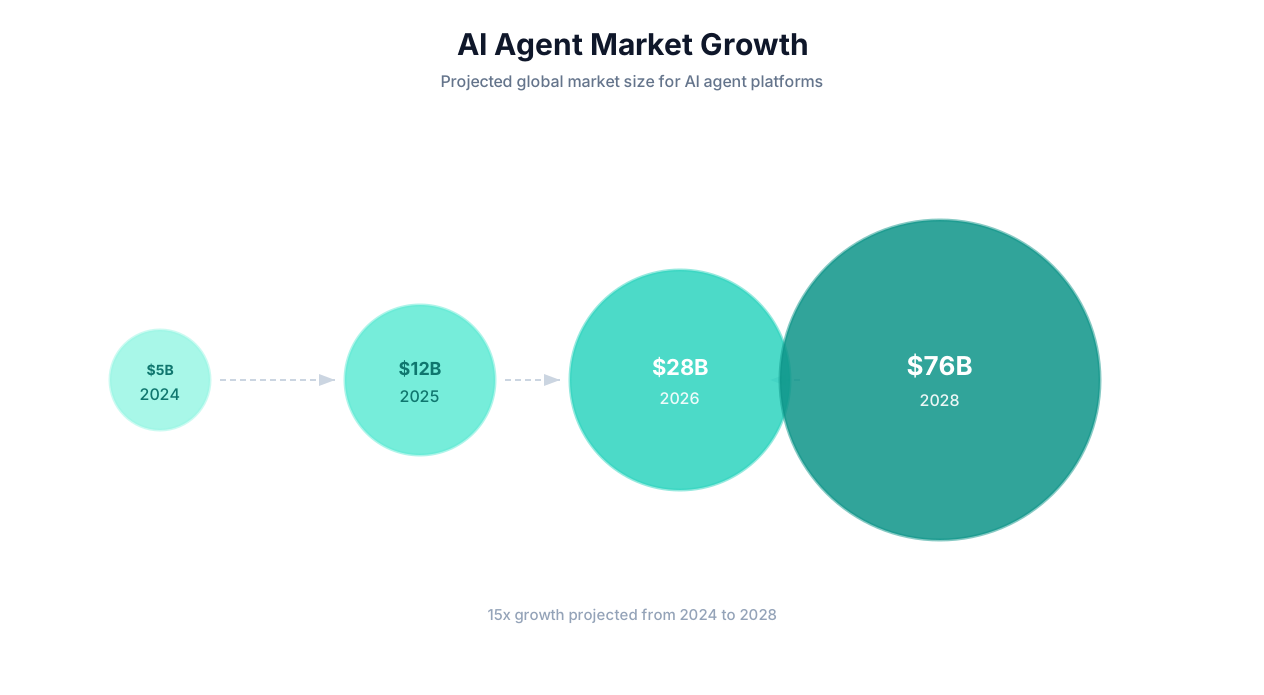
In 2026, AI agent platforms have moved from experimental technology to a core business tool category. The shift happened fast: in 2024, fewer than 5% of businesses used any form of agentic AI. By mid-2026, Gartner estimates that figure has reached 28%, with enterprise adoption growing at 3x the rate of consumer adoption.
💡 Key Insight
The global AI agent platform market reached $18.2 billion in 2025 and is projected to grow to $65 billion by 2029, representing a 37% CAGR. This makes AI agents one of the fastest-growing enterprise software categories in history — outpacing even the initial cloud computing adoption curve.
Why 2026 Is the Inflection Point
Three converging factors make 2026 the year AI agent platforms become indispensable:
- LLM capability thresholds: Models like Claude 4, GPT-5, and Gemini 2.5 have crossed the reliability threshold where agents can handle complex, multi-step tasks with 90%+ success rates. The reasoning improvements over the past 18 months are the single biggest enabler of practical agent deployment.
- Protocol standardization: Anthropic's Model Context Protocol (MCP) has emerged as the de facto standard for connecting agents to external tools, reducing integration complexity by an order of magnitude. See our complete MCP guide for details.
- Cost economics: Agent execution costs have dropped 85% since early 2024 due to model efficiency improvements and competitive pricing. A complex 50-step agent task that cost $2-5 in early 2024 now costs $0.10-0.30, making high-volume automation economically viable.
The result is that AI agent platforms have crossed the chasm from "interesting experiment" to "essential business infrastructure" — much like cloud computing crossed that chasm in 2010-2012 or SaaS in 2014-2016.
What an AI Agent Platform Actually Does
At its core, an AI agent platform provides five essential services:
| Service | What It Provides | Why It Matters |
|---|---|---|
| Agent Runtime | The execution environment where agents run — including LLM orchestration, tool access, and session management | Without a robust runtime, agents crash, lose state, or produce inconsistent results |
| Tool Layer | Connectors to external systems: browsers, APIs, file systems, databases, communication tools | An agent without tools is just a chatbot — tools give it the ability to act |
| Memory System | Short-term (within a task) and long-term (across tasks) memory for context and learning | Memory enables agents to maintain context, avoid repeating mistakes, and improve over time |
| Orchestration | Workflow building, scheduling, monitoring, and multi-agent coordination | Moves beyond one-off tasks to repeatable, reliable business processes |
| Governance | Security, permissions, audit trails, cost controls, and human-in-the-loop checkpoints | Enterprise adoption requires trust, compliance, and oversight mechanisms |
Platform Architecture: How AI Agent Platforms Work Under the Hood
Understanding the architecture of an AI agent platform helps you evaluate competing solutions and predict which platforms will deliver reliable results. While implementations vary, every serious agent platform shares the same fundamental architecture layers.
Layer 1: The Reasoning Engine (LLM Core)
The reasoning engine is the brain of the agent. It receives observations from the environment, decides what action to take, and interprets the results. Modern agent platforms are model-agnostic — they support multiple LLMs (Claude, GPT-4o, Gemini, etc.) and let you choose the right model for each task based on capability, cost, and speed tradeoffs.
Key architectural decisions at this layer:
- Model routing: The best platforms dynamically route to different models based on task complexity — using faster, cheaper models for simple sub-tasks and more capable models for complex reasoning steps.
- Context management: Agents consume context window space rapidly as they perceive web pages, process documents, and maintain conversation history. Efficient context management (summarization, prioritization, pagination) is critical for handling complex tasks without running into token limits.
- Structured outputs: The reasoning engine must produce structured action commands ("click button with text 'Submit'", "extract text from element #price") that the tool layer can execute reliably. This requires careful prompt engineering and output parsing.
Layer 2: The Perception Layer
Perception is how the agent observes its environment. For web-based agents, this primarily means reading web pages — but the approach varies significantly between platforms:
DOM-based perception: The agent reads the HTML Document Object Model directly. This is fast and precise but can miss visually rendered content (images, canvas elements, CSS-styled layouts). Most code-based browser automation tools use this approach.
Vision-based perception: The agent takes screenshots and uses a vision model (like Claude's vision capabilities or GPT-4V) to understand the page visually. This is more robust for complex layouts but slower and more token-intensive.
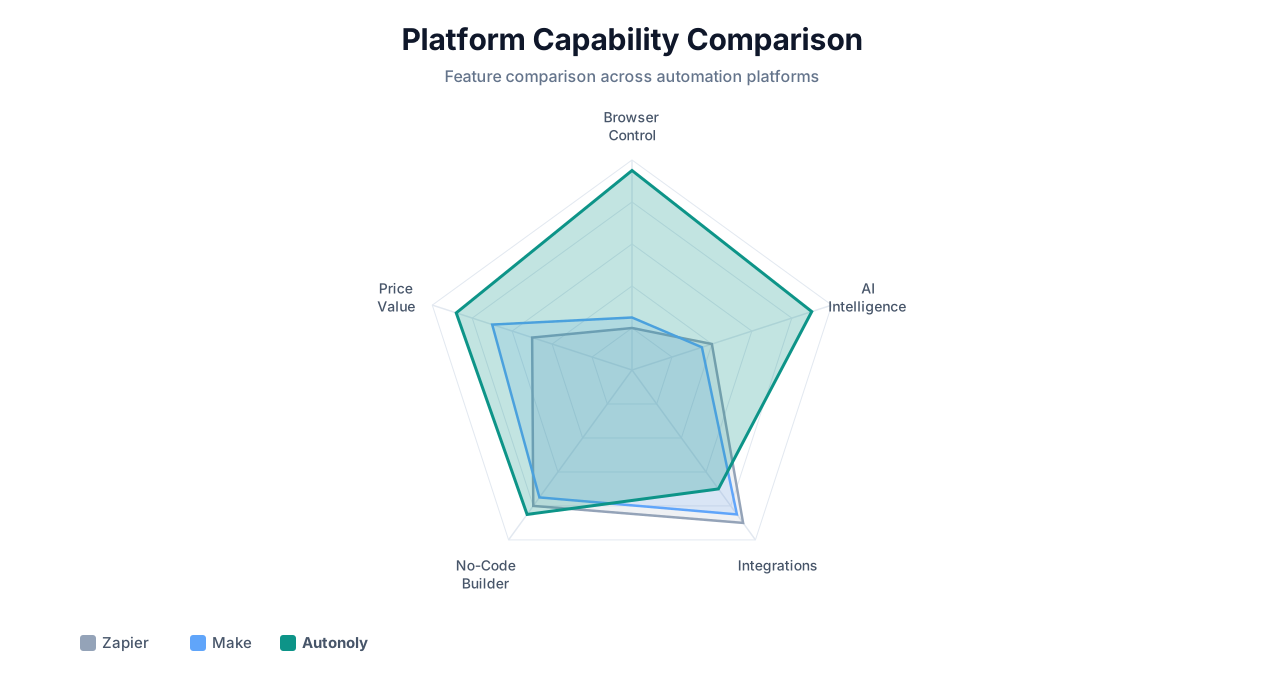
Hybrid perception: The best platforms combine both — using DOM parsing for speed and precision, with vision as a fallback for complex or unusual page layouts. Autonoly uses this hybrid approach through its live browser control system.
Layer 3: The Action Layer
The action layer is where the agent affects its environment. Actions fall into several categories:
- Browser actions: Click, type, scroll, navigate, select dropdowns, upload files, download files, handle popups. This requires a real browser engine (typically Playwright or Puppeteer) running in a controlled environment.
- API actions: HTTP requests to REST/GraphQL APIs, webhook triggers, OAuth authentication flows. For systems with APIs, direct API calls are faster and more reliable than browser interaction.
- File system actions: Read, write, rename, and organize files. Essential for document processing workflows.
- Communication actions: Send emails, post Slack messages, trigger SMS, update CRM records. These typically use a combination of API integrations and browser automation.
- Code execution: Some platforms include a sandboxed code execution environment (Python, JavaScript) for data transformation, analysis, and custom logic. Autonoly provides a code sandbox for exactly this purpose.
Layer 4: The Memory System
Memory is what separates true AI agents from stateless LLM interactions. Agent platforms implement memory at multiple levels:
Working memory: The agent's current context — what task it is working on, what steps it has completed, what it has observed. This is typically maintained in the LLM's context window and supplemented by structured state tracking.
Episodic memory: Records of past task executions — what worked, what failed, which selectors were reliable on specific sites, which approaches were most efficient. This enables cross-session learning.
Semantic memory: General knowledge about how to interact with common websites, handle standard UI patterns, and process typical document formats. This is the agent's accumulated expertise.
📊 By the Numbers
Agents with cross-session memory complete repeat tasks 40-60% faster than stateless agents and achieve 15-25% higher success rates on complex multi-step workflows. Memory is the single largest differentiator between demo-quality and production-quality agent platforms.
Layer 5: Orchestration and Governance
The orchestration layer manages the lifecycle of agent tasks: scheduling, monitoring, error handling, retry logic, and multi-agent coordination. The governance layer handles security, permissions, audit logging, and cost controls.
Enterprise-grade platforms provide:
- Role-based access controls (who can create/run/modify agents)
- Audit trails of every agent action (for compliance)
- Cost ceilings and usage alerts
- Human-in-the-loop approval gates for high-stakes actions
- Workflow versioning and rollback
Key Capabilities: Perception, Reasoning, Action, and Memory
When evaluating AI agent platforms, focus on four core capability dimensions. These determine whether a platform can handle your real-world tasks or only works in controlled demos.
Perception Capabilities
Perception determines what the agent can see and understand about its environment. The stronger the perception, the more types of tasks the agent can handle.
| Perception Capability | Basic | Intermediate | Advanced |
|---|---|---|---|
| Web page reading | Static HTML only | JavaScript-rendered content | Full SPA, dynamic content, shadow DOM |
| Visual understanding | None | Basic screenshot interpretation | OCR, chart reading, layout understanding |
| Document parsing | Plain text only | PDF text extraction | PDF tables, images, scanned documents via OCR |
| Email processing | Subject/body reading | Attachment downloading | Multi-part parsing, thread analysis, intent extraction |
| Data structure recognition | Explicit tables only | Semi-structured data | Unstructured data with semantic extraction |
For practical automation, you need at minimum intermediate perception across all dimensions. Advanced perception is required for tasks involving PDF data extraction, legacy system interaction, or complex web scraping.
Reasoning Capabilities
Reasoning determines how well the agent plans, makes decisions, handles ambiguity, and recovers from errors. This is almost entirely a function of the underlying LLM quality and how the platform uses it.
Key reasoning capabilities to evaluate:
- Task decomposition: Can the agent break a complex goal into an ordered sequence of achievable sub-tasks?
- Conditional logic: Can the agent handle if/then branches ("if the form has a CAPTCHA, try solving it; if that fails, alert the user")?
- Error recovery: When an action fails, does the agent retry blindly, or does it reason about why it failed and try a different approach?
- Ambiguity handling: When instructions are unclear, does the agent make reasonable assumptions or ask clarifying questions?
- Multi-step planning: For tasks with 20+ steps, does the agent maintain coherent progress toward the goal or lose track?
💡 Key Insight
The most reliable indicator of reasoning quality is error recovery. Ask every platform you evaluate: "Show me what happens when a website throws an unexpected popup during a scraping task." If the demo agent crashes or freezes, the platform's reasoning is not production-ready.
Action Capabilities
Action capabilities determine what the agent can actually do in the world. The broader the action set, the more types of tasks you can automate.
Essential action capabilities for a production agent platform:
- Full browser control: Click, type, scroll, navigate, handle modals, manage tabs, upload/download files
- Form interaction: Text fields, dropdowns, radio buttons, checkboxes, date pickers, file uploads, multi-page forms
- Authentication: Login flows, session management, cookie handling, OAuth
- API interaction: REST calls, GraphQL queries, webhook sending/receiving
- File operations: Create, read, edit, convert documents (PDF, Excel, CSV, JSON)
- Data output: Write to Google Sheets, databases, APIs, email, Slack
Many platforms claim "browser control" but only support basic click-and-type operations. True browser control means handling anti-bot detection, dynamic content loading, infinite scroll, embedded iframes, and complex JavaScript-driven UIs.
Memory Capabilities
Memory capabilities determine whether the agent gets smarter over time or starts from scratch on every task.
| Memory Type | Purpose | Without It | With It |
|---|---|---|---|
| Task memory | Track progress within a multi-step task | Agent repeats steps or loses context | Coherent execution across 50+ step workflows |
| Session memory | Remember context across conversation turns | Must re-explain context every time | Natural iterative refinement of tasks |
| Cross-session memory | Learn from past executions | Same mistakes repeated forever | Improving reliability and speed over time |
| Shared memory | Learn from all users' collective experience | Each user starts from zero | Instant expertise on common websites and tasks |
10 Evaluation Criteria for Choosing an AI Agent Platform
Choosing the right AI agent platform requires evaluating multiple dimensions. Here are the 10 criteria that matter most, based on interviews with 200+ teams that have evaluated and deployed agent platforms.
1. Task Success Rate
The single most important metric. What percentage of assigned tasks does the agent complete successfully without human intervention? Ask vendors for real success rate data on tasks comparable to yours — not cherry-picked demos.
Benchmark: Production-grade platforms should achieve 85-95% success rates on routine tasks (simple scraping, form filling, data extraction). Complex multi-step tasks (20+ steps across multiple sites) should achieve 70-85%.
2. Website Compatibility
Can the agent work with the specific websites and applications you need to automate? Test the platform against your actual target sites — not just well-known, easy-to-scrape websites. Pay special attention to:
- JavaScript-heavy single-page applications (React, Angular, Vue)
- Sites with anti-bot protection (Cloudflare, DataDome)
- Legacy enterprise applications with complex UIs
- Government and institutional portals
3. Setup Speed
How quickly can a non-technical user create and deploy a new automation? The best platforms let you go from description to working automation in under 5 minutes. If a platform requires hours of configuration or developer involvement, the adoption friction will limit your ROI.
4. Error Recovery
What happens when something goes wrong? The agent should handle common failure scenarios — website timeouts, unexpected popups, changed layouts, authentication challenges — without human intervention. Ask to see how the platform handles failures, not just successes.
5. Output Quality
Is the extracted or processed data accurate, well-structured, and immediately usable? Poor data quality from automation is worse than no automation at all, because it creates downstream errors and erodes trust.
6. Integration Breadth
Where can the agent send its outputs? Look for native integrations with your core tools: Google Sheets, Slack, email, CRM systems, databases, and file storage. Browser-based agents that can only output to CSV are too limited for real workflows.
7. Security and Compliance
How are credentials stored? Are agent actions auditable? Can you restrict agent access to specific domains? Is data encrypted in transit and at rest? For enterprise use, SOC 2 compliance and GDPR readiness are baseline requirements.
8. Pricing Transparency
Is pricing predictable? Some platforms charge per agent action, per LLM token, or per minute of browser time — making costs unpredictable for variable workloads. Flat-rate or tiered subscription pricing is easier to budget for.
9. Scalability
Can the platform handle your growth? If you start with 5 workflows and scale to 500, does the platform support that without architectural changes? Look for parallel execution, queue management, and enterprise team features.
10. Learning and Improvement
Does the agent get better over time? Platforms with cross-session learning deliver compounding value — each execution improves future performance. Platforms without memory give you the same reliability on day 300 as day 1.
| Criterion | Weight | How to Test |
|---|---|---|
| Task success rate | 25% | Run 10 of your real tasks during trial |
| Website compatibility | 15% | Test against your 5 most-used sites |
| Setup speed | 10% | Time from signup to first working automation |
| Error recovery | 15% | Intentionally break scenarios during testing |
| Output quality | 10% | Verify data accuracy on known datasets |
| Integration breadth | 5% | Check for your specific output destinations |
| Security | 10% | Review docs, ask for SOC 2 / audit trail |
| Pricing transparency | 5% | Model total cost for your expected usage |
| Scalability | 3% | Ask about concurrent execution limits |
| Learning | 2% | Run the same task 5 times and compare speed/accuracy |
Market Landscape: Comparing 8 Leading AI Agent Platforms (2026)
The AI agent platform market in 2026 includes established automation vendors adding agent capabilities, pure-play agent startups, and tech giants building agent infrastructure. Here is a comprehensive comparison of the 8 most significant platforms across the evaluation criteria defined above.
| Platform | Type | Browser Control | No-Code Setup | Cross-Session Learning | API + Browser | Starting Price |
|---|---|---|---|---|---|---|
| Autonoly | Purpose-built AI agent | Full (Playwright-based) | Yes — plain English | Yes | Both | Free tier / $49/mo |
| Zapier Agents | Automation + agents | No (API-only) | Yes — guided setup | Limited | API only | $20/mo (Starter) |
| OpenAI Operator | Consumer agent | Yes (limited) | Yes — conversational | No | Browser only | $200/mo (Pro) |
| Anthropic MCP + Claude | Developer framework | Via MCP servers | No — requires coding | No (custom implementation) | Both (via MCP) | API pricing |
| n8n AI Agents | Open-source + agents | Limited (via Playwright node) | Partial — visual builder | No | Both | Free (self-hosted) |
| Induced AI | Browser agent startup | Full | Yes — natural language | Limited | Browser-focused | $100/mo |
| MultiOn | Browser agent startup | Full | Yes — natural language | No | Browser only | $50/mo |
| Microsoft Copilot Studio | Enterprise agent builder | Limited | Yes — guided builder | Limited | API-focused | $200/mo |
Detailed Platform Analysis
Autonoly occupies the intersection of powerful agent capabilities and genuine ease of use. Its conversational agent interface lets non-technical users describe tasks in English, while full browser control and cross-session learning deliver production-grade reliability. The visual workflow builder bridges the gap between one-time agent tasks and repeatable business processes. Strongest for teams that need to automate tasks across websites without APIs.
Zapier Agents leverage Zapier's massive integration library (7,000+ apps) to let AI agents reason about which automations to trigger. The strength is breadth of API integrations; the limitation is that agents cannot interact with websites directly — they can only trigger pre-built Zaps. If your automation needs are entirely API-to-API, Zapier Agents are a solid choice. If you need browser-based automation, look elsewhere. Read our full comparison.
OpenAI Operator brought browser-based agents to the mainstream consumer market. Strong reasoning (GPT-4o/GPT-5) but limited in workflow building, scheduling, and enterprise features. Best for individual consumers automating personal tasks, not for business process automation.
Anthropic MCP + Claude provides the most powerful reasoning engine (Claude 4) and the most robust integration protocol (MCP), but it is a developer framework — not a ready-to-use platform. Best for engineering teams building custom agent capabilities into their own products.
n8n AI Agents add AI reasoning to n8n's open-source visual workflow builder. The self-hosted model appeals to teams with data sovereignty requirements. Browser automation is possible but limited compared to purpose-built agent platforms. Best for technical teams already using n8n.
⚠️ Important Note
This landscape is evolving rapidly. New platforms launch monthly, and existing platforms add capabilities quarterly. Any comparison is a snapshot — revisit your evaluation every 6 months as the market matures.
Choosing the Right Platform for Your Needs
| If Your Primary Need Is... | Best Platform | Runner-Up |
|---|---|---|
| Automating any website (no API) | Autonoly | Induced AI |
| Connecting SaaS apps via APIs | Zapier Agents | n8n AI Agents |
| Building agents into your product | Anthropic MCP + Claude | OpenAI Assistants API |
| Self-hosted / open-source | n8n AI Agents | LangGraph (developer) |
| Enterprise with compliance needs | Microsoft Copilot Studio | Autonoly (SOC 2) |
| Personal / consumer tasks | OpenAI Operator | MultiOn |
| Non-technical team, fast setup | Autonoly | Zapier Agents |
Industry Use Cases: How Different Sectors Deploy AI Agent Platforms
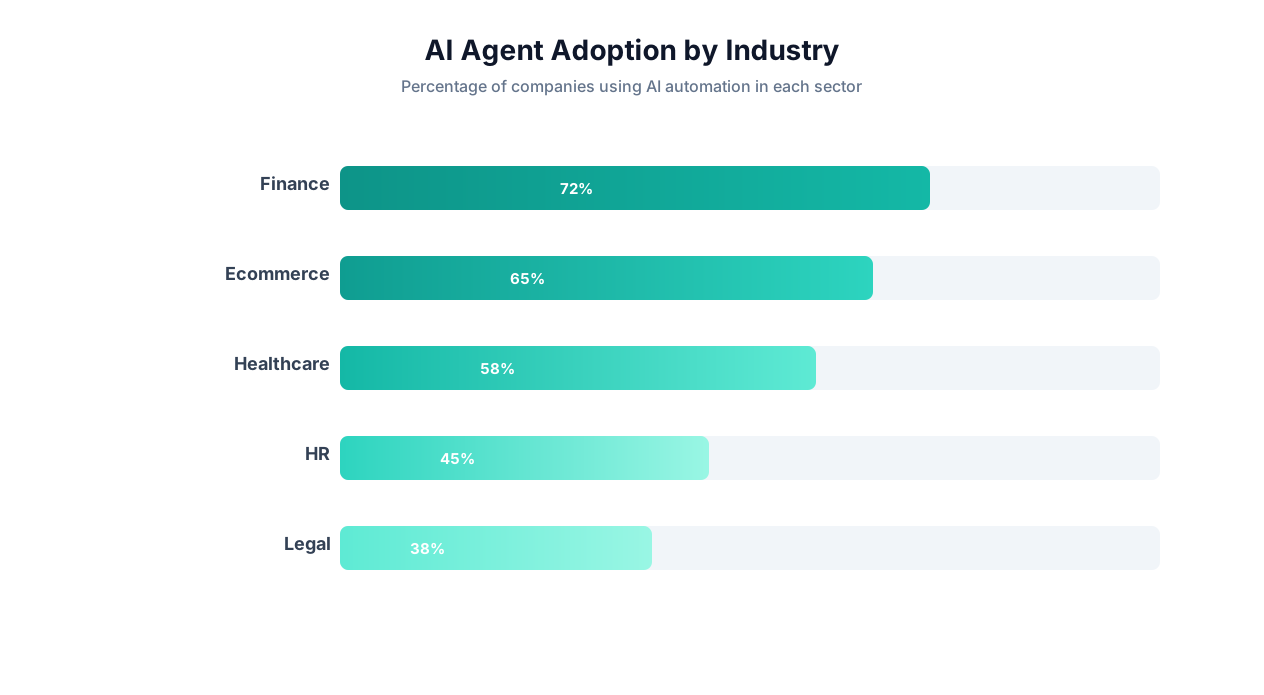
AI agent platforms deliver value across every industry, but the specific use cases and ROI drivers vary. Here is how six major sectors are deploying agents in production today.
Financial Services
Financial services firms process enormous volumes of structured and unstructured data across multiple legacy systems. AI agents automate:
- Regulatory filings: Agents navigate SEC, FINRA, and state regulatory portals to file required documents, track filing deadlines, and download confirmations
- KYC/AML checks: Agents research entities across sanctions databases, corporate registries, and news sources to compile due diligence packages
- Invoice reconciliation: Agents match invoices from vendor portals against purchase orders and flag discrepancies for review
- Market data aggregation: Agents collect pricing, volume, and sentiment data from multiple sources into unified dashboards
Typical ROI: 40-60 hours saved per analyst per month. Error reduction of 75% on data entry tasks.
Healthcare
Healthcare organizations face unique automation challenges due to strict compliance requirements and fragmented systems:
- Insurance verification: Agents check patient eligibility across multiple payer portals before appointments
- Claims processing: Agents extract data from clinical documents, map to billing codes, and submit claims to clearinghouses
- Prior authorization: Agents complete prior auth forms on insurance portals — a task that consumes an average of 13 hours per physician per week nationally
- Medical record transfer: Agents navigate different EHR systems to request and transfer patient records between providers
📊 By the Numbers
The American Medical Association reports that prior authorization requirements cost the U.S. healthcare system $35 billion annually in administrative overhead. AI agents can reduce per-authorization processing time from 45 minutes to under 5 minutes — a potential $28 billion in annual savings industry-wide.
E-Commerce and Retail
E-commerce teams automate competitive intelligence, listing management, and customer operations:
- Competitor price monitoring: Agents track prices across competitor websites daily and alert teams to changes. See our competitor monitoring template
- Product listing syndication: Agents post and update product listings across multiple marketplaces (Amazon, eBay, Walmart, Shopify)
- Review aggregation: Agents collect customer reviews from multiple platforms for sentiment analysis
- Inventory monitoring: Agents check supplier stock levels across vendor portals and trigger reorder workflows
Typical ROI: 2-5% revenue increase from competitive pricing responsiveness. 20+ hours saved per week on listing management.
Legal
Law firms and legal departments automate research, document processing, and filing:
- Court filing: Agents navigate court e-filing systems (which vary by jurisdiction) to submit documents and track case status
- Contract analysis: Agents extract key terms, dates, and obligations from contracts and populate clause libraries
- Legal research: Agents search case law databases, extract relevant precedents, and compile research memos
- Compliance monitoring: Agents track regulatory changes across multiple jurisdictions and flag relevant updates
Real Estate
Real estate professionals automate data collection and market analysis:
- Property data aggregation: Agents extract listings, prices, and property details from multiple MLS, Zillow, Redfin, and county assessor websites. See our Zillow scraping guide
- Market report generation: Agents compile comparable sales data, market trends, and neighborhood statistics into formatted reports
- Permit tracking: Agents monitor city and county permit portals for new construction and renovation filings
Recruiting and HR
Recruiting teams automate sourcing, screening, and coordination:
- Candidate sourcing: Agents search LinkedIn, job boards, and professional communities for candidates matching specific criteria. See our recruiting automation guide
- Resume screening: Agents parse resume PDFs, extract relevant experience and skills, and score against job requirements
- Interview scheduling: Agents coordinate across candidate and interviewer calendars to find optimal meeting times
- Background data collection: Agents compile publicly available professional information from multiple sources
| Industry | Top Agent Use Case | Time Saved/Month | Typical ROI (Year 1) |
|---|---|---|---|
| Financial Services | Regulatory filing automation | 60-80 hours | 800-1,200% |
| Healthcare | Prior authorization | 50-100 hours | 1,500-2,500% |
| E-Commerce | Competitor price monitoring | 30-50 hours | 500-1,000% |
| Legal | Court filing and research | 40-60 hours | 600-1,000% |
| Real Estate | Property data aggregation | 25-40 hours | 400-800% |
| Recruiting | Candidate sourcing | 35-55 hours | 700-1,200% |
Getting Started: Your First 30 Days With an AI Agent Platform
Deploying an AI agent platform successfully requires a structured approach. Here is a 30-day playbook based on the patterns of the most successful deployments we have observed.
Week 1: Foundation (Days 1-7)
Day 1-2: Identify your top 5 time-wasting tasks. Survey your team. Ask everyone: "What repetitive digital task do you dread most?" and "What task would you automate first if you could?" Rank answers by total hours consumed and number of people affected.
Day 3-4: Create your first automation. Pick the simplest task from your list — something with clear inputs and outputs that involves one or two websites. Use the AI agent chat to describe and deploy it. Watch the first 3-5 executions through the live browser view.
Day 5-7: Iterate and refine. Review outputs for accuracy. Adjust instructions where the agent misunderstood or produced imperfect results. Set up the automation to run on schedule if it is a recurring task.
Week 2: Expansion (Days 8-14)
Deploy automations for tasks #2 and #3 from your list. These can be more complex — multi-step workflows, multiple data sources, or cross-platform data synchronization. Key actions:
- Set up Google Sheets or Slack as output destinations
- Configure error notifications so you know if something fails
- Start building reusable workflows for tasks your team does repeatedly
Week 3: Team Onboarding (Days 15-21)
Share access with 2-3 team members. The best AI agent platforms are self-serve — team members should be able to describe and deploy their own automations without training. Provide them with:
- Access to the platform
- Examples of your existing automations (so they see what is possible)
- A shared channel (Slack or Teams) for sharing automation wins and tips
Week 4: Optimization and Scale (Days 22-30)
By week 4, you should have 5-10 automations running. Focus on:
- Reviewing ROI: Calculate actual time savings per workflow. Identify which automations deliver the most value.
- Scaling winners: Take your most successful automation patterns and apply them to similar tasks across other departments.
- Setting up monitoring: Ensure all automations have error notifications and output validation.
- Planning phase 2: Identify more complex automation opportunities — multi-agent workflows, cross-department processes, and data pipelines.
Common Mistakes to Avoid
| Mistake | What Happens | What to Do Instead |
|---|---|---|
| Starting with the most complex task | Long setup, unclear ROI, team loses confidence | Start with a simple, high-frequency task that proves value fast |
| Deploying without watching first runs | Undetected errors accumulate in output data | Watch the first 3-5 runs via live browser view, verify outputs |
| Skipping error notifications | Automations fail silently, data goes stale | Configure Slack or email alerts for every automation |
| One person owns all automations | Bottleneck, single point of failure | Train 2-3 team members in week 3 |
| Not measuring ROI | Cannot justify expansion or budget | Track hours saved per workflow weekly |
The organizations that see the highest ROI from AI agent platforms treat them as a team capability, not a tool. When everyone on the team can describe and deploy automations, the collective time savings compound rapidly — often reaching 100+ hours per month within 90 days.
Get started with Autonoly's AI agent and deploy your first automation in under 5 minutes. No code required.
Frequently Asked Questions
Answers to the most common questions about AI agent platforms and autonomous task execution.
What is the difference between an AI agent platform and a regular automation tool?
A regular automation tool (like Zapier or Make) requires you to manually build workflows by connecting pre-built integrations through a visual interface. An AI agent platform lets you describe what you want in plain English, and an AI agent autonomously builds and executes the workflow. Additionally, AI agents can interact with any website through browser control, while traditional automation tools are limited to apps with API integrations.
Are AI agents reliable enough for production use in 2026?
Yes, for most business tasks. Production-grade AI agent platforms achieve 85-95% success rates on routine tasks like data extraction, form filling, and web scraping. For mission-critical tasks, platforms support human-in-the-loop review steps. The key is starting with lower-stakes tasks, building confidence, and gradually expanding to more complex workflows.
How much does an AI agent platform cost?
Pricing varies significantly. Free tiers and open-source options (n8n) are available for basic usage. Mid-range platforms like Autonoly start at $49/month. Enterprise solutions can range from $200-2,000/month depending on volume and features. The ROI typically exceeds costs within the first week — a single automation saving 5 hours/week at $40/hour pays for most platform subscriptions.
Can AI agents handle sensitive data securely?
Yes, with proper safeguards. Look for platforms with encrypted credential storage, audit trails, role-based access control, and data isolation. For regulated industries, confirm SOC 2 compliance and GDPR readiness. Always use dedicated service accounts with minimal permissions for agent access to business systems.
Do I need developers to set up an AI agent platform?
Not for no-code platforms like Autonoly or Zapier Agents. Business users describe tasks in plain English and the agent handles implementation. Developer frameworks like Anthropic MCP or LangGraph do require programming skills but offer more customization. Most businesses start with a no-code platform and only involve developers for highly custom or complex integrations.