
Why Automate UTM Link Generation?
UTM parameters are the foundation of marketing attribution — the invisible tags in your URLs that tell Google Analytics exactly where each visitor came from, which campaign brought them, and which specific piece of content or ad creative they clicked. Marketing teams at companies like HubSpot treat consistent UTM conventions as a prerequisite for trustworthy attribution reporting. Without properly tagged URLs, your analytics data is a fog of "(direct) / (none)" traffic that you cannot attribute to any marketing effort. You end up unable to answer the most fundamental marketing question: which of our campaigns actually drove results? For teams spending thousands of dollars monthly on paid ads, email campaigns, social media, and influencer partnerships, the inability to attribute revenue to specific efforts means you are making budget allocation decisions based on intuition rather than data.
Yet UTM link creation is one of the most error-prone tasks in marketing. Manual link building leads to inconsistent naming conventions that silently destroy your analytics data quality. One team member writes "facebook" as the source, another writes "Facebook" with a capital F, and a third writes "fb" — and now your Google Analytics shows three separate traffic sources for what is actually one channel. These fragments make your reports inaccurate and your attribution unreliable. Industry surveys suggest that 30-40% of marketing teams report inconsistent UTM naming as a top analytics pain point, and the problem grows worse as team size increases. Every new person who creates campaign links introduces their own naming variations unless there is an enforcement mechanism.
The problem extends beyond naming inconsistency. Manual link creation is slow, tedious, and prone to structural errors. Forgetting to include a required parameter, mistyping a campaign name, or accidentally encoding a space as "%20" in one link but "+" in another creates data quality issues that are nearly impossible to clean up retroactively. By the time you discover the inconsistency in your analytics report, the campaign has already run and the data is permanently fragmented.
Automating UTM generation with Google Sheets integration enforces consistent naming conventions across your entire team. Every link follows the same format, uses the same naming taxonomy, and is logged in a central spreadsheet for reference. This eliminates the attribution data quality issues that plague most marketing teams. The automation acts as both a generator and a governance layer — producing correct links instantly while simultaneously preventing anyone from introducing naming inconsistencies.
For teams running campaigns across multiple channels simultaneously — paid search, social media, email, influencer partnerships — generating dozens of unique UTM links per campaign is a significant time investment. A multi-channel product launch might require 30 to 50 unique tagged URLs covering every ad creative, email variant, and social post. Automation reduces this from thirty minutes of careful copy-pasting and double-checking to seconds of automated generation with guaranteed accuracy.
How the AI Agent Generates UTM Links
Autonoly's AI Agent Chat reads your campaign parameters from a Google Sheets spreadsheet. Each row contains the inputs needed to generate a UTM link — the base URL and the UTM parameters (source, medium, campaign, term, content). The Data Processing engine constructs the full URL by combining these parameters with proper URL encoding.
The agent validates each parameter against your naming conventions before generating the link. If someone enters "Facebook" instead of your standard "facebook," the agent normalizes it automatically. This enforcement layer ensures your Google Analytics data stays clean regardless of who submits campaign parameters.
For campaigns with multiple variants — A/B test versions, different ad placements, or multiple content pieces — the agent generates all link variants from a single row by expanding parameter arrays. One campaign entry can produce dozens of correctly tagged links.
UTM Naming Convention Enforcement
The Visual Workflow Builder lets you define your naming convention rules:
utm_source: Lowercase, specific platform name (google, facebook, linkedin, email)
utm_medium: Standard categories (cpc, social, email, referral, display)
utm_campaign: Your naming format (e.g., productlaunchq1_2026)
utm_term: For paid keywords, lowercase with hyphens
utm_content: Variant identifier (bannera, ctablue, headline_v2)
The Logic & Flow engine validates each parameter against these rules and flags or auto-corrects deviations. This is the single most effective thing you can do to improve your marketing analytics data quality.
Bulk Generation
For large campaigns, provide a template row and variable lists. The agent generates all combinations automatically. For example, if you have 5 ad creatives, 3 audiences, and 2 landing pages, the agent produces all 30 unique UTM links in seconds. Each link is logged with its parameters for easy reference when analyzing campaign results later.
Link Shortening and Management
After generating UTM links (which can be long and unwieldy), add a Data Processing step to create shortened versions using URL shortening services. The agent can also check that each base URL is valid and returns a 200 status code before generating the tagged version.
What Data You Get
Every generated link is logged to your Google Sheets spreadsheet with full parameter breakdowns:
Base URL — The destination page before UTM tagging
utm_source — The traffic source (google, facebook, linkedin, email, partner_name)
utm_medium — The marketing medium (cpc, social, email, referral, display)
utm_campaign — The campaign identifier following your naming convention
utm_term — The paid keyword or targeting criteria (optional)
utm_content — The specific creative or content variant (optional)
Full Tagged URL — The complete URL ready to use in campaigns
Short URL — A shortened version if link shortening is enabled
Generation Date — When the link was created for audit tracking
Validation Status — Whether the base URL was verified as live and reachable
Organizing Your Link Library
All generated links are stored in your Google Sheets spreadsheet with full parameter breakdowns. This becomes your campaign link library — a searchable reference for every tagged URL you have ever created. Filter by campaign, source, or date to quickly find links for reporting or reuse.
Integration Options
Connect UTM link generation with your broader campaign workflow. Generate links automatically when new campaigns are added to your content calendar in Google Sheets. Post generated links to Slack so your marketing team can grab them immediately without opening the spreadsheet. Feed UTM parameters into your social media cross-posting workflow so every shared link is properly tagged. Export your link library to Notion or Airtable for team-wide access with filtering and grouping by campaign. Visit the Integrations page for all supported connections, or browse the templates library for pre-built UTM generation workflows.
Use Cases
Performance marketing teams generating tagged links for every ad creative across Google, Facebook, and LinkedIn campaigns
Email marketing managers creating unique UTM links for each email campaign, segment, and CTA button
Social media teams tagging every shared link for accurate social traffic attribution in analytics
Marketing agencies enforcing consistent UTM naming conventions across multiple client accounts and team members
Content marketers tracking which distribution channels drive the most traffic to individual blog posts and resources
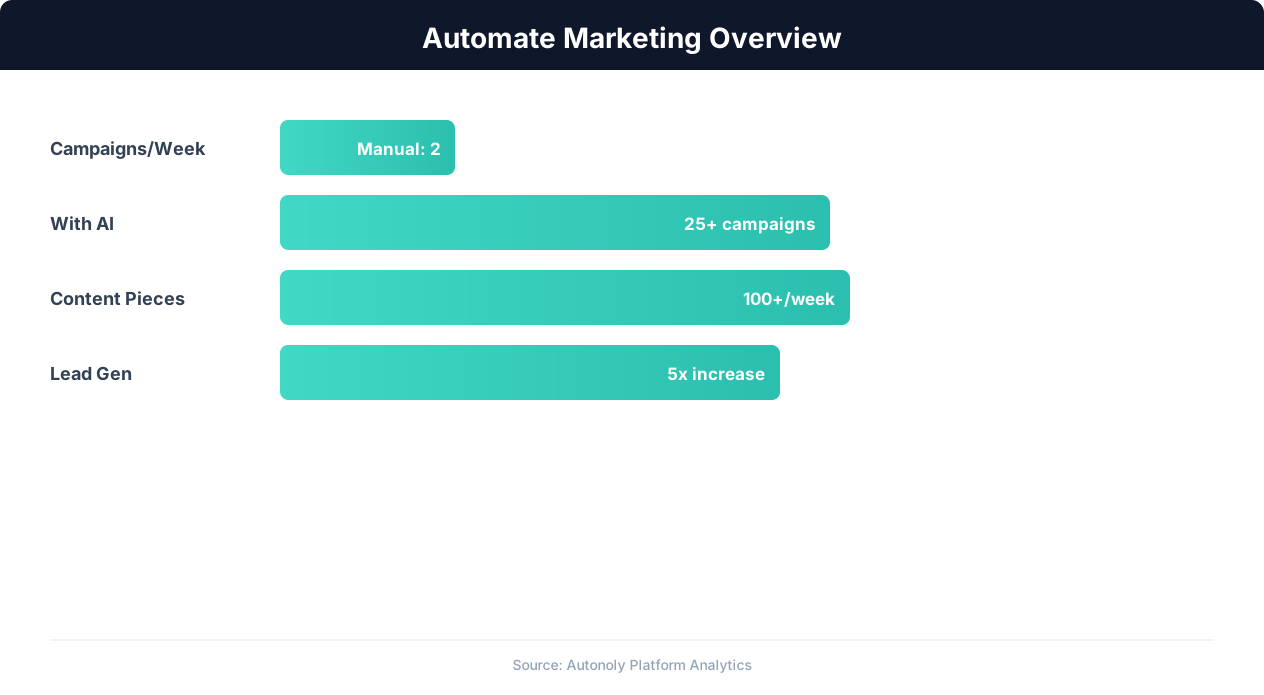
Marketing automation impact on campaign ROI
Key Insight: Companies automating their marketing analytics report 26% higher marketing ROI due to real-time performance tracking and rapid campaign optimization (Forrester).
How the AI Agent Does It
The agent opens your campaign parameter spreadsheet in Google Sheets via Browser Automation, reads the base URLs and UTM parameters, constructs the full tagged URLs using the Data Processing engine with proper URL encoding, validates them against your naming conventions, and writes the complete links back to the spreadsheet. The entire process runs in a real browser session, so it handles any spreadsheet formatting or formula dependencies.
Validation and Error Handling
Before generating each link, the agent validates that all required UTM parameters are present and correctly formatted. Missing parameters are flagged in the spreadsheet with a note explaining what needs to be filled in. Invalid characters are URL-encoded automatically.
Key Insight: 63% of marketers say their biggest challenge is generating traffic and leads. Automation addresses this by running campaigns 24/7 without manual intervention (HubSpot State of Marketing).
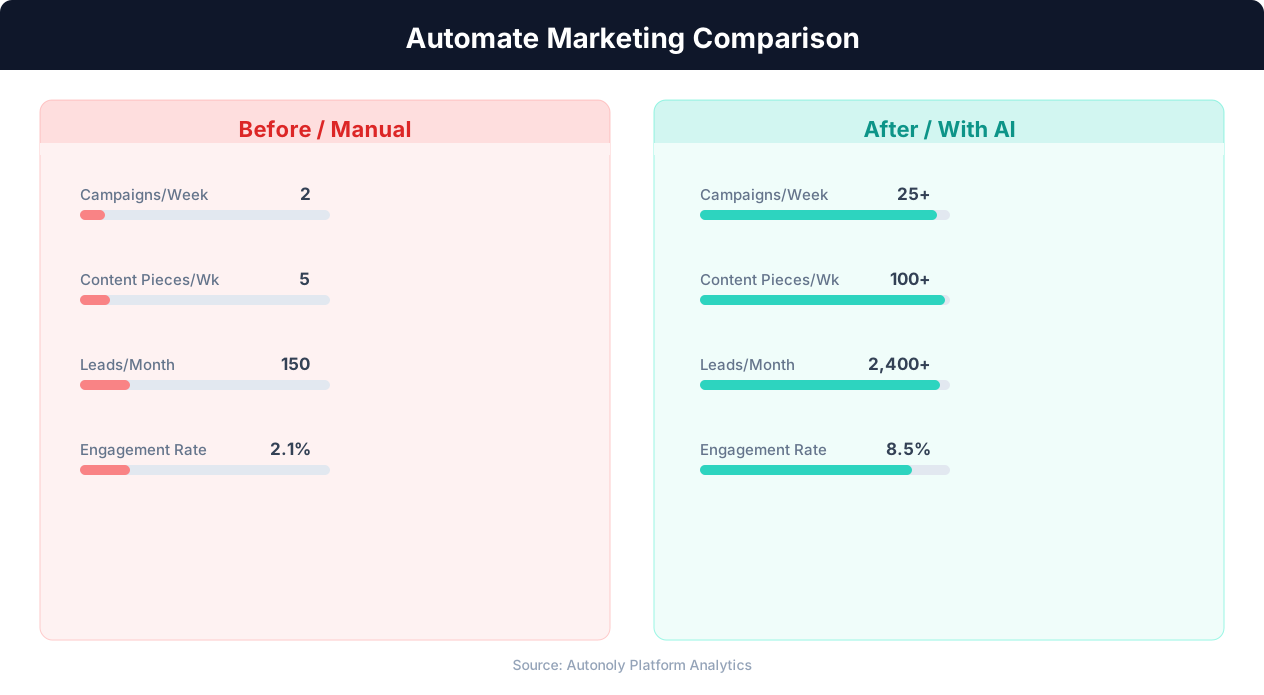
Content production speed in manual vs automated workflows
Key Insight: Automated content repurposing saves marketing teams 12+ hours per week while increasing content output by 3x across channels (Content Marketing Institute).
Scheduling and Automation
This workflow runs on-demand via the Visual Workflow Builder — trigger it whenever you set up a new campaign. You can also schedule weekly runs to process any new rows added to your campaign parameter Google Sheets spreadsheet. Add Logic & Flow conditions to automatically notify your team via Slack when new campaign links are ready, including the links themselves for easy copying.
Further Reading
Explore more about the tools and techniques used in this workflow: Marketing Automation, Automate Google Sheets.