


Why Automate Real Estate Listing Scraping?
The real estate market generates enormous amounts of listing data across dozens of platforms — Realtor.com, Redfin, Trulia, Homes.com, regional MLS sites, and more. Each platform presents data differently, making cross-platform comparison a manual nightmare. Investors analyzing deals, agents building CMAs (Comparative Market Analyses), and researchers studying market trends need this data in a unified, structured format.
Autonoly's Browser Automation scrapes listings from any real estate website into a consistent Google Sheets format, regardless of the source platform's layout or technology. This means you can compare Redfin listings side-by-side with Realtor.com data in a single spreadsheet.
How the AI Agent Scrapes Real Estate Sites
Every real estate platform is built differently — Zillow uses React, Redfin uses their own framework, and many MLS sites run legacy systems. Traditional scraping tools need custom configurations for each site. Autonoly's AI Agent Chat eliminates this complexity because the agent adapts to any website automatically.
Describe what you need in plain English — "scrape all 3-bedroom houses for sale in Denver under $600K from Redfin" — and the agent handles the rest. It launches a browser, navigates to the site, enters your search criteria, and uses Data Extraction to identify and collect listing data from each property card.
The agent handles site-specific challenges: Realtor.com's infinite scroll, Redfin's map-based search, Trulia's card-based results, and regional MLS sites that require login or specific navigation paths. Because it uses a real browser, JavaScript-rendered content, lazy-loaded images, and dynamically filtered results are all captured accurately.
What Data You Get
A standard real estate listing export includes:
Address — Full property address
List Price — Current asking price
Bedrooms — Bedroom count
Bathrooms — Bathroom count
Square Footage — Total living area
Lot Size — Property lot dimensions
Year Built — Construction year
Property Type — Single-family, condo, townhome, multi-family
Days on Market — How long the listing has been active
Listing Agent — Agent name and brokerage
MLS Number — Unique listing identifier
Source URL — Direct link to the original listing
You can request additional fields like HOA fees, tax assessment data, school district ratings, or open house dates.
Customizing Your Extraction
The Visual Workflow Builder transforms single scrapes into powerful real estate data pipelines:
Multi-source aggregation: Scrape the same market from Realtor.com and Redfin, then deduplicate by address to create a comprehensive listing inventory
Investment analysis: Chain a Data Processing step to calculate price per square foot, estimate cap rates, or score properties against your investment criteria
CMA automation: For real estate agents, automatically pull comparable sales data for a specific address and generate a comp sheet
Market boundary analysis: Scrape listings across adjacent zip codes to compare market conditions
Use SSH & Terminal to run advanced analysis — rental yield calculations, regression-based price estimates, or portfolio optimization models using the extracted listing data.
Scheduling and Market Tracking
Real estate markets are dynamic. New listings appear daily, prices get reduced, and properties go under contract. Schedule daily scrapes to maintain a current inventory database and track changes over time.
Historical data is invaluable for identifying trends: are prices rising or falling in a specific submarket? How quickly are listings selling? Are price reductions becoming more common? Automated daily collection builds this dataset without any ongoing manual effort.
Exporting and Integrating
Real estate data flows to multiple destinations:
[Google Sheets integration](/integrations/google-sheets) — Live collaborative spreadsheet for team analysis
Excel (.xlsx) — Download for offline modeling and presentations
[Notion](/integrations/notion) — Build a searchable property research database
[Airtable](/integrations/airtable) — Create visual kanban boards for deal tracking
Browse our templates library for pre-built real estate workflows. Check pricing for execution details. For concepts behind automated data collection, visit our workflow automation glossary. See the full Integrations catalog for all output options.
Use Cases
Real estate investors run market screening workflows to identify undervalued properties across multiple zip codes. Agents automate CMA data collection to save hours per listing presentation. Appraisers gather comp data from multiple MLS sources. Developers monitor land and teardown listings in target areas. Relocation companies track housing inventory across destination cities for corporate clients.
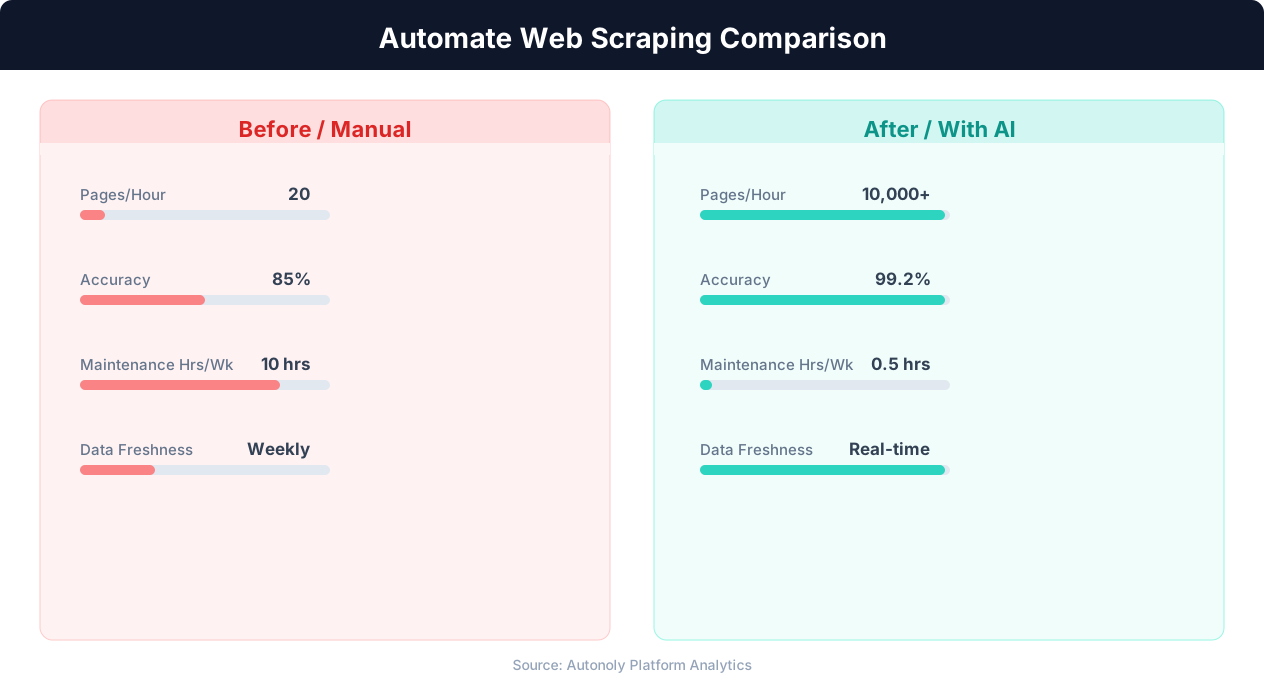
Data extraction speed for manual vs AI-powered scraping
Key Insight: Companies using automated data collection make strategic decisions 4x faster by having real-time competitive and market data instead of quarterly manual reports (Gartner).
How the AI Agent Does It
Autonoly's AI agent uses Browser Automation to launch a real Chromium browser and navigate any real estate website — Realtor.com, Redfin, Trulia, or regional MLS portals — just like a human buyer would. You describe your listing search in plain English, and the agent handles site-specific navigation, search filters, and pagination automatically. The Data Extraction engine identifies repeating property card patterns and pulls consistent fields from each listing, regardless of the source platform's layout or technology stack. Because the agent adapts to each site's structure semantically rather than relying on hardcoded selectors, your workflows keep running even when platforms update their design.
Cross-Platform Normalization
When scraping listings from multiple real estate platforms in a single workflow, the agent normalizes field names and data formats so that Redfin data and Realtor.com data appear in the same consistent columns. This eliminates the manual reformatting work that typically plagues multi-source real estate analysis.
Key Insight: AI-powered web extraction achieves 94% accuracy vs 72% for regex-based scrapers, while handling dynamic JavaScript-rendered content automatically (Diffbot Research).
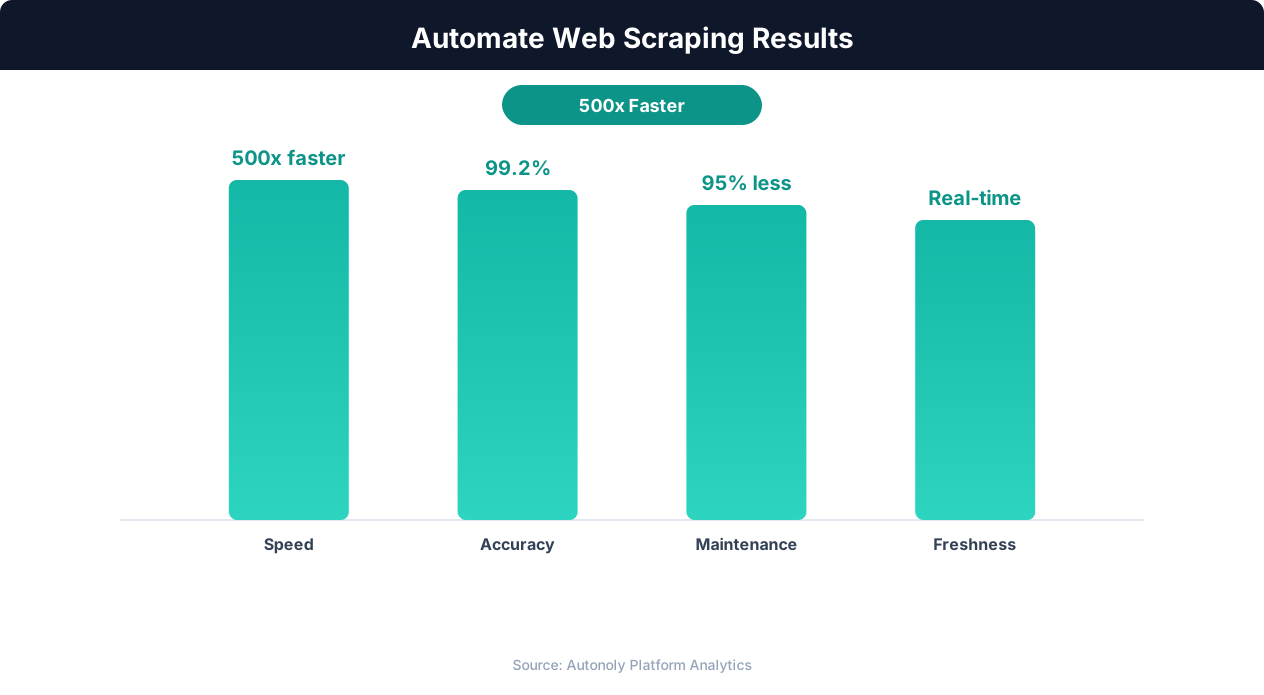
Data quality metrics for automated web scraping pipelines
Key Insight: 68% of traditional web scrapers break within 2 months due to website changes. AI-powered extraction adapts automatically, reducing maintenance by 85% (Oxylabs Research).
Customize Your Output
The Visual Workflow Builder transforms one-time listing scrapes into powerful real estate intelligence pipelines. Add Data Processing steps to calculate price-per-square-foot, estimate cap rates, or score properties against custom investment criteria. Use Logic & Flow conditions to route listings by property type — sending single-family homes to one sheet and multi-family properties to another — or to filter out listings that have been on the market too long. Schedule daily scrapes to build a historical database that tracks price reductions, new listings, and days-on-market trends over time. Results can flow to Google Sheets for collaborative team analysis, Airtable for visual kanban deal tracking, or Notion for a searchable property research database. For advanced analytics, use SSH & Terminal to run Python scripts that generate comparable sales reports, regression-based price estimates, or portfolio optimization models.
Further Reading
Explore more about the tools and techniques used in this workflow: Scrape Zillow Real Estate Data, Real Estate Automation.