


Why Automate Review Sentiment Tracking?
Customer reviews are the most honest and unfiltered source of product feedback available. They reveal what users truly think about your product — or your competitors' products — in their own words. But reviews are scattered across dozens of platforms: Amazon, G2, Capterra, TrustRadius, Trustpilot, the App Store, Google Play, and industry-specific sites. Manually monitoring all these sources, reading reviews, and categorizing feedback is impossible at scale.
Autonoly's Browser Automation automates the entire review monitoring pipeline — collecting reviews from multiple platforms, analyzing sentiment, categorizing topics, and delivering trend reports. This transforms scattered customer feedback into structured market intelligence.
How the AI Agent Tracks Review Sentiment
Autonoly's AI Agent Chat orchestrates multi-platform review collection. The agent visits each specified review platform, navigates to the target product's review section, and uses Data Extraction to pull review data — star ratings, review titles, full text, dates, and reviewer information.
After collection, a Data Processing step analyzes the review text for sentiment polarity (positive, negative, neutral) and topic categorization. Common topics include product quality, customer support, pricing, ease of use, performance, reliability, and integration capabilities. This automated analysis turns thousands of unstructured reviews into quantified, actionable intelligence.
The agent handles platform-specific challenges — G2's verified review badges, Capterra's categorized scoring system, Amazon's verified purchase indicators, and each platform's unique pagination and filtering mechanisms.
What Data You Get
A comprehensive sentiment tracking report includes:
Review Data:
Review Text — Full review content
Star Rating — Numerical rating per platform's scale
Reviewer — Display name and verification status
Date — When the review was posted
Platform — Which review site it came from
Sentiment — Positive, negative, or neutral classification
Topics — Categorized feedback themes
Trend Analysis:
Average rating over time — Monthly trend lines
Sentiment distribution — Percentage positive vs. negative
Topic frequency — Most discussed themes by time period
Platform comparison — How ratings differ across sites
Customizing Your Sentiment Tracking
The Visual Workflow Builder enables sophisticated review intelligence:
Competitive review monitoring: Track reviews for your product AND competitor products side by side
Topic deep-dives: Focus analysis on specific topics (e.g., only pricing-related feedback or only UX complaints)
Alert-based monitoring: Get notifications when negative reviews spike or when specific keywords appear
Response tracking: Monitor whether and how companies respond to negative reviews
Use SSH & Terminal to run advanced NLP models — topic modeling with LDA, aspect-based sentiment analysis, or custom classification models trained on your specific product domain. The raw review data provides the foundation for any level of analysis sophistication.
Scheduling and Continuous Monitoring
Review sentiment is a leading indicator of product health and market perception. Schedule weekly review collection to build a continuous feedback stream. Track how product updates, marketing campaigns, and support changes affect review sentiment over time.
Set up threshold alerts — when average ratings drop below 4.0, when negative review volume increases by more than 20%, or when a new topic emerges in feedback. These automated alerts catch reputation issues before they escalate.
Exporting and Integrating
Review intelligence flows to your team's tools:
[Google Sheets integration](/integrations/google-sheets) — Live sentiment dashboard with charts and trend data
Excel (.xlsx) — Comprehensive review dataset for deep analysis
[Notion](/integrations/notion) — Customer feedback knowledge base linked to product decisions
[Slack](/integrations/slack) — Weekly sentiment summaries and negative review alerts
Browse our templates library for pre-built review monitoring workflows. Visit pricing for execution details. For background concepts, see our web scraping glossary and workflow automation glossary. The Integrations page covers all available output options.
Use Cases
Product managers prioritize feature development based on the most frequently mentioned complaints and requests. Customer success teams identify at-risk accounts by monitoring individual review platforms for negative feedback. Marketing teams track competitive positioning by comparing sentiment across products. Quality teams detect product issues early through review monitoring. Executives use sentiment trend data in board presentations to demonstrate customer satisfaction trajectory.
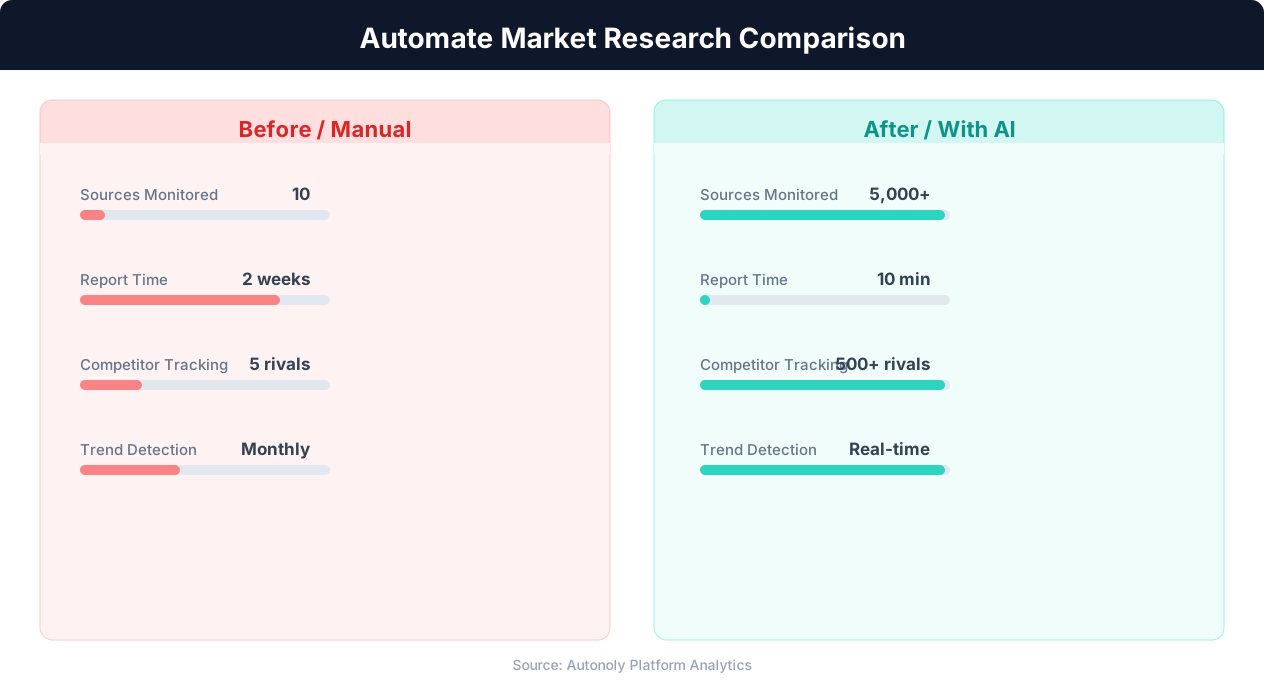
Data collection time for manual vs automated research
Key Insight: Automated market research delivers insights 10x faster than manual methods while covering 5x more sources and competitors (Crayon Competitive Intelligence Report).
How the AI Agent Handles This
The AI agent visits each review platform in a real browser using Browser Automation, navigating to the correct product pages, sorting reviews by date, and extracting review text, ratings, dates, and reviewer information using Data Extraction. It handles each platform's unique interface — G2's verified badge system, Capterra's multi-dimensional scoring, Amazon's verified purchase indicators, and App Store review layouts — without any site-specific configuration. After collection, the Data Processing engine analyzes review text for sentiment polarity and topic categorization, transforming unstructured customer feedback into quantified intelligence. The agent tracks which reviews it has already processed between runs, ensuring no duplicates in your dataset.
Cross-Platform Normalization
Different review platforms use different rating scales and review formats. The agent normalizes star ratings, sentiment scores, and review metadata into a consistent schema so you can compare customer feedback across platforms on equal footing.
Key Insight: 89% of competitive intelligence professionals say they cannot track competitors fast enough manually. Automation eliminates this gap entirely (Klue Research).
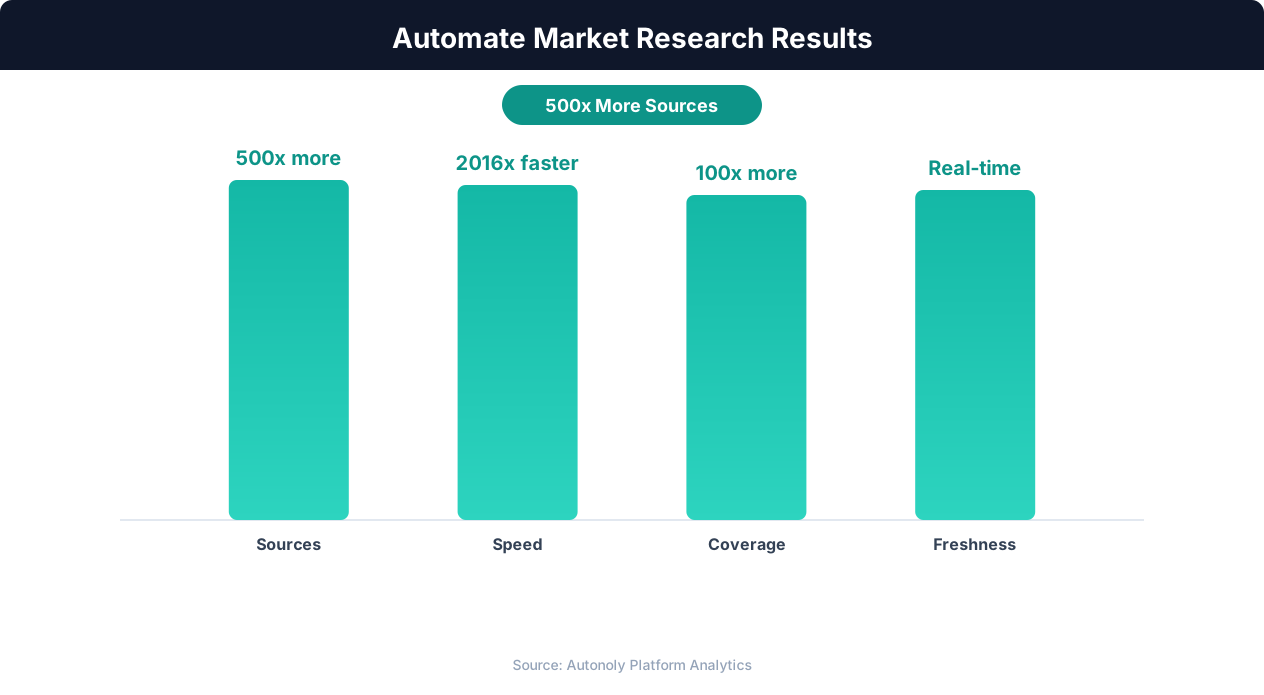
Competitive intelligence accuracy with AI-powered research
Key Insight: Companies with automated competitive monitoring are 2.3x more likely to gain market share, responding to competitor moves within hours instead of weeks (McKinsey Strategy).
Scheduling and Recurring Runs
Schedule weekly review collection through the Visual Workflow Builder to build a continuous feedback stream that tracks sentiment over time. Use Logic & Flow to set up threshold alerts — trigger Slack notifications when average ratings drop below a target, when negative review volume spikes, or when a new complaint topic emerges. Each run captures only reviews posted since the last execution, building a longitudinal dataset ideal for tracking the impact of product updates, marketing campaigns, and support changes on customer perception. Explore our templates for pre-built review monitoring workflows covering common SaaS and e-commerce use cases.
Further Reading
Explore more about the tools and techniques used in this workflow: Web Scraping Best Practices, Ai Workflow Automation, Ai Content.