

Why Automate Deal Won/Lost Notifications?
Closing a deal — whether won or lost — is the most important event in your sales pipeline, and how your organization responds to it in the first hours determines whether the momentum is captured or wasted. Won deals deserve celebration and recognition that reinforces winning behaviors across the team — and as Harvard Business Review research on win/loss analysis shows, the lessons captured at the moment a deal closes are the most accurate your organization will ever have. Lost deals require immediate analysis to capture learnings while the details are fresh in the rep's mind, before the specifics blur and the opportunity for improvement disappears. Yet in many teams, these pivotal moments pass without the broader organization knowing until the next weekly pipeline review meeting — by which time the emotional energy around a win has faded and the lessons from a loss have grown stale.
The impact of delayed closure notifications ripples across the organization. When customer success does not know about a new win until days later, the onboarding window narrows and the customer's initial enthusiasm cools. When marketing does not know which deals closed, they cannot attribute revenue to campaigns or calculate accurate ROI. When leadership does not see deal closures in real time, they lose the pulse of the business and make decisions based on lagging information. For lost deals, the delay is even more costly — competitive intelligence gathered from a fresh loss analysis is exponentially more valuable than a vague post-mortem conducted weeks later.
Automating deal closure notifications with Google Sheets and Slack ensures that every close is visible to the right people instantly. When a rep marks a deal as won, the team celebrates together in Slack. When a deal is lost, the feedback loop starts immediately rather than weeks later. This real-time visibility transforms how your organization learns, adapts, and improves its sales execution.
This visibility has compounding effects over time. Sales managers can spot trends in real time — if multiple deals are lost this week to the same competitor, they can adjust strategy immediately rather than discovering the pattern at the end of the quarter. New reps learn from watching deal outcomes across the team, absorbing patterns about what works and what does not. Support and customer success teams can prepare for incoming onboarding when they see a Closed Won notification, ensuring the customer experience starts strong.
How the AI Agent Detects Closed Deals
Autonoly's AI Agent Chat monitors your sales pipeline spreadsheet through Browser Automation on a recurring schedule. It compares each deal's current stage against the previous snapshot, specifically looking for transitions to "Closed Won" or "Closed Lost" (or whatever terminology your team uses). The detection is precise — it only fires on actual stage transitions, not on edits to other fields in the row.
The Data Extraction engine pulls comprehensive context for each closed deal: deal name, client company, deal value, owner, close date, days in pipeline, close reason, competitor information, and any notes. This context is included in the Slack notification so your team gets the full picture without clicking through to the spreadsheet.
The agent distinguishes between genuinely new closures and deals that were already closed in the previous run. Only fresh closures trigger notifications, so you never get duplicate alerts for deals that closed days ago.
What Data You Get
Each closure notification includes rich context for immediate action:
Deal Name and Client — Who the opportunity was with
Outcome — Closed Won or Closed Lost with clear visual indicator
Deal Value — Revenue won or lost
Sales Rep — Who owned and closed the deal
Days in Pipeline — Total time from opportunity creation to close
Close Reason — Why the deal was won or lost (if tracked in your spreadsheet)
Competitor — Who you won or lost against (if tracked)
Stage History — Which stages the deal passed through before closing
Celebrating Wins
When a deal closes as won, the notification creates a moment of shared celebration that reinforces winning behaviors. Use Logic & Flow to customize celebrations based on deal size. Deals above a certain value could trigger a message in a company-wide channel, while smaller wins stay in the sales team channel. Milestone deals — the largest deal of the quarter, or the hundredth customer — can trigger special formatting with congratulatory elements.
The Visual Workflow Builder lets you chain additional actions after a Closed Won notification — create a customer onboarding task, add the client to a welcome email sequence via Gmail, update a revenue tracking dashboard, or notify the customer success team to begin their handoff process. These downstream automations ensure that the positive momentum of a closed deal translates immediately into a great customer experience.
Analyzing Losses
Lost deal notifications serve a fundamentally different purpose — they are learning opportunities disguised as bad news. Each loss notification includes:
Deal name and client company
Deal value (lost revenue and its impact on quota)
Close reason (if your spreadsheet tracks it)
Competitor who won (if known)
Stage where the deal stalled before being lost
Days in pipeline and time spent in each stage
Route loss notifications to a dedicated #deal-losses channel for candid discussion. The immediate visibility helps the team identify patterns — are you losing to price, features, or timing? Is a specific competitor showing up repeatedly? Are deals stalling at the same stage, suggesting a gap in your sales process? This pattern recognition is impossible with weekly meetings and relies on real-time data flow.
Customizing Your Workflow
Add a Data Processing step to aggregate loss data into a monthly summary that tracks win rates, average deal cycle, and top loss reasons. Build a weekly competitive intelligence digest that summarizes which competitors appeared in won and lost deals. Create automated post-mortem prompts that ask the rep to fill in additional context within 24 hours of a loss while details are still fresh.
Integration Options
Connect deal closure notifications with your broader business workflows. Sync won deals to Airtable or Notion for customer success tracking. Post revenue updates to a finance dashboard in Google Sheets. Trigger contract generation workflows for won deals. Send loss summaries to the product team to inform roadmap priorities. Visit the Integrations page for all supported connections, or browse the templates library for pre-built deal notification workflows.
Use Cases
Sales managers maintaining real-time win/loss visibility across their team
Revenue operations teams tracking pipeline velocity, win rates, and competitive dynamics
Customer success teams preparing for onboarding the moment a deal closes
Executive leadership monitoring business health through deal closure patterns
Product teams learning from lost deals to prioritize features that affect competitive outcomes
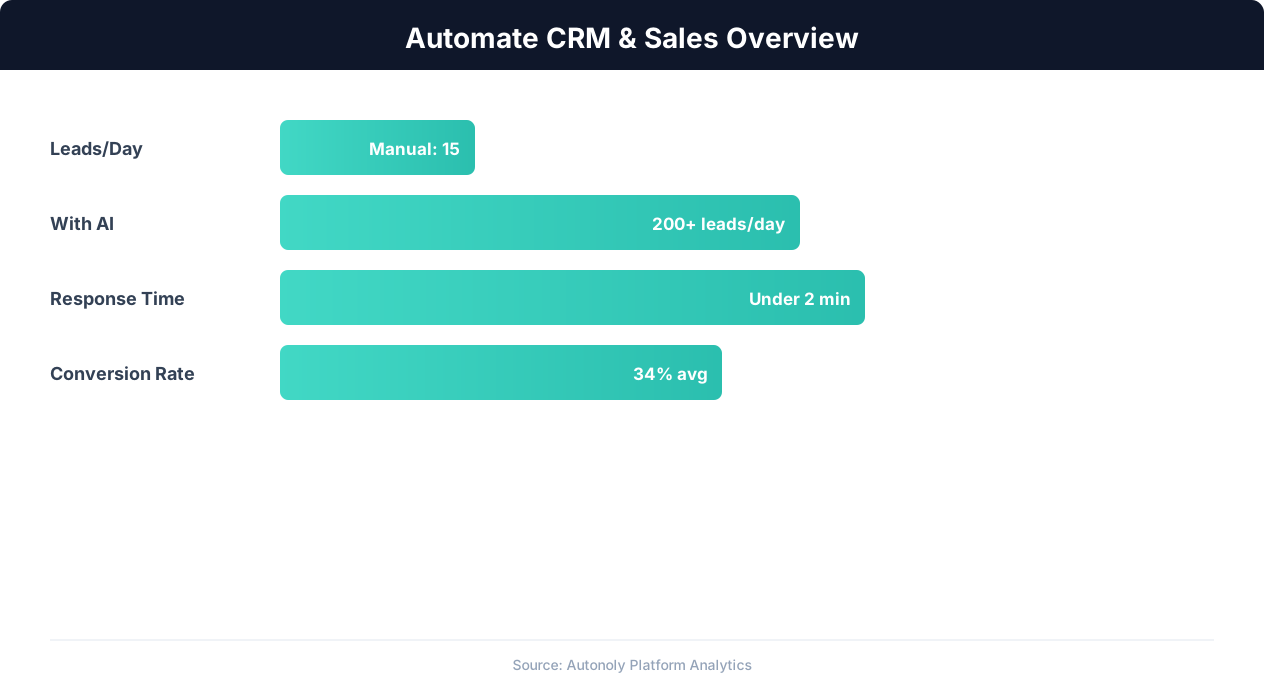
CRM automation impact on lead conversion rates
Key Insight: Responding to leads within 5 minutes makes you 9x more likely to convert them. Automated capture and routing makes sub-minute response times possible.
How the AI Agent Does It
The agent opens your Google Sheets pipeline via Browser Automation, reads the current state of all deals, and compares against its stored snapshot to identify new closures. For each Closed Won or Closed Lost transition, it composes a formatted Slack message with full deal context and posts it to the appropriate channel. The agent manages authentication, state tracking, and message formatting entirely on its own.
Handling Custom Pipeline Stages
Your team might use different terminology — "Won," "Closed-Won," "Deal Closed," "W," or custom stage names. The agent adapts to your specific vocabulary. Simply tell it which stage values represent won and lost outcomes, and it monitors for those exact transitions. It also handles partial matches and common variations.
Key Insight: Organizations that automate CRM data entry report 41% higher revenue per salesperson and 27% faster deal close rates (Nucleus Research).
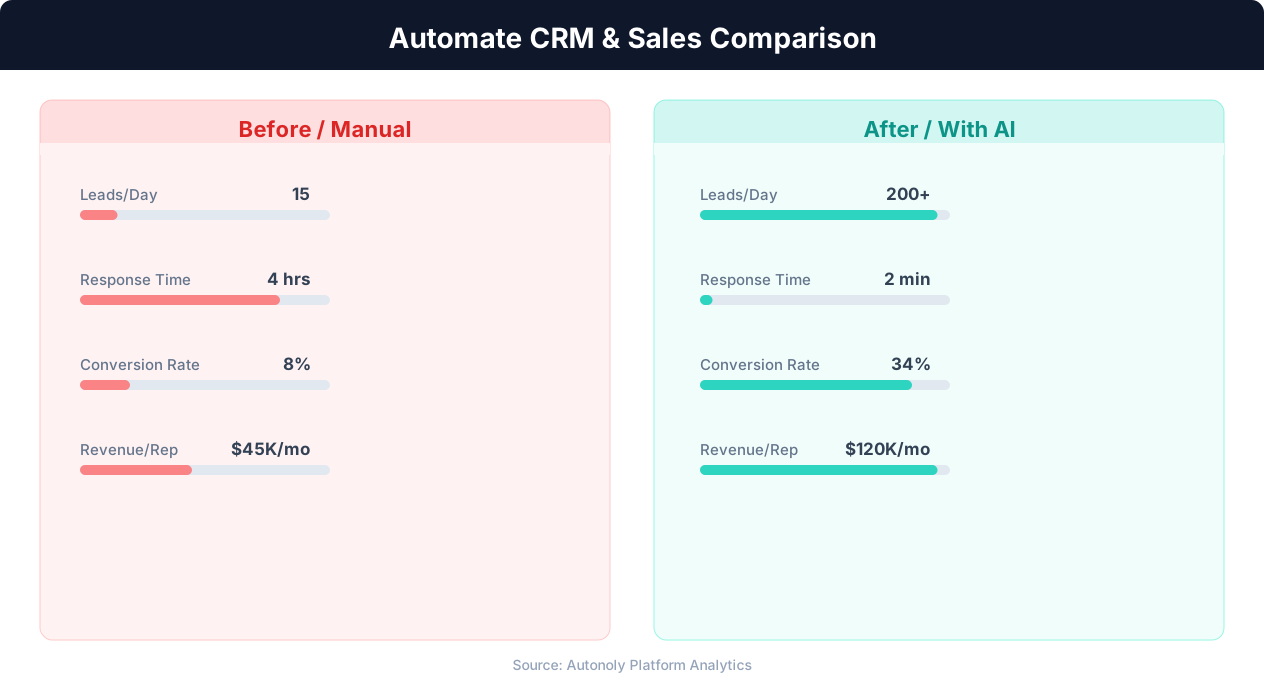
Manual vs automated CRM data entry time comparison
Key Insight: Sales reps spend only 28% of their time actually selling — the rest goes to data entry, scheduling, and admin tasks that automation can eliminate (Salesforce Research).
Scheduling and Automation
Schedule this workflow to run every four hours using the Visual Workflow Builder. The agent monitors your pipeline in Google Sheets and posts to Slack only when deals close. Add Logic & Flow conditions to route won and lost deals to different channels, tag specific team members for high-value closures, suppress duplicate alerts for deals that toggle between stages, or trigger downstream onboarding workflows when deals are won. For high-velocity teams, increase to hourly monitoring to keep celebrations timely. See our pricing page for scheduling options.
Further Reading
Explore more about the tools and techniques used in this workflow: No Code Automation Guide, Automate Email Reports, Webhooks.