


Why Transform API Data for Sheets?
APIs are the primary way modern applications share data, but their JSON responses are designed for machines, not humans. Nested objects, arrays within arrays, inconsistent field names, and paginated responses make it difficult for non-technical team members to work with API data directly. Google Sheets, on the other hand, is the tool where most business analysis actually happens.
The gap between raw API data and analysis-ready spreadsheet data is where most integration projects get stuck. Custom code is expensive to write and maintain. Manual copy-paste from API explorers does not scale. Autonoly bridges this gap by automating the entire fetch-transform-load pipeline, making API data accessible to anyone who can use a spreadsheet.
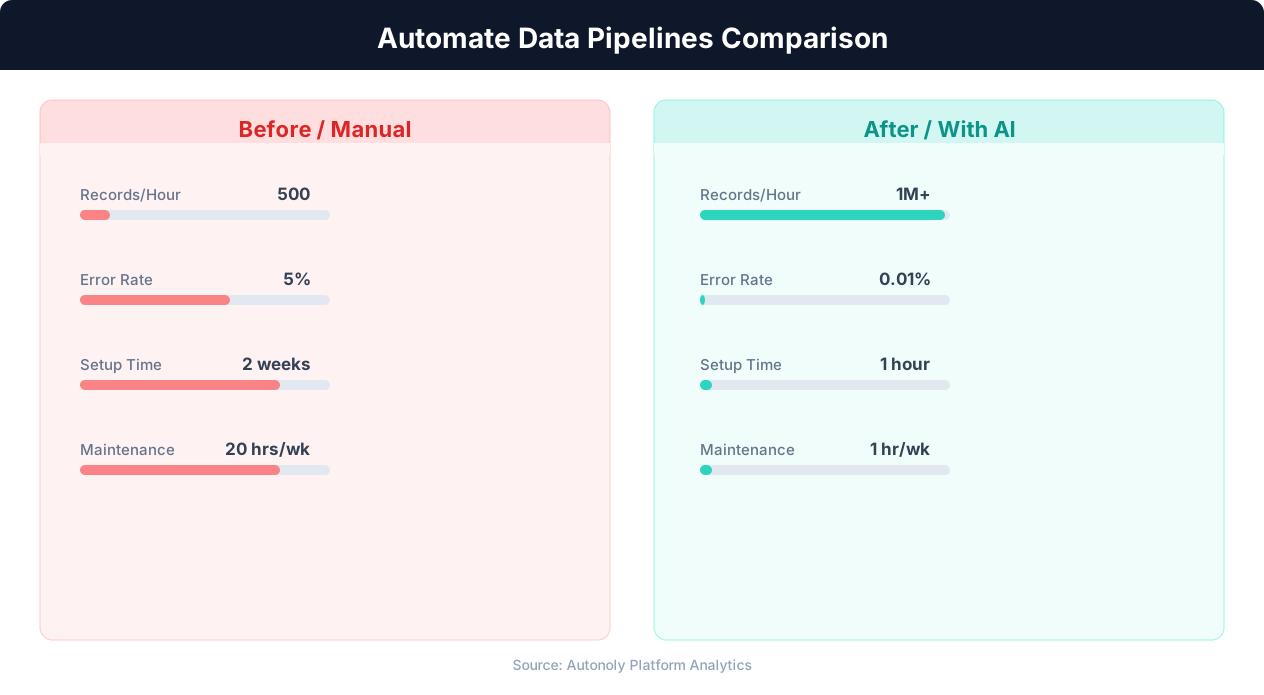
Error rates in manual vs automated data pipelines
Key Insight: Automated data pipelines reduce data processing errors by 87% compared to manual ETL processes (McKinsey Data & Analytics Report).
How Autonoly Handles API-to-Sheets Pipelines
The AI Agent Chat lets you describe the pipeline conversationally. You might say "fetch all orders from our Shopify API, flatten the line items, and put them in a Google Sheet" or "pull the latest weather data for 10 cities from the OpenWeather API and save to Sheets." The agent handles authentication, pagination, JSON parsing, and flattening automatically.
Connecting to Any REST API
Autonoly connects to any REST API that uses standard HTTP protocols. The SSH & Terminal feature handles API calls that require complex authentication — OAuth flows, API key headers, bearer tokens, or custom signing. For APIs behind VPNs or firewalls, the container execution environment can establish the necessary connections.
The agent handles pagination intelligently — whether the API uses page numbers, cursor-based pagination, or next-page URLs. It fetches all available data across multiple pages without you needing to understand the pagination scheme.
JSON Flattening and Transformation
Nested JSON is the biggest challenge in API-to-spreadsheet pipelines. A single API response might contain objects nested three or four levels deep, arrays of varying lengths, and fields that appear conditionally. Autonoly's Data Processing engine flattens these structures into clean rows and columns.
For example, an order API might return a JSON object with customer details nested inside an order object, which contains an array of line items, each with its own nested product details. The flattening produces one row per line item with all parent fields included — order ID, customer name, product name, quantity, and price — all in a flat, spreadsheet-friendly format.
You control the flattening strategy through the Visual Workflow Builder. Options include flattening arrays into separate rows (one-to-many expansion), concatenating array values into a single cell, or creating separate sheets for different nested entities.
Data Type Handling
APIs return data as strings, numbers, booleans, timestamps, and null values. The agent converts these to appropriate spreadsheet types — dates are formatted as dates, numbers as numbers, and booleans as clear yes/no values. The Data Extraction capabilities handle specialized data types like geolocation coordinates, ISO timestamps, and encoded binary fields.
Scheduling API Data Pulls
Most API data pipelines benefit from regular execution. Sales data might be pulled daily, analytics weekly, and financial data monthly. Autonoly's scheduling system handles retries when APIs are temporarily unavailable and implements rate limiting to stay within API quotas. The Logic & Flow feature adds error handling — if an API returns an error, the workflow can retry, alert you, or fall back to cached data.
Building Multi-API Dashboards
Advanced users combine data from multiple APIs into a single Google Sheet, creating a unified dashboard. For example, you might pull CRM data from HubSpot, revenue data from Stripe, and analytics data from Google Analytics — all flattened and merged into one sheet for executive reporting. The Browser Automation feature can supplement API data with web-scraped data for sources that lack APIs.
Visit the templates library for pre-built API pipeline workflows, check the pricing page for plan details, and explore the Integrations ecosystem. For more on APIs and integration patterns, see the API integration glossary, workflow automation glossary, and web scraping glossary. The Google Sheets integration page has more details on supported Sheets operations.
Key Insight: Data teams spend 80% of their time on data preparation and pipeline maintenance. Automation can reclaim up to 60% of that time (Anaconda State of Data Science).
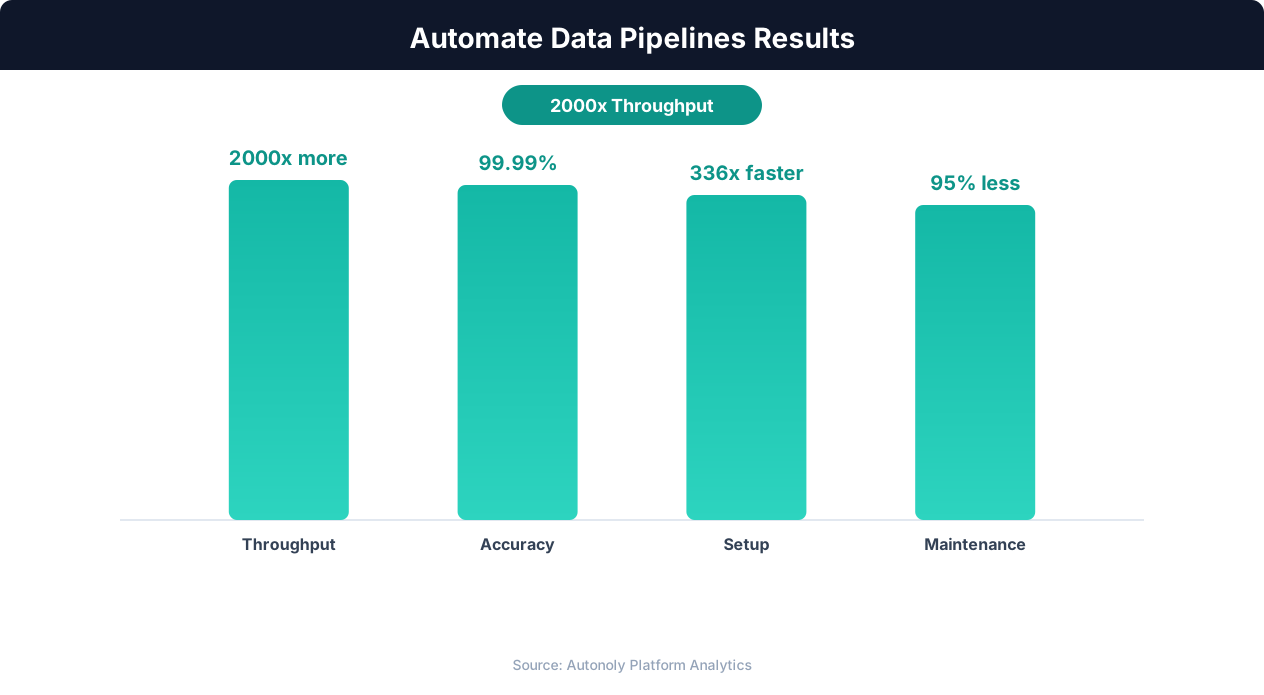
Data processing throughput with automated pipelines
Key Insight: Pipeline failures cost enterprises an average of $15 million per year in lost productivity and delayed decisions. Automated monitoring cuts this by 73% (Gartner).
Getting Started
Setting up an API-to-Sheets pipeline takes just a few minutes. Open the AI Agent Chat and describe the API you want to pull from — include the endpoint URL, authentication method, and what data you need. The agent builds the full pipeline automatically: API calls, pagination handling, JSON flattening, and Sheets delivery. You can refine the transformation rules in the Visual Workflow Builder afterward, adjusting which fields to include, how nested arrays are handled, and the output sheet format.
Handling Authentication and Secrets
API keys, OAuth tokens, and other credentials are stored securely in Autonoly's credential vault. The agent references these credentials at runtime without exposing them in the workflow configuration. For OAuth 2.0 flows, the SSH & Terminal feature can execute custom authentication scripts that handle token refresh, multi-step OAuth, or API-specific signing requirements. This ensures your pipeline stays authenticated even when tokens expire.
Error Handling and Retries
APIs are inherently unreliable — servers go down, rate limits are hit, and responses occasionally contain unexpected data. Autonoly's Logic & Flow feature adds robust error handling to your pipeline. Configure automatic retries with exponential backoff for transient failures, fallback to cached data when the API is unavailable, and alert notifications via Slack or email when a pipeline run fails. These safeguards ensure your Google Sheets data stays fresh even when upstream APIs have issues.
Further Reading
Explore more about the tools and techniques used in this workflow: No Code Automation Guide, Automate Google Sheets, Api Http.