The Legacy App Problem: Billions of Hours Lost to Manual Clicks
Every organization has them. The government portal that only works in a specific browser. The insurance carrier system built on Oracle Forms. The internal CRM from the pre-API era that somehow still runs half the business. The banking portal that requires 47 clicks to process a single wire transfer. Understanding what automation is and how a solid workflow automation approach handles these UI-only systems is what unlocks them.
These are legacy web applications — systems critical to daily operations that were built before modern integration standards existed. They have no APIs. No webhooks. No Zapier connectors. The only way to interact with them is through their browser-based user interface.
The Scale of the Problem
Over 70% of enterprise applications are classified as "legacy" — predating modern API and integration standards. The average enterprise IT department spends 60-80% of its budget maintaining these systems. Knowledge workers spend an estimated 30-40% of their time on manual data entry tasks that exist solely because these systems cannot talk to each other.
The frustration is universal. IT teams know these systems need automation. Operations managers watch employees waste hours on repetitive clicking. But when they explore solutions, they hit a wall: traditional automation tools either require APIs (which these systems do not have) or require enterprise RPA platforms costing $10K-$100K+ per year with specialized developers.
This article is for the teams stuck in that gap. There is a third path: AI browser agents that automate legacy web apps through the UI itself, the same way a human would, but faster, cheaper, and without the errors.
The Legacy App Landscape: What You're Actually Dealing With
"Legacy app" is a broad term. To automate effectively, you need to understand the specific categories of systems you are dealing with.
Government and Regulatory Portals
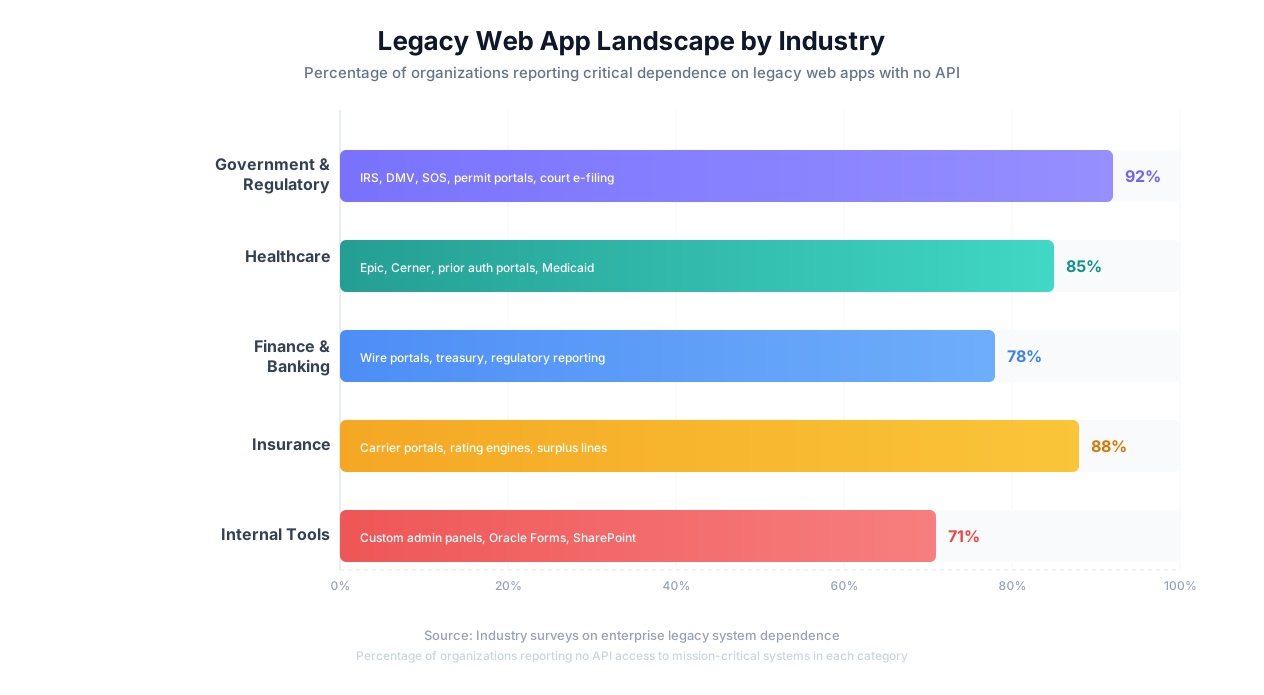
Government portals are the most universally frustrating legacy systems. Every business interacts with them for tax filings, license renewals, permit applications, and compliance submissions — yet almost none offer API access. They share common pain points: aggressive session timeouts, inconsistent UI design across agencies, multi-step form wizards, and browser-specific quirks.
Examples: IRS tax transcript portal, state Secretary of State business filing systems, county property tax portals, municipal permit systems, OSHA reporting, court e-filing systems, DMV services.
Healthcare Systems
Healthcare is one of the most legacy-dependent industries. Systems like Epic and Cerner dominate hospital operations with web interfaces that remain fundamentally closed ecosystems. Each insurance carrier has its own portal for prior authorizations, claims status, and eligibility verification — all requiring manual navigation.
Examples: Epic MyChart/Hyperspace web, Cerner PowerChart web, insurance carrier prior auth portals, state Medicaid enrollment systems, CMS quality reporting portals.
Financial and Banking Portals
Financial institutions maintain some of the oldest legacy systems in any industry. Core banking systems built on mainframes now have web interface layers, but the underlying systems have no modern integration points. Wire transfers, ACH processing, and regulatory reporting all require navigating through multiple screens.
Examples: Commercial banking portals, treasury management systems, trade settlement platforms, regulatory reporting portals (FDIC, SEC, FINRA).
Insurance Carrier Portals
Independent insurance agencies face a unique challenge: interacting with 15-30 different carrier portals, each with its own proprietary interface. Getting competitive quotes means entering the same client data into multiple portals sequentially. None have APIs available to independent agents.
Examples: Carrier-specific agent portals (Travelers, Hartford, Progressive Commercial), surplus lines filing systems, state insurance department portals.
Internal Tools and Custom Applications
The most overlooked category: internal tools built by developers who left the company years ago. These applications handle essential functions but have zero documentation, no API layer, and no one who fully understands the code.
Examples: Custom PHP/Java admin panels, Oracle Forms web applications, Lotus Notes web interfaces, SharePoint classic workflows, Citrix-published applications.
Common Misconception
"We should just replace the legacy system." Legacy system replacement projects take 2-5 years on average, cost millions, and have a 50-70% failure rate. Automation through the existing UI delivers value immediately while the replacement debate continues indefinitely.
| Category | Typical # of Portals | Avg. Manual Time per Task | API Availability |
|---|---|---|---|
| Government | 10-20 per business | 15-45 min | None |
| Healthcare | 5-15 per practice | 20-40 min | Very Limited |
| Finance/Banking | 3-8 per company | 10-30 min | Limited |
| Insurance | 15-30 per agency | 15-25 min per carrier | None |
| Internal Tools | 5-15 per org | 5-20 min | None |
Three Approaches to Automating Legacy Web Apps
When you need to automate a legacy web app with no API, you have three realistic options. Each has fundamentally different cost structures, technical requirements, and trade-offs.
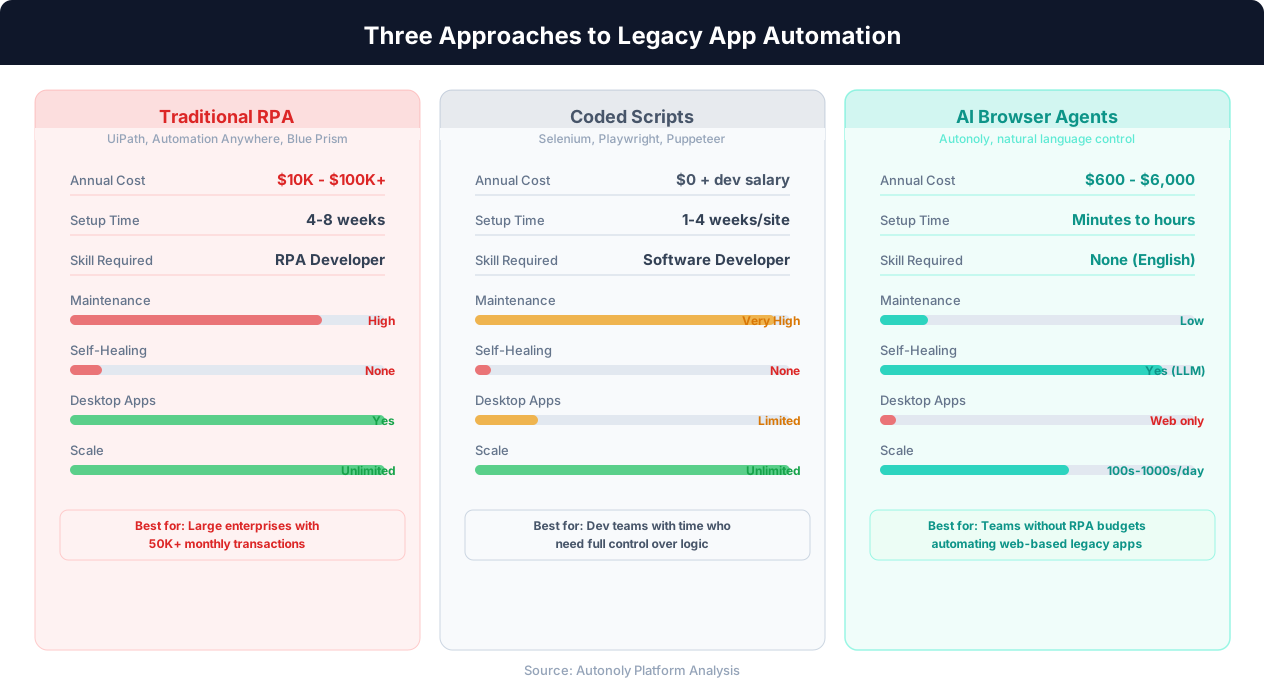
Approach 1: Traditional RPA (UiPath, Automation Anywhere, Blue Prism)
Enterprise RPA platforms record user interactions and replay them as automated scripts. They are proven technology with genuine enterprise value — but they come with significant costs.
Strengths: High-volume transaction processing (50K+ per month), desktop app support, enterprise-grade audit trails and governance, established vendor ecosystems.
Limitations: Platform licenses range from $10K-$100K+/year. Per-bot licensing adds $5K-$15K per bot annually. Implementation requires certified RPA developers and takes 4-8 weeks per process. Bots rely on fixed selectors that break when target UIs change, requiring constant maintenance.
RPA Reality Check
If your organization processes 50,000+ transactions per month through legacy systems and has the budget for a dedicated RPA team, enterprise RPA remains a strong choice. The issue is that most mid-market companies cannot justify the investment. See our detailed Autonoly vs UiPath comparison.
Approach 2: Custom Coded Scripts (Selenium, Playwright, Puppeteer)
Write automation scripts using browser automation frameworks like Playwright, Selenium, or Puppeteer. Full control, no licensing costs — but extreme fragility.
Strengths: Complete control over logic, no licensing costs (open-source), integration with any programming ecosystem.
Limitations: Requires a developer to write and maintain. Hard-coded CSS selectors break the moment the target app changes its HTML structure. Each new legacy app requires a separate script. Ongoing maintenance tax is the highest of all three approaches.
Approach 3: AI Browser Agents
AI browser agents combine automation frameworks with large language models to create agents that see, reason about, and interact with any web application — without hard-coded selectors or pre-programmed sequences.
How it works: Describe the task in plain English. An AI agent opens a real browser, navigates to the target app, reads the page via DOM parsing and screenshot analysis, reasons about what to do next, and interacts with the UI — adapting to whatever it encounters.
Strengths: No coding required. Self-healing (adapts to UI changes automatically). Universal compatibility with any web app. Setup takes minutes, not weeks. Annual costs are a fraction of RPA.
Limitations: Slower than direct API calls. Web apps only (not native desktop apps). Moderate transaction volumes (hundreds to thousands per day vs. unlimited for RPA).
| Factor | Traditional RPA | Coded Scripts | AI Browser Agents |
|---|---|---|---|
| Annual Cost | $10K-$100K+ | $0 + developer salary | $50-$500/month |
| Setup Time | 4-8 weeks per process | 1-4 weeks per site | Minutes to hours |
| Technical Skill | RPA developer | Software developer | None (describe in English) |
| Maintenance | High (30-50% of time) | Very High | Low (self-healing) |
| Handles UI Changes | Poorly | Does not | Adapts automatically |
| Desktop App Support | Yes | Limited | Web apps only |
| Scale | Unlimited | Unlimited | 100s-1000s/day |
Real-World Examples: Legacy App Automation in Practice
Here are concrete examples of legacy web apps that organizations actually automate, with the specific challenges each presents.
Example 1: Multi-State Tax Filing Portals
The system: A multi-state business files quarterly sales tax returns through 8 different state Department of Revenue portals. Each has a completely different interface, different field names, and different submission workflows.
Before automation: An accountant logs into each portal, navigates to the filing section, enters gross sales, taxable sales, and tax collected. Some states require itemization by county. Total: 3-4 hours per quarter across all states.
With AI agents: The agent receives a structured data file, sequentially navigates to each state portal, adapts to each state's unique form layout, enters the appropriate data, submits, and captures confirmations. If a portal is down, the agent retries later.
Result: 3-4 hours reduced to 25 minutes of agent runtime plus 10 minutes of human review.
Example 2: Oracle Forms Inventory System
The system: A manufacturing company's inventory runs on an Oracle Forms application exposed through a web browser. Built in the early 2000s, tracking 15,000+ SKUs across 3 warehouses. No API, no export function, and the original developers are long gone.
Before automation: Warehouse managers generate daily reports by logging into the Oracle Forms web interface, navigating through 4 menu levels, setting filter parameters, running queries, and manually copying results into Excel. Roughly 15 iterations per day, consuming 90 minutes.
With AI agents: The agent navigates the Oracle Forms web interface, works through the menu structure and filter parameters for each combination, extracts structured data, and compiles everything into a single spreadsheet. Runs automatically at 5 AM.
Result: 90 minutes of daily manual work eliminated. Data is more complete because the agent consistently runs all combinations — humans often skip some under time pressure.
Key Pattern
In every example, the manual process involves navigating the same UI repeatedly with slightly different inputs. This is the sweet spot for AI browser agents: repetitive UI interactions where the structure is consistent but the data changes.
Example 3: Insurance Carrier Quote Collection
The system: An independent insurance agency submits commercial applications through carrier-specific portals — Travelers, Hartford, Progressive Commercial, Nationwide, CNA. Each has a completely different form layout. None have APIs for independent agents.
Before automation: For each new client, a producer enters the same client data into 6-8 carrier portals to get competitive quotes. Each takes 15-30 minutes. Total: 2-4 hours per client.
With AI agents: The agent reads client data from the agency management system, navigates to each carrier's portal, adapts to each carrier's unique form layout, enters data, and compiles quotes into a comparison spreadsheet.
Result: 2-4 hours per client reduced to 20-30 minutes. With 10-15 new clients per week, this saves 20-50 hours weekly — equivalent to a full-time employee.
Example 4: Medicare Eligibility Verification
The system: A multi-location medical practice verifies patient insurance eligibility before appointments through CMS and state Medicaid web portals. No batch processing — individual lookups only.
Before automation: Front desk staff enter each patient's information into the portal, wait for the response, and record coverage details. With 150+ patients per day, this consumes 4-6 hours of staff time daily.
With AI agents: The agent receives the next day's patient schedule, performs lookups for each patient, extracts coverage details, and updates the practice management system. Patients with eligibility issues are flagged for staff follow-up.
Result: 4-6 hours of daily manual work eliminated. Eligibility issues are caught the day before the appointment instead of at check-in.
ROI Analysis: Manual vs. RPA vs. AI Browser Agents
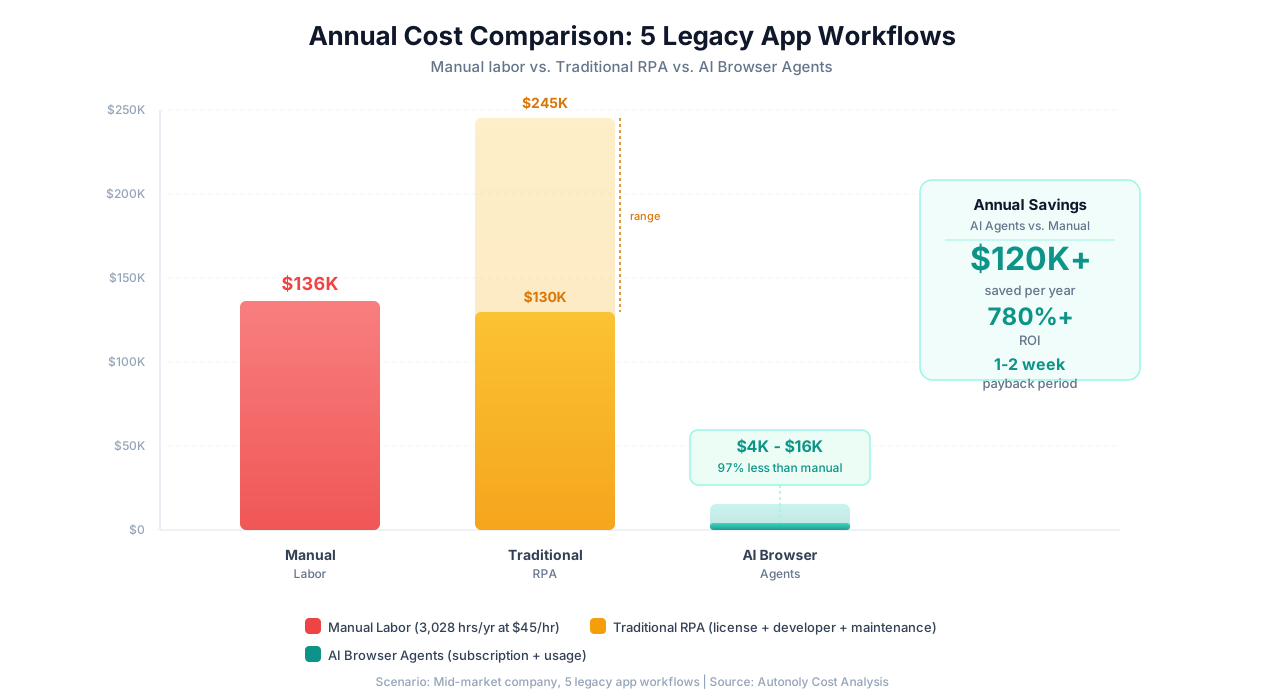
The decision to automate legacy web apps comes down to return on investment. Here is a realistic cost comparison for a mid-market company automating 5 legacy app workflows.
The Scenario: 5 Workflows
Quarterly tax filings across 6 state portals. Daily inventory report extraction from Oracle Forms ERP. Weekly insurance carrier quote submissions across 8 carriers. Daily eligibility verification for 100 patients. Monthly compliance filings on 3 government portals.
Cost Breakdown
| Approach | Annual Cost | Annual Savings vs. Manual | ROI |
|---|---|---|---|
| Manual (status quo) | $136,260 (3,028 hrs at $45/hr) | — | — |
| Traditional RPA | $130,000-$245,000 | $0 to negative | Breakeven at best |
| AI Browser Agents | $4,100-$15,500 | $120,760-$132,160 | 780-3,200% |
For this mid-market scenario, traditional RPA costs more than the manual labor it replaces in the first year. The economics only work at very high transaction volumes (50K+ monthly). AI browser agents deliver the same outcomes for a fraction of the cost, with payback periods of 1-2 weeks.
Important Caveat
These RPA cost estimates are for mid-market companies. Large enterprises processing hundreds of thousands of transactions may achieve strong ROI with RPA because per-transaction costs drop at scale. If your organization processes 50K+ transactions monthly, RPA deserves serious evaluation.
Implementation Roadmap: From Manual to Automated in 30 Days
A practical, week-by-week roadmap for automating your first legacy web app workflow.
Week 1: Audit and Prioritize
Catalog every legacy web app your team interacts with. For each, record the application name, tasks performed, frequency, time per task, and whether the task follows a repeatable pattern. Score each by automation potential:
| Criterion | High Score (automate first) | Low Score (automate later) |
|---|---|---|
| Frequency | Daily or weekly | Quarterly or annual |
| Time per occurrence | 30+ minutes | Under 5 minutes |
| Repetitiveness | Same steps every time | Highly variable |
| Error impact | Errors cause downstream problems | Errors easily caught |
Week 2: Pilot Setup
Document the manual process step by step — the same way you would train a new employee. Include the starting URL, login credentials (use a dedicated service account), navigation steps, data to enter, and expected outputs. Then set up the agent:
- Provide the task description to the AI agent chat
- Enter the starting URL and credentials
- Watch through the live browser view as the agent executes
- Provide feedback if needed and iterate
Week 3: Production Deployment
Schedule the agent, configure output delivery (Google Sheets, email, Slack), set up error notifications, and manually verify outputs for the first week.
Week 4: Expand
Automate the next 2-3 highest-priority tasks. Each subsequent automation is faster because you understand the pattern. Start exploring hybrid workflows that combine API-based automation for systems that have APIs with AI browser agents for legacy systems that do not.
Success Pattern
The most successful legacy app automation projects follow a "prove it small, scale it fast" approach. Start with one well-defined workflow, demonstrate clear ROI within 2 weeks, then expand. Trying to automate everything at once is the most common reason automation projects stall.
Security and Compliance Considerations
Legacy web apps often handle sensitive data — financial records, patient information, tax data. Automating interactions with these systems requires careful attention to security.
Credential Management
- Dedicated service accounts: Create separate login credentials for the automation agent. Never use personal employee credentials.
- Encrypted storage: Ensure credentials are encrypted at rest (AES-256) and in transit (TLS 1.3). Credentials should never appear in logs or error messages.
- Least privilege: Grant the service account only the minimum permissions needed for the specific task.
- Regular rotation: Rotate service account passwords on a regular schedule.
Compliance Frameworks
| Regulation | Applies When | Key Requirement |
|---|---|---|
| HIPAA | Healthcare data | BAA with platform vendor, encrypted PHI, audit logs |
| SOC 2 | Any sensitive data | Platform security certification, data isolation |
| GDPR | EU personal data | Data processing agreement, data minimization |
| PCI DSS | Payment card data | Encrypted transmission, restricted access |
Risk Mitigation
- Human-in-the-loop: For financial submissions and regulatory filings, configure the agent to pause before final submission for human approval.
- Read-before-write: Start with read-only tasks (data extraction, status checking) before write operations (form submissions, data entry).
- Staged rollout: Run the agent in parallel with the manual process for 1-2 weeks. Compare outputs to verify accuracy.
Work With Your IT Team
Before automating any legacy system that handles sensitive data, involve your IT security and compliance teams. They may have specific requirements around network access, MFA handling, and data classification that affect how the automation is configured.
Getting Started: Your Next Steps
If you are dealing with legacy web apps that consume your team's time, here is how to move forward.
Quick Self-Assessment
- Do you interact with web-based applications that have no APIs? If yes, browser-based automation is your only option short of enterprise RPA.
- Does your team spend more than 5 hours per week on repetitive tasks in these systems? If yes, the ROI is almost certainly positive.
- Can the tasks be described as a repeatable procedure? If a new employee could follow written instructions, an AI agent can do it too.
- Is your budget for this problem under $50,000? If yes, enterprise RPA is out of reach, and AI browser agents are the practical alternative.
If you answered "yes" to most of these, you are a strong candidate for legacy app automation via AI browser agents.
Start Today
- Pick one task. Choose the most repetitive, time-consuming interaction with a legacy web app.
- Document it. Write the steps as if training a new employee.
- Try it. Create a free Autonoly account, describe the task to the AI agent, and watch it work through the live browser view.
- Measure it. Compare time, accuracy, and cost against the manual process.
Most teams go from "skeptical" to "expanding to more workflows" within a single week. For more context, see our guide on automating without APIs, the Autonoly vs UiPath comparison, and What Are AI Agents?
The Bottom Line
Legacy web apps are not going away. The average enterprise will be running them for another 10-20 years. The question is not whether to automate — the manual costs are too high — but how. AI browser agents have made the answer accessible to every team, not just the ones with six-figure automation budgets.