


Why Scrape Glassdoor Reviews?
Understanding how employees perceive a company is essential for recruitment strategy. Whether you are a talent acquisition leader benchmarking your employer brand, a recruiter preparing candidates for interviews, or an HR analyst tracking sentiment trends, Glassdoor data provides invaluable insight.
Manually reading and categorizing hundreds of reviews across multiple companies is impractical. Autonoly's Browser Automation does the heavy lifting — navigating Glassdoor, expanding review text, handling pagination, and extracting every review into structured rows.
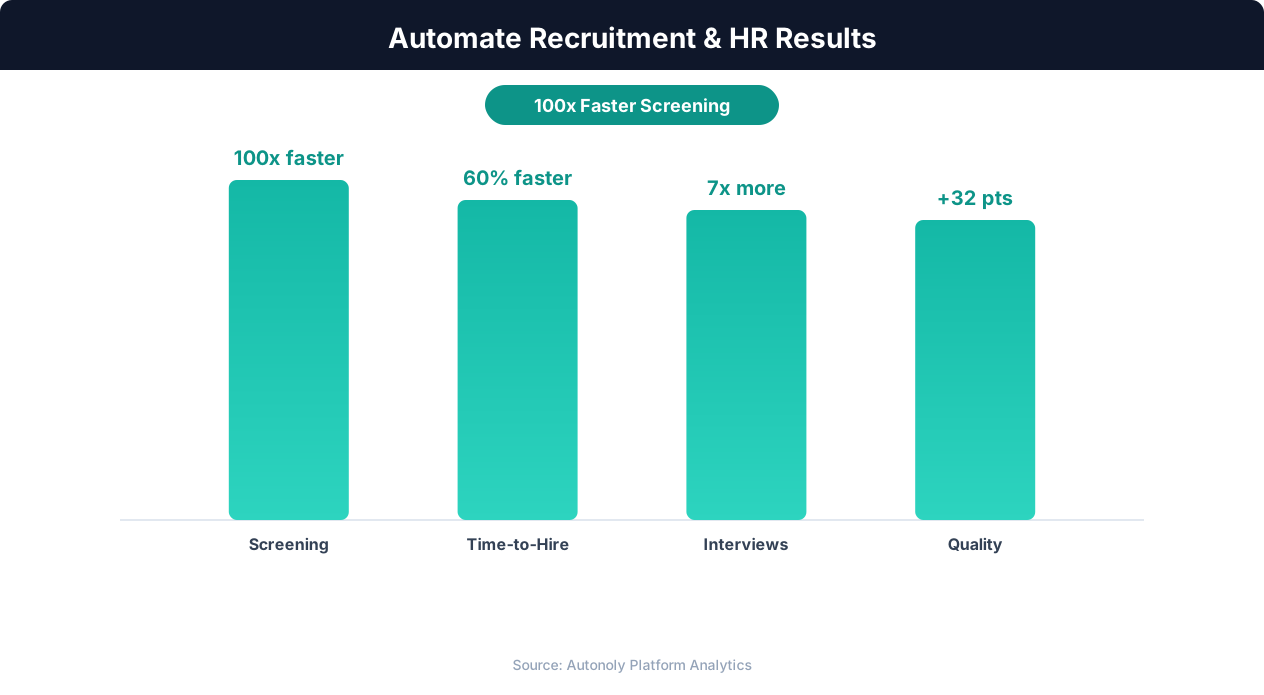
Quality of hire improvements from automated screening
Key Insight: Companies using recruitment automation report 67% lower cost-per-hire and 31% lower turnover in the first year due to better candidate matching (Bersin by Deloitte).
What Data Gets Extracted?
The Data Extraction engine captures a comprehensive set of fields from each Glassdoor review: overall star rating, sub-ratings (work-life balance, compensation, culture, management), review title, full pros and cons text, advice to management, reviewer job title, reviewer location, employment status (current or former), review date, and whether the reviewer recommends the company.
This rich dataset enables quantitative analysis of employer brand perception. Aggregate ratings by department, track sentiment over time, or compare two competitors side by side.
Key Insight: Automated job posting syndication to 50+ platforms increases qualified applicant volume by 88% compared to manual posting on individual boards (iCIMS Research).
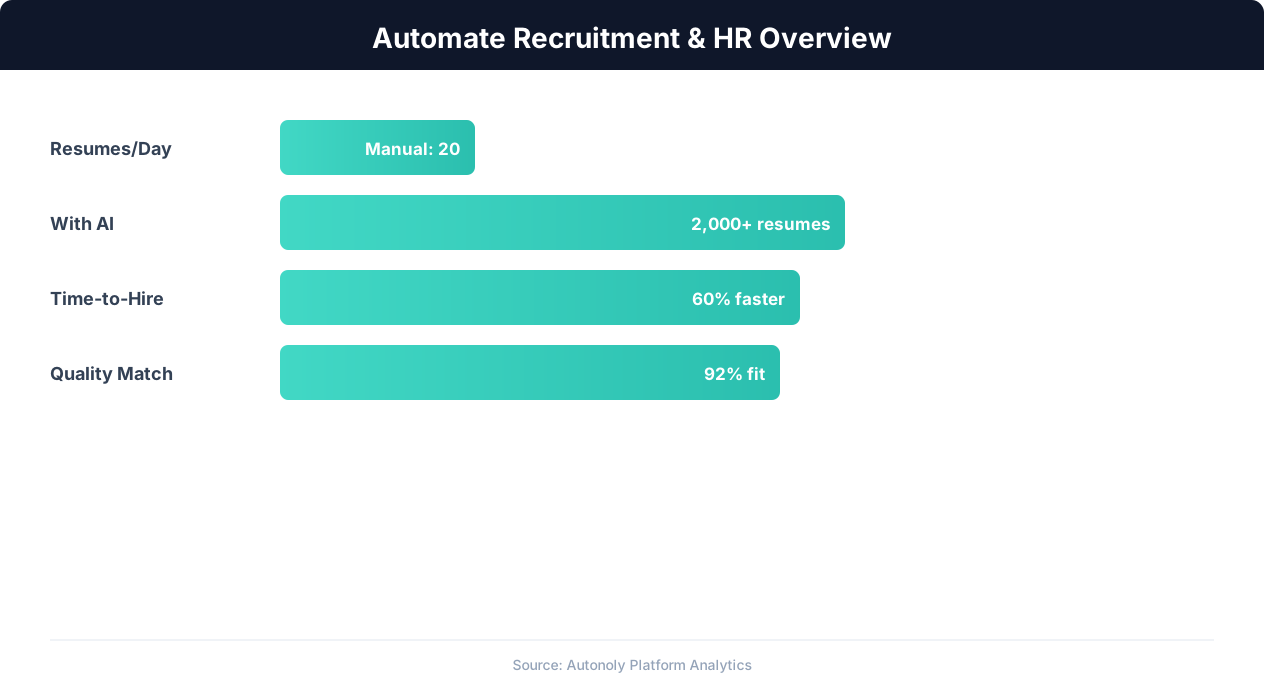
Recruitment automation impact on hiring metrics
Handling Glassdoor's Content Walls
Glassdoor sometimes requires an account or prompts users to contribute a review before viewing more content. Autonoly's AI Agent Chat can navigate these interactions using credentials you provide, ensuring uninterrupted access to review pages. The agent handles cookie banners, pop-ups, and pagination automatically.
For teams concerned about access policies, see our web scraping glossary for definitions of ethical scraping practices and compliance considerations.
Structuring Data in Excel
Each company's reviews land in a dedicated tab within the Excel workbook. Columns are pre-formatted for filtering and pivot table analysis. The Visual Workflow Builder lets you customize column order, add calculated fields (like a sentiment score), or split the output into separate files per company.
If your team prefers Google Sheets, swap the Excel destination for a Google Sheets node — the extraction logic remains unchanged.
Sentiment Analysis and Enrichment
Go beyond raw text by adding a Data Processing node that categorizes review sentiment as positive, negative, or neutral. You can build keyword-frequency reports, identify recurring complaints, or flag reviews mentioning specific topics like "remote work" or "compensation." The Integrations hub supports pushing enriched data to BI dashboards or databases.
Key Insight: Automated resume screening reduces time-to-hire by 43% while improving candidate quality by surfacing qualified applicants human reviewers missed (SHRM Research).
Use Cases for Recruiting Teams
Talent acquisition leaders use this data to benchmark employer brand against competitors. Recruiters share company culture summaries with candidates to set accurate expectations. HR teams identify internal issues before they become public sentiment trends. Consulting firms aggregate reviews across industries for market reports.
Filtering by Department or Role
Large companies may have thousands of reviews spanning dozens of departments. Configure the Data Processing pipeline to filter reviews by reviewer job title, isolating feedback from engineering, sales, or leadership roles. This targeted analysis reveals department-specific issues that aggregate ratings obscure.
Tracking Sentiment Over Time
Schedule the workflow to run monthly and append new reviews to your existing dataset. Over quarters, this builds a longitudinal view of employer sentiment that tracks the impact of leadership changes, layoffs, or culture initiatives. Use Logic & Flow to flag sudden sentiment drops and send alerts to your HR team for rapid response.
Explore pre-built review scraping workflows in our templates library, or create a custom pipeline through the Visual Workflow Builder. Check pricing for plans that include the execution minutes needed for large-scale review extraction.
Real-World Examples
A talent acquisition director at a healthcare company monitors Glassdoor reviews for her own organization and five competitors on a monthly schedule. The automated pipeline extracts all new reviews since the last run, scores sentiment, and produces a dashboard-ready Excel file with trend charts. When negative sentiment around "work-life balance" spiked at a competitor, the team adjusted their own job postings to highlight flexible scheduling — resulting in a measurable increase in qualified applicants.
Management consulting firms use this automation at scale, extracting reviews for 50-100 companies in a single industry vertical. The structured dataset feeds into client deliverables on employer brand positioning, helping companies understand where they rank relative to peers on compensation, culture, and career growth.
Comparing with Manual Review Analysis
Without automation, analyzing Glassdoor reviews means reading each review individually, mentally categorizing sentiment, and manually logging data points into a spreadsheet. For a company with 500 reviews, this process can take an analyst two to three full days. Autonoly completes the same extraction and initial analysis in under an hour, freeing the analyst to focus on interpreting patterns and making strategic recommendations rather than data entry.
Manual analysis is also inherently subjective — different analysts may categorize the same review differently. Automated sentiment scoring applies consistent criteria across every review, producing reproducible results that can be compared across time periods and companies without inter-rater variability.
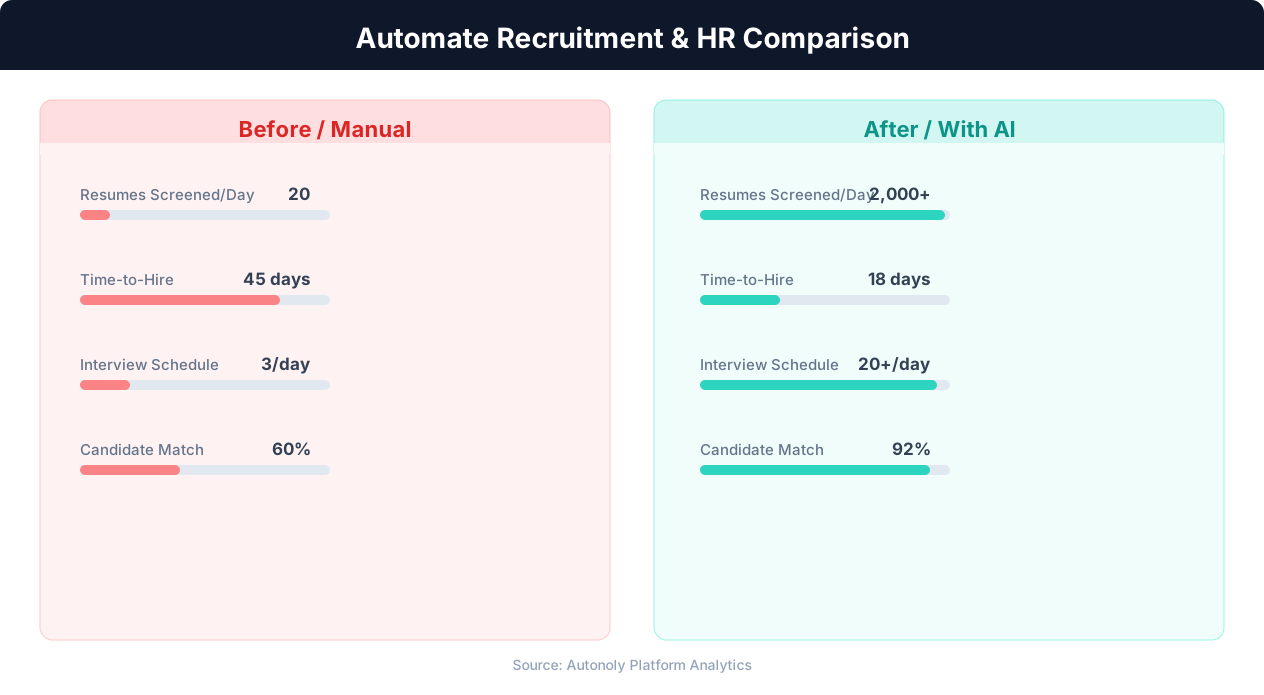
Time-to-hire comparison for manual vs automated recruitment
Key Insight: Recruiters spend 23 hours per week on average sourcing candidates manually. Automation reduces this to 5 hours while expanding the candidate pool 4x (LinkedIn Talent Report).
Advanced Pipeline Integration
Combine Glassdoor review extraction with Logic & Flow nodes to build sophisticated employer brand monitoring pipelines. Route reviews with ratings below 3 stars to an alert channel so HR can respond quickly. Aggregate monthly sentiment scores and push them to a Google Sheet that feeds a live dashboard. Cross-reference reviewer job titles with your open requisitions to identify departments where employer brand may be affecting candidate flow. The Data Processing engine supports keyword extraction, frequency analysis, and custom scoring formulas that transform raw review text into actionable recruiting intelligence.
Further Reading
Explore more about the tools and techniques used in this workflow: Recruiting Automation, Best Web Scraping Tools, Ai Content.