
Why Extract Your Shopify Product Catalog?
There are many reasons you might need your entire Shopify product catalog in a structured spreadsheet. Platform migrations, SEO audits, advertising feed preparation, pricing structure analysis, wholesale catalog sharing, or simply creating an offline backup that you fully control. Shopify's built-in CSV export covers the basics, but it has well-documented limitations — it often misses variant-level image associations, strips HTML formatting from descriptions, excludes metafield data entirely, and does not include collection memberships or publication channel assignments. For any task that requires a complete, accurate picture of your catalog, the native export falls short.
The problem is compounded for stores that have grown organically over years. Product data quality tends to degrade over time — descriptions become inconsistent, tags proliferate without a taxonomy, SEO fields are left blank on older products, and variant naming conventions drift. A comprehensive catalog extraction is the first step toward identifying and fixing these data quality issues, because you cannot fix what you cannot see. With thousands of products, scrolling through the Shopify admin one product at a time to audit data is impractical — it would take weeks of tedious manual work and the data would be outdated before you finished.
Autonoly's Browser Automation gives you a flexible extraction that pulls exactly the fields you need, formatted exactly how you want them. Unlike rigid CSV exports, you control the output structure — group variants under parent products or give each variant its own row, include high-resolution image URLs for all images in the gallery, extract SEO titles and meta descriptions, or pull custom metafield data that Shopify's native export ignores entirely. The agent works with both your own store (via admin access for full data including cost and inventory) and any public Shopify storefront (for competitive analysis of publicly visible data).
For agencies and freelancers managing multiple client stores, catalog extraction is a recurring need. Every new client engagement starts with a catalog audit, every platform migration requires a complete export, and every quarterly review needs updated data. Automating this process saves hours per client and ensures consistency across engagements. The extracted data becomes the foundation for strategic recommendations about product organization, pricing tiers, SEO improvements, and catalog gaps.
What Data Gets Extracted
The AI agent can extract product title, description (HTML or plain text), price, compare-at price, cost per item, SKU, barcode, inventory quantity by location, weight, variant options (size, color, material), variant-specific pricing, image URLs (all variants including variant-specific images), SEO title, meta description, URL handle, product type, vendor, tags, collection memberships, publication status, and created/updated timestamps. You choose which fields matter for your use case — tell the agent in plain English through the AI Agent Chat, and it extracts exactly those fields.
Common Use Cases
Platform migration: Moving from Shopify to WooCommerce, BigCommerce, Magento, or a custom platform requires a comprehensive product data export that maps to the new platform's import format. The Data Extraction engine gives you cleaner, more complete data than Shopify's native export, with proper handling of HTML descriptions, image galleries, and variant hierarchies that migration tools need.
SEO audit: Extract all product titles, meta descriptions, URL handles, and image alt texts to identify duplicate titles, missing meta descriptions, thin content pages, keyword cannibalization, and optimization opportunities. Combine with Google Sheets to collaborate with your SEO team, adding columns for recommended changes and tracking implementation progress.
Advertising feeds: Build product feeds for Google Shopping, Facebook/Meta Catalog, Pinterest Shopping, or TikTok Shop by extracting the exact fields each platform requires. Process the data through the Visual Workflow Builder with Data Processing nodes to transform fields into the required format — mapping Shopify product types to Google product categories, formatting prices with currency codes, and generating required identifiers.
Competitor analysis: Extract a competitor's public Shopify storefront to understand their product range, pricing tiers, catalog organization, and product positioning. This works with any public Shopify store — the agent browses the storefront just like a customer would, extracting visible product data without needing admin access.
Wholesale catalogs: Generate product catalogs for wholesale partners with specific pricing, minimum order quantities, and product selections. Use Logic & Flow to filter products by tag or collection before exporting.
Handling Large Catalogs
For stores with thousands of products, the agent handles pagination automatically, working through collection pages or admin product lists systematically. It can process catalogs of 10,000+ products in a single run, with progress tracking so you know exactly how far along the extraction is. The agent processes products in batches, writing results incrementally so that even if a run is interrupted, all previously extracted data is preserved. For extremely large catalogs, you can configure the workflow to process specific collections or product types in separate runs.
Exporting and Integrating Results
Results can be delivered to multiple destinations simultaneously. Download as Excel (.xlsx) files directly from the Autonoly dashboard, push to Google Sheets for collaborative editing, sync to Notion databases for team wikis, or load into Airtable bases for visual catalog management. Check the templates library for pre-built Shopify extraction workflows you can clone and customize in minutes. Visit our pricing page to see how catalog extraction fits into your plan, and see our workflow automation glossary for more context on product data management.
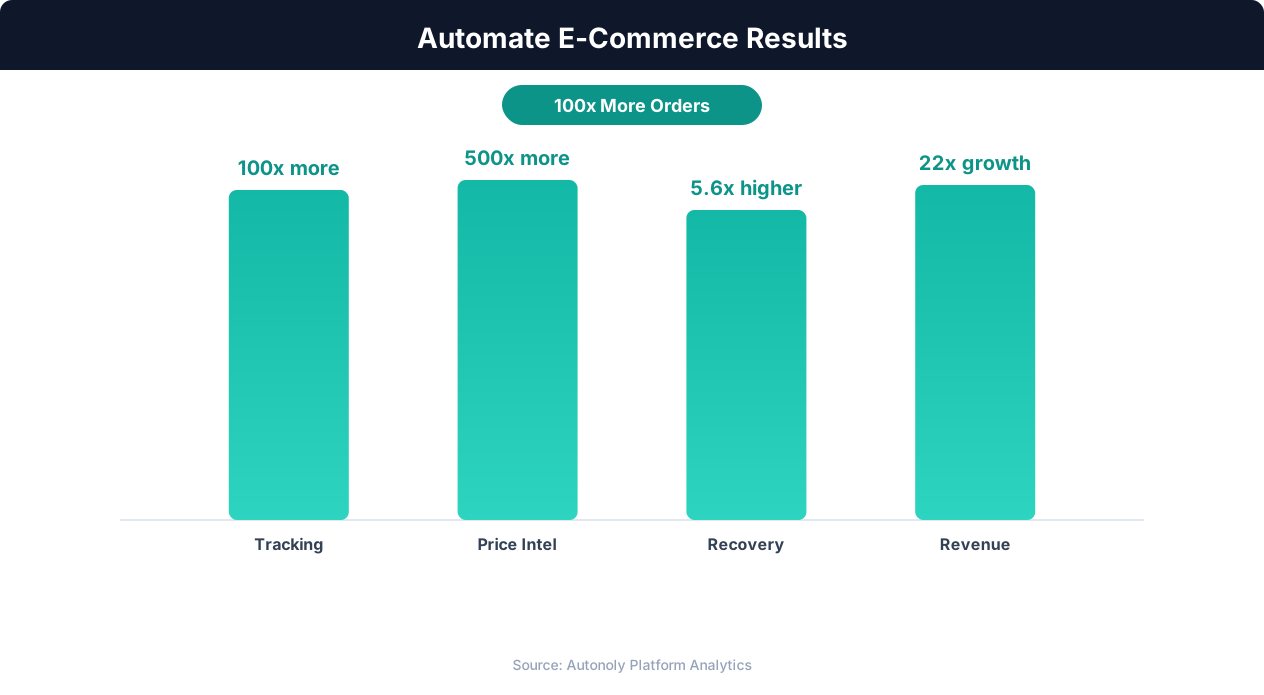
Revenue growth from e-commerce workflow automation
Key Insight: Automated inventory sync reduces stockouts by 63% and overstock situations by 45%, directly improving margins (National Retail Federation).
How the AI Agent Does It
The agent uses Browser Automation to open a real Chromium browser and navigate your Shopify store. For public storefront extraction, it browses collection pages, handles infinite scroll or click-to-load pagination, and visits each product page individually to extract detailed data including full image galleries, variant-specific pricing, and complete descriptions. For admin-level extraction, it logs into Shopify admin and reads from the product management interface, which provides access to inventory counts by location, cost-per-item data, metafields, and other fields not visible on the storefront. Shopify's Admin API documents the same product objects for teams that later want a direct integration.
The Data Extraction engine identifies repeating product elements on list pages, extracts consistent fields from each, and structures everything into clean rows and columns. When the agent visits individual product pages for deeper data, it detects variant selectors and cycles through each option to capture variant-specific details — prices that change by size, images that change by color, and inventory counts per variant per location. The agent adapts to different Shopify themes and layouts using visual pattern recognition rather than hardcoded CSS selectors, so it works reliably regardless of which theme your store uses — Dawn, Debut, Brooklyn, custom themes, or headless Shopify storefronts.
Key Insight: Product listing automation cuts catalog management time by 78%, allowing sellers to scale from 500 to 5,000+ SKUs without additional staff (BigCommerce Research).
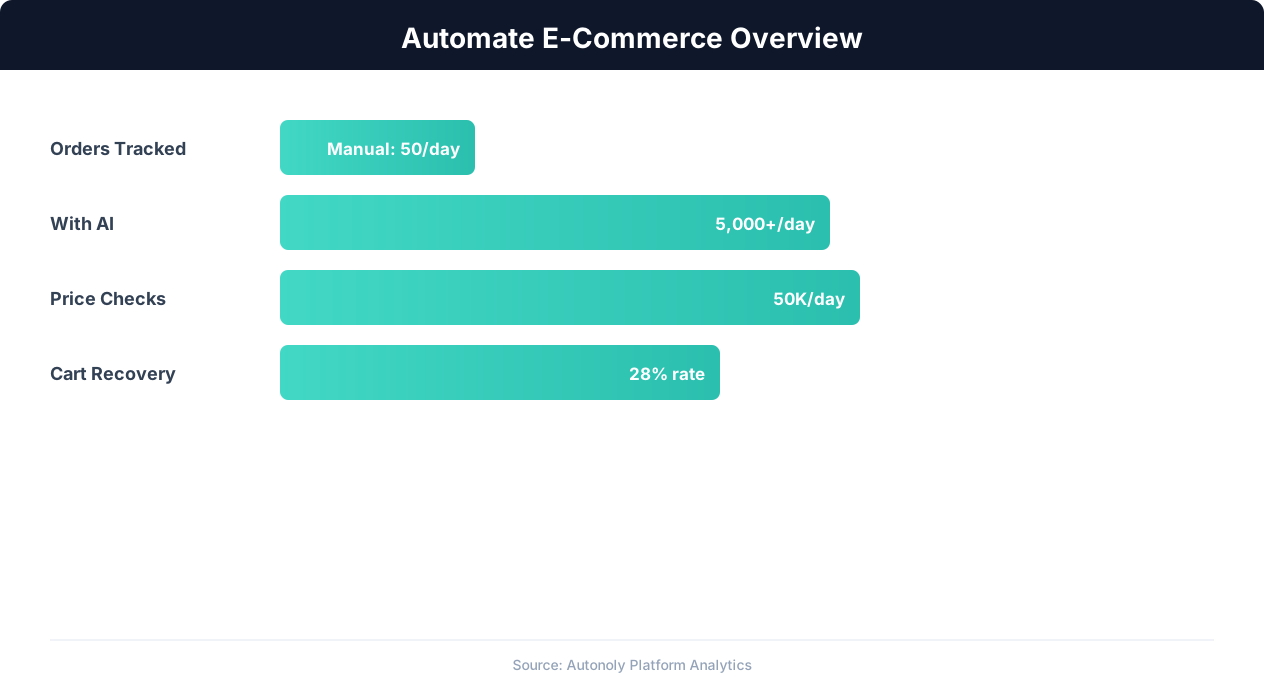
E-commerce automation impact on key performance metrics
Key Insight: E-commerce businesses using automation grow revenue 2.5x faster than those relying on manual processes (Shopify Commerce Trends).
Scheduling and Automation
While catalog extraction is often a one-time task, you can schedule it to run weekly or monthly for ongoing catalog audits using the cron scheduler in the Visual Workflow Builder. A weekly extraction creates a version history of your catalog — you can compare this week's export against last week's to spot unintended changes, identify products that were accidentally unpublished, or track how your catalog is growing over time. Differential processing highlights what changed since the last run, so your team can focus on reviewing modifications rather than sifting through the entire catalog.
For ongoing monitoring, pair catalog extraction with the scrape-competitor-prices-to-sheets workflow to track how your catalog compares to competitors over time. Add Logic & Flow conditions to flag products missing SEO descriptions, products with zero inventory, or products that have not been updated in over 90 days. Results can be delivered to Excel, Google Sheets, Notion, or Airtable. Use SSH & Terminal to run custom Python scripts on the extracted data — for example, generating product description rewrites using AI, calculating optimal pricing based on cost and competitor data, or producing formatted catalogs for print.
Further Reading
Explore more about the tools and techniques used in this workflow: Best Web Scraping Tools, Ecommerce Price Monitoring.