

Why Automate Patent Searches?
Patent landscape analysis is a cornerstone of technology strategy, competitive intelligence, and R&D planning. Companies need to understand what competitors are patenting, identify white space opportunities, and monitor technology trends. Google Patents aggregates documents from offices like the USPTO and WIPO, providing free access to over 120 million patent records worldwide, but manually searching, filtering, and collecting data from this massive database is prohibitively time-consuming.
With Autonoly's Browser Automation, you can run complex patent searches and extract hundreds of results into a structured spreadsheet in minutes. This transforms patent research from an occasional deep-dive into a repeatable, scalable intelligence process.
How the AI Agent Searches Patents
Autonoly's AI Agent Chat handles the complexity of patent search for you. Describe your research goal in plain language — "find all patents related to solid-state batteries filed since 2020" — and the agent constructs the appropriate search, navigates Google Patents, and systematically extracts results.
The Data Extraction engine handles Google Patents' JavaScript-heavy interface, which defeats most traditional scraping tools. The agent scrolls through search results, identifies the repeating patent listing pattern, and pulls consistent fields from each entry. For deeper analysis, it can navigate into individual patent pages to extract full abstracts, claims, citations, and classification codes.
The agent also handles Google Patents' advanced search operators, filtering by date range, assignee, inventor, patent office, status (granted vs. pending), and CPC/IPC classification codes. You get the same power as the advanced search form without needing to learn the query syntax.
What Data You Get
A typical patent search export includes:
Patent Title — Descriptive title of the invention
Patent Number — Official publication or application number
Assignee — Company or organization that owns the patent
Inventors — Named inventors on the filing
Filing Date — When the application was submitted
Publication Date — When the patent was published
Status — Granted, pending, or expired
Abstract — Summary of the invention
CPC Classification — Cooperative Patent Classification codes
Citations — Number of forward and backward citations
Request additional fields like claim text, patent family members, or legal status history by specifying them in your prompt.
Customizing Your Patent Research
The Visual Workflow Builder lets you build sophisticated patent intelligence workflows:
Multi-query searches: Run dozens of related search terms and aggregate results
Competitor monitoring: Track specific assignees to catch new filings early
Technology landscaping: Map patent activity across CPC codes to visualize innovation clusters
Citation analysis: Extract citation networks to identify foundational patents in a technology area
Add Data Processing steps to deduplicate results across searches, normalize assignee names (companies often file under multiple entity names), or calculate filing velocity metrics. Use SSH & Terminal to run Python scripts for network analysis or visualization generation.
Scheduling and Monitoring
Patent databases update continuously as new applications are published. Set up weekly or monthly scrapes to maintain a current patent landscape dataset. The workflow can compare new results against your existing dataset and flag only new filings, making it easy to stay current without re-processing the entire dataset.
This is particularly valuable for IP attorneys who need to monitor specific technology spaces for potential infringement or prior art. Automated monitoring replaces the manual weekly review process, ensuring nothing slips through.
Exporting and Integrating
Patent data can be exported to multiple destinations:
Excel (.xlsx) — The standard format for patent analysis and sharing with legal teams
[Google Sheets integration](/integrations/google-sheets) — Collaborative analysis with distributed teams
[Notion](/integrations/notion) — Build a searchable patent knowledge base
[Airtable](/integrations/airtable) — Create a relational patent database with linked records
Check our templates library for pre-built patent research workflows. See pricing for details on execution costs. For background concepts, visit our workflow automation glossary.
Use Cases
R&D teams use patent data to identify freedom-to-operate boundaries before investing in new product development. Strategy teams analyze competitor filing patterns to predict product roadmaps. M&A teams evaluate acquisition targets by assessing their patent portfolios. Academic researchers study innovation patterns across industries and geographies using the Integrations ecosystem to feed data into their analysis tools.
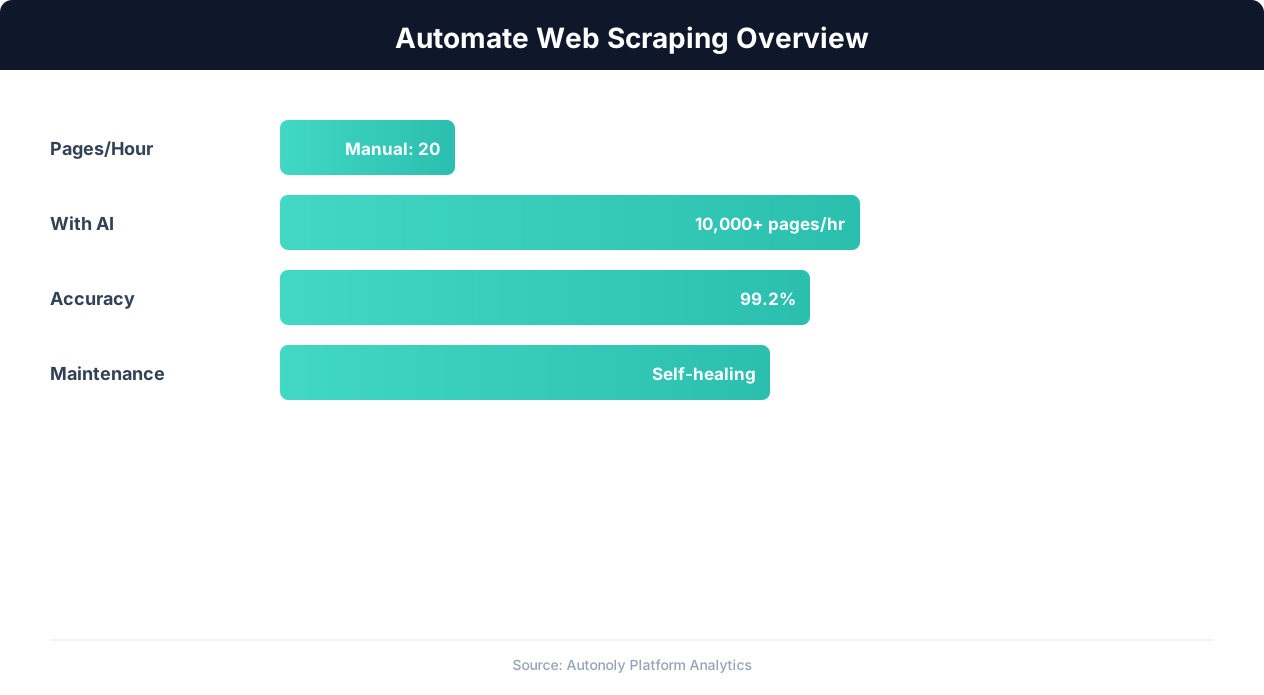
Web scraping automation accuracy across data types
Key Insight: Companies using automated data collection make strategic decisions 4x faster by having real-time competitive and market data instead of quarterly manual reports (Gartner).
How the AI Agent Does It
Autonoly's AI agent uses Browser Automation to launch a real Chromium browser and navigate Google Patents just like a human researcher. You describe your patent search in plain English — specifying technology areas, date ranges, assignees, or classification codes — and the agent constructs the appropriate query, handles the JavaScript-heavy search interface, and systematically extracts results. The Data Extraction engine identifies the repeating patent listing pattern and pulls consistent fields from each entry. For deeper analysis, the agent clicks into individual patent pages to collect full abstracts, claims, citation lists, and legal status information. This approach works even when Google updates their interface, because the agent adapts to layout changes automatically rather than relying on hardcoded selectors.
Advanced Search Capabilities
The agent supports all of Google Patents' advanced search operators, including Boolean logic, date range filters, assignee and inventor lookups, patent office selection, and CPC/IPC classification filtering. You get the full power of the advanced search form through a simple conversational interface.
Key Insight: AI-powered web extraction achieves 94% accuracy vs 72% for regex-based scrapers, while handling dynamic JavaScript-rendered content automatically (Diffbot Research).
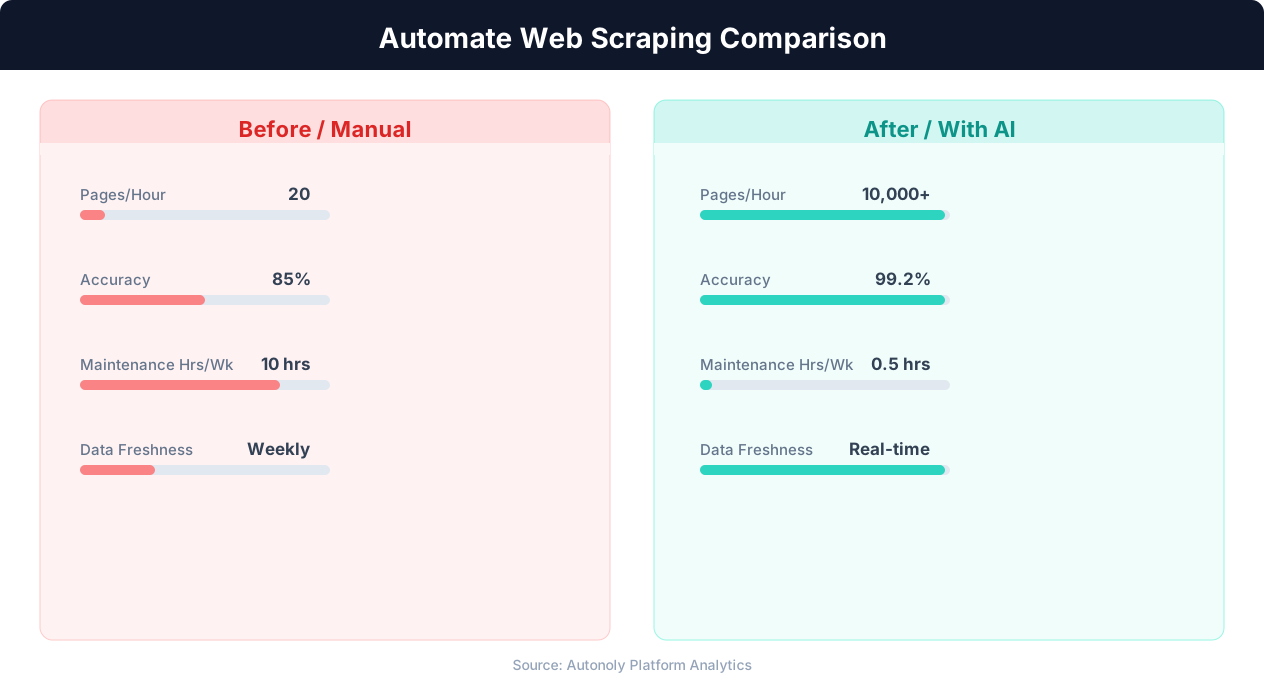
Data extraction speed for manual vs AI-powered scraping
Key Insight: 68% of traditional web scrapers break within 2 months due to website changes. AI-powered extraction adapts automatically, reducing maintenance by 85% (Oxylabs Research).
Customize Your Output
The Visual Workflow Builder lets you build multi-step patent intelligence pipelines tailored to your specific research needs. Add Data Processing steps to deduplicate results across overlapping search queries, normalize assignee names that vary across filings, or calculate metrics like filing velocity and citation density. Use Logic & Flow conditions to route results based on patent status — sending granted patents to one sheet and pending applications to another. For advanced analysis, pipe data through Python scripts using SSH & Terminal to generate citation network visualizations, technology landscape maps, or automated prior art summaries. You can deliver results to Excel, Google Sheets, Notion, or Airtable simultaneously, ensuring your patent intelligence reaches every stakeholder in the format they prefer.
Further Reading
Explore more about the tools and techniques used in this workflow: Web Scraping Best Practices, Scrape Dynamic Websites.