Machine Learning Without Code: How It Actually Works
The promise of "no-code machine learning" has been around for years, but most tools that claim it deliver either dumbed-down AutoML that strips away all control, or visual pipeline builders that still require you to understand data transformations, feature engineering, and model configuration at a deep technical level. Neither approach delivers what most people actually want: the ability to describe a machine learning problem in plain English and get a working model with interpretable results.
Autonoly takes a fundamentally different approach. Instead of providing a visual interface for assembling ML components, it gives you access to a full Python environment — with scikit-learn, XGBoost, pandas, matplotlib, SHAP, and other standard ML libraries — controlled by an AI agent that understands both machine learning and your business intent. You describe what you want to predict, what data you have, and what kind of output you need. The agent writes and executes the Python code, handles the technical decisions, and presents you with results you can act on.
What the Agent Actually Does
When you ask the AI agent to build an ML pipeline, it performs the same steps a data scientist would:
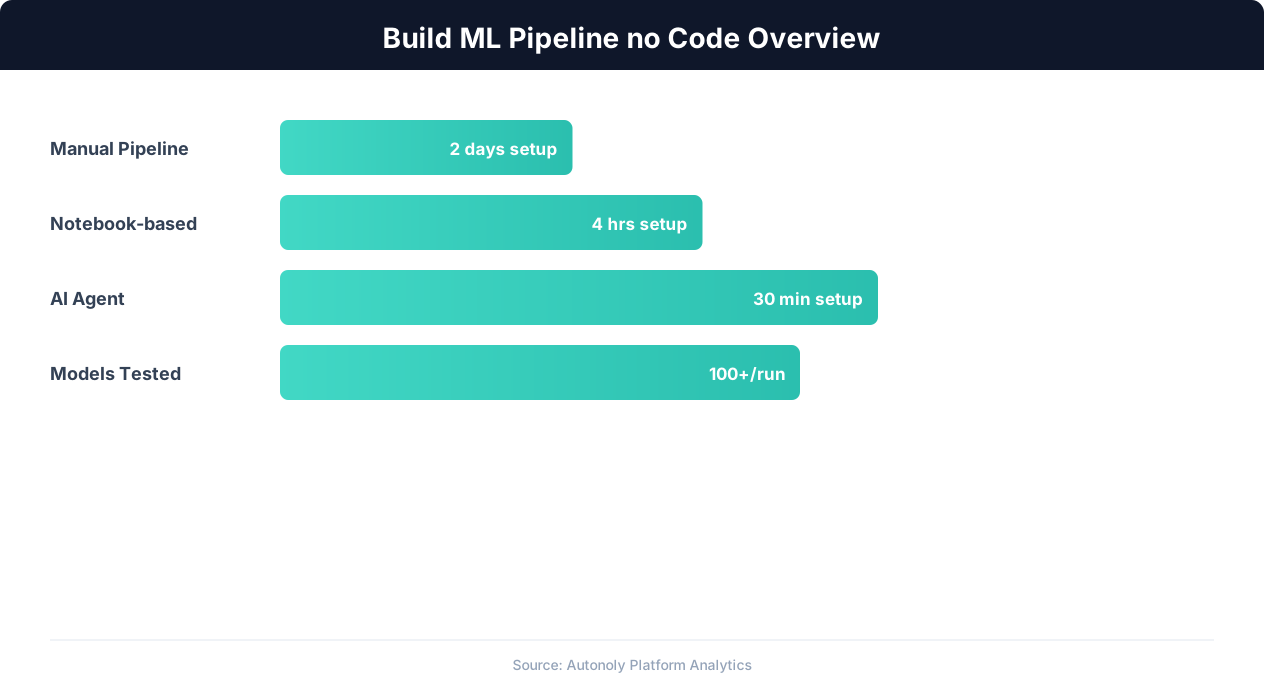
- Loads and inspects your data — reads your CSV, Excel, or Google Sheets data into a pandas DataFrame and examines the structure, data types, missing values, and distributions.
- Cleans and prepares the data — handles missing values, encodes categorical variables, normalizes numerical features, and splits the data into training and test sets.
- Selects and trains models — chooses appropriate algorithms based on your problem type (classification, regression, clustering) and trains them on your data.
- Evaluates performance — computes relevant metrics (accuracy, precision, recall, RMSE, R-squared) and generates visualizations (confusion matrices, feature importance plots, SHAP explanations).
- Exports results — saves predictions, model artifacts, and visualizations. Can write predictions directly to Google Sheets or export as CSV.
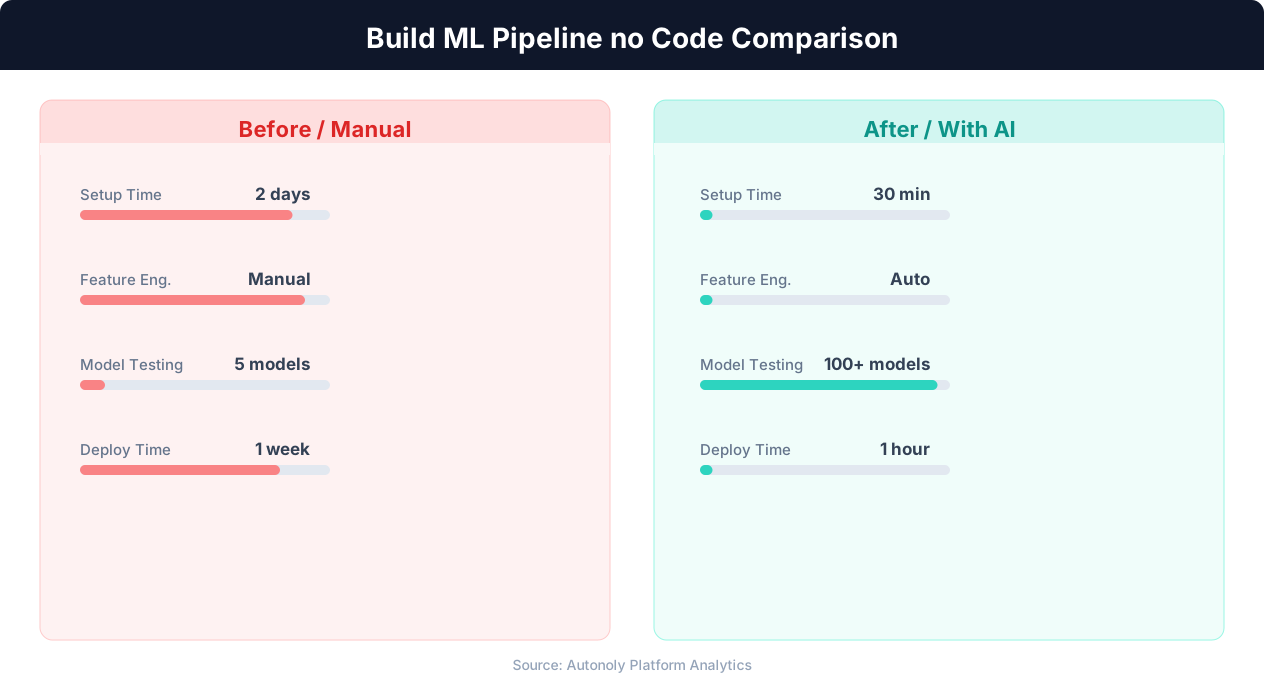
The difference from traditional no-code ML tools is that you have full control through conversation. If you want the agent to try a different algorithm, adjust hyperparameters, add a feature transformation, or change the evaluation metric, you just say so. The agent adapts the pipeline in real time, re-runs the code, and shows you updated results.
Data Preparation: The Foundation of Any ML Pipeline
Data preparation typically consumes 60-80% of a data scientist's time. It is tedious, error-prone, and requires deep understanding of both the data and the downstream modeling requirements. With Autonoly's agent, you can delegate data preparation entirely.
Loading Data from Multiple Sources
The agent can load data from several sources directly within the terminal environment:
- CSV and Excel files: Upload files directly to the Autonoly workspace, and the agent loads them with pandas.
- Google Sheets: The agent can read data from Google Sheets using Autonoly's integrations, pulling the latest data directly into the pipeline.
- Scraped data: If your ML input is data scraped from websites, the agent can use browser automation to scrape first, then process in the terminal — all in one session.
Automated Data Profiling
When the agent loads your dataset, it automatically profiles it and reports back to you in the chat. You see the number of rows and columns, data types for each column, missing value counts and percentages, basic statistics (mean, median, standard deviation, min, max) for numerical columns, unique value counts for categorical columns, and any detected data quality issues (constant columns, highly correlated features, outliers). This profiling gives you immediate visibility into what the agent is working with, without needing to write a single df.describe() call.
Handling Missing Values
Missing data is one of the most common data quality issues. The agent applies appropriate imputation strategies based on the data type and missingness pattern:
- Numerical columns with few missing values: Median imputation (robust to outliers) or mean imputation.
- Categorical columns: Mode imputation or a new "Unknown" category.
- Columns with high missingness (over 50%): The agent flags these and asks whether to drop them or impute. Columns with very high missingness often add noise rather than signal.
- Systematic missingness: If missing values correlate with specific conditions (e.g., a "discount" field that is null when there is no discount), the agent can create binary indicator features that capture the missingness pattern itself.
Feature Engineering
The agent goes beyond basic cleaning to create derived features that improve model performance:
- Date features: Extracts day of week, month, quarter, and year from datetime columns. Creates binary flags for weekends, holidays, and end-of-month.
- Text features: Computes text length, word count, and can extract TF-IDF features from text columns.
- Interaction features: Creates products and ratios of numerical features that may capture non-linear relationships.
- Encoding: Applies one-hot encoding for low-cardinality categorical variables and target encoding for high-cardinality categoricals.
You can guide this process at any level of detail. Say "create a feature for the ratio of revenue to headcount" and the agent adds exactly that. Or say "do whatever feature engineering you think will improve the model" and let the agent decide.
Model Training: From scikit-learn to XGBoost
Autonoly's terminal environment comes with the most widely used ML libraries pre-installed, giving the agent access to the full spectrum of algorithms for any supervised or unsupervised learning task.
Classification Tasks
For problems where you need to predict a category (customer churn, fraud detection, lead qualification, spam detection), the agent typically starts with a baseline model and progressively tries more powerful algorithms:
- Logistic Regression: A simple, interpretable baseline that establishes minimum performance. The agent uses scikit-learn's
LogisticRegressionwith appropriate regularization. - Random Forest: An ensemble method that handles non-linear relationships and feature interactions without explicit feature engineering. Good balance of performance and interpretability.
- XGBoost: The agent's go-to for maximum predictive accuracy on tabular data. XGBoost's gradient boosting algorithm consistently wins machine learning competitions on structured data. The agent configures learning rate, tree depth, regularization, and early stopping automatically.
- Support Vector Machines: Useful for smaller datasets with clear class boundaries, especially when the number of features is large relative to the number of samples.
Regression Tasks
For predicting continuous values (price forecasting, demand estimation, revenue projection), the agent follows a similar progression:
- Linear Regression: Baseline model. The agent checks for multicollinearity and applies regularization (Ridge or Lasso) when needed.
- Random Forest Regressor: Handles non-linear relationships and is robust to outliers.
- XGBoost Regressor: Typically delivers the best accuracy for tabular regression tasks. The agent tunes hyperparameters using cross-validation.
- Gradient Boosting Regressor: scikit-learn's native gradient boosting implementation, which the agent uses when XGBoost's specific features are not needed.
Clustering and Unsupervised Learning
For tasks where you do not have labeled outcomes — customer segmentation, anomaly detection, pattern discovery — the agent applies unsupervised algorithms:
- K-Means: The standard clustering algorithm. The agent uses the elbow method and silhouette scores to determine the optimal number of clusters.
- DBSCAN: Density-based clustering that automatically detects the number of clusters and identifies outliers. Useful when clusters have irregular shapes.
- Isolation Forest: Anomaly detection algorithm that identifies outliers in your dataset. The agent configures contamination parameters based on your expected anomaly rate.
Hyperparameter Tuning
The agent does not just use default hyperparameters. It runs cross-validated hyperparameter searches to find optimal configurations. For quick iterations, it uses RandomizedSearchCV (sampling random parameter combinations). For final production models, it uses GridSearchCV or Bayesian optimization to find the best parameters systematically. You can see the cross-validation scores for each parameter combination in the agent's output, giving you full transparency into how the model was tuned.
Evaluation, Visualization, and Model Interpretation
A model is only useful if you can trust its predictions and understand what drives them. The agent generates comprehensive evaluation reports and visualizations that make model performance and behavior transparent.
Classification Evaluation
For classification models, the agent produces:
- Confusion matrix: A visual grid showing true positives, true negatives, false positives, and false negatives. The agent renders this as a heatmap using matplotlib, making it easy to see where the model makes mistakes.
- Precision, recall, and F1 score: Per-class and macro-averaged metrics that quantify the tradeoff between false positives and false negatives.
- ROC curve and AUC: For binary classification, the agent plots the Receiver Operating Characteristic curve and computes the Area Under Curve score, showing model performance across all decision thresholds.
- Precision-recall curve: Especially useful for imbalanced datasets where the ROC curve can be misleadingly optimistic.
Regression Evaluation
For regression models, the evaluation includes:
- R-squared and adjusted R-squared: How much variance in the target variable the model explains.
- RMSE (Root Mean Squared Error): The average prediction error in the same units as the target variable.
- MAE (Mean Absolute Error): A more robust error metric that is less sensitive to outliers than RMSE.
- Residual plots: Scatter plots of predicted vs. actual values and residual distributions. These reveal systematic biases, heteroscedasticity, and outlier predictions.
Feature Importance
Understanding which features drive predictions is often more valuable than the predictions themselves. The agent generates feature importance visualizations using multiple methods:
- Tree-based importance: For Random Forest and XGBoost models, the agent extracts and plots the built-in feature importance scores (based on information gain or permutation importance).
- SHAP (SHapley Additive exPlanations): The gold standard for model interpretation. The agent generates SHAP summary plots showing how each feature contributes to predictions across the entire dataset, SHAP waterfall plots for individual predictions, and SHAP dependence plots showing the relationship between a feature's value and its impact on predictions.
Generating Visualizations with matplotlib
All visualizations are generated using matplotlib and saved as images that you can download, share, or include in reports. The agent creates publication-quality charts with proper axis labels, titles, legends, and color schemes. If you need a specific visualization — "show me a bar chart of the top 10 features by importance" or "create a scatter plot of predicted vs. actual prices" — just describe it and the agent generates it in seconds.
Every chart the agent creates is available for download through Autonoly's file system access. You can also ask the agent to export all visualizations to a specific folder or compile them into a summary report.
Real-World ML Pipeline Examples
Here are concrete examples of ML pipelines you can build with Autonoly, showing the conversation flow and the kind of results you get.
Example 1: Customer Churn Prediction
You upload a CSV with customer data — account age, monthly spend, support tickets filed, feature usage metrics, and a binary "churned" column. You tell the agent:
"Build a churn prediction model using this customer data. The target variable is the 'churned' column. I want to understand which factors drive churn and get a churn probability score for each active customer."
The agent loads the data, profiles it, handles missing values, engineers features (like spend trend over the last 3 months), trains a Random Forest and an XGBoost model, evaluates both, selects the better performer, generates SHAP plots showing that support ticket frequency and declining monthly spend are the top churn predictors, and exports a spreadsheet of active customers ranked by churn probability. The entire process takes 5-10 minutes of conversation.
Example 2: Pricing Optimization
You have scraped competitor pricing data using Autonoly's browser automation and want to predict optimal price points. Upload the dataset with columns for product category, competitor prices, your current price, demand volume, seasonality indicators, and margin data.
"Train a regression model to predict demand volume based on price and the other features. Then generate a price sensitivity curve for each product category showing how demand changes at different price points."
💡 Key Insight
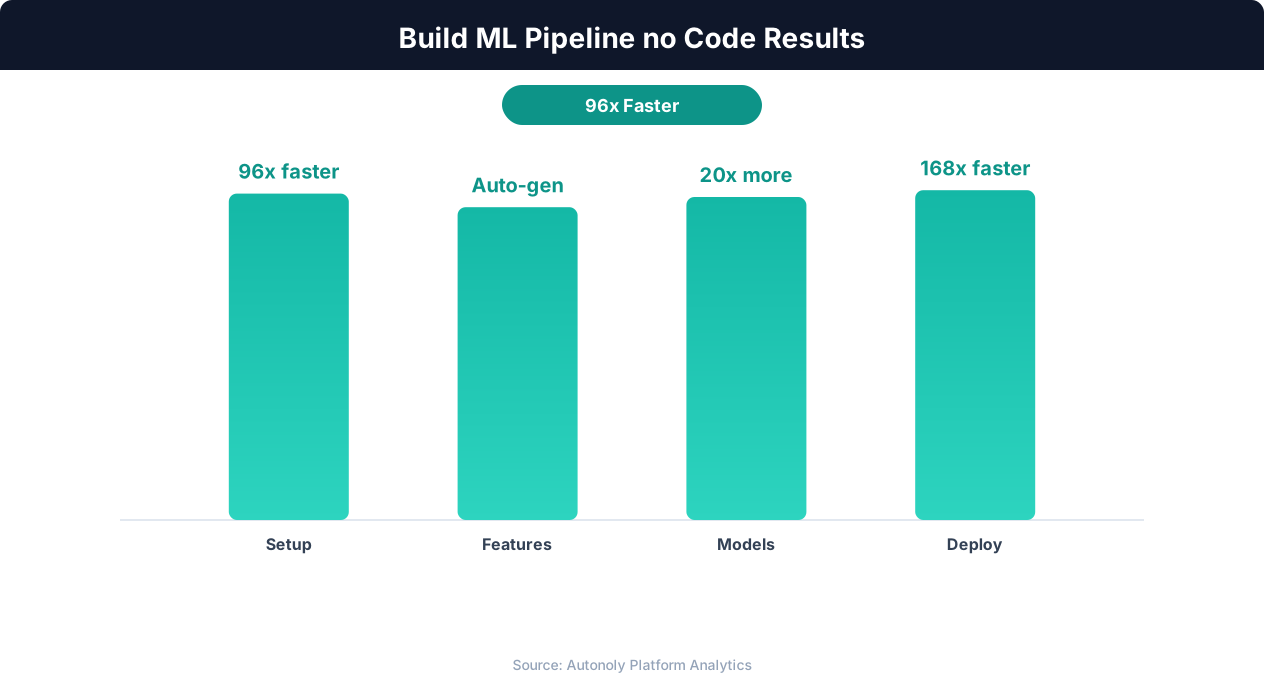
No-code ML platforms enable teams to build production-ready models 5x faster than traditional coding approaches.
The agent trains an XGBoost regressor, evaluates prediction accuracy, and then uses the trained model to simulate demand at various price points — generating price-demand curves that directly inform pricing decisions. This combines competitive price monitoring data with ML-driven optimization.
Example 3: Lead Scoring
Your sales team has historical data on leads — source, company size, industry, website visits, email engagement, and whether the lead converted. You want an automated lead scoring model.
"Build a lead scoring model that predicts conversion probability. Score all current leads in the pipeline and export the results to Google Sheets sorted by score."
The agent builds a classification model, calibrates the probability outputs so they represent true conversion likelihoods, identifies the key conversion predictors (often company size and email engagement), and writes the scored leads directly to a Google Sheet using Autonoly's Sheets integration. Your sales team gets a prioritized lead list backed by data science, delivered without any data science resources.
Example 4: Anomaly Detection in Scraped Data
You run daily price monitoring scrapes and want to automatically detect anomalous price changes — potential errors, flash sales, or competitive moves that need immediate attention.
"Train an anomaly detection model on this historical pricing data. Flag any prices in the latest scrape that deviate significantly from the expected pattern."
The agent uses Isolation Forest to learn normal price patterns for each product, then scores the latest data against the model. Anomalous prices are flagged with a severity score, and the agent can send alerts via Slack or Discord for prices that exceed the anomaly threshold.
Exporting Predictions and Scheduling ML Pipelines
A model that lives only in a Jupyter notebook is a model that delivers no value. The final critical step is getting predictions into the systems where decisions are made and keeping those predictions fresh as new data arrives.
Exporting Predictions
The agent can export model predictions in several formats:
- Google Sheets: Write predictions, confidence scores, and feature importance directly to a Google Sheet. This is ideal for sharing results with non-technical stakeholders who live in spreadsheets. The agent formats the sheet with headers, conditional formatting for high-probability predictions, and a summary tab with aggregate statistics.
- CSV files: Export as CSV for import into databases, BI tools, or other downstream systems. The agent includes all relevant columns — input features, predictions, probability scores, and timestamps.
- Visualizations as images: SHAP plots, confusion matrices, feature importance charts, and any other visualizations are saved as PNG files that you can download and include in presentations or reports.
Scheduling Recurring ML Runs
Many ML use cases require regular re-scoring — lead scoring needs to run as new leads enter the funnel, churn prediction should update as customer behavior changes, and anomaly detection must run against every new data batch. Autonoly's scheduled execution lets you automate the entire pipeline:
💡 Key Insight
68% of organizations report that no-code ML tools have democratized AI access beyond their data science teams.
- Data ingestion: The scheduled workflow pulls fresh data from Google Sheets, scraped sources, or uploaded files.
- Model execution: The agent runs the trained model against the new data, generating updated predictions.
- Output delivery: Predictions are written to Google Sheets, and alerts are sent via Slack or email for high-priority predictions (high churn probability, anomalous prices, hot leads).
This creates a production ML pipeline that runs on autopilot — no data science team required, no infrastructure to manage, no code to maintain.
Model Retraining
As your data accumulates over time, the model should be retrained periodically to incorporate new patterns. The agent can do this too — schedule a monthly retraining run that loads all historical data, trains a new model, evaluates it against the previous model's performance, and automatically promotes the new model if it performs better. If the new model underperforms (which can happen due to data quality issues or distribution shifts), the agent alerts you and keeps the existing model active.
Connecting to Your Workflow
The ML pipeline does not have to stand alone. Because Autonoly combines ML capabilities with browser automation, file access, and integrations, you can build end-to-end workflows that scrape data, process it with ML, and take action on the results. Scrape competitor prices, predict optimal pricing with ML, and update your pricing system — all in one automated workflow. This integration of browser automation, terminal-based ML, and integrations is what makes Autonoly's approach to no-code ML genuinely different from standalone AutoML tools.
Limitations and When This Approach Works Best
Autonoly's agent-driven ML is powerful, but it is not a replacement for every data science workflow. Understanding where it excels and where it has limitations helps you apply it to the right problems.
Where Agent-Driven ML Excels
- Tabular data problems: Classification and regression on structured data — the bread and butter of business ML — is where this approach shines. Customer churn, lead scoring, price prediction, demand forecasting, and anomaly detection are all ideal use cases.
- Rapid prototyping: When you need to know whether ML can solve a problem before committing to a full data science project, Autonoly lets you go from raw data to initial results in under an hour.
- Small to medium datasets: Datasets up to a few hundred thousand rows work well in the terminal environment. The agent can train models on these efficiently and iterate quickly.
- Teams without data science resources: Marketing teams, operations teams, and small businesses that cannot hire a data scientist can still benefit from ML through the agent's guidance.
- Recurring prediction tasks: Scheduled pipelines that re-score data regularly benefit from the automation — set it up once, and it runs indefinitely.
Where Traditional Data Science Is Better
- Deep learning and neural networks: Image classification, NLP with transformers, and other deep learning tasks require GPU compute and more complex training infrastructure than the terminal provides.
- Very large datasets: Datasets with millions of rows require distributed computing (Spark, Dask) that exceeds the terminal's single-machine resources.
- Custom model architectures: If your problem requires a bespoke model architecture, a human data scientist designing and implementing it will produce better results than an agent working through conversation.
- Production ML infrastructure: For models serving millions of predictions per day with strict latency requirements, you need dedicated ML infrastructure (MLflow, Kubeflow, SageMaker) that goes beyond what Autonoly's terminal provides.
The Right Mental Model
Think of Autonoly's ML capabilities as having a skilled junior data scientist who works instantly, never gets tired, and follows instructions precisely. This "junior data scientist" can handle 80% of the ML tasks that businesses need — the tabular data classification and regression problems that drive real business value. For the remaining 20% — deep learning, massive scale, custom architectures — you need specialized tools and expertise. But for the vast majority of organizations, that 80% is exactly where the untapped value lies.