
The Evolution of Browser Automation: 15 Years of Fragile Progress
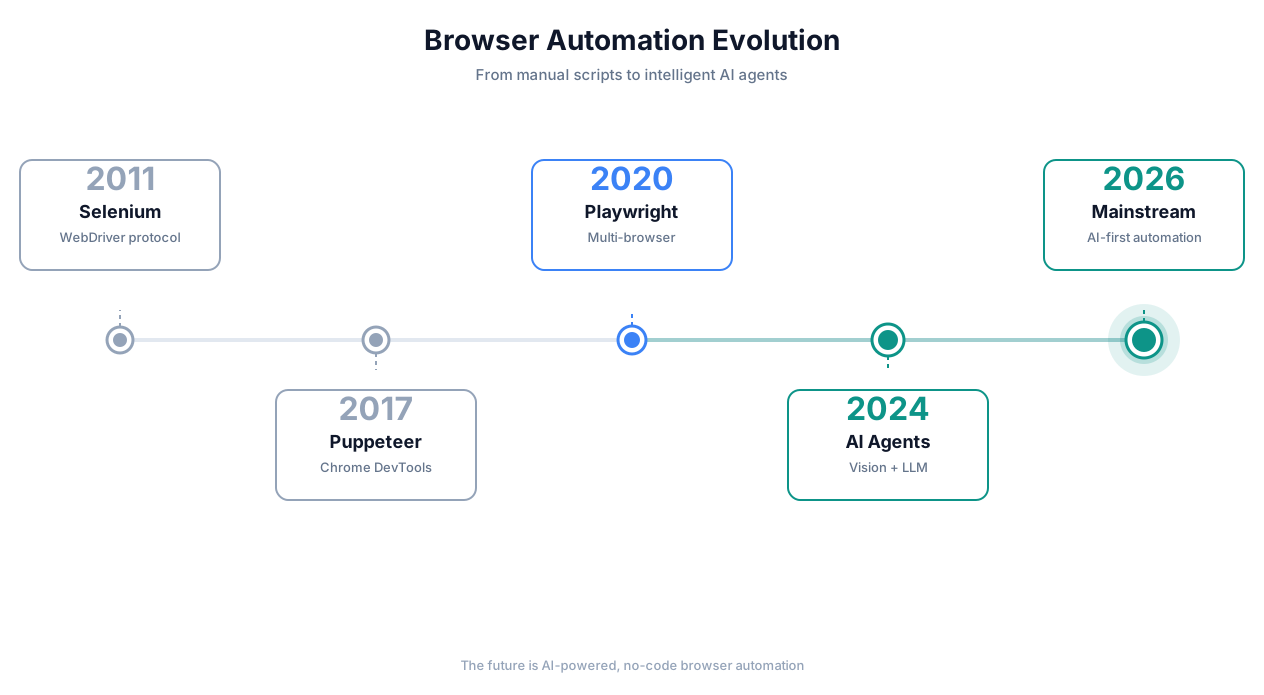
Browser automation evolution timeline
2011: Selenium — The Pioneer That Taught Us Pain
Selenium WebDriver was genuinely revolutionary. For the first time, you could control a real browser programmatically. QA teams went from clicking through test cases manually to running automated suites overnight.
But Selenium had a fundamental design flaw that haunts us to this day: it relies on the DOM being predictable. You write a selector — #login-button, //div[@class='submit-wrapper']/button[1] — and you pray it stays the same between deploys. It rarely does.
Selenium scripts are also slow. Each command is a round-trip over the WebDriver protocol. A simple login flow that takes a human two seconds takes Selenium eight. And the error messages? StaleElementReferenceException. If you know, you know.
2017: Puppeteer — Google's Headless Chrome Revolution
Puppeteer was a breath of fresh air. Direct Chrome DevTools Protocol access meant faster execution, better debugging, and first-class support for headless mode. Google built it, so Chrome integration was flawless.
But Puppeteer was Chrome-only, still required JavaScript expertise, and did nothing to solve the selector fragility problem. You just wrote the same brittle code faster.
2020: Playwright — Microsoft Gets It (Almost) Right
Playwright fixed Puppeteer's biggest gaps: multi-browser support (Chromium, Firefox, WebKit), auto-waiting for elements, better iframe handling, and a genuinely excellent API. If you are a developer writing browser automation in 2026, Playwright is still the gold standard for deterministic, code-based automation.
But "if you are a developer" is doing a lot of heavy lifting in that sentence. Playwright's learning curve is steep. You need to understand async/await, browser contexts, selector engines, and the nuances of web rendering. It is a power tool for engineers, not a solution for the 95% of people who need browser tasks automated but do not write code.
2022-2023: The RPA and Low-Code Wave
Tools like UiPath, Automation Anywhere, Bardeen, and Axiom tried to make browser automation accessible. Record-and-replay. Visual workflow builders. Chrome extensions that capture your clicks.
They helped. But they all shared the same Achilles' heel: under the hood, they still generated selector-based scripts. When the website changed — and websites always change — the automations broke. Users who were promised "no-code automation" found themselves debugging XPath expressions they did not understand.
2024-2026: AI Browser Agents — The Paradigm Shift
Starting in late 2024, a new approach emerged: instead of telling a browser *exactly* which element to click using a CSS selector, you tell an AI *what you want to accomplish* in plain language, and it figures out the rest.
This is not a gimmick. Gartner's 2025 Hype Cycle placed AI-augmented automation at the "Slope of Enlightenment," projecting that by 2028, 40% of all browser-based automation will use AI-driven approaches rather than deterministic scripting. The global intelligent process automation market hit $19.2 billion in 2025 and is growing at 14.6% CAGR.
2026 is the inflection point because three things converged simultaneously:
- Vision models got fast enough. GPT-4o, Claude's vision capabilities, and Gemini can process a screenshot and identify UI elements in under 800ms. Two years ago, that took 5-8 seconds — too slow for real-time automation.
- Context windows got large enough. A full DOM tree for a complex web app can be 200K+ tokens. Modern LLMs handle this without truncation.
- Cost dropped below the maintenance threshold. Running an AI agent costs roughly $0.02-0.08 per task execution. Maintaining a brittle Selenium script costs $15-40/hour in developer time when it breaks. The math finally works.
Why Traditional Browser Automation Fails 95% of the Time
I am not being hyperbolic with that number. A 2024 study by Testim found that 87% of Selenium test suites require weekly maintenance, and 62% of organizations reported that more than a third of their automated tests were "permanently broken" — disabled and never fixed. My own experience across dozens of projects tracks with this.
Here is why.
Selectors Break. Constantly.
Your automation targets #submit-btn-v2. The frontend team ships a redesign. Now it is .btn-primary-action. Your script throws ElementNotFoundError at 3 AM, and your overnight data pipeline produces nothing.
This is not edge-case fragility. This is the default state. Modern frontend frameworks generate dynamic class names — css-1a2b3c4 in styled-components, _submit_x7k2q_42 in CSS Modules. These hashes change on every build. You cannot write stable selectors against them.
Even "stable" selectors like data-testid attributes require frontend developers to add and maintain them. In practice, this means your automation team is perpetually filing tickets with your frontend team, asking them to add test hooks to elements. The coordination overhead alone kills most automation initiatives.
Single-Page Applications Are Nightmares
React, Vue, and Angular do not render pages — they render virtual DOM trees that reconcile with the actual DOM asynchronously. A button might exist in the DOM but not be interactive yet because React has not finished hydrating. It might be visible but covered by a loading overlay with z-index: 9999. It might re-render mid-click because a parent component's state changed.
Traditional automation tools handle this with waitForSelector and sleep calls. You end up with code like:
await page.waitForSelector('.submit-btn', { timeout: 10000 });
await page.waitForFunction(() => !document.querySelector('.loading-overlay'));
await new Promise(resolve => setTimeout(resolve, 500)); // "just in case"
await page.click('.submit-btn');
That setTimeout is a white flag. You are admitting you do not actually know when the page is ready, so you are guessing. And guesses break.
Shadow DOM Is Invisible
Web Components use Shadow DOM to encapsulate their internals. Standard CSS selectors cannot pierce the shadow boundary. Playwright added >> pierce selectors, but you need to know the shadow DOM structure in advance. Many component libraries — Salesforce Lightning, Ionic, Shoelace — use nested shadow roots, creating multiple layers you have to manually traverse.
If the website you are automating uses Web Components (and in 2026, many do), traditional selectors simply cannot reach the elements you need.
Iframes: The Recursion From Hell
Banks, insurance portals, and government websites love iframes. A payment form inside an iframe inside a modal inside another iframe. Each iframe is a separate document context. You have to switch contexts, find the element, interact with it, then switch back. Cross-origin iframes add security restrictions that block automation entirely in some configurations.
I once spent two weeks automating a healthcare enrollment form that had five levels of nested iframes, three of which were cross-origin. The final script was 400 lines of context-switching spaghetti. It worked for exactly eleven days before the vendor changed their iframe embedding strategy.
Anti-Bot Systems Are Sophisticated
Modern anti-bot services — Cloudflare Turnstile, DataDome, PerimeterX, Akamai Bot Manager — do not just check for CAPTCHAs. They analyze:
Browser fingerprinting: WebGL renderer, canvas fingerprint, installed fonts, screen resolution, color depth, timezone, language settings, platform string
Behavioral patterns: Mouse movement velocity and acceleration curves, scroll patterns, keystroke timing, touch pressure on mobile
TLS fingerprinting: The order of cipher suites in the TLS handshake reveals whether you are a real browser or a headless automation tool
JavaScript execution patterns: Headless browsers have detectable differences in how they execute JavaScript — missing
window.chromeproperties, differentnavigator.webdriverflags, absent codec support
Tools like puppeteer-extra-plugin-stealth patch some of these tells, but anti-bot vendors update their detection weekly. It is an arms race, and if you are running traditional automation, you are losing.
The Maintenance Tax: 30-40% of Developer Time
Here is the number that kills browser automation projects: teams spend 30-40% of their total automation development time on maintenance, not building new automations. A 2023 survey by Katalon found that test maintenance was the #1 challenge cited by 68% of automation engineers.
You build an automation. It works. You move on. Two weeks later it breaks. You fix it. A month later it breaks again, differently. Eventually, the maintenance burden exceeds the time saved by automating, and the project gets abandoned. I have seen this cycle play out at least thirty times across different organizations.
How AI Browser Automation Is Fundamentally Different
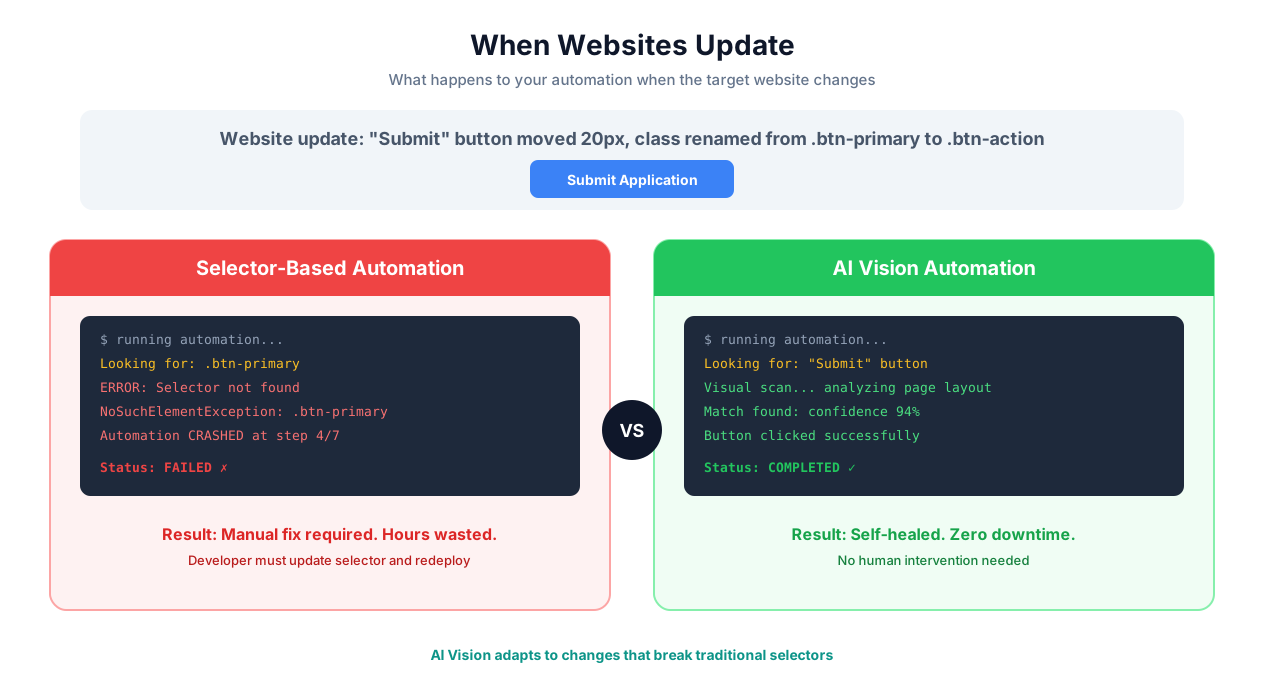
Selector-based vs AI vision detection
AI browser automation does not fix the problems above. It sidesteps them entirely by operating on a completely different paradigm.
Vision-Based Element Detection: See the Page Like a Human
Instead of parsing the DOM to find #submit-btn-v2, an AI browser agent takes a screenshot of the page and identifies elements visually. It sees a blue button with the text "Submit Order" in the lower-right corner of the form — the same way you do.
This means:
CSS class names are irrelevant. Rename them, hash them, delete them — the button still looks like a button.
Dynamic rendering does not matter. If you can see the element on screen, the AI can see it too, regardless of how React chose to render it.
Shadow DOM boundaries disappear. The screenshot captures the rendered output, not the DOM structure.
Iframe nesting is invisible. The screenshot shows the composed page, iframes and all.
The AI does not care how the page is built. It cares how the page looks and behaves. This is a fundamental architectural difference, not a feature improvement.
Natural Language Instructions Instead of Code
Traditional automation:
javascript
await page.goto('https://crm.example.com/contacts');
await page.waitForSelector('input[placeholder="Search contacts"]');
await page.fill('input[placeholder="Search contacts"]', 'Acme Corp');
await page.keyboard.press('Enter');
await page.waitForSelector('.contact-row');
await page.click('.contact-row:first-child .contact-name a');
await page.waitForSelector('.contact-detail-panel');
const email = await page.$eval('.contact-email', el => el.textContent);
AI browser automation:
Go to our CRM, search for "Acme Corp", open the first result,
and get their email address.
Same outcome. One version requires a developer who understands async JavaScript, CSS selectors, and the specific DOM structure of this CRM. The other requires someone who can describe what they want in English.
This is not about developer convenience — though it is convenient. It is about who can create automations. When instructions are natural language, the person closest to the workflow (the sales rep, the HR coordinator, the operations manager) can build and modify automations directly instead of filing tickets with engineering.
Self-Healing: When Layouts Change, AI Adapts
A traditional script targeting .sidebar-nav .menu-item:nth-child(3) breaks when someone reorders the navigation menu. An AI agent told to "click on Reports in the sidebar" will find the Reports link regardless of its position, styling, or DOM structure — because it understands what "Reports" means, not just where it was last time.
This self-healing capability is not perfect (more on that in the limitations section), but it eliminates the single largest category of automation failures: selector breakage due to UI changes.
Context Awareness: Understanding Intent, Not Just Position
When you tell an AI agent to "fill out the shipping address form," it understands what a shipping address form is. It knows that "Street Address" comes before "City," that "State" is likely a dropdown in the US, that "ZIP Code" expects five digits. It does not need you to enumerate every field and its selector.
This context awareness means AI agents handle variations gracefully. Different CRM? Different field layout? Different labels ("Address Line 1" vs. "Street Address" vs. "Mailing Address")? The AI adapts because it understands the semantic meaning, not just the syntactic structure.
Error Recovery: Try Another Way Instead of Crashing
A traditional script encounters an unexpected modal dialog and crashes with an ElementClickInterceptedError. An AI agent sees the modal, reads it ("Your session will expire in 5 minutes. Continue?"), clicks "Continue," and resumes the original task.
This is not hardcoded error handling — you do not need to anticipate every possible popup, cookie banner, or "rate our app" interstitial. The AI evaluates the unexpected element in context and decides how to handle it, the same way a human would.
Cross-Session Learning
AI browser agents can remember what worked in previous executions. If clicking a button by its visual position failed but clicking by text content succeeded, the agent records that preference. Over time, it builds a reliability profile for each website it interacts with, prioritizing strategies that have historically succeeded.
This means automations get more reliable over time, not less — the opposite of traditional scripts, which degrade as websites evolve.
The Technical Architecture (For People Who Care)
If you are technical and want to understand how this actually works under the hood, here is the architecture. If you are not, skip to the use cases section — you do not need to understand the engine to drive the car.
The Core Loop: Playwright + LLM Reasoning
AI browser automation is not "AI instead of Playwright." It is "AI on top of Playwright." The browser is still controlled programmatically via Playwright (or CDP directly), but the decision-making layer — which element to interact with, what action to take, how to handle errors — is delegated to an LLM.
The execution loop:
- Capture state: Take a screenshot of the current page. Optionally, extract the DOM tree (simplified and cleaned of noise) as supplementary context.
- Reason: Send the screenshot, DOM snapshot, and the user's instruction to the LLM. The model identifies the next action: click element X, type "Y" into field Z, scroll down, wait, navigate to a URL.
- Execute: Translate the LLM's decision into a Playwright command and execute it.
- Verify: Capture a new screenshot. Send it back to the LLM with the question: "Did the action succeed? Is the page in the expected state?"
- Iterate or complete: If the action succeeded, move to the next step. If it failed, the LLM reasons about why and tries an alternative approach.
Dual Detection: Vision + DOM
The best AI browser agents use both vision and DOM parsing, not one or the other.
Vision-first detection works by sending a screenshot to a multimodal model. The model returns bounding box coordinates for the target element. This handles cases where the DOM structure is opaque (Shadow DOM, canvas-rendered UIs, iframes) but can struggle with elements that look similar (multiple "Edit" buttons on the same page).
DOM-based detection parses the accessibility tree or a simplified DOM representation. The LLM identifies the target element by its role, label, and position in the document structure. This is more precise for text-heavy pages but fails when the DOM does not reflect the visual layout (absolutely positioned elements, CSS Grid reordering, display: contents).
By combining both approaches — visual identification confirmed by DOM analysis — AI agents achieve higher accuracy than either method alone. When vision and DOM agree, confidence is high. When they disagree, the agent can use additional heuristics (like checking ARIA labels or running JavaScript queries) to resolve the ambiguity.
Action Verification
This is the piece most people overlook, and it is what separates reliable AI automation from demos that look impressive but fail in production.
After every action, the agent verifies the result. Clicked a button? Check that the expected page transition or state change occurred. Typed in a field? Verify the field's value matches what was typed (autocomplete and input masks can modify values). Submitted a form? Confirm the success message appeared or the next page loaded.
This verification loop catches a class of errors that traditional automation misses entirely: actions that execute successfully at the browser level but do not produce the intended result. A click event fires, but the button was disabled. A form submits, but validation errors appear. The page navigates, but to an error page. The AI agent detects these discrepancies and recovers.
Retry Logic With Strategy Switching
When an action fails, traditional automation retries the same action. Click failed? Click again. Still failed? Click harder (increase timeout). Still failed? Crash.
AI agents switch strategies:
Direct click failed? Try clicking by coordinates instead of selector.
Coordinates failed? Try keyboard navigation (Tab to the element, press Enter).
Keyboard navigation failed? Try JavaScript execution (
element.click()).JavaScript failed? Re-evaluate whether this is the right element at all.
This multi-strategy approach dramatically improves success rates on complex or poorly-built websites — which, in the real world, is most of them.
Real-World Browser Automation Use Cases
1. Web Scraping at Scale
Traditional scraping breaks when sites deploy anti-bot protection. AI browser agents navigate these defenses because they operate real browsers with human-like interaction patterns — natural mouse movements, realistic timing, actual rendering.
Example: A market research firm needs pricing data from 200+ supplier websites, many behind Cloudflare. Traditional scrapers get blocked within hours. An AI agent navigates each site like a human researcher would: searching for products, reading results, extracting prices. Block rate drops from 60% to under 5%.
2. Cross-Platform Form Filling
Government portals, insurance applications, compliance filings — forms that are critical but tedious. Each platform has different field layouts, different validation rules, different submission workflows.
Example: An immigration law firm files visa applications across USCIS, state department, and consular portals. Each has unique form structures. An AI agent takes standardized client data and fills each form correctly, adapting to each portal's specific layout and requirements. Processing time drops from 45 minutes to 6 minutes per application.
3. Testing and QA
AI-driven testing does not replace unit tests or integration tests. It excels at end-to-end user journey testing where you want to verify that a workflow works from the user's perspective, across browsers and devices.
Example: An e-commerce company tests their checkout flow across Chrome, Firefox, Safari, and mobile viewports before every release. Instead of maintaining four sets of brittle Selenium tests, they describe the test scenario once: "Add a product to cart, apply coupon code SAVE20, complete checkout with test credit card, verify order confirmation." The AI executes it across all targets, adapting to responsive layout differences automatically.
4. Data Migration Between Web Apps
Moving data from a legacy system to a modern SaaS tool. No API available. No export function. The only interface is a web browser.
Example: A manufacturing company migrates 12,000 product records from a legacy inventory system (built in 2009, no API, runs on Internet Explorer compatibility mode) to a modern ERP. An AI agent logs into the legacy system, extracts each record, and enters it into the new platform. What would have taken an intern three months of copy-paste takes the agent four days.
5. Price and Inventory Monitoring
Track competitor pricing, stock levels, and promotions across dozens of e-commerce sites that actively block scrapers.
Example: A retail chain monitors pricing for 500 SKUs across 15 competitor websites daily. Sites use dynamic rendering, lazy loading, and anti-scraping measures. An AI agent navigates each site naturally, handles cookie consent banners and popups, and extracts structured pricing data into a dashboard. Price discrepancy alerts trigger within 30 minutes of a competitor change.
6. Social Media Operations
Posting content, responding to messages, collecting engagement metrics across platforms that limit API access or charge exorbitant rates for it.
Example: A marketing agency manages social media for 30 clients across Instagram, LinkedIn, Facebook, and X. Platform APIs have rate limits and missing features. An AI agent handles scheduled posting, comment moderation, DM responses (using approved templates), and weekly analytics export — across all platforms and accounts.
7. HR and Recruiting Workflows
Job posting distribution, candidate screening, interview scheduling — across ATS platforms that rarely integrate well with each other.
Example: A recruiting firm posts job listings to LinkedIn, Indeed, Glassdoor, and five niche job boards simultaneously. Each has different posting formats, required fields, and category taxonomies. An AI agent takes a single job description, adapts it to each platform's format, fills out the posting forms, and publishes — then monitors applications across all platforms and consolidates them into one view.
Browser Automation Tools Compared: An Honest Assessment
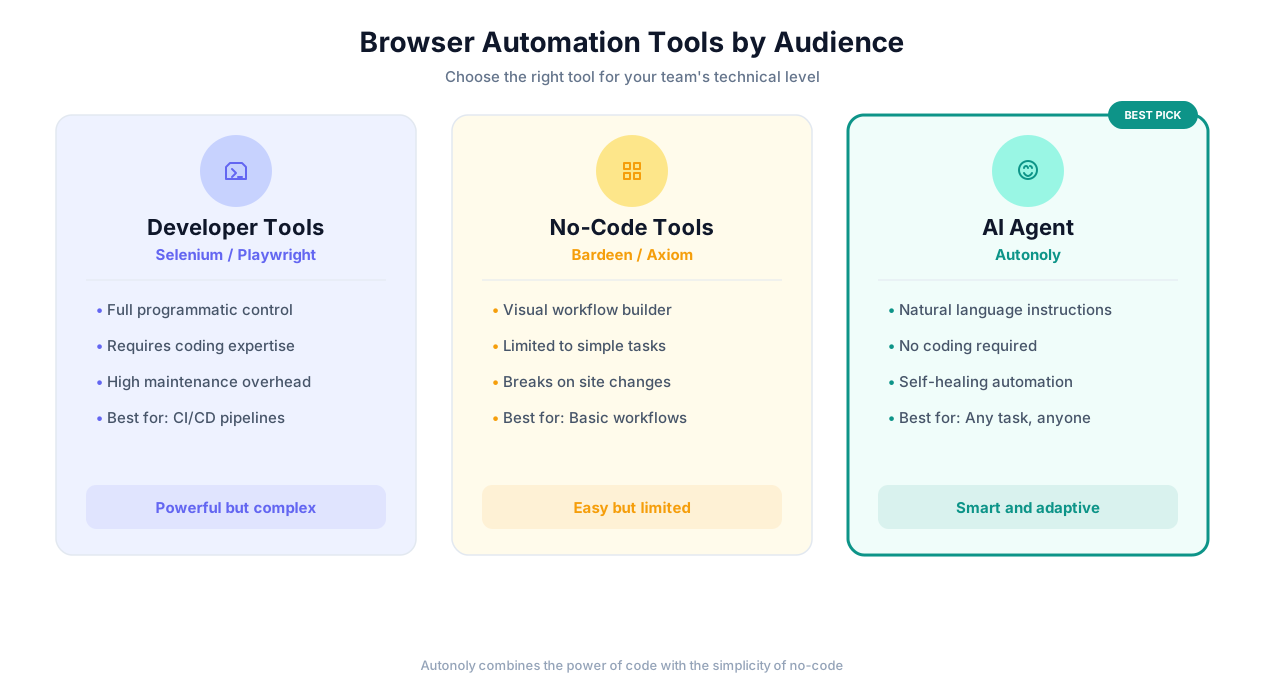
Tool comparison by use case
I have used all of these tools in production. Here is where each one genuinely excels and where it falls short.
| Dimension | Selenium | Playwright | Puppeteer | Bardeen | Axiom | Conferbot AI |
|---|---|---|---|---|---|---|
| Setup complexity | High (drivers, bindings, config) | Medium (npm install, one command) | Medium (npm install) | Low (Chrome extension) | Low (Chrome extension) | None (cloud-hosted) |
| Coding required | Yes (Java/Python/JS/C#) | Yes (JS/TS/Python/.NET) | Yes (JavaScript) | No (visual builder) | No (visual builder) | No (natural language) |
| Multi-browser | Yes (all major) | Yes (Chromium/FF/WebKit) | No (Chromium only) | No (Chrome only) | No (Chrome only) | Yes (cloud browsers) |
| Selector fragility | High | Medium (auto-wait helps) | High | High (recorded selectors) | High (recorded selectors) | Low (vision + AI) |
| Anti-bot handling | Manual (stealth plugins) | Manual (stealth plugins) | Manual (stealth plugins) | Limited | Limited | Built-in (human-like behavior) |
| Shadow DOM support | Poor | Good (pierce selectors) | Limited | Poor | Poor | Full (vision-based) |
| Error recovery | None (crashes) | None (crashes) | None (crashes) | Basic (retry same step) | Basic (retry same step) | Intelligent (strategy switching) |
| Maintenance burden | Very high | High | High | Medium | Medium | Low (self-healing) |
| Speed per action | 200-500ms | 50-150ms | 50-150ms | 300-800ms | 300-800ms | 500-2000ms |
| Cost | Free (OSS) | Free (OSS) | Free (OSS) | $10-50/mo | $15-50/mo | Usage-based |
| Best for | Legacy test suites | New dev automation | Chrome-specific tooling | Simple personal tasks | Simple personal tasks | Complex, cross-site workflows |
Where Developer Tools Still Win
I will be direct: if you are a developer building automation for a single, well-structured website that you control, Playwright is the better choice. It is faster (50-150ms per action vs. 500-2000ms for AI), deterministic (same inputs always produce same outputs), free, and gives you fine-grained control over every aspect of browser behavior.
Playwright wins when:
You control the target website and can add
data-testidattributesSpeed is critical (high-frequency trading dashboards, real-time monitoring)
You need pixel-perfect screenshot comparison for visual regression testing
The automation must be 100% deterministic with zero variance between runs
You have developers available to build and maintain the scripts
AI browser automation wins when:
You are automating websites you do not control
The target websites change frequently
You do not have (or do not want to spend) developer resources
You need to automate across many different websites with one approach
Error handling and edge cases would require extensive custom code
Anti-bot protection blocks traditional tools
When AI Browser Automation Does Not Work Well
I would not trust a tool that claims to be perfect, and you should not either. Here is where AI browser automation has genuine limitations.
Pixel-Perfect Visual Testing
If you need to verify that a button is exactly 4px from the left edge of its container, or that a specific shade of blue (#2563EB, not #2563EC) is used consistently, AI browser automation is the wrong tool. Visual regression testing tools like Percy, Chromatic, or BackstopJS are purpose-built for this. AI agents understand visual elements semantically, not at the pixel level.
Ultra-Low-Latency Requirements
Each AI reasoning step takes 500-2000ms. For a 10-step workflow, that is 5-20 seconds of overhead. If you need to execute thousands of browser actions per minute (high-frequency data collection, real-time arbitrage), the LLM reasoning latency is prohibitive. Traditional Playwright scripts executing at 50-150ms per action are 10-20x faster.
Highly Deterministic Workflows
Some workflows must execute the exact same steps in the exact same order every single time — regulatory compliance recording, audit trail generation, certified testing procedures. AI agents may take slightly different paths to the same outcome (clicking a nav menu vs. using a URL shortcut). If the path matters as much as the destination, deterministic scripting is safer.
Offline or Air-Gapped Environments
AI browser automation requires connectivity to LLM APIs for reasoning. If your automation runs in an air-gapped network with no external API access, you need a fully local solution. (Self-hosted LLMs can address this, but the inference hardware requirements are significant.)
Extreme Scale
Running 10,000 concurrent browser sessions with AI reasoning on each one is technically possible but expensive. At scale, traditional scraping with purpose-built parsers (not even browser automation — just HTTP requests and HTML parsing) is orders of magnitude more cost-effective. AI browser automation shines at moderate scale (tens to low hundreds of concurrent sessions) where the flexibility justifies the per-execution cost.
Getting Started With Conferbot's AI Browser Automation
Step 1: Describe Your Workflow
No recording, no coding, no flowcharts. Describe what you want automated in plain English:
"Every Monday at 9 AM, log into our CRM, export last week's new leads as CSV, upload that CSV to our Google Sheet 'Weekly Leads', and send a Slack message to #sales-team with the count."
Step 2: Review the Agent's Plan
Before executing anything, the AI agent shows you its plan — the steps it will take, the websites it will visit, the data it will collect. You approve, modify, or reject. No surprises.
Step 3: Run and Monitor
Watch the first execution in real-time. See the browser, see each action, see the AI's reasoning. Once you are satisfied, set it to run on schedule. You get notifications on success, detailed logs on failure.
Step 4: Let It Improve
Over subsequent executions, the agent learns the optimal path. It discovers that the CRM loads faster if you navigate directly to the export page instead of going through the dashboard. It remembers that the Google Sheets upload takes 3 seconds to process and waits accordingly. It gets better without you doing anything.
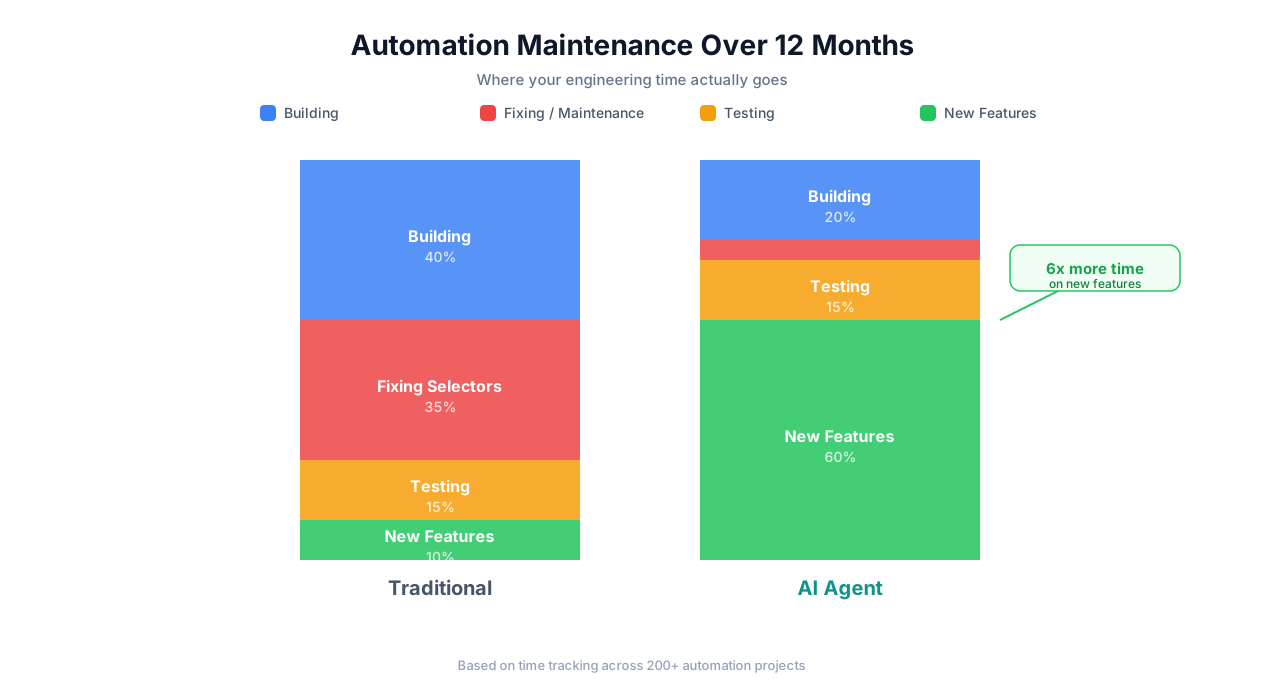
Browser automation reliability over time
The chart above illustrates what we see consistently across deployments: traditional selector-based automation starts at high reliability and degrades steadily as the target website evolves. AI browser automation starts slightly lower (the agent is learning the site) and improves over time as it accumulates execution history and optimizes its approach. The crossover typically happens within 2-4 weeks.
Frequently Asked Questions
Is AI browser automation just a wrapper around Selenium or Playwright?
No, though it uses Playwright (or similar) as the browser control layer. The difference is in the decision-making. Playwright executes predefined commands: "click this selector, type this text, navigate to this URL." AI browser automation uses an LLM reasoning loop to decide what to do based on the current visual state of the page. Playwright is the hands; the AI is the brain. You could theoretically swap Playwright for any browser control mechanism and the AI layer would still work.
How does it handle two-factor authentication (2FA)?
For TOTP-based 2FA (authenticator apps), the agent can integrate with your TOTP secret to generate codes automatically. For SMS or email-based 2FA, the agent pauses and notifies you to provide the code, then resumes. For hardware keys (YubiKey), the agent cannot physically press the key — you would need to handle that step manually or use a virtual FIDO2 solution.
What about websites behind a corporate VPN?
Conferbot supports connecting through your VPN or proxy. The cloud browser can be configured to route traffic through your corporate network, allowing it to access internal applications. For highly sensitive environments, we also support running the browser agent on your own infrastructure while using our orchestration layer.
Can it handle dynamic content that loads asynchronously?
Yes, and this is one of the key advantages. Instead of writing explicit wait conditions (waitForSelector, waitForNetworkIdle), the AI agent simply observes whether the expected content has appeared on screen. It takes successive screenshots and reasons about whether the page is "ready" — loading spinners gone, content populated, interactive elements enabled. This mirrors how a human decides when a page is loaded.
How accurate is the data extraction?
For structured data (tables, lists, labeled fields), extraction accuracy is typically 97-99%. For unstructured content (free-text paragraphs, mixed-format documents), accuracy depends on the specificity of your extraction instructions. Providing examples of expected output format significantly improves accuracy. All extractions can be validated against schemas you define.
What happens when a website completely redesigns?
This is where AI browser automation earns its keep. A complete redesign that would break every selector in a traditional script typically requires zero changes to an AI automation. The agent's instructions say "click on Reports" — it does not matter if Reports is now in a top nav instead of a sidebar, or if it is behind a hamburger menu on the new responsive layout. The agent finds it because it understands what "Reports" means visually and semantically.
That said, if a redesign changes the fundamental workflow (the Reports page no longer exists, it has been split into "Analytics" and "Dashboards"), you will need to update your natural language instructions. But updating "click on Reports" to "click on Analytics" is a very different level of effort than rewriting 200 lines of selectors.
Is this compliant with website terms of service?
Browser automation operates in a legal gray area that depends on jurisdiction, the specific website's ToS, and what you are doing. Conferbot's AI browser automation is a tool — like Playwright or a web browser itself — and the responsibility for compliant use lies with you. We recommend reviewing the ToS of any website you automate, respecting robots.txt directives, implementing reasonable rate limiting, and avoiding automation that could be construed as unauthorized access. For your own internal tools and websites, there are generally no restrictions.
How does pricing work compared to traditional tools?
Selenium, Playwright, and Puppeteer are free open-source tools — but the hidden cost is developer time for building and maintaining scripts. Conferbot's AI browser automation is usage-based: you pay per task execution. For a rough comparison, a workflow that would take a developer 20 hours to build and 5 hours/month to maintain in Playwright costs roughly $3,000 in the first year (at $100/hr developer cost). The same workflow in Conferbot might cost $50-200/month depending on execution frequency — $600-2,400/year with zero maintenance time.
Can I combine AI browser automation with traditional API calls?
Absolutely, and you should. If a service has a reliable API, use the API. AI browser automation is best deployed where APIs do not exist, are too limited, too expensive, or too slow to update. Many real-world workflows combine both: pull data via API from services that support it, use browser automation for the ones that do not. Conferbot supports hybrid workflows that mix API calls, browser automation, and data processing in a single pipeline.
What is the learning curve?
If you can describe a task in writing, you can use AI browser automation. There is no coding, no selector syntax, no async/await. The learning curve is primarily in writing clear, specific instructions — a skill most people already have. Power users who want to optimize performance, handle edge cases, or build complex multi-step workflows will benefit from understanding how the AI reasons about web pages, but this is optional, not required.
The Bottom Line
Browser automation has been promising to "save you time" for fifteen years. For most people, it has not delivered on that promise — because the tools required developer skills to build and constant maintenance to keep running.
AI browser automation changes the equation. Not because AI is magic, but because operating on visual and semantic understanding instead of brittle DOM selectors eliminates the primary failure mode that has plagued every previous generation of tools.
If you have browser tasks you have been doing manually because automation was too fragile or too complex, this is the technology that finally makes it practical. Not perfect — I have been honest about the limitations. But practical, reliable, and accessible in a way that nothing before it has been.