


The Problem with Manual Job Board Monitoring
Recruitment teams typically track five to fifteen job boards simultaneously — mainstream platforms like Indeed and LinkedIn, plus niche boards relevant to their industry. Checking each board, copying listings, and pasting them into a tracker spreadsheet can consume two or more hours every day. Multiply that across a team of recruiters and the cost is staggering.
Autonoly's Browser Automation replaces this entire process with a single automated workflow that visits every board, extracts listings, and produces a clean, deduplicated Excel file.
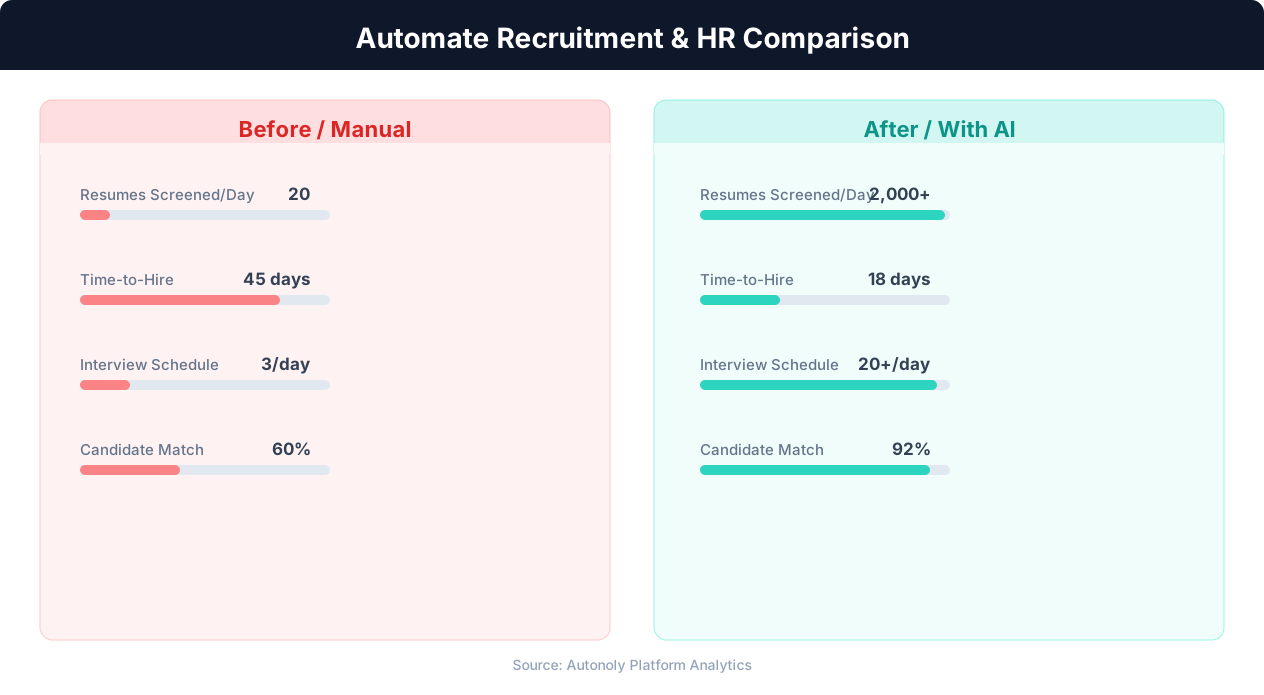
Time-to-hire comparison for manual vs automated recruitment
Key Insight: Automated resume screening reduces time-to-hire by 43% while improving candidate quality by surfacing qualified applicants human reviewers missed (SHRM Research).
Supported Job Boards
The automation works with any job board that has a web interface. Out of the box, users commonly scrape Indeed, LinkedIn Jobs, Glassdoor, AngelList, We Work Remotely, Stack Overflow Jobs, and industry-specific boards. The AI Agent Chat adapts to each site's layout automatically — you provide the URL and search criteria, and the agent figures out the page structure.
For boards behind authentication, you can provide login credentials through the secure credential storage. The agent logs in, navigates to the jobs section, and begins extraction.
Key Insight: Recruiters spend 23 hours per week on average sourcing candidates manually. Automation reduces this to 5 hours while expanding the candidate pool 4x (LinkedIn Talent Report).
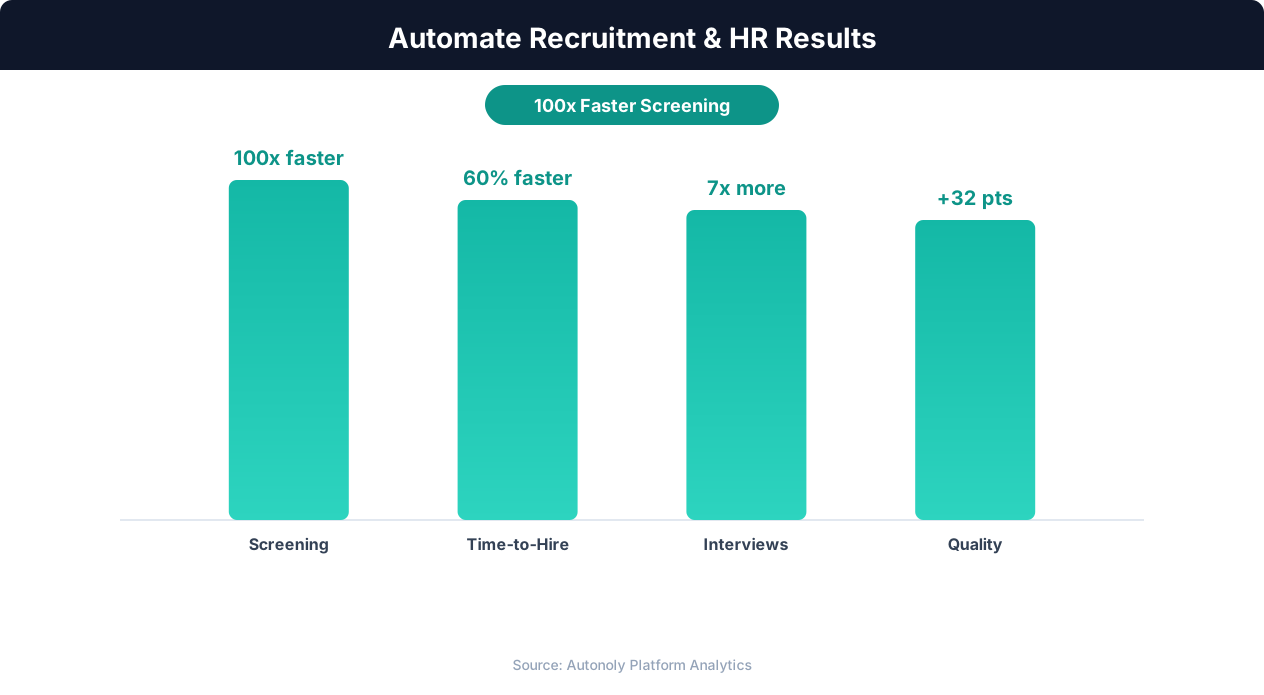
Quality of hire improvements from automated screening
What Gets Extracted
The Data Extraction engine captures every available field: job title, company name, location, salary (if listed), employment type, posted date, application deadline, and a direct link to the listing. Fields that exist on one board but not another are filled with blank values, so the unified spreadsheet remains consistent.
Custom fields are supported too. If a niche board displays "visa sponsorship" or "equity range," the agent can capture those with a simple configuration tweak in the Visual Workflow Builder.
Deduplication Across Boards
The same job often appears on multiple boards. Autonoly's Data Processing pipeline matches listings by company + title + location to identify duplicates. The first occurrence is kept, and subsequent duplicates are marked or removed. A "Source" column preserves which board each listing came from.
Building the Unified Spreadsheet
The output Excel file contains a master sheet with all listings and optional per-board tabs for reference. Columns are consistent regardless of source, making it trivial to build pivot tables, apply conditional formatting, or import into your ATS.
If your team uses Google Sheets, swap the output node. The Integrations hub also supports Airtable, Notion, and direct database writes for teams with more advanced data pipelines.
Scheduling and Alerts
Run the workflow daily for active hiring campaigns or weekly for passive monitoring. Combine it with a Slack or email notification node to alert your team when new listings matching priority criteria appear. Browse our templates library for pre-built multi-board scraping workflows.
Configuring Priority Alerts
Use Logic & Flow to define priority criteria — salary thresholds, specific companies, or keyword matches — that trigger immediate Slack or email notifications. Routine listings are batched into the daily spreadsheet update, while high-value matches generate real-time alerts so your team can act fast on competitive opportunities.
Handling Board-Specific Authentication
Some niche job boards require login credentials to view full listings. Store credentials securely in Autonoly's vault and the agent authenticates automatically before scraping. The Visual Workflow Builder lets you configure authentication per board without affecting the rest of the pipeline.
Key Insight: Companies using recruitment automation report 67% lower cost-per-hire and 31% lower turnover in the first year due to better candidate matching (Bersin by Deloitte).
Who Uses This
Staffing agencies managing hundreds of open requisitions across industries, in-house recruiting teams consolidating board spend analysis, and market research firms tracking labor demand patterns all rely on multi-board scraping. Check our pricing page for plans designed for high-volume extraction. For scraping concepts, visit the web scraping glossary.
Practical Examples and Scenarios
A recruiting agency specializing in remote engineering talent monitors We Work Remotely, RemoteOK, AngelList, and LinkedIn simultaneously. Each morning, the workflow runs at 6 AM, visits all four boards with the same search criteria (React, Node.js, Senior-level, Remote), and produces a single Excel file with 80-120 consolidated listings. The source column lets recruiters see which boards have the most activity, informing where the agency should invest in premium job postings.
An in-house talent team at an enterprise software company uses multi-board scraping to perform competitive analysis. They track job postings from five direct competitors across Indeed, LinkedIn, and Glassdoor. When a competitor suddenly posts fifteen new engineering roles in a single week, the talent team flags this as a potential product launch signal and adjusts their own sourcing strategy accordingly.
Why Automation Beats Manual Monitoring
Manually checking five job boards for three role-location combinations means performing fifteen separate searches, scrolling through results, and copying relevant listings into a spreadsheet. At 10-15 minutes per search, this daily ritual takes over three hours. Autonoly completes the same work in a background run that finishes in 15-20 minutes, producing a cleaner result with automatic deduplication that no manual process can match.
Consistency is another advantage that compounds over time. Manual monitoring depends on individual discipline — recruiters may skip a board on a busy day, use slightly different filters, or miss listings on later result pages. An automated workflow applies identical parameters across every board on every run, ensuring complete and reproducible coverage. Over weeks and months, the accumulated dataset becomes a reliable source for labor market trend analysis.
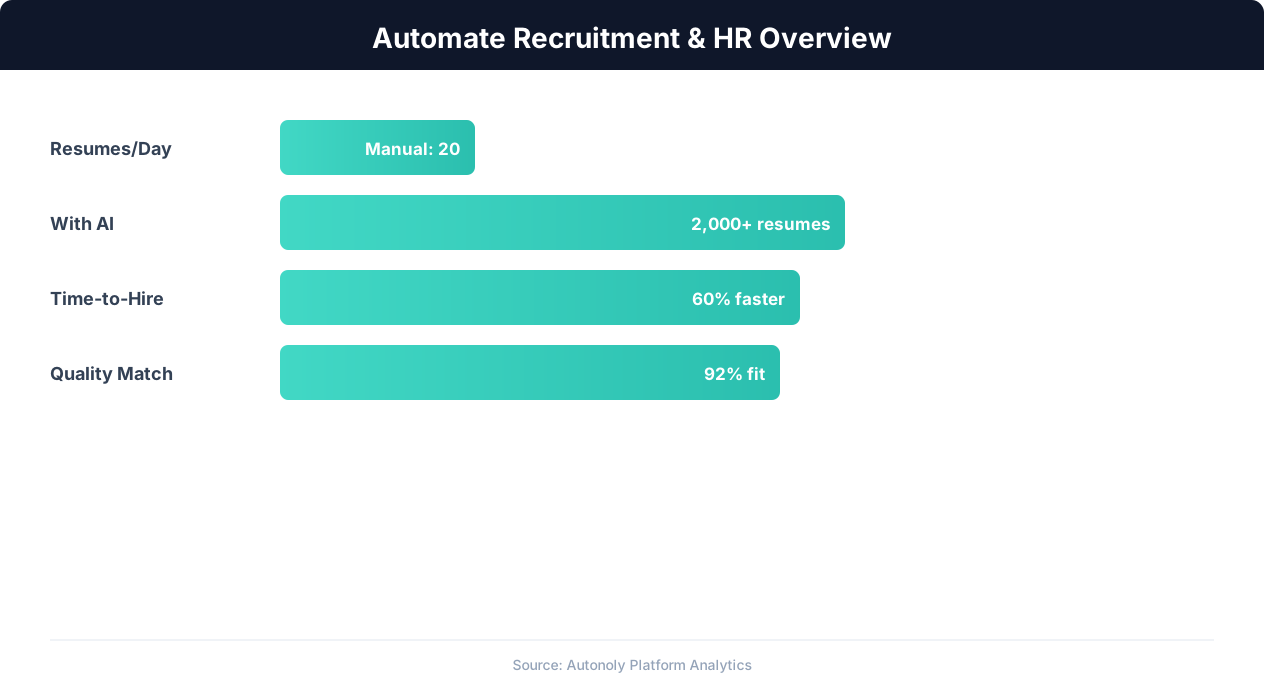
Recruitment automation impact on hiring metrics
Key Insight: Automated job posting syndication to 50+ platforms increases qualified applicant volume by 88% compared to manual posting on individual boards (iCIMS Research).
Building Advanced Pipelines with Autonoly Features
Chain the multi-board scraping workflow with Data Processing nodes to enrich listings before they reach your spreadsheet. For example, look up each company on Crunchbase to append funding stage and employee count, or cross-reference salaries against your internal compensation bands using Logic & Flow conditional nodes. Route high-priority listings to a Slack channel for immediate action while accumulating the full dataset in Excel for weekly review. The Visual Workflow Builder makes it straightforward to compose these multi-step pipelines without writing code.
Further Reading
Explore more about the tools and techniques used in this workflow: Best Web Scraping Tools, Recruiting Automation.