The Portal Problem: Why Accountants Are Trapped in Manual Browser Work
Accounting is one of the most portal-intensive professions in existence. A typical CPA firm managing 200-400 clients interacts with dozens of distinct web portals every single day. Bank portals for downloading statements. Tax authority portals for filing returns and checking statuses. Client accounting platforms like QuickBooks Online, Xero, and FreshBooks for reconciliation and data entry. Understanding what automation is and how business process automation tackles repetitive portal work explains why accounting is such fertile ground for it. Payroll portals like ADP, Gusto, and Paychex for wage data. State Department of Revenue sites for sales tax and quarterly filings. IRS portals for transcript requests and e-file confirmations. 1099 portals for contractor payment reporting. And the list continues.
The fundamental problem is not complexity. Accountants are highly skilled professionals who can navigate any portal. The problem is volume and repetition. Downloading a single bank statement takes 2-3 minutes: log in, navigate to the right account, select the date range, choose the format, click download, save the file, rename it according to your naming convention, and move it to the correct client folder. That is straightforward. Now multiply it by 15 bank accounts across 8 clients on a Monday morning, and you have burned an hour on a task that requires zero professional judgment.
During tax season, this manual portal work consumes an estimated 40-60% of an accountant's day. Partners at CPA firms consistently report that their most experienced staff — people billing at $150-$300 per hour — spend half their working hours on tasks that a well-trained assistant could do. Except there are not enough assistants, and training someone to navigate 30 different portal interfaces takes months.
What makes accounting portal work particularly painful is the lack of APIs. Unlike modern SaaS tools that offer robust integrations, most banking portals, government tax sites, and legacy accounting platforms either have no API at all, or offer APIs so limited they cover only a fraction of what accountants actually need. The IRS does not offer an API for pulling transcripts. Your client's community bank does not have an API for downloading statements. The State of Ohio's Department of Taxation does not expose an API for filing quarterly returns. These portals were built for humans clicking through web browsers, and that is the only way to interact with them.
This is exactly the gap that browser automation fills. Instead of waiting for APIs that may never arrive, browser automation works with portals exactly as they exist today — navigating pages, clicking buttons, filling forms, and downloading files, all without requiring any changes or cooperation from the portal providers. For accounting firms drowning in manual portal work, this is transformative.
The Top Accounting Tasks to Automate First
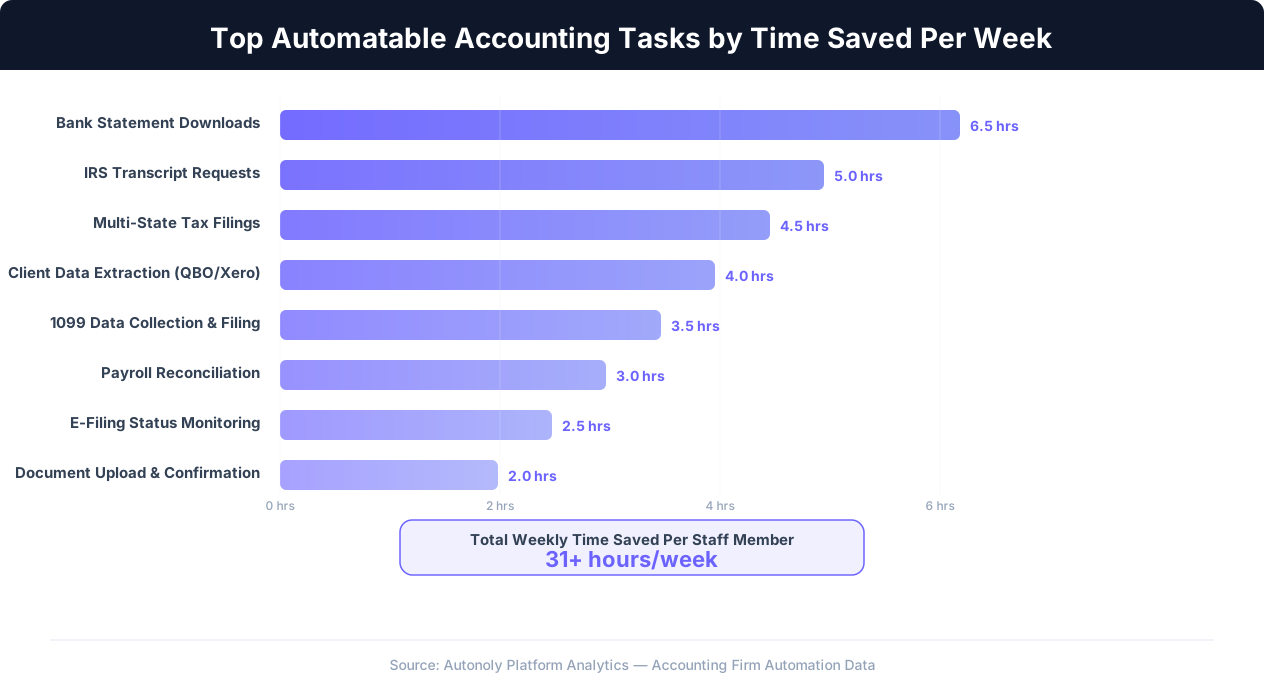
Not every accounting task is a good candidate for automation. The highest-impact targets are tasks that are high-volume, repetitive, time-consuming, and require minimal professional judgment. Here are the specific workflows where browser automation delivers the greatest return for accounting firms, ranked by typical time savings.
1. Bank Statement Downloads
This is the single highest-impact automation for most firms. The workflow is identical every time: log into a banking portal, navigate to the statements section, select the correct account, choose the date range, download the statement in PDF or CSV format, rename it with a standardized naming convention (Client_BankName_AccountLast4_Period), and save it to the appropriate client folder. For a firm managing 300 clients with an average of 3 bank accounts each, that is 900 statement downloads per month — roughly 30-45 hours of pure portal work.
An automated workflow handles this end-to-end. You configure it once per bank portal with the login credentials, account identifiers, and file naming convention. The automation runs on a schedule — monthly, weekly, or daily depending on your needs — and deposits the correctly named files into your document management system. The accountant's involvement drops from 3 minutes per statement to 0 minutes per statement, with a brief review of the downloaded batch.
2. IRS Transcript Requests
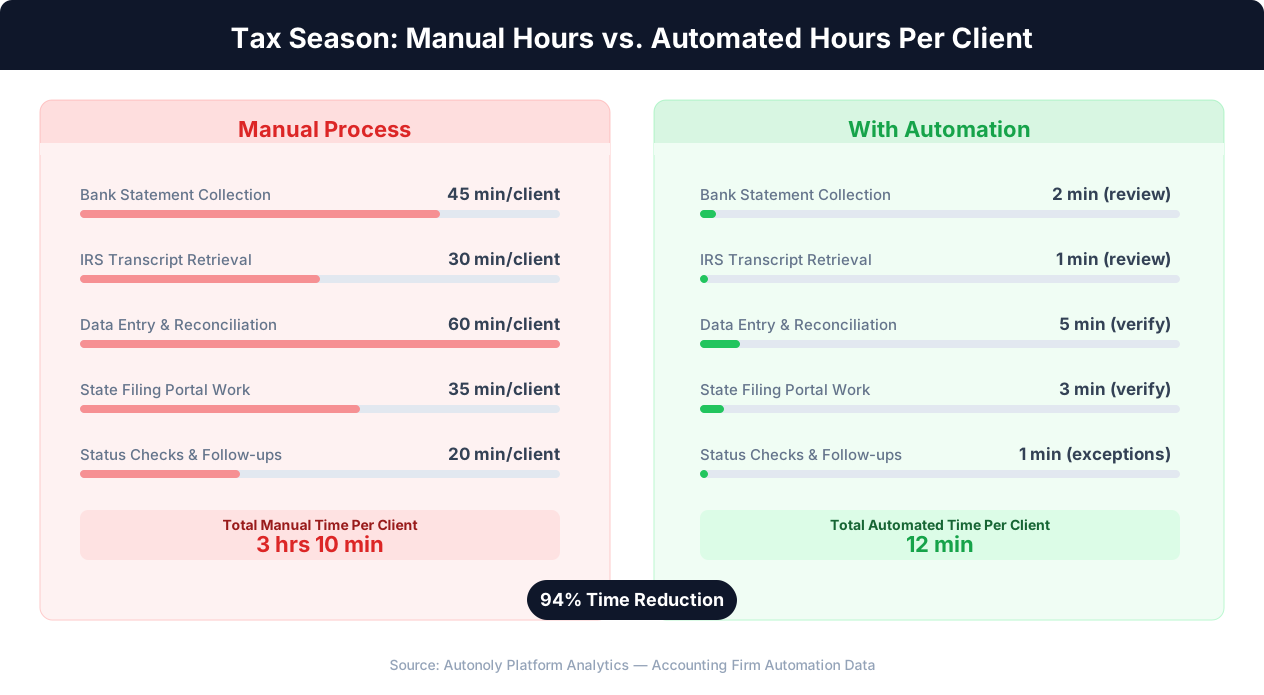
During tax season, firms request hundreds of IRS transcripts through the IRS.gov portal. Each request involves logging into the e-Services portal, navigating to the Transcript Delivery System, entering the client's information, selecting the transcript type (Account Transcript, Return Transcript, Wage and Income), choosing the tax period, and submitting the request. Then waiting for it to generate. Then downloading it. For a firm preparing 500 returns, this easily consumes 80-120 hours across the season.
Browser automation can batch these requests, processing them sequentially through the IRS portal at a pace that respects the portal's rate limits while freeing staff to work on actual tax preparation.
3. Multi-State Tax Filings
Firms with clients operating in multiple states face a particularly brutal version of the portal problem. Each state has its own Department of Revenue portal with its own interface, its own filing requirements, and its own quirks. Filing quarterly sales tax for a client operating in 12 states means navigating 12 different portals, entering similar but slightly different data into each one, and confirming 12 separate submissions. Some states require separate logins for different tax types (sales tax vs. withholding tax vs. income tax).
Automated workflows can handle multi-state filings by templating the data once and executing the filing process across each state portal in sequence. The accountant prepares the filing data in a standardized spreadsheet, and the automation enters it into each portal.
4. Client Data Extraction from QuickBooks Online and Xero
Accountants frequently need to pull reports, trial balances, or transaction data from client accounting platforms. While QuickBooks Online and Xero do have APIs, their APIs often lack access to specific reports or views that accountants need. Browser automation can navigate directly to the reports section, generate the required report with the correct date range and filters, export it, and save it — all without being limited by API coverage gaps.
5. 1099 Data Collection and Filing
Preparing 1099s requires collecting payment data from multiple sources: bank records, accounting systems, payment platforms. The filing itself involves entering data into IRS FIRE (Filing Information Returns Electronically) or a third-party filing portal. For firms handling 1099 preparation for dozens of clients with hundreds of contractors each, the data collection and entry work is enormous. Browser automation can extract the payment data from source portals and enter it into the filing system.
6. Payroll Data Reconciliation
Reconciling payroll data between payroll providers (ADP, Gusto, Paychex) and accounting systems requires logging into the payroll portal, downloading payroll reports, and cross-referencing them with general ledger entries. This is weekly or biweekly work that follows an identical pattern each cycle.
Firm-Level Impact
A mid-size CPA firm with 15 staff members automating just bank statement downloads and IRS transcript requests typically recovers 500-800 billable hours per year — equivalent to adding a full-time staff member without the salary, benefits, or training costs.
7. Client Portal Status Checks
Many firms check client portal statuses daily: has the IRS processed a filing? Has a state refund been issued? Has a client's quarterly payment cleared? Each check requires logging into a portal, navigating to the status page, and noting the result. Automated workflows can run these checks on a schedule and alert the accountant only when something changes or requires attention.
8. Document Upload and E-Filing Confirmation
Uploading signed documents to client portals, submitting e-filed returns, and downloading confirmation receipts are all high-volume, zero-judgment tasks that follow rigid patterns — perfect candidates for automation.
How Browser Automation Works for Accounting Portals
Browser automation for accounting works differently from traditional software integrations, and understanding the mechanism helps firms evaluate whether it fits their needs. The core concept is straightforward: instead of a human sitting at a computer, clicking through web portals, an AI agent performs those same actions in a cloud browser.
The Workflow: Describe, Execute, Convert
With a platform like Autonoly, the process follows three stages. First, you describe the task in plain English: "Log into Chase Business Online using these credentials, navigate to the checking account ending in 4521, download the statement for last month in PDF format, and save it as ClientName_Chase_4521_May.pdf." Second, the AI agent executes the task in a cloud browser, interacting with the portal exactly as a human would — clicking buttons, filling fields, navigating menus, waiting for pages to load. Third, the successful execution is converted into a reusable workflow that can run on a schedule without further human involvement.
This approach has several critical advantages for accounting firms.
Works with Any Portal, No API Required
Because browser automation interacts with the portal's web interface directly, it works with every portal your firm uses — regardless of whether that portal offers an API. The IRS e-Services portal, your client's community bank, the State of New Jersey's Division of Taxation website, an obscure 1099 filing platform — if a human can use it in a browser, the automation can too. This is the key differentiator from integration-based tools like Zapier or Make, which can only connect to platforms that provide APIs.
Handles Multi-Step, Multi-Portal Workflows
Real accounting workflows often span multiple portals. Downloading a bank statement from Chase, then uploading it to QuickBooks Online, then logging the reconciliation status in a project management tool — that is a single logical workflow that touches three different portals. Browser automation chains these steps together into a single automated workflow that runs end-to-end.
Adapts to Portal Changes
Portal interfaces change. Banks redesign their login pages, the IRS updates its e-Services layout, state tax portals add new fields or rearrange navigation. AI-powered browser automation adapts to these changes more gracefully than rigid scripts because the AI agent understands the intent of each action ("click the download button") rather than relying on fixed element selectors that break when a page redesigns.
| Approach | Portal Coverage | Setup Effort | Handles Changes | Multi-Portal Chains |
|---|---|---|---|---|
| Manual (Human) | 100% | None | Instantly | Yes (slowly) |
| API Integrations (Zapier/Make) | 15-25% | Low | Automatically | Only API portals |
| Custom Scripts (Selenium/Playwright) | 100% | Very High | Breaks often | Yes (complex) |
| AI Browser Automation | 100% | Low | Adapts via AI | Yes (native) |
No Code Required
This is particularly important for accounting firms that do not have in-house developers. Traditional browser automation tools like Selenium or Playwright require writing and maintaining code. AI browser automation platforms like Autonoly let you describe tasks in plain English and build workflows visually. The firm's bookkeepers and tax preparers can create and modify automations without needing to learn programming.
Tax Season Workflows: Where Automation Saves the Most Time
Tax season amplifies every inefficiency in an accounting firm's operations. The same portal tasks that are manageable during normal months become overwhelming when the volume doubles or triples. Here is how browser automation transforms the specific workflows that create the biggest bottlenecks during tax season.
Batch Transcript Retrieval from IRS e-Services
The IRS Transcript Delivery System is one of the most-visited portals for any tax preparation firm. During filing season, a firm preparing 400-500 individual returns needs Account Transcripts, Wage and Income Transcripts, and sometimes Return Transcripts for each client. Manually, each transcript request takes 4-6 minutes including login, navigation, data entry, and download. For 500 clients needing 2-3 transcripts each, that is 1,000-1,500 requests — roughly 80-150 hours of portal work.
An automated workflow processes these requests in batches. The accountant prepares a spreadsheet with client names, SSNs, and requested transcript types. The automation logs into e-Services, processes each request sequentially (respecting the IRS portal's rate limits and session constraints), downloads each transcript, names it according to the firm's convention, and saves it to the correct client folder. The 80-150 hours of manual work becomes 2-3 hours of batch processing time with 15 minutes of accountant oversight.
Multi-State Filing Execution
A client with operations in eight states requires eight separate state tax portal filings each quarter. Each filing involves navigating a different state portal (California's FTB, New York's DTF, Texas's Comptroller, Illinois's IDOR, and so on), entering the filing data, uploading any required documents, and submitting. The interfaces are all different. Some require two-factor authentication. Some have Byzantine navigation structures. Some time out after 10 minutes of inactivity.
Browser automation handles the portal-by-portal execution while the accountant focuses on the substantive work: ensuring the numbers are correct. The automation receives the prepared filing data and executes each state submission in sequence, capturing confirmation numbers and screenshots for the firm's records.
Document Collection from Client Portals
Tax preparation requires collecting documents from multiple sources for each client. W-2s from payroll portals, 1099s from investment accounts, K-1s from partnership portals, mortgage interest statements from lender portals, health insurance forms from marketplace portals. For clients who cannot or will not gather these documents themselves, the firm logs in on their behalf and downloads everything.
A pre-configured document collection workflow runs through each client's portals systematically, downloading every available tax document and organizing them by type and client. What previously required an intern spending two weeks on document collection becomes a batch process that runs overnight.
E-Filing Status Monitoring
After filing, firms need to track acceptance or rejection status for every return. The IRS e-file status portal, state filing portals, and third-party filing platforms each need to be checked. For a firm that filed 500 returns across federal and multiple state jurisdictions, that is thousands of status checks over the weeks following filing deadlines.
Automated monitoring workflows check these statuses on a daily schedule and generate exception reports — only surfacing returns that were rejected, flagged, or have not been acknowledged within the expected timeframe. Instead of checking 500 statuses daily, the accountant reviews a report of the 5-10 that need attention.
Tax Season Reality Check
During peak filing season, a firm with 20 staff members can recover 400-600 hours by automating just four workflows: bank statement downloads, transcript requests, multi-state filing execution, and e-file status monitoring. At average billing rates, that represents $60,000-$120,000 in recovered capacity per season.
Security and Compliance: Handling Client Credentials and Sensitive Data
Security is the first question any responsible accounting firm asks about browser automation, and rightly so. Accounting firms handle some of the most sensitive financial data in existence: Social Security numbers, bank account credentials, tax identification numbers, financial statements. Any automation platform that touches this data must meet rigorous security standards.
Credential Management
The most sensitive element of browser automation is credential storage. The automation needs login credentials for each portal it accesses. Modern browser automation platforms address this with encrypted credential vaults — credentials are encrypted at rest using AES-256 encryption, transmitted only over TLS 1.3, and never stored in plain text. When the automation needs to log into a portal, it retrieves the encrypted credential, decrypts it in memory for the login action, and discards it from memory immediately after use.
Firms should look for platforms that support role-based access controls so that only authorized personnel can view or modify credentials. A staff accountant should be able to run a pre-configured workflow without ever seeing the underlying bank login credentials. Only a partner or IT administrator should have access to the credential vault itself.
SOC 2 Compliance
SOC 2 (System and Organization Controls 2) is the baseline security certification that accounting firms should require from any automation vendor. SOC 2 Type II certification means an independent auditor has verified that the platform maintains appropriate controls for security, availability, processing integrity, confidentiality, and privacy — and that those controls were operating effectively over a sustained period (typically 6-12 months).
Beyond SOC 2, firms handling client data subject to IRS requirements should verify that their automation platform's data handling practices align with IRS Publication 4557 (Safeguarding Taxpayer Data) and any applicable state data protection requirements.
Data Residency and Processing
When a browser automation downloads a bank statement or tax transcript, that document passes through the automation platform's infrastructure. Firms need to understand where that data is processed and stored. Key questions include: Are cloud browsers hosted in the US? Is data encrypted in transit and at rest? How long is downloaded data retained on the platform's servers before being delivered to the firm's systems? Can the firm configure automatic data purging?
| Security Feature | Why It Matters for Accounting | What to Verify |
|---|---|---|
| Encrypted credential vault | Protects bank and portal logins | AES-256, no plain text storage |
| Role-based access controls | Staff runs workflows without seeing credentials | Granular permission levels |
| SOC 2 Type II certification | Independently verified security controls | Current audit report available |
| US data residency | IRS and state compliance requirements | Cloud infrastructure location |
| Audit logging | Track who accessed what and when | Immutable, exportable logs |
| Session isolation | One client's data never leaks to another | Isolated cloud browser per session |
Two-Factor Authentication Handling
Many banking and government portals now require two-factor authentication (2FA). This presents a challenge for automation. The most practical approaches are: configuring the automation to handle TOTP (Time-based One-Time Password) codes via an authenticator app API, using SMS-based 2FA with a dedicated phone number that the automation can read, or setting up the automation to pause and request human intervention when a 2FA prompt appears. The last option sacrifices some of the time savings but maintains full compatibility with any 2FA method.
Client Authorization
Firms should obtain written authorization from clients before automating access to their portals. This can be incorporated into the firm's standard engagement letter. The authorization should specify which portals the firm will access via automation, what data will be downloaded, and how credentials will be stored and protected. This is not just good practice — it is a professional responsibility under the AICPA Code of Professional Conduct and state board of accountancy rules governing client data handling.
Implementation Guide: Rolling Out Browser Automation at Your Firm
Implementing browser automation at an accounting firm requires a thoughtful rollout that balances quick wins with long-term process change. Here is a practical implementation roadmap based on what works for firms of different sizes.
Phase 1: Single-Task Pilot (Weeks 1-2)
Start with one high-volume, low-risk task. Bank statement downloads are the ideal first automation for most firms because they are high-frequency, low-sensitivity (statements are read-only downloads, not submissions), and the time savings are immediately visible. Choose 5-10 clients with the same bank (Chase, Bank of America, or Wells Fargo are common starting points) and automate their monthly statement downloads.
During the pilot, track three metrics: time saved per statement, error rate (files downloaded with wrong dates, wrong accounts, or naming errors), and staff feedback on the workflow's reliability. A successful pilot typically shows 90%+ time reduction with an error rate below 5%.
Phase 2: Expand to Additional Banks and Tasks (Weeks 3-6)
Once the first bank portal workflow is proven, expand to additional banks. Each new bank requires a separate workflow configuration because portal interfaces differ, but the pattern is identical. Simultaneously, add your second automation target — typically IRS transcript requests or QuickBooks data exports, depending on the time of year.
This phase is also when you establish naming conventions, folder structures, and review processes. Decide where automated downloads land (a staging folder for review? directly into the client folder?), who reviews automated work before it is considered complete, and how exceptions are handled (what happens when a portal login fails or a download errors out).
Implementation Tip
Assign one "automation champion" at the firm — a senior staff member or manager who owns the automation roadmap, trains others, and serves as the first point of contact for issues. Firms that skip this step consistently report slower adoption and more friction.
Phase 3: Multi-Portal Workflows (Weeks 7-12)
With individual portal automations running reliably, begin chaining them into multi-step workflows. The most impactful multi-portal workflows for accounting firms include:
- Monthly close package: Download bank statements (bank portal) then import transactions into QuickBooks Online then generate and download the trial balance
- Payroll reconciliation: Download payroll reports from ADP/Gusto then cross-reference with general ledger entries in the accounting system then flag discrepancies
- Tax document assembly: Pull W-2s from payroll portal then download 1099s from investment platforms then collect mortgage interest statements from lender portals then organize everything in the client's tax preparation folder
Phase 4: Firm-Wide Adoption (Months 4-6)
By this phase, the automation infrastructure is proven and the firm has developed internal expertise. The focus shifts to training all staff on using automated workflows, building a library of reusable workflow templates for common tasks, and establishing monitoring processes to catch and resolve automation failures quickly. Many firms also begin identifying client-facing automation opportunities — such as automatically generating and sending monthly financial summaries to clients.
Staffing Considerations
A common concern is whether automation will eliminate jobs. In practice, accounting firms implementing automation almost never reduce headcount. Instead, they redistribute capacity. Staff who were spending 40% of their time on portal work now spend that time on advisory services, client communication, and complex analysis — the high-value activities that firms want to grow. During tax season, automation is the difference between mandatory overtime and manageable workloads. The staff who previously worked 70-hour weeks during filing season can maintain productivity at 50 hours because the portal work that consumed 20 hours per week is now automated.
ROI Analysis: The Numbers Behind Accounting Automation
Accounting firm partners think in terms of billable hours and realization rates. Here is how browser automation impacts those numbers directly.
Direct Time Savings
Based on aggregated data from firms that have automated their portal workflows, here are conservative time savings estimates per staff member:
| Task | Manual Time/Week | Automated Time/Week | Weekly Savings |
|---|---|---|---|
| Bank statement downloads | 5-8 hrs | 15 min (review) | 5-8 hrs |
| IRS transcript requests | 3-5 hrs | 10 min (review) | 3-5 hrs |
| Multi-state tax filings | 4-6 hrs | 30 min (verify) | 3.5-5.5 hrs |
| Client data extraction | 3-4 hrs | 10 min (review) | 3-4 hrs |
| 1099 data collection | 2-3 hrs | 10 min (review) | 2-3 hrs |
| Payroll reconciliation | 2-3 hrs | 15 min (review) | 2-3 hrs |
| Status checks and monitoring | 2-3 hrs | 5 min (exceptions only) | 2-3 hrs |
| Total | 21-32 hrs | 1.5-2 hrs | 20-30 hrs |
For a single staff accountant, that is 20-30 hours per week recovered — roughly half their working week. During tax season, when these tasks intensify, the savings are even larger.
Financial Impact Calculation
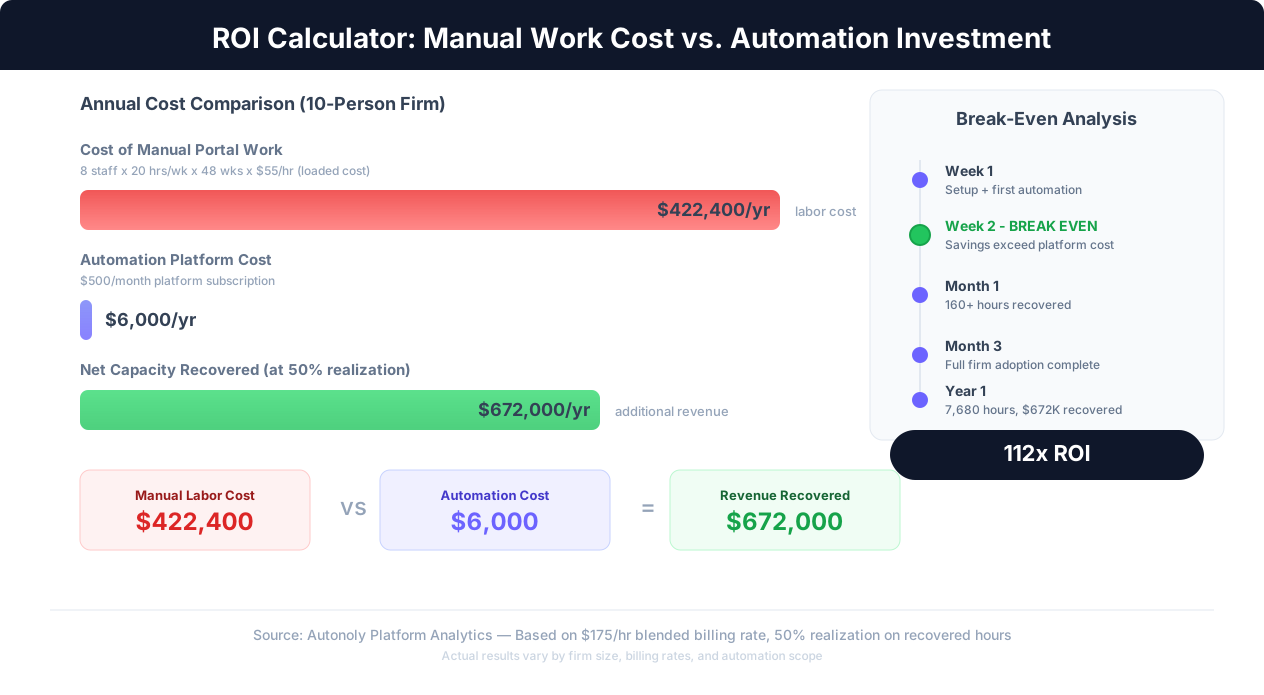
Here is the math for a 10-person CPA firm:
- Average billing rate: $175/hour (blended across staff levels)
- Hours recovered per staff member per week: 20 hours (conservative)
- Staff using automation: 8 (of 10 total)
- Weeks per year: 48 (accounting for vacation/holidays)
- Total hours recovered: 8 x 20 x 48 = 7,680 hours/year
- Potential additional revenue: 7,680 x $175 = $1,344,000/year
Not all recovered hours convert to billed work. A realistic realization rate on recovered hours is 40-60%, as some time goes to unbilled activities, training, and firm operations. Even at 40% realization, that is $537,600 in additional annual revenue from a 10-person firm.
Cost of Automation
Browser automation platform costs for accounting firms typically range from $200-$500/month depending on the volume of automated tasks and number of users. Even at the high end ($6,000/year), the ROI is dramatic — you are investing $6,000 to recover $500,000+ in capacity. The payback period is measured in days, not months.
Indirect Benefits
Beyond direct time and revenue impact, automation delivers several harder-to-quantify but equally important benefits:
- Reduced errors: Automated downloads and data entry eliminate transposition errors, wrong-date-range downloads, and misfiled documents that create downstream rework
- Staff retention: Accountants who joined the profession for analytical and advisory work are more satisfied when they spend less time on portal drudgery. Firms report lower turnover after implementing automation
- Scalability: Taking on 50 new clients no longer requires hiring additional staff purely for portal work. The automation scales with client count
- Consistency: Every statement is downloaded, every transcript is requested, every status is checked — automation does not forget, get distracted, or deprioritize tasks during busy periods
Getting Started: Your First Accounting Automation in 30 Minutes
The best way to evaluate browser automation for your firm is to automate one real task and see the results. Here is a step-by-step guide to setting up your first automation — a bank statement download workflow — in about 30 minutes.
Step 1: Choose Your Target (5 Minutes)
Pick one bank portal that you access frequently. Chase Business Online, Bank of America Business, or Wells Fargo Commercial Banking are good starting points because they are common and their portals have stable, well-structured interfaces. Select 3-5 client accounts at that bank for your initial test.
Step 2: Set Up Your Automation Platform (5 Minutes)
Sign up for Autonoly or your chosen browser automation platform. Configure a secure workspace for your firm. Add the bank portal credentials to the encrypted credential vault. If your firm has specific data residency requirements, verify the platform's infrastructure location before uploading any credentials.
Step 3: Describe the Task (10 Minutes)
Using Autonoly's AI agent chat, describe the bank statement download task in plain English. Be specific about the steps: "Log into Chase Business Online, navigate to the Statements section for checking account ending in 4521, download the most recent monthly statement in PDF format, and save it as ACME-Corp_Chase_4521_Apr.pdf." The AI agent will execute this in a cloud browser while you watch in real time through the live browser view.
Step 4: Review and Refine (5 Minutes)
Watch the AI agent perform the task. If it navigates correctly, downloads the right file, and names it properly, the workflow is ready to save. If it takes a wrong turn — clicking the wrong menu or selecting the wrong date range — provide correction through the chat and it will adjust. Once the execution is clean, save it as a reusable workflow.
Step 5: Scale and Schedule (5 Minutes)
Duplicate the workflow for each client account at that bank, updating only the account-specific details (account number, client name, file naming). Set the workflows to run on a monthly schedule, triggered on the first business day after statement closing dates. The entire bank statement download process for that bank is now fully automated.
Next Steps
Once bank statement downloads are running smoothly, the natural next automations are IRS transcript requests (during tax season) or QuickBooks/Xero data exports (year-round). Each new automation follows the same describe-execute-convert pattern and typically takes less time to set up as you become familiar with the platform.
For firms that want to go deeper into automating portal work without APIs, our guide on automating tasks without APIs covers the technical foundations. For data extraction from downloaded PDFs and statements, see our guide on automating PDF data extraction. And for streamlining the invoice and billing side of your practice, check out our guide on automating invoice processing.
The accounting profession is built on precision, thoroughness, and reliability. Browser automation does not replace those values — it applies them to the repetitive portal work that currently consumes your most valuable resource: your team's time and expertise. The firms that adopt automation first will not just work faster. They will free their best people to do the work that actually grows the practice: advising clients, deepening relationships, and delivering the strategic insight that no portal can automate.