
Security Is a Trust Feature, Not a Traffic Feature
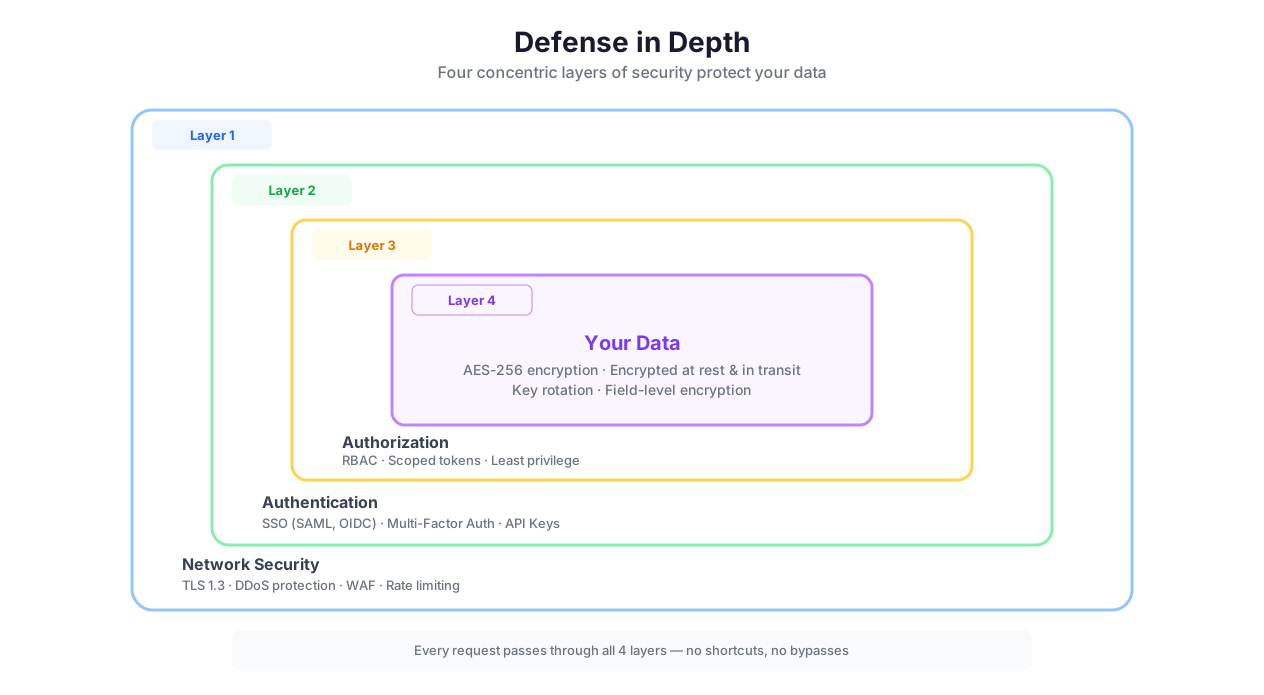
Security layers: encryption, isolation, RBAC, audit
Let me be honest about why this page exists. Nobody searches "automation platform security features" and clicks "buy." Security pages do not drive signups. They prevent disqualifications.
The enterprise procurement process works like this: someone on the team finds Autonoly, gets excited, builds a proof of concept, shows it to their manager, who shows it to IT, who asks for a security review. IT sends a vendor security questionnaire — 200 questions about encryption, access control, audit logging, data residency, incident response, and compliance certifications. If the answers are wrong — or worse, if there are no answers — the deal dies. Every enterprise buyer who cannot find a security page assumes the worst.
This page exists so your IT team can read it, check the boxes, and approve the tool that your team has already decided they want to use.
That said, Autonoly's security is not theater. It is built into every layer because automation workflows touch the most sensitive parts of your infrastructure: login credentials for SaaS tools, API keys that can create charges, database connections with customer data, SSH keys to production servers. A security breach in your automation platform is not a data leak — it is a skeleton key to everything the automation touches.
Encryption: What, Where, and How
TLS 1.3 in Transit
Every network connection uses TLS 1.3 — the latest transport layer security protocol. This covers browser-to-server communication, internal service-to-service traffic, and connections between Autonoly and any external APIs or websites your automations interact with. TLS 1.3 eliminated legacy cipher suites that were vulnerable to downgrade attacks, reduced handshake latency from two round trips to one, and mandated perfect forward secrecy.
Practically, this means: even if someone intercepts the network traffic between Autonoly and your Google Sheets API call, they see encrypted noise. And even if a private key is compromised in the future, past sessions cannot be decrypted (forward secrecy).
AES-256 at Rest
All data stored by Autonoly is encrypted with AES-256 — the same standard used by the US government for classified information. This includes workflow definitions, extracted data, execution logs, uploaded files, and any artifacts generated during automation runs.
AES-256 means there are 2^256 possible keys — a number so large that brute-forcing it would take longer than the remaining lifespan of the universe using all the computing power that currently exists. Even if someone gained physical access to the storage hardware, they would see only encrypted data.
Zero-Knowledge Credential Architecture
Credentials receive protection beyond standard at-rest encryption. The credential vault uses a key hierarchy: a master key encrypts per-workspace keys, which encrypt individual credential values. Credentials are decrypted only at the moment of execution — they exist in plaintext for milliseconds, inside an isolated execution environment, and are discarded immediately after use.
Credentials never appear in:
Execution logs (masked as
****)The workflow canvas (shown as credential name only, never the value)
Error messages or debug output
API responses or exports
Version history or change logs
When you delete a credential, it is permanently removed from the encrypted store. No soft deletes. No recovery period. No tombstone records that retain the encrypted value.
Authentication: SSO, MFA, API Keys, Sessions
SSO and SAML
Enterprise plans support SAML 2.0 Single Sign-On. Your team authenticates through your existing identity provider — Okta, Azure AD, Google Workspace, OneLogin, PingFederate — and never creates a separate Autonoly password. This centralizes authentication management: when someone leaves the company, disabling their IdP account immediately revokes their Autonoly access. No orphan accounts. No forgotten password resets.
Multi-Factor Authentication
All accounts support MFA via authenticator apps (Google Authenticator, Authy, 1Password). Enterprise plans can enforce MFA for all workspace members — no exceptions, no "I'll set it up later." MFA prevents the most common attack vector in SaaS platforms: credential stuffing from leaked password databases.
API Key Management
For teams that integrate Autonoly via API (triggering workflows programmatically, reading execution results, managing resources), API keys are generated per-user with configurable permissions. Keys can be rotated without disrupting active workflows — generate the new key, update your integration, then revoke the old key. Keys follow the same encryption and audit logging as all other credentials.
Session Management
Browser sessions expire after configurable inactivity periods (default: 24 hours). Concurrent session limits prevent credential sharing. Session tokens are cryptographically signed and validated on every request. Admins can view and terminate active sessions for any workspace member from the security dashboard.
Access Control: RBAC and Workspace Isolation
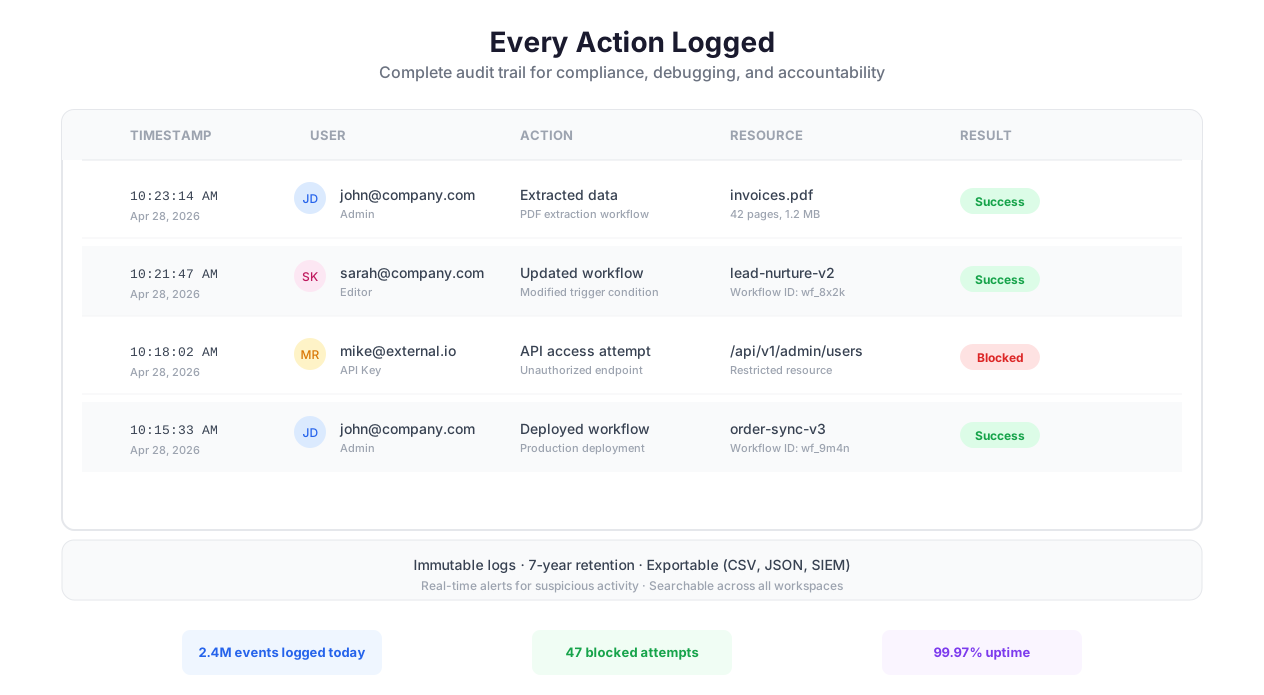
Encrypt, process, and audit security workflow
Role-Based Access Control
Autonoly supports three permission levels, following the principle of least privilege:
Viewer: Can see workflows and execution results but cannot edit, run, or create anything. Perfect for stakeholders, managers, and audit teams who need visibility without modification rights. Viewers cannot see credential values (only credential names).
Editor: Can create, edit, and run workflows. Can manage credentials within their scope. Can view execution logs and results. The standard role for automation builders and operators.
Admin: Full access including user management, billing, workspace settings, credential management, audit log access, and the ability to manage all workflows. Admin access should be limited to one or two people.
Permission changes take effect immediately — revoking editor access stops the user from running workflows mid-session, not after their next login.
Workspace Isolation
Each workspace is a fully isolated environment. Workflows, credentials, execution data, and audit logs are separated at the infrastructure level — not just the application level. A credential created in workspace A is invisible to workspace B, even if the same user has access to both.
For enterprises deploying across multiple departments, workspace isolation ensures that sales team credentials stay with the sales workspace, engineering SSH keys stay with the engineering workspace, and finance API tokens stay with the finance workspace. A compromised editor account in one workspace cannot access credentials or data in another.
Audit-Scoped Permissions
Beyond the three standard roles, admins can create audit-scoped access for external compliance reviewers. Audit-scoped users can view execution logs and audit trails but cannot see workflow details, credentials, or data. This gives auditors the evidence they need without exposing sensitive automation logic or credentials.
Audit Logs: Immutable, Exportable, Retained
Every action in Autonoly is logged with a comprehensive audit trail:
Who performed the action (user identity, IP address, session ID)
What was done (workflow created, edited, executed, deleted; credential created, accessed, rotated, deleted; user invited, role changed, removed)
When it happened (timestamp with timezone, millisecond precision)
What happened during execution (step-by-step operation log with inputs, outputs, durations, and error details)
Immutability
Audit logs cannot be modified or deleted by any user, including admins. This is a hard requirement for SOC 2 and SOX compliance — if an admin could delete audit logs, they could cover their tracks after a security incident.
Retention
Default retention is 90 days. Enterprise plans support custom retention up to 7 years — matching the retention requirements of SOX (7 years), HIPAA (6 years), and PCI DSS (1 year). Logs beyond the active retention window are archived in encrypted cold storage and can be retrieved on request.
Export
Audit logs are exportable in JSON and CSV formats for integration with external SIEM systems (Splunk, Datadog, Sumo Logic, Elastic), compliance reporting tools, and archival systems. For real-time log forwarding, enterprise plans support webhook-based log streaming to your SIEM.
Compliance: SOC 2, GDPR, CCPA, HIPAA
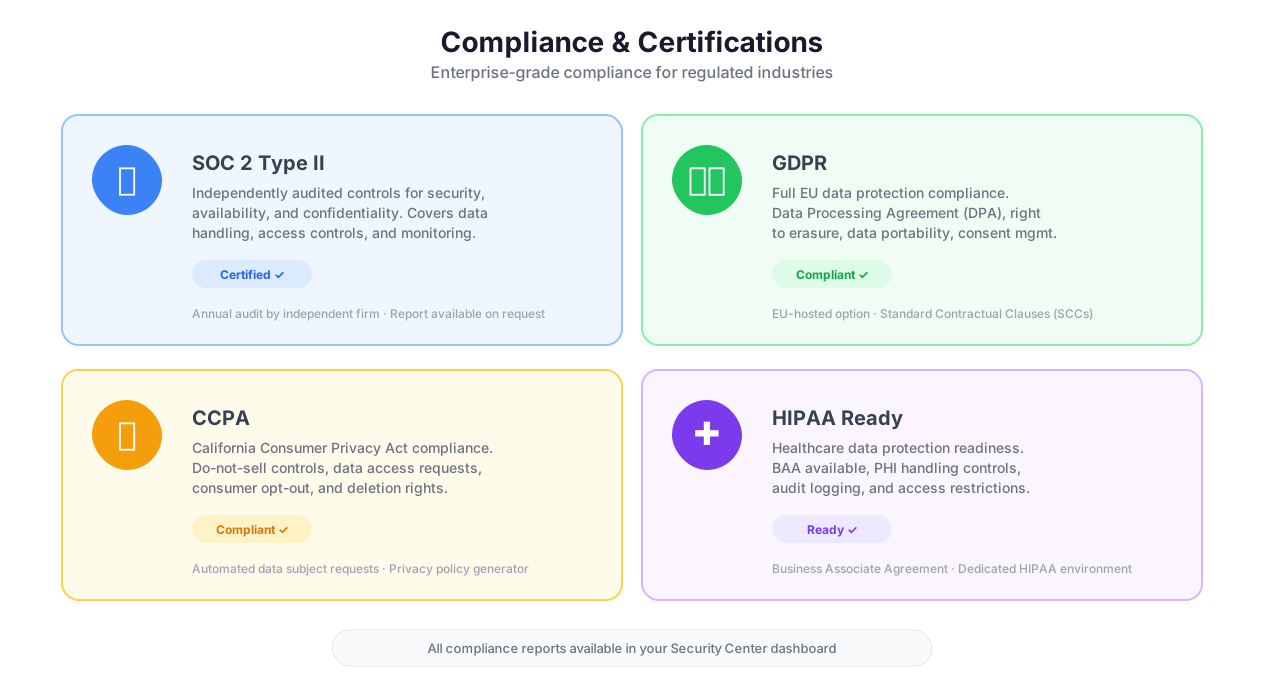
Compliance standards comparison: SOC 2, GDPR, HIPAA
SOC 2 Type II
Autonoly follows SOC 2-aligned practices across all five Trust Service Criteria: Security, Availability, Processing Integrity, Confidentiality, and Privacy. This includes encryption, execution isolation, audit logging, access control, incident response procedures, and vendor management. Full SOC 2 Type II certification is in progress — the audit covers a 6-12 month observation period of these controls in practice.
SOC 2 matters for enterprise procurement because it provides independent verification that security controls are not just documented but actually operating effectively over time. A SOC 2 Type II report is the standard artifact that IT security teams request during vendor evaluation.
GDPR
For GDPR compliance, Autonoly supports:
Data deletion on request — delete individual workflows, sessions, credentials, and extracted data at any time
Account deletion — permanently removes all associated data within 30 days
Data portability — export your workflow definitions, execution logs, and data
Data minimization — execution environments are ephemeral; data is not retained beyond configured retention periods
Right to be forgotten — contact lists in Email Campaigns support per-record deletion
CCPA
California Consumer Privacy Act compliance aligns with GDPR practices: data access, deletion, and portability rights are supported through the same mechanisms.
HIPAA Considerations
Autonoly is not HIPAA-certified (a common misconception — HIPAA does not have a certification process). However, for covered entities and business associates, Autonoly's security architecture supports HIPAA compliance: encryption at rest and in transit, access controls, audit logging, and execution isolation all align with the HIPAA Security Rule requirements. Enterprise customers processing PHI can execute a Business Associate Agreement (BAA) — contact our team to discuss.
Data Residency: Where Your Data Lives
For most customers, data is processed and stored in US-based infrastructure. Enterprise plans support EU data residency — all data (workflow definitions, execution logs, credentials, extracted data) is processed and stored exclusively in EU-region infrastructure. This matters for GDPR compliance and for organizations with data sovereignty requirements.
The infrastructure runs on cloud providers that maintain SOC 2, ISO 27001, and SOC 1 certifications. Server access is restricted to authorized personnel with multi-factor authentication. Network segmentation ensures that execution environments, databases, and application servers are isolated from each other. DDoS protection and Web Application Firewalls (WAF) protect all public-facing endpoints.
The Self-Hosted Option
For organizations that cannot put data in the cloud — government agencies, defense contractors, financial institutions with strict data sovereignty requirements, or companies with on-premises-only policies — Autonoly offers a self-hosted deployment option.
Self-hosted means Autonoly runs on your infrastructure: your servers, your network, your data center. No data leaves your environment. You manage updates, scaling, and infrastructure, with support from the Autonoly team. This eliminates the "where is my data stored?" question entirely — it is stored wherever you decide to put it.
Self-hosted deployments are available on enterprise plans. Contact our team for architecture requirements and pricing.
CAPTCHA & Bot Detection Handling
Web automation inevitably encounters CAPTCHAs and bot detection systems (Cloudflare, DataDome, PerimeterX, Akamai Bot Manager). Autonoly handles these automatically:
Automated detection: The system recognizes when a CAPTCHA appears or bot detection triggers
Smart resolution: Multiple solving strategies are applied based on the CAPTCHA type
Learning from experience: The platform remembers which sites use which protections and adapts preemptively via Cross-Session Learning
Human-like patterns: Browser Automation uses variable timing, realistic mouse movements, and natural interaction patterns to reduce detection
See the Browser Automation feature page for details.
Best Practices
Security is most effective when it is habitual, not heroic. The companies that avoid security incidents are not the ones with the fanciest tools — they are the ones where every team member follows basic practices every day.
Use the credential vault for every sensitive value — no exceptions. Never hardcode passwords, API keys, tokens, or secrets in workflow node configurations, Python scripts, or prompt text. Even "temporary" test credentials end up in execution logs, version history, and team-shared workflows. The vault encrypts on storage and injects at runtime. There is no good reason to bypass it.
Assign the minimum necessary role to each team member. Not everyone needs editor access. Give analysts and stakeholders viewer access. Reserve editor access for people who actively build workflows. Limit admin access to one or two people. This is not about trust — it is about reducing the blast radius of a compromised account. A compromised viewer account can see data; a compromised admin account can exfiltrate everything.
Review audit logs monthly. Schedule a 30-minute monthly review of audit logs. Look for: workflow executions outside business hours, credential access by unexpected users, role changes you did not approve, and workflows modified by users who should not be editing them. Export logs for long-term retention if your compliance framework requires it. The companies that catch insider threats early are the ones that actually read their logs.
Rotate credentials on a quarterly schedule. API keys, OAuth tokens, and passwords should be rotated proactively — not just when you suspect a breach. The credential vault makes rotation painless: update the value in one place and every workflow that references it picks up the new credential automatically. Set a calendar reminder. Make it a habit. Our web scraping best practices guide covers credential management in automation contexts.
Delete what you no longer need. Stale workflows with credential references are unnecessary risk. Execution results that have been delivered to their final destination are unnecessary copies. Data you do not have cannot be breached. Archive or delete superseded workflows. Purge old execution data. Apply the same data minimization principles to your automation workspace that you apply to your production systems.
Data Lifecycle Management
Data in Autonoly follows a controlled lifecycle. When data is created, it is encrypted immediately. When data is deleted (manually or through retention policies), it is permanently removed — no soft deletes, no tombstone records, no "deleted but recoverable for 30 days." Account deletion triggers a complete data purge within 30 days, including all workflows, credentials, execution logs, and extracted data.
For organizations building data processing pipelines with compliance in mind, this lifecycle management ensures data minimization and purpose limitation — two core GDPR principles that are easy to state and hard to implement without infrastructure support.
Check pricing for details on enterprise security features, SSO/SAML availability, and dedicated support.
Common Use Cases
Financial Services Data Automation
A financial advisory firm automates the collection and analysis of market data, client portfolio information, and regulatory filings. Every automation runs in an isolated environment, ensuring one client's data cannot contaminate another's. Login credentials for brokerage portals and financial databases are stored in the encrypted vault with quarterly rotation. Audit logs provide a complete record of every data access for SEC compliance reporting. Role-based access ensures junior analysts can view reports but cannot modify the workflows that generate them. The firm's annual compliance audit passes cleanly because the audit trail is complete, immutable, and exportable. Learn more in our AI workflow automation guide.
Healthcare Data Processing
A healthcare analytics company processes patient satisfaction surveys from 50 hospital systems. Execution isolation ensures data from different providers never mixes — a hard HIPAA requirement. Data Processing pipelines include anonymization steps that strip PII (names, dates of birth, SSNs) before analysis. Credentials for EHR systems are encrypted in the vault and accessible only to the data engineering team (RBAC). Every processing run is documented in the audit log with row counts, timestamps, and user identity — the evidence trail that HIPAA auditors require. Retention policies purge raw survey data 90 days after analysis, keeping only anonymized aggregates.
Enterprise Multi-Team Deployment
A 2,000-person company deploys Autonoly across five departments: sales, marketing, engineering, finance, and customer success. Each department has its own workspace with isolated credentials, workflows, and data. Sales has Salesforce and HubSpot credentials. Engineering has AWS and GitHub credentials. Finance has Stripe and QuickBooks credentials. Workspace isolation ensures that a compromised account in the marketing workspace cannot access engineering's SSH keys or finance's payment processor tokens. A central IT admin reviews cross-workspace audit logs monthly, looking for anomalies. SSO via Okta ensures that when employees leave, their access is revoked within minutes.
Compliance-Driven Quarterly Reporting
A publicly traded company automates quarterly financial reporting data collection. SOX compliance requires that the process be consistent, traceable, and auditable. Execution isolation ensures each quarter's data collection runs identically. Audit logging captures every step: which data sources were accessed, which transformations were applied, which values were extracted. Version control in the Visual Workflow Builder tracks workflow changes — if someone modifies the data collection logic, the change is logged with the user, timestamp, and diff. The external auditors receive an exported audit log covering the full quarter, along with workflow version history. The audit passes because the evidence trail is complete and immutable. For more, see our no-code automation guide.