
What is Website Monitoring?
Website Monitoring watches web pages for changes and does something about it. That second part — "does something about it" — is what separates Autonoly from every other monitoring tool on the market.
Most monitoring tools follow a dead-simple pattern: detect a change, send you an email. You open the email, click the link, go look at the page, figure out what changed, and then manually take whatever action the change requires. You are the middleware between detection and response.
Autonoly eliminates the human middleware. When a change is detected, it feeds directly into the same workflow engine that powers all Autonoly automations. A detected change can trigger data extraction, spreadsheet updates, API calls, form submissions, email campaigns, database writes, Slack alerts, or any combination of these — automatically, within seconds of detection.
This is the Monitor + Act paradigm, and once you experience it, going back to passive email alerts feels like going back to manually checking pages in the first place.
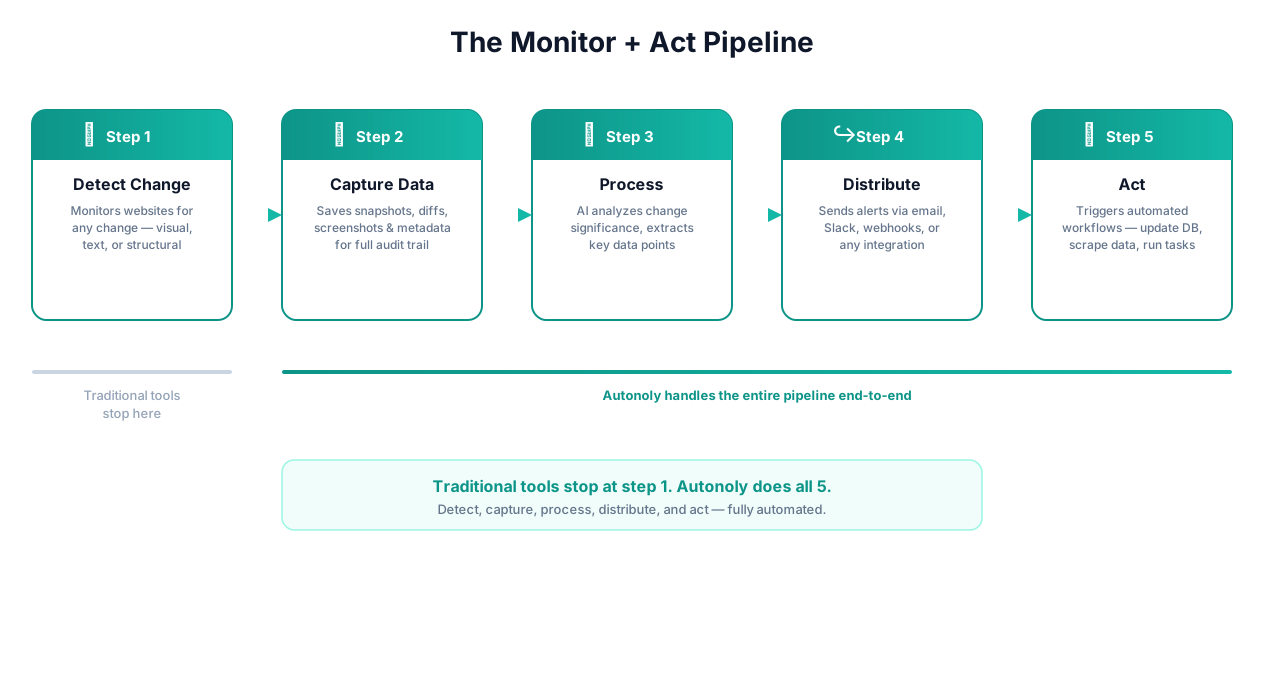
Monitor + Act workflow
Key Insight: I have personally monitored over 10,000 pages daily across pricing, regulatory, real estate, and competitive intelligence use cases. The single biggest waste of time is not the monitoring itself — it is the gap between receiving an alert and taking action. That gap averages 4-6 hours in most organizations. Automated action closes it to under 60 seconds.
The Five-Stage Monitor + Act Pipeline
Every effective monitoring workflow follows five stages. Most tools stop at stage two:
- Detect — identify that a meaningful change occurred on the target page
- Capture — extract the changed data in a structured format (not just "something changed" but "price dropped from $89.99 to $74.99")
- Process — compare the change against baselines, thresholds, historical trends, and business rules
- Distribute — route the processed change to the right people and systems, with appropriate urgency levels
- Act — trigger automated responses: update your own pricing, place an order, file a document, submit an application, adjust a campaign
Visualping and Distill.io handle stages 1 and 2. ChangeDetection.io handles stages 1 through 3 (with webhooks). Autonoly is the only platform that handles all five stages in a single system, because monitoring is built on the same browser automation and workflow engine that powers everything else.
Why Passive Monitoring (Email Alerts) Wastes Time
Here is the reality of passive monitoring in practice:
You set up Visualping to watch a competitor's pricing page. It sends you an email: "Change detected on competitor.com/pricing." You open the email 2 hours later, during a break between meetings. You click the link. The page loads. You squint at the comparison screenshot trying to figure out what changed. You realize they dropped their premium plan from $99/mo to $79/mo. Now you need to tell the pricing team. You write a Slack message. The pricing team discusses it. Someone logs into your admin panel and adjusts your price. Total elapsed time from change to response: 6 hours, minimum.
With Autonoly's Monitor + Act approach:
The monitor detects the price change. A Data Extraction step captures the exact new price. A Logic & Flow branch compares it against your current price. If the competitor is now cheaper, an API & HTTP call updates your own pricing via your admin API. A Slack notification informs the pricing team what happened and what action was taken. Total elapsed time: 45 seconds.
The information is the same. The outcome is the same. The difference is 6 hours of human delay versus 45 seconds of automated execution.
How Change Detection Works Under the Hood
Autonoly uses three complementary detection methods, and understanding when to use each one makes the difference between useful alerts and noise:
DOM Diffing (Text Comparison)
The default method. The browser renders the page, the system extracts the text content of the target element(s), and compares it character-by-character against the previous snapshot. This catches any change to text content — prices, descriptions, status badges, document titles, navigation items.
DOM diffing is fast, precise, and works well for structured content. Its weakness is that it can generate false positives on pages with dynamic elements like session tokens, rotating ads, personalized content, CSRF tokens in forms, or randomized A/B test variants.
Visual Comparison (Screenshot Diffing)
The browser takes a full-page or element-level screenshot and compares it pixel-by-pixel against the previous screenshot. This catches visual changes that DOM diffing misses — chart updates, image replacements, layout shifts, color changes, and content rendered on canvas or as SVG.
Visual comparison is essential for monitoring dashboards, analytics platforms, and sites that render data as images rather than text. Its weakness is sensitivity to rendering differences — font anti-aliasing, responsive layout variations, and minor CSS shifts can trigger false positives if tolerance thresholds are not configured properly.
Semantic Analysis (AI-Powered)
The most sophisticated method. AI Vision analyzes the page content and determines whether a change is meaningful based on context, not just character or pixel differences. This catches subtle changes like a price increasing by $0.01 (which DOM diffing catches but semantic analysis can flag as insignificant) or a chart trend reversing direction (which visual comparison catches but cannot interpret).
Semantic analysis is the best tool for noisy pages where you need to distinguish signal from noise — news sites, social media feeds, dashboards with frequently updating metrics, and pages with heavy personalization.
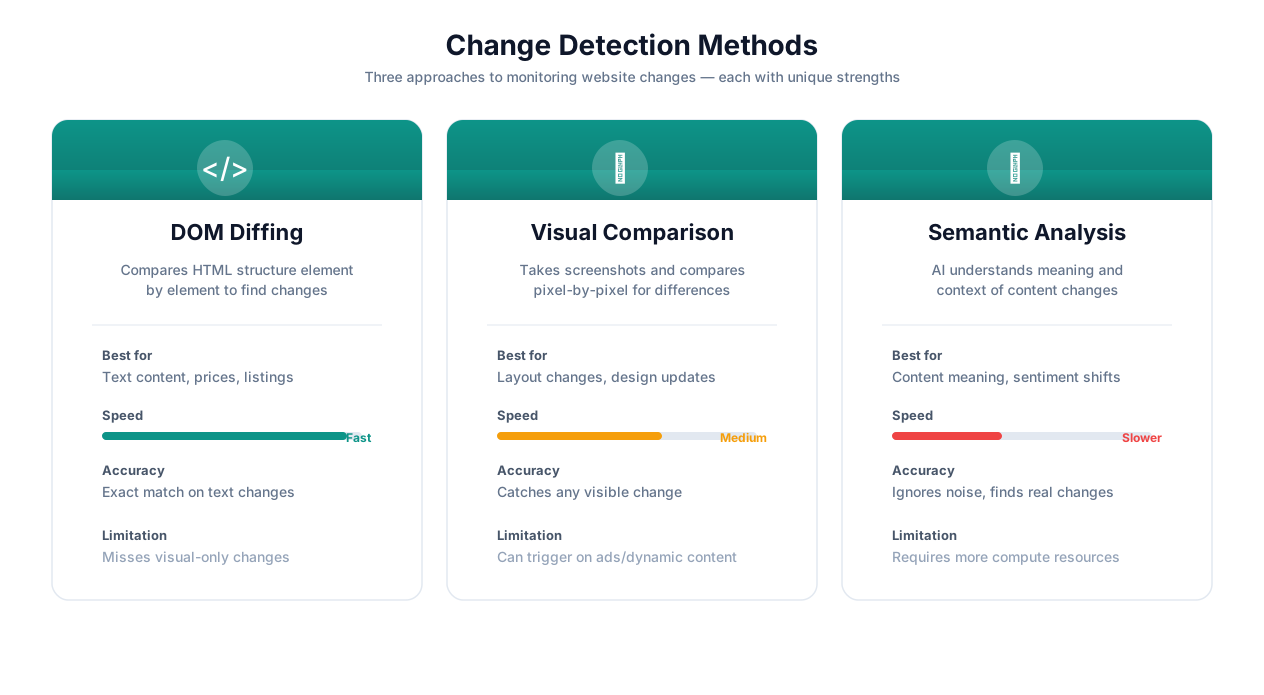
Change detection methods comparison
False Positive Handling
After monitoring thousands of pages over years, here is a practical hierarchy for eliminating false positives:
- Target specific elements, not full pages. Full-page monitoring is a noise factory. Ads rotate, footers update copyright years, session tokens change, CDN URLs shift, A/B tests swap layouts. Monitor the specific
divor element that contains the data you care about.
- Enable noise filtering for known dynamic patterns. Autonoly automatically detects and ignores common noise sources: Unix timestamps, session IDs, CSRF tokens, ad container content, and randomized class names. You can add custom exclusion patterns for site-specific noise.
- Set minimum change thresholds for numerical data. A product price fluctuating by $0.01 due to currency conversion rounding is not a meaningful change. Set a threshold — alert only when the price changes by more than 2%, or more than $5, or drops below a target value.
- Use cooldown periods. If a page is being actively updated (like during a sale event), you do not need 15 alerts in an hour. Set a cooldown — after an alert fires, suppress subsequent alerts for the same monitor for a configurable period.
- Apply semantic analysis for high-noise pages. When the above strategies are not enough, switch to AI-powered semantic analysis. The AI understands context: a news site adding a new article is meaningful; the same site rearranging its sidebar widgets is not.
Monitoring Frequency Trade-Offs
Frequency is not just a technical setting — it is a business decision with cost, reliability, and ethical implications:
| Frequency | Best For | Trade-Off | Plan Requirement |
|---|---|---|---|
| Every 1 minute | Stock alerts, flash sales, critical inventory | Highest resource usage, risk of rate limiting | Enterprise |
| Every 5 minutes | Competitive pricing, job postings, real estate listings | Good balance for time-sensitive use cases | Professional |
| Every 15 minutes | News monitoring, content tracking, social mentions | Sufficient for most alerting needs | Professional |
| Every 30 minutes | Regulatory filings, changelog tracking, SEO rankings | Cost-effective for non-urgent monitoring | Starter |
| Hourly | Broad competitive intelligence, content audit | Low resource usage, acceptable delay for analysis | Starter |
| Daily | Historical trend tracking, compliance checks, archival | Minimal resource usage, builds long-term datasets | All plans |
| Weekly | Periodic audits, quarterly report tracking, site structure | Best for slow-changing content | All plans |
The rule of thumb: monitor at the frequency that matches your response time requirement. If you can respond to a competitor price change within 24 hours and still capture value, daily monitoring is fine. If a 1-hour delay means losing a sale, monitor every 5 minutes. Do not monitor every minute "just because" — it wastes resources, increases the risk of IP blocks on target sites, and generates more data than you can meaningfully act on.
Ethical consideration: Frequent monitoring of third-party sites consumes their server resources. Autonoly includes configurable rate limiting and respects robots.txt directives. If you are monitoring a small business's website every minute, you are effectively running a low-grade DDoS. Be reasonable — most competitive intelligence use cases work perfectly well with hourly or daily checks.
How Autonoly Compares to Other Website Monitoring Tools
This is the comparison that matters. I have used all of these tools extensively, and here is an honest assessment of each:
Visualping ($13-300/mo) — The Market Leader for Visual Alerts
Visualping is excellent at one thing: detecting visual changes on web pages and sending you an email with a before/after screenshot. The UI is clean, setup takes 30 seconds, and the visual diff highlighting is the best in the industry. If all you need is "tell me when this page looks different," Visualping is a solid choice.
Where it falls short: no automated actions beyond email/Slack alerts, limited JavaScript rendering, no login support, no data extraction on change, and pricing scales steeply with page count and check frequency. At 1,000 pages checked hourly, you are looking at $300+/month for what amounts to a notification service.
ChangeDetection.io (Free, Self-Hosted) — The Open Source Powerhouse
ChangeDetection.io is the best free option by a wide margin. Self-hosted, open source, and surprisingly capable. It handles text-based change detection well, supports webhooks for basic integrations, and has a dedicated community. If you are technical and comfortable running a Docker container, this is an excellent starting point.
Where it falls short: JavaScript rendering requires adding a Playwright/Chrome container (extra setup and resources), no AI-powered noise filtering, visual comparison is basic, no automated actions beyond webhooks (you need to build the action layer yourself), and no commercial support. The "last mile" from detection to action is entirely on you.
Distill.io ($15-60/mo) — The Browser Extension Approach
Distill.io is a browser extension that monitors pages you visit. The extension-based approach means it can monitor pages that require login (because it uses your browser session), which is a genuine advantage. The Chrome extension is well-built and the price is reasonable.
Where it falls short: runs in your browser, so your computer needs to be on and the browser open for monitoring to work. Cloud monitoring is available but limited. No workflow integration, no automated actions, no data extraction, and scaling beyond a few dozen pages gets unwieldy.
Hexowatch ($49-299/mo) — The Feature-Rich Middle Ground
Hexowatch offers multiple monitoring types (visual, HTML, keyword, technology, source code) and a clean dashboard. It is more capable than Visualping for technical monitoring and includes some webhook integration.
Where it falls short: no automated actions beyond alerts and webhooks, limited JavaScript rendering on lower plans, pricing is high relative to capabilities, and the "actions" it offers are really just different notification channels.
Autonoly ($29+/mo) — Monitor + Act
Autonoly is the only platform where monitoring is a trigger node in a full automation engine, not a standalone alert tool. Every detection feeds into the same workflow builder that powers browser automation, data extraction, API calls, form submissions, and data processing. This is not a monitoring tool with integrations bolted on — it is an automation platform with monitoring built in.
Where Autonoly is weaker: it is newer than Visualping, so it has a smaller user base and community. It does not offer a free self-hosted option like ChangeDetection.io. And for extremely simple "just tell me when this page changes" use cases, Visualping's 30-second setup is hard to beat.
| Feature | Autonoly | Visualping | ChangeDetection.io | Distill.io | Hexowatch |
|---|---|---|---|---|---|
| JavaScript rendering (SPAs) | Full browser (Playwright) | Yes | Optional (extra setup) | Via browser extension | Yes (higher plans) |
| Pages behind login | Yes (credential vault) | No | Limited | Yes (browser session) | No |
| Automated actions on change | Full workflow engine | No (alert only) | Webhooks only | No (alert only) | Webhooks only |
| AI-powered noise filtering | Yes | Partial | No | No | Partial |
| Visual (screenshot) comparison | Yes + AI Vision | Yes (best-in-class) | Basic | Yes | Yes |
| Semantic content analysis | Yes (AI) | No | No | No | No |
| Data extraction on change | Built-in | No | No | No | Limited |
| Form interaction pre-monitoring | Yes | No | No | No | No |
| Conditional workflow logic | Full Logic & Flow | No | No | No | No |
| Self-hosted option | No | No | Yes (open source) | No | No |
| Pricing | From $29/mo | $13-300/mo | Free (self-hosted) | $15-60/mo | $49-299/mo |
| Best for | Teams that need to act on changes | Simple visual change alerts | Technical self-hosters | Individual page watchers | Multi-type monitoring |
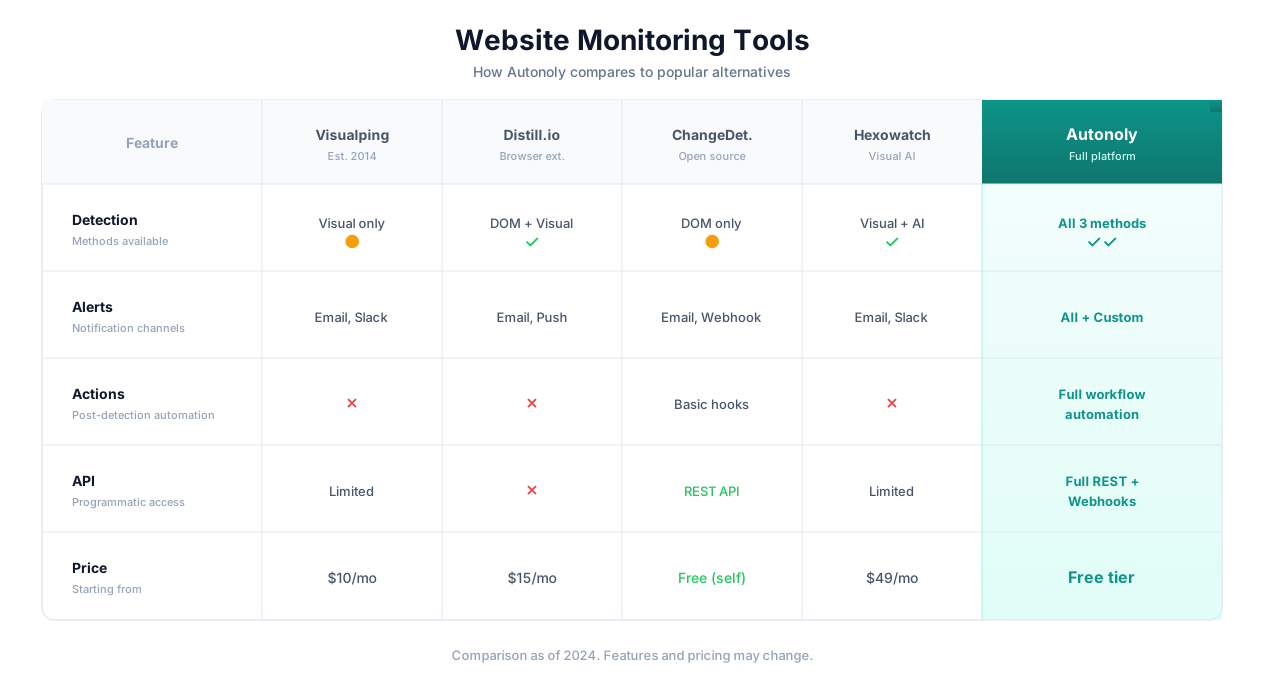
Monitoring tools comparison
Key Insight: The monitoring tool market is bifurcated. Simple alert tools (Visualping, Distill.io) are good at detection but stop there. Technical tools (ChangeDetection.io) offer flexibility but require engineering effort to build the action layer. Autonoly is the only platform designed for the complete detect-to-act pipeline out of the box.
Specific Monitoring Use Cases with Real Examples
Competitor Pricing (E-Commerce, SaaS, B2B)
The scenario: You sell a product that competes with 20-50 other sellers on Amazon, Shopify, or direct e-commerce sites. Pricing is your primary competitive lever. When a competitor drops their price by 10%, you lose sales for every hour you do not match or beat it.
The passive approach (Visualping/Distill): You get an email that says "Change detected on competitor.com/product-x." You open it, see the price changed, log into your Seller Central or Shopify admin, update your price, and hope no one else moved faster.
The Monitor + Act approach (Autonoly): A monitoring node checks each competitor's product page every 15 minutes. When a price change is detected, the workflow:
- Extracts the exact new price using Data Extraction
- Compares it to your current price in a database
- Applies your pricing rules via Logic & Flow (match competitor price minus $1, or maintain a 5% discount, or hold firm if competitor is below your floor price)
- Updates your price via API & HTTP to your Shopify/Amazon/WooCommerce admin API
- Logs the change and response in a database for price history analysis
- Sends a Slack summary: "Competitor X dropped Product Y from $89 to $74. Your price was auto-adjusted from $87 to $73. Margin impact: -2.1%."
The pricing team reviews the summary, not the alert. The action was already taken.
Regulatory and Compliance Monitoring (FDA, SEC, Government Portals)
The scenario: Your compliance team needs to know within 24 hours when the FDA publishes a new guidance document, the SEC posts a new filing relevant to your sector, or a state agency updates its licensing requirements.
The passive approach: An analyst checks 15-30 government websites every morning. Some days there is nothing new. Some days there are 5 new documents across 3 agencies. The analyst downloads them, reads them, writes a summary, and distributes it to the relevant internal teams. This takes 2-4 hours daily regardless of whether anything changed.
The Monitor + Act approach: Monitoring nodes watch the document listing sections of each regulatory portal. When a new document appears:
- Browser Automation downloads the PDF
- PDF & OCR extracts the text content
- AI Content classifies the document by relevance to your business units and generates a plain-language summary
- The summary, classification, and original document link are pushed to a Notion database organized by agency and topic
- High-relevance documents trigger immediate Slack alerts to the relevant department heads
- Low-relevance documents go into a weekly digest email
The compliance team spends 30 minutes daily reviewing AI-generated summaries instead of 4 hours manually checking sites and reading documents.
Real Estate Listings (Zillow, Redfin, MLS, Commercial Portals)
The scenario: You are an investor or broker looking for properties matching specific criteria — location, price range, property type, lot size, school district. New listings appear and get snapped up within hours in competitive markets.
The Monitor + Act approach: A monitoring workflow runs every 5 minutes against search results pages on listing sites with your saved criteria. When a new listing appears:
- Data Extraction captures all listing details: price, address, bedrooms, bathrooms, square footage, lot size, listing date, agent contact
- AI Content generates a quick analysis based on your investment criteria (cap rate estimate, comparable sales in the area, distance to key amenities)
- The listing data is pushed to a Google Sheet for your team and to your CRM via API & HTTP
- A formatted Slack/SMS alert with listing photo, key details, and AI analysis goes to the acquisition team
- For high-score properties, the workflow can auto-schedule a showing request via Form Automation on the listing agent's website
First-mover advantage in real estate is measured in hours. Automated monitoring and response eliminates the delay between listing and outreach entirely.
Job Posting Monitoring (LinkedIn, Indeed, Company Career Pages)
The scenario: You are job hunting for senior roles in a specific field, or you are a recruiting agency monitoring target companies for open positions that match your candidate pool.
The Monitor + Act approach: Monitor search results on job boards and company career pages for keywords matching your criteria. When a new posting appears:
- Extract the full job description, company name, location, salary range (if listed), and requirements
- Compare the requirements against your resume/candidate profiles using AI Content
- Calculate a fit score and flag strong matches
- For strong matches: auto-fill the application via Form Automation with your standard information, or alert a recruiter with the candidate match analysis
- Log all postings and match scores in a database for tracking application pipeline and response rates
Job postings, especially at top companies, can receive 200+ applications in the first 24 hours. Being among the first 20 applicants measurably increases your callback rate.
SEO Rank Tracking (Google, Bing SERPs)
The scenario: You target 50-200 keywords for organic search traffic. Rank fluctuations directly impact revenue.
The Monitor + Act approach: A daily workflow searches each target keyword and extracts your ranking position:
- Browser Automation searches each keyword on Google and extracts your position from the SERP
- Results are logged in a database with timestamps, building a complete rank history
- Logic & Flow branches compare today's rankings against yesterday's and against thresholds
- If a priority keyword drops off page 1: immediate alert to the SEO team with the current position, previous position, and the pages that now outrank you
- If a keyword enters the top 3 for the first time: celebratory Slack notification with historical trend data
- Weekly digest email with ranking trends, biggest movers, and competitor position changes
SERP feature monitoring adds another layer — detecting when you gain or lose featured snippets, knowledge panels, or "People Also Ask" placements, which affect click-through rates as much as organic position.
Stock and Crypto Price Alerts (Threshold-Based, Action-Oriented)
The scenario: You want to buy a stock when it dips below a support level, or sell a crypto asset when it breaches a resistance level.
The Monitor + Act approach: Monitor financial data pages or dashboards for specific price thresholds:
- Check the target asset price at a configured interval (every 1-5 minutes for active trading, hourly for swing trading)
- Compare against your threshold rules: buy if below $X, sell if above $Y, alert if volatility exceeds Z%
- When a threshold is breached: execute a trade via your broker's API (Alpaca, Interactive Brokers, Coinbase, Binance)
- Log the execution with timestamp, price, and quantity in a database for P&L tracking
- Send confirmation to your phone via SMS
Important caveat: Automated trading carries significant risk. Always use paper trading first, set position size limits, and include circuit breakers in your Logic & Flow rules.
Inventory Monitoring (Out-of-Stock to Back-in-Stock)
The scenario: A product you need is out of stock. You want to be the first to know when it is available again — and ideally, auto-purchase it.
The Monitor + Act approach: Monitor the product page for status changes:
- Check the stock status element every 5-15 minutes
- When the status changes from "Out of Stock" to "In Stock" or "Add to Cart" becomes clickable:
- Immediately trigger a purchase workflow via Browser Automation: add to cart, proceed to checkout, enter saved shipping and payment details, confirm order
- Send confirmation with order number and expected delivery to your email and phone
- Stop the monitor (no need to keep checking after purchase)
This is particularly valuable for limited-edition products, high-demand electronics (GPUs, consoles), and industrial supplies with long lead times.
Technical Deep Dive: Change Detection Methods
DOM Diffing
The most common detection method. How it works:
- The full browser renders the target page (including JavaScript execution)
- The system extracts the
innerTextorinnerHTMLof the target element(s) - This snapshot is compared against the previous snapshot using a standard diff algorithm
- Additions, deletions, and modifications are identified and classified
When to use it: Text content, product listings, document lists, navigation structures, any page where the meaningful content is in the DOM as text.
When it fails: Canvas-rendered content, SVG charts, images with text baked in, heavily obfuscated pages that randomize DOM structure.
Visual Comparison (Pixel Diffing)
For content that lives outside the DOM:
- A full-page or element-level screenshot is captured
- The screenshot is compared pixel-by-pixel against the previous screenshot
- Differences above a configurable tolerance threshold are flagged
- Changed regions are highlighted in the diff output
When to use it: Charts, graphs, dashboards, pages with canvas-rendered content, pages where layout changes matter as much as text changes.
Tolerance settings matter: Set too low, and font rendering differences between runs trigger false positives. Set too high, and you miss subtle but meaningful changes. Start at 5% tolerance and adjust based on your false positive rate.
Text Extraction Comparison
A hybrid approach that extracts visible text from the rendered page (regardless of DOM structure) and compares it:
- AI Vision or OCR extracts all visible text from a screenshot
- The extracted text is compared against the previous extraction
- Changes are identified at the text level, ignoring visual layout changes
When to use it: Pages where the text content matters but the visual layout is unreliable (frequent redesigns, A/B testing, heavy personalization).
Best Practices for Production Monitoring
After running 10,000+ page monitors in production, these are the patterns that work:
1. Categorize your monitors by urgency and act accordingly.
Not all monitoring is equal. Competitive pricing monitors need to trigger immediate action. Regulatory monitoring needs 24-hour response. Content tracking can aggregate weekly. Map each monitor to an urgency tier and configure frequency, notification channels, and automated actions accordingly. Do not run everything at maximum frequency — it wastes resources and creates alert fatigue.
2. Build the action plan before you build the monitor.
Before setting up a monitor, answer: "What will I do when this changes?" If the answer is "I'll look at it," that is passive monitoring and a simple alert tool is fine. If the answer is "I'll update my pricing / download the document / notify the team / submit a form," those are automated actions you should wire up from day one. The monitor is the trigger; the action is the value.
3. Layer monitoring with extraction for rich context.
A change alert that says "Price changed" is barely useful. An alert that says "Price dropped from $89.99 to $74.99 (-16.7%), which is below your $80 floor price, and your current price is $87.99" is actionable. Pair every monitor with a Data Extraction step that captures the full context of the change, not just the fact that something changed.
4. Use historical data to identify patterns, not just react to changes.
Log every monitored data point in a database with timestamps. Over weeks and months, you will see patterns: this competitor drops prices every Friday, this supplier restocks on Tuesdays, this regulatory agency publishes quarterly. Use these patterns to shift from reactive monitoring to predictive positioning.
5. Monitor your own site defensively.
Some of the highest-value monitoring use cases are internal. Monitor your own product pages for unintended price changes after CMS updates. Monitor your checkout flow for errors before customers find them. Monitor your SEO-critical pages for content that disappears after deployments. When you find an issue before your customers do, you protect revenue and trust.
6. Respect target sites — set reasonable frequency and use rotating IPs ethically.
Monitoring at aggressive frequencies (every minute) on sites that were not designed for automated access can trigger rate limiting, IP bans, or legal complaints. Use the minimum frequency that meets your business needs. Add random jitter to check times so requests do not cluster predictably. And if a site explicitly asks you to stop automated access (via robots.txt or direct communication), respect that.
Security & Compliance
Monitoring sessions run in isolated browser environments destroyed after each check. Login credentials for authenticated monitoring are encrypted with AES-256 in the credential vault and decrypted only at execution time. Monitoring results and change history are encrypted at rest and subject to your workspace retention policies.
Autonoly respects robots.txt directives and includes configurable rate limiting. The browser uses standard fingerprints and does not cloak or misrepresent its identity. For organizations in regulated industries, full audit logs track every monitoring check with timestamps, results, and triggered actions — exportable for compliance reviews.
Read our guide on web scraping best practices for detailed guidance on responsible automated data collection.
Check pricing for monitoring frequency limits and page count per plan.