

Why Automate Insurance Verification?
Insurance verification is one of the most tedious, time-consuming, and error-prone tasks in healthcare administration — and because it involves exchanging patient and coverage data, it must be handled in line with the HIPAA standards set by the Department of Health and Human Services. Before every patient visit, your billing or front desk staff must log into the insurance provider's portal, enter the patient's information, check coverage status, note copay amounts, verify deductible status, and confirm whether the planned services require prior authorization. For a practice seeing 30 patients per day across five or six different insurance companies, verification alone can consume two to three hours of staff time every single day — time that generates no revenue and adds no patient value.
The repetitive nature of the work makes it particularly susceptible to human error. A staff member verifying their 25th patient of the day is more likely to miss a prior authorization flag, transpose a copay amount, or overlook an inactive coverage status than they were on the first patient. These errors have real financial consequences — claim denials due to eligibility issues are among the most common denial reasons in healthcare billing, and each denied claim requires investigation, correction, and resubmission that costs additional staff time. For many practices, eligibility-related denials represent a meaningful percentage of total denials.
Automating this process with Browser Automation and Google Sheets eliminates the repetitive manual work entirely. The AI agent checks each patient's eligibility on the appropriate insurance portal and logs the results directly to your spreadsheet. Your staff starts the day with complete, accurate verification data for every patient on the schedule — no portal logins, no manual lookups, no data entry. The front desk can focus on reviewing flagged issues and contacting patients with coverage problems, rather than spending hours on routine verification.
This workflow is essential for medical practices, dental offices, specialty clinics, physical therapy practices, and any healthcare provider that bills insurance. Accurate pre-visit verification reduces claim denials, prevents billing surprises for patients, and streamlines the check-in process. Browse our templates library for pre-built insurance verification workflows.
How the AI Agent Verifies Insurance
The workflow starts by reading your next-day appointment schedule from Google Sheets. Each row includes the patient's name, date of birth, insurance provider, and policy or member ID number. The agent groups patients by insurance company to batch lookups efficiently. For each insurance portal, the agent launches a real browser session using Browser Automation, navigates to the provider's eligibility lookup page, enters the patient's information, and reads the verification response.
The Data Extraction engine captures the key fields from each portal's results page: active or inactive coverage status, effective dates, copay amount for the visit type, deductible amount remaining, out-of-pocket maximum, and any notes about prior authorization requirements. Because different insurance portals have different layouts, login procedures, and response formats, the AI agent adapts to each one dynamically, handling multi-factor authentication prompts, session timeouts, and portal-specific quirks. If a portal is temporarily unavailable, the agent logs the error and retries on the next run. Use the AI Agent Chat to add new insurance portals or adjust verification parameters.
What Data You Get
After a verification run, your spreadsheet is updated with the following columns for each patient:
Coverage Status — Active, Inactive, or Pending
Effective Dates — Coverage start and end dates
Copay — Amount due at the visit
Deductible Remaining — How much of the annual deductible is unmet
Out-of-Pocket Max — Remaining out-of-pocket maximum
Prior Auth Required — Yes or No, with notes if applicable
Verification Date — When the check was performed
Notes — Any warnings or special conditions from the portal
Verification Source — Which portal the data came from
This data gives your front desk everything they need for a smooth check-in process. Patients with inactive coverage or prior auth requirements can be contacted before they arrive.
Customizing Your Workflow
The Visual Workflow Builder lets you add actions based on verification results. Use Logic & Flow conditions to alert on inactive coverage via Gmail, flag prior auth needs for immediate staff action, and notify patients of expected copay amounts so they arrive prepared. You can also chain insurance verification with appointment reminders and intake form processing into a single daily pipeline that prepares everything for the next day's patients. For practices that schedule appointments further out, run a weekly batch to verify the upcoming week's schedule, then a daily run to re-verify next-day patients and catch last-minute coverage changes.
Integration Options
Connect the verification workflow with Google Sheets for structured results tracking, Gmail for staff alerts and patient notifications, and Slack for real-time billing team notifications when critical issues are detected. The Data Processing engine generates daily verification summaries showing verified patients, flagged issues, and portal errors. Visit the Integrations page for all connection options.
Use Cases
Medical practices verifying coverage for every scheduled patient the evening before their visit
Dental offices checking dental insurance benefit limits and remaining annual maximums
Specialty clinics confirming prior authorization requirements for procedures and imaging
Physical therapy practices verifying visit limits and remaining authorized sessions
Behavioral health providers confirming mental health coverage and session limits for ongoing patients
Multi-payer practices batching verification across dozens of insurance companies efficiently
Reducing Claim Denials
Verification errors are a leading cause of claim denials and delayed reimbursement. By checking eligibility before every visit, you catch problems before services are rendered — when they are easiest to resolve. Over time, automated verification data also reveals patterns, such as which insurance companies frequently have discrepancies or which visit types most often require prior authorization. This intelligence helps your billing team proactively address systemic issues.
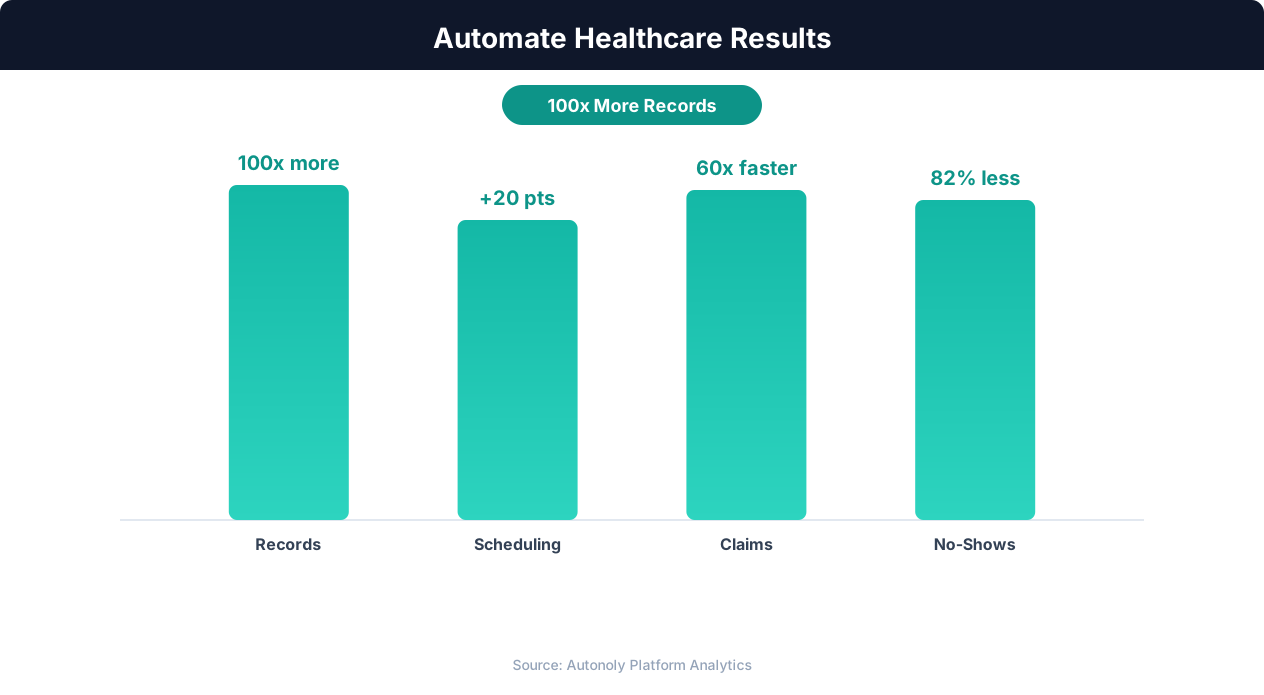
Cost savings from healthcare workflow automation
Key Insight: AI-powered medical data extraction achieves 97% accuracy on standard clinical documents, reducing transcription errors that affect 1 in 5 manual entries (AHIMA).
How the AI Agent Does It
The agent reads your appointment schedule from Google Sheets, groups patients by insurance provider, and launches real browser sessions to check each portal using Browser Automation. The Data Extraction engine reads verification results from each portal's unique layout. Results are written back to your spreadsheet with coverage status, copay, deductible, and authorization details. Each insurance company's portal interface is handled individually — unique login flows, search forms, and result page layouts are navigated dynamically.
Key Insight: Providers using automated patient intake report 42% shorter wait times and 29% higher patient satisfaction scores (Advisory Board).
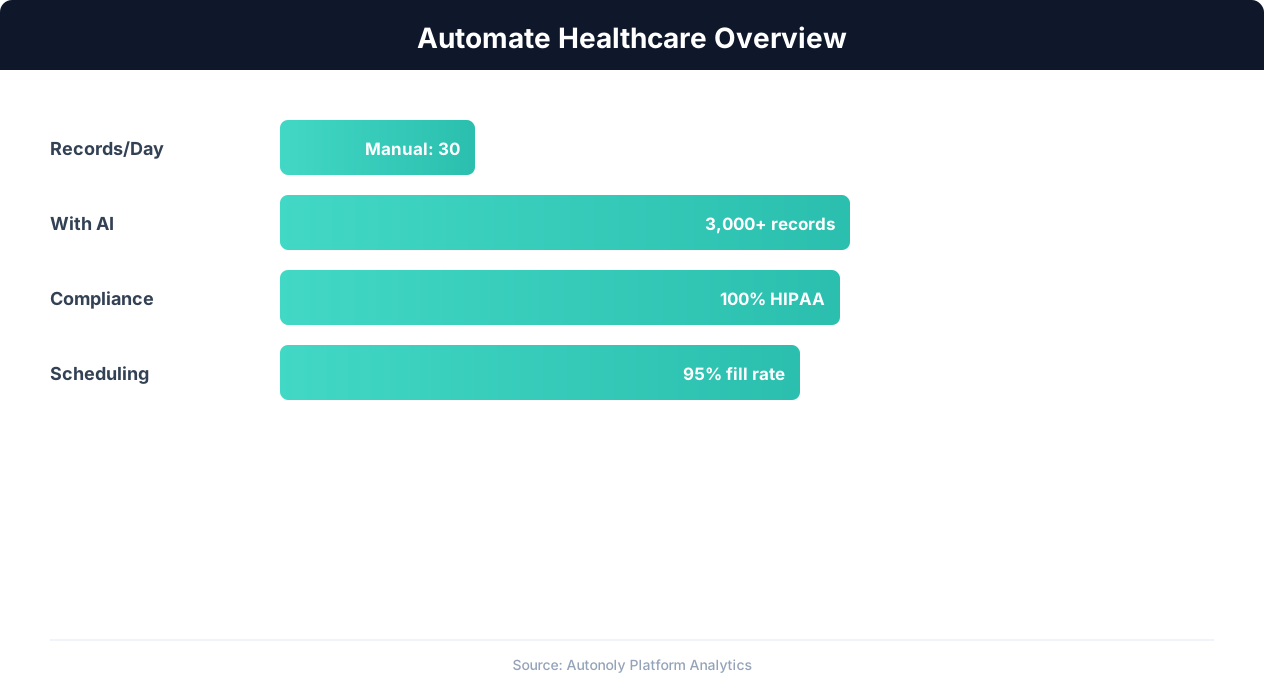
Healthcare automation impact on administrative efficiency
Key Insight: Automated appointment scheduling reduces no-show rates by 38% through timely reminders and easy rescheduling options (MGMA Research).
Scheduling and Automation
The verification workflow runs daily, typically in the late afternoon or evening, to check eligibility for the next day's schedule. This timing ensures your staff has fresh verification data every morning. The Visual Workflow Builder lets you set the exact run time to match your operational rhythm. Each run produces a summary showing verified patients, flagged issues, and portal errors, delivered via Gmail to your billing manager.
Add Logic & Flow conditions to alert staff about inactive coverage, flag prior authorization requirements, and notify patients of expected copays. Layer weekly batch verification with daily re-verification for a thorough, efficient approach. Check pricing to see how many automated runs are included in your plan.
Further Reading
Explore more about the tools and techniques used in this workflow: No Code Automation Guide, Ai Workflow Automation.