


Why Automate Proposal Generation?
Creating sales proposals is one of the most time-consuming parts of the sales process, and it sits on the critical path between qualifying a deal and closing it. For each deal, a rep typically copies client information from the CRM into a document template, adjusts pricing tables, customizes the scope section, updates terms, re-does the math on discounts and totals, and formats everything to look professional. A single proposal can take 30 minutes to two hours depending on complexity. When you are managing multiple deals simultaneously, proposal creation becomes a bottleneck that directly delays your pipeline — every day a proposal sits unfinished is a day the deal stalls and the prospect's interest cools.
The quality risk is equally concerning. Manual proposal creation is error-prone. Reps accidentally use outdated pricing sheets, forget to update the client name from the last proposal they copied, miscalculate discount percentages, or include irrelevant scope sections. These errors range from embarrassing (wrong company name on the cover page) to deal-killing (incorrect pricing that you later have to walk back). A survey of B2B buyers found that 68% of prospects lose confidence in a vendor when the proposal contains errors or inconsistencies.
Automating proposal generation with Google Sheets data and Data Processing collapses this process to minutes. The AI agent reads your deal data, merges it into a professional template, and produces a polished PDF that is ready to send. Your reps spend their time selling, not formatting documents. The automation eliminates copy-paste errors, ensures pricing is always current, and guarantees that every proposal follows your approved template with correct branding.
This approach also ensures consistency across your entire sales team. Whether a proposal comes from your most experienced closer or your newest SDR, it looks the same, uses the same language, and presents the same level of professionalism. This brand consistency builds trust with prospects and makes your organization appear more established and reliable.
How the AI Agent Generates Proposals
Autonoly's AI Agent Chat reads your deal record from Google Sheets and extracts all the fields needed for the proposal — client company name, contact person, deal scope, line items, pricing, discount percentage, payment terms, and projected timeline. The agent validates each field before processing, ensuring no critical information is missing.
The Data Processing engine merges this data into your proposal template. Each section of the proposal is populated dynamically:
Cover page: Client company name, logo, proposal date, and your company branding
Executive summary: Customized based on the client's stated needs and industry
Scope of work: Pulled from the deal's scope column with proper formatting
Pricing table: Line items, quantities, unit prices, discounts, and totals calculated automatically
Timeline: Milestones and delivery dates based on the deal's projected start date
Terms and conditions: Standard legal language with deal-specific modifications
The Visual Workflow Builder lets you design the proposal generation flow with conditional sections. For example, enterprise deals above a certain threshold automatically include an SLA section and dedicated support terms. International deals include currency conversion and regional compliance language. Deals involving custom development automatically add a technical architecture section.
What Data You Get
Each generated proposal is tracked in your pipeline with:
Proposal PDF — The finished document ready for client delivery
Generation Timestamp — When the proposal was created
Deal Record Link — Reference back to the source data in your spreadsheet
Validation Status — Confirmation that all required fields were populated
Pricing Summary — Total deal value, discount applied, and payment terms
Delivery Status — Whether the proposal was emailed, downloaded, or pending review
Template Customization
You define your proposal template once, and the agent uses it for every deal. Templates support:
Company branding (logo, colors, fonts) for a professional, consistent appearance
Dynamic sections that appear or hide based on deal attributes
Pricing calculations including tax, discounts, multi-currency support, and recurring vs. one-time fees
Custom fields unique to your business or industry
Conditional legal addenda based on deal type, region, or customer segment
For teams with multiple product lines, create separate templates and let Logic & Flow select the right one based on the deal type. A SaaS subscription proposal looks different from a professional services engagement, and the agent handles both seamlessly.
Customizing Your Workflow
Build proposal generation into your broader sales workflow. When a deal reaches the "Proposal" stage in your pipeline spreadsheet, automatically generate the proposal, route it to the manager for review via Slack, wait for approval, then email it to the client through Gmail — all without manual intervention. Add a step that creates a follow-up reminder three days after the proposal is sent. Include a version tracking system that generates proposal revisions when deal terms change.
Quality and Consistency
Every generated proposal passes through a formatting check to ensure tables are aligned, page breaks are clean, and all placeholders have been filled with actual data. The agent flags any missing fields — if a deal record is missing the client's mailing address or a required line item quantity, you are alerted before the proposal is finalized rather than sending an incomplete document. This pre-flight check prevents the most common proposal errors before they reach the client.
Integration Options
Once the PDF is generated, you have several delivery options:
Download directly from the Autonoly dashboard
Email to client via Gmail with a personalized cover message
Save to Google Drive for team access and version tracking
Post to [Slack](/integrations/slack) for manager review before sending
Log to [Airtable](/integrations/airtable) or [Notion](/integrations/notion) for deal documentation
The agent can also update your Google Sheets pipeline to mark the deal as "Proposal Sent" and log the timestamp, keeping your CRM current without manual updates. Check the Integrations page for all supported delivery destinations, or browse the templates library for pre-built proposal workflows.
Use Cases
SaaS companies generating subscription proposals with tiered pricing and annual vs. monthly options
Consulting firms creating engagement proposals with phased scopes and deliverable milestones
Marketing agencies producing campaign proposals with channel-specific budgets and timelines
IT services firms building infrastructure proposals with hardware, software, and labor line items
Wholesale distributors generating bulk pricing proposals with volume discount tiers
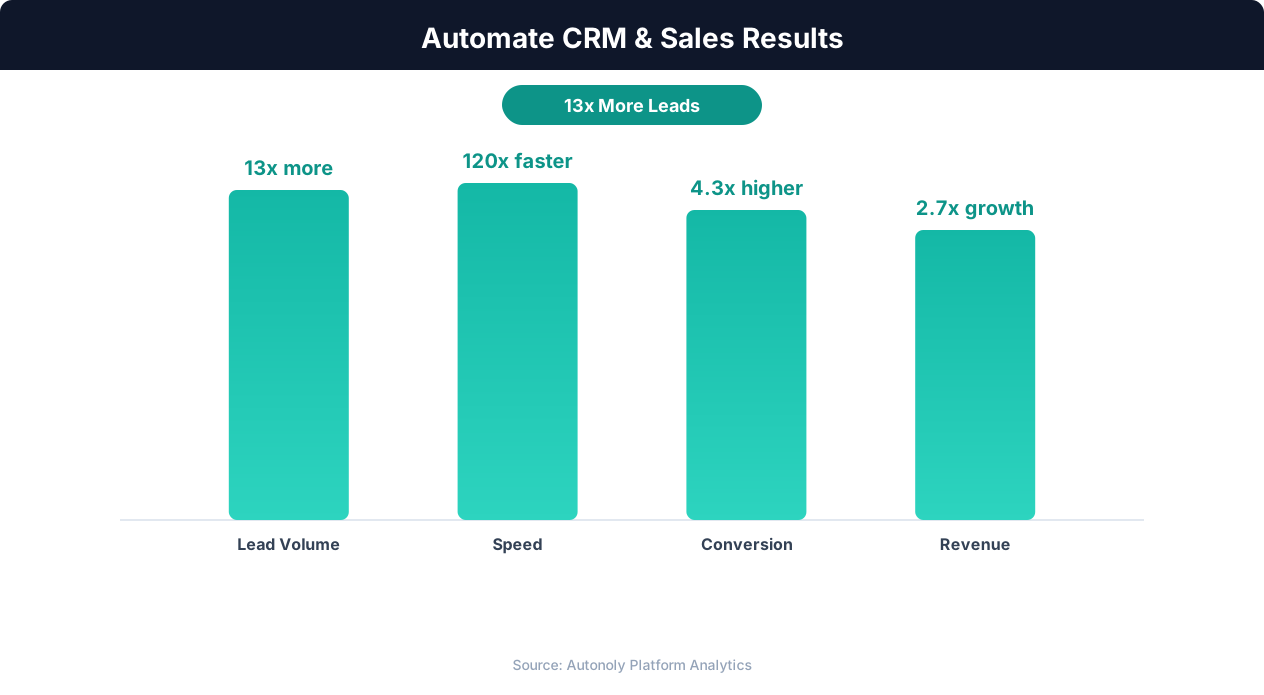
Sales pipeline velocity improvements with automation
Key Insight: Sales reps spend only 28% of their time actually selling — the rest goes to data entry, scheduling, and admin tasks that automation can eliminate (Salesforce Research).
How the AI Agent Does It
The agent opens Google Sheets via Browser Automation, reads the specified deal record, and extracts all relevant fields. It then processes the data through the Data Processing engine to merge fields into your template, perform pricing calculations, and generate the final PDF document. The entire process runs in a real browser session, so it handles complex spreadsheet formulas, conditional formatting, and linked data across multiple sheet tabs that API-based tools might miss.
Handling Complex Pricing
The agent supports multi-tier pricing, volume discounts, recurring vs. one-time fees, percentage-based and flat-rate discounts, and tax calculations across different jurisdictions. It reads your pricing rules from a dedicated sheet tab and applies them to each deal automatically. If your pricing model changes, update the rules sheet and every future proposal reflects the new structure instantly.
Key Insight: Responding to leads within 5 minutes makes you 9x more likely to convert them. Automated capture and routing makes sub-minute response times possible.
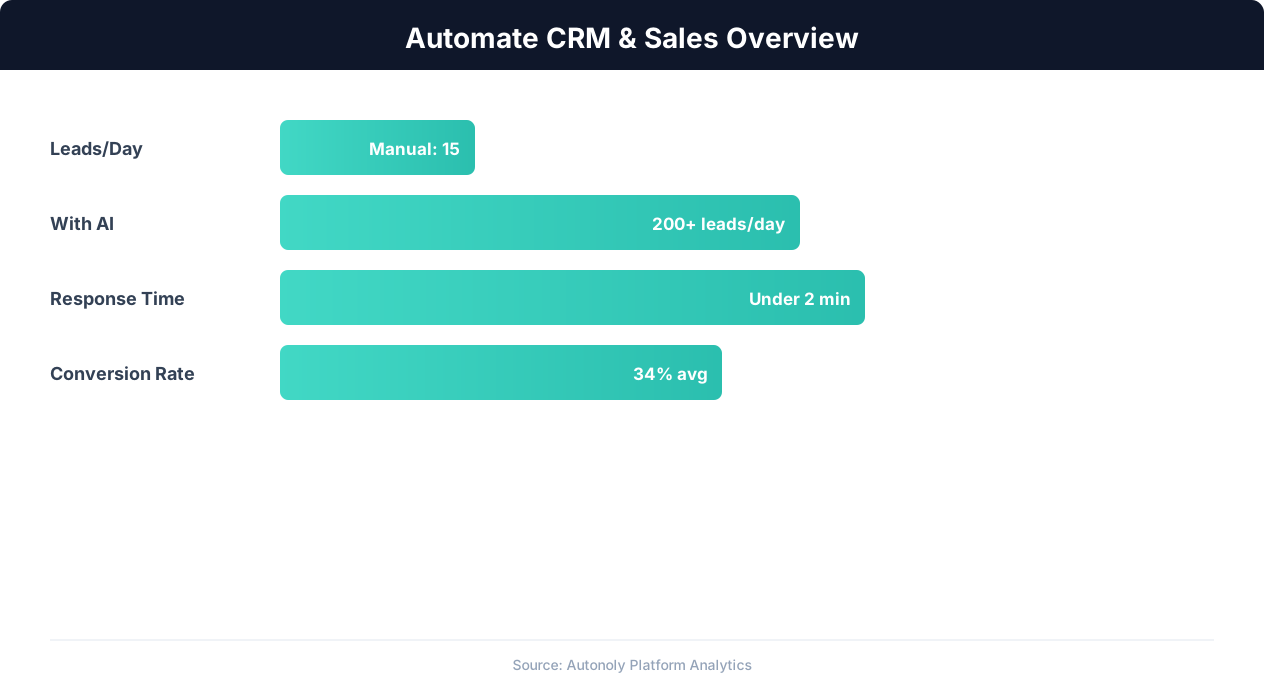
CRM automation impact on lead conversion rates
Key Insight: Companies using automated lead capture see 3x more qualified leads entering their pipeline compared to manual processes (Salesforce State of Sales Report).
Scheduling and Automation
This workflow runs on-demand — trigger it whenever you need a proposal for a specific deal. You can also set it to run on a schedule via the Visual Workflow Builder, automatically generating proposals for any deal that reaches the "Proposal" stage in your pipeline. Add Logic & Flow conditions to require manager approval for deals above a certain value before the proposal is emailed to the client. For quarter-end pushes, batch-generate proposals for all deals in the pipeline that are ready for proposals. See our pricing page for workflow run details.
Further Reading
Explore more about the tools and techniques used in this workflow: No Code Automation Guide, Ai Workflow Automation, Ai Content.