


Why Automate TripAdvisor Hotel Scraping?
TripAdvisor is the world's largest travel platform with over 8 million accommodation listings and nearly a billion reviews. For hospitality consultants, travel agencies, market researchers, and revenue management teams, TripAdvisor data is essential for competitive analysis, pricing strategy, and market positioning. Manually collecting this data — scrolling through results, copying hotel names, noting prices and ratings — is impractical for any serious analysis.
Autonoly's Browser Automation transforms hours of manual research into a minutes-long automated process. Extract hundreds of hotel listings with ratings, pricing, review counts, and amenity details into a structured spreadsheet that is ready for analysis.
How the AI Agent Scrapes TripAdvisor
TripAdvisor's website uses heavy JavaScript rendering, dynamic pricing modules, and complex pagination — all of which defeat simple HTTP scrapers. Autonoly's AI Agent Chat launches a real browser that renders the page fully, seeing exactly what a human visitor would see.
The agent navigates to TripAdvisor, enters your destination city, applies date and filter criteria, and begins extracting hotel listings. The Data Extraction engine identifies the repeating hotel card pattern on the results page and pulls consistent fields from each listing: hotel name, star rating, traveler rating, review count, price per night, and neighborhood.
For deeper data, the agent can click into individual hotel pages to extract amenity lists, recent review text, room type availability, and proximity to landmarks. This multi-level scraping produces comprehensive hotel profiles that go far beyond what a quick search reveals.
What Data You Get
A standard TripAdvisor hotel export includes:
Hotel Name — Property name as listed on TripAdvisor
Star Rating — Official hotel classification (1-5 stars)
Traveler Rating — Average user rating based on reviews
Review Count — Total number of traveler reviews
Price Per Night — Current listed price for your dates
Neighborhood — Location within the destination city
Amenities — Key amenities like pool, spa, free WiFi, parking
TripAdvisor URL — Direct link to the hotel listing
Additional fields such as room types, cancellation policies, and review breakdown by traveler type are available upon request.
Customizing Your Extraction
The Visual Workflow Builder enables powerful customizations:
Multi-destination comparison: Scrape hotels across several cities in one workflow to compare market conditions
Seasonal pricing analysis: Run the same search with different date ranges to map seasonal price variations
Competitive set monitoring: Track a specific group of competitor hotels and their pricing over time
Review sentiment extraction: Pull recent review text for sentiment analysis on specific properties
Add Data Processing steps to calculate value scores (rating divided by price), rank hotels by review-to-price ratio, or flag properties with declining ratings. Use SSH & Terminal for advanced statistical analysis or to generate executive summary reports.
Scheduling and Market Monitoring
Hotel pricing is dynamic and changes based on demand, events, and seasonal patterns. Schedule weekly scrapes to build a pricing trend database for your competitive set. Revenue management teams use this data to adjust their own pricing strategy in response to market movements.
Travel agencies benefit from daily monitoring of prices for popular destinations, allowing them to alert clients when prices drop. Hospitality consultants use multi-month datasets to identify pricing patterns and advise on rate strategy.
Exporting and Integrating
Deliver your TripAdvisor hotel data wherever your team works:
Excel (.xlsx) — Standard format for hospitality analysis and client reports
[Google Sheets integration](/integrations/google-sheets) — Real-time collaborative analysis with remote teams
[Notion](/integrations/notion) — Build a searchable hotel intelligence database
[Airtable](/integrations/airtable) — Create relational views linking hotels to destinations and competitors
Browse our templates library for ready-to-use hotel scraping workflows. See pricing for execution costs, and explore our workflow automation glossary for foundational concepts. The full Integrations ecosystem ensures your data flows to wherever it is needed most.
Use Cases
Revenue management teams compare their property's pricing and rating against the competitive set. Travel agents build curated hotel recommendation lists for client segments. Market researchers analyze hotel supply and pricing trends in emerging destinations. Real estate investors assess the short-term rental market by comparing hotel rates to Airbnb pricing in the same area. Event planners evaluate hotel options for large group bookings based on price, ratings, and proximity to venues.
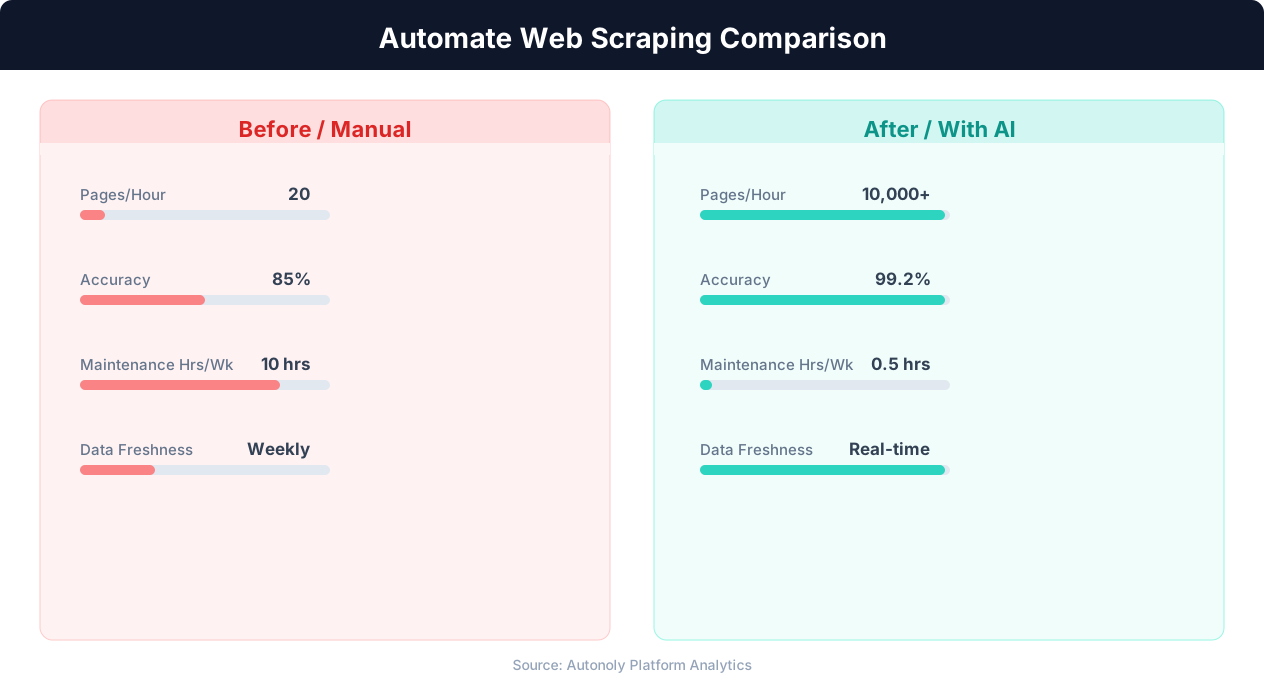
Data extraction speed for manual vs AI-powered scraping
Key Insight: AI-powered web extraction achieves 94% accuracy vs 72% for regex-based scrapers, while handling dynamic JavaScript-rendered content automatically (Diffbot Research).
How the AI Agent Does It
Autonoly's AI agent uses Browser Automation to launch a real Chromium browser and navigate TripAdvisor exactly as a human traveler would. You describe your hotel research needs in plain English — specifying destination, dates, price range, or minimum rating — and the agent handles the rest. It enters your search criteria, applies filters, scrolls through results, and uses the Data Extraction engine to identify and extract data from each hotel listing card. Because it runs a real browser, it renders all JavaScript-powered content including dynamic pricing, review summaries, and interactive map elements that static scrapers miss entirely.
Multi-Level Data Collection
For comprehensive hotel profiles, the agent can click into individual property pages to extract detailed amenity lists, room type availability, recent review text, and proximity information. This multi-level scraping approach produces rich datasets that go far beyond the summary data visible on search results pages.
Key Insight: Automated web scraping collects data from 1,000+ pages per hour — a task that would take a human researcher over 200 hours to complete manually (Bright Data Report).
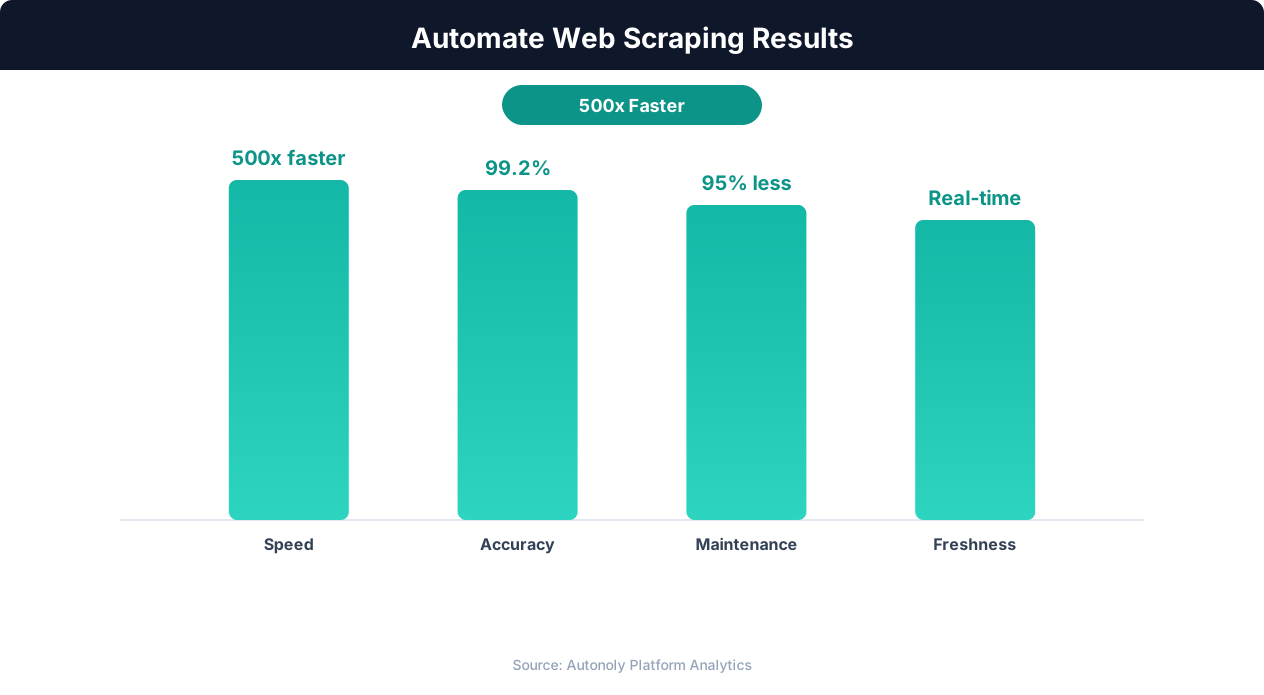
Data quality metrics for automated web scraping pipelines
Key Insight: Companies using automated data collection make strategic decisions 4x faster by having real-time competitive and market data instead of quarterly manual reports (Gartner).
Customize Your Output
The Visual Workflow Builder gives you complete control over how hotel data is processed and delivered. Add Data Processing steps to calculate value scores — such as rating-to-price ratios or review sentiment indices — that help you rank hotels objectively. Use Logic & Flow conditions to filter results by minimum rating threshold, maximum price, or required amenities before they reach your final spreadsheet. You can schedule multi-destination comparison workflows that scrape hotels across several cities in a single run, then route the combined results to Google Sheets for collaborative analysis or to Airtable for a visual database with linked destination records. For advanced hospitality analytics, pipe data through Python scripts using SSH & Terminal to generate pricing heat maps, competitive benchmarking reports, or seasonal trend visualizations.
Further Reading
Explore more about the tools and techniques used in this workflow: Scrape Dynamic Websites, Best Web Scraping Tools.