

Why Automate CRM Data Entry from Email?
Sales teams spend an estimated 28% of their time on administrative tasks, with manual CRM data entry being one of the biggest time drains — a productivity leak that platforms like Salesforce have built entire automation suites to address. Every email from a prospect contains valuable information — contact details, company name, specific needs, budget signals, timeline indicators — but transferring this information into a spreadsheet or CRM requires reading each email, identifying the relevant fields, and typing them in. Multiply this by dozens of emails per day and you have a significant productivity bottleneck that directly reduces selling time.
The cost of this manual work extends beyond just time. Data entry errors are inevitable when humans are copying information between screens. A misspelled email address means your follow-up bounces. A wrong phone number means your outbound call reaches a stranger. A missed budget mention means you fail to prioritize a high-value opportunity. Industry research suggests that CRM data quality degrades by roughly 30% per year without automated maintenance, and poor data quality costs the average company 12% of its revenue through missed opportunities and wasted effort on bad leads.
Automating this process with Gmail integration and Data Extraction eliminates the bottleneck entirely. The AI agent reads your incoming emails, intelligently extracts structured data from unstructured text, and updates your Google Sheets CRM automatically. Your sales reps get back hours each week to focus on what they do best — building relationships and closing deals. The data captured is more accurate and more complete than manual entry, because the agent does not skip fields out of haste or misread handwriting.
This is particularly valuable for teams that use a spreadsheet as their lightweight CRM. You get the flexibility of Google Sheets with the automation power of an enterprise CRM, without the cost or complexity of platforms like Salesforce or HubSpot that require dedicated administrators and expensive per-seat licenses.
How the AI Agent Parses Emails
Autonoly's AI Agent Chat connects to your Gmail account through Browser Automation and scans for new emails matching your criteria. You can filter by sender domain, subject line keywords, Gmail labels, or even specific inboxes within your organization. The agent reads the full email body plus the signature block, which often contains phone numbers, job titles, LinkedIn profile URLs, and company information that the body text does not include.
The Data Processing engine uses natural language understanding to extract structured fields from unstructured email text. It recognizes patterns like "My name is..." or "I represent..." and maps them to the correct spreadsheet columns. It also parses email signatures with sophisticated pattern matching that identifies phone number formats across different countries, extracts LinkedIn URLs, and recognizes mailing addresses even when formatted inconsistently. The agent gets smarter over time — emails that follow a consistent template, such as notifications from a lead generation service or forwarded form submissions, are parsed with near-perfect accuracy after the first few examples.
For complex emails that contain multiple pieces of information — a prospect describing their company size, budget, timeline, and specific requirements all in one message — the agent extracts each data point and maps it to the appropriate column. It handles abbreviations, industry jargon, and informal language naturally.
What Data Gets Extracted
A typical extraction includes:
Contact Name — Parsed from the email greeting, body, or signature
Email Address — The sender's email or any addresses mentioned in the body
Company Name — Extracted from the email domain, signature, or body text
Phone Number — Found in signatures or message body, normalized to international format
Job Title — Extracted from the signature block or email body
Inquiry Type — Categorized based on email content (demo request, pricing question, support, partnership)
Key Details — The main ask or requirement mentioned in the email
Budget Signals — Any mentions of budget, spend, or financial constraints
Timeline — Urgency indicators or specific deadline mentions
The Visual Workflow Builder lets you customize which fields to extract and how they map to your spreadsheet columns. Add custom extraction rules for industry-specific terminology or your own internal categorization scheme. For example, a real estate company might extract property type, location preference, and price range from inquiry emails.
Customizing Your Workflow
Beyond basic extraction, you can build sophisticated processing pipelines. Add a lead scoring step that assigns points based on company domain (enterprise domains score higher), inquiry type (demo requests score higher than general questions), and urgency language. Insert a domain lookup step that visits the company website to extract additional context — employee count, industry, and technology stack. Create conditional branches that handle different email types differently — form notification emails follow one extraction pattern, while freeform prospect emails follow another.
The Logic & Flow engine handles edge cases elegantly. When a prospect emails from a personal address after initially contacting you from a company address, you can define matching rules based on name similarity, domain matching, or phone number to link the records. When an email contains information about multiple contacts (such as a conference organizer listing several attendees), the agent can create separate records for each.
Deduplication and Record Matching
Not every email represents a new lead. The agent checks incoming email addresses against existing records in your Google Sheets CRM. If a match is found, it updates the existing record with new information rather than creating a duplicate — adding a new phone number discovered in a follow-up email, or updating the inquiry status based on the latest conversation. If no match exists, a new row is created with all available fields populated.
Integration Options
Once data is extracted and stored in Google Sheets, connect with downstream workflows. Trigger an automated follow-up sequence via Gmail. Post new high-value leads to Slack for immediate team visibility. Sync records to Airtable or Notion databases for teams that prefer richer CRM interfaces. Visit the Integrations page for all supported destinations, or browse the templates library for pre-built email-to-CRM workflows.
Use Cases
B2B sales teams capturing lead data from inbound inquiry emails automatically
Professional services firms extracting client requirements and contact details from RFP emails
Recruiting agencies parsing candidate information from application emails
Real estate brokerages logging buyer and seller inquiries with property preferences
Consulting firms extracting project scope and budget details from prospect emails
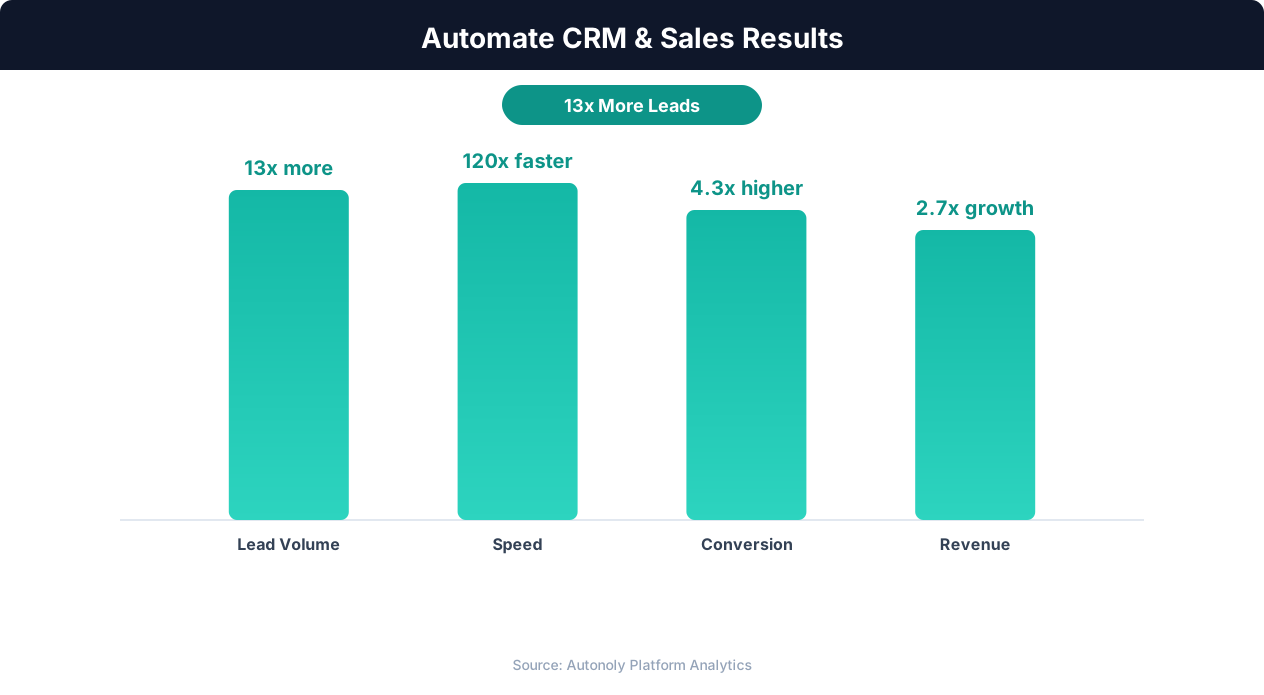
Sales pipeline velocity improvements with automation
Key Insight: Responding to leads within 5 minutes makes you 9x more likely to convert them. Automated capture and routing makes sub-minute response times possible.
How the AI Agent Does It
The agent opens a real Chromium browser, navigates to Gmail, and searches for new emails matching your defined criteria. It reads each email's content, applies natural language extraction to pull structured fields, and then opens your Google Sheets spreadsheet to append or update records. Because it uses Browser Automation, it works with any Gmail account without requiring API keys or OAuth setup. The agent handles Gmail's interface changes automatically, adapting to layout updates without workflow maintenance.
Handling Complex Email Formats
The agent handles HTML emails, plain text emails, forwarded chains, and even nested reply threads. It strips out previous thread content to focus on the latest message. For emails with attachments like business cards or PDF proposals, the agent can extract text content and include relevant details in the CRM record. It processes emails in any language, extracting structured data from English, Spanish, French, German, Portuguese, and many other languages.
Key Insight: Organizations that automate CRM data entry report 41% higher revenue per salesperson and 27% faster deal close rates (Nucleus Research).
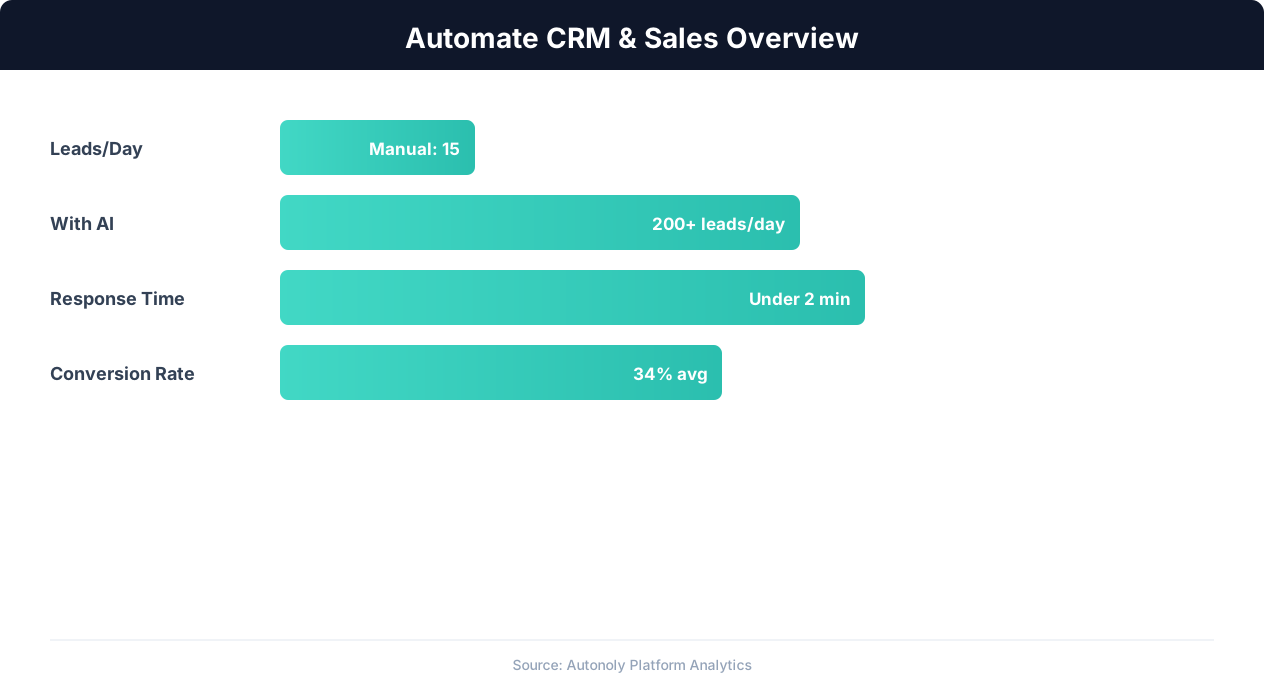
CRM automation impact on lead conversion rates
Key Insight: Sales reps spend only 28% of their time actually selling — the rest goes to data entry, scheduling, and admin tasks that automation can eliminate (Salesforce Research).
Scheduling and Automation
Schedule this workflow to run every four hours using the Visual Workflow Builder. The agent checks your Gmail inbox, processes new messages, and updates your Google Sheets CRM. Each processed email is marked with a Gmail label so you can verify at a glance which messages have been captured. Add Logic & Flow conditions to route high-priority emails to a separate Slack notification channel, trigger an immediate auto-reply acknowledging receipt, or escalate emails from enterprise domains to a priority queue. See our pricing page for run frequency details.
Further Reading
Explore more about the tools and techniques used in this workflow: Automate Data Entry, No Code Automation Guide, Ai Content.