


Why Monitor Job Postings Automatically?
The job market moves fast. High-demand positions at top companies can receive hundreds of applications within the first 48 hours of posting. Candidates who apply early have a statistically significant advantage — their applications are more likely to be reviewed before hiring managers become overwhelmed with volume. Automated job monitoring puts you at the front of the line by alerting you the moment a relevant position appears.
Beyond individual job seekers, this automation is valuable for recruiters tracking competitor hiring patterns, HR teams benchmarking against industry roles, and investors analyzing company growth signals through hiring activity. The ability to systematically monitor career pages across dozens of companies provides intelligence that manual browsing cannot match.
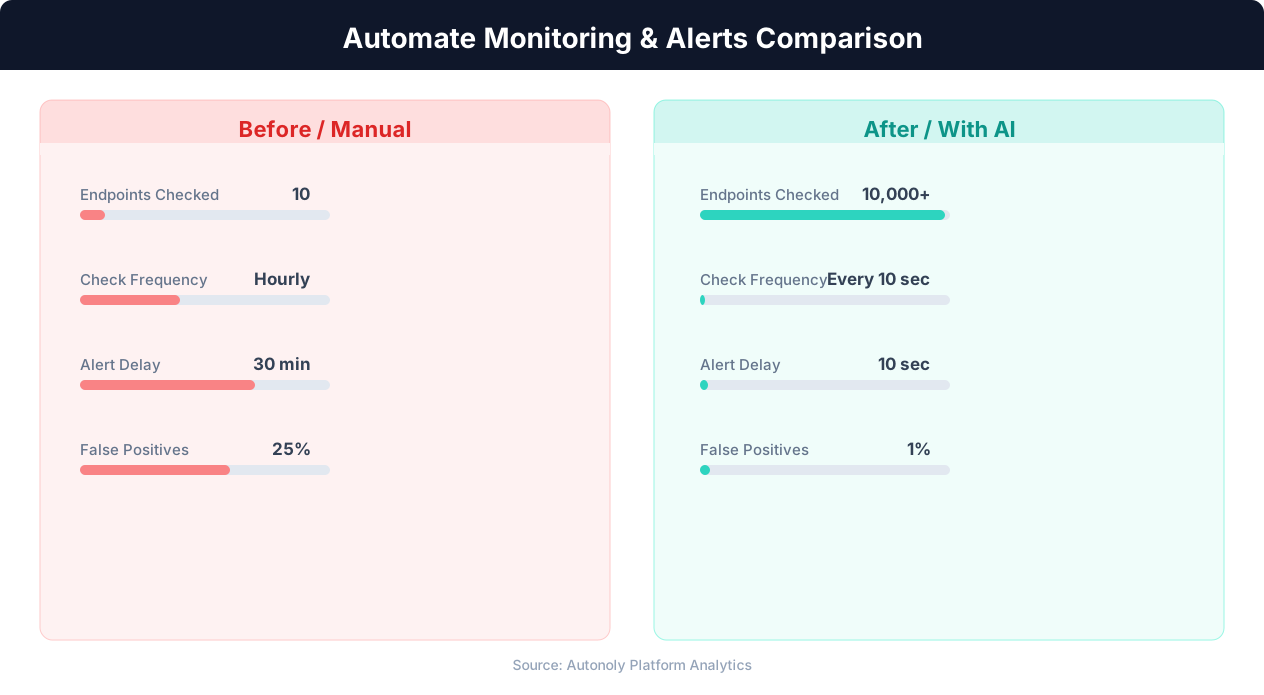
Mean time to detection for manual vs automated monitoring
Key Insight: Automated monitoring detects issues 60x faster than manual checks, reducing mean time to detection from hours to seconds (PagerDuty State of Digital Operations).
How Autonoly Monitors Job Postings
The AI Agent Chat makes setup simple — describe the roles you are looking for, the companies or industries you care about, and where you want alerts sent. The agent handles everything else.
Using Browser Automation, the agent navigates company career pages, job boards like LinkedIn Jobs, Indeed, and Glassdoor, as well as niche industry job boards. Many career pages use complex JavaScript frameworks, infinite scrolling, and dynamic filters that break simple scrapers. Autonoly's full Playwright browser handles all of these correctly, ensuring no listings are missed.
Smart Matching and Filtering
The Data Extraction engine pulls structured data from each listing — title, department, location, experience level, salary range, and posting date. The Data Processing feature then applies your matching criteria. You can filter by keywords in the title or description, location (including remote-friendly positions), experience level, salary range, and specific departments or teams.
The agent maintains a memory of previously seen listings, so each email only contains genuinely new positions. This deduplication prevents you from seeing the same listing repeatedly when a company re-publishes or refreshes their postings.
What Your Email Alerts Include
Each email is formatted for quick scanning with the job title and company prominently displayed, followed by location, salary range (when published), posting date, a brief description excerpt, and a direct link to apply. When multiple matching positions are found in a single run, they are grouped by company for easy review.
Customization for Different Use Cases
Job seekers can monitor specific companies they dream of working for, casting a wide net across role types. Recruiters can track competitor companies to understand their hiring velocity and focus areas. The Visual Workflow Builder enables complex monitoring setups — for example, monitoring 50 company career pages daily but only alerting for engineering roles at Series B+ startups.
You can also save all discovered listings to Google Sheets to build a searchable database of job market activity. Over time, this data reveals hiring trends — which companies are scaling which departments, seasonal hiring patterns, and salary range evolution. The Logic & Flow feature lets you route different types of positions to different email addresses or channels.
Scheduling and Coverage
Job monitoring typically runs daily, checking all configured sources in the early morning so you have fresh listings waiting in your inbox. For highly competitive roles, you can increase the frequency to twice daily. Autonoly's scheduling system handles retries if a career page is temporarily unavailable.
Beyond Simple Job Alerts
The job monitoring data feeds naturally into broader workflows. You might want to automatically add promising listings to a tracking spreadsheet, enrich them with company information from Crunchbase, or even draft personalized cover letters using the job description as input. Autonoly's Integrations ecosystem supports all of these extensions. Visit the templates library for pre-built job monitoring workflows, check the pricing page for plan details, and explore the SSH & Terminal feature for custom analysis scripts. For background on how web scraping works, see our web scraping glossary and workflow automation glossary. The API integration glossary covers how data flows between systems in automated pipelines.
Key Insight: Organizations with automated monitoring experience 78% fewer critical incidents due to early warning detection and proactive alerting (Datadog Infrastructure Report).
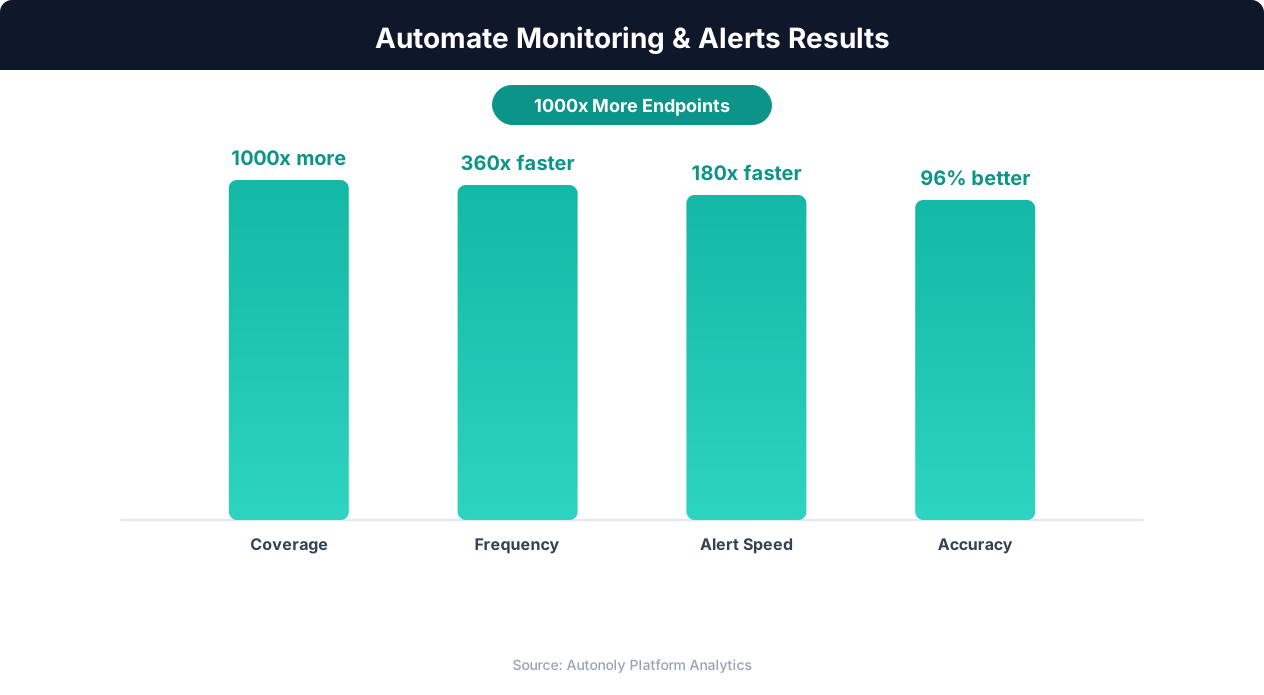
Downtime reduction from automated monitoring workflows
Key Insight: 91% of enterprises report that automated monitoring has eliminated blind spots in their infrastructure that manual checks consistently missed (Splunk Observability Report).
How to Customize Your Pipeline
Every job search is different, and Autonoly adapts to yours. The Visual Workflow Builder lets you modify every aspect of the monitoring pipeline without writing code. Add Data Processing nodes to score listings based on your priority criteria — weighting salary, location, company size, or specific keywords. Use Logic & Flow to create branching paths that route engineering roles to one email and marketing roles to another. You can also insert enrichment steps that look up company details like funding stage, employee count, or Glassdoor ratings before the data reaches your inbox.
Filtering by Keywords
Keyword filtering goes beyond simple title matching. Configure the agent to scan the full job description for must-have terms like specific programming languages, certifications, or industry experience. Negative keywords let you exclude irrelevant listings — for example, filtering out "senior" roles if you are targeting mid-level positions. The Data Processing engine supports regex patterns and fuzzy matching for flexible keyword rules.
Building a Job Market Database
Over time, saving every discovered listing to Google Sheets creates a comprehensive job market database. This data reveals hiring trends — which companies are scaling, seasonal patterns in job postings, and salary range evolution across roles and locations. Use the SSH & Terminal feature to run Python analysis on this data for deeper market intelligence.
Further Reading
Explore more about the tools and techniques used in this workflow: Web Scraping Best Practices, Schedule Automated Workflows, Website Monitoring, Email Campaigns.