

Why Automate Competitor Price Monitoring?
Pricing is one of the most powerful levers in e-commerce. Research consistently shows that 87% of online shoppers consider price a primary factor in their purchasing decision, and a product priced even a few percent lower than competitors can capture dramatically more sales on comparison-heavy marketplaces. Conversely, overpricing by just 5-10% drives customers straight to alternatives — especially when price comparison tools and browser extensions make it trivially easy for shoppers to find the lowest price in seconds. Yet most merchants set prices based on gut feel or check competitors manually once in a while — a process that is slow, inconsistent, and impossible to scale across hundreds of products and multiple competitors.
The reality of modern e-commerce is that competitors change prices constantly. A competitor might drop their price on a key product Monday morning to grab market share, run a flash sale on Wednesday afternoon, and raise prices again by Friday. If you are checking prices manually once a week — or worse, once a month — you are operating on stale intelligence and making pricing decisions in the dark. By the time you notice a competitor has undercut you on a best-selling product, you may have already lost days or weeks of sales volume to them.
Automated competitor price monitoring with Browser Automation gives you daily pricing intelligence across every product and competitor that matters to your business. Instead of spot-checking a handful of products when you remember, you get a complete, timestamped dataset in Google Sheets that reveals pricing trends, promotional patterns, and strategic opportunities you would otherwise miss entirely. This is not just about matching the lowest price — it is about understanding the competitive landscape deeply enough to price strategically, knowing when to hold your margins and when to compete aggressively.
The financial impact of pricing intelligence is substantial. A mid-size e-commerce store with 200 products competing against 5 competitors has 1,000 price points to monitor. Checking each one manually takes roughly 1-2 minutes per product per competitor — that is over 16 hours of tedious, repetitive work per week just to maintain awareness of the competitive landscape. Autonoly completes the same task in 20-30 minutes, runs it every day without fail, and delivers the results in a structured format ready for analysis. The time saved alone justifies the automation, but the real value comes from the strategic insights that continuous monitoring unlocks.
What Data Gets Captured
For each competitor product, the agent extracts the current listed price, original price (if on sale), discount percentage, availability status (in stock, out of stock, limited quantity), shipping cost where visible, and any promotional badges like "Best Seller," "Limited Time Offer," or "Lightning Deal." The agent can also capture product ratings, review counts, and seller information when available. Over time, this daily snapshot builds a powerful historical dataset that reveals when competitors run sales, how often they change prices, what their pricing floor seems to be, and how they respond to your own price changes.
Strategic Applications
Use competitor pricing data to implement dynamic pricing strategies — adjusting your own prices to maintain a target margin while staying competitive. Identify products where you are significantly underpriced (leaving money on the table) or overpriced (losing sales to competitors who offer the same product for less). Spot when competitors run promotional campaigns so you can respond quickly with counter-promotions or plan your own sales to coincide with periods when competitors return to full price.
Combine pricing data with your own sales data from monitor-shopify-orders-to-sheets to understand the direct relationship between price gaps and your conversion rates. When you see that your sales drop every time Competitor A prices a shared product more than 8% below yours, you have actionable intelligence for setting price floors. The Integrations ecosystem makes it easy to route pricing alerts to Slack when a competitor drops below your price on a key product, letting your pricing team respond within hours instead of days.
Scaling Across Markets
Whether you compete with 3 stores or 30, the agent handles them all in a single workflow. Add new competitors or products at any time by updating your configuration in the Visual Workflow Builder. The Data Extraction engine adapts to different website layouts automatically — whether a competitor uses Shopify, WooCommerce, BigCommerce, Magento, or a custom-built storefront — so you do not need separate setups for each competitor's site structure. For international sellers, the agent can monitor prices across different country domains, capturing currency-specific pricing for each market.
Exporting and Integrating Results
Beyond Google Sheets, pricing data can be pushed to Airtable for visual dashboards, Notion for team-shared competitive intelligence databases, or downloaded as Excel files for offline analysis. Use Data Processing nodes to calculate price differentials, percentage gaps, and moving averages automatically within your workflow. Check the templates library for pre-built competitor monitoring workflows, and visit our pricing page to see how this compares to dedicated price monitoring SaaS tools. For more background on competitive intelligence workflows, see our workflow automation glossary.
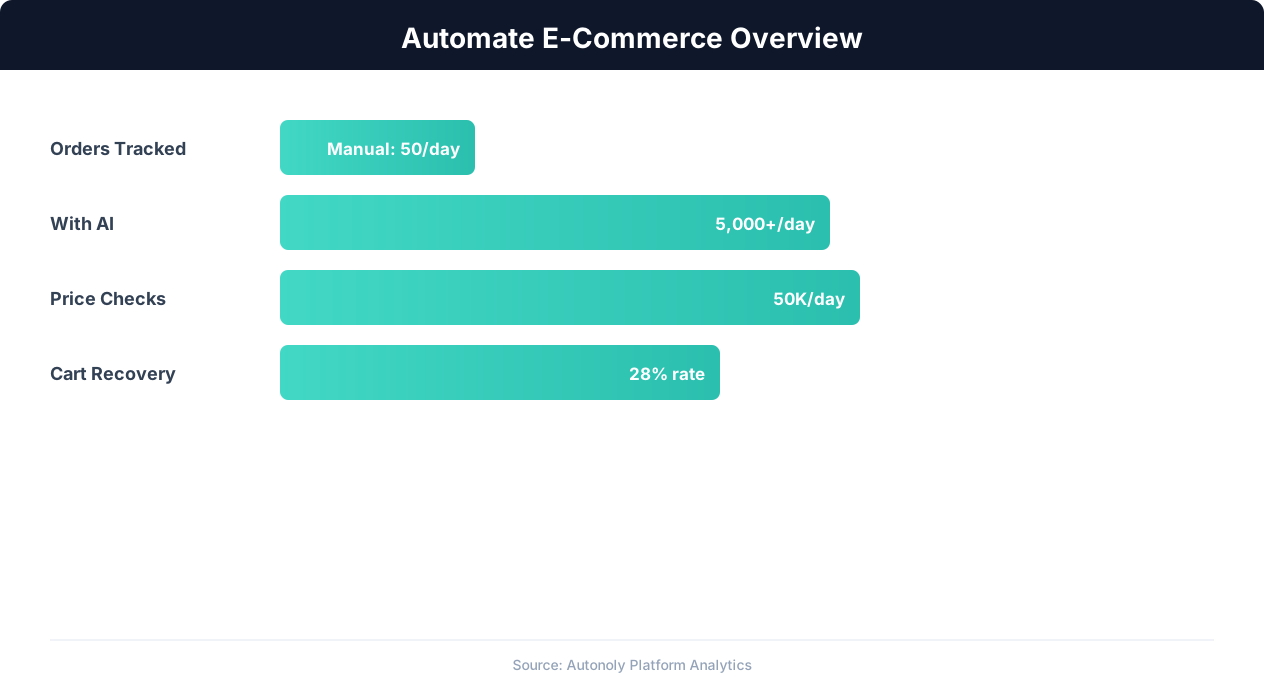
E-commerce automation impact on key performance metrics
Key Insight: Automated pricing intelligence captures 31% more competitive opportunities by monitoring and responding to market changes in real time (McKinsey Retail Practice).
How the AI Agent Does It
The AI agent uses Browser Automation to visit each competitor URL in a real Chromium browser. This is critical because many e-commerce sites load prices dynamically via JavaScript, display different prices based on geographic location or user session, or use anti-bot measures that block traditional HTTP scrapers entirely. Pacing these visits in line with each site's robots.txt directives keeps recurring price checks respectful of the source. The agent renders each page fully, identifies price elements using visual pattern recognition powered by the AI Agent Chat intelligence layer, and extracts the data accurately even when HTML structures vary dramatically between sites. It handles cookie consent banners, popup overlays, newsletter modals, age verification gates, and lazy-loaded content that would trip up simpler scraping tools.
For category pages with multiple products, the agent paginates through all results automatically, ensuring complete coverage without manual intervention. When product pages use dynamic variant selectors — where the price changes based on selected size, color, or configuration — the agent can cycle through each variant to capture the full price matrix. The Data Extraction engine normalizes currency formats — following the three-letter ISO 4217 currency codes — strips promotional text from price fields, and handles edge cases like "from $X" range pricing or "member price vs. regular price" dual displays.
Key Insight: E-commerce businesses using automation grow revenue 2.5x faster than those relying on manual processes (Shopify Commerce Trends).
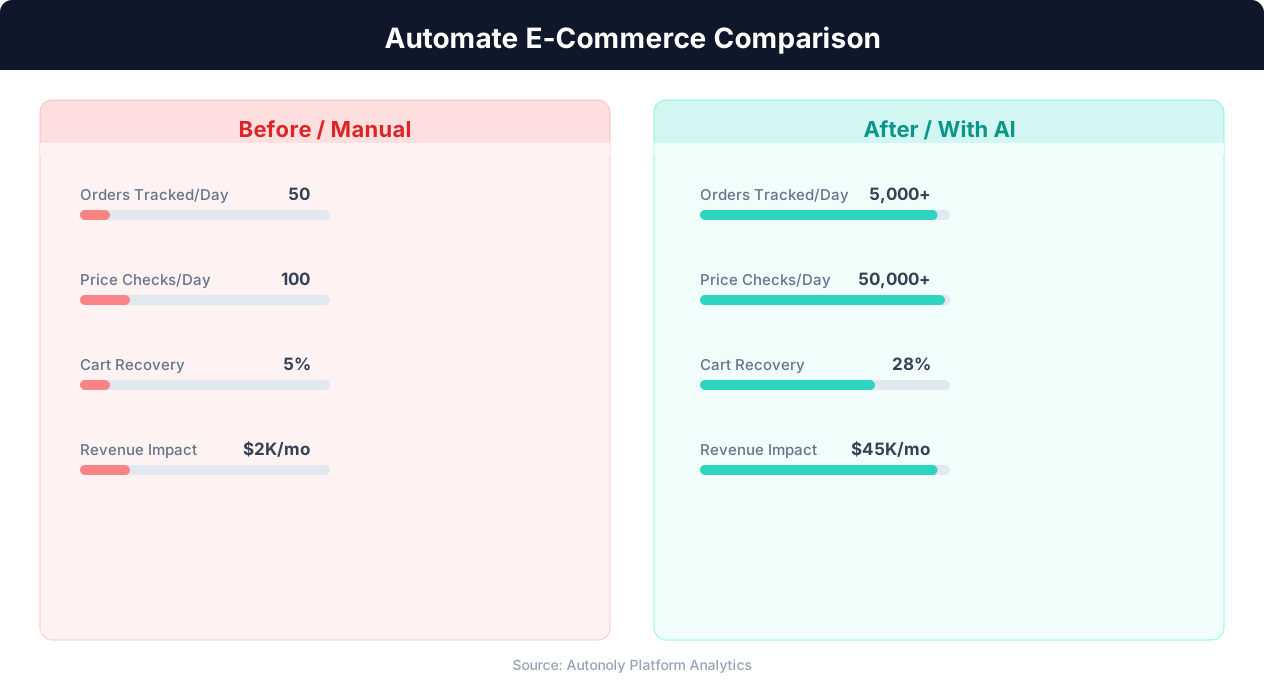
Manual vs automated product listing time comparison
Key Insight: Product listing automation cuts catalog management time by 78%, allowing sellers to scale from 500 to 5,000+ SKUs without additional staff (BigCommerce Research).
Scheduling and Automation
Run this workflow daily to capture a complete pricing snapshot every morning before your team starts work. The cron-based scheduler in the Visual Workflow Builder lets you set the exact time — many merchants prefer 6 AM runs so the data is fresh when pricing decisions are made at 9 AM. Configure which Google Sheet to update, and the agent appends each day's data as new rows with timestamps, preserving the full history for trend analysis. Differential processing highlights only the prices that changed since the previous run, so your team can focus on what moved rather than reviewing hundreds of static data points.
Add a Logic & Flow condition to send a Slack alert only when a competitor drops their price by more than 5% on a product you both sell — filtering out the noise of minor fluctuations and focusing attention on competitively significant moves. You can also trigger the workflow manually before a big promotional event like Black Friday or Prime Day to get the freshest competitive data for your pricing decisions. Chain this with SSH & Terminal scripts to feed pricing data into custom pricing algorithms or machine learning models that recommend optimal price points based on competitive position and your margin targets.
Further Reading
Explore more about the tools and techniques used in this workflow: Ecommerce Price Monitoring, Best Web Scraping Tools, Website Monitoring.