What Is a Data Science Pipeline and Why Automate It?
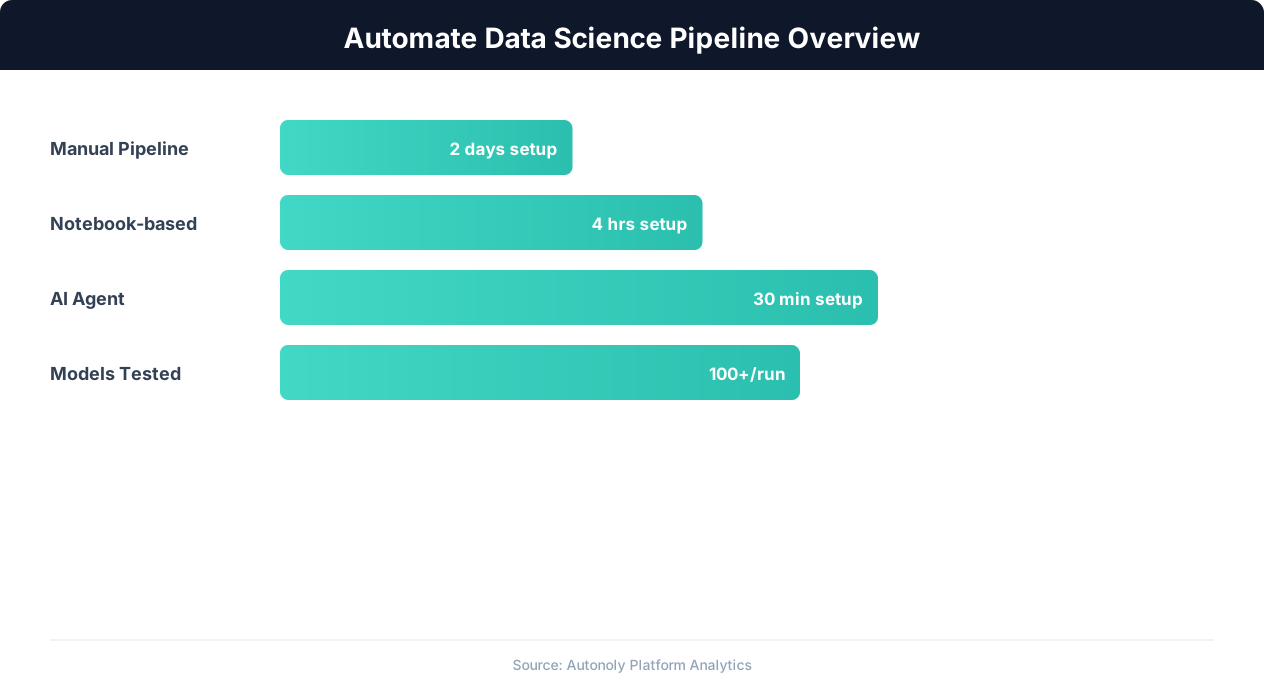
A data science pipeline is the end-to-end process of turning raw data into actionable predictions and insights. It spans data collection, cleaning, feature engineering, model training, evaluation, and deployment. In traditional data science, each of these steps requires manual coding, debugging, and iteration. Understanding what automation is and how AI automation compresses these manual steps reframes the whole pipeline. A data scientist might spend days writing Python scripts to scrape data, hours debugging pandas transformations, and more hours tuning model hyperparameters.
The bottleneck is not the algorithms — it is the manual labor surrounding them.
The Typical Data Science Workflow
A standard data science project follows this sequence:
- Data Collection: Gather data from APIs, databases, websites, or files. This step often involves web scraping, API calls, or manual CSV exports.
- Data Cleaning: Handle missing values, remove duplicates, fix data types, standardize formats, and filter outliers. This is universally acknowledged as the most time-consuming step, consuming 60-80% of a data scientist's time.
- Exploratory Data Analysis (EDA): Generate summary statistics, distributions, correlations, and visualizations to understand the data before modeling.
- Feature Engineering: Create new features from existing data that improve model performance. This requires domain knowledge and iterative experimentation.
- Model Training: Select algorithms (Random Forest, XGBoost, logistic regression, etc.), train them on the prepared data, and tune hyperparameters.
- Evaluation: Assess model performance using metrics like accuracy, precision, recall, F1 score, and RMSE. Compare multiple models to select the best performer.
- Prediction and Output: Apply the trained model to new data, generate predictions, and export results for business use.
Why AI Agents Change the Game
Autonoly's AI agent can execute every step of this pipeline through a combination of browser automation (for data collection from websites) and terminal execution (for Python-based cleaning, analysis, and modeling). You describe each step in plain English, and the agent writes and executes the Python code.
This is not theoretical. Autonoly's terminal environment comes pre-loaded with pandas, NumPy, scikit-learn, matplotlib, and other essential data science libraries. The agent has demonstrated the ability to scrape data, train Random Forest and XGBoost models, generate evaluation metrics, create publication-quality plots, and export predictions — all from natural language instructions.
Step 1: Collecting Data With Browser Automation
Every data science project starts with data. While some projects use existing datasets from Kaggle or internal databases, many real-world projects require collecting fresh data from the web. This is where Autonoly's browser automation becomes the first stage of the pipeline.
Scraping Structured Data from Websites
The AI agent navigates to websites using a real Chromium browser, extracts structured data from tables, lists, and product pages, and outputs it as a clean dataset ready for analysis. Common data collection scenarios include:
- Financial data: Stock prices, economic indicators, and market data from financial portals.
- Real estate data: Property listings, prices, and features from listing sites.
- Product data: Prices, specifications, and reviews from e-commerce sites.
- Sports statistics: Player stats, team records, and historical results from sports databases.
- Job market data: Salary ranges, job posting volumes, and skill requirements from job boards.
For example, a real estate price prediction project might start with:
"Go to [real estate listing site] and search for apartments in San Francisco. Extract the listing price, square footage, number of bedrooms, number of bathrooms, neighborhood, and listing date for the first 200 results across multiple pages."
The agent handles pagination, dynamic content loading, and data extraction, producing a structured dataset of 200 property listings in minutes.
Scraping Multiple Sources
Robust data science often combines data from multiple sources. The agent can scrape property data from one site, neighborhood crime statistics from another, and school ratings from a third. Each dataset is extracted separately and then merged in the terminal using pandas. Cross-source data collection that would take a data scientist hours of manual work happens automatically.
API Data Collection
For data sources that offer APIs (weather data, financial data, government datasets), the agent can use Python in the terminal to make API calls and parse the responses. This is particularly useful for supplementing scraped data with time-series data, geographic data, or reference datasets that are more efficiently accessed through APIs than browser scraping.
File-Based Data
For a comprehensive overview of web scraping techniques and best practices that apply to data collection, see our web scraping best practices guide.
Uploading Existing Files
If your data already exists as CSV, Excel, or JSON files, upload them directly to the Autonoly environment. The agent reads the files into pandas DataFrames and proceeds to the cleaning and analysis stages. This is the fastest path when your data collection is already handled by other systems.
Step 2: Cleaning and Preparing Data With Pandas
Raw data is never analysis-ready. Cleaning and preparation transform messy real-world data into the structured format that machine learning algorithms require. The AI agent handles this entire stage through Python pandas in the terminal.
Initial Data Inspection
After data collection, the agent inspects the dataset and reports its findings:
"Show me the shape of the dataset, column names and data types, number of missing values per column, and basic statistics for numeric columns."
The agent runs df.info(), df.describe(), and df.isnull().sum(), presenting a comprehensive overview of data quality. This inspection often reveals issues that were not apparent during collection: columns parsed as strings that should be numeric, unexpected null patterns, and outlier values that suggest data quality problems.
Handling Missing Values
Missing data is the most common data quality issue. The agent handles it according to your instructions:
- "Drop rows where the target variable (price) is missing" — You cannot train on rows without labels.
- "Fill missing square footage values with the median for the same neighborhood" — Group-aware imputation preserves neighborhood-level patterns.
- "For missing 'year_built' values, use the median year built for the same building type" — Domain-appropriate imputation.
- "Drop any column with more than 40% missing values" — Columns with too much missing data are unreliable features.
Data Type Conversion
Scraped data often arrives as text. Prices like "$1,250,000" need to be converted to numbers. Dates like "March 15" need to be parsed into datetime objects. Boolean fields like "Yes"/"No" need to be converted to 1/0 for modeling. The agent handles all of these conversions:
"Convert the price column to numeric (remove $ and commas). Parse the listing_date column as dates. Convert has_parking to a binary 0/1 column."
Outlier Detection and Handling
Outliers can distort model training. The agent identifies and handles them:
"Remove listings where the price per square foot is more than 3 standard deviations from the mean. Also remove any listings with square footage below 100 or above 10,000 as likely data entry errors."
Feature Engineering
Creating new features from existing data often improves model performance dramatically:
- "Add a price_per_sqft column (price / sqft)"
- "Add a days_on_market column (today minus listing_date)"
- "Create dummy variables for the neighborhood column" — One-hot encoding for categorical features.
- "Add a is_luxury column: 1 if bedrooms >= 4 AND sqft >= 2000, otherwise 0"
Each instruction generates the appropriate pandas code. The agent shows you the results after each transformation so you can verify correctness before proceeding.
Step 3: Exploratory Data Analysis and Visualization
Before training models, exploratory data analysis (EDA) reveals patterns, distributions, and relationships in the data that inform modeling decisions. The AI agent generates visualizations and statistical summaries using matplotlib, seaborn, and pandas.
Distribution Analysis
"Show me histograms for price, square footage, and bedrooms. Use a log scale for price since it is likely right-skewed."
The agent creates matplotlib figures that reveal the shape of each feature's distribution. Skewed distributions often benefit from log transformation before modeling. Bimodal distributions might suggest distinct sub-populations in the data. The agent generates the plots and displays them directly in the session, so you can inspect the visuals and make decisions.
Correlation Analysis
"Create a correlation heatmap for all numeric features. Highlight correlations above 0.7 or below -0.7."
The agent generates a seaborn heatmap that visualizes pairwise correlations. Strong correlations between features indicate multicollinearity (which can be problematic for linear models) or redundant features that can be dropped. Strong correlations between features and the target variable identify the most predictive features.
Feature-Target Relationships
"Create scatter plots of price vs square footage, price vs bedrooms, and price vs days on market. Add trend lines."
These visualizations show the relationship between each feature and the target variable. Linear relationships suggest that simple models may perform well. Non-linear relationships indicate that tree-based models (Random Forest, XGBoost) or polynomial features may be needed.
Categorical Feature Analysis
"Show me box plots of price by neighborhood for the top 10 neighborhoods by listing count."
Box plots reveal how the target variable varies across categories. Neighborhoods with high median prices and low variance are premium markets. Neighborhoods with wide price ranges may have distinct sub-markets. This analysis informs whether to include neighborhood as a feature and how to encode it.
Time-Based Patterns
If your data has a time dimension:
"Show me average listing price by month. Is there a seasonal pattern?"
The agent aggregates by time period and plots trends. Seasonal patterns suggest including time-based features (month, quarter, day of week) in the model. Trending data suggests that a time-based train/test split is more appropriate than random splitting.
Automated EDA Summary
For a comprehensive overview, ask the agent to generate a full EDA report:
"Generate a complete EDA summary: dataset shape, missing values, distributions for all numeric columns, correlation matrix, top 5 features correlated with price, and any obvious data quality issues you find."
The agent produces a multi-page analysis with statistics and charts that would typically take a data scientist 2-4 hours to create manually.
Step 4: Training Machine Learning Models
With clean, explored data, the next step is training machine learning models. Autonoly's terminal has scikit-learn pre-installed, giving the agent access to dozens of algorithms and evaluation tools. Here is how to train models through natural language instructions.
Train/Test Split
First, split the data to prevent overfitting:
"Split the data into 80% training and 20% test sets. Use the price column as the target variable. Set a random seed of 42 for reproducibility."
The agent uses scikit-learn's train_test_split and reports the sizes of both sets. For time-series data, you might instruct: "Use the oldest 80% of listings for training and the newest 20% for testing" to avoid data leakage from future observations.
Training a Random Forest
Random Forest is an excellent starting model for most tabular data problems:
"Train a Random Forest regression model to predict price. Use 100 trees. Show me the feature importance ranking."
The agent writes the scikit-learn code to train the model, extract feature importances, and display them in a sorted bar chart. Feature importance reveals which variables the model relies on most, which is valuable for both model interpretation and feature selection.
Training XGBoost
XGBoost often outperforms Random Forest, especially with structured data:
"Also train an XGBoost model on the same data. Use 200 boosting rounds and early stopping based on validation performance."
The agent trains the XGBoost model with appropriate hyperparameters, using a validation set for early stopping to prevent overfitting. XGBoost's built-in feature importance and gain metrics provide additional insight into which features drive predictions.
Training Multiple Models for Comparison
For a comprehensive evaluation, train several models:
"Train the following models and compare their performance: Linear Regression, Ridge Regression, Random Forest (100 trees), XGBoost (200 rounds), and Gradient Boosting. Show me a comparison table of their test set performance."
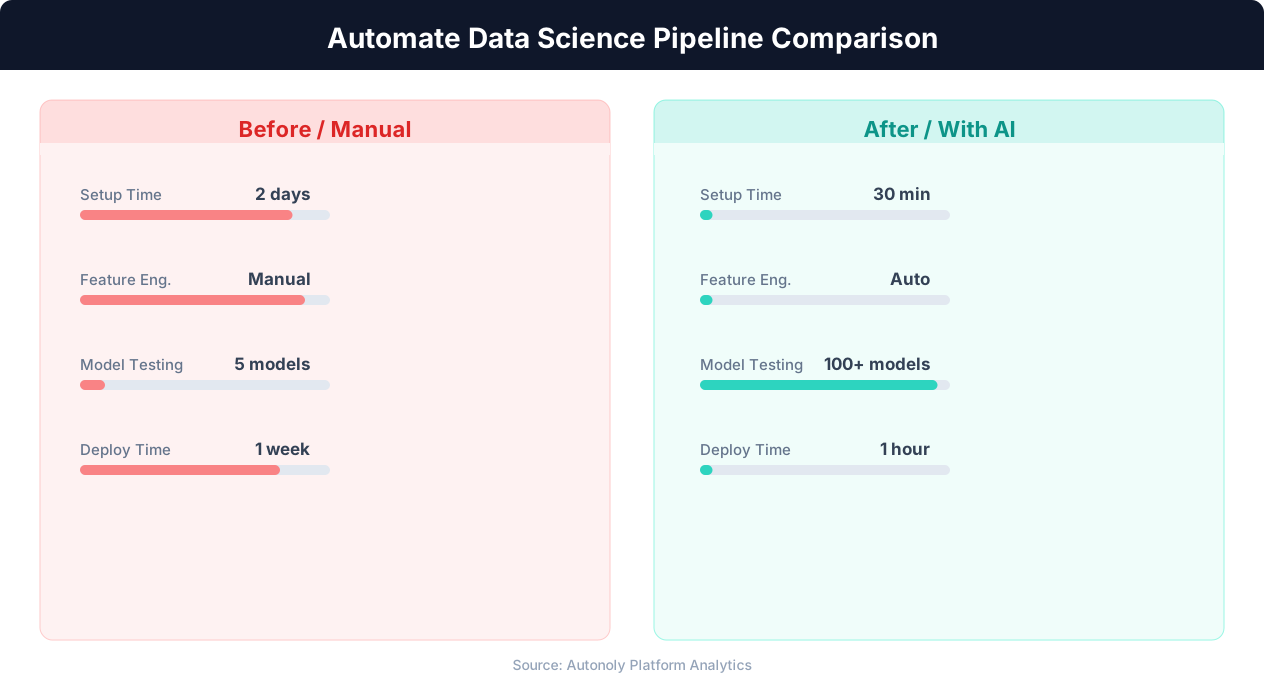
The agent trains all five models, evaluates each on the test set, and presents a comparison table. This systematic comparison replaces the trial-and-error approach of testing models one at a time.
Hyperparameter Tuning
Once you identify the best-performing model, tune its hyperparameters:
"For the XGBoost model, run a grid search over learning rates (0.01, 0.05, 0.1), max depths (3, 5, 7), and min child weights (1, 3, 5). Use 3-fold cross-validation. Show me the best parameters and the performance improvement."
The agent runs the grid search using scikit-learn's GridSearchCV or manual loops, tests all parameter combinations, and reports the best configuration. Grid search is computationally intensive but the terminal environment handles it well for moderate dataset sizes (under 100,000 rows).
Cross-Validation for Robust Estimates
For more reliable performance estimates:
"Run 5-fold cross-validation on the tuned XGBoost model. Report the mean and standard deviation of R-squared and RMSE across folds."
Cross-validation provides a more stable estimate of model performance than a single train/test split. Low variance across folds indicates that the model's performance is consistent regardless of which data ends up in the test set.
Step 5: Evaluating Models and Generating Visual Reports
Model training is only useful if you can rigorously evaluate performance and communicate results to stakeholders. The AI agent generates evaluation metrics and publication-quality visualizations.
Regression Metrics
For regression problems (predicting prices, quantities, scores):
"Evaluate the best model on the test set. Show me R-squared, RMSE, MAE, and MAPE. Also show me the residuals distribution."
The agent calculates all metrics and generates a residuals histogram. A normal distribution of residuals indicates a well-calibrated model. Heavy tails suggest the model struggles with extreme values. Systematic bias in residuals (all positive for low values, all negative for high values) suggests the model's functional form is incorrect.
Classification Metrics
For classification problems (predicting categories, yes/no outcomes):
"Show me the confusion matrix, classification report (precision, recall, F1 for each class), and the ROC curve with AUC score."
💡 Key Insight
Data scientists spend 80% of their time on data preparation — automation reduces this to 20%, tripling model development capacity.
The agent generates a formatted confusion matrix, a detailed classification report, and an ROC curve plot. These visualizations are standard deliverables for any classification project and communicate model performance clearly to non-technical stakeholders.
Prediction vs. Actual Plots
"Create a scatter plot of predicted prices vs actual prices on the test set. Add a diagonal reference line (perfect prediction line). Color points by neighborhood."
This plot is the most intuitive visualization of regression model performance. Points clustered tightly around the diagonal indicate accurate predictions. Points far from the diagonal reveal where the model struggles. Coloring by a categorical variable can reveal whether the model performs differently across subgroups.
Feature Importance Visualization
"Create a horizontal bar chart of the top 15 most important features for the XGBoost model. Include both gain and frequency importance measures."
Feature importance charts serve double duty: they help data scientists interpret the model and they help business stakeholders understand what drives the predictions. A stakeholder who sees that "square footage" and "neighborhood" are the top two features for price prediction gains intuitive confidence in the model.
Error Analysis
"Show me the 20 listings where the model's prediction error was largest. Include all features and the actual vs predicted price. Are there any patterns in the high-error predictions?"
Error analysis reveals the model's weaknesses. Maybe it consistently overestimates prices for older buildings, or underestimates prices in a specific luxury neighborhood. These patterns suggest feature engineering opportunities or the need for neighborhood-specific models.
Saving Plots for Reports
The agent saves all generated plots as image files that you can download and include in presentations, reports, or dashboards. You can also instruct the agent to generate a PDF report containing all visualizations and metrics using the fpdf2 library, creating a self-contained document that summarizes the entire analysis.
Step 6: Generating and Exporting Predictions
The final pipeline stage applies the trained model to new data and exports predictions for business use.
Batch Predictions
Apply the model to a new dataset:
"Load the file new_listings.csv. Apply the same cleaning and feature engineering steps we used on the training data. Then use the trained XGBoost model to predict prices for each listing. Add the predictions as a new column."
The agent ensures that the new data goes through the exact same preprocessing pipeline as the training data (same columns, same encoding, same scaling). This consistency is critical — a model trained on standardized data will produce garbage predictions on unstandardized input. The agent handles this automatically.
Prediction Confidence
For many business decisions, knowing the confidence of each prediction is as important as the prediction itself:
"For each prediction, also estimate a confidence interval. Use the Random Forest model's individual tree predictions to calculate the standard deviation of predictions as an uncertainty measure."
The agent extracts predictions from each tree in the ensemble and calculates the spread. Predictions where all trees agree (low standard deviation) are high confidence. Predictions where trees disagree widely (high standard deviation) should be treated with more caution.
Exporting to Google Sheets
Export predictions to a collaborative spreadsheet:
"Write the predictions to my Google Sheet called 'Price Predictions' with columns for listing address, predicted price, confidence interval, and all input features."
Autonoly's Google Sheets integration writes the results directly to the specified sheet. Business users can then filter, sort, and act on the predictions without touching Python or the model directly.
Exporting to CSV or Excel
For integration with other systems:
"Export the predictions as a CSV file and also as an Excel file with formatted headers and number formatting for the price columns."
The exported files are available for download from the Autonoly dashboard and can be fed into CRM systems, reporting tools, or other downstream applications.
Scheduled Prediction Pipeline
The full pipeline — scrape new data, clean it, apply the model, and export predictions — can be scheduled to run automatically using scheduled execution. This creates a production-grade prediction system that updates daily or weekly without human intervention. New listings get scraped, preprocessed, scored by the model, and delivered to stakeholders on a reliable schedule.
Complete Example: Real Estate Price Prediction Pipeline
Here is a complete walkthrough of a real data science pipeline built in Autonoly, from data collection to prediction delivery. This demonstrates the full capability of combining browser automation with terminal-based data science.
The Business Problem
A real estate investment firm wants to identify underpriced properties by comparing listing prices to model-predicted fair market values. Properties listed significantly below the predicted price are potential investment opportunities.
Pipeline Execution
Step 1 — Data Collection (Browser Automation):
"Go to [real estate site] and search for apartments for sale in Austin, TX. Extract listing price, address, square footage, bedrooms, bathrooms, year built, lot size, and listing date for the first 300 results."
The agent scrapes 300 listings across multiple pages in approximately 15 minutes.
Step 2 — Data Cleaning (Terminal):
"Clean the scraped data: convert prices to numeric, parse dates, fill missing year_built with the neighborhood median, remove listings under 200 sqft or over 10,000 sqft, and create dummy variables for neighborhoods."
The agent writes and executes 20-30 lines of pandas code, transforming the raw scraped data into a clean DataFrame.
Step 3 — EDA (Terminal):
💡 Key Insight
Automated ML pipelines reduce model deployment time from weeks to hours while maintaining 99.5% reproducibility.
"Generate price distributions by neighborhood, a correlation heatmap, and scatter plots of price vs sqft and price vs bedrooms."
The agent generates 4-5 visualizations that reveal the data's structure and guide modeling decisions.
Step 4 — Model Training (Terminal):
"Train a Random Forest and an XGBoost model to predict price. Use 80/20 train/test split. Compare their R-squared and RMSE on the test set."
Both models train in seconds. The agent reports that XGBoost achieves an R-squared of 0.87 and RMSE of $45,000 on the test set, outperforming Random Forest's 0.83 R-squared.
Step 5 — Prediction and Opportunity Detection (Terminal):
"Apply the XGBoost model to all 300 listings. Add a 'predicted_price' column and a 'price_gap' column (listing_price - predicted_price). Flag listings where the listing price is more than 15% below the predicted price as potential opportunities."
The agent scores all listings and identifies 12 properties listed significantly below the model's fair value estimate.
Step 6 — Export (Google Sheets):
"Write the flagged opportunities to my Google Sheet called 'Investment Opportunities' with all features, predicted price, and price gap. Sort by price gap ascending (biggest discount first)."
The 12 flagged properties appear in the Google Sheet within seconds, ready for the investment team to review.
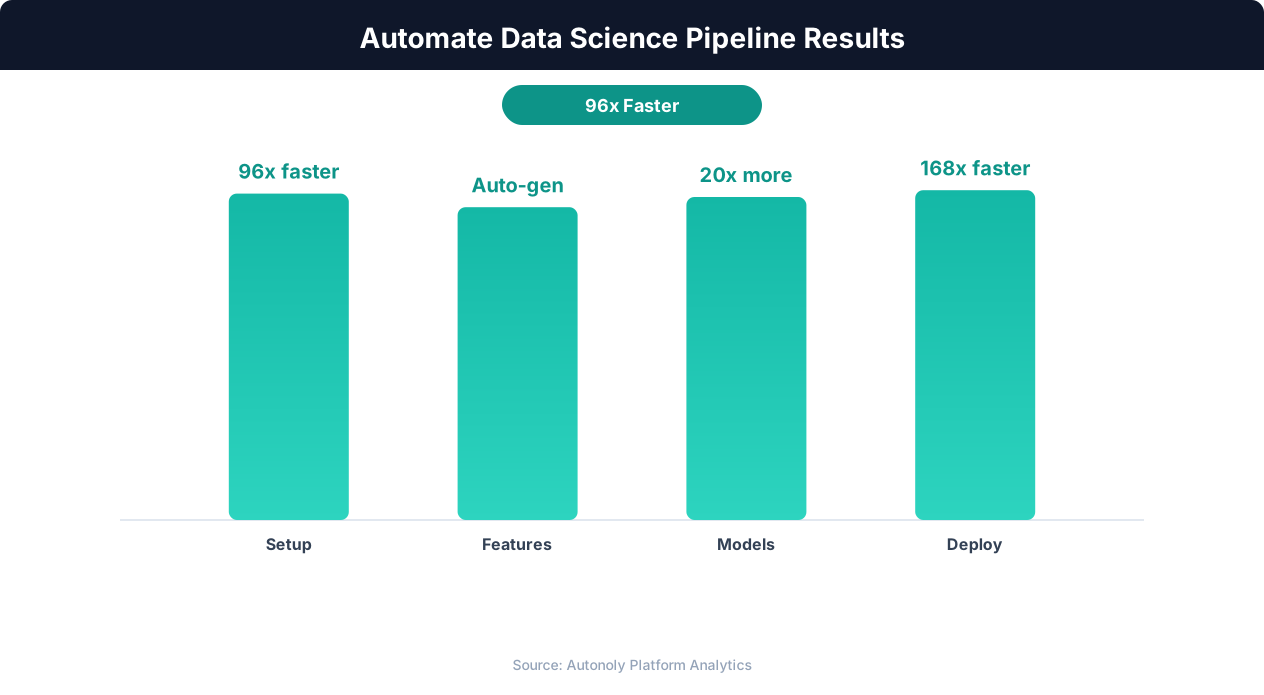
Total time: approximately 25 minutes from empty workflow to actionable investment recommendations. A data scientist doing this manually would spend 2-3 days.
Limitations, Best Practices, and When to Bring in a Data Scientist
AI-powered data science pipelines are powerful but not magic. Understanding their limitations helps you get the most value while avoiding pitfalls.
What Works Well
- Tabular data problems: Structured data with clear features and a defined target variable. Classification and regression on CSV/spreadsheet data is the sweet spot.
- Standard algorithms: Random Forest, XGBoost, Gradient Boosting, Linear/Logistic Regression, K-Means clustering. These are the workhorses of applied data science and the agent handles them competently.
- Feature engineering from explicit instructions: When you know what features you want (ratios, categories, date-derived fields), the agent creates them quickly.
- Exploratory analysis and visualization: Generating statistics, charts, and summaries is fast and reliable.
What Requires Caution
- Deep learning: Training neural networks requires GPU resources and longer training times than the terminal environment typically supports. For deep learning, use dedicated ML platforms.
- Large datasets: Datasets above 500,000 rows may strain the terminal environment's memory. The agent can use chunked processing or sampling, but very large-scale ML needs dedicated infrastructure.
- Domain-specific feature engineering: The agent creates features you ask for, but it does not have domain expertise to know that "distance to nearest subway station" is an important feature for NYC real estate pricing. Domain knowledge comes from you; execution comes from the agent.
- Model interpretability: While the agent generates feature importance and basic evaluation metrics, deep model interpretation (SHAP values, partial dependence plots, fairness analysis) requires more specific instructions and careful interpretation.
Best Practices
- Start simple. Train a basic model first. Add complexity only if the simple model underperforms.
- Always split train/test. Never evaluate on training data. The agent does this correctly when instructed.
- Validate with domain knowledge. If the model predicts a 500-sqft apartment is worth $5 million, something is wrong regardless of what the metrics say.
- Document the pipeline. Ask the agent to save the Python code for each step. This creates a reproducible record of every transformation and model parameter.
- Iterate. The first model is rarely the final model. Use the evaluation results to inform feature engineering, data cleaning, and algorithm selection for the next iteration.
When to Involve a Human Data Scientist
AI-powered pipelines are ideal for prototyping, exploratory analysis, and straightforward prediction problems. Bring in a human data scientist when you need production-grade model serving with SLAs, custom deep learning architectures, rigorous statistical hypothesis testing, regulatory compliance (model explainability, bias auditing), or integration with existing ML infrastructure (MLflow, Kubeflow, SageMaker).
The AI agent is best thought of as a highly capable data science assistant: it accelerates the workflow dramatically but benefits from human oversight on high-stakes decisions.