
Why Automate Fulfillment Notifications?
E-commerce operations require constant visibility into what is shipping, what has been delivered, and what is stuck. Your fulfillment team needs to know when orders are ready to ship, your customer support team needs to answer "where is my order" questions instantly, and your managers need a pulse on daily shipping volume. In a typical mid-size e-commerce operation, 3-5 team members need regular access to order fulfillment data, and each one checking the Shopify admin independently creates a fragmented, inefficient workflow where critical updates slip through the cracks.
Having everyone log into Shopify admin individually is inefficient for several reasons. It creates security risks with shared credentials — every additional admin user is a potential attack surface. It generates inconsistent information because team members check at different times and see different snapshots of the data. And it means important updates get missed entirely, because nobody is monitoring the admin around the clock. A delivery exception that occurs at 3 PM might not be noticed until the next morning when a customer complaint arrives — by which point the window for proactive resolution has closed.
By routing fulfillment updates to Slack with Autonoly's Browser Automation, you create a shared, real-time feed that everyone on your team can follow without needing Shopify credentials. Each status change appears in your chosen Slack channel within hours, formatted with all the context your team needs — order number, customer name, items shipped, carrier, tracking number, and delivery status. The information is searchable, threaded, and archived, creating an operational log that serves both real-time coordination and historical reference.
The operational impact goes beyond convenience. Stores that implement automated fulfillment notifications consistently report faster response times to delivery exceptions, fewer "where is my order" support tickets (because the support team can proactively reach out before customers need to ask), and improved carrier accountability because delivery performance data is visible and trackable. For stores shipping hundreds of packages daily, the difference between catching a delivery exception within 4 hours versus 24 hours can mean the difference between a loyal customer and a chargeback.
What Gets Tracked
The agent monitors the full fulfillment lifecycle: order placed and awaiting fulfillment, label created, picked up by carrier, in transit, out for delivery, delivered, and any exceptions like failed delivery attempts, address issues, or returns initiated. You choose which events trigger a Slack notification — some teams want every update for complete visibility, while others prefer to filter down to only exceptions and deliveries to keep the channel signal-to-noise ratio high. The Visual Workflow Builder lets you configure these filters precisely using Logic & Flow conditions.
Team Benefits
Fulfillment team: See new orders queued for shipping without refreshing the Shopify admin. Know immediately when a label is created so you can prepare the package. Track daily shipping volume in real time and spot backlogs before they become customer-facing problems.
Customer support: Answer "where is my order" questions by searching the Slack channel instead of logging into Shopify — a simple Slack search for the customer name or order number surfaces the latest status instantly. Copy tracking links directly from Slack messages to share with customers. Proactively reach out to customers whose orders show delivery exceptions before they need to contact you.
Management: Get a bird's-eye view of daily fulfillment activity. Spot bottlenecks when orders sit in "awaiting fulfillment" too long — if the average time from order to label creation creeps above your SLA, the notification pattern makes it immediately visible. Track delivery rates and exception patterns by carrier to inform carrier selection decisions. Use the data to negotiate better rates with carriers by demonstrating volume and performance expectations.
Escalation and Alerting
Beyond basic notifications, configure the agent to escalate critical events with intelligent routing. If an order has been unfulfilled for more than 48 hours, send an @mention to the warehouse manager in Slack so it cannot be ignored. If a delivery exception occurs on a high-value order (above $200, for example), alert both the support team and the account manager immediately. If the number of unfulfilled orders exceeds a threshold, post an urgent alert to the #operations channel flagging a potential fulfillment backlog.
Combine fulfillment notifications with Google Sheets logging to build fulfillment analytics — average time from order to shipment, delivery success rates by carrier, exception frequency by region, and on-time delivery percentages. This data is invaluable for carrier performance reviews, SLA compliance tracking, and operational planning. The Integrations ecosystem lets you route data to wherever your team works best. Check the templates library for pre-built fulfillment notification workflows. For more context on operational automation, see our workflow automation glossary.
Use Cases
Small DTC brands use fulfillment notifications to keep their lean team coordinated without expensive operations management software. Multi-channel sellers track fulfillment across Shopify and other platforms in a single Slack channel. Dropshipping businesses monitor supplier fulfillment timelines to ensure SLAs are being met. Subscription box companies track batch shipments and catch delivery exceptions early. Agencies managing client stores provide white-glove service by proactively flagging fulfillment issues before clients notice them. Visit our pricing page to see how fulfillment notification workflows fit into your plan.
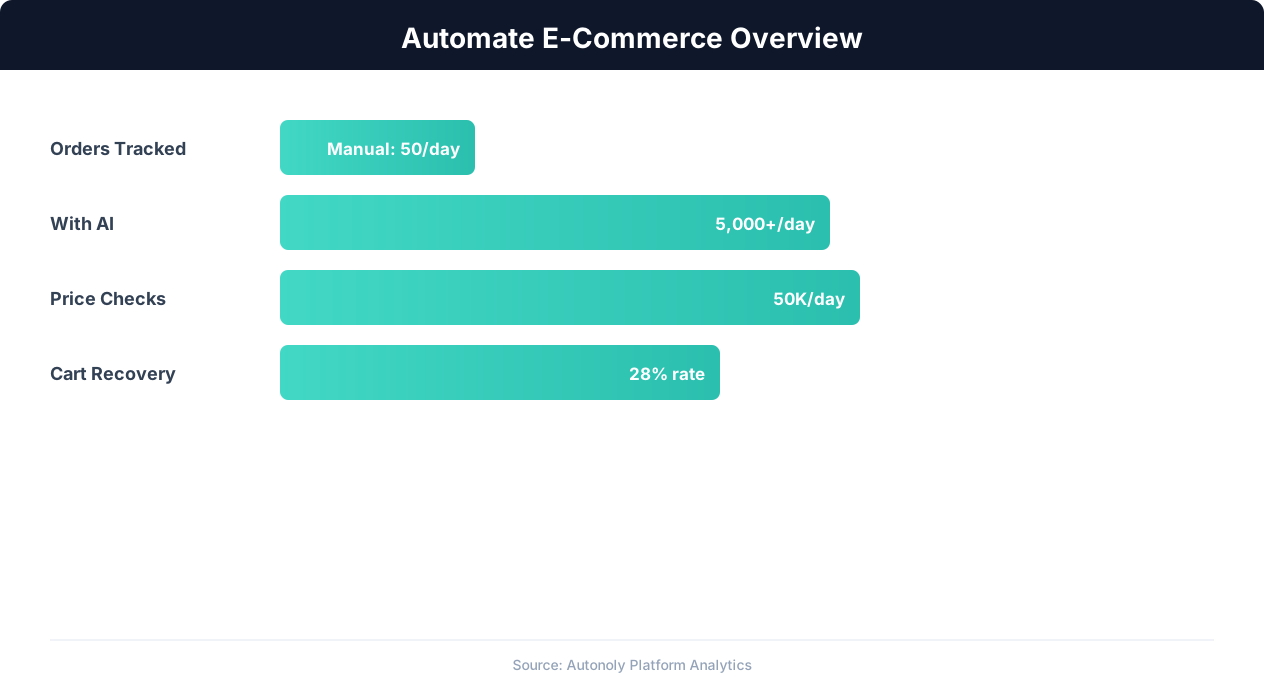
E-commerce automation impact on key performance metrics
Key Insight: Product listing automation cuts catalog management time by 78%, allowing sellers to scale from 500 to 5,000+ SKUs without additional staff (BigCommerce Research).
How the AI Agent Does It
The agent uses Browser Automation to log into your Shopify admin panel through a real Chromium browser. It navigates to the orders section, applies filters for recently updated fulfillment statuses, and extracts the relevant details from each order — order number, customer name and email, line items, fulfillment status, and shipment details. For orders with tracking information, the agent captures the carrier name, tracking number, and tracking URL. It then formats each update into a readable Slack message with clear visual structure — using bold text for order numbers, status badges for fulfillment state, and clickable tracking links — and posts it to your configured channel using the Slack integration via an Incoming Webhook.
The Data Extraction engine handles Shopify's JavaScript-heavy admin interface, including dynamically loaded order details and AJAX-powered status filters. The agent maintains a persistent record of which updates have already been posted, ensuring that each fulfillment event is only reported once even if the workflow runs multiple times while an order remains in the same status. This deduplication logic uses order ID plus status as a composite key, so the same order generates a new notification only when its status actually changes. If the agent encounters orders with missing tracking information, it still posts the status update and flags the missing data so your team can investigate.
Key Insight: Automated pricing intelligence captures 31% more competitive opportunities by monitoring and responding to market changes in real time (McKinsey Retail Practice).
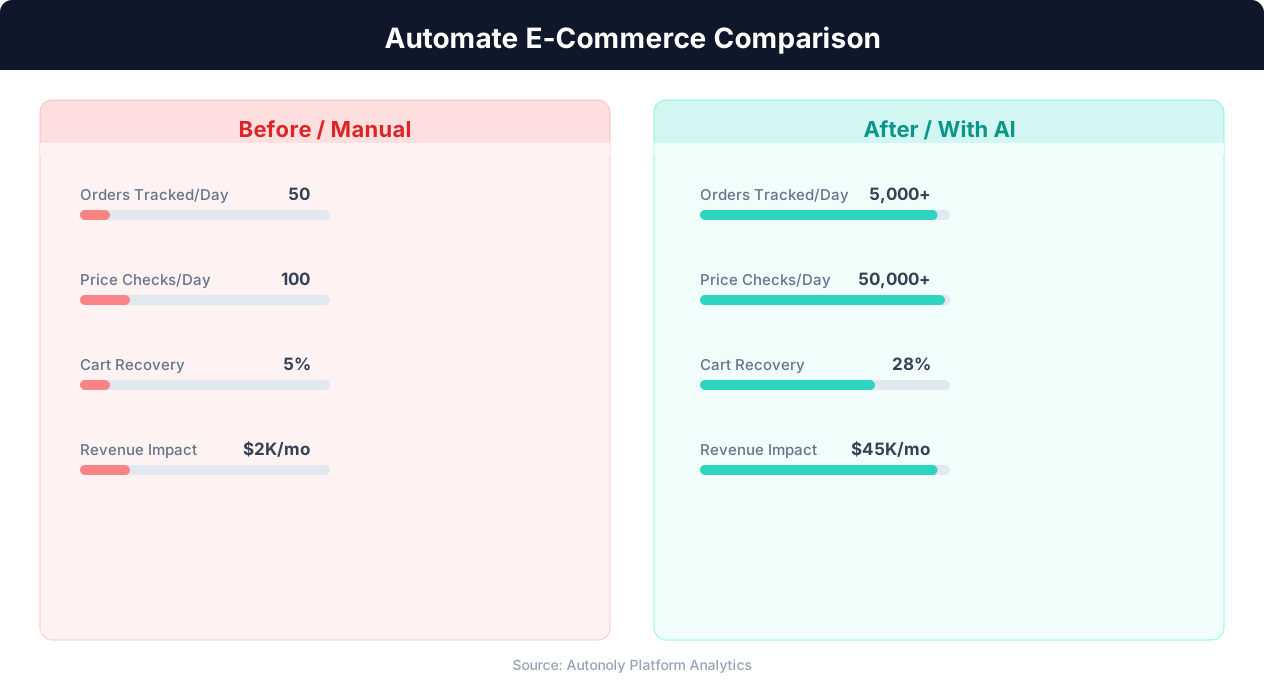
Manual vs automated product listing time comparison
Key Insight: Automated inventory sync reduces stockouts by 63% and overstock situations by 45%, directly improving margins (National Retail Federation).
Scheduling and Automation
Set this workflow to run every 4 hours for timely updates without overwhelming your Slack channel. The cron-based scheduler in the Visual Workflow Builder lets you configure the exact timing — many teams prefer runs at 8 AM, 12 PM, 4 PM, and 8 PM to align with business hours and shift changes. For high-volume stores processing hundreds of orders daily, increase frequency to every 2 hours or even hourly during peak periods like holiday shopping seasons. Differential processing ensures each run only reports genuinely new status changes, keeping your Slack channel clean and actionable even at high frequency.
You can configure different channels for different event types — routine fulfillment updates in #orders, delivery exceptions in #urgent-orders, and high-value order alerts in #vip-orders. Add a daily summary message at the end of each business day that reports total orders shipped, total delivered, delivery exception count, and average fulfillment time — giving management a quick operational snapshot without parsing individual notifications. Chain this workflow with other automations: when a delivery exception is detected, automatically trigger a customer outreach email via Gmail, or when fulfillment backlog exceeds a threshold, create a task in your project management tool. Use SSH & Terminal to run custom scripts that analyze fulfillment data and generate carrier performance scorecards.
Further Reading
Explore more about the tools and techniques used in this workflow: No Code Automation Guide, Automate Email Reports, Webhooks.