


Why Automate Scholarship Application Review?
Scholarship committees face a common challenge: too many applications and too little time. When a school, foundation, or organization offers a scholarship, applications can number in the dozens or hundreds. Each one contains GPA data, financial information, extracurricular lists, essays, and references. Reviewing them all manually is exhausting, and human reviewers inevitably introduce inconsistency — the 50th application does not get the same careful attention as the first. Committee members who volunteer their time to review applications often find themselves overwhelmed by the sheer volume, leading to shortcuts that undermine the fairness of the selection process.
The inconsistency problem is more serious than most organizations realize. Studies in decision-making psychology show that human reviewers experience significant fatigue effects when evaluating large numbers of similar applications. Applications reviewed later in a session receive systematically different treatment than those reviewed first. Without a structured, quantitative pre-screening step, the selection process is vulnerable to order effects, confirmation bias, and inconsistent weighting of criteria. The students who deserve the scholarship may not receive it simply because their application landed in the middle of a stack rather than at the top.
Automating the intake and initial scoring of scholarship applications with Browser Automation and Google Sheets solves the volume problem while ensuring consistent, objective treatment of every applicant. The AI agent captures every application, scores it against your defined criteria using the same rubric every time, and presents a ranked list to your committee. Reviewers can focus their limited time on the top candidates rather than sifting through the entire pool — reading essays, evaluating leadership potential, and making the nuanced qualitative judgments that humans do best. The automation handles the quantitative screening; your committee handles the human judgment. Use the AI Agent Chat to configure your scoring rubric and eligibility criteria through natural conversation.
This workflow serves schools with institutional scholarships, community foundations, corporate scholarship programs, and any organization that manages competitive application processes. Browse our templates library for pre-built scholarship review workflows.
How the AI Agent Processes Applications
Students submit scholarship applications through a web-based form — Google Forms, JotForm, Typeform, or a custom application portal. The form collects personal information, academic records (GPA, class rank, test scores), financial need indicators, extracurricular activities and leadership roles, community service hours, essays, and references.
The agent monitors submissions weekly using Browser Automation to check the form dashboard or by reading submission notification emails. The Data Extraction engine captures every field from each application and structures it into a consistent format in your Google Sheets review workbook.
Once the data is captured, the Data Processing engine applies your scoring rubric. Each criterion is weighted according to your committee's priorities. A typical rubric might include:
Academic achievement (30%) — GPA, class rank, test scores
Financial need (25%) — Family income, number of dependents, current financial aid status
Extracurricular involvement (20%) — Number and quality of activities, leadership positions held
Community service (15%) — Total hours and nature of service activities
Essay quality markers (10%) — Word count compliance, prompt adherence, and keyword relevance
The quantitative criteria (GPA, income, hours) are scored mathematically. Essay evaluation uses quality markers like word count, prompt keyword presence, and structural indicators — the agent identifies applications that clearly meet the prompt requirements versus those that are incomplete or off-topic.
What Data You Get
After scoring, the agent produces a ranked spreadsheet in Google Sheets with the following for each applicant:
Overall score — Weighted composite score
Score breakdown — Individual scores for each criterion
Application summary — Key data points at a glance
Flag indicators — Incomplete applications, potential data issues, or exceptional qualities worth noting
Essay excerpt — First 200 words of the essay for quick assessment
The ranked list gives your committee a starting point. Top-scoring applicants rise to the top, and committee members can dive deeper into the full applications of their top candidates rather than reading every single submission. The spreadsheet supports sorting and filtering by any criterion, so reviewers with specific priorities can reorder as needed.
Customizing Your Scoring Rubric
The Visual Workflow Builder lets you define your scoring criteria and weights without coding. Different scholarships can use different rubrics — an academic merit scholarship might weight GPA at 50 percent, while a community service scholarship weights volunteer hours at 40 percent. Each scholarship's configuration is stored in a settings tab of your workbook.
Use Logic & Flow conditions to handle eligibility requirements. Automatically disqualify applicants who do not meet minimum GPA thresholds, are outside the eligible grade level, or missed the application deadline. These applicants are logged but moved to a separate "ineligible" tab rather than cluttering the ranked results.
For organizations that manage multiple scholarships simultaneously, the agent can process applications across all scholarships in a single run, routing each applicant to the correct review workbook based on which scholarship they applied for.
Scheduling and Automation
The application review workflow runs weekly during the application period, processing all new submissions received since the last run. The Visual Workflow Builder lets you set the day and time. Many committees prefer a Monday morning run so they can review the latest batch during the work week.
At the application deadline, a final run processes all remaining submissions and generates the complete ranked list. The agent also produces a summary report: total applications received, average scores by criterion, distribution of scores, and any flagged applications requiring special attention. This report is delivered via Gmail to the committee chair and members.
Post-deadline, the workflow can support the committee's decision-making process. As reviewers add their notes and ratings to the spreadsheet, the agent can recalculate rankings incorporating human reviewer scores alongside the automated initial scores. This blended approach gives the committee the best of automated efficiency and human judgment.
Integration Options
Track all application data and scoring in Google Sheets for easy committee access and collaborative review. Send applicant communications — confirmations, missing information requests, and outcome notifications — through Gmail from your organization's official email address. Add Slack notifications to alert committee members when a new batch of scored applications is ready for review. Visit the Integrations page for all connection options.
Use Cases
High schools managing merit-based and need-based institutional scholarship programs with hundreds of applicants
Community foundations processing scholarship applications from students across multiple schools and districts
Corporate scholarship programs evaluating employee dependent scholarship applications with company-specific criteria
Universities pre-screening departmental scholarship applications before faculty committee review
Nonprofit organizations managing competitive grant and fellowship applications with multi-criteria evaluation
Civic organizations processing community service scholarships with volunteer hour verification
Applicant Communication
After the committee reaches decisions, the agent can send outcome emails through Gmail to all applicants. Award recipients receive congratulations with next steps. Non-selected applicants receive a respectful notification with encouragement to apply for future opportunities. These emails are personalized with the applicant's name and the specific scholarship they applied for.
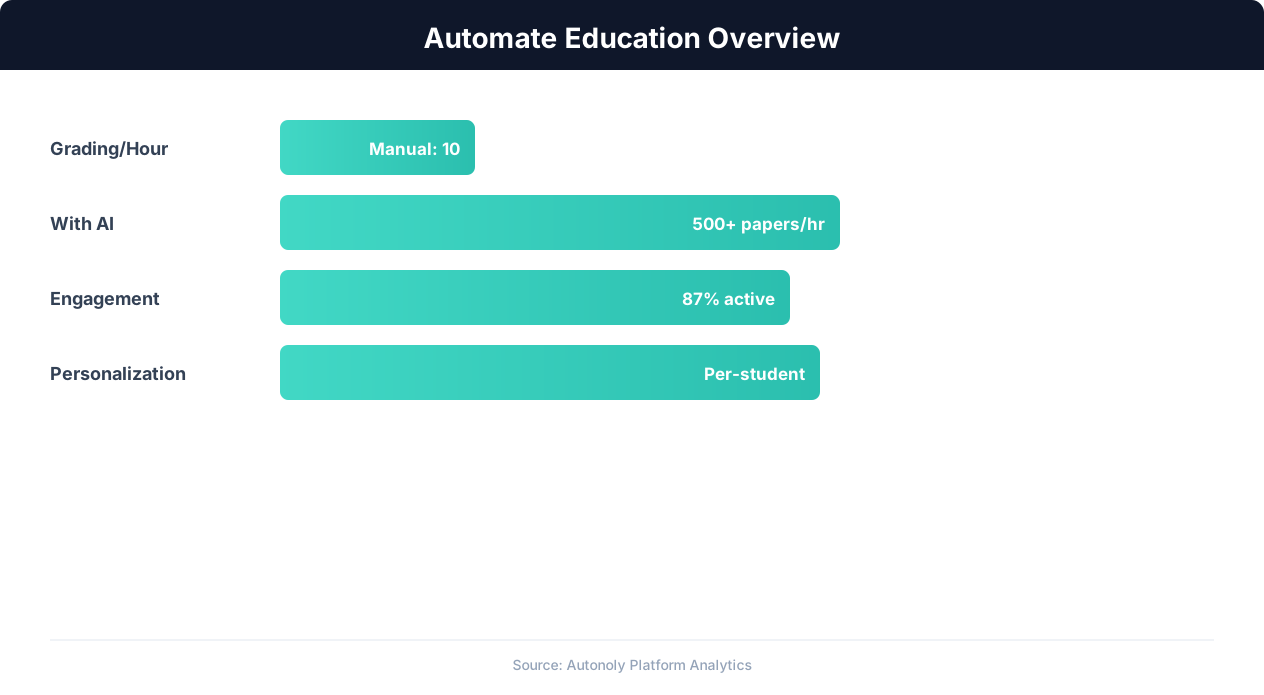
Education automation adoption rates across institution types
Key Insight: Institutions using enrollment automation see 34% higher conversion rates from inquiry to enrollment due to faster, more personalized responses (NACAC).
How the AI Agent Does It
The agent monitors scholarship application submissions using Browser Automation and captures all fields with the Data Extraction engine. The Data Processing engine applies your weighted scoring rubric to each application, calculating composite scores and ranking all candidates. Results are organized in Google Sheets for committee review. Applications with missing required fields are flagged and moved to a separate review tab, and the agent can send automated emails through Gmail notifying applicants of missing information and giving them a deadline to complete their submission.
Key Insight: 72% of educators report that administrative burden is their top source of burnout. Automating routine tasks is the most effective intervention (Gallup Education).
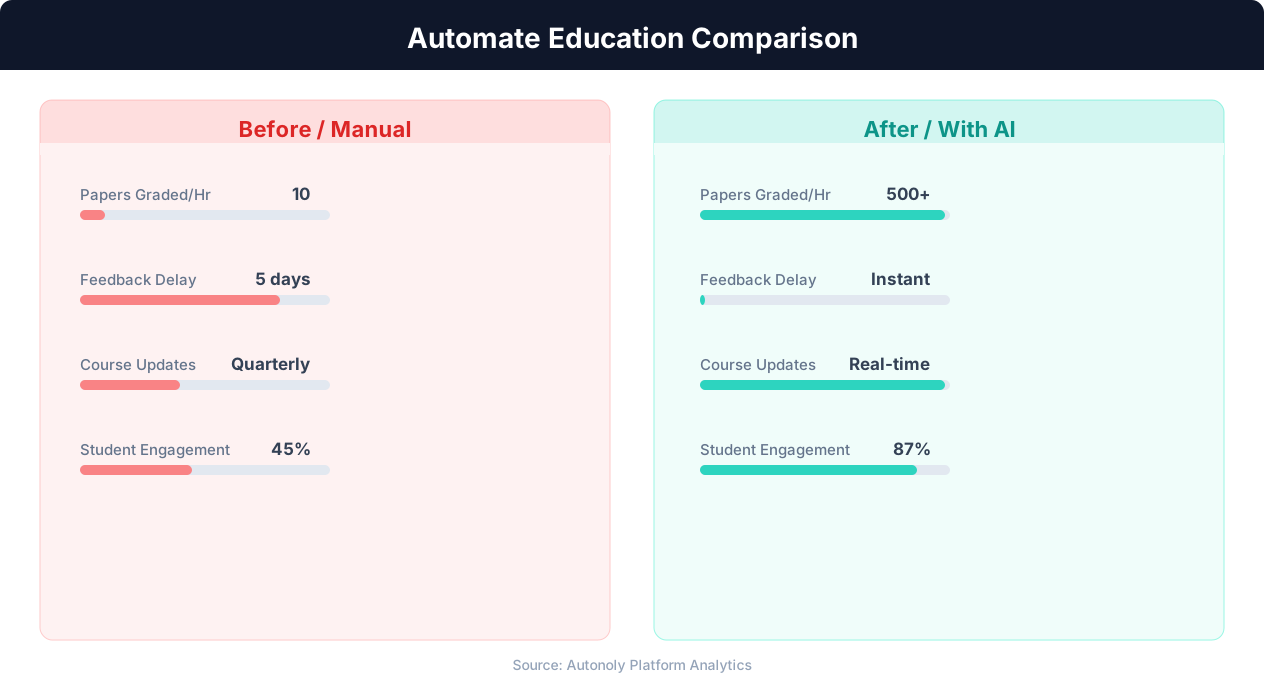
Time savings for educators using automated workflows
Key Insight: Automated grading and feedback systems improve student performance by 18% by providing instant, consistent feedback on assignments (EdTech Magazine).
Scheduling and Automation
The application review workflow runs weekly during the application period, processing all new submissions received since the last run. The Visual Workflow Builder lets you set the day and time — many committees prefer a Monday morning run so they can review the latest batch during the work week. At the application deadline, a final run processes all remaining submissions and generates the complete ranked list with a summary report delivered via Gmail to the committee chair.
Post-deadline, the workflow can support the committee's decision-making process — as reviewers add their notes and ratings to the spreadsheet, the agent can recalculate rankings incorporating human reviewer scores alongside the automated initial scores. Add Logic & Flow conditions for eligibility screening, multi-scholarship routing, and automated applicant communication after decisions are made. Check pricing to see how many automated runs are included in your plan.
Further Reading
Explore more about the tools and techniques used in this workflow: No Code Automation Guide, Ai Workflow Automation, Ai Content.