


Why Automate Refund Processing?
Refund requests are high-stakes customer interactions that sit at the intersection of customer satisfaction, financial accuracy, and operational efficiency. Handle them quickly and fairly, and you retain the customer's trust even if they are returning a product — research from the National Retail Federation shows that 92% of customers will buy from a retailer again if the return process was easy. Handle them slowly or inconsistently, and you lose the customer permanently — plus risk negative reviews that deter future buyers. A single unresolved refund complaint on social media can cost you dozens of potential customers who read it and decide to shop elsewhere.
Yet refund processing is one of the most manually intensive support workflows in any organization. Each request requires reading the customer's email, locating their order in your system, checking the purchase date against your return window, verifying the product is eligible for refund, confirming the amount, checking for prior refund history that might indicate abuse, routing to a manager if the amount exceeds a threshold, and then tracking the request through approval and completion. A single refund can touch three to four different people and take fifteen to thirty minutes of total processing time. Multiply that by dozens of daily requests during peak return periods, and your team is spending hours on a workflow that follows the same decision tree every time.
The inconsistency of manual processing creates additional problems. One agent might approve a refund that another would deny for the same product under the same policy, leading to customer complaints about unfair treatment. Policy exceptions granted by one team member are not visible to others, creating precedents that are impossible to track. Without a centralized log, financial reconciliation becomes a nightmare — the accounting team has to piece together refund activity from scattered email threads and Slack messages.
Automating the intake and validation stages with Gmail and Google Sheets integration removes the slowest parts of the process entirely. The AI agent reads refund requests, extracts the relevant details, validates them against your policy rules, and presents your team with a pre-processed request that is ready for a quick approval decision. What used to take fifteen to thirty minutes per request now takes seconds of automated processing plus a moment of human review. The entire audit trail is logged automatically, giving accounting and management complete visibility into every refund decision.
This automation is especially valuable during peak return periods — post-holiday seasons, promotional campaign expirations, or after a product issue — when refund volumes spike and manual processing creates a dangerous backlog that delays resolution and frustrates customers at the worst possible time.
How the AI Agent Processes Refunds
Autonoly's AI Agent Chat monitors your inbox through Browser Automation for emails containing refund-related keywords — "refund," "return," "money back," "cancel subscription," "charge reversal." The Data Extraction engine parses each email to extract:
Customer Name and Email — Who is requesting the refund
Order Number — Referenced in the email or extracted from the subject line
Product/Service — What they want refunded
Amount — The refund amount requested
Reason — Why they want a refund (categorized: defective, not as described, changed mind, etc.)
Purchase Date — When the original purchase was made
Policy Validation
Once the request data is extracted, the Data Processing engine validates it against your refund policy rules. Common policy checks include:
Time window: Is the request within your return period (e.g., 30 days from purchase)?
Product eligibility: Is this product category eligible for refunds?
Prior refund history: Has this customer requested multiple refunds recently?
Amount threshold: Does the amount require manager approval?
The agent cross-references order data in your Google Sheets records or e-commerce dashboard to verify purchase dates and amounts. Each policy rule is evaluated and the result is included in the ticket record — "Eligible: within 30-day window" or "Requires review: amount exceeds $500 threshold."
Tracking and Resolution
Every refund request is logged to your Google Sheets tracker with:
Unique request ID
Customer details
Order information
Refund amount
Eligibility assessment
Current status (Pending Review, Approved, Denied, Processed, Completed)
Assigned reviewer
The Visual Workflow Builder lets you add status transition notifications. When a request is approved, trigger an email to the customer confirming the refund. When it is processed, send a follow-up confirming the amount returned. Use Logic & Flow to auto-approve requests that meet all policy criteria and fall below a certain dollar amount, requiring human review only for exceptions.
Team Notifications
Add a Slack notification step to alert your team about new refund requests. High-value or policy-exception requests can be routed to a manager channel for expedited review. Include the eligibility assessment in the notification so the reviewer has all the context needed for a quick decision.
What Data You Get
Every processed refund request is tracked in your Google Sheets spreadsheet with:
Request ID — Unique identifier for tracking and customer communication
Customer Name and Email — Who submitted the request
Order Number — The original purchase reference
Product/Service — What is being refunded
Refund Amount — The dollar amount requested
Reason Category — Defective, not as described, changed mind, duplicate charge, etc.
Purchase Date — When the original transaction occurred
Eligibility Status — Eligible, requires review, or ineligible with the specific rule that triggered the status
Processing Status — Pending review, approved, denied, processed, completed
Assigned Reviewer — Who is responsible for the approval decision
Resolution Timestamp — When the refund was finalized
Customizing Your Workflow
The Visual Workflow Builder lets you design refund processing flows that match your exact business rules. Create tiered approval paths — refunds under $50 auto-approve instantly, $50-500 require a team lead, and over $500 require a manager. Add conditional paths for different product categories — digital products follow a different refund flow than physical goods. Insert a step that checks the customer's lifetime value before processing, so high-value customers receive expedited handling and a personal follow-up.
Build exception handling into the workflow. When a request falls outside normal policy parameters — slightly past the return window, unusual circumstances, or a VIP customer — route it to a special review queue with the full context rather than auto-denying. This balances policy enforcement with customer relationship preservation.
Reporting and Trends
The refund tracking spreadsheet becomes your source of truth for refund analytics. Track refund rates by product, reason category, and time period. Identify products with unusually high refund rates for quality investigation. Monitor total refund volume and amount for financial planning.
Integration Options
Connect your refund workflow with your broader support and financial operations. Post new refund requests to Slack for team visibility and quick approval decisions. Send status update emails through Gmail at each stage so customers know their request is being handled. Sync refund data to Airtable or Notion for financial dashboards that combine refund metrics with revenue data. Chain with the order status notification workflow to keep customers informed throughout the process. Visit the Integrations page for all supported connections, or browse the templates library for pre-built refund processing workflows.
Use Cases
E-commerce businesses processing return and refund requests across hundreds of daily orders
SaaS companies handling subscription cancellation refunds and pro-rated credit calculations
Subscription box services managing skip, pause, and cancellation refund workflows
Digital product sellers processing refund requests for courses, software, and digital downloads
Marketplace platforms mediating refund disputes between buyers and sellers with policy automation
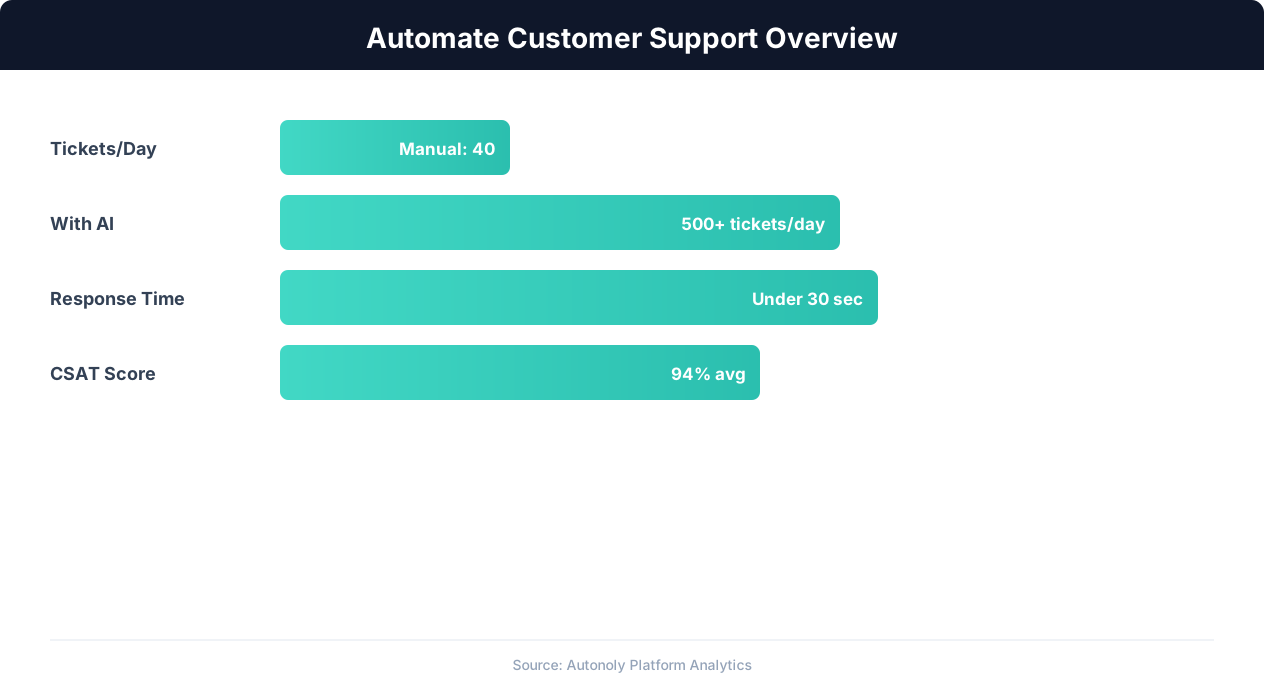
Customer support automation resolution rates by channel
Key Insight: The average cost per support ticket drops from $22 to $2 when routine inquiries are handled by AI automation (IBM Customer Experience Report).
How the AI Agent Does It
The agent monitors your email inbox via Browser Automation, identifies refund-related emails using keyword detection, and extracts customer and order details with the Data Extraction engine. The Data Processing engine validates each request against your policy rules by cross-referencing order data in Google Sheets. The processed request with eligibility assessment is logged as a new row in your refund tracker spreadsheet.
Handling Ambiguous Requests
Not every refund email is straightforward. Some customers ask vague questions like "Can I get my money back?" without specifying an order. The agent flags these as requiring additional information and can optionally send a templated response asking for the order number and specific product.
Key Insight: AI agents resolve 80% of routine support inquiries automatically, freeing human agents for complex issues that require empathy and judgment (Gartner).
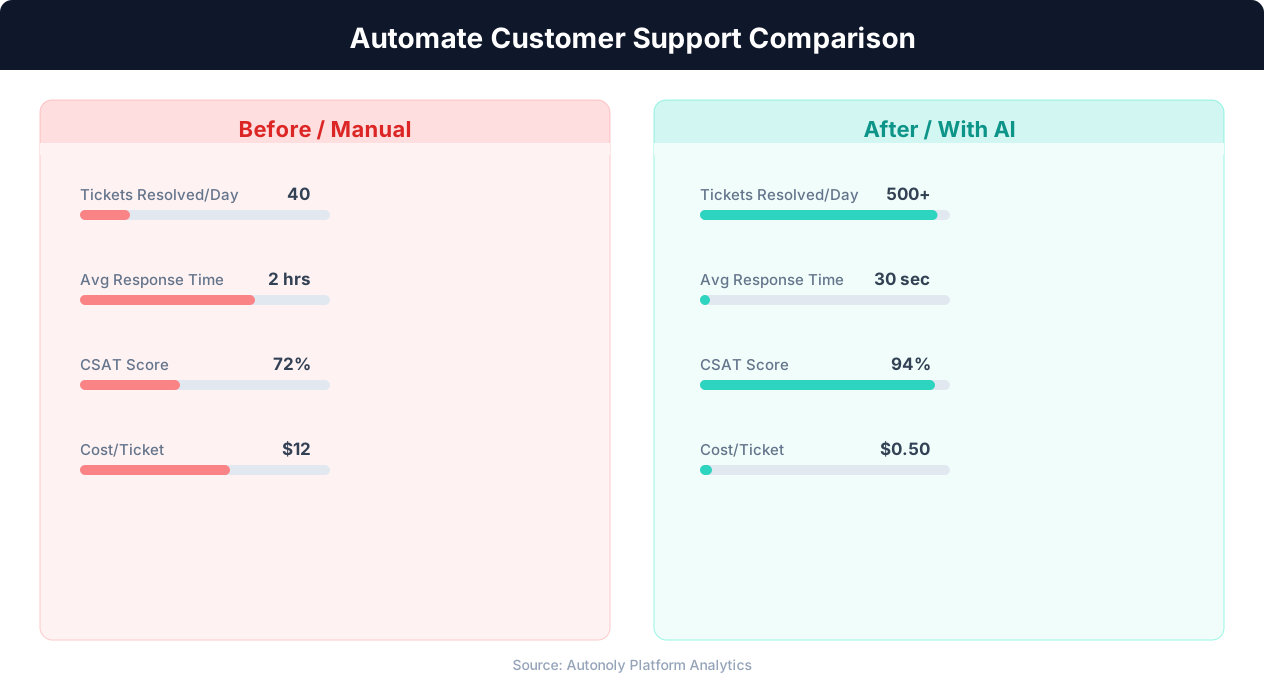
Response time comparison between manual and automated support
Key Insight: Companies using support automation report 35% higher customer satisfaction scores due to faster response times and 24/7 availability (Forrester Research).
Scheduling and Automation
Run this workflow daily using the Visual Workflow Builder. The agent processes all new refund-related emails, validates them against your policy, and logs requests to Google Sheets. Add Logic & Flow conditions to auto-approve straightforward refunds, escalate exceptions to Slack, and send status update emails to customers via Gmail at each stage of the process.
Further Reading
Explore more about the tools and techniques used in this workflow: No Code Automation Guide, Ai Workflow Automation, Email Campaigns.