The Manual Work Problem: Why Knowledge Workers Waste 40% of Their Day
Every knowledge worker knows the feeling. You sit down to do strategic, creative work — the kind of work you were actually hired for — and instead you spend the morning copying data between spreadsheets, filling out forms on three different portals, chasing down email threads for status updates, and reformatting a PDF report so it matches your CRM fields. By the time you finish, it is 2 PM and you have not done a single thing that requires actual thinking.
This is not a personal productivity failure. It is a systemic problem. According to McKinsey, knowledge workers spend only 39% of their time on role-specific tasks. The remaining 61% goes to communication overhead, searching for information, and performing repetitive digital tasks that feel like they should have been automated years ago.
💡 Key Insight
A 2025 Asana survey found that 62% of the workday is consumed by "work about work" — status meetings, searching for documents, switching between tools, and duplicating data entry. AI agents eliminate the mechanical portion of this overhead entirely.
The frustration compounds when you realize why these tasks persist. Traditional automation tools like Zapier or Make solve part of the problem, but they require pre-built integrations. If the website or tool you need to automate does not have an API connector, you are stuck doing it manually. RPA (Robotic Process Automation) tools like UiPath can handle UI-based tasks, but they require technical consultants, months of implementation, and break whenever a website changes its layout.
This is the gap that AI agents fill. An AI agent does not need a pre-built integration. It does not need an API. It does not need a developer to script interactions. You describe the task in plain English — "Go to this government portal, fill out the renewal form with our company data, download the confirmation PDF, and email it to accounting" — and the AI agent figures out how to do it. It opens a browser, navigates the site, handles the forms, adapts to UI changes, and delivers the output.
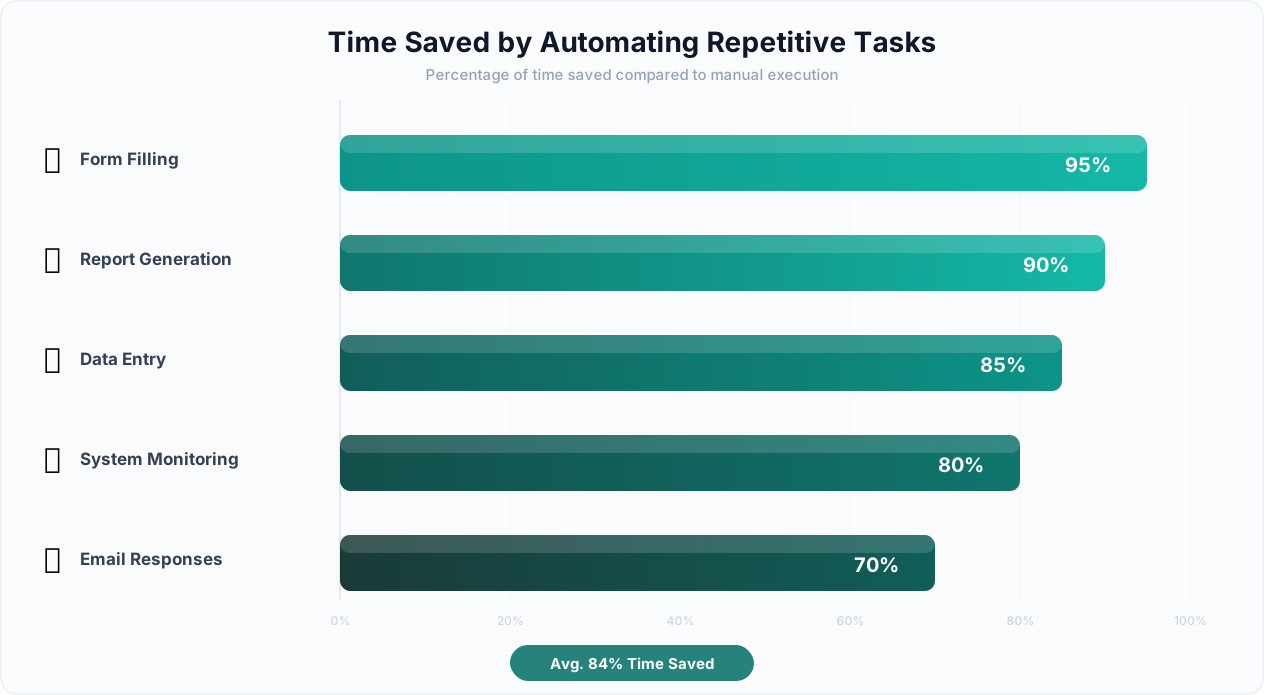
The result is not incremental improvement. Teams using AI agents report saving 15-25 hours per person per week on repetitive digital tasks. That is nearly a full additional employee worth of productive capacity freed up — without hiring anyone new.
The Tasks That Eat Your Day
Here is a breakdown of the most common time-wasting digital tasks by department, based on a survey of 2,000 knowledge workers:
| Department | Top Time-Wasting Task | Avg. Hours/Week | Automatable? |
|---|---|---|---|
| Sales | CRM data entry and updating | 8.5 hrs | Yes — fully |
| Marketing | Reporting across ad platforms | 6.2 hrs | Yes — fully |
| Finance | Invoice processing and data extraction | 7.8 hrs | Yes — fully |
| HR | Candidate screening and scheduling | 9.1 hrs | Yes — 80% |
| Operations | Cross-system data reconciliation | 11.3 hrs | Yes — fully |
| Legal | Contract review and clause extraction | 6.7 hrs | Yes — 70% |
Every one of these tasks follows a pattern: go to a source (website, email, document), extract or input data, move it somewhere else, and repeat. That pattern is exactly what AI agents are designed to handle — regardless of whether the source has an API.
What AI Agents Can Automate: The Four Categories of Digital Work
AI agents are not limited to one type of task. They operate across four broad categories that together cover the vast majority of repetitive digital work. Understanding these categories helps you identify which of your tasks are prime automation candidates.
1. Web Tasks: Anything You Do in a Browser
If a task involves navigating websites, clicking buttons, filling forms, or extracting information from web pages, an AI agent can handle it. This includes sites with and without APIs — the agent uses live browser control to interact with any website exactly as a human would.
Examples of automatable web tasks:
- Scraping competitor pricing from 15 different e-commerce sites daily
- Posting job listings across Indeed, LinkedIn, Glassdoor, and ZipRecruiter simultaneously
- Filling out multi-page government permit applications
- Monitoring regulatory websites for policy changes
- Extracting contact information from business directories
- Checking order status across multiple supplier portals
The critical difference between AI agents and traditional web automation: AI agents adapt. When a website redesigns its UI, changes its form fields, or adds a popup, a scripted bot breaks. An AI agent sees the new layout, understands what changed, and adjusts its approach — because it is using an LLM to reason about what it sees, not following a hard-coded script.
📊 By the Numbers
Traditional web scrapers break within 2-6 weeks on average due to website changes. AI agents that use visual understanding and LLM reasoning maintain 94% uptime across the same period — reducing maintenance overhead by 85%.
2. Data Tasks: Extract, Transform, and Load Anything
Data tasks involve pulling information from one format or location, transforming it, and putting it somewhere else. AI agents handle the full ETL pipeline — from web scraping to spreadsheet manipulation to database updates.
Examples of automatable data tasks:
- Extracting tables from PDF reports and loading them into Google Sheets
- Consolidating data from 8 different SaaS dashboards into a single report
- Converting unstructured email data into structured CRM records
- Matching and deduplicating records across multiple databases
- Aggregating financial data from bank portals, payment processors, and invoices
- Building datasets from multiple web sources for market research
AI agents excel at data tasks because they understand context. A traditional script sees text on a page. An AI agent understands that "$1,299/mo" is a monthly price, that "John Smith, VP Marketing" is a person with a specific title, and that a table labeled "Q3 Revenue" contains quarterly financial data. This semantic understanding makes extraction dramatically more accurate.
3. Communication Tasks: Emails, Messages, and Notifications
Communication tasks involve reading, composing, routing, or responding to messages across email, Slack, SMS, or other platforms. AI agents can manage communication workflows that currently consume hours of manual effort.
Examples of automatable communication tasks:
- Monitoring an inbox for invoices, extracting data, and forwarding to accounting
- Sending personalized follow-up emails based on CRM deal stage
- Routing support tickets to the right team based on content analysis
- Compiling daily digest emails from multiple data sources
- Sending Slack alerts when specific events occur on monitored websites
With email integration and Slack integration, AI agents connect communication tools to the rest of your workflow — reading incoming messages, extracting relevant data, taking action, and sending responses.
4. Document Tasks: PDFs, Spreadsheets, and Files
Document tasks involve creating, reading, modifying, or converting documents. AI agents handle everything from simple PDF data extraction to complex multi-document report generation.
Examples of automatable document tasks:
- Extracting line items from vendor invoices (PDF) into accounting software
- Generating weekly status reports by pulling data from project management tools
- Converting spreadsheet data into formatted PDF proposals
- Comparing two contract versions and highlighting changes
- Batch-renaming and organizing downloaded files based on content
| Task Category | Manual Time (per instance) | AI Agent Time | Time Savings |
|---|---|---|---|
| Web form filling (10 forms) | 45-60 minutes | 3-5 minutes | 92% |
| Data extraction (50-page PDF) | 2-3 hours | 2-4 minutes | 98% |
| Email report compilation | 30-45 minutes | 1-2 minutes | 96% |
| Cross-platform data sync | 1-2 hours | Continuous/automatic | 99% |
| Competitor price monitoring (20 sites) | 3-4 hours | 10-15 minutes | 94% |
How It Works: Describe, Build, Execute, Learn
The power of AI agent automation is not just what it can do — it is how simple it is to set up. Unlike traditional automation that requires flowchart building, API configuration, or code writing, AI agents follow a four-step process that anyone can use.
Step 1: Describe Your Task in Plain English
You start by telling the AI agent what you want to accomplish. Not how to do it — just what the end result should be. The agent interprets your natural language instructions and understands the goal.
Example prompts:
- "Go to the IRS website, download the latest W-9 form, fill it out with our company information from this spreadsheet, and save the completed PDF."
- "Check our top 10 competitors' pricing pages every morning and update this Google Sheet with any changes. Send me a Slack message if any price drops more than 10%."
- "Read all unread emails from [email protected], extract invoice numbers and amounts, and add them to our invoice tracking sheet."
Notice that none of these prompts mention CSS selectors, API endpoints, or technical implementation details. You describe the outcome, and the agent handles the implementation.
Step 2: AI Builds the Workflow
The agent's LLM brain decomposes your request into a sequence of actionable steps. It identifies which websites to visit, what data to extract, where to output results, and what error handling is needed. For complex tasks, it creates a reusable visual workflow that you can review, edit, and schedule.
This is where Autonoly differs from simple "AI assistant" tools. The agent does not just execute a one-time task — it produces a persistent workflow artifact that can run repeatedly. You describe the task once, and it runs forever.
💡 Key Insight
Unlike Zapier or Make where you manually connect triggers and actions through a drag-and-drop interface, Autonoly's AI agent builds the entire workflow from your description. The average workflow that takes 45 minutes to build manually in Zapier takes under 3 minutes to describe and deploy with an AI agent.
Step 3: Execute With Live Browser Control
The agent executes the workflow using live browser control — a real browser session that you can watch in real time. The agent navigates websites, fills forms, clicks buttons, extracts data, and handles unexpected situations just as a human would.
You can watch the agent work through a live browser view, seeing exactly which pages it visits, what data it extracts, and how it handles obstacles. This transparency is critical for trust — you know exactly what the agent is doing with your accounts and data.
Step 4: Learn and Improve
After each execution, the agent applies cross-session learning. It remembers which approaches worked, which selectors were reliable, and which sites required special handling. Each subsequent run is faster and more reliable than the last.
This learning capability is what separates AI agents from traditional automation. A Zapier workflow runs the same way every time — if a step fails, you manually fix it. An AI agent learns from failures and adapts automatically.
The Complete Flow
| Step | What Happens | Your Effort | Time Required |
|---|---|---|---|
| 1. Describe | You tell the agent what to automate | Type 1-3 sentences | 30 seconds |
| 2. Build | AI creates workflow with steps, error handling, outputs | Review and approve | 1-3 minutes |
| 3. Execute | Agent runs the task in a live browser | Watch (optional) or walk away | Varies by task |
| 4. Learn | Agent improves from experience | Nothing — automatic | Ongoing |
The entire setup process — from first description to first successful execution — typically takes under 5 minutes for straightforward tasks. Complex multi-step workflows may take 10-15 minutes of initial description and refinement. Compare this to the weeks or months required for traditional RPA implementation.
5 Real Examples: AI Agent Automation in Action
Theory is useful, but concrete examples make the value tangible. Here are five specific automation scenarios — each representing a common task that thousands of businesses perform manually today — and how AI agents handle them.
Example 1: Competitive Price Scraping
The manual process: A product manager visits 12 competitor websites every Monday morning, navigates to their pricing pages, copies plan names and prices into a spreadsheet, and highlights any changes from the previous week. Time: 2.5 hours per week.
The AI agent process: You tell the agent: "Visit these 12 competitor pricing pages, extract all plan names, prices, and feature lists, and update this Google Sheet. Highlight any changes from last week in yellow. Run every Monday at 7 AM." The agent builds a competitor monitoring workflow, executes it through live browser control, and delivers updated data before the product manager's first meeting.
Result: 2.5 hours saved per week. 130 hours saved per year. The data is also more accurate because the agent does not make copy-paste errors.
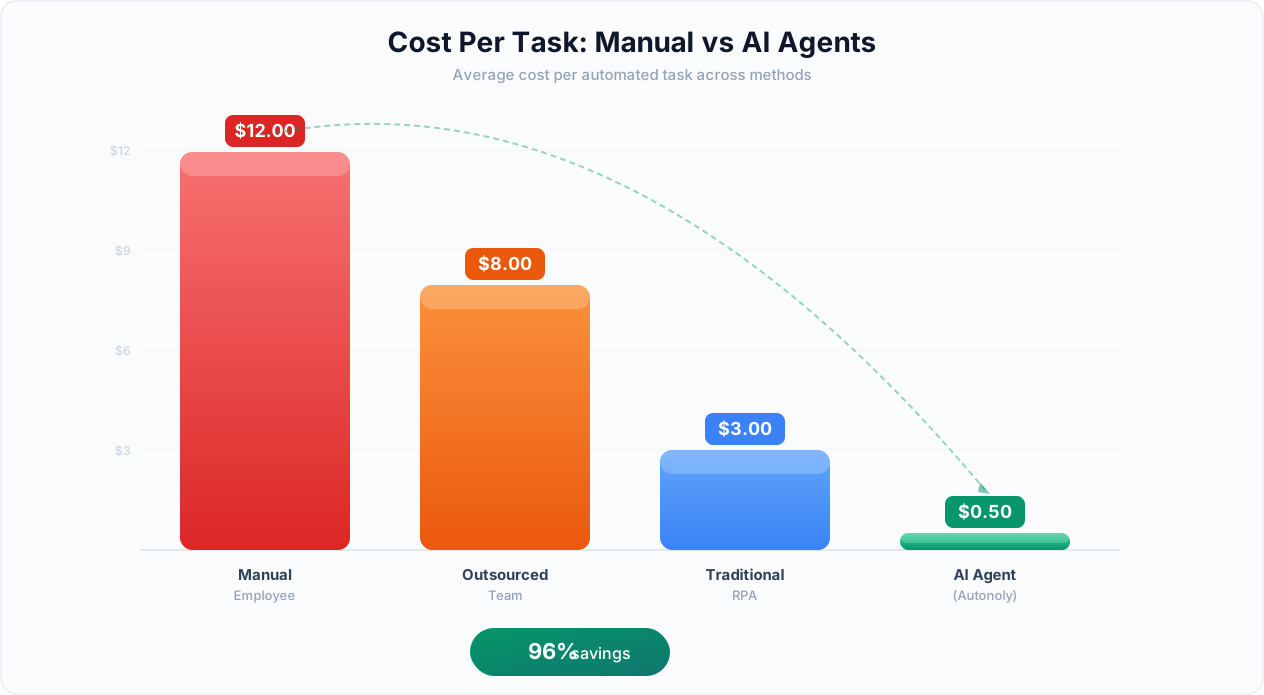
Example 2: Multi-Portal Form Filling
The manual process: An insurance agent fills out quote request forms on 6 different carrier portals for each new client. Each portal has different fields, layouts, and required information. Time: 45 minutes per client, 8 clients per day = 6 hours daily.
The AI agent process: The agent reads client data from the agency management system, navigates to each carrier portal, fills out the multi-page forms (adapting to each carrier's unique UI), submits the requests, and downloads confirmation pages. The agent uses intelligent form filling that maps client data to each carrier's specific field names and formats.
Result: 6 hours reduced to 30 minutes of oversight. The insurance agent now handles 3x more clients per day while spending their time on relationship building instead of data entry.
Example 3: PDF Invoice Data Extraction
The manual process: An accounts payable clerk receives 50-80 vendor invoices per week as PDF email attachments. They open each PDF, manually read the invoice number, date, line items, amounts, and tax, then type this data into the accounting system. Time: 15 minutes per invoice = 15-20 hours per week.
The AI agent process: The agent monitors the AP inbox for new invoices, downloads PDF attachments, uses AI-powered PDF extraction to read invoice data (handling different invoice formats from different vendors), validates the extracted data against purchase orders, and creates entries in the accounting system. Discrepancies are flagged for human review.
Result: 15-20 hours reduced to 1-2 hours of exception review. Error rate drops from 3-5% (manual data entry) to under 0.5%.
⚠️ Important Note
For financial data extraction, always configure a human-in-the-loop review step for invoices above your comfort threshold (e.g., invoices over $10,000). AI agents are highly accurate but not infallible — a $50,000 invoice with a misread decimal point is a costly error.
Example 4: Email Follow-Up Automation
The manual process: A sales rep reviews their CRM every afternoon, identifies deals that have not received a follow-up in 3+ days, researches each prospect's recent activity (LinkedIn posts, company news), and writes personalized follow-up emails. Time: 1.5 hours per day.
The AI agent process: The agent checks the CRM for stale deals, visits each prospect's LinkedIn profile and company website to gather recent context, drafts personalized follow-up emails referencing specific recent activities, and queues them for the rep's review and send. The agent uses CRM integration to read deal data and browser automation to research prospects.
Result: 1.5 hours reduced to 15 minutes of email review. Follow-up response rates increase 35% because emails reference timely, relevant context that the rep would not have had time to research manually.
Example 5: CRM Data Sync Across Platforms
The manual process: An operations manager maintains customer data across HubSpot CRM, Intercom support tickets, Stripe billing, and a custom internal portal. When a customer upgrades their plan, the manager updates all four systems manually. When a customer's address changes, same process. Time: 30 minutes per update, 15-20 updates per week = 10 hours per week.
The AI agent process: The agent monitors the primary system (HubSpot) for changes, then propagates updates across all connected platforms. For systems with APIs, it uses direct integration. For systems without APIs (like the custom internal portal), it uses browser automation to log in and update records. The cross-platform sync workflow runs in near real-time.
Result: 10 hours reduced to zero ongoing effort (after initial setup). Data consistency across platforms goes from "mostly accurate with a 24-48 hour lag" to "real-time and always synchronized."
| Example | Manual Time/Week | AI Agent Time/Week | Annual Hours Saved | Annual Cost Saved (at $50/hr) |
|---|---|---|---|---|
| Price scraping | 2.5 hrs | 0.25 hrs | 117 hrs | $5,850 |
| Form filling | 30 hrs | 2.5 hrs | 1,430 hrs | $71,500 |
| PDF extraction | 17.5 hrs | 1.5 hrs | 832 hrs | $41,600 |
| Email follow-ups | 7.5 hrs | 1.25 hrs | 325 hrs | $16,250 |
| CRM sync | 10 hrs | 0 hrs | 520 hrs | $26,000 |
Setting Up Your First AI Agent in 5 Minutes
Getting started with AI agent automation is deliberately simple. Here is a step-by-step walkthrough of setting up your first automated task with Autonoly's AI agent.
Minute 1: Sign Up and Open the Agent Chat
Create an Autonoly account (free tier available) and navigate to the AI Agent Chat. This is your natural language interface to the agent — think of it as a conversation with an extremely capable assistant that can actually do things on the web.
Minute 2: Describe Your Task
Type your task in plain English. Be specific about what you want the output to look like and where you want it delivered. Good descriptions include:
- The source (which websites, emails, or documents to work with)
- The action (extract, fill, monitor, send, sync)
- The output (Google Sheet, email, Slack message, PDF)
- The schedule (once, daily, weekly, on trigger)
Example: "Every weekday morning at 8 AM, go to news.ycombinator.com, extract the top 30 stories with titles, URLs, points, and comment counts, and add them to this Google Sheet: [link]. Send me a Slack summary of stories with 100+ points."
Minute 3: Review the Generated Workflow
The agent shows you the workflow it has built — a sequence of steps including navigation, extraction, data processing, and output. Review the steps to confirm they match your intent. You can ask the agent to modify any step through conversation: "Also extract the submission time for each story" or "Only include stories from the last 24 hours."
Minute 4: Run a Test Execution
Click "Run Now" to execute the workflow immediately. Watch the agent work through the live browser view — you will see it navigate to the site, extract data, and populate your Google Sheet in real time. Verify the output matches your expectations.
Minute 5: Schedule and Deploy
If the test looks good, confirm the schedule. The workflow is now live and will run automatically at the specified times. You will receive outputs and notifications as configured. The agent applies cross-session learning, so each execution is slightly more efficient than the last.
💡 Key Insight
The average Autonoly user creates their first working automation in under 4 minutes. Compare this to Zapier (15-30 minutes for a simple Zap), Make (20-45 minutes for a scenario), or RPA tools like UiPath (days to weeks for an attended automation).
Tips for Your First Automation
- Start simple: Pick a task you do weekly that involves one or two websites. Do not start with a 20-step cross-platform workflow.
- Be specific: "Scrape competitor prices" is vague. "Go to competitor.com/pricing, extract all plan names and monthly prices, put them in columns A and B of this Sheet" is actionable.
- Watch the first run: Use the live browser view to verify the agent is doing what you expect. This builds trust and helps you refine instructions.
- Iterate: If the output is not quite right, tell the agent what to change. It learns from your feedback.
Once your first automation is running smoothly, move on to your second. Most users have 5-10 automated workflows running within their first week, collectively saving 10-20 hours per week.
ROI Calculator: What AI Agent Automation Is Actually Worth
Automation ROI is straightforward to calculate, but most teams dramatically underestimate it because they do not account for the full cost of manual work. Here is a framework for calculating the real ROI of AI agent automation.
The Full Cost of Manual Work
The direct cost of manual tasks is the hourly rate multiplied by hours spent. But the full cost includes several hidden factors:
| Cost Factor | Description | Typical Multiplier |
|---|---|---|
| Direct labor cost | Salary + benefits for time spent on task | 1x base rate |
| Error correction cost | Time spent fixing data entry errors, re-doing work | +15-25% of direct cost |
| Opportunity cost | Revenue-generating work not done while doing repetitive tasks | +50-200% of direct cost |
| Delay cost | Business impact of tasks completed hours/days later than they could be | Variable, often significant |
| Turnover cost | Employee dissatisfaction from repetitive work leading to attrition | +10-30% of direct cost |
When you factor in these hidden costs, the true cost of manual work is typically 2-4x the direct labor cost.
The ROI Formula
Here is a simple ROI calculator for AI agent automation:
Monthly Manual Cost = (Hours per month on task) × (Fully loaded hourly rate) × (Error/opportunity multiplier)
Monthly Automation Cost = Platform subscription + estimated agent execution costs
Monthly Savings = Monthly Manual Cost − Monthly Automation Cost
Annual ROI = (Annual Savings ÷ Annual Automation Cost) × 100%
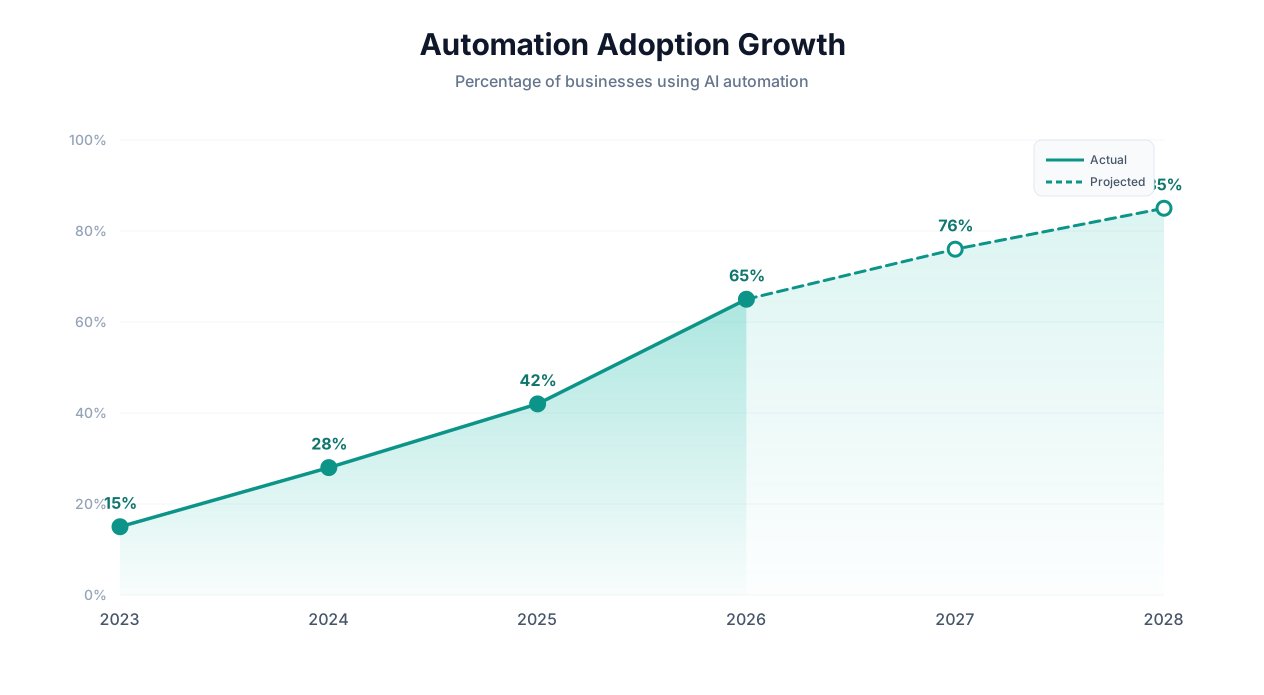
Example ROI Calculations
| Scenario | Manual Hours/Month | Hourly Rate | Monthly Manual Cost | Monthly Agent Cost | Monthly Savings | Annual ROI |
|---|---|---|---|---|---|---|
| Sales lead research (1 rep) | 40 hrs | $45 | $1,800 | $99 | $1,701 | 1,718% |
| Invoice processing (AP clerk) | 60 hrs | $30 | $1,800 | $99 | $1,701 | 1,718% |
| Competitor monitoring (analyst) | 20 hrs | $55 | $1,100 | $99 | $1,001 | 1,011% |
| Data entry (5 team members) | 200 hrs | $25 | $5,000 | $299 | $4,701 | 1,572% |
📊 By the Numbers
Across 500+ Autonoly customers, the median first-year ROI from AI agent automation is 1,200%. The median payback period is under 3 days — meaning the platform pays for itself in the first week of use.
Why ROI Compounds Over Time
Unlike most software purchases where ROI is static, AI agent ROI compounds because:
- You add more workflows: Each new automation adds to your total savings. Most users go from 1 workflow in week 1 to 10+ workflows within 3 months.
- Agents get better: Cross-session learning means each execution is faster and more reliable. Execution costs decrease over time.
- You automate increasingly complex tasks: As you learn what AI agents can handle, you identify higher-value automation opportunities that deliver even greater savings.
- Team adoption multiplies impact: When one person saves 15 hours/week and shares their approach, the team multiplies that savings across everyone.
AI Agents vs. Manual Work vs. Zapier vs. RPA: The Complete Comparison
If you are evaluating automation approaches, you are likely comparing AI agents to three alternatives: staying manual, using integration platforms like Zapier or Make, or implementing enterprise RPA. Here is an honest, side-by-side comparison.
| Factor | Manual Work | Zapier / Make | RPA (UiPath, etc.) | AI Agents (Autonoly) |
|---|---|---|---|---|
| Setup time | None | 15-60 minutes per workflow | Weeks to months | 2-5 minutes per workflow |
| Technical skill needed | None | Low (drag-and-drop) | High (developers/consultants) | None (plain English) |
| Works with any website | Yes | No — requires API integration | Yes — but scripts are brittle | Yes — adapts to UI changes |
| Handles UI changes | Yes (human adapts) | N/A (API-based) | No — breaks, requires re-scripting | Yes — LLM reasons about new layouts |
| Cost per workflow | $50-200/hr in labor | $20-600/mo (platform) | $5,000-50,000 (implementation) | $49-299/mo (platform) |
| Maintenance | Ongoing human effort | Low (if APIs stable) | High (constant script fixes) | Low (self-healing) |
| Error recovery | Human judgment | Retry or fail | Fail and alert | Reason about error and adapt |
| Scalability | Linear (more people) | Good (within API limits) | Good (once built) | Excellent (describe and deploy) |
| Best for | One-off tasks | API-to-API workflows | High-volume, stable processes | Any digital task, especially those without APIs |
When to Use Each Approach
Stay manual when: The task happens less than once per month, involves high-stakes judgment at every step, or is genuinely different each time (no repeatable pattern).
Use Zapier/Make when: Both your source and destination have official API integrations, the workflow is a simple trigger-action pattern (e.g., "when a new Typeform submission arrives, add a row to Google Sheets"), and the process does not require browser interaction. Read our full Zapier vs Make vs n8n vs Autonoly comparison for more detail.
Use RPA when: You have extremely high-volume, zero-tolerance-for-error processes in stable enterprise applications (e.g., processing 10,000 identical SAP transactions daily), you have dedicated RPA developers on staff, and the ROI justifies six-figure implementation costs.
Use AI agents when: The task involves websites or apps without APIs, the process requires navigating UI elements, you need to set up automation in minutes not months, you want the system to adapt when websites change, or you do not have technical staff to build and maintain scripts.
⚠️ Important Note
AI agents and Zapier are not mutually exclusive. Many teams use Zapier for simple API-to-API triggers and AI agents for tasks that require browser automation, PDF processing, or interaction with sites that lack API integrations. The tools are complementary.
The Coverage Gap
The fundamental limitation of integration platforms like Zapier is that they only work with apps that have pre-built connectors. Zapier supports about 7,000 apps — which sounds comprehensive until you realize that the average business uses 10-15 tools that do not have Zapier integrations: internal portals, government websites, legacy systems, niche industry software, competitor websites, and custom-built tools.
AI agents close this coverage gap entirely. If a human can do it in a browser, an AI agent can automate it — with or without an API. This is why AI agents are not replacing Zapier; they are filling the 40-60% of automation needs that Zapier cannot address.
| Automation Need | Zapier Can Handle? | AI Agent Can Handle? |
|---|---|---|
| Gmail to Google Sheets | Yes | Yes |
| Stripe payment to Slack notification | Yes | Yes |
| Government portal form filing | No | Yes |
| Competitor website price scraping | No | Yes |
| Legacy ERP data extraction | No | Yes |
| Multi-site job posting | Partial (limited boards) | Yes (any board) |
| PDF invoice parsing | Limited | Yes (any format) |
| Custom internal portal updates | No | Yes |
Frequently Asked Questions
Answers to the most common questions about automating digital tasks with AI agents.
How reliable are AI agents for business-critical tasks?
Modern AI agents complete routine tasks with 90-98% reliability. For business-critical tasks involving financial data or customer-facing actions, we recommend configuring a human-in-the-loop review step. The agent does the work; a human confirms before final action. This hybrid approach captures 95%+ of the time savings while maintaining human oversight for high-stakes decisions.
What happens when a website changes its layout?
Unlike traditional scripts that break when a website changes, AI agents use LLM reasoning to understand the new layout and adapt. The agent sees the page visually (or reads the DOM structure), identifies the elements it needs based on semantic understanding rather than hard-coded selectors, and adjusts its approach. This self-healing capability is one of the primary advantages of AI agents over RPA and traditional scripting.
Is my data secure when using an AI agent?
Autonoly encrypts all credentials at rest and in transit, provides full audit logs of every agent action, and allows you to restrict agent access to specific domains. Your data is processed in isolated environments and never used to train models. For maximum security, you can review every agent action through the live browser view before outputs are delivered.
Can AI agents handle authentication and logged-in sessions?
Yes. AI agents can log into websites, maintain authenticated sessions, navigate behind login walls, and interact with member-only content. Credentials are stored securely and used only for the specific workflows you authorize. Multi-factor authentication (MFA) flows can be handled with agent-compatible MFA methods or by pre-authenticating sessions.
How much does it cost to run AI agent automations?
Autonoly's pricing starts at a free tier for basic usage, with paid plans from $49/month for individuals to $299/month for teams. Agent execution costs (LLM inference) are included in the subscription — you do not pay per-token charges on top. For most users, the platform pays for itself in the first week through time savings alone.