


Why Automate Salary Comparisons?
Compensation benchmarking is one of the most time-consuming tasks in HR and recruiting. Manually searching multiple job boards, copying salary ranges, and normalizing the data across cities and roles can take an entire week. Autonoly's Browser Automation eliminates this tedium by scraping salary data from multiple sources in a single automated run.
The result is a unified, pivot-ready report that your compensation team can use immediately for offer calibration, budget planning, and competitive analysis.
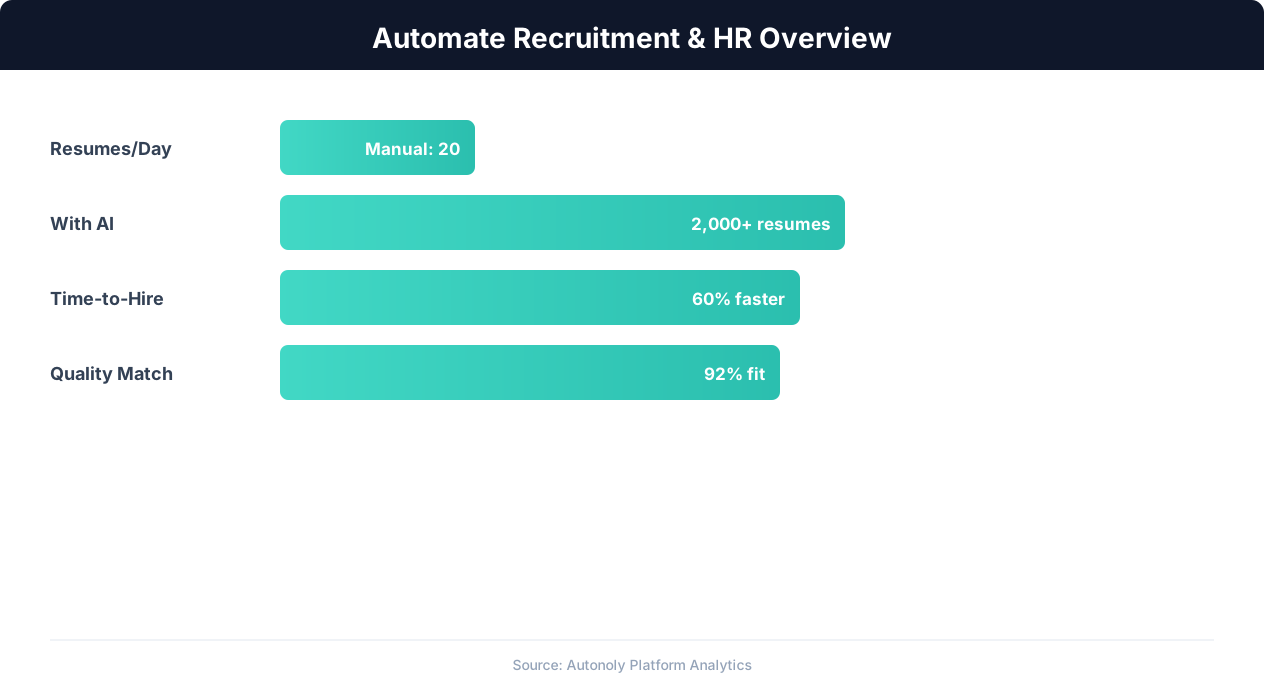
Recruitment automation impact on hiring metrics
Key Insight: Automated job posting syndication to 50+ platforms increases qualified applicant volume by 88% compared to manual posting on individual boards (iCIMS Research).
Multi-Source Data Collection
Autonoly's AI Agent Chat orchestrates a multi-step scraping pipeline. For each role-city combination, the agent queries Indeed salary pages, Glassdoor salary explorer, and specialized sites like Levels.fyi or Payscale. The Data Extraction engine captures median salary, salary range (10th-90th percentile), sample size, and the source URL.
Scraping from multiple sources reduces the impact of any single site's data bias. You get a more accurate picture of the market by triangulating across platforms.
Key Insight: Automated resume screening reduces time-to-hire by 43% while improving candidate quality by surfacing qualified applicants human reviewers missed (SHRM Research).
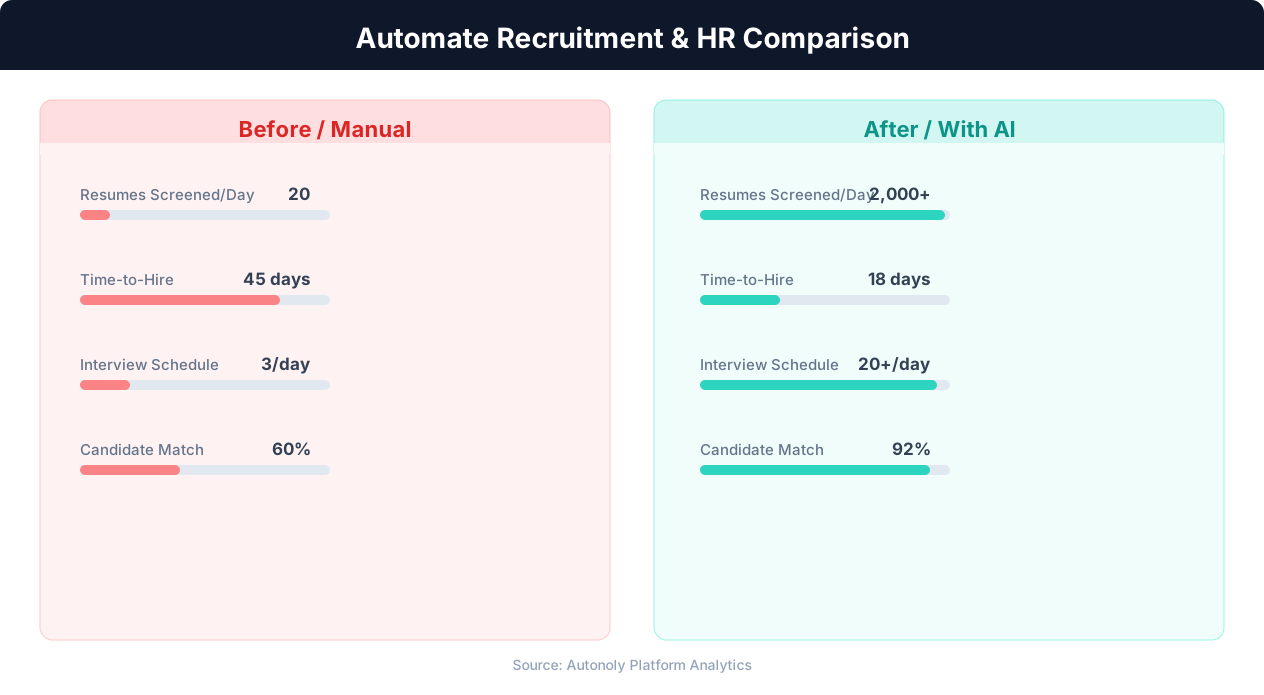
Time-to-hire comparison for manual vs automated recruitment
Normalization and Cleaning
Raw salary data comes in many formats: "$150,000/yr," "$72/hr," "150K-180K." The Data Processing pipeline standardizes everything to annual USD figures, converts hourly and monthly rates, and strips non-numeric characters. Source attribution is preserved so you can trace any figure back to its origin.
Deduplication logic ensures that overlapping listings from different boards do not inflate your averages. The Visual Workflow Builder lets you add custom transformation steps if your analysis requires cost-of-living adjustments or currency conversion.
Building the Comparison Report
The output is an Excel workbook with multiple tabs: a summary matrix (roles as rows, cities as columns), detailed data per city, and a raw data sheet with every scraped record. Charts and conditional formatting highlight where compensation is above or below your company's bands.
Prefer Google Sheets? Swap the output node and share the live spreadsheet with your leadership team. The Integrations library also supports pushing data to Airtable, Notion, or a SQL database for programmatic access.
Scheduling for Quarterly Benchmarks
Most compensation teams refresh salary benchmarks quarterly. Set the workflow to run on a schedule and receive an updated report without any manual intervention. For fast-moving markets like tech, monthly runs may be more appropriate. Check our templates for pre-configured compensation research workflows.
Cost-of-Living Adjustments
Raw salary numbers tell only part of the story. Add a Data Processing node to apply cost-of-living indices, converting salaries to a normalized purchasing-power equivalent. This lets you compare a $150K offer in Austin against a $200K offer in San Francisco on an apples-to-apples basis — a critical input for relocation decisions and distributed-team compensation design.
Handling Currency Conversions
For international benchmarking, the pipeline can normalize salaries from different currencies to a single base currency using current exchange rates. The SSH & Terminal feature can fetch live exchange rates from a financial API and apply them during the transformation step, ensuring your cross-border comparisons reflect current market conditions.
Key Insight: Recruiters spend 23 hours per week on average sourcing candidates manually. Automation reduces this to 5 hours while expanding the candidate pool 4x (LinkedIn Talent Report).
Real-World Applications
HR directors use the output to set competitive salary bands. Recruiters reference it during offer negotiations. Finance teams incorporate the data into headcount budgets. Relocation advisors share city-by-city comparisons with transferring employees.
Whether you are building a compensation philosophy from scratch or updating existing bands, automated salary benchmarking saves dozens of hours per cycle. Visit our pricing page to find a plan that supports multi-source scraping. For background on data extraction techniques, see the web scraping glossary.
Detailed Use Case Examples
A fast-growing SaaS company preparing to open an engineering office in Austin needs to set competitive salary bands before publishing job postings. The compensation team configures Autonoly to scrape salary data for Software Engineer, Senior Software Engineer, and Engineering Manager roles across Austin, Denver, and Raleigh — three cities under consideration. Within 30 minutes, they have a comparison report showing that Austin's median for Senior Software Engineers is 12% below San Francisco but 8% above Raleigh, giving them the data points needed to finalize their offer ranges.
A recruiting agency specializing in healthcare IT runs this workflow quarterly to update the salary benchmarking report they share with clients. The automated pipeline scrapes Indeed, Glassdoor, and Payscale for 20 healthcare IT roles across 15 major metro areas, producing a comprehensive 300-row dataset that forms the backbone of their consulting deliverable.
Manual Benchmarking vs. Automated Pipelines
Traditional salary benchmarking involves a compensation analyst visiting multiple websites, searching for each role-city combination individually, and manually recording the data in a spreadsheet. For a modest scope of 5 roles across 10 cities, that is 50 individual searches — each taking 3-5 minutes to execute and record. The total time investment easily exceeds a full workday. Autonoly performs all 50 searches automatically in a single run, applies consistent normalization, and delivers a merge-ready dataset without any manual intervention.
Beyond time savings, automation eliminates transcription errors that plague manual data collection. A misplaced decimal or an accidentally omitted row can distort an entire compensation analysis. Automated extraction captures data exactly as displayed on the source page and applies programmatic normalization, ensuring accuracy throughout the pipeline.
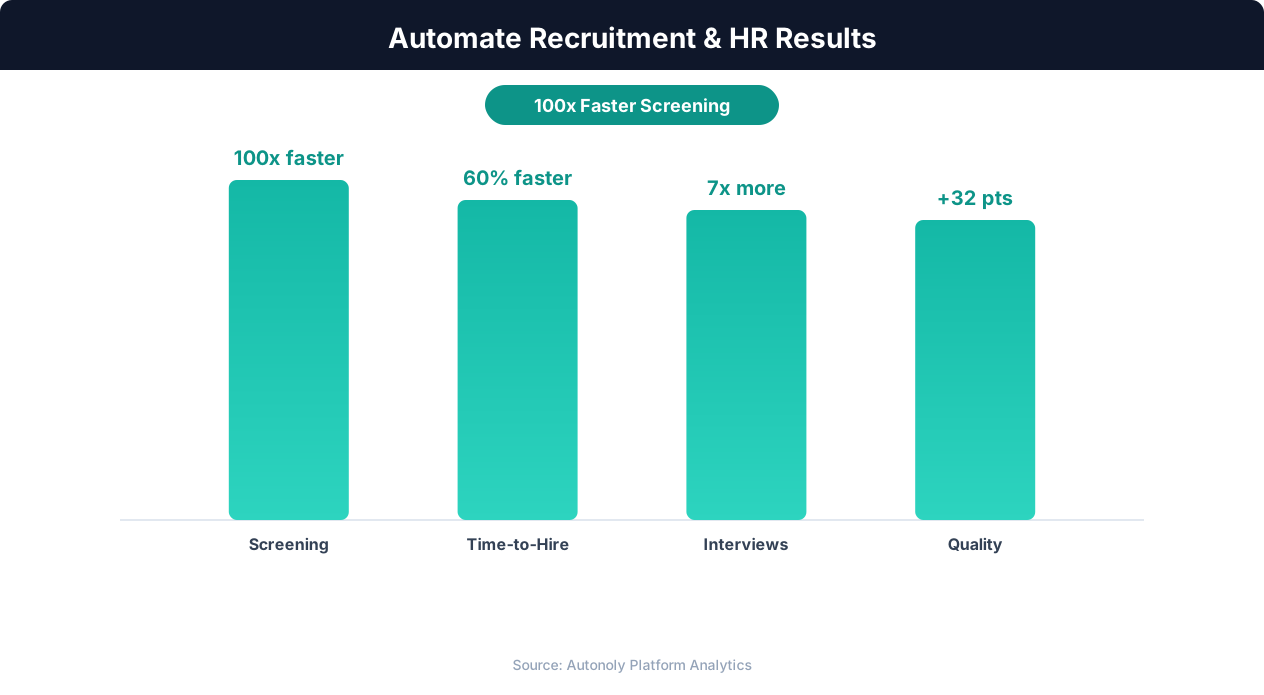
Quality of hire improvements from automated screening
Key Insight: Companies using recruitment automation report 67% lower cost-per-hire and 31% lower turnover in the first year due to better candidate matching (Bersin by Deloitte).
Connecting to Broader Compensation Workflows
Use Logic & Flow to build conditional alerts into your salary benchmarking pipeline. For example, flag any role-city combination where the market median has increased more than 10% since the last run — an early warning that your existing bands may be falling behind. Push the flagged entries to a dedicated Slack channel for the compensation committee to review. Feed the normalized data into Google Sheets dashboards that update automatically each quarter, giving leadership a real-time view of market positioning without waiting for a manual report.
Further Reading
Explore more about the tools and techniques used in this workflow: Recruiting Automation, Web Scraping Best Practices.