


Why Automate News Monitoring?
Media coverage shapes public perception of your brand, influences investor decisions, and signals competitive movements. A positive feature in a major publication can drive traffic and credibility, while a negative story requires rapid response. For competitive intelligence, tracking when competitors are covered in the press reveals their strategies, partnerships, and challenges. Manual news monitoring — visiting multiple news sites, running searches, and copying results — is time-consuming and inevitably incomplete.
Automating news monitoring with Autonoly ensures comprehensive coverage across hundreds of sources without anyone on your team spending time on manual searches. By routing results to Google Sheets, you build a living database that grows more valuable over time, enabling trend analysis and media ROI measurement.
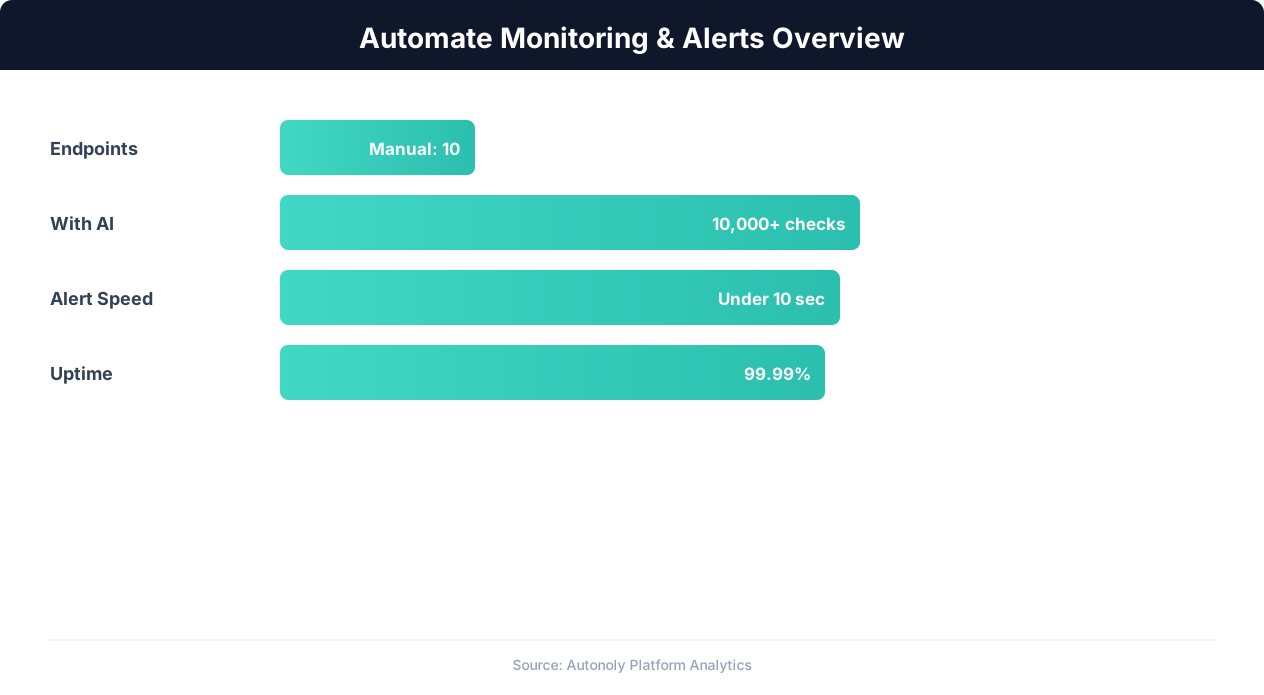
Monitoring automation detection rates across alert types
Key Insight: Website downtime costs businesses an average of $5,600 per minute. Automated monitoring pays for itself by preventing even a single extended outage (Gartner).
How Autonoly Monitors News Sources
The AI Agent Chat makes setup conversational — tell the agent which topics to monitor, which publications matter most, and how you want results organized. The agent then creates a monitoring workflow that runs on your chosen schedule.
Using Browser Automation, the agent navigates news aggregators (Google News, Bing News), major publications (TechCrunch, Reuters, Bloomberg, industry-specific outlets), and any other news websites you specify. The full Playwright browser ensures accurate rendering of JavaScript-heavy news sites with paywalls, cookie consent dialogs, and dynamic content loading.
Structured Data Extraction
For each matching article, the Data Extraction engine captures the headline, publication name, author, publication date, article summary or first paragraph, full URL, and estimated sentiment. This structured approach transforms scattered news mentions into a clean, queryable dataset.
The Data Processing feature can enrich each entry with additional analysis — categorizing articles by topic (product review, partnership announcement, funding news, controversy), identifying the article's reach based on the publication's domain authority, and flagging high-priority mentions that need immediate attention.
Google Sheets as a Media Database
Google Sheets is an ideal destination for news monitoring data because it is collaborative, searchable, and connects easily to visualization tools. Each monitoring run appends new rows to your sheet, building a chronological record of all media mentions. You can create pivot tables to analyze mention volume over time, filter by sentiment or publication, and share the data with stakeholders who need to see media coverage.
The spreadsheet structure makes it easy to add manual annotations — marking which articles were responded to, noting the quality of coverage, or tagging articles for inclusion in board reports or investor updates. The Visual Workflow Builder can also be configured to send a daily or weekly summary email via Gmail alongside the Sheets logging.
Filtering and Relevance Scoring
Not every news mention is equally important. An offhand reference in a list article is very different from a dedicated feature story. Autonoly's Logic & Flow capabilities let you assign relevance scores based on the publication tier, article length, position of your keyword (headline versus body), and whether the article is original reporting or a syndicated piece.
You can configure the workflow to only add high-relevance mentions to your primary sheet while logging everything to a secondary sheet for completeness. This ensures your team focuses on the coverage that matters most.
Competitive Intelligence Application
News monitoring is not just about your own brand. Tracking competitor mentions reveals their marketing pushes, product launches, funding rounds, and strategic pivots. By monitoring multiple brands in the same sheet with a "Company" column, you can build a comparative media intelligence dashboard that shows how your coverage stacks up against competitors over time.
Scheduling and Historical Analysis
Daily monitoring is the standard cadence for most organizations. The accumulated data becomes increasingly powerful as it grows — after a few months, you can visualize media mention trends, correlate coverage spikes with specific events, and measure the impact of your PR efforts. The SSH & Terminal feature lets you run custom Python analysis on the Sheets data for advanced media analytics. Visit the templates library for pre-built news monitoring workflows, and check the pricing page for plan details. For background on data extraction techniques, see our web scraping glossary, workflow automation glossary, and API integration glossary. The Integrations ecosystem supports connecting your news data to Slack, Airtable, and other destinations.
Key Insight: 91% of enterprises report that automated monitoring has eliminated blind spots in their infrastructure that manual checks consistently missed (Splunk Observability Report).
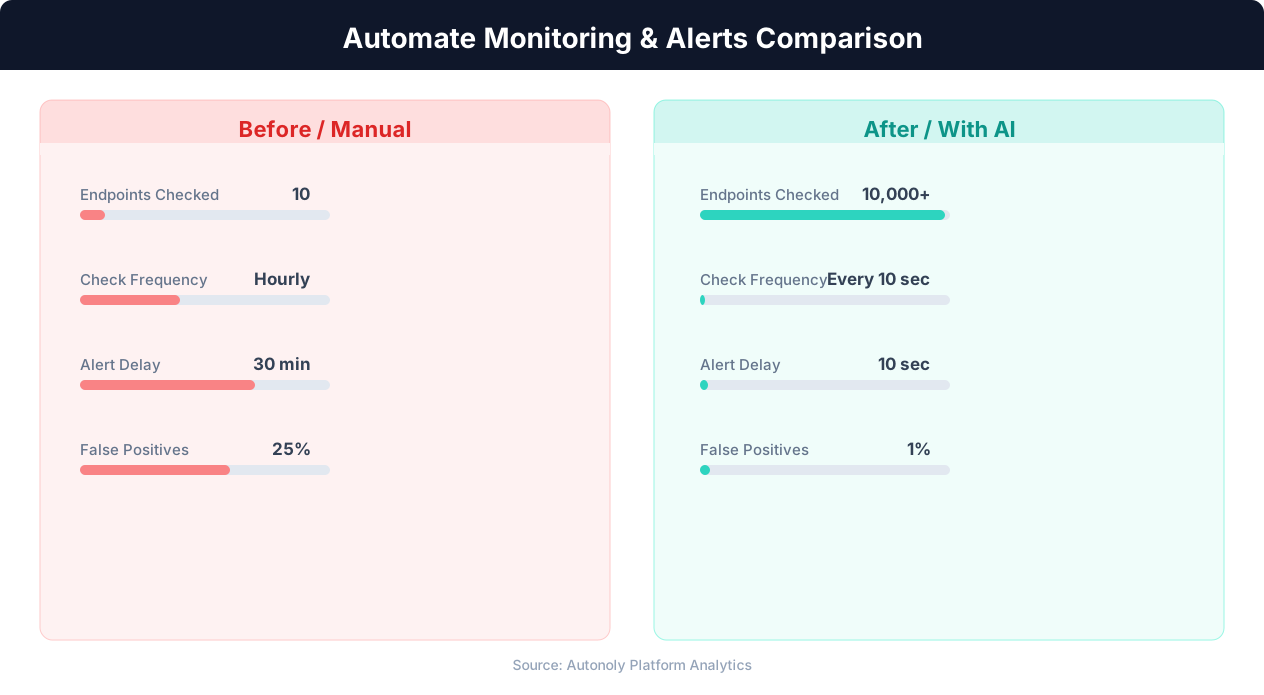
Mean time to detection for manual vs automated monitoring
Key Insight: Organizations with automated monitoring experience 78% fewer critical incidents due to early warning detection and proactive alerting (Datadog Infrastructure Report).
How to Customize Your Pipeline
Every organization has unique media monitoring needs, and Autonoly adapts to yours. The Visual Workflow Builder lets you modify every aspect of the monitoring pipeline without writing code. Add keyword groups for different topics — product mentions, executive mentions, and industry trends — each tagged with a category column in your spreadsheet. Use Logic & Flow to create conditional routing that sends high-priority mentions to Slack for immediate attention while logging everything to Sheets for the historical record. Insert Data Processing nodes to calculate mention volume trends, identify emerging topics, or flag articles from tier-one publications that deserve executive attention.
Tracking Across Multiple Languages
For global brands, news monitoring often spans multiple languages and regions. Configure the agent to visit regional news sites, non-English publications, and local media outlets alongside major international sources. The Data Extraction engine captures content in any language, and you can add a translation step to normalize everything into English before it reaches your spreadsheet. This ensures comprehensive coverage regardless of where your brand is discussed.
Further Reading
Explore more about the tools and techniques used in this workflow: Web Scraping Best Practices, Marketing Automation, Website Monitoring.