

Why Automate Patient Intake Processing?
New patient intake is one of the most data-heavy processes in any healthcare practice. Each patient submits pages of information — personal demographics, insurance details, medical history, allergies, current medications, emergency contacts, and consent forms — much of which ultimately needs to map cleanly into structured EHR fields using interoperability standards from HL7. All of it is protected health information governed by HIPAA. A single intake form can contain 30 to 50 individual data points that need to be accurately captured and organized in your records system. When this information arrives digitally through website forms or patient portals, someone on your staff still needs to transfer it into your practice database — a manual process that is both time-consuming and error-prone.
The hidden cost of manual intake processing goes beyond staff time. Transcription errors are common when copying data from form submissions to spreadsheets — a transposed digit in a policy number, a misspelled medication name, or an incorrect date of birth can trigger insurance claim denials, medication safety issues, or patient identification problems. These errors create downstream work that is far more expensive to fix than the original data entry. For practices processing 10 to 20 new patients per week, the cumulative cost of manual intake — in staff hours, error correction, and delayed records — is substantial.
By automating intake form processing with Browser Automation and Google Sheets, every submission is automatically captured, normalized, validated, and organized in your patient database. No more copying and pasting from form emails, no more transcription errors, and no more backlog of unprocessed intake packets sitting on the front desk when patients arrive for their first visit. Your staff starts each morning with complete, accurate records for the day's new patients — ready for verification rather than creation.
This workflow benefits medical offices, dental practices, specialty clinics, therapy practices, chiropractic offices, and any provider that processes new patient paperwork regularly. Whether you use Google Forms, JotForm, Typeform, or a custom patient portal, the automation adapts to your existing submission process without requiring changes to how patients complete their paperwork. Visit our templates library for pre-built intake processing workflows.
How the AI Agent Processes Intake Forms
The agent monitors your form submission channel — whether that is an email inbox receiving form notifications, a web portal with new submissions, or a form builder dashboard. Every four hours, it checks for new submissions that have not yet been processed. For web-based portals, the agent uses Browser Automation to log in, navigate to the submissions page, and extract each new form's data. The Data Extraction engine reads every field — name, date of birth, address, phone, email, insurance provider, policy number, primary care physician, allergies, medications, and medical history notes.
The Data Processing engine normalizes the extracted data — phone numbers are formatted consistently, dates are standardized, insurance provider names are matched against your known payer list, and fields are organized into the column structure your practice uses. Each processed form becomes a single row in your Google Sheets patient database. For practices that receive intake forms via email (e.g., PDF attachments or form notification emails), the agent parses the email content or attachment and extracts the same structured data. The agent validates data as it processes forms — missing required fields are flagged, insurance policy numbers are checked for format validity, and dates are verified for logical consistency.
The AI Agent Chat lets you configure field mapping and validation rules through natural conversation. Whether your practice uses Google Forms, JotForm, Typeform, or a custom patient portal, the agent adapts to the submission format and maps fields to your spreadsheet columns automatically.
What Data You Get
A typical intake form extraction produces the following fields in your spreadsheet:
Full Name — Patient's legal name
Date of Birth — Formatted consistently
Contact Info — Phone, email, address
Insurance — Provider, policy number, group number
Emergency Contact — Name, relationship, phone
Medical History — Conditions, surgeries, allergies
Current Medications — Names, dosages
Primary Care Physician — Name and practice
Submission Date — When the form was completed
Processing Status — Confirmed, flagged, or duplicate
You can customize which fields are captured based on your form structure. The agent adapts to whatever fields your intake form includes.
Customizing Your Workflow
The Visual Workflow Builder lets you add processing steps beyond basic data capture. Use Logic & Flow conditions to flag patients who report specific conditions, allergies to common medications, or insurance providers that require pre-authorization. For practices with multiple departments, intake data can be routed to the appropriate team — a new orthodontics patient goes to the ortho spreadsheet, while a general dentistry patient goes to the main intake sheet. Automate the patient welcome sequence by sending a confirmation email through Gmail after processing, with appointment preparation instructions, directions, and what to bring.
Integration Options
Connect the intake workflow with Gmail for patient welcome emails and staff notifications, Google Sheets for structured record keeping, and Slack for front desk alerts about new patient registrations. The Data Processing engine generates daily summary emails listing all new patients processed. All data stays within your own Google Workspace account — Autonoly does not store patient data on its servers beyond the duration of each processing run. Visit the Integrations page for all connection options.
Use Cases
Medical offices processing new patient registration forms before first appointments
Dental practices capturing insurance and medical history from digital intake forms
Therapy clinics organizing client intake questionnaires and consent documentation
Specialty clinics routing referral patients to department-specific intake sheets
Urgent care centers processing high volumes of walk-in patient registrations daily
Multi-provider practices consolidating intake data from multiple form sources into a unified database
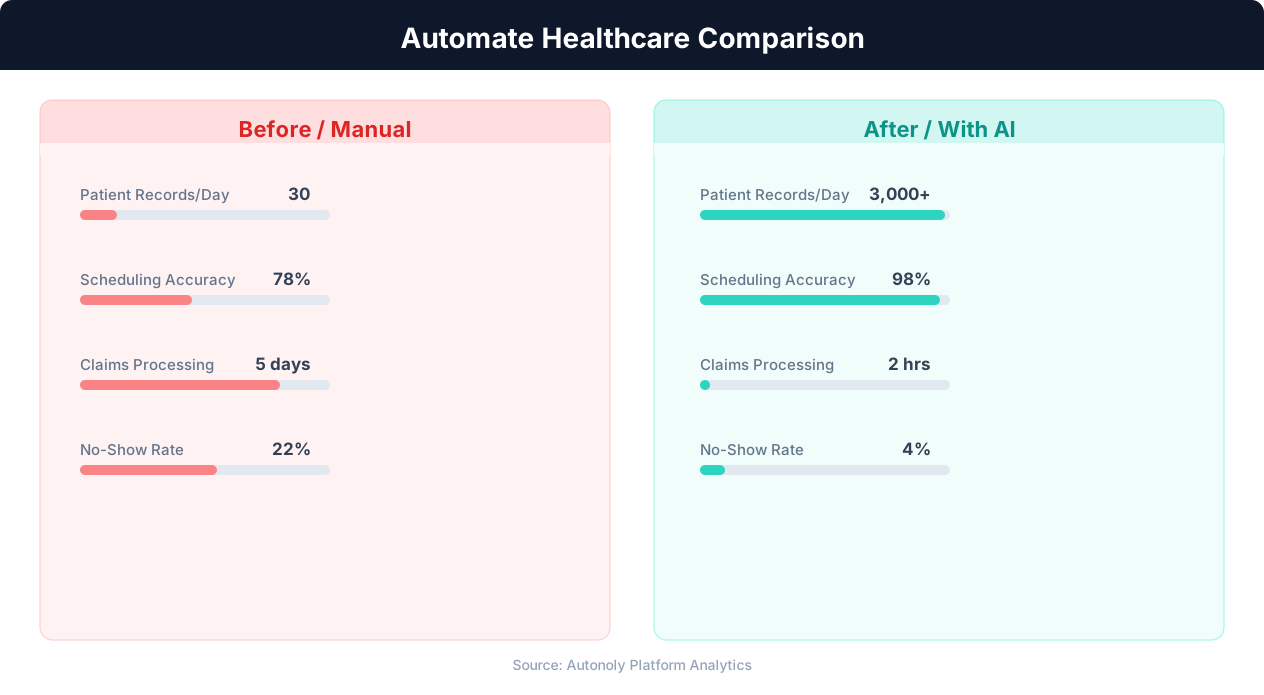
Patient wait time reduction with automated scheduling
Key Insight: Automated appointment scheduling reduces no-show rates by 38% through timely reminders and easy rescheduling options (MGMA Research).
How the AI Agent Does It
The agent monitors your intake form submission channel using Browser Automation to access web portals or Gmail to read form notification emails. The Data Extraction engine captures every field from each submission. The Data Processing engine normalizes and validates the data before writing it to your Google Sheets patient database. Duplicate submissions are detected by matching patient names and dates of birth, and flagged for manual review rather than creating duplicate records.
Key Insight: AI-powered medical data extraction achieves 97% accuracy on standard clinical documents, reducing transcription errors that affect 1 in 5 manual entries (AHIMA).
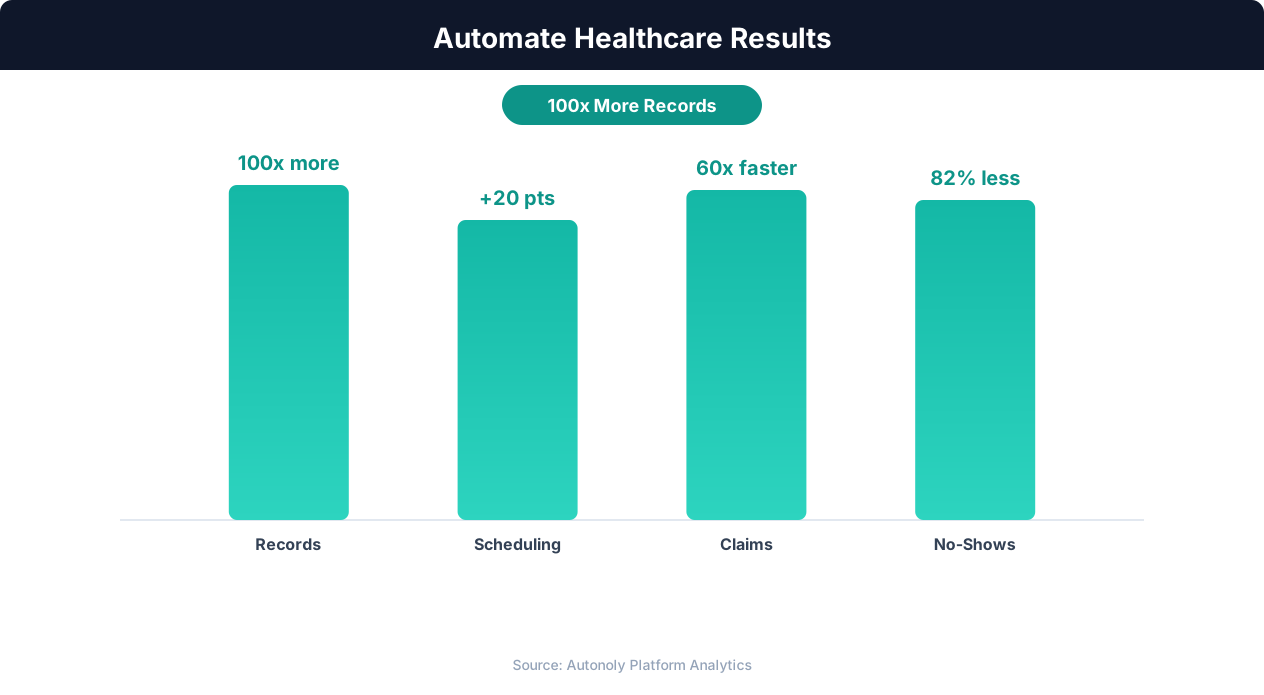
Cost savings from healthcare workflow automation
Key Insight: Healthcare organizations spend 34% of total revenue on administrative tasks. Automation can reduce this overhead by up to 50% (McKinsey Healthcare Report).
Scheduling and Automation
Run the workflow every four hours using the Visual Workflow Builder. For practices with high new patient volume, increase the frequency to hourly. Each run processes only new submissions — the agent tracks which forms have already been captured and skips them. The automation ensures your front desk team starts every day with complete intake data for that day's new patients.
Add Logic & Flow conditions to flag special cases, route patients to department-specific sheets, and trigger welcome emails through Gmail. Generate daily summaries of processed intake forms for your front desk team. Check pricing to see how many automated runs are included in your plan.
Further Reading
Explore more about the tools and techniques used in this workflow: Automate Data Entry, No Code Automation Guide, Form Automation.