


Why Automate Competitor Website Monitoring?
Competitive intelligence is essential for strategic decision-making, but most teams do it poorly because it is so labor-intensive. Manually visiting 10-20 competitor websites, reading their feature pages, comparing pricing plans, and tracking changes requires hours of work — and by the time you finish, the information may already be outdated. Competitors update their websites constantly, adding features, changing pricing, and adjusting messaging.
Autonoly's Browser Automation turns competitive website monitoring from an occasional project into an automated, always-current intelligence system. Extract specific data points from any number of competitor websites and organize them into a structured comparison matrix you can use for strategy meetings, product roadmap planning, and sales battle cards.
How the AI Agent Scrapes Competitor Websites
Every competitor website is built differently — different frameworks, different page structures, different navigation patterns. This is what makes competitive scraping particularly challenging for traditional tools that require custom configurations per site. Autonoly's AI Agent Chat eliminates this problem because the agent interprets each page intelligently, adapting to whatever structure it encounters.
Describe what you want: "Visit the pricing pages of Competitor A, B, and C, and extract all plan names, prices, and included features." The agent navigates each website, finds the relevant pages, and uses Data Extraction to pull data into a consistent format regardless of how each competitor organizes their information.
The agent handles complex website patterns — tabbed pricing interfaces, expandable feature comparison tables, dynamically loaded content, and multi-page feature descriptions. It can also capture screenshots of key pages for visual reference.
What Data You Get
A typical competitor analysis export includes:
Pricing Comparison:
Plan Names — All pricing tiers per competitor
Monthly/Annual Prices — Cost per plan
Feature Inclusions — What each plan includes
Usage Limits — API calls, seats, storage, etc.
Enterprise Contact — Whether custom pricing exists
Feature Comparison:
Feature Name — Capability or function
Competitor A — Available, limited, or unavailable
Competitor B — Available, limited, or unavailable
Feature Category — Grouped by function area
Positioning & Messaging:
Tagline — Homepage headline
Value Propositions — Key selling points
Target Audience — Who they say they serve
Social Proof — Customer logos, testimonials, case studies
Customizing Your Competitive Analysis
The Visual Workflow Builder supports deep competitive intelligence workflows:
Feature gap analysis: Compare competitor features against your own to identify gaps and opportunities
Pricing intelligence: Track competitor pricing changes over time to inform your own pricing strategy
Content monitoring: Extract blog posts, case studies, and documentation to track competitor content strategy
Team tracking: Monitor competitor careers and team pages to track hiring patterns and organizational growth
Add Data Processing steps to calculate feature parity scores, pricing position indices, or content velocity metrics. Use SSH & Terminal to run analysis scripts that generate competitive positioning charts or Venn diagrams.
Scheduling and Change Detection
Competitors do not announce when they change their pricing or add new features. Schedule weekly or monthly scrapes to catch these changes automatically. The workflow compares new extractions against previous data and flags any differences — price changes, new features, removed features, or messaging shifts.
This change detection capability transforms your competitive intelligence from a periodic manual effort into a continuous automated system that alerts your team to meaningful competitive moves.
Exporting and Integrating
Competitive intelligence flows to where your strategy team works:
Excel (.xlsx) — Multi-tab comparison workbook for strategy meetings
[Google Sheets integration](/integrations/google-sheets) — Live competitive dashboard updated automatically
[Notion](/integrations/notion) — Build a competitive intelligence wiki accessible to the whole company
[Slack](/integrations/slack) — Automated alerts when competitor pricing or features change
Browse our templates library for pre-built competitive analysis workflows. Visit pricing for execution details. For concepts behind automated intelligence, see our web scraping glossary and workflow automation glossary. The Integrations page covers all output destinations.
Use Cases
Product managers use competitor feature comparisons to prioritize their roadmap based on competitive gaps. Sales teams build data-driven battle cards showing where their product wins against each competitor. Marketing teams track competitor messaging evolution to differentiate their positioning. Investors analyze competitive landscapes to evaluate market dynamics. Founders preparing fundraising decks use automated competitive analysis to demonstrate market awareness and differentiation.
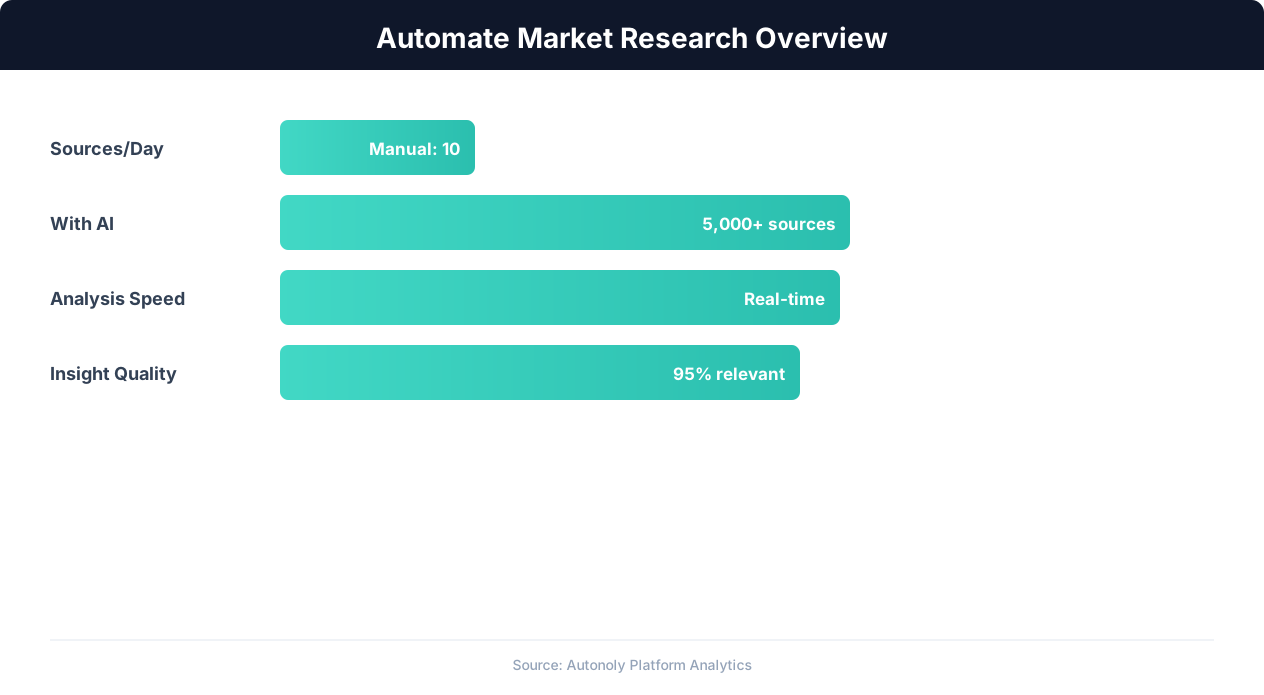
Market research automation coverage and speed improvements
Key Insight: Companies with automated competitive monitoring are 2.3x more likely to gain market share, responding to competitor moves within hours instead of weeks (McKinsey Strategy).
How the AI Agent Handles This
The AI agent visits each competitor website in a real browser using Browser Automation, adapting to every site's unique layout, navigation structure, and interactive elements without any site-specific configuration. It clicks through tabbed interfaces, expands accordion sections, scrolls through feature lists, and captures data from dynamically loaded content that traditional scrapers cannot access. The Data Extraction engine normalizes information from wildly different page structures into a consistent comparison matrix. Because the agent interprets pages intelligently rather than relying on hardcoded selectors, your competitive monitoring workflows keep working even when competitors redesign their websites.
Handling Diverse Website Architectures
Every competitor builds their site differently — some use single-page apps, others rely on server-rendered pages, and many use complex JavaScript frameworks. The agent handles all of these transparently, producing consistent output regardless of the underlying technology.
Key Insight: Automated market research delivers insights 10x faster than manual methods while covering 5x more sources and competitors (Crayon Competitive Intelligence Report).
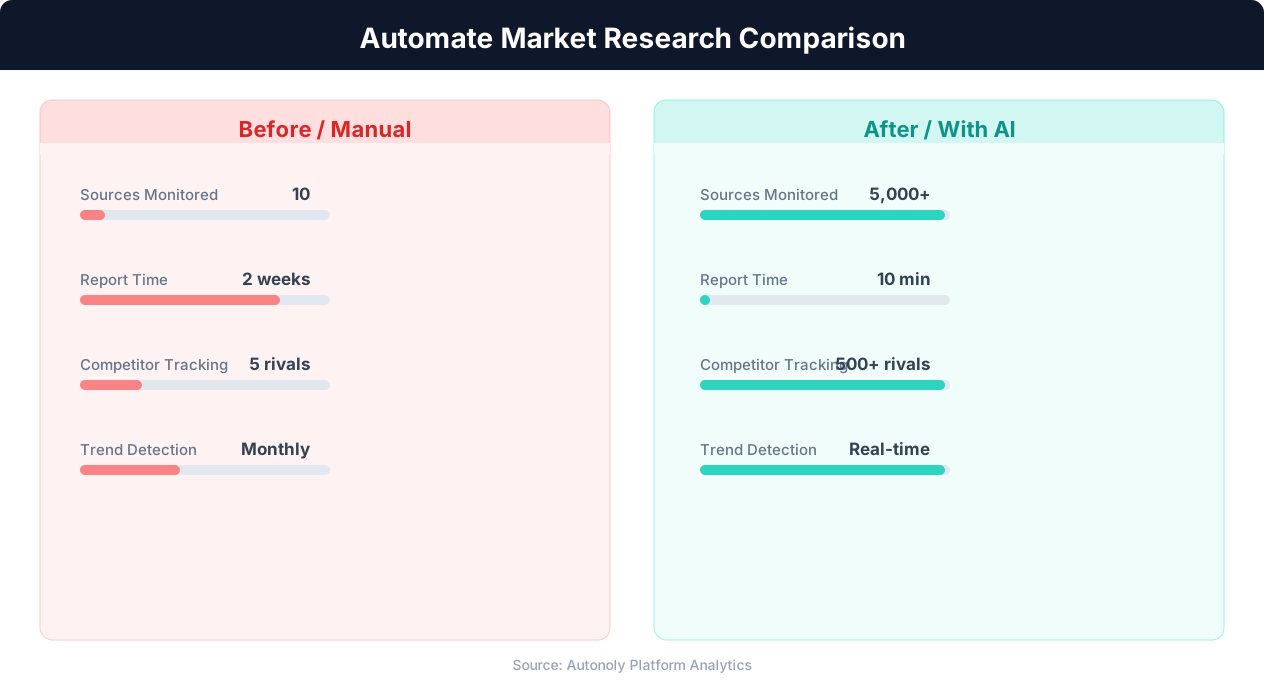
Data collection time for manual vs automated research
Key Insight: AI-powered sentiment analysis processes 50,000+ data points per hour with 91% accuracy, versus 200 per hour for manual analysis (Deloitte AI Review).
Scheduling and Recurring Runs
Schedule weekly or monthly competitor scrapes through the Visual Workflow Builder to maintain an always-current competitive intelligence database. Each run compares extracted data against previous snapshots and flags changes — price adjustments, new features, removed capabilities, or messaging shifts. Use Logic & Flow to trigger Slack notifications when significant changes are detected, ensuring your team learns about competitive moves within hours rather than weeks. Add Data Processing steps to calculate feature parity scores and pricing position indices automatically. Browse our templates for pre-configured competitive monitoring workflows.
Further Reading
Explore more about the tools and techniques used in this workflow: Best Web Scraping Tools, Ecommerce Price Monitoring.