Why Data-Driven Real Estate Requires Automation
Real estate has always been a data-intensive industry, but the volume and velocity of available data have outpaced the industry's ability to process it manually. Property listings update hourly. Market conditions shift weekly. Comparable sales data accumulates daily across dozens of county recorder offices, MLS systems, and listing platforms. Understanding what automation is and how business process automation keeps pace with constantly changing data is essential here. An investor or agent who relies on manual research is always working with stale information, and in a market where pricing moves fast, stale data means missed opportunities or overpaying.
Consider the daily workflow of a real estate investor evaluating potential acquisitions in a single metropolitan area. They need to monitor new listings on Zillow, Redfin, and Realtor.com for properties matching their investment criteria. They need to pull comparable sales data from county assessor websites to validate asking prices. They need to check rental rate data on Zillow Rentals, Apartments.com, and Rentometer to estimate potential cash flow. They need to cross-reference property tax records, zoning information, and school district ratings. And they need to do this across potentially dozens of target neighborhoods.
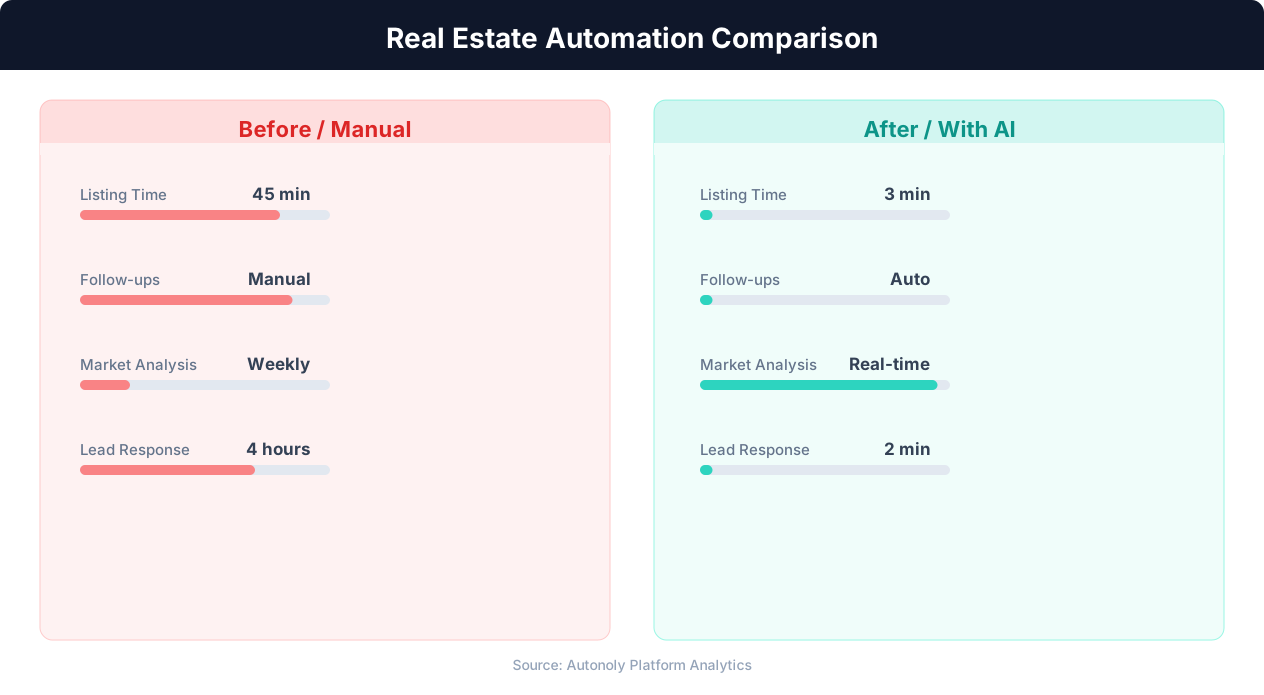
Doing this manually for even a single property takes 2-3 hours of focused research. An active investor evaluating 10-20 properties per week would need a full-time research assistant just for data collection. Scale that to a real estate fund analyzing hundreds of properties across multiple markets, and the data collection challenge becomes enormous.
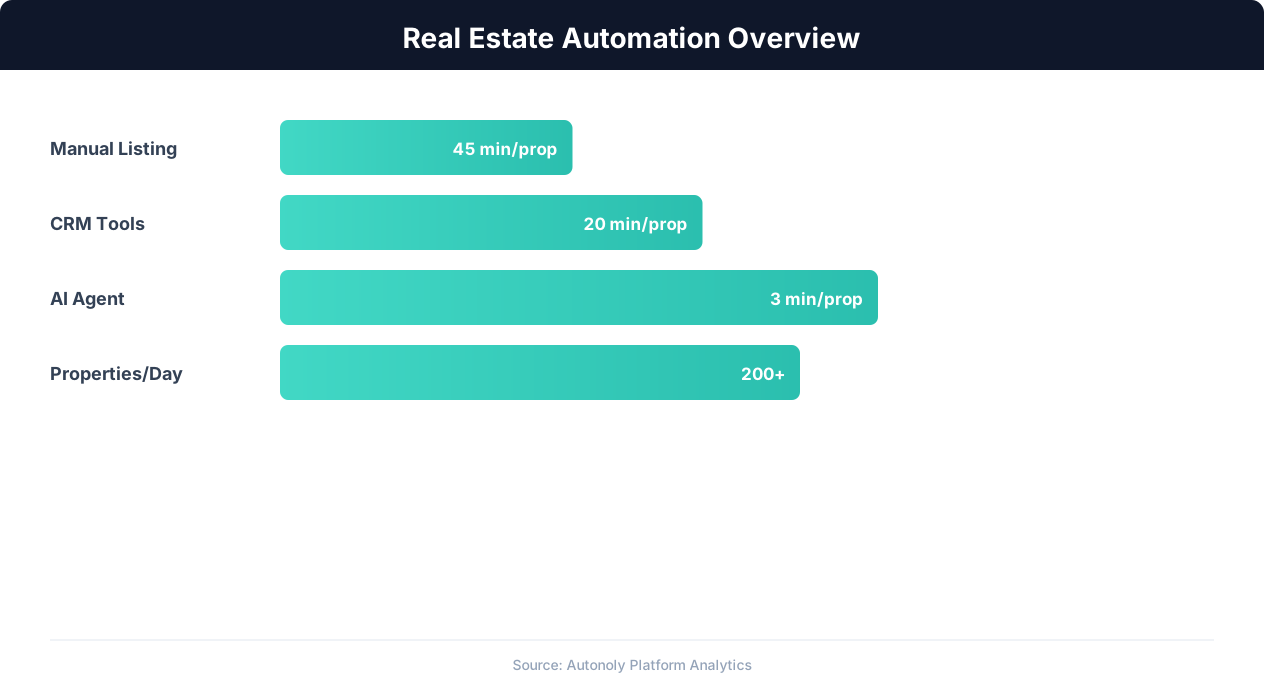
The fundamental problem is that real estate data is fragmented across many sources, each with its own interface, data format, and access method. There is no single API that provides comprehensive property data across all sources. MLS data requires membership and platform-specific access. County records vary wildly in their online availability and interface design. Listing platforms present data visually for human consumption, not programmatic access.
Automation bridges this gap by treating each data source as a node in a pipeline. Web scraping workflows extract listing data from Zillow and Redfin. Browser automation navigates county assessor websites to pull tax and ownership records. Data transformation steps normalize the different formats into a consistent schema. And the output flows into dashboards, spreadsheets, or databases where analysts and investors can make decisions based on comprehensive, current data.
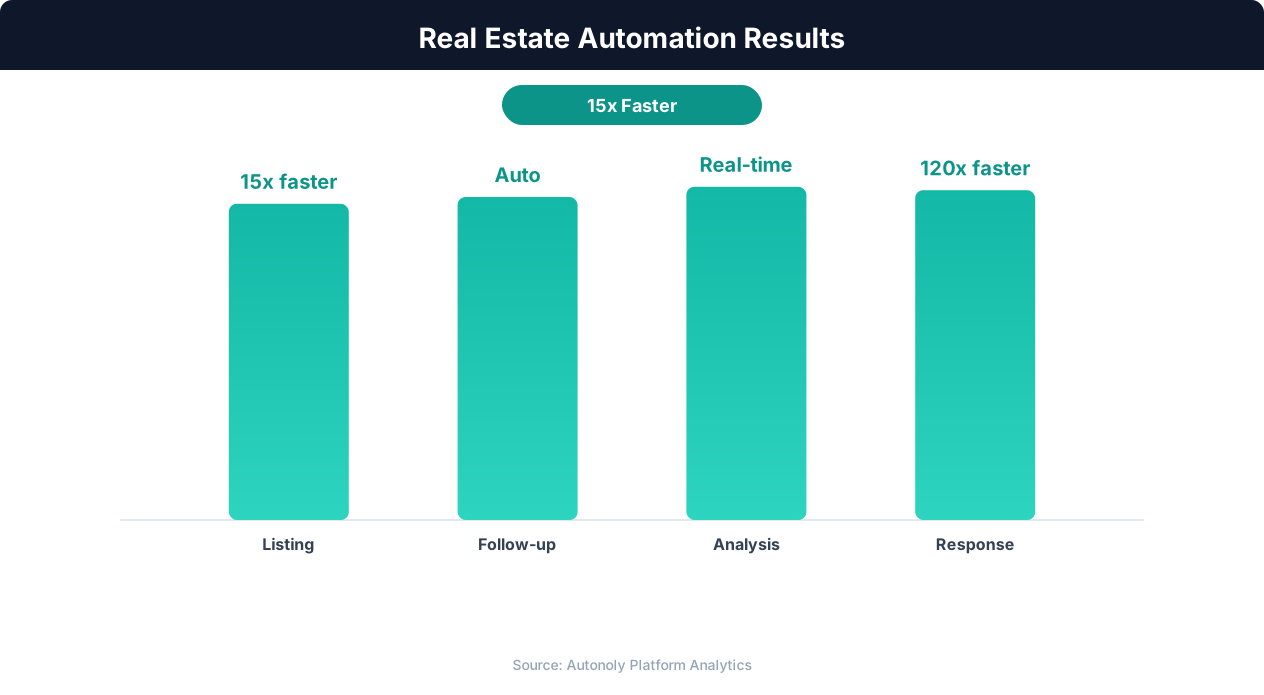
The teams and firms that have adopted automated real estate data pipelines report transformative results: 10x more properties analyzed per week, investment decisions backed by comprehensive comparable data instead of gut feel, and market trend visibility that catches pricing shifts weeks before competitors who rely on monthly manual reports. This is not about replacing the human judgment that makes real estate investing an art. It is about ensuring that judgment is informed by the most complete and current data possible.
Key Data Sources for Real Estate Automation
Building a comprehensive real estate data pipeline requires pulling from multiple complementary sources. Each source provides unique data points that, when combined, create a complete picture of a property's value, potential, and risk profile.
Listing Platforms: Zillow, Redfin, Realtor.com
The major listing platforms are the starting point for most real estate research. Zillow provides listing prices, Zestimate automated valuations, price history, tax assessments, and neighborhood data for virtually every residential property in the United States. Redfin offers similar data with the addition of its own automated valuation model and more detailed listing agent information. Realtor.com, powered by MLS data, often has the most current listing information since it receives direct feeds from multiple listing services.
Automating data extraction from these platforms captures: listing price, property type, bedrooms, bathrooms, square footage, lot size, year built, days on market, price history (including reductions), Zestimate or Redfin Estimate, property taxes, HOA fees, and listing description text. This baseline data is essential for initial screening and filtering. A ready-made workflow to scrape real estate listings to a spreadsheet captures these fields automatically for every property in your target area.
County Assessor and Recorder Websites
County government websites provide authoritative data that listing platforms may not include or may present inaccurately. Assessor websites show assessed value (which may differ significantly from market value in some jurisdictions), property tax amount and history, legal description, parcel boundaries, zoning designation, and ownership history. Recorder websites show deed transfers, liens, mortgages, and other encumbrances.
The challenge with county data is that every county has a different website with a different interface. Maricopa County, Arizona looks nothing like Cook County, Illinois. Automated workflows that use browser automation with AI-powered navigation can handle this variation because they interpret each page visually rather than relying on hard-coded selectors that break across different county websites.
Rental Data: Zillow Rentals, Apartments.com, Rentometer
For investment properties, rental income estimation is critical. Rental data platforms provide current asking rents, historical rent trends, vacancy rates, and rental comparables. Automating rental data collection enables instant cash flow projections for any property: pull the rental rates for comparable properties in the same zip code, calculate average rent, and apply it against the property's purchase price and expenses to estimate cap rate and cash-on-cash return.
Public Records and Government Data
Beyond county assessor data, additional public records provide valuable context. Building permit records reveal renovation activity in a neighborhood (a leading indicator of gentrification). Code violation records identify problem properties. Flood zone maps (from FEMA) flag insurance cost risks. School district ratings (from GreatSchools and state education departments) affect property values and rental demand. Census data provides demographic trends at the neighborhood level.
Market Analytics Platforms
Platforms like FRED (Federal Reserve Economic Data), CoreLogic, and local MLS analytics provide macro-level market indicators: median home prices over time, months of inventory, absorption rates, foreclosure rates, and mortgage rate trends. Automating the extraction of these metrics provides the market context needed to evaluate whether a specific property is priced above or below market trends.
The power of automation is not just collecting data from each source individually but combining them into a unified property record. A single automated pipeline can take a property address, pull its listing data from Zillow, its tax records from the county assessor, its rental comparable from Apartments.com, its flood zone status from FEMA, and its neighborhood school rating from GreatSchools, then present all of that in a single consolidated view. That level of comprehensive research, delivered in minutes rather than hours, fundamentally changes how real estate professionals evaluate opportunities.
Building a Real Estate Data Pipeline: Architecture and Workflow
A real estate data pipeline transforms scattered, unstructured property data from multiple sources into a clean, queryable dataset that powers analysis and decision-making. Here is how to architect and build one.
Pipeline Architecture Overview
The pipeline has four layers: extraction, transformation, storage, and presentation. The extraction layer pulls raw data from source websites using web scraping and browser automation. The transformation layer cleans, normalizes, and enriches the raw data. The storage layer persists the processed data in a structured format (database or spreadsheet). The presentation layer visualizes the data through dashboards, reports, or alerts.
Extraction Layer: Scraping and Browser Automation
Each data source requires its own extraction workflow. For Zillow, the workflow navigates to search results for a target area, applies filters (price range, property type, listing status), and extracts listing data from each result. For county assessor websites, the workflow takes a property address or parcel number, navigates the county site, searches for the property, and extracts assessment data from the property detail page. For rental platforms, the workflow searches for comparable rentals in the same area and extracts rent amounts, property sizes, and amenities.
The extraction workflows should be designed for resilience. Websites change their layouts frequently, and a brittle scraper that relies on exact CSS selectors will break within weeks. AI-powered browser automation (as provided by platforms like Autonoly) handles layout changes more gracefully because it interprets pages semantically rather than depending on specific HTML structure. When a county assessor redesigns their website, a traditional scraper breaks and requires developer attention. An AI-driven automation adapts to the new layout in most cases without modification.
Transformation Layer: Cleaning and Normalization
Raw extracted data is messy. Square footage might appear as "1,500 sq ft" from one source, "1500" from another, and "1.5k sqft" from a third. Addresses may use different abbreviations ("St" vs. "Street" vs. "St."). Price formats vary ("$450,000" vs. "450000" vs. "$450K"). The transformation layer standardizes all of this into consistent formats and data types.
Key transformations include: stripping currency symbols and commas from price fields and converting to integers, standardizing address formats using a geocoding service (which also adds latitude/longitude coordinates for mapping), parsing date fields into consistent ISO format, calculating derived fields (price per square foot, estimated monthly mortgage payment, cap rate), and flagging data quality issues (missing fields, outlier values, stale data).
Storage Layer: Where to Put It
For small-scale operations (individual investor, small team), Google Sheets or Airtable provide a familiar, accessible storage layer with built-in collaboration features. The automation writes processed property data to a spreadsheet with one row per property and standardized columns. For larger operations, a database (PostgreSQL, MongoDB, or even a purpose-built real estate data warehouse) provides better query performance, data integrity, and scalability.
The storage layer should maintain history. Instead of overwriting a property's price when it changes, append a new record with the updated price and timestamp. This price history enables trend analysis: identifying properties with repeated price reductions (motivated sellers), neighborhoods with consistent price appreciation, and seasonal pricing patterns.
Presentation Layer: Dashboards and Alerts
The stored data feeds dashboards that provide real-time market visibility. A typical real estate dashboard includes: a map view showing properties color-coded by investment potential (based on cap rate or price-per-square-foot relative to neighborhood average), a deal pipeline table with sortable columns for key metrics, trend charts showing price movements over time for target neighborhoods, and a comparative analysis view that shows a specific property against its comparables.
Alert workflows add proactive monitoring. Configure alerts for: new Zillow listings matching your investment criteria (notify immediately via email or Slack), price reductions on tracked properties (a reduction of 5%+ may signal a buying opportunity), and market indicators crossing thresholds (months of inventory dropping below 3, indicating a seller's market). These alerts transform your pipeline from a passive research tool into an active opportunity detection system.
Practical Guide: Extracting Data from Zillow and Redfin
Zillow and Redfin are the two most popular starting points for real estate data automation. Both present challenges that require thoughtful automation design. Our step-by-step guide to scraping Zillow real estate data walks through the extraction details, and the broader web scraping best practices apply here too. Here is a practical walkthrough of extracting data from each platform.
Zillow Data Extraction
Zillow presents property data across several page types, each offering different data points. The search results page shows listing cards with price, address, beds, baths, square footage, and a thumbnail image. The property detail page adds extensive information: full price history, tax assessment, Zestimate with confidence range, neighborhood statistics, nearby schools, walk score, and sometimes rental estimates.
An effective Zillow extraction workflow starts with search results. Navigate to Zillow's search for your target area, apply filters (for sale, price range, property type), and extract data from each listing card. Zillow uses dynamic content loading, meaning the page loads more listings as you scroll down. Your automation needs to handle this infinite scroll by scrolling to the bottom of the results, waiting for new content to load, and repeating until all results are captured or a defined limit is reached.
For deeper data, the workflow clicks into individual property detail pages. Each detail page contains structured data that can be extracted: the price history table shows every listing, sale, and price change event with dates and amounts. The tax history section shows annual assessed values and tax amounts. The Zestimate section provides Zillow's automated valuation with a confidence range. The "Nearby homes" section provides automatic comparable properties.
Zillow actively discourages automated access through rate limiting, CAPTCHA challenges, and bot detection. Effective strategies for maintaining access include pacing requests with natural delays between page loads (15-30 seconds), rotating between different search queries rather than sequentially crawling all results, and using browser automation that maintains realistic browsing patterns (mouse movements, scroll behavior, referrer headers). Using real browser sessions rather than headless HTTP requests significantly reduces detection risk because the browser maintains cookies, JavaScript execution context, and fingerprint consistency.
Redfin Data Extraction
Redfin provides a complementary data set to Zillow with some unique advantages. Redfin's data often updates faster because of its direct MLS feeds. Its property pages include detailed listing agent information, open house schedules, and more granular neighborhood statistics. Redfin also provides a downloadable CSV feature on search results pages, which can be triggered by automation, giving you structured data without needing to parse HTML.
The Redfin extraction workflow is similar to Zillow: search, filter, extract from results, and optionally drill into detail pages. Redfin's search interface uses map-based navigation with draw-on-map filtering, which browser automation can interact with by zooming to the target area and applying filters from the sidebar. Redfin also tends to be less aggressive about bot detection than Zillow, though respectful pacing is still important.
Combining Zillow and Redfin Data
Running extraction workflows against both platforms and merging the results produces a richer dataset than either platform alone. Zillow's Zestimate and Redfin's estimate provide two independent valuations for comparison. Listing dates may differ slightly, giving you a more accurate picture of when a property actually hit the market. And properties that appear on one platform but not the other (due to MLS feed differences or timing) are captured in the combined dataset.
The merge process matches properties by address (after normalization), keeping the most complete data from each source. Where both sources provide the same field (like square footage), discrepancies are flagged for manual review, as they often indicate data quality issues worth investigating before making investment decisions. This dual-source validation is one of the most valuable byproducts of automating across multiple platforms rather than relying on a single source.
Building Market Analysis Dashboards with Automated Data
Raw data becomes actionable intelligence when presented through well-designed dashboards. A real estate market analysis dashboard transforms your automated data pipeline into a decision-making tool that surfaces opportunities, tracks trends, and provides the context needed for confident investment decisions.
Dashboard Design Principles for Real Estate
Effective real estate dashboards follow three principles. First, lead with geography. Real estate is inherently spatial, and map-based visualizations communicate property location, neighborhood context, and spatial patterns (clustering of opportunities, proximity to amenities) more effectively than tables or charts alone. Second, provide context for every number. A listing price of $350,000 means nothing without context: what is the price per square foot relative to the neighborhood? How has the asking price changed since listing? What are comparable properties selling for? Third, enable drill-down. Overview dashboards should surface the most important metrics at a glance, with the ability to click into detailed views for specific properties or neighborhoods.
Essential Dashboard Views
Market Overview: A high-level view showing key market health indicators across your target areas. Include median listing price (and month-over-month change), median days on market, new listings this week versus last week, price reduction frequency, and months of inventory. These metrics tell you whether you are in a buyer's market or seller's market and whether conditions are tightening or loosening. Your automated pipeline updates these metrics daily or weekly, giving you a real-time pulse on market conditions.
Deal Pipeline Map: An interactive map showing all properties matching your investment criteria, color-coded by opportunity score (a composite metric you define based on cap rate potential, price-to-value ratio, neighborhood trajectory, and other factors). Clicking a property pin shows a summary card with key metrics and a link to the full property analysis. This map view enables pattern recognition: clusters of high-opportunity properties often indicate neighborhoods in transition where early investment yields the best returns.
Property Comparison View: A side-by-side comparison of up to five properties showing price, price per square foot, estimated rent, estimated cap rate, tax burden, and comparable sales data. This view supports the final evaluation stage when a team is deciding between competing investment options. The automation populates all comparison data automatically, so the analyst spends time analyzing rather than assembling.
Neighborhood Trend Analysis: Historical charts showing price trends, rental rate trends, days-on-market trends, and new construction activity for each target neighborhood over the past 12-24 months. These trends reveal whether a neighborhood is appreciating (good for buy-and-hold), peaking (good for selling), or declining (avoid or look for deep-value opportunities). Your automated pipeline collects this historical data over time, and the longer it runs, the richer the trend analysis becomes.
Dashboard Tools and Implementation
For most real estate teams, Google Sheets combined with Google Looker Studio (formerly Data Studio) provides a practical, low-cost dashboard solution. Your automated pipeline writes data to Google Sheets, and Looker Studio connects to those sheets to create interactive visualizations. The setup requires no coding, updates automatically as new data arrives, and can be shared with team members via link. For more sophisticated needs, tools like Tableau, Power BI, or custom web dashboards built with libraries like Plotly or D3.js provide greater flexibility and performance with larger datasets.
The key is starting simple and iterating. Build a basic dashboard with three or four views using whatever tool your team is already comfortable with. Use it for a few weeks, identify what additional data or views would be most valuable, and then enhance. The automated data pipeline makes iteration painless because adding a new data field to your extraction workflow automatically populates it in the dashboard without manual data entry.
Automating Investment Analysis: Cap Rates, Cash Flow, and Comparables
Beyond market monitoring, automation can perform the quantitative analysis that determines whether a specific property is a good investment. Automating these calculations ensures consistency, eliminates arithmetic errors, and enables rapid evaluation of many properties in parallel.
Automated Cap Rate Calculation
Capitalization rate (cap rate) is the most fundamental metric for evaluating investment property. Cap rate equals net operating income (NOI) divided by property value. Automating this calculation requires three data inputs: estimated gross rental income (from your rental comparable data), estimated operating expenses (property taxes from county records, insurance estimates, maintenance reserves, property management fees, and vacancy allowance), and property price (from listing data).
The automated calculation pipeline works as follows. For a given property, pull comparable rental data from your pipeline: what are similar properties in the same area renting for? Calculate estimated monthly rent using the average of the three to five closest comparables, adjusted for differences in size and condition. Annualize the rent and subtract estimated operating expenses to get NOI. Divide NOI by the asking price to get the cap rate. A property listed at $300,000 with estimated annual NOI of $18,000 has a cap rate of 6%. Compare this against the market average cap rate for the area to determine whether the deal is above or below market.
Cash Flow Projection
Cash flow analysis goes beyond cap rate to account for financing. Most investment properties are purchased with a mortgage, and the monthly debt service payment significantly impacts actual cash flow. Automated cash flow projections take the property price, apply your financing assumptions (down payment percentage, interest rate, loan term), calculate the monthly mortgage payment, and subtract it along with operating expenses from monthly rental income to determine monthly and annual cash flow.
💡 Key Insight
Real estate agents using automation close 30% more deals by spending 60% less time on administrative tasks.
The automation can model multiple scenarios simultaneously. What does cash flow look like with 20% down at 6.5% interest? What about 25% down at 7%? What if rent increases 3% annually? What if vacancy runs 8% instead of 5%? Running these scenarios manually for a single property takes 30-60 minutes. An automated workflow runs all scenarios in seconds, presenting results in a comparison table that shows the range of likely outcomes.
Automated Comparable Sales Analysis
Comparable sales (comps) are the foundation of property valuation. Your automated pipeline can pull recent comparable sales into a spreadsheet from county recorder websites and listing platforms to identify properties that sold recently in the same area with similar characteristics (property type, size, age, condition). The automation calculates price per square foot for each comp, identifies the adjusted average, and applies it to the subject property to estimate market value.
The key to good automated comps is filtering criteria. Start broad (same zip code, same property type, sold in last 6 months) and narrow if results are too numerous. Good automations also flag when comps are sparse (indicating a thin market where valuation is less certain) or when there is wide variance in comp values (indicating a heterogeneous neighborhood where location within the area matters significantly).
Scoring and Ranking Properties
With cap rate, cash flow, and comparable analysis automated for every property in your pipeline, you can create a composite investment score that ranks opportunities. A simple scoring formula might weight cap rate at 30%, cash-on-cash return at 25%, price-to-comp-value ratio at 25%, and neighborhood trend trajectory at 20%. Each property in your pipeline gets scored automatically, and the dashboard surfaces the highest-scoring properties at the top.
This systematic scoring replaces the common practice of evaluating properties sequentially as they are discovered, which leads to anchoring bias and inconsistent criteria. When every property is scored against the same rubric with the same data freshness, the best opportunities surface objectively. The investor's judgment then focuses on the qualitative factors that the numbers cannot capture: property condition, neighborhood feel, specific risks, and strategic fit with their portfolio.
Scaling Real Estate Automation Across Multiple Markets
A data automation pipeline built for one market becomes exponentially more valuable when extended to multiple markets. Geographic diversification is a fundamental investment principle, and automation makes multi-market research feasible for teams that previously could only deeply research one or two areas.
The Multi-Market Challenge
Researching a new real estate market manually requires significant time investment. You need to learn the local market dynamics, identify the relevant neighborhoods, understand pricing norms, find the right data sources (each county has different websites and data availability), and build a network of local contacts for ground-truth validation. This learning curve means most individual investors and small firms stick with markets they already know, missing opportunities in areas where fundamentals are stronger.
Automation reduces the learning curve for new markets dramatically. The same extraction workflows that pull data from Zillow and Redfin in your home market work identically in any US market by simply changing the search geography. County assessor workflows need adaptation for each county's website, but once built, they run automatically. Rental data workflows transfer directly. Within a few hours of configuration, you can have the same quality of data pipeline for a new market that took weeks to build manually for your first market.
Configuring Multi-Market Pipelines
The most efficient approach is a parameterized pipeline where market-specific settings (target zip codes, price ranges, property type preferences, and data source URLs) are defined in a configuration file or spreadsheet. The core extraction, transformation, and scoring workflows are market-agnostic. When you want to add a new market, you add a new row to the configuration with the market-specific parameters, and the pipeline starts running for that market automatically.
For county assessor and public records extraction, maintain a library of county-specific workflow templates. Once you have built an extraction workflow for Maricopa County, save it as a template. The next time you need to research a property in Maricopa County, the template is ready. Over time, this library grows to cover the counties you research most frequently, and the setup time for returning to a market drops to near zero.
Cross-Market Comparison
Multi-market automation enables powerful cross-market analysis that is practically impossible manually. Compare median cap rates across ten metropolitan areas to identify which markets offer the best returns. Track how quickly different markets are appreciating to find areas still in the early stages of a growth cycle. Analyze the correlation between job growth data (from Bureau of Labor Statistics) and rental rate increases across markets to predict where rents will rise next.
These cross-market insights help you allocate capital more effectively. Instead of investing exclusively in your local market because it is what you know, you can objectively compare opportunities across geographies and invest where the fundamentals are strongest. Your dashboard can include a market comparison view that ranks metropolitan areas by key metrics, updated automatically as new data flows through the pipeline.
Practical Scaling Tips
Start with two to three markets and scale from there. Adding markets too quickly before your pipeline is stable in the first market means you are debugging multiple data sources simultaneously, which is frustrating. Once the first market's pipeline runs cleanly for two to three weeks, add the next market. By the fourth or fifth market, you will have encountered and solved most of the common data quality and extraction issues, and new markets will come online quickly.
Monitor data freshness across markets. If your Zillow extraction for Market A runs daily but Market B has not updated in a week due to a workflow error, your cross-market comparison will be misleading. Build monitoring into your pipeline: a simple daily check that verifies each market's data was updated within the expected timeframe, with an alert if any market falls behind.
Common Pitfalls in Real Estate Data Automation
Real estate data automation delivers enormous value, but common mistakes can undermine your results. Learning from others' pitfalls saves you time and prevents decisions based on flawed data.
Trusting Automated Valuations Blindly
Zillow's Zestimate, Redfin's estimate, and your own automated cap rate calculations are useful screening tools, but they are not appraisals. Automated valuations have median error rates of 5-8% nationally, with much higher error rates in areas with few comparable sales, unique properties, or rapid market changes. A Zestimate of $400,000 on a property that an appraiser would value at $360,000 could turn a projected profitable deal into a loss.
Use automated valuations for initial screening and ranking, but always validate with local market knowledge and, for serious acquisition candidates, a professional appraisal or broker price opinion before making offers. Your dashboard should display valuation confidence ranges (not just point estimates) to remind users that every automated number has uncertainty around it.
Stale Data Leading to Bad Decisions
Real estate data has a shelf life. A comparable sales analysis based on transactions from 12 months ago may be meaningless in a market that has shifted 10% in either direction. Rental rate data from six months ago does not reflect current asking rents if the market has tightened or softened. Listing data from last week may not reflect a price reduction made yesterday.
Build freshness tracking into your pipeline. Every data point should have a "last updated" timestamp visible in your dashboard. Set freshness thresholds (listing data should be no more than 24 hours old, comparable sales no more than 7 days, rental data no more than 3 days) and flag or exclude data that exceeds these thresholds. Running your extraction workflows on an appropriate schedule (daily for listing data, weekly for comparables, monthly for tax records) ensures freshness.
💡 Key Insight
Automated property data collection covers 10x more listings than manual research in the same timeframe.
Ignoring Data Quality
Automated extraction is not immune to errors. A scraping workflow might extract a price of $45,000 instead of $450,000 because of a parsing error, or it might attribute the wrong square footage to a property because of a misaligned table row. These errors, compounded across hundreds of properties, can systematically distort your analysis.
Implement data quality checks as a transformation step in your pipeline. Flag outlier values (price per square foot below $50 or above $1,000 in most markets is likely an error). Validate that addresses resolve to real locations via geocoding. Check that numeric fields contain reasonable values (negative square footage, zero bedrooms for a house). Log and review flagged records regularly. A small investment in data quality saves you from making decisions based on garbage data.
Over-Engineering the Pipeline
It is tempting to build a comprehensive, multi-market, fully automated pipeline from day one. Resist this temptation. Start with one market, one or two data sources, and a simple spreadsheet output. Validate that the data is accurate and useful for your actual decision-making process. Then add sources, markets, and sophistication incrementally. Many real estate data projects stall because the team spent months building an elaborate system before validating that the core data extraction was reliable.
Neglecting Legal and Ethical Boundaries
Respect website terms of service and scraping rate limits. Excessive automated traffic can get your IP blocked, disrupt service for other users, and potentially create legal liability. Keep your automation at a pace that a dedicated human researcher might maintain. Do not redistribute scraped data commercially without understanding the intellectual property implications. And never use automated data collection to circumvent Fair Housing Act protections or other regulations designed to prevent discrimination in real estate.
These pitfalls are avoidable with deliberate pipeline design and a healthy skepticism toward automated outputs. The goal is augmenting human judgment with comprehensive data, not replacing judgment with blind algorithmic trust.
Getting Started: Your First Real Estate Data Automation
If you are new to real estate data automation, start with a focused project that delivers immediate value. Here is a step-by-step guide to building your first automated real estate data workflow.
Choose Your Starting Point
Select one specific use case that addresses your current biggest pain point. Common starting points include: monitoring new listings in a target neighborhood that match your criteria (saves daily manual searching), building a comparable sales database for a specific market (eliminates repetitive county website visits), or tracking rental rates in areas where you own or plan to purchase investment properties (replaces monthly manual surveys).
Resist the urge to start with "build a comprehensive dashboard for all data across all markets." That is a month-long project. Start with something that delivers value this week.
Set Up Your Data Destination
Create a Google Sheet (or Airtable base) with columns for the data you want to collect. For a listing monitoring workflow, your columns might include: address, listing price, bedrooms, bathrooms, square footage, price per square foot, days on market, listing URL, and extraction date. Having the destination ready before building the extraction ensures you know exactly what data to extract.
Build the Extraction Workflow
Using a platform like Autonoly, describe your extraction task. For example: "Go to Zillow, search for houses for sale in [target zip code] between $200,000 and $400,000 with at least 3 bedrooms. For each listing, extract the address, price, beds, baths, square footage, and listing URL. Put the results in my Google Sheet." The AI agent builds the workflow, navigates Zillow, and populates your spreadsheet.
Run the workflow manually a few times and validate the results. Check extracted data against the actual Zillow listings to verify accuracy. If any fields are consistently incorrect or missing, adjust your instructions and re-run. This validation step is critical. Do not automate a workflow on a schedule until you have confirmed it produces accurate data through at least three to five manual runs.
Schedule for Recurring Execution
Once validated, use scheduled execution to run the workflow on a recurring basis. Daily execution works well for listing monitoring (new listings appear throughout the day, but daily captures are sufficient for most investors). Weekly execution works for comparable sales and rental data, which change more slowly. Your scheduled workflow runs automatically, and you check the results each morning rather than spending an hour manually searching.
Add Layers Incrementally
After your first workflow runs reliably for one to two weeks, add the next layer. If you started with Zillow listings, add Redfin as a second source and build deduplication into your pipeline. If you started with listing monitoring, add a comparable sales extraction workflow for the same market. Each new layer builds on the infrastructure you have already validated.
Build Your First Dashboard View
After two to three weeks of data collection, you have enough data to build a meaningful dashboard. Connect Google Looker Studio (free) to your Google Sheet data. Create a map visualization showing property locations, a table view with sortable columns, and a simple chart showing new listings per week. This initial dashboard takes 30-60 minutes to set up and provides a visual interface that is far more useful than scrolling through spreadsheet rows.
The progression from here is natural: add more data sources, expand to additional markets, build more sophisticated analysis calculations, and refine your dashboard views based on what you find most useful in your daily decision-making. The automated pipeline grows with your needs, and each addition is incremental rather than requiring a from-scratch rebuild.