

Why Automate Course Enrollment Processing?
Registration periods are among the most hectic times for school administrators. Hundreds of forms arrive within days, each needing to be reviewed for completeness, checked against prerequisites, verified against capacity limits, and entered into class rosters — rosters that are often exchanged between systems using the OneRoster specification from 1EdTech (IMS Global). Manual processing is slow, error-prone, and creates a frustrating experience for families who wait days to learn whether their child's registration was accepted. During peak registration, a registrar's office can receive more submissions in a single day than staff can process in a week — creating backlogs that delay confirmations, frustrate families, and leave administrators unable to accurately gauge enrollment until the backlog clears.
The consequences of slow registration processing extend beyond inconvenience. When capacity is not tracked in real time, popular sections become overbooked while others sit half-empty — creating last-minute schedule changes that disrupt both students and teachers. When prerequisites are not verified at registration time, students enroll in courses they are not prepared for and discover the problem on the first day of class. When families do not receive timely confirmation, they call the front office repeatedly for status updates, consuming staff time that could be spent on actual enrollment work.
By automating enrollment processing with Browser Automation and Google Sheets, every submission is captured, validated, and processed within hours instead of days. Students receive prompt confirmation, administrators have real-time roster visibility, and capacity issues are flagged before classes become overbooked. The automation handles the volume spike of registration season without requiring additional temporary staff or overtime, and every registration receives the same thorough validation regardless of when it arrives. Use the AI Agent Chat to configure validation rules and enrollment parameters through natural conversation.
This workflow serves K-12 schools, community colleges, continuing education programs, tutoring centers, summer camps, and any organization that processes course registrations. Visit our templates library for pre-built enrollment processing workflows.
How the AI Agent Processes Enrollments
Students or parents submit registration forms through your website — built with Google Forms, JotForm, Typeform, or any web-based form platform. The agent checks for new submissions every four hours using Browser Automation to access the form dashboard, or by reading form notification emails.
For each submission, the Data Extraction engine captures all form fields: student name, grade level, parent contact information, selected courses, section preferences, and any special accommodation requests. The extracted data is normalized by the Data Processing engine — standardizing name formats, validating email addresses, and mapping course selections to your official course catalog.
The agent then performs validation checks:
Prerequisites: Cross-references the student's completed courses (from a student records tab) against the prerequisites for each requested course. Students missing prerequisites are flagged.
Capacity: Checks current enrollment counts for each requested section. If a section is full, the student is placed on a waitlist or offered an alternative section.
Schedule conflicts: Compares the time slots of selected courses to detect any overlapping periods that would create a scheduling conflict.
Validated enrollments are added to the appropriate class rosters in Google Sheets. Each roster tab shows the class name, section, meeting time, instructor, enrolled students, and remaining capacity.
Confirmation and Communication
After processing, the agent sends confirmation emails through Gmail to each student or parent. Confirmed enrollments receive a welcome email with class details, meeting times, instructor names, and any materials or preparation needed before the first day.
Students whose registrations have issues — missing prerequisites, full sections, or schedule conflicts — receive a different email explaining the problem and offering next steps. For waitlisted students, the email explains their position and when they can expect to hear about availability.
The Logic & Flow engine handles these branching communications automatically. Each student receives exactly the right message based on the outcome of their registration validation.
Managing Capacity and Waitlists
The automated system provides real-time capacity tracking. As enrollments are processed, roster counts update immediately in your Google Sheets workbook. Administrators can view a capacity dashboard showing every section's enrollment count and remaining spots.
When a section fills up, subsequent registrations are added to a waitlist tab ordered by submission timestamp. If a spot opens (due to a drop or capacity increase), the agent automatically promotes the next waitlisted student and sends them a confirmation email. This first-come-first-served automation eliminates the manual work of managing waitlist priorities.
For high-demand courses, you can set up Logic & Flow conditions to automatically open additional sections when enrollment hits a threshold — or to alert the department head that a new section may be needed.
What Data You Get
Your enrollment tracking workbook provides complete registration visibility:
Student Name — Who submitted the registration
Course / Section — Which class and section they requested
Submission Time — When the form was submitted
Validation Status — Passed, prerequisite missing, capacity full, or schedule conflict
Enrollment Status — Confirmed, waitlisted, pending review, or rejected
Confirmation Sent — Timestamp of when the student was notified
Roster Count — Current enrollment and remaining capacity for each section
Customizing Your Enrollment Workflow
The Visual Workflow Builder lets you add custom validation beyond standard prerequisites. Use Logic & Flow conditions to enforce grade-level restrictions, check minimum GPA requirements for honors courses, validate co-requisite enrollment, and handle instructor approval requirements for independent study courses. Different registration forms for different student populations — incoming freshmen, returning students, transfer students — can all feed into the same processing pipeline.
Integration Options
Store all roster and enrollment data in Google Sheets for real-time access by registrars, department heads, and administrators. Send confirmations and status updates through Gmail from your school's official email address. Add Slack notifications to alert department heads when their sections reach capacity or when waitlists grow beyond a threshold. Visit the Integrations page for all connection options.
Use Cases
K-12 schools processing elective and course selection during spring registration for the next academic year
Community colleges handling open enrollment periods with prerequisite validation across hundreds of course offerings
Continuing education programs managing rolling enrollment for adult learning courses and professional development
Summer camps processing activity and session registrations with capacity tracking across age groups
Tutoring centers enrolling students in group sessions with schedule conflict detection
Audit Trail
Every registration action is logged in the spreadsheet with timestamps: when the form was submitted, when it was processed, what validation checks were performed, and what the outcome was. This complete audit trail supports inquiries from families and demonstrates fair, consistent processing of all registrations.
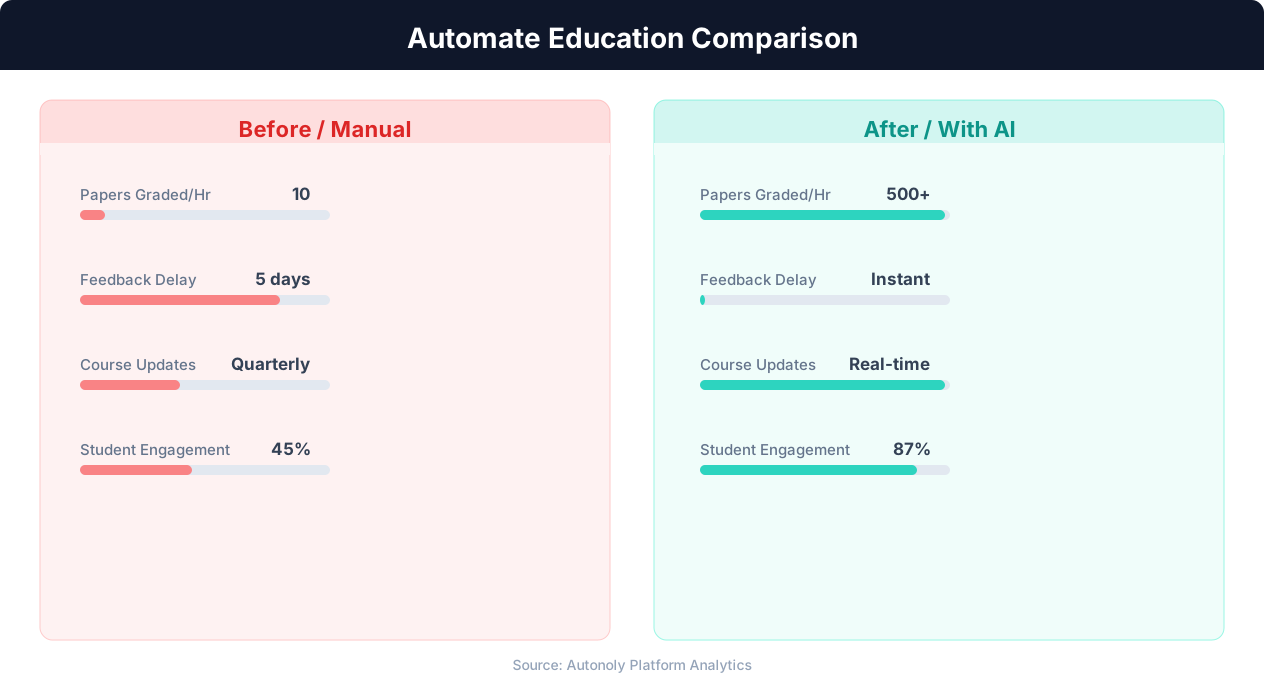
Time savings for educators using automated workflows
Key Insight: Teachers spend 50% of their working hours on non-teaching tasks like grading and admin. Automation can reclaim up to 13 hours per week (McKinsey Education Report).
How the AI Agent Does It
The agent monitors registration form submissions using Browser Automation and extracts student data with the Data Extraction engine. The Data Processing engine validates prerequisites, capacity, and schedule conflicts. Confirmed enrollments are added to class rosters in Google Sheets, and status-appropriate emails are sent through Gmail. The agent cross-references each student's course history against prerequisite requirements defined in your course catalog tab, flagging students who have not completed required prerequisites automatically.
Key Insight: Automated grading and feedback systems improve student performance by 18% by providing instant, consistent feedback on assignments (EdTech Magazine).
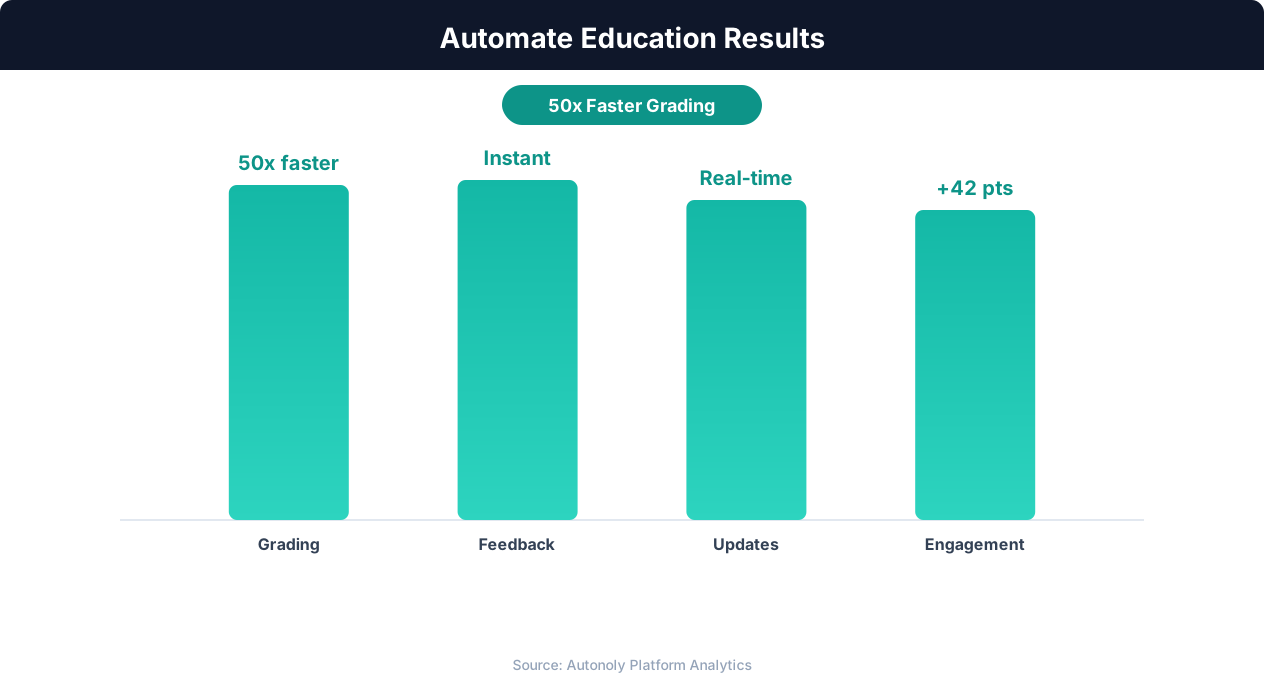
Student engagement improvements from automation
Key Insight: 72% of educators report that administrative burden is their top source of burnout. Automating routine tasks is the most effective intervention (Gallup Education).
Scheduling and Automation
The enrollment processing workflow runs every four hours during registration periods, ensuring students receive timely feedback without overwhelming your systems. The Visual Workflow Builder lets you adjust the frequency — hourly during peak registration days, or daily during slower periods. Outside of registration season, the workflow can run at a reduced frequency to handle late registrations, add/drop requests, and transfer students.
At the close of registration, the agent generates a comprehensive enrollment summary: total registrations processed, sections at capacity, waitlisted students, and any registrations pending resolution. This report is delivered via Gmail to administrators and department heads. Add Logic & Flow conditions for waitlist management, priority-based registration windows, and capacity alerts. Check pricing to see how many automated runs are included in your plan.
Further Reading
Explore more about the tools and techniques used in this workflow: Automate Data Entry, No Code Automation Guide, Form Automation, Email Campaigns.