
Why Automate Medical Billing Claims?
Medical billing is the financial engine of every healthcare practice, and inefficiencies in the claims process directly impact revenue. Claims and clinical data move through standardized formats — including HL7 messaging — and every step is subject to the HIPAA safeguards for protected health information. Missed claims, coding errors, delayed submissions, and lack of follow-up on denials all contribute to revenue leakage that most practices underestimate. Industry analysis shows that the average medical practice loses between 5 and 10 percent of potential revenue to billing inefficiencies — for a practice generating one million dollars annually, that represents fifty to one hundred thousand dollars left on the table. The problem is not that practices do not bill; it is that claims slip through cracks in the process, denials are not followed up promptly, and aging receivables drift past the timely filing deadline without anyone noticing until it is too late.
Many small to mid-size practices still manage billing through a combination of spreadsheets and manual processes, which are prone to human error and difficult to scale. A billing clerk processing 30 encounters per day is likely to make data entry errors, miss coding inconsistencies, and lose track of which claims have been submitted versus which are still pending. When a denial comes back two weeks later, the context of the original encounter has faded, and investigating the denial takes longer than it should. Without systematic tracking, some denials are never appealed at all — representing pure lost revenue.
By automating claim processing and tracking with Google Sheets and the Data Processing engine, you create a systematic pipeline that ensures every encounter becomes a claim, every claim is tracked, and every denial is followed up. The workflow does not replace your billing software or clearinghouse — it adds an organizational layer that keeps your revenue cycle moving and ensures nothing falls through the cracks. Use the AI Agent Chat to set up and customize your billing workflow through natural conversation.
This workflow serves medical practices, dental offices, physical therapy clinics, behavioral health providers, and any healthcare organization that manages their own billing operations. Browse our templates library for pre-built billing workflow configurations.
How the AI Agent Processes Claims
Your encounter log in Google Sheets captures the raw data from each patient visit: patient name, date of service, diagnosis codes (ICD-10), procedure codes (CPT), units, provider name, rendering NPI, insurance payer, policy number, and expected reimbursement amount. This data can be entered by your front desk, exported from your EHR, or populated by other Autonoly workflows like the intake form processor.
The agent runs daily and reads new encounters that have not yet been processed into claims. The Data Processing engine validates each record — checking that required fields are present, diagnosis and procedure code formats are correct, and insurance information is complete. Encounters with missing or invalid data are flagged for manual review rather than being silently skipped.
For valid encounters, the agent creates a claim record in a separate "Claims" tab of your spreadsheet. Each claim record includes all the encounter data plus a claim status (initially "Ready to Submit"), a submission date field, a reference number field, and columns for tracking payer response, payment amount, and denial reason.
Claims Tracking and Follow-Up
Once claims are submitted through your clearinghouse or payer portal, update the status and reference number in the spreadsheet. The agent monitors these status fields daily and performs several automated follow-up actions:
The Logic & Flow engine identifies claims that have been in "Submitted" status for more than 30 days without a response and flags them for follow-up. Denied claims are immediately highlighted with the denial reason, so your billing team can review and resubmit.
The Data Processing engine generates aging reports — grouping outstanding claims by age (0-30, 31-60, 61-90, 90+ days) and by payer. These reports reveal which insurance companies are slowest to pay and which claim types are most frequently denied, informing process improvements.
You can configure the workflow to send automated follow-up summaries via Gmail to your billing manager or revenue cycle team. A daily email listing newly denied claims and approaching aging thresholds keeps everyone informed without requiring manual report generation.
What Data You Get
Your claims tracking spreadsheet provides complete revenue cycle visibility:
Patient Name — Who the encounter was with
Date of Service — When the visit occurred
Diagnosis Codes — ICD-10 codes for the encounter
Procedure Codes — CPT codes billed
Insurance Payer — Which company is being billed
Billed Amount — Total charges submitted
Claim Status — Ready, submitted, accepted, denied, or paid
Reference Number — Clearinghouse or payer tracking number
Payment Amount — What was reimbursed
Denial Reason — Code and description for denied claims
Days Outstanding — Calculated aging from submission date
Customizing Your Billing Workflow
The Visual Workflow Builder lets you build a complete revenue cycle management pipeline. Beyond basic claim tracking, you can add:
Pre-submission validation: Cross-reference diagnosis and procedure codes against common denial reasons. Flag claims with historically problematic code combinations before submission.
Payment posting: When payments arrive, the agent can match them to open claims by reference number and update the payment amount and status automatically.
Patient balance calculation: After insurance payment, calculate the patient's remaining balance and trigger a patient statement email through Gmail.
Monthly revenue reporting: Aggregate claims data into monthly reports showing total billed, collected, denied, and outstanding amounts by provider, payer, or service type.
Integration Options
Track all claims data in Google Sheets for centralized revenue cycle management. Send denial alerts, aging reports, and patient statements through Gmail. Add Slack notifications to alert your billing team immediately when denials arrive or when claims cross aging thresholds. The Data Processing engine generates automated financial summaries for practice administrators. Visit the Integrations page for all connection options.
Use Cases
Medical practices tracking the full revenue cycle from encounter to payment for every patient visit
Dental offices managing claims across multiple dental insurance companies with different fee schedules
Physical therapy clinics tracking authorized visit limits and billing each session against remaining approvals
Behavioral health providers monitoring claim status for ongoing therapy sessions billed weekly or biweekly
Multi-provider practices generating per-provider revenue reports for compensation and performance tracking
Billing companies managing claims for multiple client practices from a centralized tracking system
Building Institutional Knowledge
Over months of automated tracking, your claims spreadsheet becomes a comprehensive billing database. You can analyze denial patterns by payer, identify which procedure codes are most profitable, track reimbursement timelines, and measure your overall collection rate. This data supports contract negotiations with insurance companies and informs practice financial strategy.
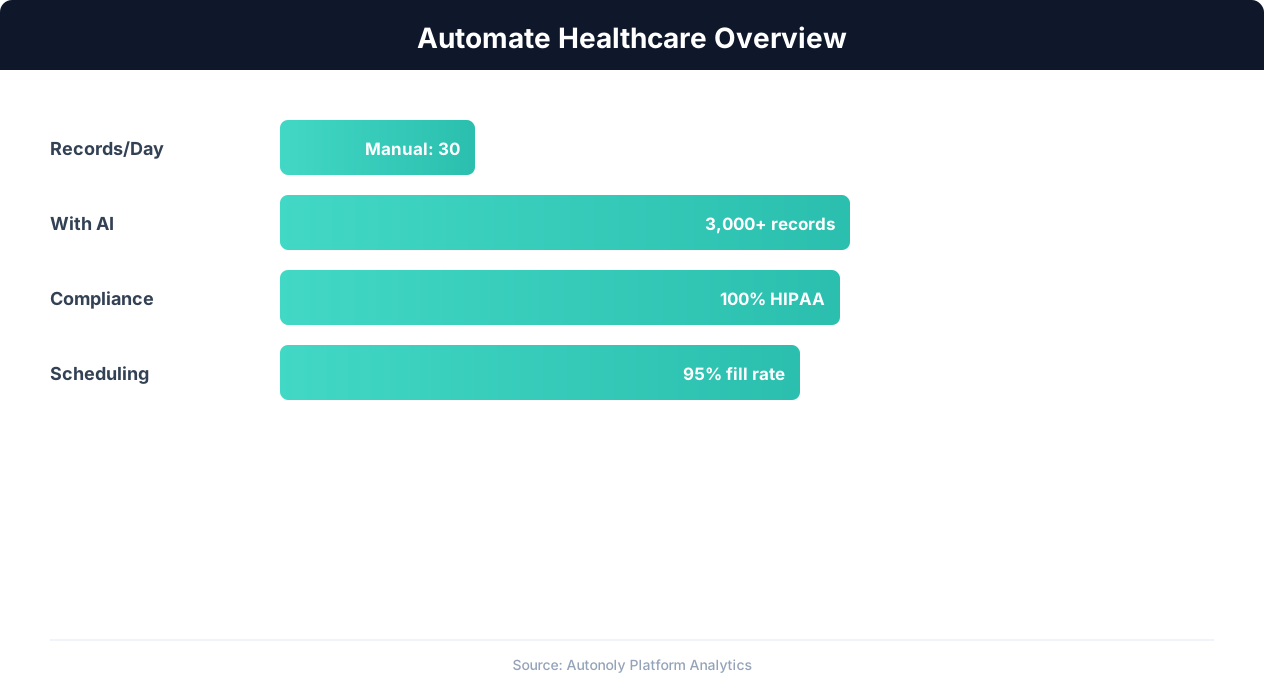
Healthcare automation impact on administrative efficiency
Key Insight: AI-powered medical data extraction achieves 97% accuracy on standard clinical documents, reducing transcription errors that affect 1 in 5 manual entries (AHIMA).
How the AI Agent Does It
The agent reads your encounter log from Google Sheets, validates data completeness and format with Data Processing, and generates claim records in a tracking tab. Before creating a claim record, the agent checks every required field — diagnosis codes, procedure codes, insurance information, and provider details. Invalid or incomplete encounters are flagged for review rather than processed, reducing downstream denials from bad data. Daily runs monitor claim statuses, flag aging claims, and highlight denials. The Logic & Flow engine routes alerts to your billing team via Gmail and generates weekly aging reports.
Key Insight: Providers using automated patient intake report 42% shorter wait times and 29% higher patient satisfaction scores (Advisory Board).
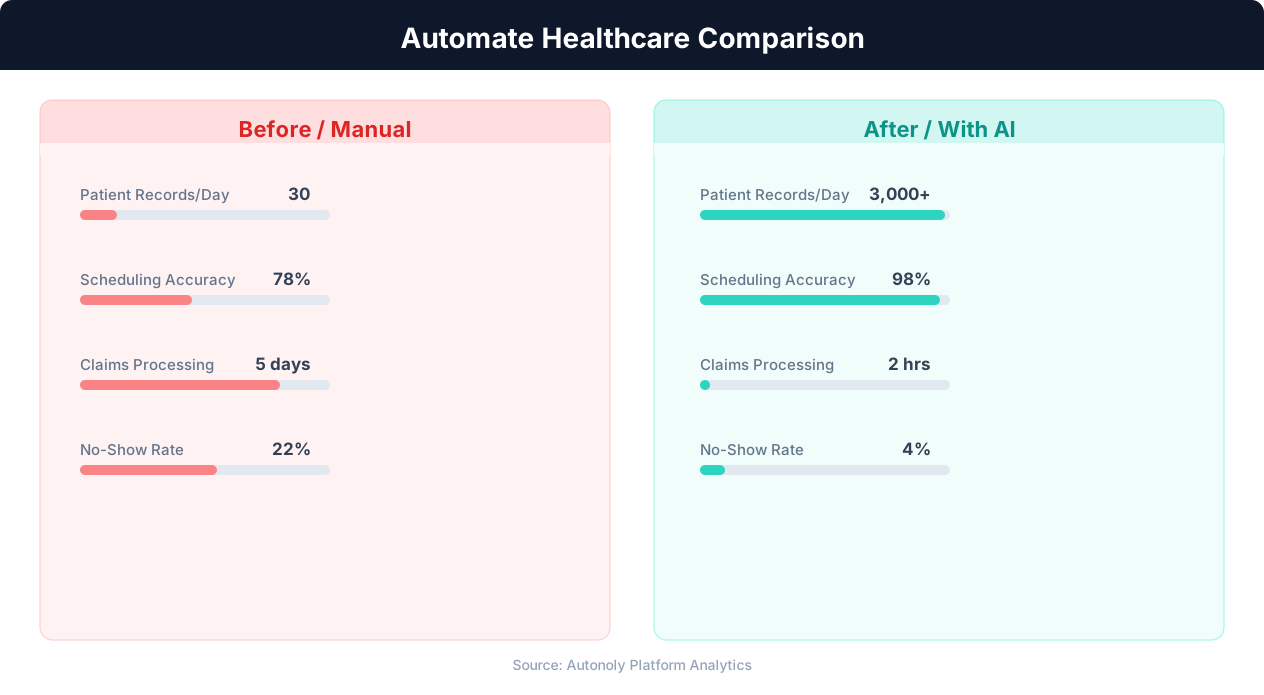
Patient wait time reduction with automated scheduling
Key Insight: Automated appointment scheduling reduces no-show rates by 38% through timely reminders and easy rescheduling options (MGMA Research).
Scheduling and Automation
The claims processing workflow runs daily to capture new encounters and update claim statuses. Morning runs ensure any encounters entered the previous day are processed into claims promptly. The Visual Workflow Builder lets you configure the exact schedule. Weekly aging report runs provide a regular cadence for reviewing outstanding claims. Monthly revenue cycle reports give practice owners and administrators the financial visibility they need for planning and performance monitoring.
Each run is fully autonomous — the agent reads the spreadsheet, processes new data, updates statuses, generates reports, and sends notifications without manual intervention. Use Logic & Flow conditions to alert on denials, flag aging claims, and calculate patient balances. Check pricing to see how many automated runs are included in your plan.
Further Reading
Explore more about the tools and techniques used in this workflow: Automate Data Entry, No Code Automation Guide.