The Recruiting Bottleneck: Why Manual Sourcing Does Not Scale
Recruiting teams face a fundamental scaling problem. Every open role requires sourcing dozens, sometimes hundreds, of potential candidates from multiple platforms. A single recruiter managing 15-20 open requisitions spends the majority of their week on repetitive sourcing tasks: searching LinkedIn, scrolling through job board databases, copying candidate information into spreadsheets, Understanding what automation is and how business process automation removes this repetitive sourcing load is the key to scaling recruiting. This includes manually cross-referencing profiles against job requirements.
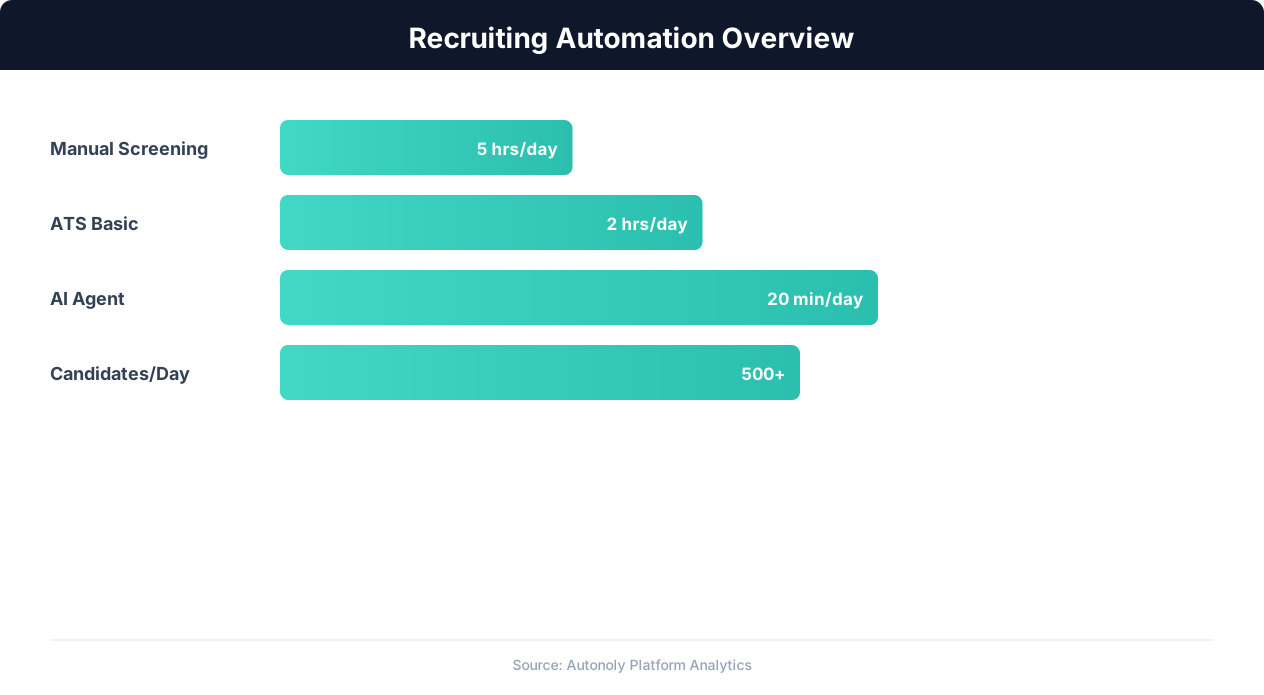
The math is unforgiving. If sourcing one qualified candidate takes 10-15 minutes of searching, reviewing, and data entry, building a pipeline of 50 candidates for a single role consumes 8-12 hours of focused work. Multiply that across all open roles, and sourcing alone can consume 60-70% of a recruiter's productive time, leaving precious little for the high-value activities that actually close hires: building relationships, conducting interviews, and selling candidates on the opportunity.
This is not a new problem, but it has intensified. The labor market has become more competitive, candidate expectations have risen, and the number of sourcing channels has proliferated. A decade ago, recruiters primarily used one or two job boards. Today, a thorough sourcing strategy spans LinkedIn, Indeed, Glassdoor, ZipRecruiter, GitHub (for technical roles), Dribbble (for designers), AngelList (for startup talent), industry-specific boards, and social media platforms. Each platform has its own interface, search logic, and data format.
Traditional approaches to this problem have significant limitations. Recruiting CRMs and ATS platforms offer some sourcing integrations, but they are typically limited to a handful of platforms and require expensive enterprise contracts. LinkedIn Recruiter provides powerful search within LinkedIn, but it does not help with other platforms, and its per-seat cost ($8,000-$10,000 per year) puts it out of reach for many teams. Manual browser extensions and bookmarklets offer marginal time savings but still require human-in-the-loop operation for every candidate.
The result is a recruiting industry that runs on brute-force manual labor for its most fundamental task. Recruiters burn out, time-to-fill metrics stretch, and qualified candidates slip through the cracks because no human can monitor every platform continuously. This is exactly the type of problem that automation was designed to solve: high-volume, repetitive, multi-platform work that follows consistent patterns but varies enough in detail to resist simple scripting.
Recruiting automation changes the equation. Instead of a recruiter manually searching each platform, an automated workflow handles the searching, data extraction, deduplication, and organization. The recruiter's role shifts from data collection to data evaluation, from searching to selecting, from copy-pasting to decision-making. The same recruiter who previously spent 60% of their time sourcing can now spend 60% of their time engaging with the best candidates.
What to Automate in the Recruiting Pipeline
Not every part of recruiting should be automated. The key is identifying which stages involve repetitive, rule-based work and which require genuine human judgment and relationship skills. Here is a breakdown of the recruiting pipeline with automation potential at each stage.
Candidate Sourcing (High Automation Potential)
Sourcing is the single highest-impact area for automation. The work is fundamentally repetitive: search for profiles matching specific criteria, extract relevant information, and compile it into a structured list. An automated workflow can search LinkedIn for software engineers with 5+ years of Python experience in the Bay Area, extract their name, title, company, location, and profile URL, and deposit that data into a spreadsheet or ATS, all without a human touching the keyboard. The same workflow can run across Indeed, Glassdoor, and GitHub simultaneously, deduplicating candidates who appear on multiple platforms.
Resume Screening and Scoring (Medium-High Automation Potential)
Once candidates are sourced or have applied, screening resumes against job requirements is another repetitive task. Automated workflows can parse resumes, extract key qualifications (years of experience, specific skills, education, certifications), and score candidates against a rubric you define. A candidate with 7 years of Python, a CS degree, and AWS certification might score 92/100 for a senior backend role, while one with 2 years of JavaScript and no cloud experience might score 35/100. The recruiter reviews the ranked list rather than reading every resume from scratch.
Outreach Sequencing (Medium Automation Potential)
Initial outreach messages can be templated and personalized at scale. Automation tools can send connection requests or InMail messages on LinkedIn, personalized emails through your email system, or messages through job board platforms. The personalization can pull from candidate data: mentioning their current company, a recent project, or a shared connection. However, the messaging strategy and templates themselves should be crafted by a human recruiter who understands tone and positioning.
Interview Scheduling (High Automation Potential)
Coordinating interview times across candidates, hiring managers, and panel members is pure logistics with no judgment required. Automated scheduling tools can check calendar availability, propose time slots to candidates, handle rescheduling requests, send confirmation emails with video call links, and add events to all participants' calendars. This alone saves recruiters 3-5 hours per week.
Reference and Background Checks (Medium Automation Potential)
Sending reference check forms, following up on incomplete responses, and compiling results into a summary report are all automatable. The actual evaluation of references (reading between the lines of what a reference says and does not say) still requires human judgment.
Offer Letter and Onboarding (Medium Automation Potential)
Generating offer letters from templates, routing them for approval, sending them for e-signature, triggering onboarding workflows upon acceptance (IT provisioning, badge creation, orientation scheduling) are all highly automatable processes that many organizations still handle manually or through disconnected tools. Our guide to automating employee onboarding across HR systems picks up exactly where recruiting leaves off.
The pattern is clear: automate the data work, keep humans on the judgment work. Searching, extracting, organizing, scheduling, and routing are for machines. Evaluating culture fit, selling the opportunity, negotiating compensation, and making final hiring decisions are for humans.
Automating LinkedIn Candidate Sourcing Step by Step
LinkedIn is the primary sourcing platform for most recruiters, with over 900 million members and the richest professional profile data available. Automating LinkedIn sourcing requires a thoughtful approach that balances efficiency with platform compliance and data quality.
Defining Your Search Criteria
Before building any automation, crystallize exactly what you are looking for. Vague criteria produce noisy results that waste time downstream. Strong search criteria include: target job titles (current and adjacent, since people hold different titles for similar roles), required skills, years of experience range, geographic location or willingness to relocate, industry background, company size and type (startup vs. enterprise), and education requirements if relevant. The more specific your criteria, the higher quality your automated results will be.
Building the Search Workflow
An automated LinkedIn sourcing workflow typically follows this sequence. First, the automation navigates to LinkedIn's search interface and enters your search parameters. LinkedIn Sales Navigator or Recruiter provides more granular filtering, but even basic LinkedIn search supports useful filters for title, location, company, and industry. The automation applies each filter methodically, just as a human recruiter would.
Second, the workflow processes search results page by page. For each candidate in the results, it extracts the visible profile information: name, headline, current company, location, and profile URL. Depending on the level of detail needed, the workflow can click into each profile to extract additional information such as full work history, education, skills endorsements, and activity (posts, articles, comments). This deeper extraction takes more time but produces significantly richer candidate profiles.
Third, the extracted data is structured and exported. Each candidate becomes a row in your spreadsheet or a record in your ATS, with consistent column formatting regardless of how the data appeared on LinkedIn. Names are split into first and last, locations are standardized, and job titles are normalized so that "Sr. Software Engineer," "Senior Software Dev," and "Senior SWE" all map to the same role category.
Handling LinkedIn's Limitations
LinkedIn limits the number of search results visible to free accounts (roughly 100 per search) and imposes rate limits on profile views. Effective automation strategies account for these constraints. Break broad searches into narrower, overlapping segments: instead of searching for "software engineer in the US," search for "software engineer in San Francisco," then "software engineer in New York," and so on. Each narrower search produces results within the visible limit, and deduplication catches any overlap.
Pace your automation to mimic human browsing patterns. A recruiter does not view 200 profiles in 10 minutes. Building in natural delays between profile views (15-30 seconds) and session breaks keeps your activity within normal usage patterns. Running sourcing automation during business hours rather than at 3 AM also helps maintain a natural pattern.
Enriching LinkedIn Data
LinkedIn profiles often lack direct contact information. Enrichment adds email addresses, phone numbers, and additional data points. Automated workflows can cross-reference LinkedIn profiles with business email databases, company websites (checking the team or about page), GitHub profiles (which often include email addresses), personal websites linked from LinkedIn, and professional directories. This enrichment step transforms a list of LinkedIn profiles into an actionable outreach list with verified contact channels.
A ready-made workflow to automate LinkedIn profile scraping handles this search-and-extract sequence, and our deep dive on how to scrape LinkedIn data covers the techniques in more detail. The result of a well-built LinkedIn sourcing automation is a structured, enriched candidate pipeline built in minutes rather than hours, with every candidate meeting your specified criteria and ready for recruiter review and outreach.
Scaling Beyond LinkedIn: Multi-Platform Sourcing Automation
LinkedIn is essential, but limiting yourself to a single platform means missing candidates who are active elsewhere. A comprehensive sourcing strategy automates across multiple platforms simultaneously, capturing candidates from different professional communities and reducing dependence on any single data source.
Indeed and Job Board Resume Databases
Indeed's resume database contains hundreds of millions of resumes from job seekers who have actively uploaded their information. Unlike LinkedIn, where many profiles belong to passive candidates who are not actively looking, Indeed's resume database skews toward active job seekers. Automating Indeed resume search follows a similar pattern to LinkedIn: define search criteria, process results, extract candidate data. Indeed's search filters include job title, location, experience level, salary expectations, and education. The automation navigates the search interface, applies filters, and extracts candidate summaries including their most recent job title, employer, location, years of experience, and key skills. A related workflow that pulls Indeed job postings into a spreadsheet with Slack alerts shows the same pattern applied to job-posting monitoring.
Indeed also provides valuable signal that LinkedIn does not: salary expectations. Many Indeed candidates include their desired salary range, which helps recruiters quickly filter for budget alignment before investing time in outreach.
GitHub for Technical Roles
For engineering roles, GitHub profiles reveal capabilities that no resume or LinkedIn profile can match. Automated sourcing on GitHub involves searching for users by location, programming language, and contribution activity. The automation can evaluate repository quality (star counts, fork counts, contribution frequency), identify candidates who actively contribute to relevant open-source projects, and extract contact information from profile pages. A candidate with 500+ contributions in the past year to Kubernetes-related projects tells you far more about their infrastructure engineering skills than any resume bullet point.
Specialized Platforms
Different roles require sourcing from different platforms. For designers, Dribbble and Behance showcase portfolios that demonstrate actual skill. For data scientists, Kaggle competition rankings and notebook contributions are powerful signals. For startup-oriented talent, Wellfound (formerly AngelList) provides profiles specifically oriented toward startup roles, including equity expectations and preferred company stages. Each of these platforms can be automated following the same search-extract-structure pattern.
Deduplication Across Platforms
When sourcing from multiple platforms, the same candidate inevitably appears on several of them. Automated deduplication prevents wasting recruiter time reviewing the same person twice and avoids the embarrassment of sending duplicate outreach. Effective deduplication uses multiple matching criteria: name + company is the primary match, supplemented by email address, LinkedIn URL, or other unique identifiers. Fuzzy matching handles name variations ("Robert" vs. "Rob," "Smith-Jones" vs. "Smith Jones") and company name differences ("Google" vs. "Alphabet" vs. "Google LLC").
Unified Candidate View
The ultimate output of multi-platform sourcing automation is a unified candidate database where each person has a single merged record containing data from all platforms where they appeared. A candidate might have their professional summary from LinkedIn, portfolio link from Dribbble, salary expectation from Indeed, and GitHub activity level all in one view. This composite profile gives recruiters a richer picture than any single platform provides and enables more informed outreach that references the candidate's specific strengths and interests.
Building this multi-platform sourcing pipeline manually would be impossibly time-consuming. With automation, it runs on a schedule, continuously refreshing your talent pipeline with candidates who match your active requirements. The recruiter's inbox fills with pre-qualified, deduplicated, enriched candidate profiles every morning instead of empty search bars waiting for manual work.
Automated Screening: Scoring and Ranking Candidates with Workflows
Sourcing produces volume. Screening produces quality. Without automated screening, the volume advantage of automated sourcing actually creates a new problem: too many candidates to evaluate manually. The solution is building scoring workflows that rank candidates against your specific requirements, surfacing the best matches at the top of the list. A prebuilt resume screening pipeline applies a consistent rubric to every applicant automatically.
Building a Scoring Rubric
An effective scoring rubric translates your job requirements into weighted, measurable criteria. For a senior backend engineering role, the rubric might look like this: years of relevant experience (0-25 points, with 10+ years earning maximum), required programming languages proficiency (0-20 points, based on skills listed and verified through GitHub or portfolio), industry experience relevance (0-15 points), education level (0-10 points), leadership or mentoring experience (0-15 points), and location or remote alignment (0-15 points). Each criterion has clear scoring rules that an automation can apply consistently across every candidate.
The critical advantage of automated scoring is consistency. Human reviewers suffer from fatigue effects (the 50th resume of the day gets less attention than the first), anchoring bias (a strong candidate early in the stack sets an unconscious benchmark), and similarity bias (favoring candidates who resemble the reviewer). An automated scoring workflow applies the same rubric to the first candidate and the five-hundredth candidate with identical rigor.
Data-Driven Scoring
Automated workflows can extract and score data that would take a human considerable time to evaluate. Years of experience can be calculated from work history dates rather than relying on the candidate's self-reported summary. Skill proficiency can be inferred from how frequently and recently a skill appears in job descriptions, project descriptions, and endorsements. Career trajectory (advancing titles over time vs. lateral moves) can be algorithmically assessed. Even cultural signals like volunteer work, side projects, and thought leadership (articles, talks, open-source contributions) can be factored into a comprehensive score.
Handling Incomplete Data
Real candidate data is messy. Some profiles are sparse, with a name, current title, and nothing else. Others are exhaustively detailed. Your scoring workflow needs rules for handling gaps. One approach is to score only on available data and normalize: if a candidate is missing education information, score them on the remaining criteria and scale proportionally. Another approach is to assign a neutral midpoint score for missing data, ensuring that candidates with incomplete profiles are neither penalized nor rewarded for the gap. The best approach depends on your hiring philosophy and the importance of each criterion.
Tiered Output for Recruiter Review
Rather than presenting recruiters with a flat ranked list, the most effective scoring workflows produce tiered outputs. Tier 1 (score 80-100) candidates are strong matches who should be contacted immediately. Tier 2 (score 60-79) candidates are worth reviewing and may be strong fits depending on nuances the automation cannot assess (personality, communication style, specific project experience). Tier 3 (score 40-59) candidates are marginal matches to revisit if Tier 1 and 2 pipelines dry up. Below 40, candidates are typically not worth recruiter time for this specific role, though they might be excellent fits for other open positions.
This tiered approach transforms the recruiter's task from "review 200 candidates" to "contact these 15 Tier 1 candidates, review these 30 Tier 2 profiles when you have time, and ignore the rest." The time savings compound: recruiters spend their hours on candidates most likely to convert, improving both efficiency and hiring outcomes.
Continuous Refinement
The scoring rubric should evolve based on hiring outcomes. Track which score ranges produce the most successful hires (candidates who accept offers, pass probation, and perform well). If Tier 2 candidates consistently outperform Tier 1 candidates, your rubric needs adjustment. Automated workflows make this feedback loop practical because changing the scoring weights and re-running the workflow across your entire candidate database takes minutes, not weeks of re-evaluation.
Personalized Outreach at Scale: Templates, Sequences, and Timing
Sourcing and screening identify who to contact. Outreach automation determines how and when to reach them. The challenge is maintaining personalization quality at volume. Candidates can spot generic mass outreach from a mile away, and response rates on templated messages continue to decline as more recruiters adopt basic automation tools. The solution is structured personalization: templates with dynamic fields that pull real data from candidate profiles.
Building Effective Outreach Templates
A strong recruiting outreach message has three components: a personalized hook that demonstrates you actually looked at the candidate's profile, a concise value proposition for the role, and a clear low-friction call to action. The personalized hook is where automation provides leverage. Instead of writing "I noticed your impressive background," the automation pulls specific data points: "Your work on the payments infrastructure at Stripe, particularly the migration to event-driven architecture you described in your recent talk, caught our attention." This level of specificity requires data that your sourcing workflow has already collected.
Effective templates use merge fields that pull from your candidate database: {first_name}, {current_company}, {recent_project}, {mutual_connection}, {relevant_skill}. The automation populates these fields for each candidate, producing messages that read as individually written while being generated at scale. The key is having rich enough candidate data to populate meaningful merge fields. Generic fields like name and company produce generic-feeling messages. Specific fields like recent projects, published articles, or notable achievements produce messages that feel genuinely personal.
Multi-Channel Sequences
Top candidates receive dozens of recruiting messages weekly. Standing out requires a multi-touch, multi-channel approach. An effective outreach sequence might look like this: Day 1, send a personalized LinkedIn connection request with a brief note mentioning a specific aspect of their profile. Day 3, if the connection is accepted, send a LinkedIn message with the role details and value proposition. Day 5, send an email to their professional email address (obtained during enrichment) through Gmail with additional context and a link to learn more. Day 10, if no response, send a brief follow-up message on whichever channel they are most active on. Day 20, send a final touchpoint that adds new value (a relevant article, company news, or team update) rather than just asking for a response again.
Automation handles the timing, channel selection, and message personalization for each step. The recruiter defines the sequence once, and a workflow to automate LinkedIn message sequences executes it across hundreds of candidates simultaneously, pausing automatically when a candidate responds (to prevent awkward follow-ups after a conversation has started).
Timing Optimization
When you send a message matters almost as much as what the message says. Analysis of millions of recruiting messages shows that LinkedIn messages sent Tuesday through Thursday between 8-10 AM in the candidate's local time zone have the highest response rates. Email outreach performs best mid-morning on weekdays. Messages sent on weekends or late evenings have significantly lower response rates and can create a negative impression of your company's work culture.
Automated outreach workflows can schedule messages based on the candidate's time zone (inferred from their location data) and optimal send times. This is virtually impossible to do manually when managing outreach to candidates across multiple time zones, but trivial for an automation to handle.
Response Handling and Routing
When candidates respond, the automation should route the response to the appropriate recruiter with full context: the candidate's profile, which message they responded to, their score from the screening workflow, and any notes from the sourcing stage. This context transfer ensures the recruiter can pick up the conversation seamlessly without asking the candidate to repeat information or losing the personalization thread that prompted the response in the first place.
Negative responses (not interested, wrong timing, different role preference) should also be captured and categorized. A candidate who says "not now but maybe in 6 months" goes into a nurture queue with a future follow-up date. A candidate who specifies interest in a different role type gets tagged for future matching. This systematic handling of responses turns even rejections into future pipeline value.
Tools and Platforms for Recruiting Automation
The recruiting automation ecosystem includes both specialized recruiting tools and general-purpose automation platforms. Understanding the landscape helps you choose the right combination for your team's needs and budget.
Specialized Recruiting Automation Tools
LinkedIn Recruiter and Sales Navigator: LinkedIn's own premium tools provide advanced search filters, InMail messaging, and candidate tracking within the LinkedIn ecosystem. Recruiter costs $8,000-$10,000 per seat per year, while Sales Navigator runs $800-$1,600 per year. They are powerful within LinkedIn but do not help with sourcing from other platforms, and their automation capabilities are limited to what LinkedIn chooses to expose.
Gem: A recruiting CRM that integrates with LinkedIn and ATS platforms to provide sourcing automation, outreach sequencing, and candidate relationship management. Gem's strength is its tight LinkedIn integration and analytics. Pricing is enterprise-focused, typically starting around $5,000-$10,000 per year.
hireEZ (formerly Hiretual): An AI-powered sourcing platform that searches across 45+ platforms including LinkedIn, GitHub, and job boards. It provides candidate enrichment, outreach automation, and diversity analytics. Pricing starts around $3,000-$5,000 per year per user.
💡 Key Insight
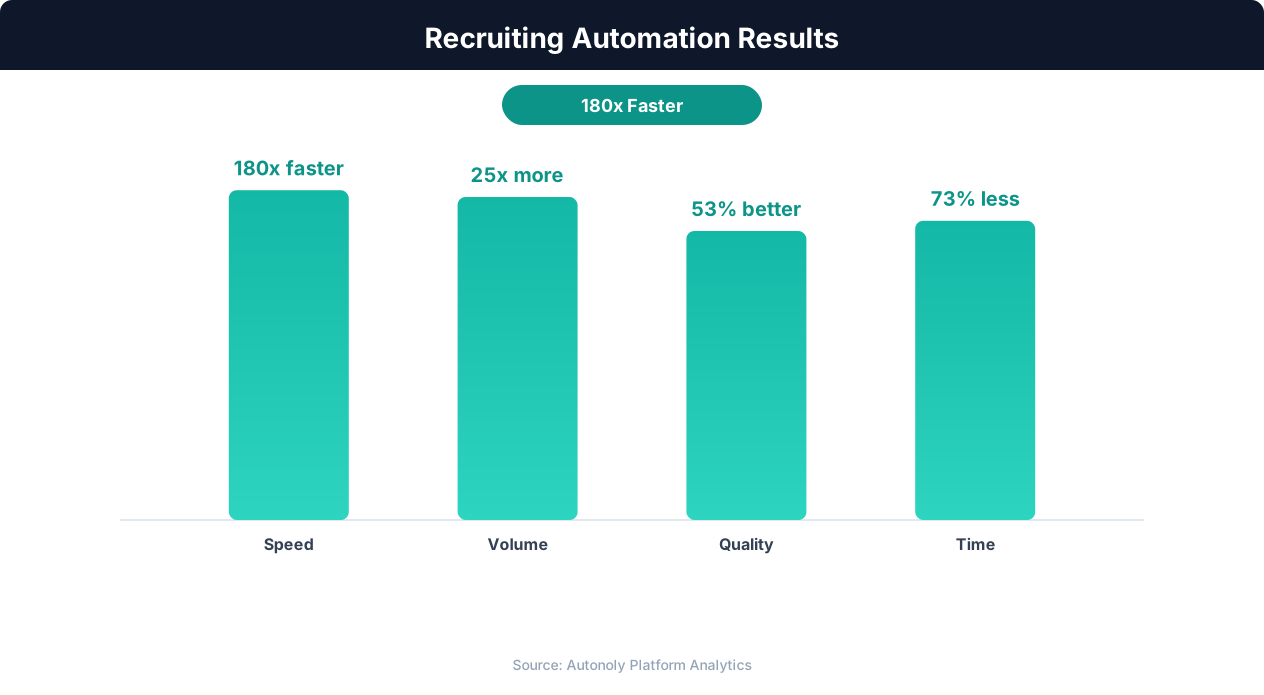
Recruiting automation reduces time-to-fill by 50%, from an average of 42 days to 21 days.
General-Purpose Automation Platforms
Autonoly: A general-purpose automation platform with AI agent capabilities and live browser control that can automate recruiting workflows across any platform. Unlike specialized tools that only work with platforms they have built integrations for, Autonoly's browser automation can interact with any website. This makes it particularly valuable for sourcing from niche platforms, smaller job boards, and industry-specific sites that specialized tools do not support. You describe the sourcing task in plain English, and the AI agent builds the workflow.
Zapier and Make: Integration platforms that connect recruiting tools together. They excel at moving data between your ATS, email, calendar, and other tools but lack the browser automation needed for sourcing from websites that do not have APIs. Useful for the workflow orchestration layer (when a candidate is added to the ATS, automatically schedule an email sequence) but not for the sourcing layer itself.
Applicant Tracking Systems with Automation
Greenhouse, Lever, and Ashby: Modern ATS platforms include some automation features: automated interview scheduling, template-based outreach, and workflow triggers. They are the system of record for your hiring process but typically weak on the sourcing side. Most teams use a dedicated sourcing tool that feeds candidates into their ATS.
Building Your Stack
The optimal recruiting automation stack depends on your team size, budget, and sourcing needs. A small team (1-3 recruiters) might use Autonoly for multi-platform sourcing, a lightweight ATS like Ashby for candidate tracking, and Google Sheets as an intermediate data store. A mid-size team (4-10 recruiters) might add LinkedIn Recruiter for deep LinkedIn sourcing and a tool like Gem for outreach sequencing. An enterprise team layers in dedicated enrichment services, analytics platforms, and compliance tools.
The common mistake is over-investing in tools before establishing processes. Start with one platform sourcing automation, prove the workflow works, then expand to additional platforms and tools. Each new tool should solve a specific bottleneck you have identified through actual usage, not a theoretical gap you anticipate.
Compliance, Ethics, and Candidate Experience
Recruiting automation operates in a space with significant legal, ethical, and reputational considerations. Moving fast with automation is valuable, but moving carelessly can create serious problems. Understanding the boundaries ensures your automation helps rather than harms your recruiting function.
Legal Compliance
Data privacy regulations directly impact recruiting automation. GDPR (in the EU and UK) requires a legal basis for processing candidate personal data, limits how long you can store it, and gives candidates the right to request deletion. The California Consumer Privacy Act (CCPA) provides similar protections for California residents. Illinois' Biometric Information Privacy Act (BIPA) restricts automated analysis of video interviews. New York City's Local Law 144 requires bias audits for automated employment decision tools.
Practically, this means your automated workflows must include data retention policies (automatically purging candidate data after a defined period if no hiring relationship exists), opt-out mechanisms (candidates can request removal from your sourcing database), and documentation of your automated processes for regulatory review. If you are sourcing candidates in the EU, ensure your data processing has a legitimate basis (typically "legitimate interest" for direct sourcing, but this requires a documented balancing test).
Platform Terms of Service
Most platforms, including LinkedIn, explicitly restrict automated access in their terms of service. LinkedIn's User Agreement prohibits scraping, automated data collection, and use of bots. While enforcement varies and the legal landscape around web scraping continues to evolve (the hiQ v. LinkedIn case established some rights to access public data), operating within platform guidelines is the safest approach. This means using official APIs where available, maintaining reasonable access patterns that mimic human behavior, and avoiding aggressive data collection that could trigger account restrictions.
Bias in Automated Screening
Automated scoring and screening workflows can inadvertently encode and amplify biases present in their design criteria. If your scoring rubric heavily weights degree prestige, you are systematically disadvantaging candidates from underrepresented backgrounds who are less likely to have attended elite institutions. If you filter by years of experience, you are potentially creating age discrimination issues. If you use name-based matching for deduplication without accounting for naming conventions across cultures, you may be creating data quality issues that disproportionately affect certain candidate populations.
Mitigating bias requires deliberate rubric design. Review each scoring criterion for potential adverse impact. Test your scoring workflow against a diverse candidate set and check for statistically significant differences in scores across demographic groups. Some jurisdictions now require formal bias audits for automated hiring tools, and this regulatory trend is expanding.
Candidate Experience
Automation should improve the candidate experience, not degrade it. Candidates who receive obviously automated messages with broken merge fields, irrelevant role suggestions, or aggressive follow-up sequences form negative impressions of your employer brand. Every automated touchpoint should pass the "would I want to receive this?" test. Messages should be relevant (only contact candidates who genuinely match the role), respectful (honor opt-outs immediately, do not message the same candidate for the same role repeatedly), and professional (proofread templates, test merge fields, ensure messages render correctly across devices).
The best recruiting automation is invisible to the candidate. They experience what feels like personal attention from a recruiter who has done their homework, responds promptly, and respects their time. The automation happens behind the scenes, enabling that quality experience at a scale that would be impossible manually.
Building a Complete Recruiting Automation Workflow
Let us put everything together into a concrete, end-to-end recruiting automation workflow that you can implement. This workflow covers sourcing through initial outreach for a typical mid-market hiring scenario.
Workflow Overview
The workflow has five stages: (1) multi-platform search and extraction, (2) deduplication and enrichment, (3) scoring and tiering, (4) outreach sequence execution, and (5) response routing and tracking. Each stage feeds into the next, creating a pipeline that transforms search criteria into engaged candidates with minimal manual intervention.
Stage 1: Search and Extraction
Configure your automation with the role's search criteria: target titles, required skills, location, experience range, and any other filters. The workflow runs searches across your selected platforms, typically LinkedIn, Indeed, and one or two specialty platforms relevant to the role. For each search result, the workflow extracts the candidate's core data: name, current title, current company, location, profile URL, and a summary of their experience. This raw data is deposited into a staging table or spreadsheet tab labeled "Raw Candidates."
For a typical search, expect 100-300 raw candidates per platform. The workflow runs at a pace that respects platform rate limits, typically completing a full multi-platform search in 30-60 minutes. You can schedule this to run overnight or during off-hours so results are waiting when the recruiting team starts their day.
Stage 2: Deduplication and Enrichment
The deduplication step compares candidates across platforms using name, company, and location matching with fuzzy logic to handle variations. Duplicates are merged into a single record, preserving the richest data from each source. A candidate found on both LinkedIn and GitHub gets their LinkedIn professional summary merged with their GitHub activity data.
💡 Key Insight
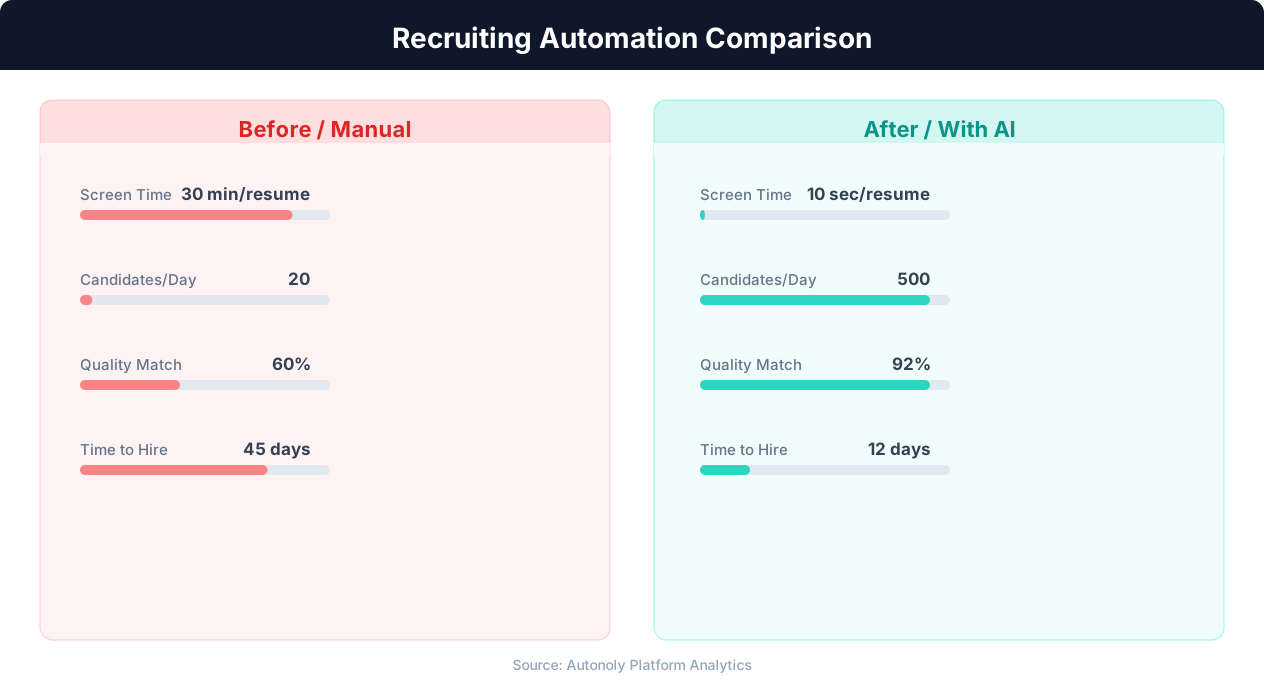
Automated candidate screening processes 500+ applications per hour with 92% accuracy in matching job criteria.
Enrichment adds contact information and additional data points. The workflow checks business email databases, looks for personal websites and portfolios linked from profiles, and extracts any publicly available contact information. The enriched, deduplicated data moves to a "Clean Candidates" table with standardized fields.
Stage 3: Scoring and Tiering
Each candidate in the clean table is scored against the role's rubric. The workflow evaluates each criterion, calculates a weighted total score, and assigns a tier. Tier 1 candidates (top 10-15%) are flagged for immediate outreach. Tier 2 candidates (next 20-25%) are queued for secondary review. The scored and tiered list is the primary working view for the recruiter.
Stage 4: Outreach Execution
For Tier 1 candidates, the outreach sequence begins automatically (or waits for recruiter approval, depending on your preference). The workflow sends personalized messages using templates populated with candidate-specific data. Each message is sent at the optimal time for the candidate's time zone. Follow-up messages are queued at defined intervals, with automatic pausing when a candidate responds.
Stage 5: Response Routing
Responses are detected and routed to the assigned recruiter with full candidate context: their profile data, score, tier, and the specific message they responded to. Positive responses trigger an interview scheduling workflow. Neutral responses (asking for more information) trigger a detailed follow-up. Negative responses are categorized and the candidate is removed from the active sequence.
Maintenance and Optimization
Review workflow performance weekly during the first month. Check sourcing quality (are the extracted profiles relevant?), scoring accuracy (do Tier 1 candidates actually get interviews at a higher rate?), and outreach effectiveness (what are the response rates by channel and message variant?). Adjust search criteria, scoring weights, and outreach templates based on these metrics. After the initial tuning period, the workflow typically stabilizes and requires only periodic adjustment as roles and requirements change.
Measuring Success: Recruiting Automation Metrics and ROI
Recruiting automation is an investment of time, money, and organizational change. Measuring its impact rigorously ensures you optimize the right workflows, justify continued investment, and identify when something is not working. Here are the metrics that matter and how to calculate ROI.
Efficiency Metrics
Time-to-source: The elapsed time from opening a requisition to having a qualified candidate pipeline. Without automation, this typically ranges from 5-15 business days depending on role complexity. With sourcing automation, expect 1-2 days for common roles and 3-5 days for highly specialized positions. Track this metric per role and per platform to identify which sourcing channels produce the fastest results.
Candidates sourced per hour: A recruiter manually sourcing on LinkedIn typically reviews and records 8-12 candidates per hour. Automated sourcing workflows produce 50-200 structured candidate records per hour depending on the depth of data extraction. This 10-20x improvement in sourcing throughput is the most dramatic efficiency gain from automation.
Recruiter time allocation: Track how recruiters spend their time before and after automation. The goal is shifting time from sourcing and administrative tasks (target: reduce from 60% to 20% of time) toward candidate engagement and closing (target: increase from 20% to 50% of time). Use time-tracking data or recruiter self-reports to measure this shift.
Quality Metrics
Source-to-screen ratio: Of candidates sourced by the automation, what percentage makes it past recruiter review to the phone screen stage? A healthy ratio is 15-25%. Below 10% suggests your search criteria or scoring rubric needs refinement. Above 30% suggests you might be too conservative and could broaden your search to find additional qualified candidates.
Screen-to-interview ratio: Of candidates who pass the phone screen, what percentage advances to a full interview? This measures whether your automated screening is surfacing candidates who genuinely match the role. Expect 40-60% for well-tuned scoring rubrics.
Outreach response rate: What percentage of automated outreach messages receive a response? Industry benchmarks for cold recruiting outreach are 15-25% for LinkedIn InMail, 10-20% for email, and 5-10% for LinkedIn connection requests with notes. If your automated outreach consistently falls below these benchmarks, review your personalization quality and targeting accuracy.
Outcome Metrics
Time-to-fill: The total elapsed time from opening a requisition to an accepted offer. This is the ultimate measure of recruiting effectiveness. Automation typically reduces time-to-fill by 25-40% by compressing the sourcing phase and enabling parallel outreach to more candidates simultaneously.
Cost-per-hire: Total recruiting costs (tools, recruiter time, job board postings, agency fees) divided by hires made. Automation reduces cost-per-hire primarily by reducing recruiter hours per hire and by reducing dependence on expensive external recruiting agencies. Teams that previously relied on agencies for 30-40% of hires often reduce agency usage to 10-15% after implementing sourcing automation.
Calculating ROI
A straightforward ROI calculation: If a recruiter earning $80,000/year (with benefits, approximately $55/hour fully loaded) saves 15 hours per week through automation, that is $42,900 in annual time savings per recruiter. If the automation tools cost $10,000-$15,000 per year, the ROI is 3-4x on direct cost savings alone. Factor in the revenue impact of faster time-to-fill (roles generating revenue sooner) and the quality impact of reaching more candidates (better hires performing better), and the ROI expands further.
The organizations seeing the highest ROI are those with 5+ recruiters, 50+ open roles at any time, and high-volume hiring needs. But even a two-person recruiting team filling 20-30 roles per year sees meaningful time savings and quality improvements from automating their core sourcing workflow.