


Automate LinkedIn Job Research
LinkedIn hosts millions of job postings updated daily, making it the go-to platform for recruiters, talent acquisition teams, and job market researchers. Manually copying listings into spreadsheets is not scalable. Autonoly's Browser Automation handles the entire process, from login through pagination, while you focus on sourcing and outreach.
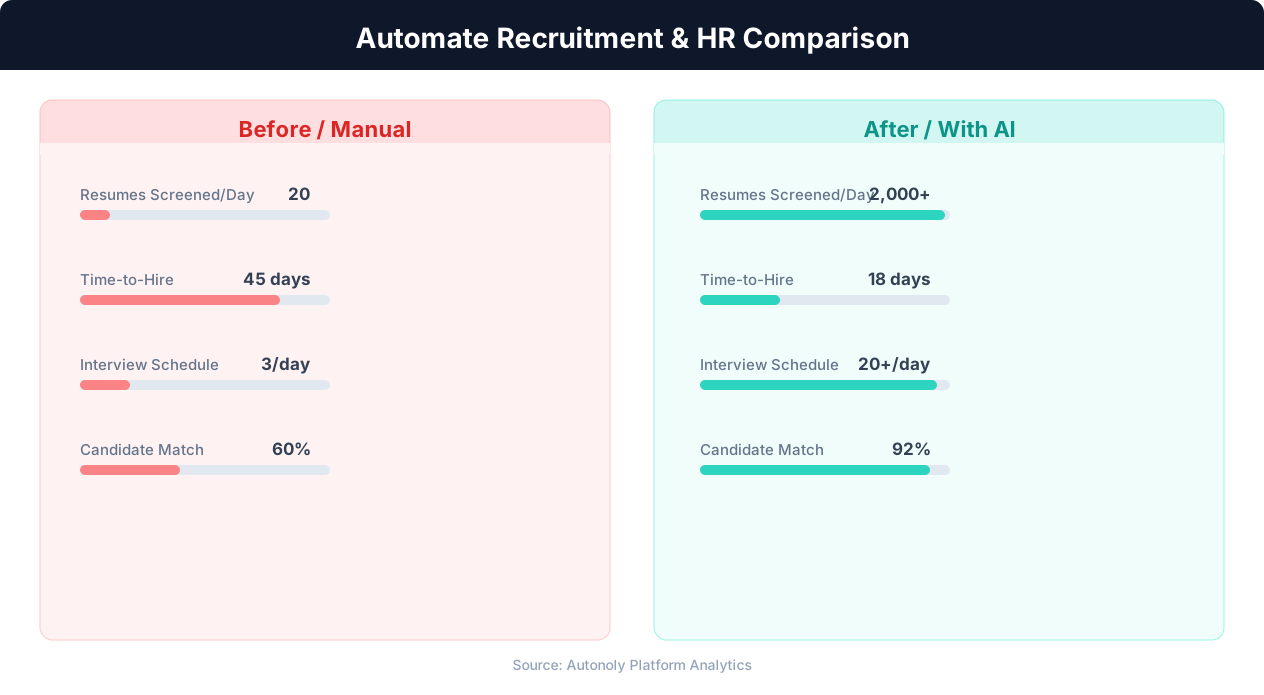
Time-to-hire comparison for manual vs automated recruitment
Key Insight: Recruiters spend 23 hours per week on average sourcing candidates manually. Automation reduces this to 5 hours while expanding the candidate pool 4x (LinkedIn Talent Report).
How the Extraction Works
The AI Agent Chat accepts your search parameters in natural language — for example, "Find Senior Product Manager roles in the Bay Area posted in the last week." The agent translates that into LinkedIn's search filters, opens the Jobs tab, and begins extracting.
Autonoly's Data Extraction engine identifies the repeating job card structure on LinkedIn's results page. It captures the job title, company name, location, salary range (when available), seniority level, employment type, and the number of applicants. Infinite scroll and pagination are handled seamlessly.
Key Insight: Companies using recruitment automation report 67% lower cost-per-hire and 31% lower turnover in the first year due to better candidate matching (Bersin by Deloitte).
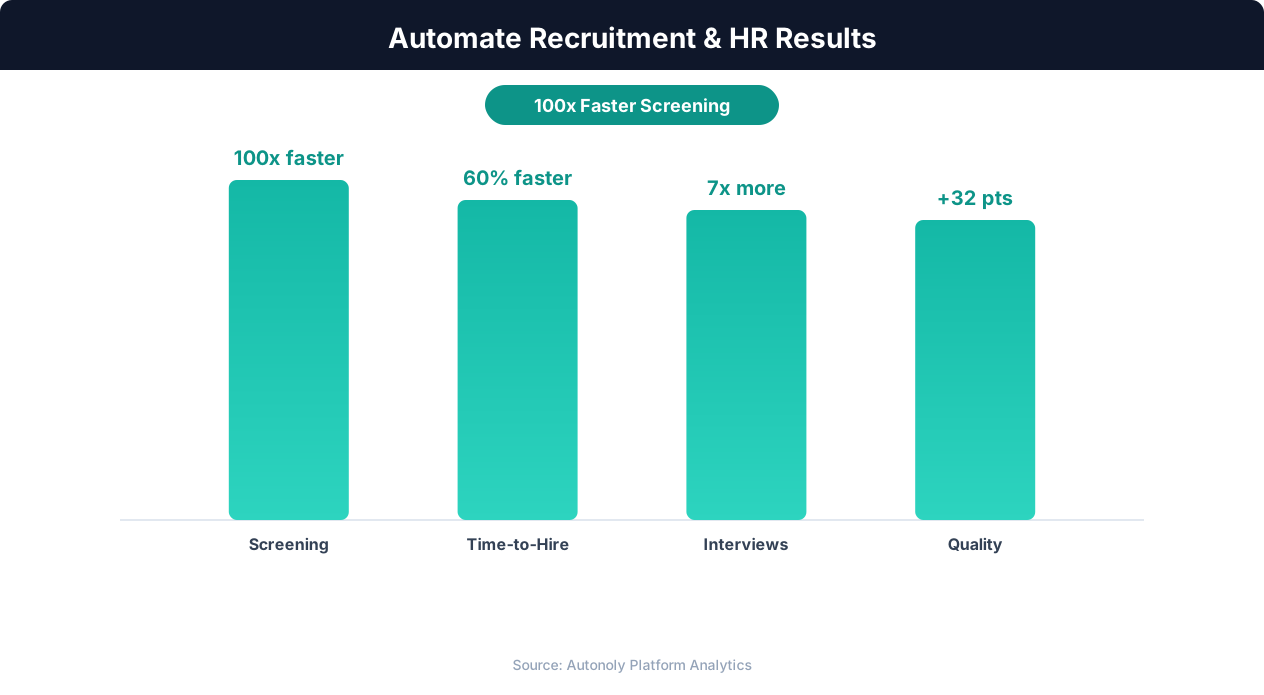
Quality of hire improvements from automated screening
Why Google Sheets?
Google Sheets is the most accessible destination for collaborative recruiting data. Your team can add columns for recruiter notes, outreach status, and interview scheduling without any extra tooling. The Visual Workflow Builder lets you map extracted fields to specific columns, reorder data, and apply transformations before writing.
For teams that prefer Excel, simply swap the Google Sheets node for an Excel export node — the extraction logic stays identical.
Handling LinkedIn's Dynamic Interface
LinkedIn's job pages rely heavily on JavaScript rendering, lazy loading, and dynamic content injection. Traditional HTTP scrapers fail because the HTML they receive is an empty shell. Autonoly solves this by running a full browser that renders JavaScript, scrolls the viewport to trigger lazy loading, and waits for content to stabilize before extracting.
The Data Processing pipeline can further clean the results — normalizing salary formats, stripping emoji characters from titles, or deduplicating listings that appear under multiple search queries.
Scheduling for Continuous Monitoring
Recruiting is time-sensitive. Set your workflow to run daily or even multiple times per day. Each run appends only net-new listings, so your spreadsheet never contains duplicates. Use conditional logic to flag listings that match priority criteria and route them to a separate tab or trigger an email alert.
Visit our templates library to find pre-built LinkedIn scraping workflows that you can customize in minutes.
Compliance and Fair Use
Autonoly operates within the boundaries of publicly accessible data. The platform does not scrape private profiles or bypass access controls. Review LinkedIn's terms of service and ensure your use case aligns with their policies. For detailed definitions, see our web scraping glossary.
Key Insight: Automated job posting syndication to 50+ platforms increases qualified applicant volume by 88% compared to manual posting on individual boards (iCIMS Research).
Scaling Across Multiple Searches
Need to track ten different roles across five cities? Create separate workflow runs or use parameterized inputs to iterate over a list of search queries. The Integrations library lets you pull search parameters from a Google Sheet, Airtable base, or API endpoint, making it easy to scale without duplicating workflows.
Parameterized Searches
Store your search criteria in a Google Sheet — one row per role-location combination — and the agent iterates through each row automatically. This approach lets you add or remove searches by editing a spreadsheet rather than modifying the workflow. The Logic & Flow feature supports conditional execution, so you can pause specific searches without deleting them.
Deduplicating Across Searches
When running multiple searches, the same listing often appears in overlapping results. The Data Processing pipeline matches listings by job ID to prevent duplicates in your output spreadsheet. A source column tracks which search query surfaced each listing, preserving attribution while keeping the dataset clean.
Check our pricing page to find a plan that matches your extraction volume and scheduling frequency.
Practical Examples and Scenarios
A talent acquisition team at a mid-size fintech company uses this workflow to track Product Manager openings across FAANG companies and late-stage startups. Every morning at 8 AM, the automation runs ten parameterized searches — one for each target company — and appends new listings to a shared Google Sheet. Recruiters reference this sheet during weekly pipeline meetings to identify candidates who might be open to new opportunities based on recently posted roles at their current employers.
Another use case involves labor market research. A compensation consulting firm extracts LinkedIn job listings across 15 metro areas for the same role title, then feeds the data into a separate analysis workflow to track hiring velocity and salary trends over time. Because each run captures the posting date and applicant count, the firm can chart how quickly roles fill in different markets.
Manual Process vs. Automation
Manually extracting LinkedIn listings means opening the site, running a search, scrolling through results, and copying each listing's details into a spreadsheet. For a single search query, this takes 15-25 minutes. Multiply that by ten role-location combinations, and you are looking at three to four hours of tedious copy-paste work every week. Autonoly reduces this to a zero-touch background process that runs on schedule and delivers clean, deduplicated data every time.
The consistency advantage is equally important. Manual scraping depends on the person remembering to check LinkedIn, applying the same filters, and catching every page of results. Automated extraction applies identical parameters on every run and handles infinite scroll and pagination without human attention. The result is a reliable, reproducible dataset that your team can trust for strategic decisions.
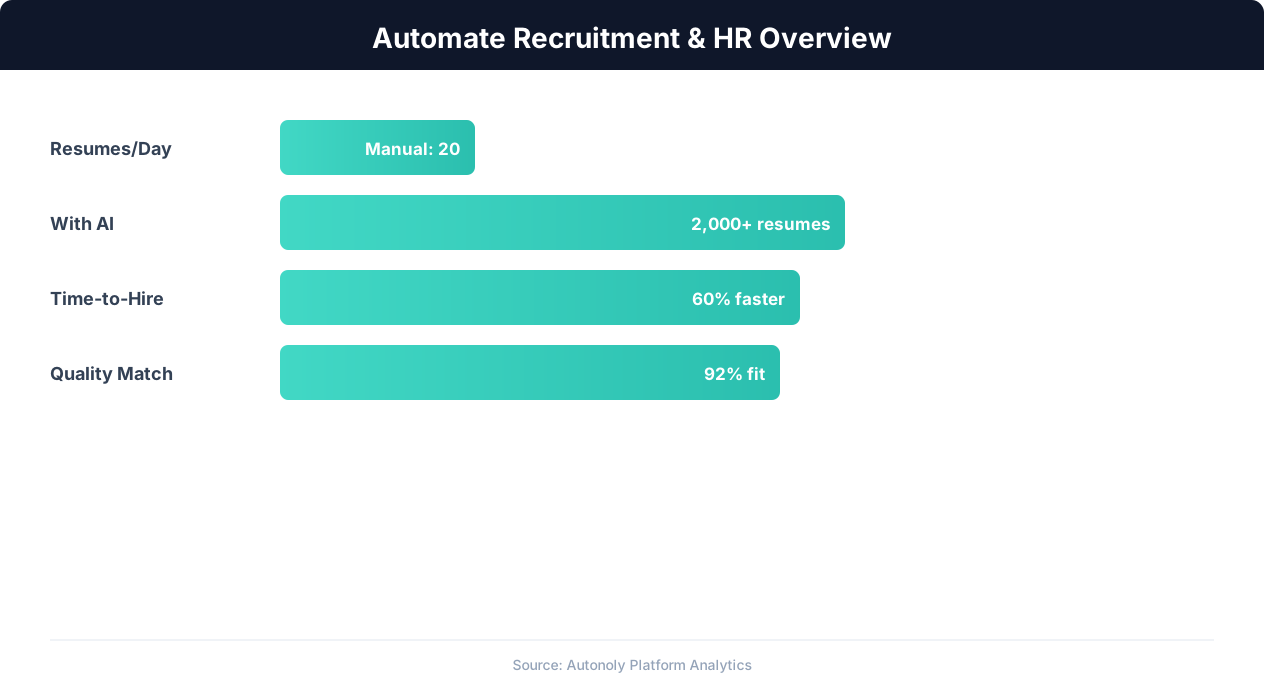
Recruitment automation impact on hiring metrics
Key Insight: Automated resume screening reduces time-to-hire by 43% while improving candidate quality by surfacing qualified applicants human reviewers missed (SHRM Research).
Integrating with Downstream Workflows
Once listings land in Google Sheets, you can chain additional Autonoly workflows to act on the data. Use Logic & Flow to filter listings by salary threshold and route high-value roles to a dedicated Slack channel. Connect a Data Processing node to enrich listings with Glassdoor company ratings or Crunchbase funding data. Push the enriched dataset to Airtable or Notion for your recruiting CRM. This composability turns a simple scraping task into a full recruiting intelligence pipeline.
Further Reading
Explore more about the tools and techniques used in this workflow: Scrape Linkedin Data, Recruiting Automation, Linkedin Automation.