

Why Automate Negative Feedback Escalation?
Negative customer feedback is time-sensitive in a way that few other business signals are — research summarized by Harvard Business Review shows that customers whose complaints are resolved quickly often become more loyal than those who never had a problem at all. A frustrated customer who emails about a bad experience is giving you one last chance to make things right before they leave a public negative review, switch to a competitor, or tell their network about their experience. The window for effective recovery is measured in hours, not days. Research from the Customer Experience Impact Report shows that customers who have their complaints resolved quickly are actually more loyal than customers who never had a problem in the first place — a phenomenon known as the "service recovery paradox." But this effect disappears entirely when the response takes too long, turning a recovery opportunity into a permanent loss.
Yet in most organizations, negative feedback sits in a shared inbox until someone happens to read it, recognize its urgency, and forward it to the right person. The detection problem is the core issue — a complaint email looks exactly like every other email in the inbox, and its urgency is invisible until a human reads it. During busy periods, holidays, or staffing gaps, critical complaints can sit for days before anyone with the authority to resolve them even becomes aware. By then, the customer has already left a one-star review on Google, posted about their experience on social media, and switched to a competitor. The damage is done and cannot be undone by a belated apology.
The financial impact of unaddressed negative feedback is substantial and measurable. A single negative review visible on Google or industry-specific review sites can reduce conversion rates by 22% according to Harvard Business School research. For businesses with high customer lifetime values — SaaS companies, professional services firms, B2B enterprises — a single churned customer can represent tens or hundreds of thousands of dollars in lost revenue over the relationship lifetime. The cost of detecting and routing a complaint five hours faster is trivial compared to the revenue protected by that speed.
Automating feedback escalation with Gmail and Slack integration ensures that negative feedback is detected and routed to decision-makers within minutes of arriving. The AI agent understands the difference between a minor complaint and a churn-level crisis, routing each to the appropriate team with the right level of urgency. This systematic detection eliminates the randomness of who happens to check the inbox when — every complaint gets seen, assessed, and routed regardless of time of day, staffing levels, or inbox volume.
This automation is the difference between losing a customer silently and having a chance to save the relationship. For companies where customer lifetime value is high, every recovered customer relationship directly impacts revenue. Teams that implement automated escalation typically recover 20-40% of customers who would have otherwise churned silently.
How the AI Agent Detects Negative Feedback
Autonoly's AI Agent Chat monitors your inbox through Browser Automation for emails containing negative sentiment signals. The Data Processing engine analyzes email content using multiple detection strategies:
Keyword Detection: Words and phrases like "disappointed," "unacceptable," "cancel my account," "worst experience," "demand a refund," and "speaking with my lawyer"
Sentiment Analysis: Overall tone assessment that catches negative emails even without explicit complaint keywords
Review Notifications: Alerts from Google Reviews, Trustpilot, G2, Yelp, or App Store review monitoring services
Escalation Indicators: Emails sent to executive addresses, CC'd to legal, or marked as urgent by the sender
Repeat Contact: Customers who have emailed multiple times about the same issue signal growing frustration
The agent does not just look for keywords — it understands context. "I love your product but this one feature is disappointing" is classified differently from "I'm deeply disappointed and considering alternatives."
Severity Assessment
Each piece of negative feedback is rated on a severity scale:
Low: Minor frustration, feature complaint, constructive criticism. Route to product feedback channel.
Medium: Significant dissatisfaction, repeated issues, explicit unhappiness. Route to support management.
High: Cancellation threat, refund demand, competitive switch mention. Route to retention team with urgency.
Critical: Public review threat, legal language, executive escalation, media mention. Route to leadership immediately.
The Logic & Flow engine applies your custom escalation rules on top of the agent's assessment. Enterprise customers might always escalate to high severity regardless of the content. Emails mentioning specific product lines might route to the relevant product team.
Slack Escalation Alerts
Each alert in Slack includes:
Customer name and email address
Severity level with a color-coded indicator
Brief content summary capturing the core complaint
Customer context (account tier, tenure, recent ticket history)
Recommended action (personal call, expedited refund, feature fix, executive response)
The Visual Workflow Builder lets you customize which channels receive which severity levels. Low severity goes to #product-feedback. Medium to #support-management. High to #retention. Critical to a DM group with the CEO and VP of Customer Success.
Enabling Fast Recovery
Speed of response is the strongest predictor of successful customer recovery. The automation ensures the right person knows about the issue within minutes, not hours or days. Include a direct reply link in the Slack notification so the assigned person can draft a response immediately.
The agent can also prepare a response draft by analyzing the customer's complaint and suggesting appropriate resolution options based on your company's recovery playbook. This gives the responder a head start.
What Data You Get
Every escalation is comprehensively logged to Google Sheets:
Customer Name and Email — Who submitted the complaint
Severity Level — Low, medium, high, or critical with the reasoning behind the assessment
Category — Product, service, billing, delivery, or other complaint type
Content Summary — A brief extraction of the core complaint
Customer Context — Account tier, tenure, lifetime value, and recent ticket history
Detection Timestamp — When the negative feedback was identified
Routed To — Which Slack channel or individual received the escalation
Recommended Action — Suggested resolution based on the complaint type and severity
Recovery Outcome — Updated after resolution: recovered, churned, partial resolution, or pending
Customizing Your Workflow
The Visual Workflow Builder lets you build sophisticated escalation workflows that match your organization's response protocols. Define custom severity criteria that account for your specific business context — a complaint about a core feature might always escalate to high severity, while a feature request complaint stays at low. Create customer-tier-based rules so that enterprise accounts with annual contracts above a certain value automatically escalate to the VP of Customer Success regardless of complaint severity.
Add automated response steps that acknowledge the customer's complaint while your team prepares a resolution. The agent can send a personalized email via Gmail within minutes of detection, letting the customer know their feedback was received, is being taken seriously, and that a specific person will follow up within a defined timeframe. This immediate acknowledgment often de-escalates frustration and buys your team time to prepare a thoughtful resolution.
Tracking Recovery Outcomes
Log every escalation to Google Sheets with the customer, severity, assigned responder, and eventual outcome (recovered, churned, partial resolution). Over time, this dataset reveals which types of complaints are most recoverable, which response strategies work best, and where your product or service is consistently falling short.
The Data Processing engine can generate monthly reports on feedback volume, severity distribution, recovery rates, and common complaint categories.
Integration Options
Connect feedback escalation with your broader customer success operations. Route escalations to Slack for immediate team visibility and action assignment. Log all feedback data to Google Sheets for trend analysis and executive reporting. Send automated acknowledgment emails through Gmail within minutes of detection. Sync escalation records to Airtable or Notion for visual dashboards showing open escalations, resolution progress, and recovery rates. Chain with the CSAT survey workflow to measure satisfaction after the complaint is resolved. Visit the Integrations page for all supported connections, or browse the templates library for pre-built feedback escalation workflows.
Use Cases
SaaS companies catching churn signals before customers cancel subscriptions
E-commerce businesses intercepting negative product reviews and shipping complaints before they become public
Professional services firms detecting client dissatisfaction early to preserve high-value relationships
Healthcare organizations identifying patient complaints that require immediate clinical or administrative attention
Financial services companies escalating compliance-sensitive complaints to legal and regulatory teams
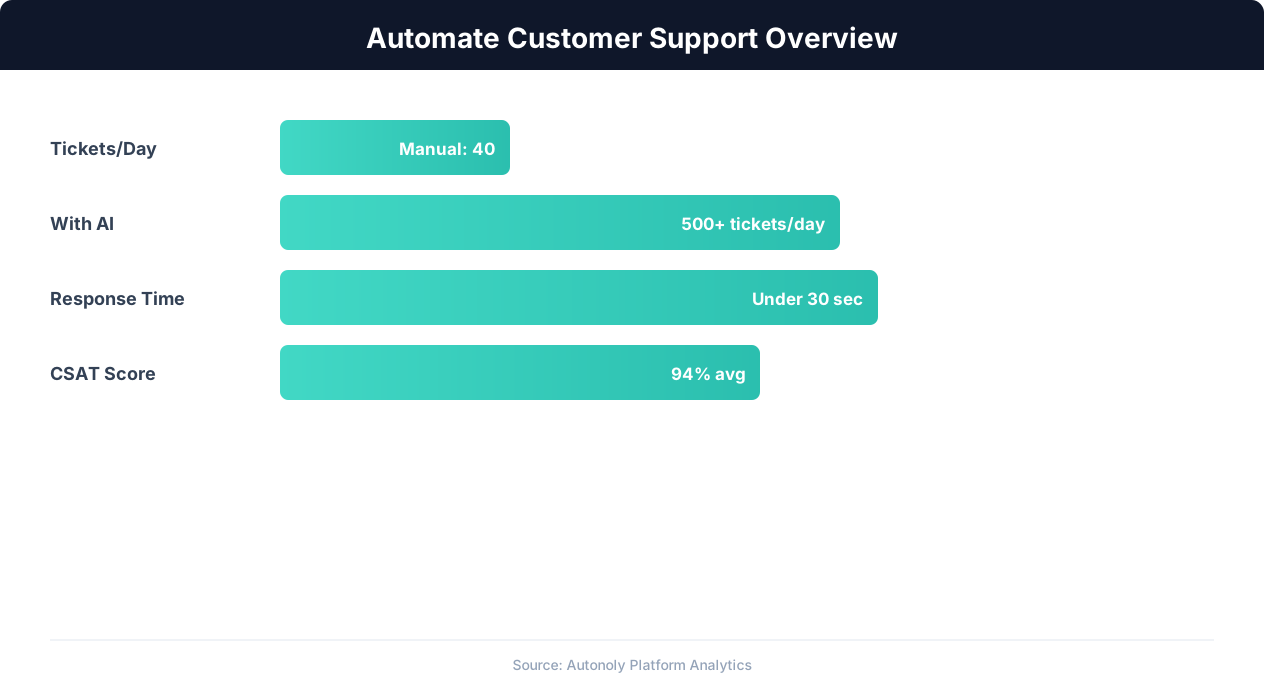
Customer support automation resolution rates by channel
Key Insight: Companies using support automation report 35% higher customer satisfaction scores due to faster response times and 24/7 availability (Forrester Research).
How the AI Agent Does It
The agent monitors your email inbox via Browser Automation, reading new messages and analyzing their content with the Data Processing engine for negative sentiment signals. Each detected complaint is assessed for severity based on content analysis and customer context from Google Sheets. The agent posts formatted escalation alerts to the appropriate Slack channels with full context for immediate action.
Minimizing False Positives
The agent is calibrated to minimize false positives — not every email with a negative word is a complaint. It distinguishes between "I can't figure out how to export" (support question) and "I'm extremely frustrated that exporting never works" (negative feedback). Only genuine negative sentiment triggers escalation.
Key Insight: The average cost per support ticket drops from $22 to $2 when routine inquiries are handled by AI automation (IBM Customer Experience Report).
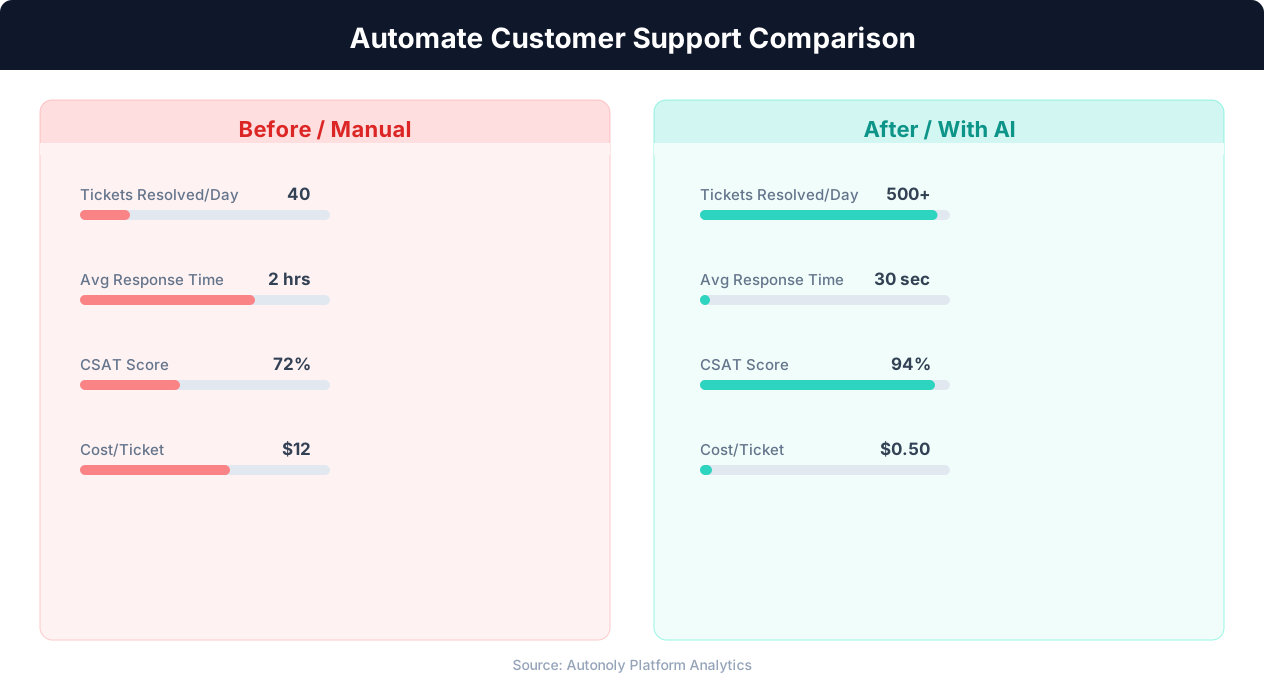
Response time comparison between manual and automated support
Key Insight: Automated ticket routing reduces average resolution time by 52% by ensuring issues reach the right specialist on the first assignment (Zendesk Benchmark).
Scheduling and Automation
Run this workflow every four hours using the Visual Workflow Builder. The agent scans your inbox for negative feedback, assesses severity, and posts escalation alerts to Slack. For companies with high email volume, increase to hourly checks. Add Logic & Flow conditions to cross-reference customers against your Google Sheets database for account tier escalation rules, and to suppress alerts during known service outages when complaint volume is expected.
Further Reading
Explore more about the tools and techniques used in this workflow: No Code Automation Guide, Ai Workflow Automation, Ai Content, Website Monitoring.