


Why Automate Listing Syndication?
Every listing you manage needs to appear on multiple platforms to maximize exposure — Zillow, Craigslist, Facebook Marketplace, Apartments.com, and your own website at minimum. More platforms mean more eyes, more inquiries, and faster fills. But manually entering the same property details, description, and photos into each platform's unique interface is one of the most time-consuming tasks in property management. Each platform has a different form layout, different required fields, and different photo upload mechanisms. By the time you finish posting a single listing to five platforms, you have spent 30 to 45 minutes on pure data entry — and that is assuming no errors.
The consistency problem is just as damaging as the time problem. When you rush through the fifth copy-paste of the same description, mistakes creep in — a wrong price on Craigslist, a missing bedroom count on Apartments.com, or outdated photos on Facebook Marketplace. Inconsistent listings confuse prospects, damage your credibility, and can lead to wasted showings when renters arrive expecting different unit features than what you posted. Keeping listings synchronized across platforms when prices change, units are rented, or descriptions are updated multiplies the maintenance burden with every platform you use.
Automating syndication with Browser Automation eliminates this repetitive work entirely. You maintain a single source of truth in Google Sheets, and the AI agent handles posting to every platform. When you update a price or description in the spreadsheet, the next syndication run pushes the changes everywhere automatically. Your listings are always consistent, always current, and always live on every platform that matters — with zero manual data entry.
This approach is essential for property managers with large portfolios, real estate agents listing multiple properties per week, and landlords who want maximum exposure without the manual effort. Even a small landlord with five units across three platforms can save hours per month, while a management company with 100+ units can eliminate what would otherwise require a dedicated staff member for listing management alone. Visit our templates library for pre-built syndication workflows.
How the AI Agent Syndicates Listings
The workflow starts by reading your listing data from Google Sheets. Each row represents one property with columns for address, price, bedrooms, bathrooms, square footage, description, photo URLs, and any platform-specific fields. The agent processes each listing and prepares it for submission to your target platforms. For each platform, the agent launches a real browser session using Browser Automation, navigates to the listing submission page, fills in every required field, uploads photos, and submits the form.
Because different platforms have different field names, layouts, and requirements, the Data Processing engine adapts your spreadsheet data to match each platform's specific format. The agent handles platform-specific quirks — Craigslist's multi-step posting flow, Facebook Marketplace's category selection, Zillow's rental manager interface. Each platform interaction uses the same underlying browser technology that handles JavaScript, dynamic forms, and CAPTCHA challenges that simpler automation tools cannot manage. The AI Agent Chat lets you add new target platforms or adjust posting parameters through natural conversation.
When a price changes, a unit is rented, or a listing needs to be taken down, you update the status in your spreadsheet. The agent reads the updated data and takes the appropriate action on each platform — editing existing posts, marking them as rented, or removing them entirely. The Logic & Flow engine enables conditional logic: if a listing's status column changes to "Rented," automatically delist it from all platforms. If the price column changes, update the price on every active posting.
What Data You Get
The agent logs every syndication action back to your spreadsheet:
Property Address — Which listing was posted
Platform — Which site received the post
Post Status — Posted, updated, removed, or failed
Platform URL — Direct link to the live listing
Post Timestamp — When the action was completed
Listing Status — Active, rented, pending, or delisted
This gives you a complete dashboard view of your syndication activity without switching between platform dashboards.
Supported Platforms
The agent can post to any platform with a web-based listing submission form, including:
Craigslist — Housing, apartments, real estate for sale
Facebook Marketplace — Rental and for-sale listings
Zillow Rental Manager — Rental listings
Apartments.com — Rental listings
Realtor.com — For-sale listings
Custom websites — Any site with a listing form
You specify which platforms to target, and the agent handles the rest. Adding a new platform is as simple as telling the agent to include it in the next run.
Customizing Your Workflow
The Visual Workflow Builder lets you customize the syndication pipeline beyond basic posting. Use Data Processing to adapt descriptions per platform — shorten for Craigslist's character limits, expand for Zillow's detail fields. Add Logic & Flow conditions to post premium listings to paid platforms and budget listings only to free ones. Include platform-specific description columns in your spreadsheet if you want different wording for each site.
Integration Options
For teams, add a Slack notification to alert your office when a batch of listings has been syndicated, along with links to each platform posting for quick review. Send daily syndication summary reports via Gmail to property owners showing their listing activity across platforms. Log all syndication history to Google Sheets for long-term tracking. Visit our Integrations page for details on connecting your accounts.
Use Cases
Property management companies syndicating vacancy listings across all major rental platforms simultaneously
Real estate agents posting new listings to multiple buyer-facing sites from a single spreadsheet
Landlords maximizing tenant applications by listing on every available platform without extra effort
Commercial brokers distributing office and retail space listings to industry-specific platforms
Short-term rental operators posting seasonal availability to Craigslist and Facebook alongside their Airbnb listings
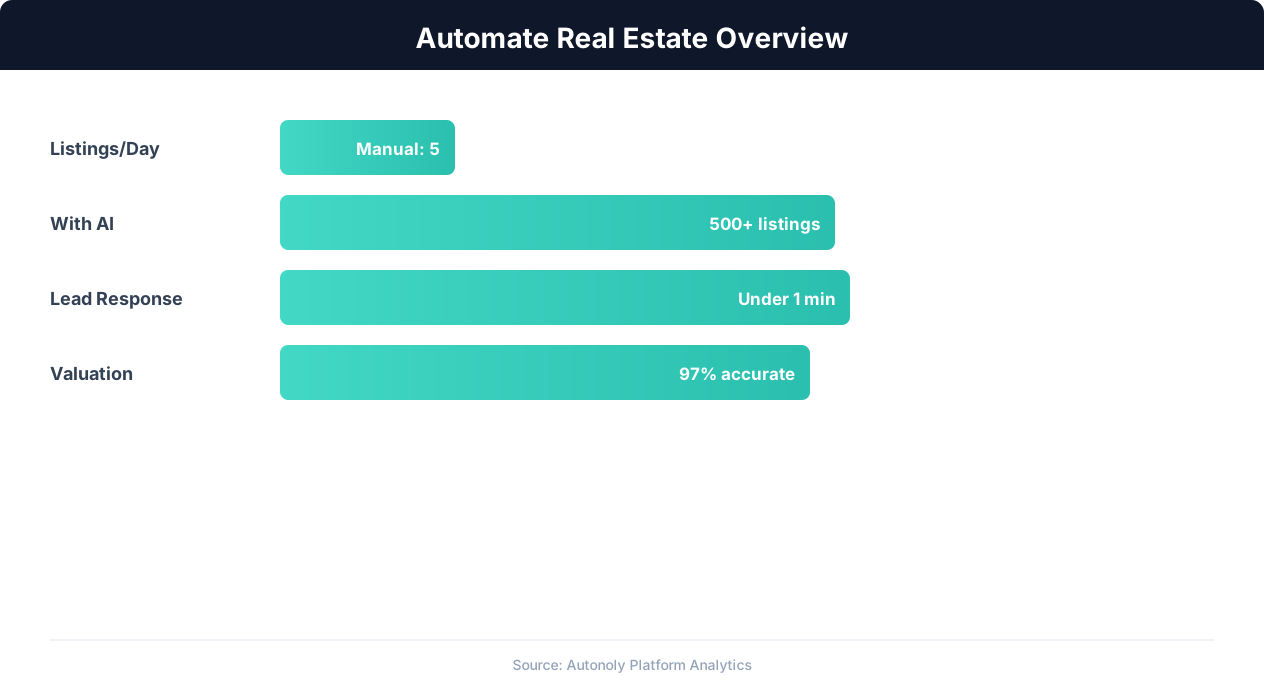
Real estate automation impact on agent productivity
Key Insight: Automated market analysis reports generate 5x more seller leads by positioning agents as local market experts with data-driven insights (Tom Ferry Research).
How the AI Agent Does It
Autonoly's agent reads your listing spreadsheet from Google Sheets and opens real browser sessions for each target platform. Using Browser Automation, it fills in listing forms, uploads photos, and submits posts just as a human would. The Data Processing engine adapts your data to each platform's unique format requirements. Post statuses and URLs are logged back to your spreadsheet for tracking. Each real estate platform has unique form layouts, required fields, and submission flows — the agent adapts to each one individually, handling multi-step wizards, dropdown menus, photo uploaders, and confirmation screens.
Key Insight: Real estate agents using automation close 26% more deals by eliminating manual listing management and lead follow-up delays (NAR Technology Report).
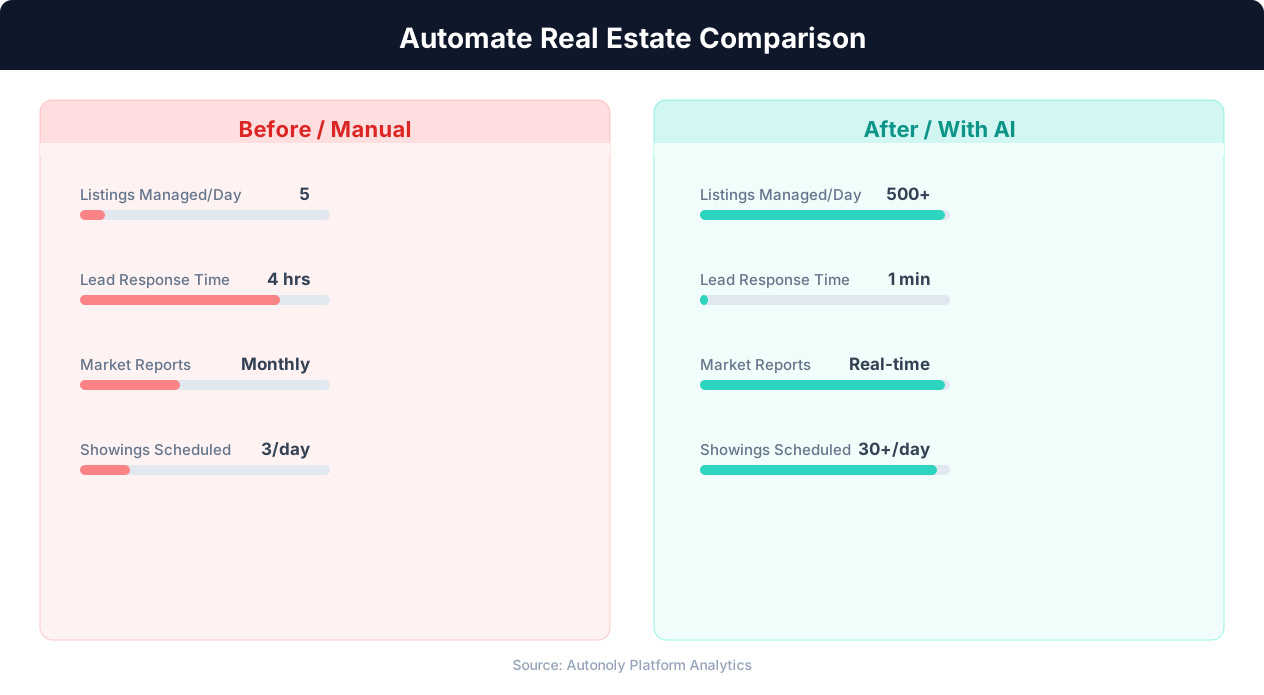
Lead response time for manual vs automated real estate workflows
Key Insight: AI-powered property matching increases client satisfaction by 43% by surfacing relevant listings faster than manual MLS searches (RealTrends Report).
Scheduling and Automation
Trigger syndication manually when you have new listings, or set up a daily schedule in the Visual Workflow Builder to auto-sync spreadsheet changes to all platforms. A daily run ensures any spreadsheet changes are reflected across all platforms within 24 hours, even if you forget to manually trigger a sync. A batch of 20 listings across 5 platforms may take 30-60 minutes depending on platform response times — larger batches run reliably overnight on a scheduled workflow.
Use Logic & Flow conditions to handle status changes automatically — delist rented units and update prices across all active postings without lifting a finger. Check pricing to see how many automated runs are included in your plan.
Further Reading
Explore more about the tools and techniques used in this workflow: Real Estate Automation, No Code Automation Guide, Form Automation.