


Why Automate Google Ads Reporting?
Managing Google Ads campaigns without consistent reporting is like flying blind with your hand on the throttle. You need daily visibility into what is working and what is burning budget, because a single underperforming campaign can waste hundreds or thousands of dollars before anyone notices. But logging into the Google Ads dashboard, navigating to the right views, selecting the correct date range, exporting data, and reformatting it for stakeholders takes 20 to 45 minutes every day. For agencies managing multiple client accounts, multiply that by every account — a team managing 10 accounts can easily spend four to six hours per day on reporting alone.
The manual approach also creates dangerous blind spots. When reporting happens only when someone has time to do it, data gaps appear — weekends, holidays, sick days, and busy periods all create holes in your performance record. A cost-per-conversion spike that happens on a Friday afternoon might not be discovered until Monday morning, after two full days of wasted ad spend. By the time you notice a campaign overspending or underperforming, the damage is already done and the budget is gone.
Automating this with Browser Automation eliminates the daily reporting grind completely. The AI agent logs into your Google Ads account, extracts the metrics you care about, and delivers them to Google Sheets in a consistent format every single day without fail. Your team starts each morning with fresh data already in their reporting dashboard, ready for analysis and decision-making. No one has to remember to pull the report, and the data is always complete and up to date.
This is particularly valuable for teams that combine Google Ads data with other marketing metrics. When your ad performance sits in the same spreadsheet as your SEO rankings, email metrics, and social media data, you get a unified marketing performance view that is impossible to build inside the Google Ads interface alone. This cross-channel perspective reveals insights like whether organic traffic gains are offsetting paid traffic declines, or whether a social media campaign is cannibalizing search ad performance.
How the AI Agent Extracts Ads Data
Autonoly's AI Agent Chat opens a real Chromium browser, logs into your Google Ads account, and navigates to the campaigns overview. The Data Extraction engine reads the performance data tables, including all columns you specify — clicks, impressions, click-through rate, cost per click, total cost, conversions, conversion rate, and cost per conversion. The agent sets the date range precisely, ensuring each day's extraction covers exactly the period you need.
The agent handles Google Ads' complex interface including date range selectors, column customization, segment dropdowns, and multi-level campaign hierarchies. It can extract data at the account, campaign, ad group, keyword, or even ad creative level depending on your reporting granularity needs. For complex accounts with hundreds of campaigns organized in hierarchical structures, the agent navigates the nested views methodically.
Because the agent uses Browser Automation with a real browser session, it sees the exact same data you see when you log in manually — including any custom columns, segments, or filters you have configured in your Google Ads views. This means your automated reports are pixel-perfect matches for what you would see checking manually.
What Data You Get
A typical daily extraction includes:
Campaign Name — The campaign identifier
Impressions — Number of times ads were shown
Clicks — Number of ad clicks
CTR — Click-through rate percentage
Avg. CPC — Average cost per click
Cost — Total spend for the period
Conversions — Number of conversion actions
Conv. Rate — Conversion rate percentage
Cost/Conv. — Cost per conversion
Impression Share — What percentage of available impressions you captured
Quality Score — Google's quality rating for your keywords
You can customize the extraction to include additional metrics like search impression share, top-of-page rate, or any column available in the Google Ads interface.
Customizing Your Workflow
The Visual Workflow Builder lets you build sophisticated reporting pipelines. Chain a Data Processing step to calculate week-over-week and month-over-month changes automatically. Build pivot table summaries that roll up ad group data to campaign level. Create budget pacing calculations that compare actual spend against planned daily budgets. Generate performance scores that combine multiple metrics into a single health indicator for each campaign.
For multi-account agencies, the agent can log into multiple Google Ads accounts in sequence, extracting data from each and consolidating it into one master reporting spreadsheet with an account identifier column. This transforms hours of per-client reporting into a single automated workflow.
Alerts and Anomaly Detection
Add Logic & Flow conditions to detect anomalies in your ad data. If cost per conversion spikes above your target threshold, trigger a Slack alert so your media buyer can investigate immediately. If a campaign's daily spend drops to zero unexpectedly, get notified before you lose a full day of traffic. If impression share drops significantly, flag it as a competitive pressure signal.
These proactive alerts turn passive reporting into active campaign management, catching issues hours before your next manual check would have found them. The financial impact of catching a runaway CPC just four hours earlier can easily cover the cost of the entire automation.
Integration Options
Autonoly is not limited to Google Ads. Build a unified marketing dashboard by adding extraction workflows for Facebook Ads, LinkedIn Ads, Microsoft Ads, and other platforms. Each workflow delivers data to the same Google Sheets spreadsheet with a platform column, giving you a single source of truth for all paid media performance. Connect to Slack for real-time budget alerts, or export to Notion or Airtable for team-wide marketing dashboards. Visit the Integrations page for all supported destinations, or browse the templates library for pre-built ad reporting workflows.
Use Cases
Performance marketing teams tracking daily campaign metrics across dozens of campaigns
Marketing agencies generating automated client reports across multiple Google Ads accounts
E-commerce brands monitoring ROAS and cost-per-acquisition for product campaigns
SaaS companies tracking lead generation costs and conversion rates from search campaigns
Startups maintaining budget discipline with daily spend tracking and anomaly alerts
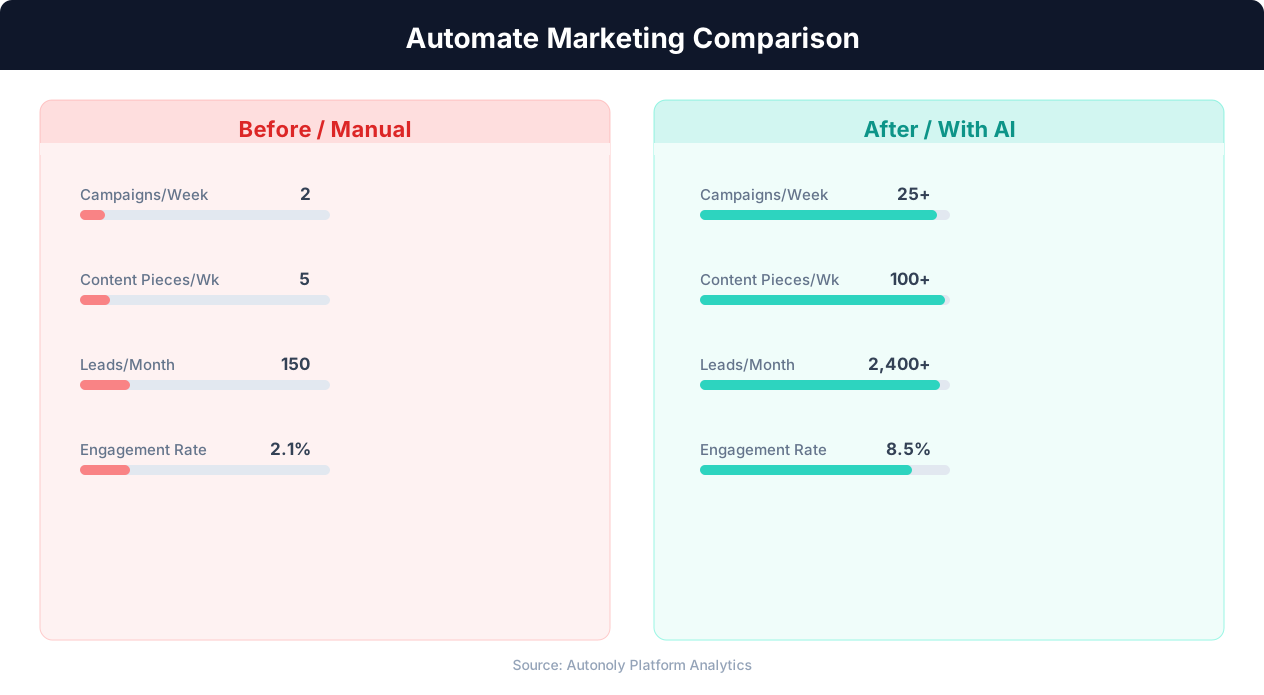
Content production speed in manual vs automated workflows
Key Insight: Automated content repurposing saves marketing teams 12+ hours per week while increasing content output by 3x across channels (Content Marketing Institute).
How the AI Agent Does It
The agent opens a real Chromium browser via Browser Automation, navigates to the Google Ads dashboard, authenticates with your credentials, and reads the performance data tables. The Data Extraction engine identifies the data grid structure, extracts metrics from each row, and maps them to consistent columns. Data is appended to your Google Sheets spreadsheet with the extraction date for historical analysis.
Handling Dashboard Complexity
Google Ads has a complex interface with nested navigation, dynamic loading, and customizable views. The agent handles all of this — selecting date ranges, expanding ad group details, switching between campaign types, and reading data from both overview cards and detailed tables. If Google updates the Ads interface, the agent adapts automatically using intelligent element detection.
Key Insight: Companies automating their marketing analytics report 26% higher marketing ROI due to real-time performance tracking and rapid campaign optimization (Forrester).
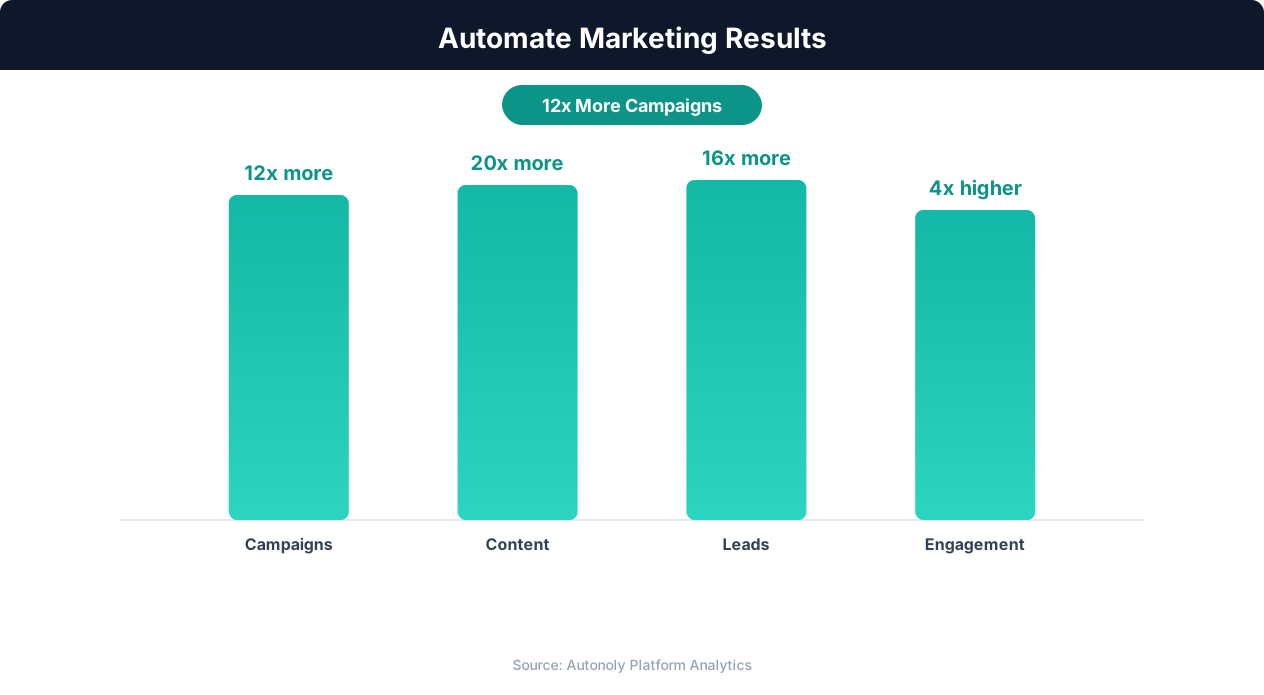
Marketing team productivity gains from automation
Key Insight: Marketing teams using automation see 451% more qualified leads and a 14.5% increase in sales productivity (Annuitas Group).
Scheduling and Automation
Run this workflow daily using the Visual Workflow Builder. The agent extracts the previous day's performance data and appends it to your Google Sheets reporting spreadsheet. Add Logic & Flow conditions to trigger Slack alerts when key metrics exceed or fall below your defined thresholds. For weekly stakeholder reports, add a summary step that calculates period-over-period changes and highlights top and bottom performing campaigns. See our pricing page for daily workflow run details.
Further Reading
Explore more about the tools and techniques used in this workflow: Automate Google Sheets, Marketing Automation, Scheduled Execution.