

Why Automate Lead Capture from Forms?
Every minute a lead sits unprocessed in a form submission inbox is a minute your competitor could be responding first. Studies show that responding to leads within five minutes makes you nine times more likely to convert them, and the odds of qualifying a lead drop by a factor of ten after just the first thirty minutes — a finding Harvard Business Review made famous in its research on lead response time. Yet most businesses still rely on manually checking form dashboards, copying data into spreadsheets, and forwarding emails to sales reps. This creates delays, data entry errors, and lost opportunities that compound over time into significant revenue leaks.
The problem is especially acute for businesses running multiple lead generation campaigns simultaneously. You might have a contact form on your main website, a demo request form on a landing page, a gated content form for a whitepaper download, and a webinar registration form — all feeding into different dashboards from different form providers. Without automation, someone on your team has to log into each dashboard separately, scan for new entries, and manually transfer the data. Even the most diligent team member will miss submissions during weekends, holidays, or busy periods. And manual data entry introduces errors — misspelled emails, transposed phone numbers, or misattributed lead sources — that pollute your pipeline data.
By automating form capture with Browser Automation, every submission is instantly logged into a central Google Sheets spreadsheet. Your team always has a live, up-to-date view of incoming leads without lifting a finger. This eliminates the gap between a prospect raising their hand and your team seeing it. The automation runs around the clock, capturing weekend and after-hours submissions just as reliably as business-day ones.
Whether you run a single contact form or multiple landing pages with different forms, centralizing all submissions into one spreadsheet gives you a unified pipeline view that is impossible to achieve with fragmented form tools. You can sort by submission date, filter by lead source, and immediately see your total lead volume across all channels — insights that previously required manual spreadsheet consolidation each week.
How the AI Agent Captures Leads
Autonoly's AI Agent Chat navigates to your form submission dashboard or email inbox, identifies new entries, and extracts the relevant fields. Unlike brittle webhook integrations that break when form providers change their API, the agent uses a real browser through the Data Extraction engine, so it works with any form tool — Typeform, Jotform, Google Forms, Webflow, WordPress Contact Form 7, HubSpot Forms, Wufoo, Gravity Forms, or custom-built forms. If you can see the submissions in a web browser, the agent can capture them.
The agent detects the structure of each submission automatically. It recognizes common fields like name, email, phone number, and message, and also handles custom fields unique to your forms — budget range selectors, multi-choice dropdowns, file upload references, and conditional fields that only appear based on previous answers. Each submission is mapped to a consistent set of columns in your spreadsheet, so the data stays clean even if you change form providers later.
For multi-page forms or forms that require login to access the submission dashboard, the agent handles authentication and navigation seamlessly. You provide credentials once, and the agent stores them securely for future runs. It can navigate through pagination, scroll through long submission lists, and expand collapsed entries to capture every detail.
Structuring and Enriching Lead Data
Raw form data often needs cleanup before it is useful. The Data Processing engine can normalize phone numbers to a consistent international format, validate email addresses to catch typos like "gmial.com" or "outloo.com," and standardize company names so that "IBM," "I.B.M.," and "International Business Machines" all resolve to the same entity. You can also add enrichment steps — for example, looking up the company domain to pull in employee count, industry classification, or headquarters location.
The Visual Workflow Builder lets you add conditional logic after capture. Route enterprise leads (companies with 500+ employees) to one sheet tab and small business leads to another. Flag duplicates automatically by matching on email address. Add a lead score column based on form responses — a prospect requesting a demo scores higher than one downloading a whitepaper. This scoring happens automatically at capture time, so your sales team can prioritize follow-ups from the moment they see the lead.
What Data You Get
Each captured form submission is logged as a structured row containing:
Full Name — Parsed from first and last name fields or a combined name field
Email Address — Validated for format and common typo corrections
Phone Number — Normalized to international format with country code
Company Name — Standardized for consistent filtering and deduplication
Message or Inquiry — The full text of the prospect's message
Form Source — Which form or landing page generated the submission
Submission Timestamp — Exact date and time for response time tracking
Custom Fields — Budget range, industry, team size, or any form-specific fields
Customizing Your Workflow
The Visual Workflow Builder gives you complete control over the capture and processing pipeline. Add branching logic to handle different form types differently — demo requests get routed to the sales team immediately, while newsletter signups go to the marketing list. Insert data validation steps that flag incomplete submissions for manual review. Create separate output tabs for different lead categories so each team sees only their relevant leads.
You can also build multi-step workflows that chain form capture with downstream actions. Capture a lead, enrich it with company data, score it based on your qualification criteria, route it to the appropriate team, and trigger a personalized auto-reply — all in a single automated workflow that runs without human intervention.
Integration Options
Once leads are in Google Sheets, you can connect downstream automations. Trigger a follow-up email sequence via Gmail, add the lead to a calling queue, or push records to your CRM. The spreadsheet acts as a lightweight, flexible CRM that your entire team can access and collaborate on. For teams that outgrow spreadsheets, Autonoly can deliver leads to Notion databases or Airtable bases with richer field types and views. Check the Integrations page for the full list of supported destinations, or browse the templates library for pre-built lead capture workflows.
Use Cases
B2B SaaS companies capturing demo requests and trial signups from multiple landing pages
Marketing agencies managing lead forms for multiple clients, each with their own spreadsheet
Real estate agents collecting inquiry forms from property listing pages
Event organizers centralizing registration forms from different event pages
E-commerce brands capturing product inquiry and wholesale request forms
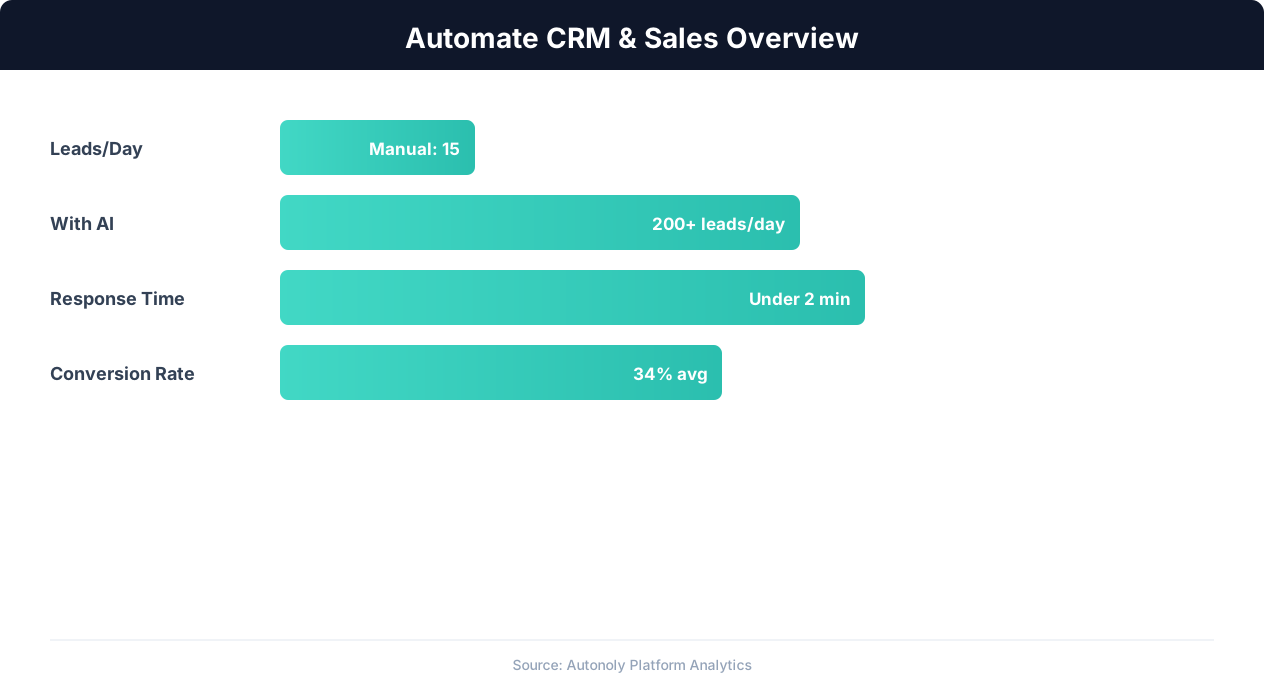
CRM automation impact on lead conversion rates
Key Insight: Companies using automated lead capture see 3x more qualified leads entering their pipeline compared to manual processes (Salesforce State of Sales Report).
How the AI Agent Does It
Autonoly uses an intelligent AI agent that opens a real Chromium browser and navigates to your form submission dashboard. The agent identifies new entries since the last run, extracts all field values, and maps them into structured rows. Because it relies on Browser Automation with a real browser engine, it handles JavaScript-rendered dashboards, login walls, CAPTCHA challenges, two-factor authentication, and dynamic content that API-based integrations cannot reach. The agent adapts automatically if your form provider updates their dashboard layout, since it uses intelligent element detection rather than brittle CSS selectors.
Handling Multiple Form Sources
If you have forms on multiple websites or landing pages, the agent can check all of them in a single scheduled run. It consolidates submissions from different sources into one unified spreadsheet, adding a source column so you know which form generated each lead. This gives you a single pane of glass across all your lead generation channels. The agent handles different form providers in the same run — checking your Typeform dashboard, then your WordPress form plugin, then your custom landing page — all without requiring separate configurations.
Key Insight: Sales reps spend only 28% of their time actually selling — the rest goes to data entry, scheduling, and admin tasks that automation can eliminate (Salesforce Research).
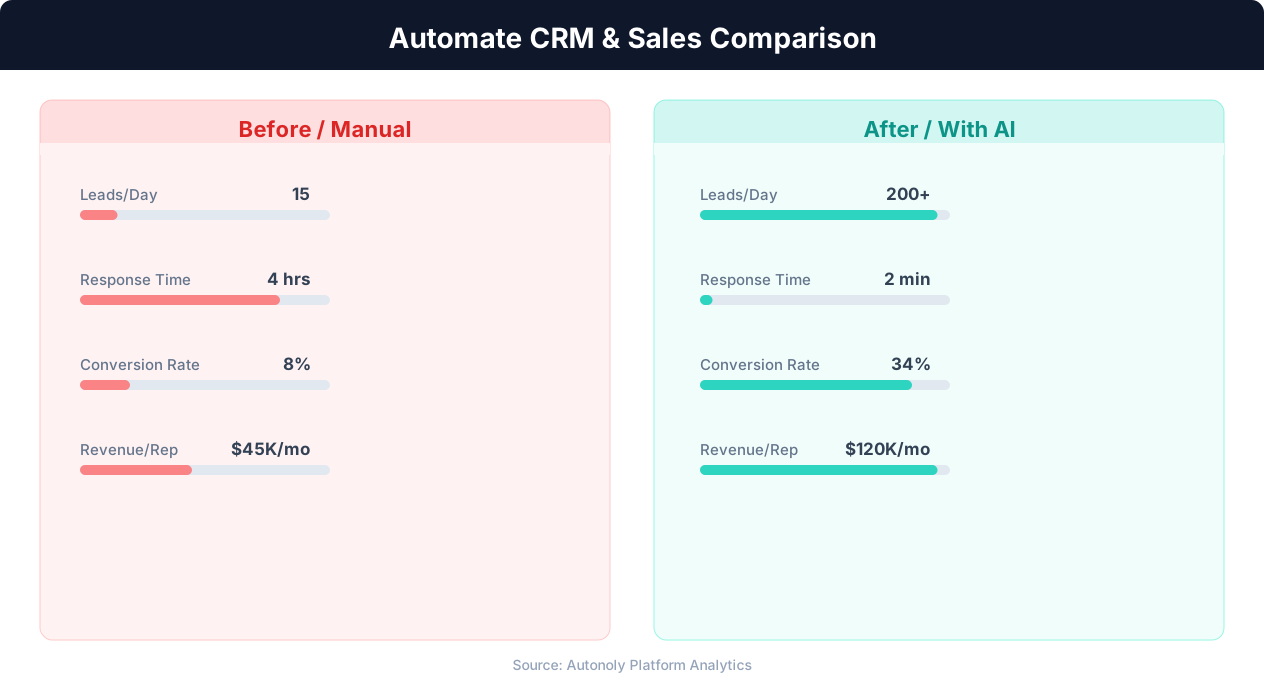
Manual vs automated CRM data entry time comparison
Key Insight: Organizations that automate CRM data entry report 41% higher revenue per salesperson and 27% faster deal close rates (Nucleus Research).
Scheduling and Automation
Configure the workflow to run every four hours using the Visual Workflow Builder. Each run appends only new submissions to your Google Sheets spreadsheet, using timestamps and unique identifiers to prevent duplicates. If a run fails because a form dashboard is temporarily down, the next run picks up where the last one left off, ensuring no leads are missed. Add Logic & Flow conditions to skip notifications on weekends or to escalate high-priority leads. You can also chain a Gmail step to send an auto-reply to the prospect, confirming their submission was received and setting expectations for response time. For high-volume forms, increase the frequency to hourly or even every thirty minutes. Check our pricing page for details on run frequency options.
Further Reading
Explore more about the tools and techniques used in this workflow: Automate Google Sheets, Automate Lead Generation, Form Automation, Webhooks.