


Why Automate LinkedIn-to-Email Outreach?
The most effective B2B outreach combines LinkedIn research with personalized email. Sales teams that personalize their emails based on prospect data see 2-3x higher response rates than those sending generic templates. But the manual process — search LinkedIn, visit a profile, copy relevant details, draft a personalized email, send, repeat — takes 5-10 minutes per prospect. At that pace, even a dedicated SDR can only reach 30-50 prospects per day.
Autonoly's Browser Automation compresses this entire pipeline into a single automated workflow. The AI agent extracts leads from LinkedIn, collects personalization data from their profiles, and sends customized emails through your Gmail account — turning hours of manual work into minutes of automated execution.
How the AI Agent Handles LinkedIn-to-Email
This workflow combines two powerful capabilities: LinkedIn data extraction and Gmail integration. Autonoly's AI Agent Chat orchestrates both steps in a single run.
First, the agent navigates LinkedIn using a real browser session, searches for prospects matching your criteria, and extracts profile data using Data Extraction. For each prospect, it collects name, title, company, location, headline, and any publicly visible context — recent posts, shared connections, or notable career moves.
Second, the agent uses this extracted data to populate personalized email templates. Each email references the prospect's specific title, company, or other relevant details — transforming generic outreach into targeted communication that demonstrates research and relevance.
The Gmail integration sends emails through your authenticated Gmail account, maintaining your sender reputation. Emails are spaced with natural intervals to avoid spam triggers, and you can set daily send limits to stay within Gmail's recommended thresholds.
What Data You Get
The workflow produces two outputs — a lead list and sent email records:
Lead List (Google Sheets):
Name — Prospect's full name
Title — Current job title
Company — Current employer
Location — Geographic location
Profile URL — LinkedIn profile link
Email Status — Sent, pending, or skipped
Email Records:
Recipient — Prospect name and email
Subject Line — Personalized subject
Send Time — When the email was delivered
Template Used — Which outreach template was applied
Customizing Your Outreach Pipeline
The Visual Workflow Builder enables sophisticated outreach automation:
Multi-segment campaigns: Target different ICPs with different messaging — send one template to VPs and another to Directors
Lead scoring: Add a Data Processing step to score leads before outreach, sending emails only to prospects above your quality threshold
Enrichment: Use third-party enrichment APIs via SSH & Terminal to append email addresses, phone numbers, or technographic data before outreach
Follow-up sequences: Chain multiple email sends with delays for multi-touch outreach campaigns
Personalization tokens go beyond basic name and company — reference the prospect's industry, recent company news, mutual connections, or specific pain points relevant to their role. The more specific the personalization, the higher the response rate.
Scheduling and Campaign Management
Run outreach campaigns on a schedule that matches your sales motion. Weekly batches work well for steady pipeline building. Daily runs suit high-velocity sales teams targeting time-sensitive opportunities.
Track results in the companion Google Sheets log — monitor send rates, delivery status, and response tracking. Over time, A/B test different templates and ICP definitions to optimize your outreach performance.
Exporting and Integrating
Beyond Gmail delivery, the workflow integrates with your broader sales stack:
[Google Sheets integration](/integrations/google-sheets) — Live dashboard of all leads and email status
Excel (.xlsx) — Download lead lists for CRM bulk import
[Notion](/integrations/notion) — Collaborative prospect database for team-based selling
[Slack](/integrations/slack) — Notifications when emails are sent or responses are received
Explore our templates library for ready-made outreach workflow templates. Visit pricing for execution and email sending costs. For background on sales automation concepts, see our workflow automation glossary. The full Integrations page covers all CRM and email destinations.
Use Cases
SDRs use this to automate the most time-consuming part of their day — researching and emailing prospects — so they can focus on conversations and closing. Founders running outbound sales without a dedicated team reach 10x more prospects per week. Recruiting teams send personalized outreach to passive candidates. Agency business development teams prospect potential clients at scale. Partnership teams reach out to potential integration or co-marketing partners with personalized pitches.
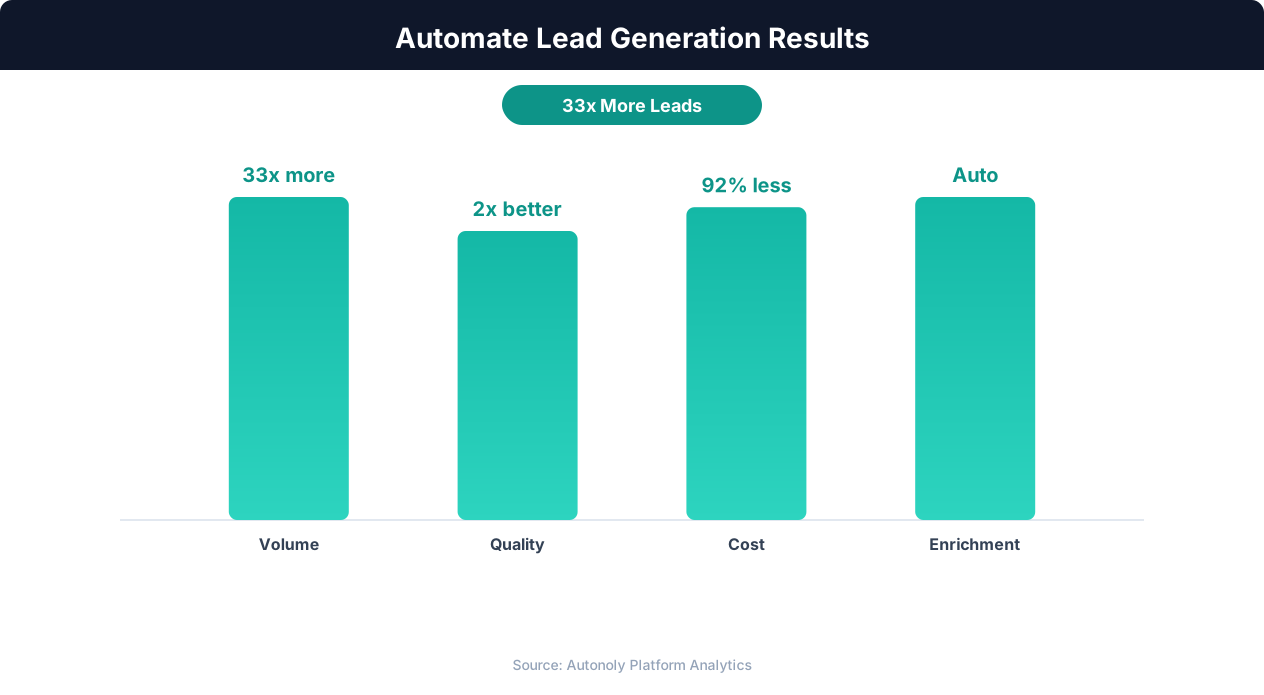
Lead quality scores with automated enrichment and scoring
Key Insight: Lead response time drops from an average of 42 hours to under 5 minutes with automation, increasing contact rates by 900% (InsideSales.com).
How the AI Agent Handles This
The AI agent orchestrates a multi-step pipeline entirely within a real browser. First, it logs into LinkedIn and extracts prospect data using Browser Automation. Then it switches context to Gmail, composing personalized emails for each prospect using the data it just collected. The agent spaces email sends with natural intervals and respects daily sending limits to protect your sender reputation. Because the entire pipeline runs in one workflow through the Visual Workflow Builder, there is no manual handoff between the extraction and outreach phases. The Integrations layer handles Gmail authentication and delivery tracking automatically.
Personalization at Scale
Each email is populated with prospect-specific details — name, title, company, industry, and any relevant context from their LinkedIn profile. This goes far beyond basic mail merge, producing messages that feel individually crafted.
Key Insight: Automated multi-channel lead generation captures 3x more prospects by simultaneously monitoring LinkedIn, websites, directories, and industry databases (HubSpot Research).
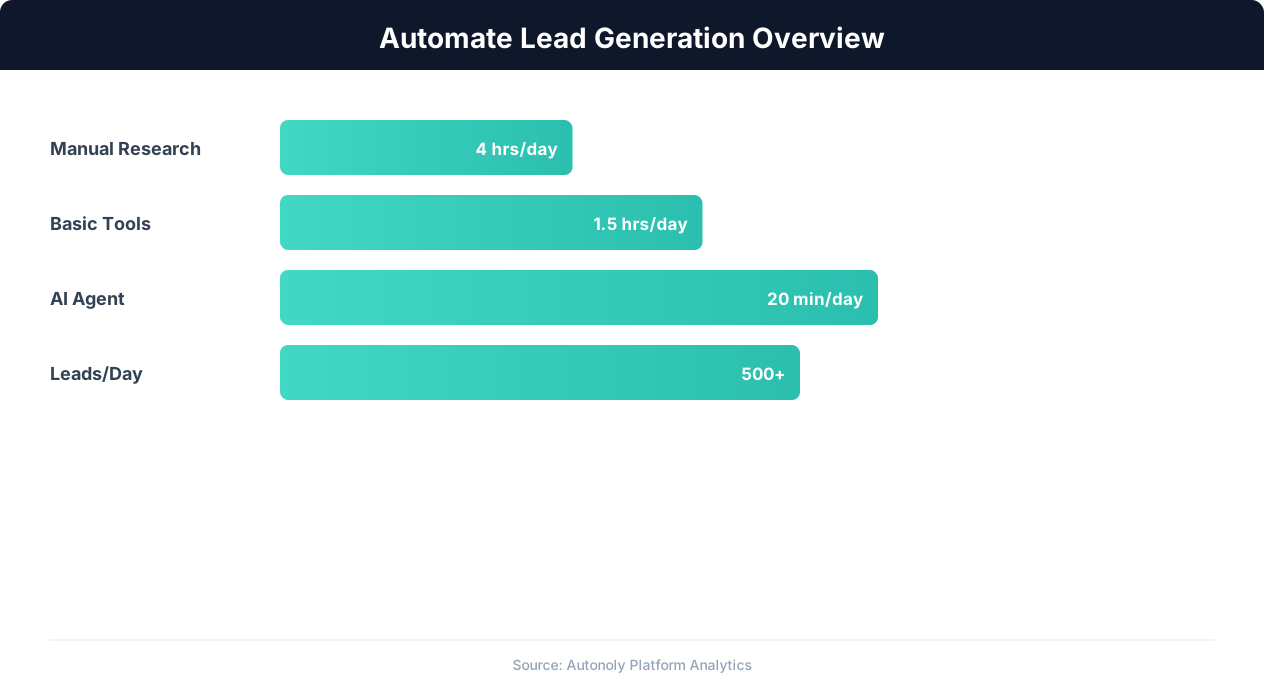
Lead generation automation funnel performance metrics
Key Insight: Companies using automated lead scoring see a 77% increase in lead conversion rates by focusing sales effort on the highest-potential prospects (Aberdeen Group).
Scheduling and Recurring Runs
Schedule weekly or daily outreach campaigns using the Visual Workflow Builder to keep your pipeline consistently fed with new prospects. Each run targets a fresh batch of leads based on your ICP criteria, avoiding duplicates from previous campaigns. Use Logic & Flow to set up multi-touch sequences — an initial email followed by a timed follow-up for non-responders. Track all sends and responses in Google Sheets to measure open rates, response rates, and conversion across campaigns. Visit our templates for pre-built outreach sequences you can customize and launch immediately.
Further Reading
Explore more about the tools and techniques used in this workflow: Scrape Linkedin Data, Automate Lead Generation, Email Campaigns, Linkedin Automation.