

Why Automate Grade Report Generation?
Producing student progress reports is one of the most time-intensive administrative tasks in education — and the grade data behind them increasingly flows between gradebooks and student information systems using interoperability standards from 1EdTech (IMS Global). At the end of each grading period, teachers must calculate final grades from dozens of individual assignments, apply category weights, add comments, and format everything into a presentable document. For a teacher with 150 students across five classes, this can consume an entire weekend — manually computing weighted averages, converting percentages to letter grades, checking for errors, and formatting individual report cards. Multiply that by every teacher in the school, and report card season becomes a significant operational burden that takes educators away from instruction and lesson planning.
The manual process also introduces errors that undermine confidence in the reports. A transposed grade, an incorrect weight calculation, or a formatting mistake on a report card creates confusion for families and extra work for the teacher who has to investigate and correct the issue. When parents receive a report card with an error, it damages their trust in the school's academic processes. For administrators responsible for transcripts and academic records, grade calculation errors can have lasting consequences if they flow into permanent student files uncorrected.
By automating report generation with Google Sheets and the Data Processing engine, the calculation and formatting work happens instantly and accurately. Teachers maintain their gradebook throughout the semester, and at the end of the grading period, the automation produces polished, formatted report cards ready for distribution. Teachers still add personal comments — the human insight that families value most — but the mechanical work of calculation and formatting is eliminated entirely. Every weighted average is computed correctly, every letter grade follows the defined scale precisely, and every report card is formatted consistently. Use the AI Agent Chat to configure your grading scales and report templates through natural conversation.
This workflow serves K-12 schools, private schools, tutoring centers, homeschool co-ops, and any educational program that produces periodic progress reports. Visit our templates library for pre-built report generation workflows.
How the AI Agent Generates Reports
Teachers maintain their gradebooks in Google Sheets throughout the grading period. Each class has its own tab with rows for students and columns for individual assignments, tests, projects, and participation scores. Category weights (e.g., tests 40 percent, homework 30 percent, projects 20 percent, participation 10 percent) are defined in a configuration row or separate settings tab.
When the report generation workflow runs, the agent reads every grade entry for every student. The Data Processing engine applies the category weights, calculates each student's weighted average, determines the letter grade based on your grading scale, and computes class rank and percentile if desired.
The agent then generates individual progress reports as formatted PDF documents. Each report includes the student's name, grade level, teacher, grading period, and a table showing every subject or class with the final grade, letter grade, and teacher comments. If attendance data is available in a linked spreadsheet, it is incorporated into the report as well.
The generated PDFs follow a consistent template that matches your school's branding — school name, logo placement, colors, and formatting. The Visual Workflow Builder lets you customize the template without coding. Reports are saved to a designated folder and optionally emailed to parents through Gmail.
What Data You Get
A typical automated progress report contains:
Student Information — Name, grade level, homeroom, student ID
Grading Period — Quarter, trimester, or semester with dates
Grade Table — Each subject with final percentage, letter grade, and category breakdowns
Teacher Comments — Pulled from a comments column in the gradebook
Attendance Summary — Days present, absent, tardy (if linked)
GPA — Weighted or unweighted, depending on your calculation method
Honor Roll Status — Automatically determined from GPA thresholds
The Data Processing engine handles all calculations, including weighted GPA, honor roll determination, and class ranking. Teachers only need to enter raw scores and comments.
Customizing Your Report Template
The Visual Workflow Builder lets you design the report layout to match your institution's standards. Elementary schools might include skill-based ratings and developmental comments. High schools need GPA calculations, credits earned, and graduation progress tracking. Each template can be different.
Use Logic & Flow conditions to handle special cases:
Students with incomplete grades: Generate a partial report flagged for follow-up rather than skipping the student entirely.
Special education students: Use a modified template that includes IEP goal progress instead of or in addition to standard grades.
Honor roll recognition: Automatically include honor roll designation for students meeting the GPA threshold.
For multi-teacher situations where a student has different teachers for each subject, the agent aggregates grades across multiple gradebook tabs into a single consolidated report card.
Scheduling and Automation
Report generation runs monthly or at the end of each grading period — quarterly, by trimester, or by semester. The Visual Workflow Builder lets you schedule the run for the last day of the grading period or a specific date each month for interim progress reports.
The generation process typically takes a few minutes for an entire school, producing individual PDF files for every student. Once generated, reports can be distributed in several ways:
Email to parents: Each family receives their child's report as a PDF attachment via Gmail.
Bulk download: All reports are saved to a folder for printing and physical distribution.
Archive: Reports are stored in the spreadsheet's linked drive folder for permanent record-keeping.
Mid-quarter progress reports can run on a more frequent schedule — biweekly or monthly — giving parents earlier visibility into their child's academic performance and creating opportunities for intervention before final grades are determined.
Integration Options
Distribute reports through Gmail by attaching each student's PDF and sending it to their parent's email address. Store all grade data and generated reports in Google Sheets for easy access by teachers, administrators, and guidance counselors. Add Slack notifications to alert staff when reports are ready for review or when the generation run completes. Visit the Integrations page for all connection options.
Use Cases
K-12 schools producing quarterly or trimester report cards for every student across all grade levels
Private schools generating polished, branded progress reports that reflect institutional quality
Tutoring centers providing progress updates to parents showing student improvement across sessions
Homeschool co-ops creating formal academic records for portfolio assessment and transcript purposes
High schools generating GPA calculations, class rankings, and honor roll designations for transcript preparation
Special education programs producing modified reports that include IEP goal progress alongside standard grades
Historical Record Keeping
Each grading period's reports are archived, creating a cumulative academic record for every student. Over multiple years, this archive serves as the basis for transcripts, college application materials, and academic trend analysis. The Data Processing engine can generate multi-year summary reports showing a student's academic trajectory across grading periods.
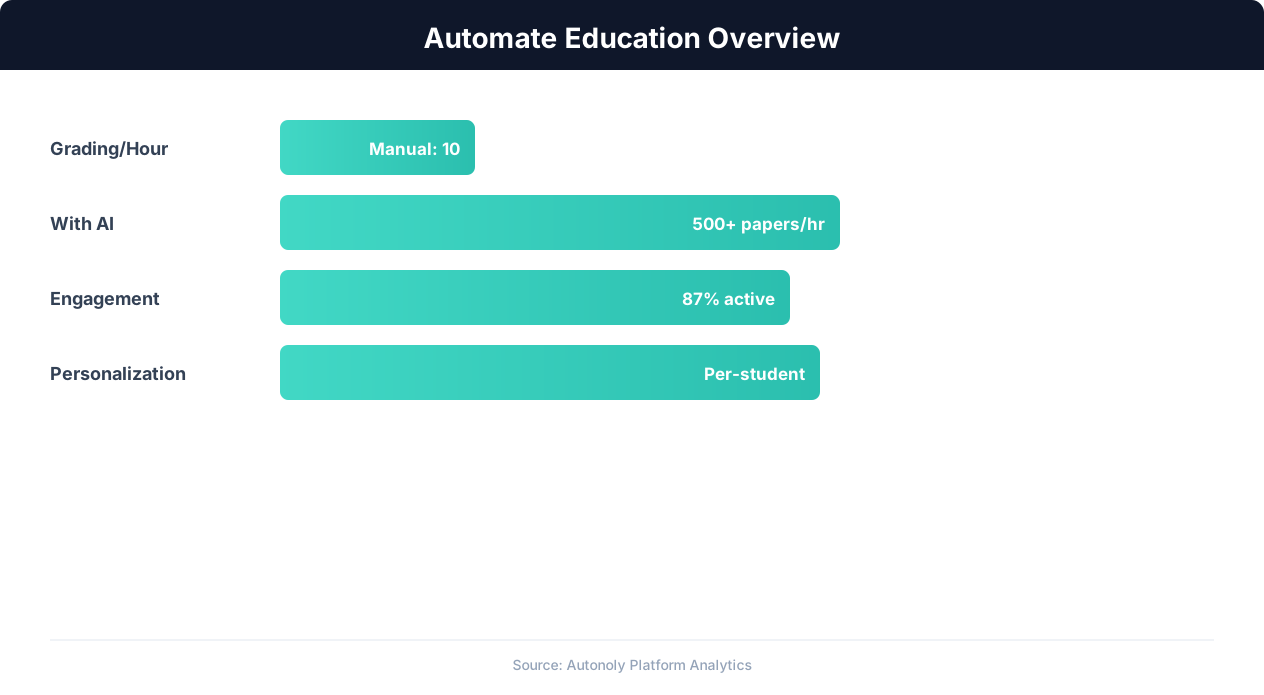
Education automation adoption rates across institution types
Key Insight: 72% of educators report that administrative burden is their top source of burnout. Automating routine tasks is the most effective intervention (Gallup Education).
How the AI Agent Does It
The agent reads grade data from your Google Sheets gradebooks, applies category weights, and calculates final grades using the Data Processing engine. Individual student reports are formatted as PDF documents following your institution's template. Reports are saved for download and optionally emailed to parents through Gmail. For students with multiple teachers, the agent reads grades from each teacher's gradebook tab and consolidates them into a single report card — each subject's grade appears on one comprehensive document, even if the source data is spread across several spreadsheet tabs.
Key Insight: Teachers spend 50% of their working hours on non-teaching tasks like grading and admin. Automation can reclaim up to 13 hours per week (McKinsey Education Report).
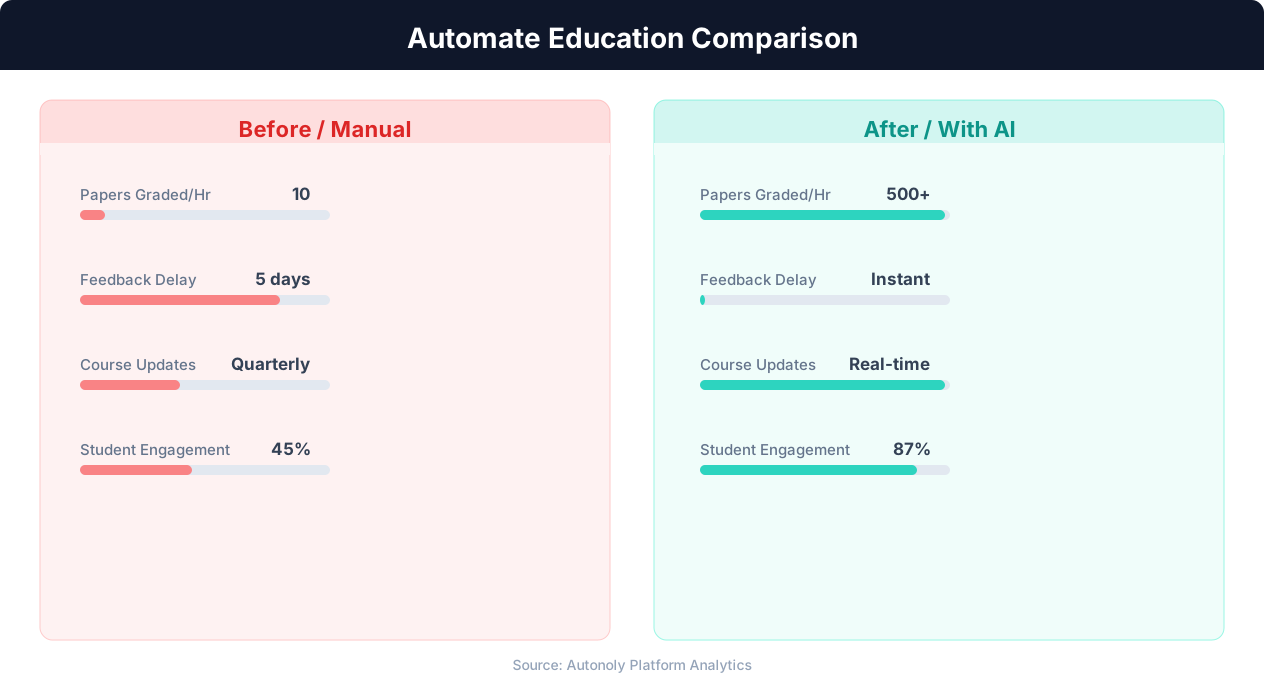
Time savings for educators using automated workflows
Key Insight: Institutions using enrollment automation see 34% higher conversion rates from inquiry to enrollment due to faster, more personalized responses (NACAC).
Scheduling and Automation
Report generation runs at the end of each grading period — quarterly, by trimester, or by semester. The Visual Workflow Builder lets you schedule the run for the last day of the grading period or a specific date each month for interim progress reports. The generation process typically takes a few minutes for an entire school, producing individual PDF files for every student. Mid-quarter progress reports can run on a more frequent schedule — biweekly or monthly — giving parents earlier visibility into academic performance and creating opportunities for intervention before final grades are determined.
Add Logic & Flow conditions to handle special cases — students with incomplete grades, special education modifications, and automatic honor roll designation. Distribute reports via Gmail or save for bulk printing. Check pricing to see how many automated runs are included in your plan.
Further Reading
Explore more about the tools and techniques used in this workflow: Automate Email Reports, No Code Automation Guide, Pdf Ocr.